Every code in one place
WhatsApp API Error Codes: Every Code, Where It Arrives
Last checked · 18 min read
The short answer
A WhatsApp Cloud API error is identified by its numeric code, not its message text. Meta returns it in the response to your request, later on the messages webhook, or both, and recommends handling errors by code and details string. Some codes mean retry later, some never retry, and some affect the whole account (checked 13 November 2026).
What do WhatsApp API error codes tell you?
A WhatsApp Cloud API error code tells you which rule a request broke, and the number is the only part of the error you should build on. Meta says so directly:
"In general, Meta recommends that you build your app's error handling logic around code values and details payload properties. These properties and their values are more indicative of the underlying error." (Meta, WhatsApp error codes)
What the code does not tell you, on its own, is where it will turn up. Some errors come back in the response to your request. Others arrive later, on the messages webhook, after the send has already returned success. A few do both. That difference decides how your system has to be built, and it is the column most error lists leave out.
This page is the index for every error code this blog has written about, plus the common ones Meta documents that we have not yet covered in depth. Each row gives Meta's own description, where the error arrives, whether retrying can help, and the first thing to do.
- What do WhatsApp API error codes tell you?
- How do you read a WhatsApp Cloud API error?
- Does a 200 from Meta mean the message went out?
- Why group failures by code and never by message text?
- Which WhatsApp error codes are there, and what does each mean?
- How should your code decide whether to retry?
- Which errors come from Embedded Signup rather than the API?
- Which WhatsApp error codes are missing from Meta's page?
- What about webhook failures that have no error code?
- How does WabaCRM show these errors?
How do you read a WhatsApp Cloud API error?
Every Cloud API error has the same shape. Meta publishes it on the error-codes page:
{
  "error": {
    "message": "(#130429) Rate limit hit",
    "type": "OAuthException",
    "code": 130429,
    "error_data": {
      "messaging_product": "whatsapp",
      "details": "Cloud API message throughput has been reached."
    },
    "error_subcode": 2494055,
    "fbtrace_id": "Az8or2yhqkZfEZ-_4Qn_Bam"
  }
}
Four fields matter, and Meta ranks them for you:
| Field | What Meta says about it |
|---|---|
code |
"Build your app's error handling around error codes instead of subcodes or HTTP response status codes." |
details |
"Error description and a description of the most likely reason for the error." |
error_subcode |
"Deprecated. Will not be returned in v16.0+ responses." |
fbtrace_id |
"Trace ID you can include when contacting Direct Support." |
The message field is "Combination of the error code and its title", and Meta adds that it recommends "that you do not rely on titles for your error handling logic as titles will eventually be deprecated" (Meta, WhatsApp error codes). So (#130429) Rate limit hit is for a human reading a log. The 130429 inside it is for your code. Keep fbtrace_id on every failure you store; it is the one thing Meta's support will ask for.
Does a 200 from Meta mean the message went out?
No, and this is the single most expensive misunderstanding in WhatsApp integrations. Meta's page on sending messages says of the success response:
"This response only indicates that the API successfully accepted your request — it does not indicate successful delivery of your message. You receive delivery status via messages webhooks instead." (Meta, Service messages)
The error-codes page says the same from the other side: "Cloud API errors are returned either synchronously as a Graph API response, asynchronously via Webhook, or sometimes through both methods." It names the two places on the webhook an error can appear, entry.changes.value.errors and entry.changes.value.messages.errors, and recommends that you "monitor both the Graph API response and the messages webhook for error handling" (Meta, WhatsApp error codes).
Meta also warns that a failure can lag: "If you send a message that fails (status set to failed), there could be a minor delay before you receive the webhook. Build in a small buffer before assuming the message was dropped." (Meta, Service messages)
In practice this means a send has three outcomes, not two: refused in the response, accepted and then delivered, or accepted and then refused on the webhook. The last one is where 131026, 131049 and 131050 live, and in our own platform it is also where account-level refusals such as 131042 and 131031 most often land. A row marked "sent" on the strength of a 200 is a guess until a delivered or read status arrives.
Why group failures by code and never by message text?
Because the message text changes and the code does not. Meta tells you titles will be deprecated, and the details string can carry recipient-specific words. If a failure report groups on the text, forty identical failures can become forty groups of one, and a summary that shows the first six silently hides thirty-four customers. We learnt that one on our own campaign report: grouping is now on the code, codeless failures go into one labelled bucket, and the rows are checked to add up to the failed count.
The same rule protects retries. A retry decision keyed on a phrase such as "rate limit" will also catch the 80007 request budget, which is about your management API calls and not about sending at all.
Which WhatsApp error codes are there, and what does each mean?
The table below groups codes by what they ask of you. The second column is Meta's own details text from its error-codes page, word for word, except where a row says otherwise. "Response" means the error comes back on the API call that caused it; "Webhook" means it arrives later on the messages webhook; "Not stated" means Meta does not say which, so watch both.
| Code | Meta's description | Arrives · retry | First move |
|---|---|---|---|
| Delivery and recipient | |||
| 131026 | Unable to deliver message. (Meta then lists three reasons.) | Webhook · don't resend blindly | Confirm the person can message your number and is on a current WhatsApp |
| 131047 | More than 24 hours have passed since the recipient last replied to the sender number. | Not stated · no | Send an approved template instead |
| 131049 | This message was not delivered to maintain healthy ecosystem engagement. | Webhook · not for 24 hours | Wait at least 24 hours before resending |
| 131050 | Unable to deliver the message. This recipient has chosen to stop receiving marketing messages on WhatsApp from your business. | Webhook · never | Mark the contact; subscribe to user_preferences |
| 130472 | Message was not sent as part of an experiment. | Webhook · no | Nothing to fix; read Meta's experiment page |
| 130403 | Unable to deliver the message. This business has blocked the end user on WhatsApp | Not stated · no | Unblock the user if the block was a mistake |
| 131021 | Sender and recipient phone number is the same. | Not stated · no | Send to a different number |
| 131030 | Not on Meta's error-codes page | Not stated · after fixing | Check you are not posting to Meta's test number |
| 131051 | Unsupported message type. | Response or inbound webhook | Outbound: fix the type. Inbound: ask the customer |
| 131052 | Unable to download the media sent by the user. | Webhook · no | Ask for the file another way |
| 131053 | Unable to upload the media used in the message. | Webhook · after fixing | Check the file's real MIME type |
| Templates and parameters | |||
| 132000 | The number of variable parameter values included in the request did not match the number of variable parameters defined in the template. | Not stated · after fixing | Count values, and check parameter_name on named templates |
| 132001 | The template does not exist in the specified language or the template has not been approved. | Not stated · after fixing | Match name, language code and account exactly |
| 132012 | Variable parameter values formatted incorrectly. | Not stated · after fixing | Send values in the template's declared format |
| 132015 | Template is paused due to low quality so it cannot be sent in a template message. | Not stated · after approval | Edit the template and wait for approval |
| 132016 | Template has been paused too many times due to low quality and is now permanently disabled. | Not stated · never | Create a new template |
| 132007 | Template content violates a WhatsApp policy. | Not stated · no | Read Meta's template review reasons |
| 131008 | The request is missing a required parameter. | Not stated · after fixing | Often a URL button variable with no value |
| 131009 | One or more parameter values are invalid. | Not stated · after fixing | Check each value against the endpoint reference |
| 100 | The request included one or more unsupported or misspelled parameters. | Response · after fixing | Read details; a line break in a variable is a common cause |
| 132018 | There's an issue with the parameters in your template. (Marketing Messages API) | Not stated · after fixing | Check the parameters on the Marketing Messages API |
| 2388019 | You have exceeded the maximum number of message templates you can have for this WhatsApp business account. | Response · no | Delete unused templates, or verify the portfolio |
| 2388024 | Not on Meta's error-codes page; arrives as code 100 | Response · no | Edit the existing template or add a language |
| 2388040 | A field in your template has exceeded the maximum character limit allowed. | Response · after fixing | Shorten the field details names |
| 2388299 | Variables cannot be at the start or end of the template. | Response · after fixing | Put fixed words before and after variables |
| 2388293 | This template has too many variables for its length. Reduce the number of variables or increase the message length. | Response · after fixing | Fewer variables, or more fixed text |
| 2388072 | Your message body contains invalid formatting. | Response · after fixing | Read the error message for the field |
| 132068 and 132069 | Flow is in blocked state. / Flow is in throttled state and 10 messages using this flow were already sent in the last hour. | Not stated · after fixing | Fix the Flow's endpoint health |
| Rate and messaging limits | |||
| 131056 | Too many messages sent from the sender phone number to the same recipient phone number in a short period of time. | Not stated · yes, later | Slow down to that one recipient |
| 130429 | Cloud API message throughput has been reached. | Response · yes, later | Send more slowly across the number |
| 80007 | The WhatsApp Business Account has reached its rate limit. | Response · yes, later | Cut polling of management endpoints |
| 80008 | Not on Meta's error-codes page | Response · yes, later | Handle exactly as 80007 |
| 4 | The app has reached its API call rate limit. | Response · yes, later | Check the App Dashboard's rate limit section |
| 131064 | Message failed to send because this account has reached its messaging limit due to template classification violations. | Not stated · after the period | Correct template categories |
| 131048 | Paraphrased: the number is limited after previous messages were blocked or flagged as spam. | Not stated · no | Check quality in WhatsApp Manager |
| 135000 | Message failed to send because of an unknown error with your request parameters. | Response or webhook | Check which route it took first |
| Account, payment and policy | |||
| 131042 | There was an error related to your payment method. | Webhook, in our experience · no | Fix billing on your own WhatsApp Business Account |
| 368 | The WhatsApp Business Account associated with the app has been restricted or disabled for violating a platform policy. | Not stated · no | Check Business Support Home |
| 131031 | Paraphrased: the account is restricted or disabled, or data in the request (such as the two-step PIN) did not verify. | Webhook, in our experience · no | Check the Health Status API |
| 130497 | The WhatsApp Business Account is restricted from messaging to users in certain countries. | Not stated · no | Check allowed countries for your category |
| 131037 | The 555 business phone number used to send the request does not have an approved display name. | Not stated · after approval | Get the display name approved |
| 131016 | A service is temporarily unavailable. | Not stated · yes, later | Check the WhatsApp Business Platform Status page |
| 2 | Temporary due to downtime or due to being overloaded. | Not stated · yes, later | Check the status page before retrying |
| 131000 | Message failed to send due to an unknown error. | Not stated · yes, once | Retry; if it persists, open a support ticket |
| 131057 | Business Account is in maintenance mode | Not stated · yes, later | Wait; Meta names a throughput upgrade as one reason |
| Registration and numbers | |||
| 131045 | Message failed to send due to a phone number registration error. | Not stated · after registering | Register the number once, with its PIN |
| 133016 | Registration or Deregistration failed because there were too many attempts for this phone number in a short period of time | Response · not until unblocked | Stop calling /register |
| 133005 | Two-step verification PIN incorrect. | Response · after fixing | Set a new PIN; do not guess |
| 133010 | Phone number not registered on the WhatsApp Business Platform. | Not stated · after registering | Register the number |
| 2388103 | Nine different details strings share this code |
Response · depends | Branch on details, never on the code |
| 33 | The business phone number has been deleted. | Response · no | Check the phone number id |
| Access tokens and permissions | |||
| 190 | Your access token has expired. | Response · after a new token | Issue a new token of the right type |
| 0 | We were unable to authenticate the app user. | Response · after a new token | Get a new access token |
| 10, 131005, 200–299 | Permission is either not granted or has been removed. | Response · after granting | Check the token in the access token debugger |
Meta's error-codes page was last updated on 18 June 2026 when read on 13 November 2026. The "Webhook, in our experience" rows are what WabaCRM sees on its own platform; Meta does not say which route those two codes take.
How should your code decide whether to retry?
Sort every code into one of three buckets before you write a single retry loop, because the wrong bucket costs more than no retry at all.
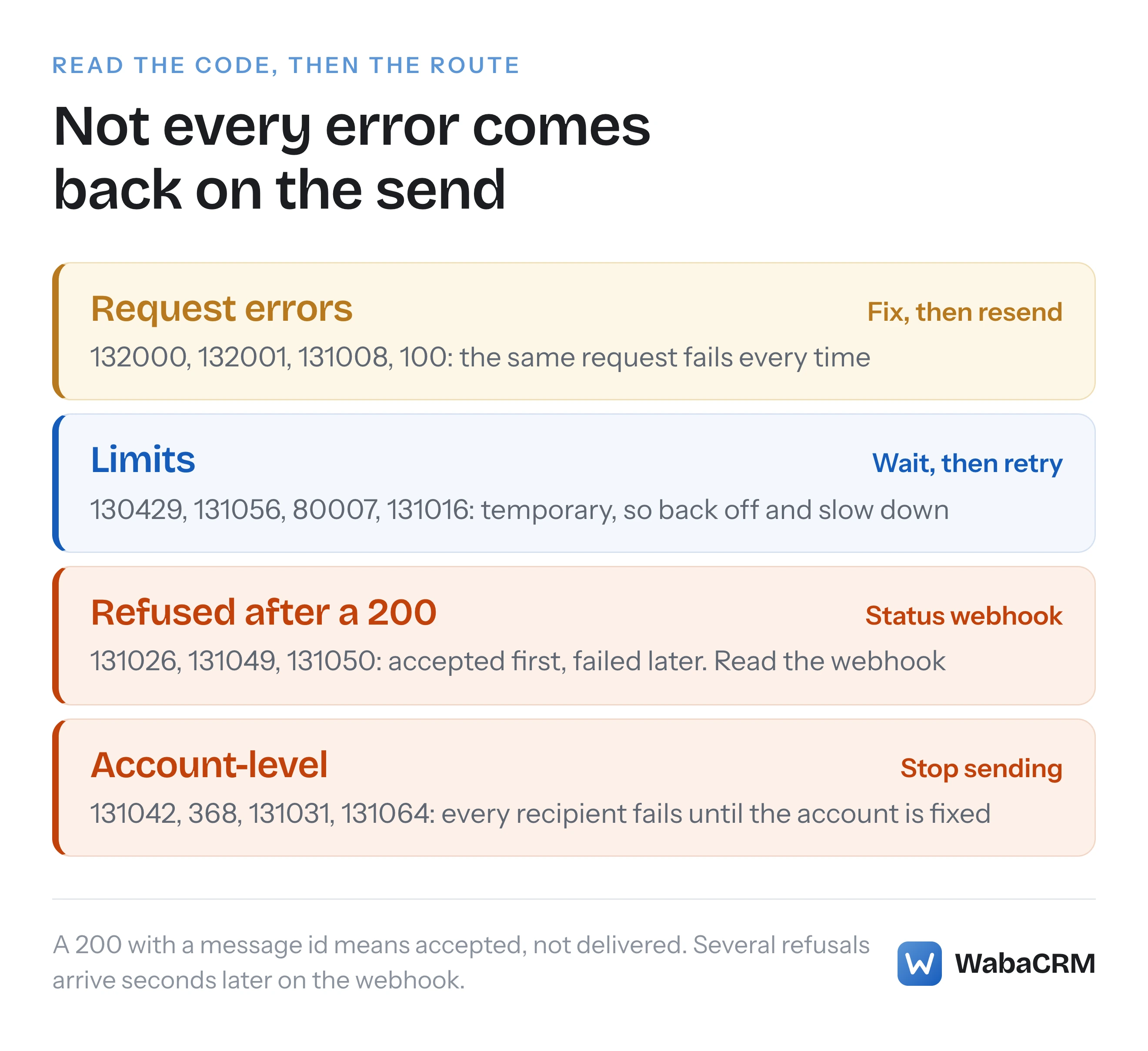
Wait, then try again. Throughput and rate limits (130429, 131056, 80007, code 4) and service problems (131016, code 2) describe something temporary. Back off and slow down. For 80007 and code 4, Meta's own advice is to reduce the frequency or amount of API queries, so the fix is fewer management calls, not a faster retry.
Fix, then resend. Template and parameter errors (132000, 132001, 132012, 131008, 100 and the 2388 family) will fail identically every time until the request changes. Retrying them only adds noise to your logs. Stop, surface the details string to whoever owns the template, and resend once it is fixed.
Stop. An opt-out (131050) is permanent for marketing. A closed window (131047) needs a template, not the same message again. After 131049, Meta says to wait at least 24 hours. Account-level codes (131042, 368, 131031, 130497, 131064) will refuse every recipient until the account is fixed, so pause sending from that number rather than failing a campaign one customer at a time. And never let a loop call /register: repeated attempts are exactly what produce 133016, as our registration-loop post explains.
One lesson from running this on our own platform: once an account-level refusal is recorded, clear it only when a message is actually delivered or read. A 200 on the next send proves nothing, because the refusal may simply arrive on the webhook a few seconds later.
Which errors come from Embedded Signup rather than the API?
Errors raised while a business connects its number are not on the API error-codes page at all. They appear inside Meta's signup window and are listed on a separate page, Embedded Signup Flow Errors, last updated 10 November 2026 when read on 13 November 2026.
| Code | Meta's description | First move |
|---|---|---|
| 2655093 | The business is already sharing this WhatsApp Business account with a partner. Switching partners is not supported in this flow. | Disconnect the current partner in the WhatsApp Business app |
| 1752206 | The user cannot be added to the business. | Contact Business Support |
| 3441061 | Your phone number is already linked to Automatic Events. | Turn off Auto lists in the Business app |
| 3441049 | This phone number is already registered with the product. | Disconnect it in the app's Business Platform settings, wait 15 minutes |
| 2655121 | You cannot proceed with this operation since your WhatsApp Business account is currently restricted. | Resolve it at Business Support Home |
One detail on 3441061 is worth knowing. When the code reached us from Meta's window in September 2026, it told us to turn off Auto labels under Business tools > Labels. Meta's page now reads "turn off Auto lists in Business Tools > Lists in your WhatsApp Business app". The wording has changed since; look for whichever of the two your app version shows. Our full write-up of connection failures, including why typing the number beats picking it from a list, is in the coexistence ineligible guide.
Which WhatsApp error codes are missing from Meta's page?
Several codes developers actually receive are not on the error-codes page as read on 13 November 2026, which is why searching them returns pages that repeat the error string and stop.
- 131030, the allowed-list error from Meta's test sender number.
- 80008, which Meta's Graph API rate-limiting page lists against the WhatsApp Business Management API, and the WhatsApp error page does not mention at all.
- 2388024 and other template refusals that arrive as subcodes of code 100.
Two others have more than one documented meaning. 135000 is "an unknown error with your request parameters" on the error-codes page and, as our 135000 write-up sets out, also the code Meta's business portfolio pacing page uses for held template messages it drops. 2388103 has nine rows, told apart only by their details string. For both, the code alone is not enough to act on.
What about webhook failures that have no error code?
Some of the hardest WhatsApp problems never produce an error code, because the failure is that nothing arrives. Meta will not validate your callback URL unless the endpoint returns hub.challenge as plain text; signatures fail to match if you hash parsed JSON rather than the raw body; and a verified webhook still receives nothing until each WhatsApp Business Account is subscribed to your app.
Each has its own page: why Meta cannot validate your callback URL, why X-Hub-Signature-256 never matches, a verified webhook that receives nothing and how long Meta retries a failed delivery. If the dashboard says connected and nothing is sending, start with that checklist before reading any code.
How does WabaCRM show these errors?
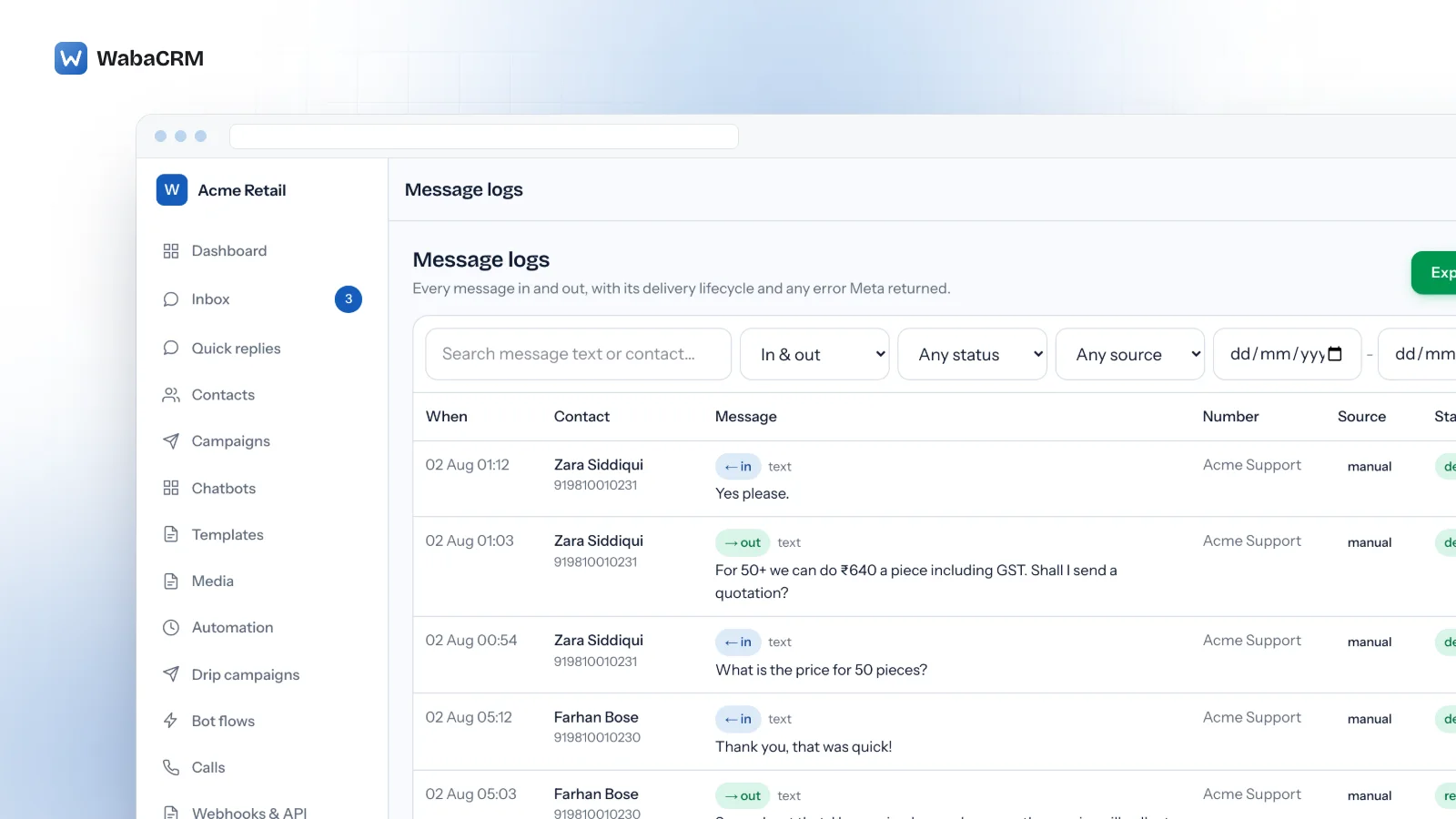
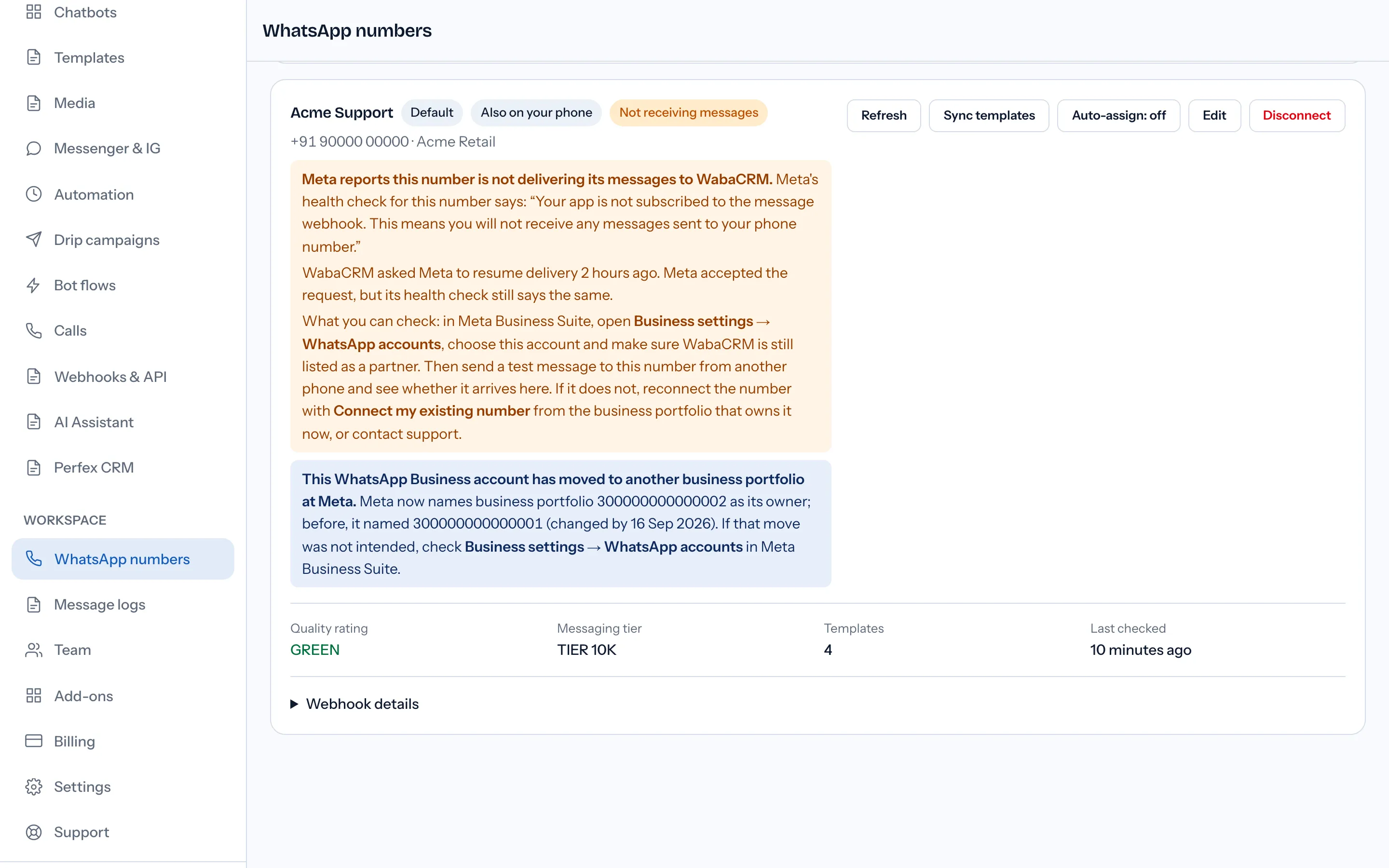
Every message in a WabaCRM workspace, in either direction, sits in the message logs with its delivery status and any error Meta returned, and a refusal is explained in plain words rather than in Meta's raw text. Refusals that belong to the account rather than the message, such as a payment or policy code, are raised once on the number's card instead of once per customer.

The number's card also repeats Meta's own health check, so an account-level problem is visible before a campaign runs into it.
WabaCRM is a Meta-verified Tech Provider, so payment errors such as 131042 are fixed on your own WhatsApp Business Account, where Meta bills you directly. If you run your sends from another tool through our API, the n8n and Zapier integration guide shows where those codes come back.
Every Meta quotation on this page was read from Meta's own documentation on 13 November 2026. Meta changes that documentation without notice; the linked pages are authoritative and this one is not.