Leads both ways
Perfex CRM WhatsApp Integration: What Actually Syncs
Last checked · 13 min read
The short answer
WabaCRM's Perfex CRM integration is an optional add-on linking WabaCRM to your Perfex install over its REST API. New WhatsApp contacts are pushed to Perfex as leads unless Perfex has a lead on that number. With the pulls on, an hourly sweep brings in Perfex customers and leads, with broadcasts off. Status travels from Perfex only. Checked 15 October 2026.
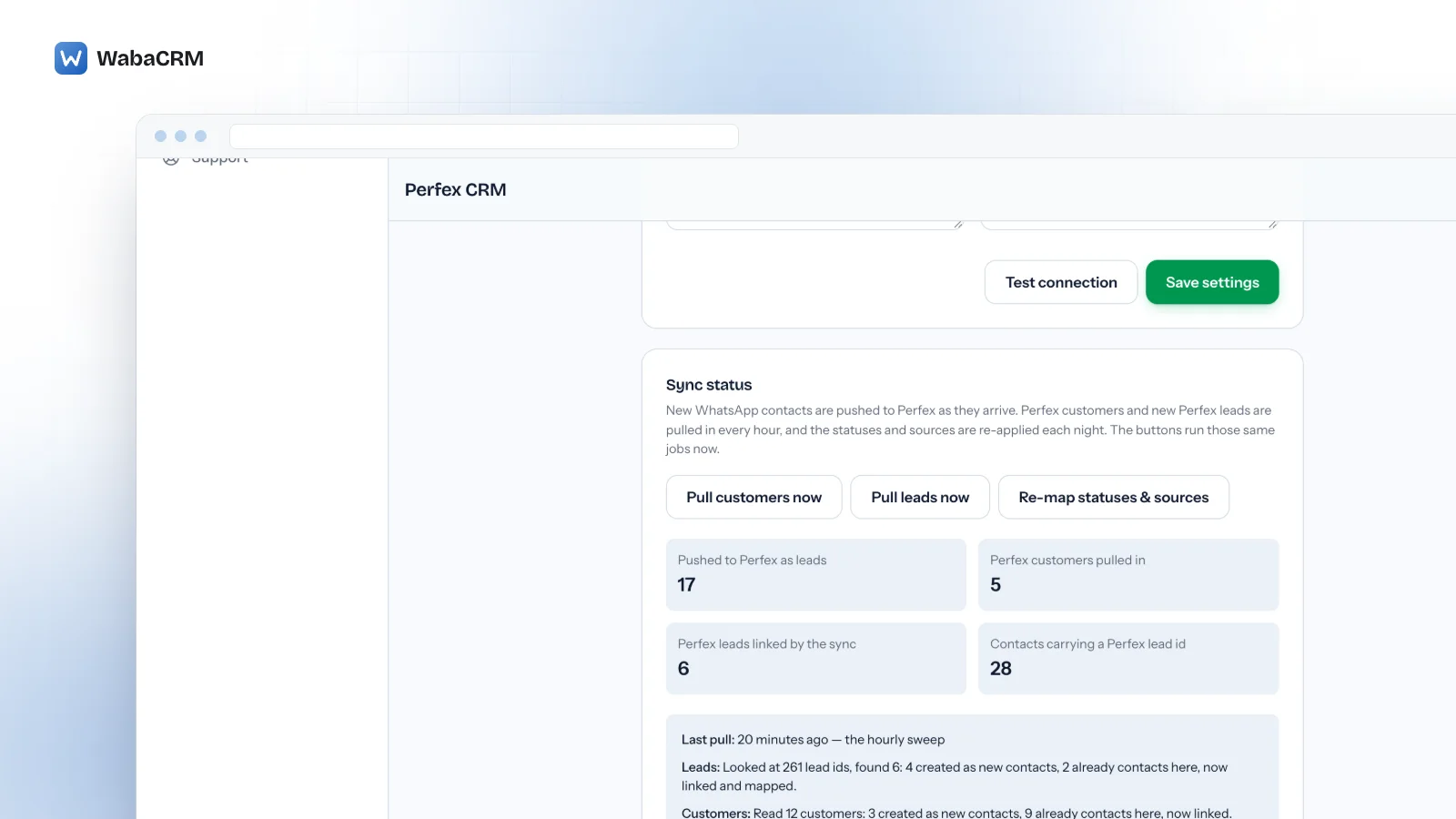
How does the Perfex CRM WhatsApp integration work?
It keeps WhatsApp in WabaCRM, on Meta's Cloud API, and syncs contacts with your own Perfex CRM through Perfex's REST API, as an optional add-on. New WhatsApp contacts become Perfex leads, and once you switch the pulls on, an hourly sweep brings Perfex customers and leads into WabaCRM.
It is not a module installed inside Perfex: no WabaCRM code runs on your Perfex server. WabaCRM calls your Perfex's REST API over HTTPS, with a token you give it.
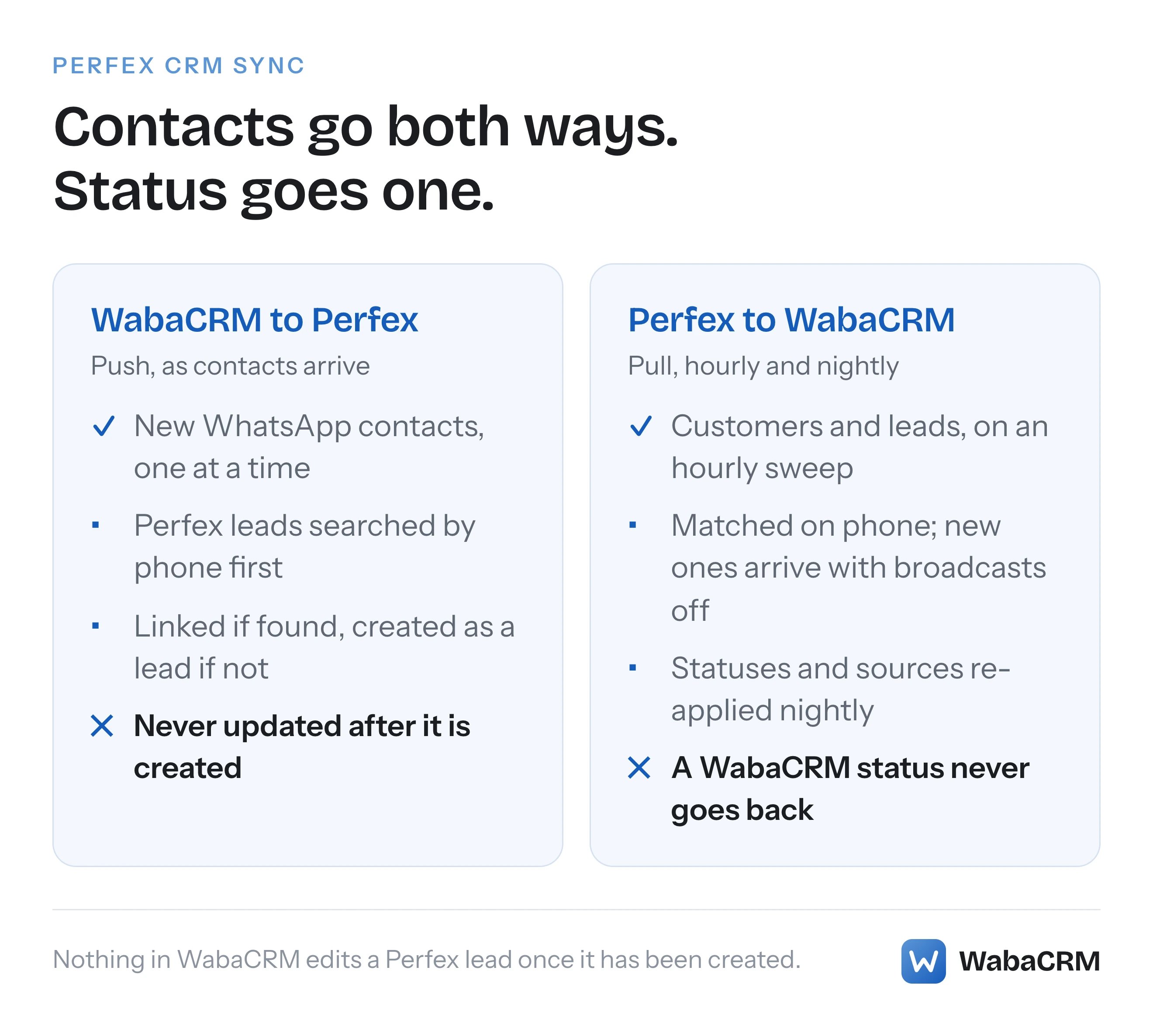
WhatsApp lives beside Perfex instead. The shared team inbox, templates, campaigns and the number's connection to Meta stay in WabaCRM, a Meta-verified Tech Provider, and Perfex stays the record of your leads and customers. The add-on is the pipe between them, and it is narrower than the words two-way sync suggest. Contacts travel both ways. Status travels one way. And once a lead exists in Perfex, nothing in WabaCRM edits it again.
- How does the Perfex CRM WhatsApp integration work?
- Which records move between WabaCRM and Perfex, and how often?
- What does your Perfex install need before you connect it?
- What happens in Perfex when a new number messages you on WhatsApp?
- Why does the push search Perfex leads and not customers?
- How do Perfex customers and leads arrive in WabaCRM?
- Why can you not broadcast to contacts pulled from Perfex?
- Why must you paste Perfex's lead status and source ids?
- When does a status changed in Perfex show up in WabaCRM?
- What does the Perfex sync leave out?
- What happens when Perfex holds more leads than your contact allowance?
Which records move between WabaCRM and Perfex, and how often?
Nothing outside this table crosses between them.
| Record | Direction | When |
|---|---|---|
| A new WhatsApp contact | WabaCRM to Perfex, as a lead | Shortly after it is created, as a queued job |
| A Perfex customer | Perfex to WabaCRM, as a contact | Hourly sweep |
| A Perfex lead | Perfex to WabaCRM, as a lead | Hourly sweep |
| A lead's status and source | Perfex to WabaCRM | With a new lead, then nightly or on demand |
| An edit, status move or deletion in WabaCRM | Does not travel | Never |
| A WhatsApp conversation | Does not travel | Never |
Only the push happens as things occur, and even that is a queued job. The rest runs on a clock. The buttons Pull customers now, Pull leads now and Re-map statuses & sources start the same jobs on demand, each at most once per workspace every two minutes.
What does your Perfex install need before you connect it?
Five settings, all entered on the add-on's settings screen in WabaCRM:
- An HTTPS address. The screen refuses a plain
http://URL, because the token travels with every request. - An API token. In Perfex it lives under Setup → API, and the account behind it needs read and write access to customers and leads. WabaCRM stores it encrypted and never shows it on the screen again.
- A lead source id and a lead status id. These are the numbers every pushed lead is filed under in Perfex, found under Setup → Leads → Sources and Statuses. Without both, no new lead is created in Perfex, and the screen does not warn you, so fill them in before you rely on the push.
- A staff id, if you want one. The screen marks it optional, and the integration sends an owner only when this field is filled in. On the Perfex install this sync was built against, creating a lead needed a valid staff id, so if pushed leads never appear in Perfex, check this field first.
- A default country code. It reads a phone number Perfex stored without one, so it matches the same number in WabaCRM.
Test connection asks Perfex for its customer list using the saved URL and token, and reports only whether Perfex accepted the request. Save first, then test.
On the WabaCRM side, the Perfex add-on needs the Webhooks & API add-on installed first, and that one cannot be removed while the Perfex sync depends on it. Both are listed on the add-ons page. Installing takes the permission to manage add-ons; saving, testing and starting a run take the permission to change workspace settings. By default only Owner and Admin hold either. Anyone in the workspace can open the screen and read its status.
What happens in Perfex when a new number messages you on WhatsApp?
WabaCRM creates a contact for the new number, and a queued job takes it to Perfex. The same happens to a contact added by hand or through the REST API: anything that arrives one at a time.
- It searches Perfex's leads for the phone number, using its last ten digits, and accepts a result only when that lead's phone ends in the same ten digits. A search that happened to hit a name or an email is not allowed to link two records.
- If a lead matches, it links the two and creates nothing. A lead that Perfex has already converted into a customer is linked as that customer.
- If nothing matches, it creates a lead with your source and status, the contact's name, phone, email and company, your staff owner if you set one, and the description
Captured from WhatsApp via WabaCRM.If Perfex does not hand back the new lead's id, the job reads it back by phone, so a retry cannot create a second lead.
It skips blocked contacts, contacts already linked, and any contact that came from Perfex in the first place, which is what stops every pulled lead being pushed straight back.
If Perfex is slow or unreachable, the job tries up to three times, waiting longer between each attempt. If Perfex refuses the lead outright, the job does not try again, because sending a rejected request again gets the same answer. A refused push is not listed on the status panel; the count of leads pushed to Perfex simply does not move.
Why does the push search Perfex leads and not customers?
Because on the Perfex install this sync was built against, the customers search did not match phone numbers, only company names, while the leads search did.
A lead that Perfex converts into a customer keeps its lead row, so customers who began as leads are still matched and linked. The gap is a customer created directly in Perfex with no lead behind them. When that person messages you on WhatsApp for the first time, the search cannot see them, and Perfex gains a new lead beside the existing customer.
The fix is ordering. If your team creates customers directly in Perfex, turn on Pull Perfex customers in as contacts and let it run before you rely on the push. A pulled customer becomes a linked contact, so when they write in, no new contact is created and nothing is pushed.
This is what the integration expects, not Perfex documentation: Perfex REST API builds can differ, and every Perfex behaviour on this page was measured on one live install.
How do Perfex customers and leads arrive in WabaCRM?
Through two switches, Pull Perfex customers in as contacts and Pull Perfex leads in as contacts, both off until you turn them on.
Customers. The first run takes in every customer Perfex holds. After that, each hourly run takes only customers with a higher Perfex id than the highest it has already handled. A number already in WabaCRM is linked rather than duplicated, including a deleted contact, which is restored where it can be. A new number becomes a contact named after the customer's company, under the source Perfex CRM. A customer with no usable phone number is skipped.
Leads. Leads arrive by a walk through Perfex's lead ids, one lead fetched at a time. On the install this sync was built against, the full leads list ignored pagination and its plain endpoint failed under load, while single leads came back reliably. The walk starts at the lowest id it has not yet read, so on a new connection it works through the leads already in Perfex first, oldest id first. Each hourly run reads at most 600 lead ids, within a time limit, and Pull leads now reads up to 3,000. On a CRM holding tens of thousands of leads, that can mean a day or more of hourly runs before a lead created today is reached.
A lead whose phone number is already a contact is linked and given its mapped status and source; a new one arrives as a lead carrying its Perfex lead id.
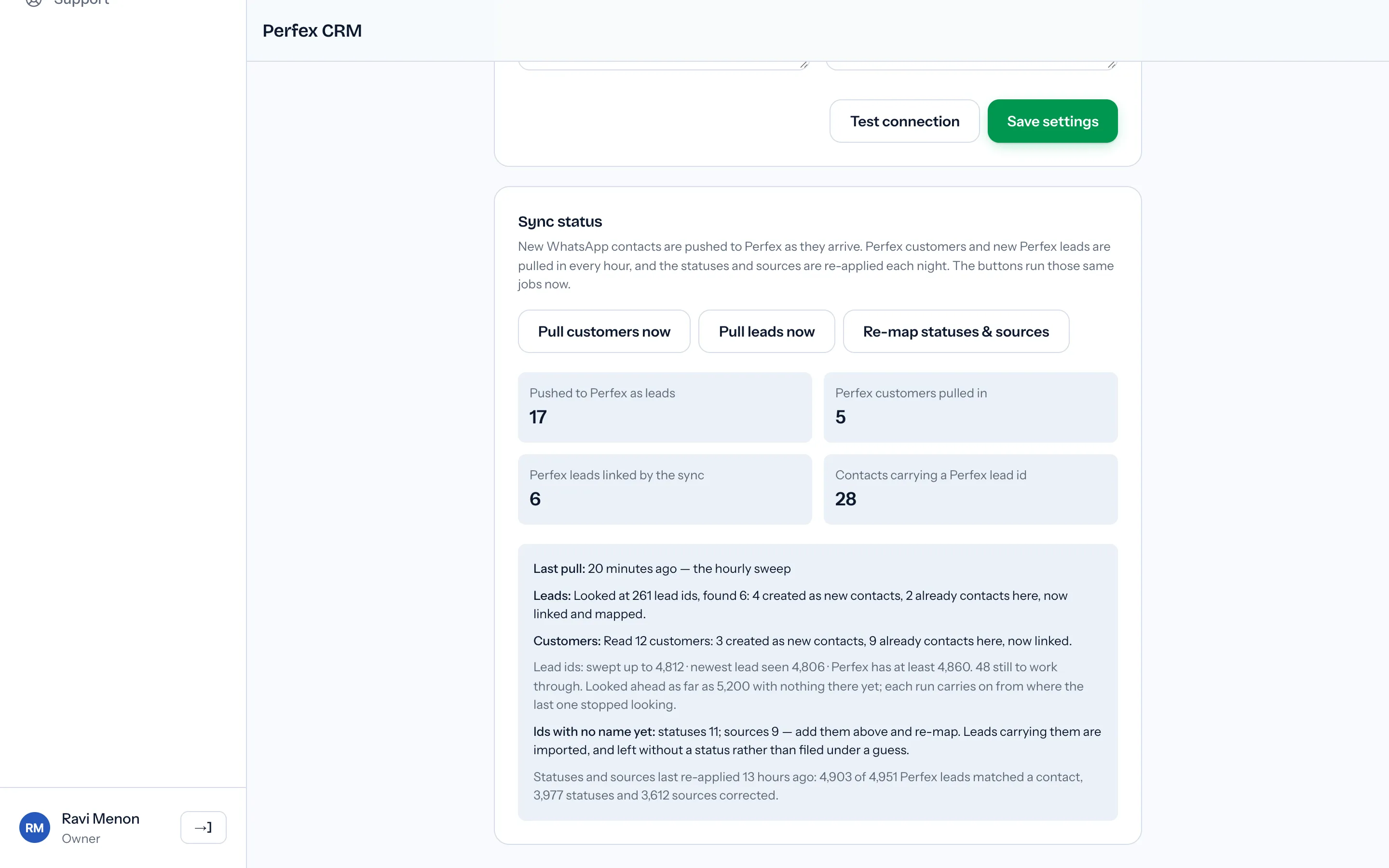
Pulled contacts arrive quietly: they fire none of your outgoing webhooks and are never pushed back. The status panel records every pull, including one that found nothing, and says in a plain sentence why a failed pull did not finish.
Why can you not broadcast to contacts pulled from Perfex?
Because being in a CRM is not consent to WhatsApp messages. Every customer and lead the sync creates arrives with broadcasts switched off, which leaves it out of every campaign audience until consent is recorded for it. Linking a Perfex record to a contact you already had never changes that contact's consent, in either direction.
Meta sets two conditions, and a CRM record can show one of them at most:
"Businesses may contact people on WhatsApp if: (a) they have given their mobile phone number; and (b) businesses have received opt-in permission from the recipient confirming that they wish to receive subsequent messages or calls from a particular business." (Meta — Get opt-in for WhatsApp)
A phone number on a Perfex lead speaks to condition (a) at best. Whether you have (b) depends on how the lead reached you. Meta leaves the method to you, gives SMS, a website, an IVR phone flow and signing up in person or on paper as examples of supported methods, and says the permission "can be general and not specifically for WhatsApp, as long as businesses comply with all local laws." It does require that the person was told which business they were agreeing to hear from. What WhatsApp actually requires from an opt-in goes through it line by line.
Consent is not the only gate. A contact the sync creates has never written to your number, so no conversation window is open, and Meta is direct about what that means: "To message WhatsApp users outside of a customer service window, use template messages instead." (Meta — Service messages) The window opens when they make contact:
"When a WhatsApp user messages you or calls you, a 24-hour timer called a customer service window starts." (Meta — Service messages)
The add-on itself sends no WhatsApp message to anyone.
Why must you paste Perfex's lead status and source ids?
Because a Perfex lead carries its status and source as bare numbers, and this sync found no way to read the names behind them over Perfex's REST API. Probed against a live install on 3 October 2026, every address tried for a status list or a source list answered 404. Without the names there is no way to know that 12 means Warm.
So you paste them once, from Perfex's own Leads → Statuses and Leads → Sources screens, one per line:
2 = New Lead
12 = Warm
22 = Meeting Done
12: Warm is read the same way. When the re-map runs, WabaCRM creates any status or source it does not already have, matching names regardless of capital letters, then puts each synced contact on the same status and source as its Perfex lead.
An id with no name is never guessed. The screen lists it under Ids with no name yet, and leads carrying it are imported without a status rather than filed under the nearest-looking one. Add the line, save, and press Re-map statuses & sources.
Add a status or a source in Perfex later, and its line has to be added here too.
When does a status changed in Perfex show up in WabaCRM?
At the next nightly re-map, which runs at 03:50 UTC for every workspace with a recorded map, or soon after you press Re-map statuses & sources, which starts within five minutes. It reads every lead in Perfex, so a large CRM takes a few minutes, and the status panel reports what changed once it finishes.
It pairs each Perfex lead with a contact by the Perfex lead id stored on the contact, then by the last ten digits of the phone number. A contact that matches neither is left alone.
The nightly run never deletes a status or a source.
The trap is the other direction, because it does not exist. Move a contact from New Lead to Paid in WabaCRM and Perfex still reads New Lead. Worse, if that contact matches a Perfex lead, the re-map takes Perfex's word for it, and the next night can put the contact back on New Lead whenever that status is in your map. That includes contacts the integration pushed to Perfex itself, and the same goes for sources. Run the pipeline in Perfex and let WabaCRM follow it.
What does the Perfex sync leave out?
Leaving bulk imports out is deliberate; the rest is simply not built.
| You might expect | What actually happens |
|---|---|
| A CSV import goes to Perfex | Not pushed, so a bulk upload cannot flood Perfex |
| Existing contacts go when you switch it on | Only contacts created afterwards, one at a time |
| A phonebook import from a coexistence number goes | Not pushed, for the same reason as a CSV |
| Messenger and Instagram contacts go | Skipped: no phone number to file a lead under |
| Chats and messages appear in Perfex | Only the lead, with its one-line description |
| A deletion is mirrored | Not in either direction |
| An edit in WabaCRM updates the lead | Nothing edits a Perfex lead once it exists |
If you need edits or status moves in Perfex, the Webhooks & API add-on that the sync depends on can send a signed contact.updated event to your own HTTPS endpoint whenever a contact's name, phone, email, company, status, source or owner changes. The event carries the contact's id and details but not its status, so your code reads the contact back through the REST API before making the Perfex call. The n8n and Zapier guide covers that route. A CSV import fires no contact event there either.
WabaCRM has no built-in sync for any other CRM.
What happens when Perfex holds more leads than your contact allowance?
The sync stops creating contacts at the allowance and never imports past it. Customers it could not add wait for a later run. Leads it could not add are counted on the status panel under Held by the contact allowance, with the lead id they start from, while the walk carries on linking leads that are already contacts. Nothing is lost: raise the allowance and they arrive on the next run. The pricing page shows what a larger allowance costs.
The same panel shows how far the lead walk has reached.
Every Meta quotation on this page was read from Meta's own documentation on 15 October 2026. Meta changes that documentation without notice; the linked pages are authoritative and this one is not.