Greeting, away and follow-up
WhatsApp Business API Auto Reply: Greeting, Away, Follow-Up
Last checked · 14 min read
The short answer
The WhatsApp Business API sends no greeting or away message for you. Meta's coexistence feature table marks the app's greeting and away messages as not supported on the Cloud API. On an API number, an automatic reply is an ordinary message sent by software, inside the 24-hour customer service window or as an approved template. Checked 15 October 2026.
Does the WhatsApp Business API have an auto reply?
No. Nothing at Meta sends a greeting or an away message for you on the Cloud API, and Meta's coexistence page, which compares WhatsApp Business app features with the Cloud API, lists the greeting message and the away message as app tools that the Cloud API does not support.
That surprises people who have read WhatsApp's Help Centre article on away messages, which is correct about the product it describes: the WhatsApp Business app on a phone. On the Cloud API an automatic reply is an ordinary message some software decided to send, under the same rules as a reply typed by a person.
Here is the row from Meta's table, which describes features for businesses onboarded to the Cloud API from the app and sets each one beside what the Cloud API supports:
"Messaging tools (for example, marketing messages, greeting message, away message, quick replies, labels)" (Meta — Onboard WhatsApp Business app users)
Against that row the app column reads "No change." and the Cloud API column reads "Not supported." Meta's service messages page and its webhooks overview describe no automatic-reply option either.
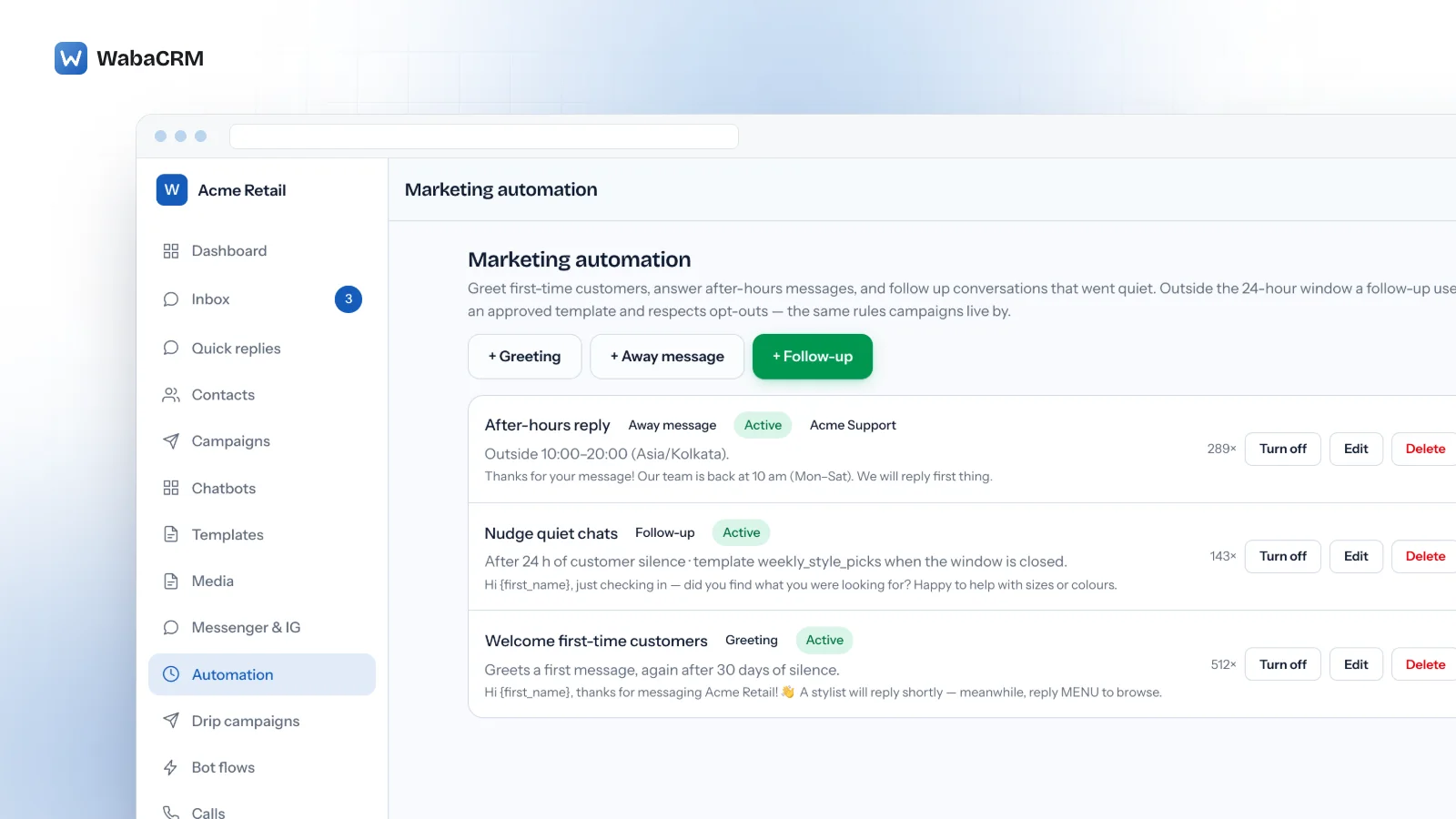
So the useful questions are who decides to reply, what Meta allows at that moment, and what Meta charges. This page takes them in order, using WabaCRM's greeting, away and follow-up rules, an optional add-on, as the worked example.
- Does the WhatsApp Business API have an auto reply?
- Where does the WhatsApp Business app keep its away message?
- Why does the WhatsApp Business app's auto reply stop sending?
- What happens to the phone's greeting and away message under coexistence?
- How does an away message work on a Cloud API number?
- When does an automatic greeting fire, and when does it stay silent?
- Can an automatic follow-up reach a customer after 24 hours?
- What does Meta charge for an automatic WhatsApp reply?
- Which auto-reply jobs does the add-on leave to something else?
- App away message or API automation: which should answer your number?
Where does the WhatsApp Business app keep its away message?
On the phone, under the Tools tab. WhatsApp's Help Centre describes the feature in one sentence:
"When away messages are enabled, customers who message you will automatically receive a customizable message, indicating that you're busy or away from your phone." (WhatsApp Help Center — How to use away messages)
You turn on Send away message, edit the text, pick a schedule (always, a custom period, or outside business hours) and pick who receives it, from everyone down to chosen contacts. For one person answering one phone it is a perfectly good tool.
What matters is where it runs: it is configured on the handset and sent by the handset.
Why does the WhatsApp Business app's auto reply stop sending?
Three causes are worth checking first, and all three are printed in the same Help Centre article.
The phone is offline. The article closes with this:
"Note: Your device must have an active internet connection in order to send away messages." (WhatsApp Help Center — How to use away messages)
A phone that is switched off, flat, in flight mode or out of signal overnight sends nothing, which is exactly when the away message was meant to work.
The business hours were never set. The "Outside of business hours" schedule depends on them, and the article says: "Note: This option is only available if you have set your business hours in your business profile."
The recipient filter excludes the person writing. If you chose "Everyone not in address book", the app will "send only to customers who aren't in your address book", so a regular customer whose number you saved hears nothing back.
None of these is an outage, and none can be fixed from a platform.
What happens to the phone's greeting and away message under coexistence?
Coexistence keeps a number in the WhatsApp Business app while also connecting it to the Cloud API. The table quoted above comes from Meta's coexistence page, and its verdict on messaging tools in the app is "No change." So the phone keeps its greeting and away message after onboarding, and Meta still lists them as not supported on the Cloud API.
Two more sentences from that page decide how the phone's message behaves:
"After a business customer has been onboarded to Cloud API, messages sent by the business via the WhatsApp Business app will continue to be free, but messages sent via Cloud API will be subject to Cloud API pricing." (Meta — Onboard WhatsApp Business app users)
"Messages sent from the WhatsApp Business app are not subject to the customer service window and do not create, extend, or affect Cloud API conversation windows or Cloud API pricing." (Meta — Onboard WhatsApp Business app users)
So the phone's away message costs nothing and touches no window, but still needs the phone online. One sent by a platform is the opposite on each count: a Cloud API message, priced as one, allowed only inside the customer service window, and sent from a server whether the phone is on or not.
Run one or the other. Nothing on Meta's page says the app stops sending its away message because the API is connected, so a platform rule switched on beside it can tell a customer writing at night the same thing twice. What else changes on the handset is in the WhatsApp coexistence guide.
How does an away message work on a Cloud API number?
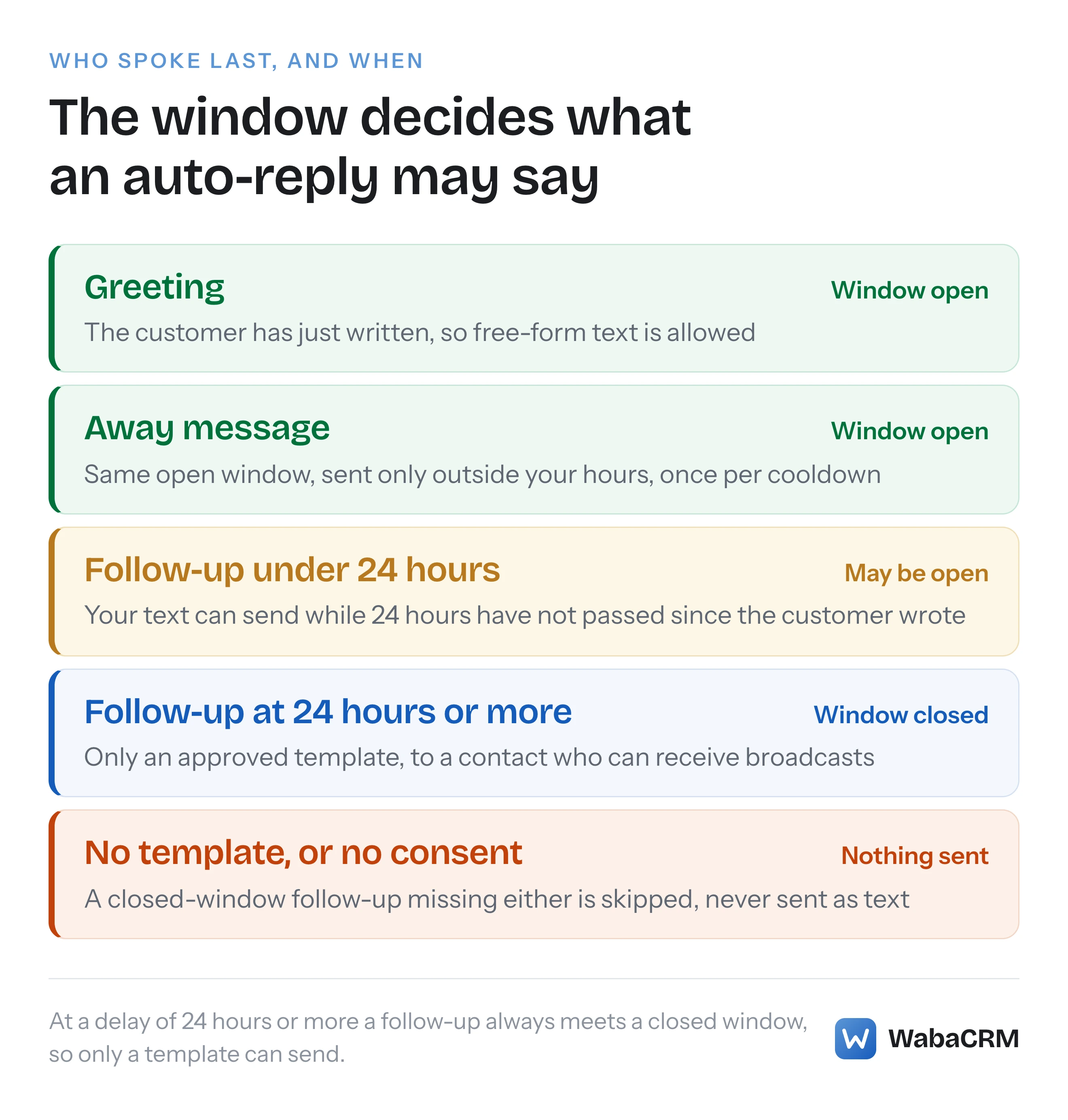
A platform receives the customer's message from Meta's webhook, checks it against a rule, and replies through the Messages API. The customer has just written, so the reply lands inside Meta's customer service window:
"When a WhatsApp user messages you or calls you, a 24-hour timer called a customer service window starts. If the user messages or calls you again before the timer expires, the timer resets to 24 hours." (Meta — Service messages)
Inside that window free-form text is allowed, so an away message needs no approved template. If you also answer Messenger, how WhatsApp's 24-hour window differs from Messenger's is worth reading first.
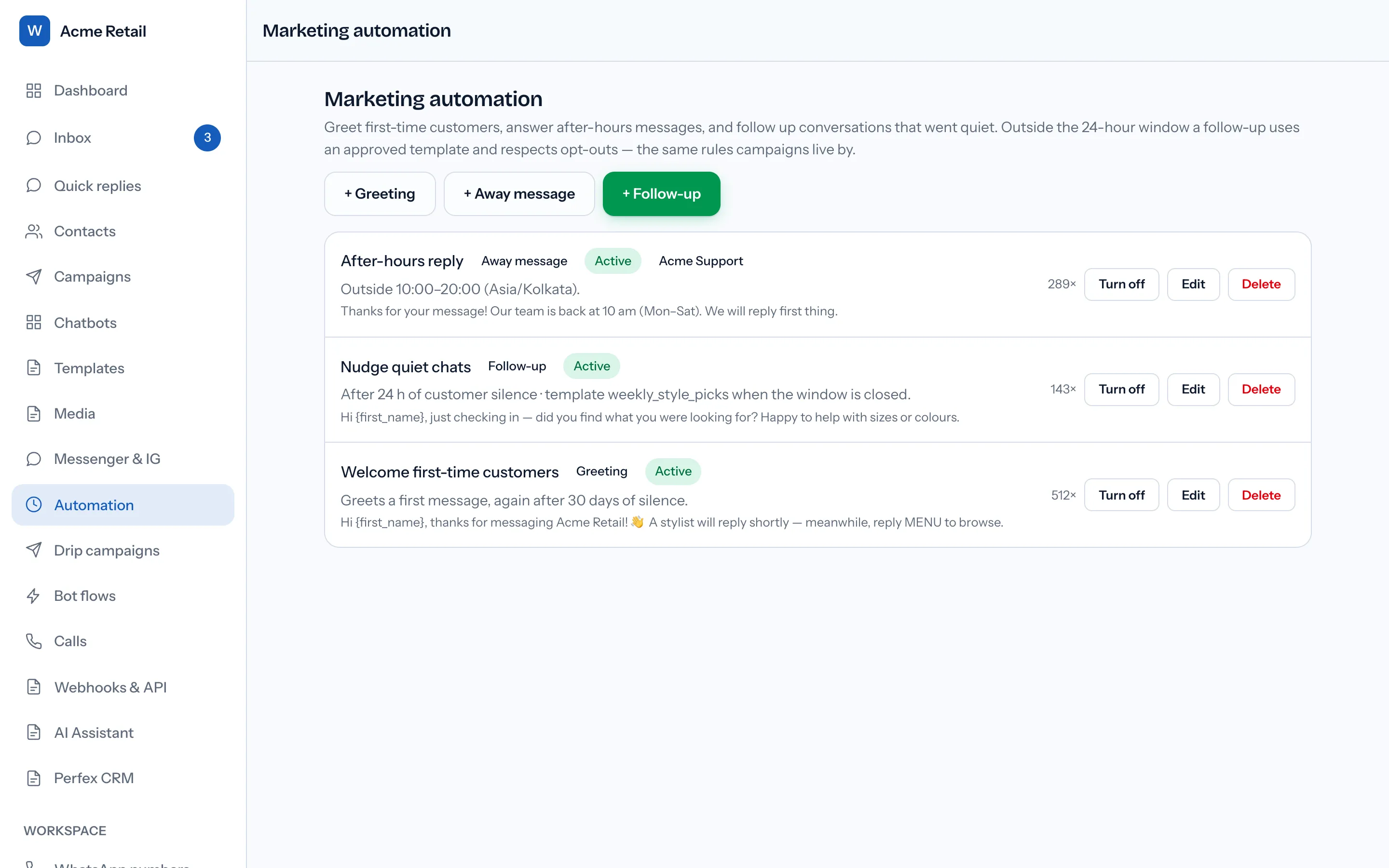
WabaCRM does this with its Marketing Automation module, an optional add-on sold separately and priced on the add-ons page. The away rule asks for a timezone, the hours and days you are open, and "At most once per contact every (minutes)". A new away rule starts at 09:00 to 19:00, Monday to Saturday, with a 480-minute cooldown and the workspace's timezone filled in. A message arriving outside those hours, or on an unticked day, gets the away text; a second one from the same person inside the cooldown does not.
Three things it does not do, because people expect them:
- It does not know whether anyone is at a desk. The rule reads the clock alone, so an agent online at 20:00 does not stop an away message if your hours end at 19:00.
- It cannot describe a day that crosses midnight. Opening hours are one window per day, and "until" must be later than "Open from", so 18:00 to 02:00 cannot be entered.
- It has one set of hours for every ticked day. There is no shorter Saturday and no holiday calendar.
A new rule's Active box starts unticked, so it is saved switched off unless you tick it. Tick Active once the text is right, and the rule's row then counts how many times it has fired.
When does an automatic greeting fire, and when does it stay silent?
A greeting rule answers a contact's first message ever. The setting "Greet again after (days)" also greets someone whose previous message is older than that many days, from 1 to 365, and 0 keeps it to the very first message. Anyone who has written before is not greeted again unless that setting is on, and that covers contacts whose earlier chats arrived through a history import.
Two interactions decide what the customer sees.
A greeting beats an away message. If a greeting is sent, the away rule stays quiet for that same message, so a first-time customer writing at 23:00 receives the greeting, not your closed-hours notice. The message box's placeholder text ends "we'll be with you shortly", which is the wrong promise at midnight. Write a greeting that says when a person will reply.
Keyword bots run first, and the greeting does not check whether one already answered. A first message that matches a keyword bot, or a bot set to answer any message, can receive both replies. If your chatbot already welcomes people, switch one of them off. The bot side is covered in the WhatsApp chatbot builder guide.
Meta's guidance on message quality, on its service messages page, carries this line:
"Avoid sending open-ended welcome or introductory messages." (Meta — Service messages)
A greeting is a reply, not a cold introduction, but the advice still applies. Greetings are text only, with no buttons, images or templates.
Can an automatic follow-up reach a customer after 24 hours?
Yes, but only as an approved template, and Meta expects it to reach only someone who has agreed to hear from you. Meta's rule is short:
"When the window closes, you can only send pre-approved template messages." (Meta — Service messages)
WabaCRM's follow-up rule runs every 15 minutes. It looks for WhatsApp conversations where the business sent the last message and nothing has been said since for a set number of hours, from 1 to 720, default 24. If the window is still open it sends your text. If it has closed it sends the approved template you chose, filling its body values, but only when the contact has a phone number, allows broadcasts, is not blocked and has not opted out. With no template chosen, a closed-window conversation is skipped, and a rule with neither is refused: "A follow-up needs a message for open windows, a template for closed ones, or both."
The part most people get wrong is the default. The window is counted from the customer's last message, the delay from the business's later message, so 24 hours after you last spoke the customer's window has already closed. At the default delay, or any longer one, the text never sends; only the template can. The text only matters with a delay under 24 hours.
Three more guards keep it from turning into a spam engine:
- One nudge per silence, across every follow-up rule. A new customer message starts a fresh silence.
- Resolved and archived conversations are left alone.
- It only acts where the business sent the last message. A conversation whose last message came from the customer is never followed up.
Consent is Meta's requirement, not a product preference:
"Businesses are required to obtain opt-in before messaging people on WhatsApp." (Meta — Get opt-in for WhatsApp)
Two notes on the template. The picker lists every approved template in the workspace, not only those approved on the rule's number, so choose one from the number the rule uses and limit the rule to that number. And only body values are filled, so a template with an image header or a dynamic button is the wrong choice.
A marketing template can also run into a limit Meta applies per person:
"WhatsApp may limit the number of marketing template messages a WhatsApp user receives from any business in a given period of time when they are less likely to be receptive and engage with those messages." (Meta — Per-user marketing template message limits)
WabaCRM's campaigns hold back a contact Meta has recently refused under that limit; the follow-up rule has no such hold.
What does Meta charge for an automatic WhatsApp reply?
The same as for a typed reply, because to Meta that is all it is. A greeting, an away message and an in-window follow-up are service messages, and a closed-window follow-up is a template message charged by its category. Since 1 October 2026 service messages are charged past a monthly allowance:
"Each business phone number has one free tier of 1,000 delivered service messages per month. Meta charges as of the 1,001st service message per month, after the free tier has been used." (Meta — Pricing on the WhatsApp Business Platform)
The same page states that "Businesses are only charged when a message is delivered."
| Automatic reply | What Meta counts it as | When Meta charges |
|---|---|---|
| Phone's away or greeting, on coexistence | WhatsApp Business app message | Not charged |
| Greeting or away text from a platform | Service message | From the 1,001st a month, per number |
| Follow-up text, window open | Service message | From the 1,001st a month, per number |
| Follow-up template, window closed | Template, by category | Each delivered message |
The table leaves out two exceptions printed on the same page. The first is the free entry point window, which a Click to WhatsApp ad can open; of that window the page says "While open, Meta does not charge for marketing, utility, authentication or service messages." (Meta — Pricing on the WhatsApp Business Platform) The second: eligible government and non-profit organisations keep service messages free beyond the monthly allowance, under a policy Meta dates through 31 December 2027.
For an automated number, one sentence on that page matters more than the rate:
"If businesses do not have a payment method for their Messaging account(s), Meta will deliver service messages within the free tier but not deliver them after the free tier has been used." (Meta — Pricing on the WhatsApp Business Platform)
An away message on a busy number can quietly use up a thousand in a month. With no payment method on file, automatic replies stop being delivered once the allowance is gone, and so do your agents' typed replies, because they are service messages too. WabaCRM adds no markup to Meta's fees and cannot resell them: as a Meta-verified Tech Provider, it leaves Meta to bill your own WhatsApp Business Account. The background is in what changed when Meta began charging for service messages.
Which auto-reply jobs does the add-on leave to something else?
The module does three narrow jobs and declines the neighbouring ones on purpose:
- WhatsApp only. It does not answer Instagram or Messenger conversations, and its number picker lists WhatsApp numbers alone.
- One follow-up per silence, never a sequence. A message after a day, another after three and a third after a week is a drip, which is the job of the drip campaign add-on.
- No free-form text outside the window, under any configuration.
- No reply to opt-out words or WhatsApp's own notices. A customer who writes STOP gets no greeting and no away notice from these rules, and neither does WhatsApp's notice that a customer changed number.
- Text only for greetings and away messages: no media, buttons or templates.
Changing a rule needs the permission to manage bots, which the Owner, Admin and Manager roles hold by default; an Agent can see the rules but not edit them. Rules live in the web app, and the Android app opens that screen on the web rather than editing rules itself.
App away message or API automation: which should answer your number?
| Question | App's away message | Platform rule on the API |
|---|---|---|
| Where it runs | On the handset | On a server |
| Needs the phone online | Yes, says WhatsApp | No |
| Schedule | Always, custom, or business hours | Hours, days and timezone per rule |
| Effect on the Cloud API window | None, says Meta | Sent inside the open window |
| Meta's charge | Free on a coexistence number | Service message pricing |
If one person answers one phone, the app's own away message is the cheaper answer; keep it. Move the job to the API when a team answers the number in a browser, when the phone cannot be relied on to stay online, or when you want a nudge after a conversation goes quiet. On a coexistence number, choose one source of away messages, so a customer writing at midnight hears from you once.
Every Meta quotation on this page was read from Meta's own documentation on 15 October 2026. Meta changes that documentation without notice; the linked pages are authoritative and this one is not.