Up to ten cards
WhatsApp Carousel Template: Meta's Rules for 2 to 10 Cards
Last checked · 15 min read
The short answer
A WhatsApp carousel template is an approved marketing template that sends one message body above a row of up to 10 scrolling cards. In Meta's media card version, each card has an image or video header, optional text of up to 160 characters and up to two buttons, and every card must carry the same components. Checked 15 October 2026.
What is a WhatsApp carousel template?
A WhatsApp carousel template is an approved marketing template that sends one message body above a row of up to 10 cards the customer swipes sideways. In Meta's media card version, each card carries an image or video, optional short text and up to two buttons, and every card must be built from the same parts.
Meta's reference puts it in one sentence:
"Media card carousel templates allow you to send a single marketing template message accompanied by a set of up to 10 product media cards in a horizontally scrollable view" (Meta — Media card carousel templates)
The same page settles the category: "Note that carousel cards are only available for marketing template messages." (Meta — Media card carousel templates) There is no utility carousel, whatever the cards say.
Meta's developer site uses the word carousel for more than one kind of message, and most wrong answers about limits come from reading a rule off the wrong one. The media card carousel template is the one this page is about. The product card version draws its cards from a catalogue. The interactive media carousel is not a template at all, and Meta's catalogue pages add product carousel messages beside the product card template.
- What is a WhatsApp carousel template?
- How many cards can a WhatsApp carousel template hold?
- Why does every card in a carousel have to match?
- What image size does a WhatsApp carousel card need?
- What are the character limits on a carousel card?
- Why does a card image need a handle at creation and an ID at send?
- Which carousel do you need: media cards, product cards or interactive?
- Can a WhatsApp carousel card carry variables?
- Is a ten-card carousel charged as one message or ten?
- Why can a brand-new carousel stall partway through its first send?
- How does WabaCRM build and send a carousel template?
How many cards can a WhatsApp carousel template hold?
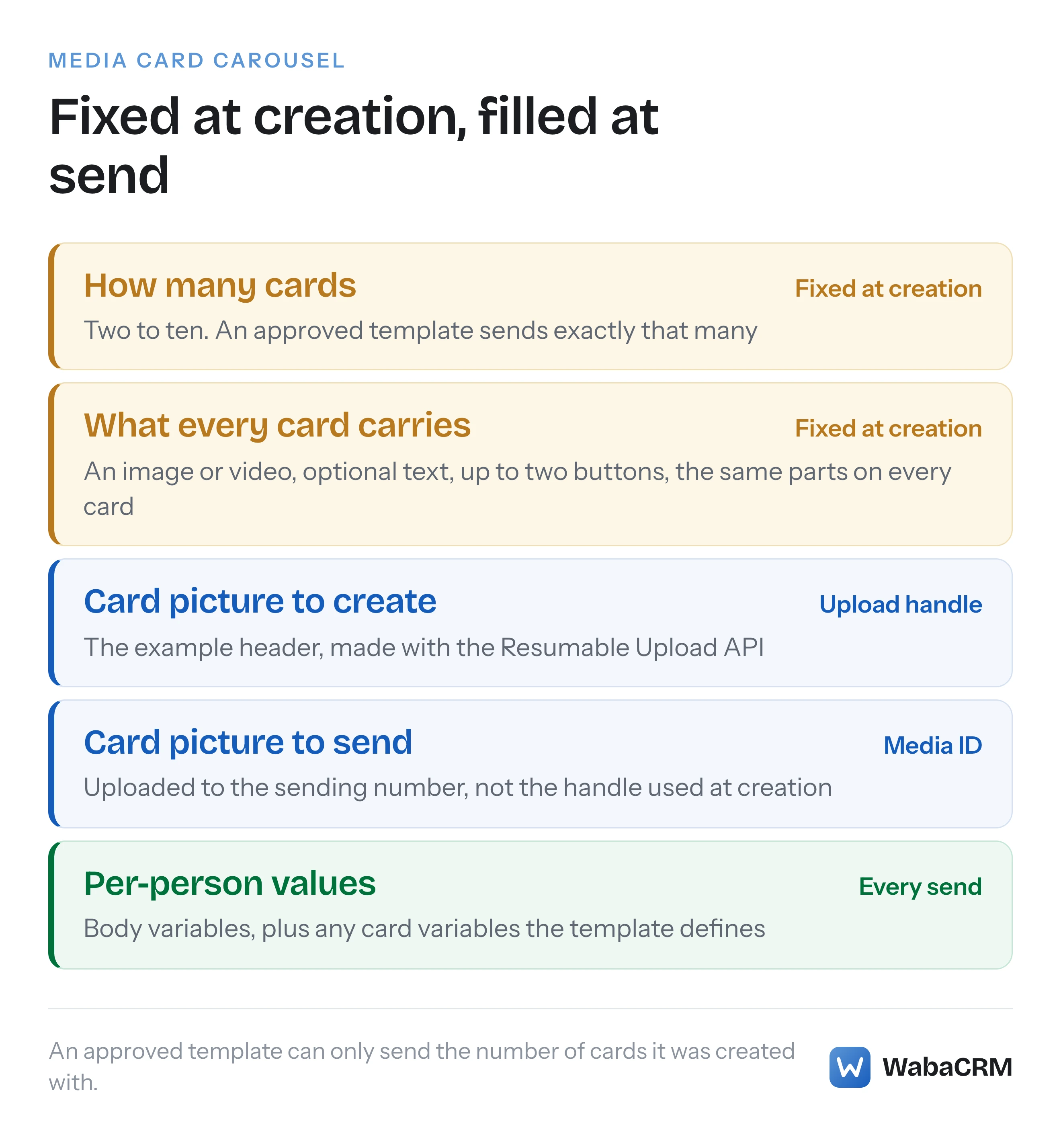
Between two and ten, and for a media card carousel the number is settled when you create the template:
"Define the exact number of product cards (minimum 2, maximum 10) when you create the template. An approved template can only be used to send the same number of cards as defined during its creation." (Meta — Media card carousel templates)
The second sentence is the one that matters. A five-card template sends five cards, every time. Meta's page does not describe changing the count of an approved template, and WabaCRM cannot edit one, so in WabaCRM a seven-product range means a new seven-card template and a new review.
The product card version works the other way round, which is where copied advice goes wrong:
"Define only two product cards when you create the template. An approved template with two product cards can be used to send up to 10 cards in a template message." (Meta — Product card carousel templates)
So "the card count is fixed" is true of media cards and false of product cards. The ten-card ceiling is the same on every one of these pages; the interactive reference puts it as "Messages must include between 2 and 10 cards." (Meta — Interactive media carousel messages)
Why does every card in a carousel have to match?
Because Meta requires it, in the same line on both template pages:
"All cards defined on a template must have the same components." (Meta — Media card carousel templates)
Card text is all or nothing:
"If any card in the carousel includes a card body text, then all cards must include a card body text to ensure consistent card heights." (Meta — Media card carousel templates)
Buttons follow the same logic. Meta allows variety within a card, saying "Button combinations can be a mix of quick reply buttons, phone number buttons, and URL buttons", but the combination has to repeat on every card. Order matters as well once any button carries a variable, because buttons are addressed by position when the message is sent:
"Note that if any buttons use variables, the type and order of buttons must match the type and order defined on the template, so you can’t use the index values to arrange the order of the buttons in the sent template." (Meta — Media card carousel templates)
The easy way to break this is to give one product a call button the others lack. The interactive reference spells it out for buttons: "Button types and numbers must match across all cards" (Meta — Interactive media carousel messages).
What image size does a WhatsApp carousel card need?
Meta's media card carousel page does not give one. It states no pixel dimensions, no specific aspect ratio and no file-size limit for a card header. What it does say is one sentence:
"Media assets are automatically cropped to a wide ratio based on the WhatsApp user’s device." (Meta — Media card carousel templates)
No single size displays uncropped on every phone, and because Meta does not say which part of the picture the crop keeps, the safest place for anything that matters, such as the product, a face or the words on a box, is the middle of the frame, away from the edges.
The header must be a picture or a video. The template reference describes the card header format with "Value can be image or video.", and the interactive reference is blunter:
"Cards must include either an image or video header. Other header types are not supported." (Meta — Interactive media carousel messages)
On media, the interactive page's only pointer is a line reading "See Supported media types." None of the three carousel pages prints a size limit of its own. A precise carousel image size quoted elsewhere did not come from Meta's carousel documentation, so ask where it came from.
What are the character limits on a carousel card?
Much shorter than the message above them. The template page gives the card allowance only in a note on card variables, which "does count against the card body text limit of 160 characters." The template and interactive references also set different limits for button labels:
| Part | Media card template | Interactive carousel |
|---|---|---|
| Message body | 1,024 characters | 1,024 characters |
| Card text | 160 characters | 160 characters, 2 line breaks |
| Quick-reply label | 25 characters | 20 characters |
| URL button label | 25 characters | 20 characters |
| Button link | 2,000 characters | No limit stated |
| Buttons per card | Up to two | One link, or quick replies |
A 23-character button label passes on a template and fails on an interactive card.
Why does a card image need a handle at creation and an ID at send?
Because creating the template and sending it are different endpoints, and each wants the picture in its own form. At creation, each card header carries an example asset:
"Uploaded media asset handle. Use the Resumable Upload API to generate an asset handle." (Meta — Media card carousel templates)
At send, the same card header asks for something else:
"Header asset’s uploaded media asset ID." (Meta — Media card carousel templates)
That ID comes from uploading the file to the sending number, at POST /<BUSINESS_PHONE_NUMBER_ID>/media in Meta's notation. A handle and a media ID are not interchangeable, and how long a media ID stays usable is its own subject, covered in the post on expiring WhatsApp media.
WabaCRM's carousel builder, which comes with the Carousel & Offer Templates module (an optional add-on), stores neither as the card's picture. It keeps the file in the workspace's media library, generates a fresh upload handle for each card when the template is created, and obtains the media ID from the library file at send, reusing one for no more than 25 days. Resolving the picture at send, not when the message was queued, keeps a scheduled campaign from carrying a stale reference. The flip side is that a live carousel depends on its files: delete a card's file from the library and every later send of that carousel fails rather than going out without the picture.
Which carousel do you need: media cards, product cards or interactive?
The three are easy to confuse, and they behave differently:
| Rule | Media card template | Product card template | Interactive carousel |
|---|---|---|---|
| Card header | Your image or video | A catalogue product | Your image or video |
| Cards set at creation | Exact count, 2 to 10 | Two | Not a template |
| When it can be sent | Any time | Any time | Open 24-hour window |
| Order webhook | No | With a View button | Not stated |
A media card carousel sends buyers to your website. Its URL buttons open a browser, and Meta is explicit about the consequence:
"When WhatsApp users place an order, they do so outside of the WhatsApp client, so no webhooks are triggered describing their order." (Meta — Media card carousel templates)
A product card carousel keeps the purchase inside WhatsApp, at the price of a catalogue:
"To use product card carousel templates, you must have an e-commerce product catalog, with inventory, connected to your Messaging account." (Meta — Product card carousel templates)
The interactive media carousel is a different thing on the wire. Its reference sends it with "type": "interactive", and Meta's pricing page is explicit about anything that is not a template:
"Non-template messages ("type":"text", "type":"image", and so on) can only be sent in an open 24-hour customer service window, which opens and resets with each user message." (Meta — Pricing on the WhatsApp Business Platform)
Against that, "Template messages ("type":"template") can be delivered at any time." (Meta — Pricing on the WhatsApp Business Platform) So an interactive carousel is a reply inside an open conversation, and a carousel to somebody who has not written recently has to be a template.
WabaCRM builds the first of the three. Every card header is a picture from your media library, so it makes media card carousel templates. It does not build product card carousels or send interactive carousels: a carousel from WabaCRM is always a template.
Can a WhatsApp carousel card carry variables?
At Meta, yes. The send reference describes a card body variable as "Required if the template card body text uses variables, otherwise omit." and a card's URL button can end in one variable:
"Supports 1 variable. Variable placeholder must be appended to the end of the URL string." (Meta — Media card carousel templates)
In WabaCRM, no, and this is WabaCRM's limit rather than Meta's. The builder refuses a {{1}} in any card's text or link before anything is sent to Meta, and tells you to move it into the message text above the cards.
What you can personalise is the message body. "Priya, here are this week's picks" works; a card reading "Priya, your size is in stock" does not. Each body placeholder needs an example value when you submit, because Meta requires them to line up: "Number of strings must match the number of variable placeholders in the message body text string." (Meta — Media card carousel templates)
Is a ten-card carousel charged as one message or ten?
One. A carousel is "a single marketing template message" in Meta's own description, and the pricing page allows a message at most one charge:
"A message from a business to a user only has 1 of the 5 categories and thus can only incur up to 1 charge, per the message’s category." (Meta — Pricing on the WhatsApp Business Platform)
Because carousel cards exist only on marketing templates, a delivered carousel costs one marketing message at the rate for the recipient's country calling code, whether it carries two cards or ten. The exception is Meta's free entry point window: when a customer writes in from a click-to-WhatsApp ad, the business's reply opens a window in which "Meta does not charge for marketing, utility, authentication or service messages." (Meta — Pricing on the WhatsApp Business Platform) A carousel that never arrives costs nothing: "Businesses are only charged when a message is delivered. Meta does not charge for messages sent." (Meta — Pricing on the WhatsApp Business Platform)
WabaCRM is a Meta-verified Tech Provider, so Meta bills that charge to the payment method on your own WhatsApp Business Account, and WabaCRM adds no markup to it. To estimate a send by country, use the WhatsApp message cost calculator.
Why can a brand-new carousel stall partway through its first send?
Because a carousel template is always a marketing template, and a new one is exactly what Meta's template pacing watches:
"Template pacing is valid for marketing and utility templates. Newly created templates, paused templates that are unpaused, and templates that may have been created previously but don’t have a GREEN quality rating are potentially subject to pacing." (Meta — Template pacing)
Pacing does not fail the send outright. Messages go out "normally until an unspecified threshold is reached" (Meta — Template pacing), and the rest are held while Meta reads early feedback. The send response marks a held message held_for_quality_assessment rather than accepted. If the feedback is good, the held messages go out. If it is poor, the template is paused and each held message is dropped with code 132015. A carousel rebuilt as a new template for each range is a newly created template every time, so it may meet pacing on every launch. The post on approved templates that stop sending covers what to do.
How does WabaCRM build and send a carousel template?
On its own screen, as a template Meta reviews like any other. Once the add-on is installed, "+ New template" opens the builder with Carousel already chosen. You name the template, set the language, choose the WhatsApp number and write the message text, with {{1}} and {{2}} for anything that changes per person. The form has three boxes for example values, one per placeholder, so a carousel built here carries at most three.
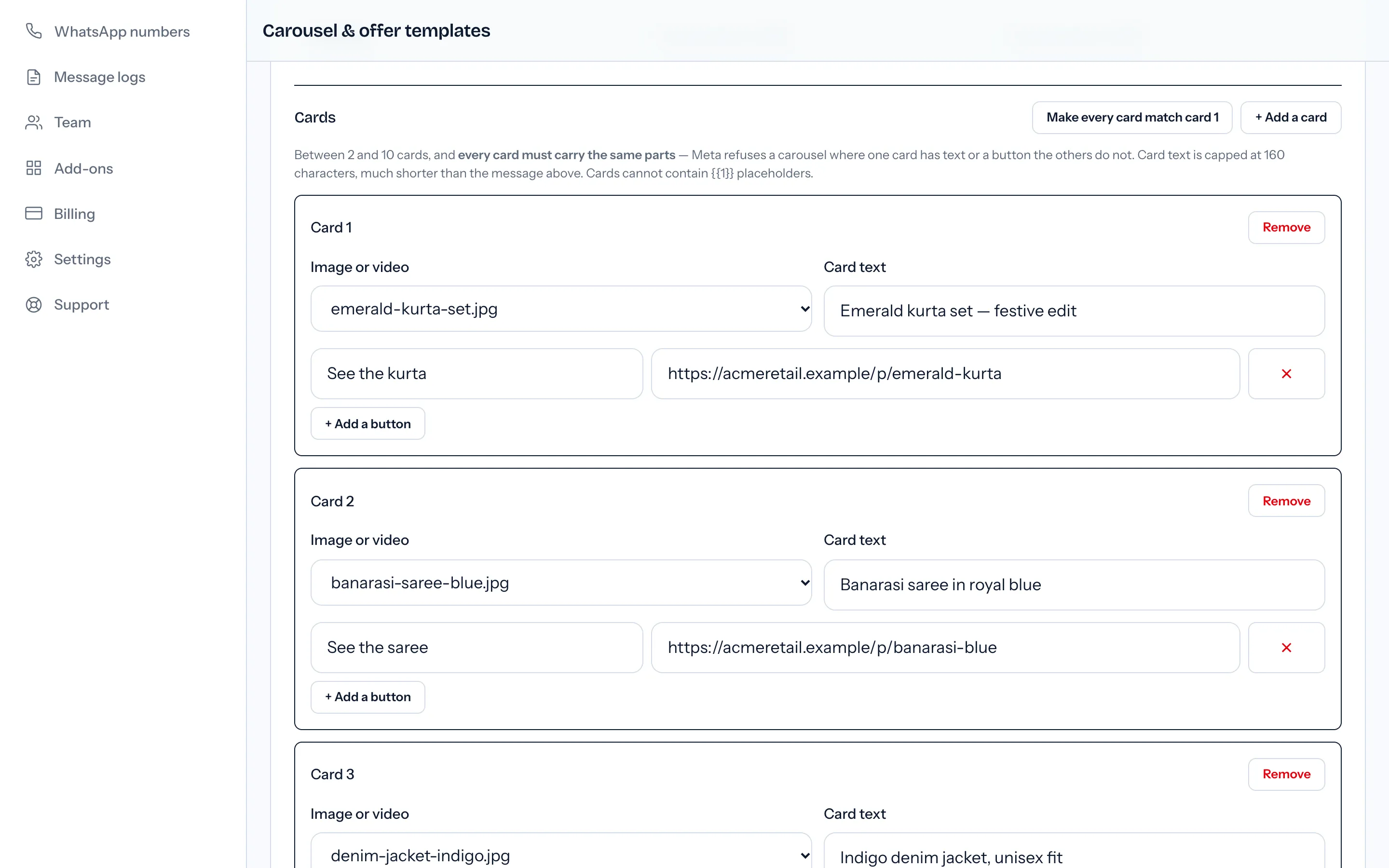
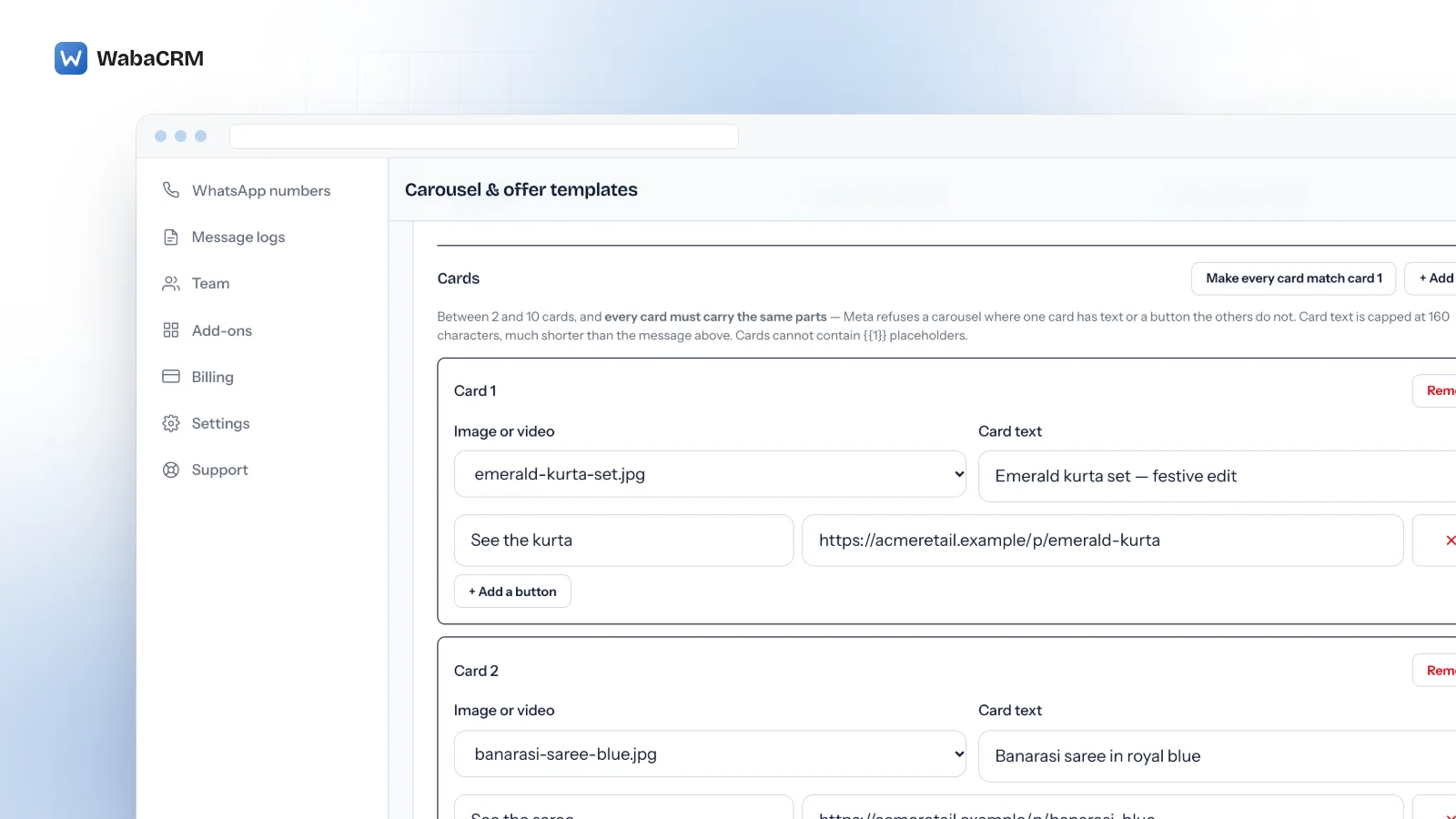
A new carousel starts with two cards, and "+ Add a card" adds more, up to ten. Each card takes a picture already in the workspace's media library (the picker lists the newest 100 images and videos), optional text held to 160 characters and up to two link buttons. "Make every card match card 1" copies the first card's layout onto the rest while keeping each card's own picture and words.
Before anything reaches Meta, the builder checks the rules quoted on this page: the card count, a picture on every card, text on all cards or none, the same buttons in the same order, and no placeholders inside cards. Failures are listed under "Meta would refuse this:". "Send to Meta for review" submits it, always as a marketing template, and Meta's decision arrives as a status.
Once approved, a carousel is an ordinary template. It can go out from a campaign, the inbox's template composer, a keyword bot, the REST API or a drip sequence (drip sequences are a separate add-on). Building one needs the permission to manage templates, which owners, admins and managers hold by default.
What it does not do:
- Card buttons are links only. Meta allows quick-reply and phone number buttons on cards; the builder does not offer them.
- Card headers are built as images. Meta also allows a video header on a card, but the builder submits every card as an image, so build cards from pictures.
- No drafts, editing or deleting from this screen. A change is a new template and a new review.
- No preview before submission and no per-card click reporting.
- WhatsApp only. It does not build carousels for Messenger or Instagram.
- A carousel built in WhatsApp Manager cannot be edited here, and WabaCRM adds card components at send only to carousels built on its own screen. Build any carousel you mean to send from WabaCRM on that screen.
The same add-on builds limited-time offer and coupon templates, covered in the guide to limited-time offer templates. Its current price is on the add-ons page.
Every Meta quotation on this page was read from Meta's own documentation on 15 October 2026. Meta changes that documentation without notice; the linked pages are authoritative and this one is not.