Answer calls in the browser
WhatsApp Business Calling API: Permissions, Limits, Cost
Last checked · 15 min read
The short answer
The WhatsApp Business Calling API is Meta's voice calling for numbers on the Cloud API. Customers can call a business, and Meta says all user-initiated calls are free. A business calling a customer needs that customer's permission first and is charged by duration in six-second pulses. Numbers still in the WhatsApp Business app are excluded. Checked 15 October 2026.
What is the WhatsApp Business Calling API?
It is Meta's voice calling for business numbers on the Cloud API: a customer can call your WhatsApp number from their chat, and you can call a customer who has given you permission. Meta's own one-line definition:
"The WhatsApp Business Calling API enables you to initiate and receive calls with WhatsApp users using Voice over Internet Protocol (VoIP)." (Meta — Cloud API Calling)
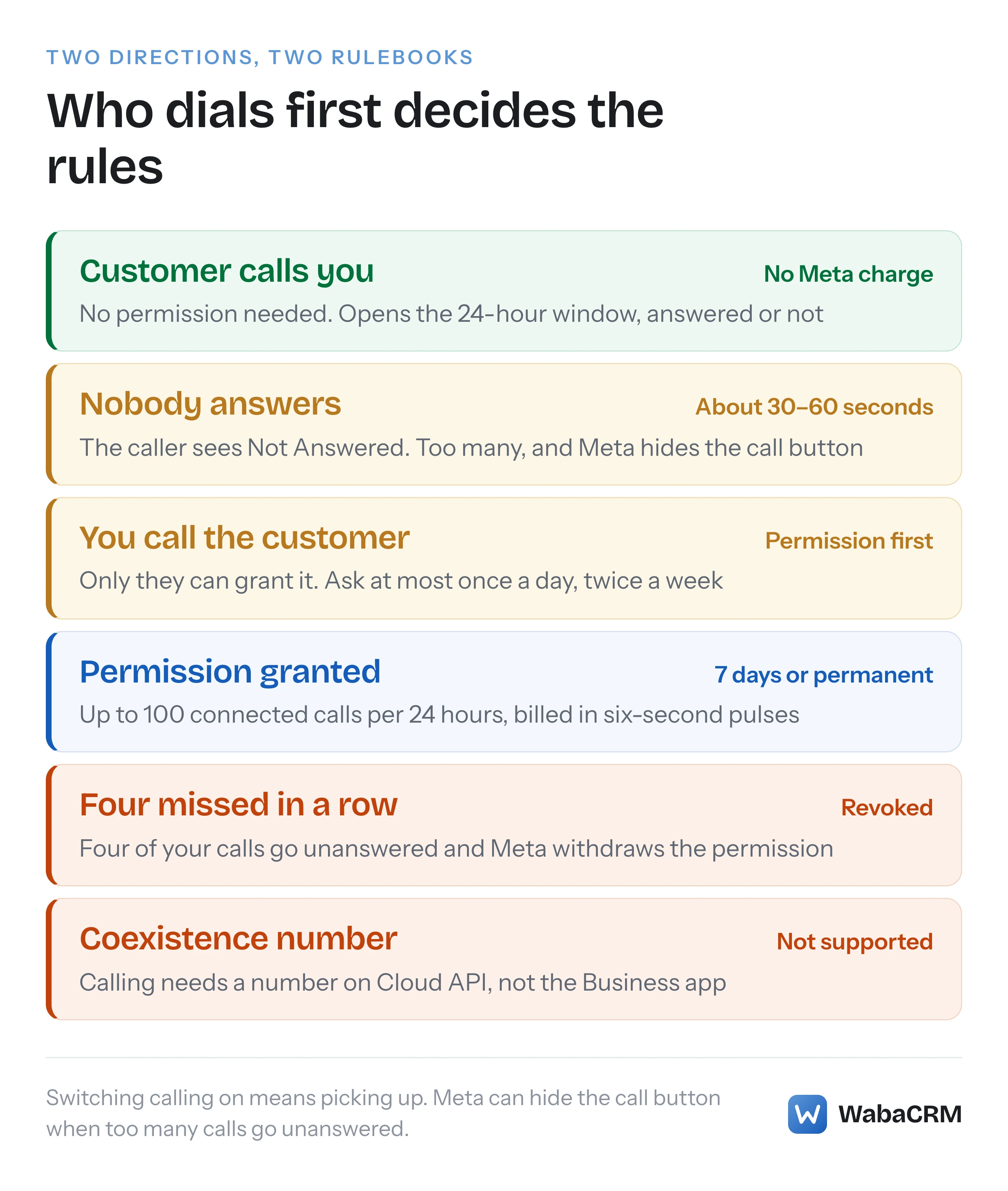
The two directions run on different rulebooks. A customer ringing you needs nothing from them, and Meta charges nothing for it. You ringing a customer needs their permission first, is billed by duration, and is rationed per person.
WabaCRM's WhatsApp Calling, an optional add-on, handles the first direction: it switches calling on for a number, lets an agent answer in a browser tab and keeps a log of each call. This page quotes Meta on both directions and says where the add-on stops.
- What is the WhatsApp Business Calling API?
- How does a customer call a business on WhatsApp?
- When is a business allowed to call a WhatsApp user?
- How long does a call permission last, and how is it lost?
- What does Meta charge for WhatsApp business calls?
- What must be true of a number before calling can be switched on?
- Why can't a coexistence number take WhatsApp calls?
- What happens when calls go unanswered?
- Can you answer WhatsApp business calls on a computer?
- What does the call log record?
- What does WabaCRM's calling add-on leave out?
How does a customer call a business on WhatsApp?
They tap the call button in your chat, and that button only exists once calling is switched on for the number. It ships off:
"Calling is not enabled by default on a business phone number. To enable calling, you must have a messaging limit of 2000 or above." (Meta — Configure call settings)
Switching it on puts the button in front of customers: with the status enabled, "WhatsApp client apps render the call button icon in both the business chat and business chat profile." It is not instant for everyone:
"After you update call configuration, WhatsApp users may take up to 7 days to reflect those changes. Most users refresh much sooner." (Meta — Configure call settings)
The caller will be on a phone, because Meta currently supports no desktop or web client for these calls: "For Cloud API Calling, only iPhone and Android phone companion devices are supported for user-initiated calls." (Meta — User-initiated calls)
Then a clock starts, and it is short:
"There is about 30 to 60 seconds after the Call Connect webhook is sent for the business to accept the phone call. If the business does not respond, the call is terminated on the WhatsApp user side with a “Not Answered” notification and a Terminate Webhook is delivered back to you." (Meta — User-initiated calls)
So whatever answers your calls needs somebody watching it.
When is a business allowed to call a WhatsApp user?
Only after that user has said yes, and the yes belongs to them:
"Your business does not have control over this permission; only the user can grant or revoke it, at any time." (Meta — Obtain user call permissions)
Meta describes three ways permission arrives. You send a call permission request, as a free-form message inside an open customer service window or as a template outside it. The customer calls you, and if the number's callback setting is on, that call grants temporary permission automatically. Or the customer grants it from your business profile. A call placed without any of these is refused: "Response with error code 138006 indicates a lack of a call request permission for this business number from the WhatsApp user." (Meta — Business-initiated calls)
Geography narrows it again. Business-initiated calling is available wherever Cloud API is, except for business numbers from the United States, Canada, Egypt, Vietnam and Nigeria. Meta's note on that list: "The consumer phone number can be from any country where Cloud API is available." (Meta — Cloud API Calling) The restriction is on your number, not theirs, and permission requests follow it: "Call permission related features are available only in regions where business initiated calling is available." (Meta — Obtain user call permissions)
| Customer calls you | You call the customer | |
|---|---|---|
| Permission | None needed | The customer's, granted first |
| Meta's charge | None | Six-second pulses, by country and tier |
| Your number's country | Anywhere Cloud API runs | Not US, Canada, Egypt, Vietnam, Nigeria |
| Customer service window | Opens, answered or not | Opens when they accept |
| Unanswered | "Not Answered" after 30–60 seconds | Four in a row revoke permission |
How long does a call permission last, and how is it lost?
Meta lists these limits under the heading "Limits (per business and WhatsApp user pair)", so each one applies to one business number and one person:
"Temporary permissions are granted for 7 calendar days (168 hours)" (Meta — Obtain user call permissions)
Permanent permission is newer — "As of November 3, 2025, permanent permissions is now available." — and it is not unlimited: "Permanent permissions do not expire, but they have the same connected calls limit." That limit is "Your business can make a maximum of 100 connected calls every 24 hours".
Asking is rationed harder than calling. Meta allows, per person, a "Maximum of 1 permission request in 24 hours" and a "Maximum 2 permission requests within 7 days", though "These limits reset when any connected call (business-initiated/user-initiated) is made between the business and WhatsApp user."
Permission is also lost when the customer leaves your calls unanswered. "2 consecutive unanswered calls result in a system message to reconsider an approved permission", and "4 consecutive unanswered calls result in an approved permission being automatically revoked." (Meta — Obtain user call permissions)
The detail that catches software out is the silent end of a temporary grant: "No webhook is sent when a temporary permission expires." Software that places calls has to store the expiry, or ask Meta's call permission endpoint first.
What does Meta charge for WhatsApp business calls?
It depends on who dialled. Meta's calling pricing page, updated 11 September 2026, opens with one line:
"All user-initiated calls are free." (Meta — Calling API pricing)
Calls a business places are priced on three inputs: "Duration of the call (calculated in six-second pulses)", "Country code of the phone number being called", and "Volume tier (based on minutes called within the calendar month) using same tiering accrual as messaging". Rounding goes up:
"Note: Our systems count fractional pulses as one pulse. For example, a 56-second call (9.33 pulses) would be counted as 10 pulses." (Meta — Calling API pricing)
Two lines on the same page matter before the first call. "A valid payment method is required to place calls." And asking costs money even when the answer is no: "Note: Call permission request messages are subject to per-messaging pricing." How that per-message price is set is explained in what decides a WhatsApp message's cost.
This page prints no per-minute figure: Meta publishes rates as downloadable cards, one per billing currency, and a copied number goes stale.
A call also opens the 24-hour customer service window: "When a WhatsApp user messages you or calls you, a 24-hour timer called a customer service window starts." (Meta — Pricing on the WhatsApp Business Platform) The calling page adds that it starts "When a WhatsApp user calls you, regardless of if you accept the call or not" (Meta — Calling API pricing). A missed call is still an open window, so the reply to it can be an ordinary message rather than a template.
What must be true of a number before calling can be switched on?
Meta's getting-started list for calling sets out its prerequisites. Two decide most cases:
"Your business number is in use with Cloud API (not the WhatsApp Business app)." (Meta — Cloud API Calling)
"The business must have a daily messaging limit of at least 2,000 unique recipients." (Meta — Cloud API Calling)
The second one rules out every newly created portfolio until it scales. "Newly created business portfolios have a messaging limit of 250", and the way to 2,000 is one of Meta's scaling paths: verifying the business, having the partner that onboarded you verify it, or this one (Meta — Messaging limits):
"Send 2,000 delivered messages outside of customer service windows to unique WhatsApp user phone numbers within a 30-day moving period, using templates with a high quality rating."
A completed path is still reviewed: "Once you complete one of these paths, Meta analyzes your message quality." (Meta — Messaging limits) The limit belongs to the business portfolio and is shared by every number in it, and Meta shows it in WhatsApp Manager under Account tools, Messaging limits.
If Meta refuses the switch on prerequisite grounds, WabaCRM's add-on asks Meta's Graph API about the number and lists, in words, what it can see: a lapsed verification, a number not on the Cloud API, or a number also in the WhatsApp Business app. A check it could not read is reported as unknown, not passed. The messaging limit is often the unknown one, so confirm it in WhatsApp Manager.
Why can't a coexistence number take WhatsApp calls?
Because Meta does not offer calling to a number that is still in the WhatsApp Business app. The calling prerequisite above says so, and Meta's coexistence feature table says it again from the other side. Its row for "Voice and video calls" reads "No change." for the app and "Not supported." for Cloud API (Meta — Onboard WhatsApp Business app users).
So the phone keeps ringing in the app as before, and nothing reaches the API. That is part of the trade coexistence makes, and the rest of it is in what stops working under coexistence.
WabaCRM refuses before Meta has to. A coexistence number on the calls screen carries the badge Also on your phone — calling unavailable and has no switch at all, so nobody sends Meta a request it does not support. If calls in a browser matter more than the phone app, the route is to move the number fully onto the Cloud API, which takes it out of the WhatsApp Business app.
What happens when calls go unanswered?
Meta treats switching calling on as a promise to pick up:
"When calling is enabled on your business phone number, you are expected to pick up calls that WhatsApp users place to you." (Meta — Configure call settings)
The penalty is specific. "If a significant number of calls placed to your calling-enabled business phone number are not picked up, you will be notified and expected to make a change." After the warning: "Calling becomes restricted on the business phone number: The calling button will be hidden from users." Negative feedback, such as blocks and reports, is a separate track. For calls customers place: "Once the negative user feedback reaches a threshold, Cloud API automatically restricts user initiated calling functionality on your phone number for a period of 7 days."
Meta gives you levers for this. With call hours set, "User-initiated calls are unavailable outside of the weekly hours and holiday schedules you set." A voicemail setting exists to "Configure voicemail collection for missed or rejected user-initiated calls." It is off by default. Meta's low-pickup guidance also points to two toggles in WhatsApp Manager, under Account tools, Phone numbers, the number, then Calls: Display call buttons and Allow voice calls.
With answering in a browser tab, a closed tab is a missed call. Press Switch calling off for a number nobody is staffing, or use those toggles, rather than let misses accumulate.
Can you answer WhatsApp business calls on a computer?
Yes. The default signalling Meta enables is Graph API requests and webhooks, with the audio carried over WebRTC using the Opus codec, so a browser can be the phone (Meta — Cloud API Calling).
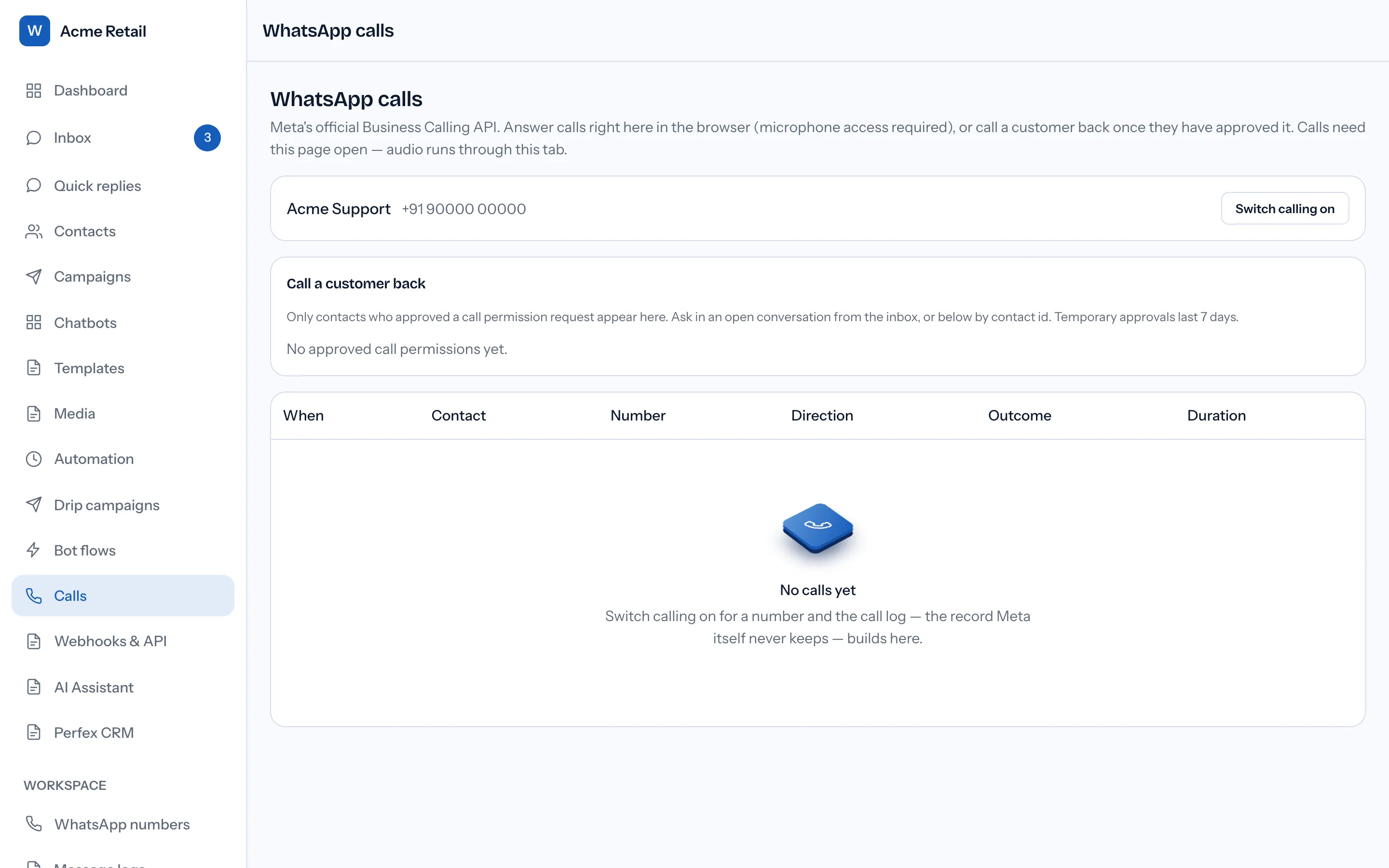
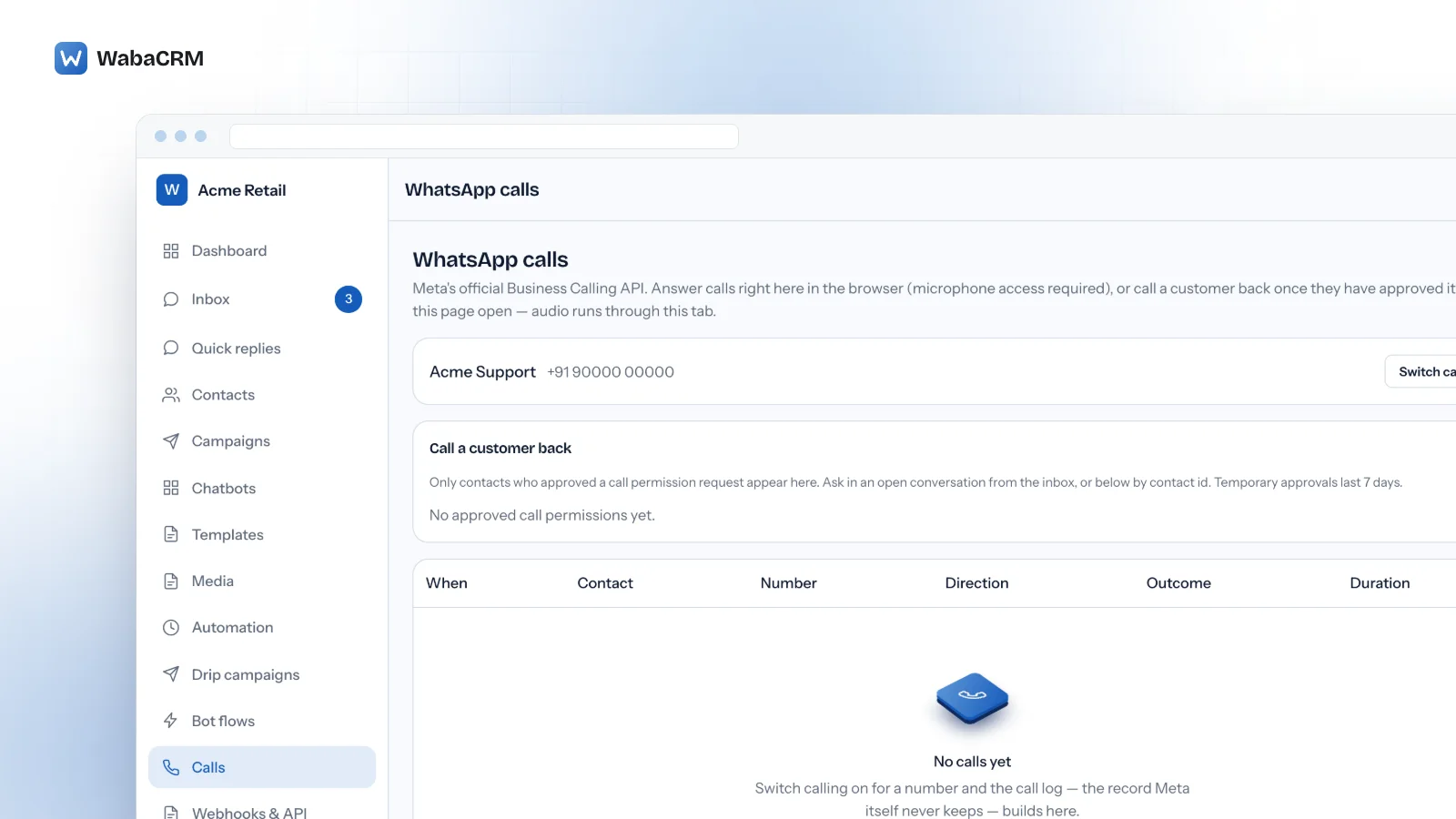
WabaCRM's WhatsApp Calling add-on does exactly that. Its Calls page lists the workspace's WhatsApp numbers, each with a Switch calling on button that sets Meta's calling status for that number. When a customer rings, the call appears on every open copy of the page, with the caller's name or Unknown caller and Answer and Reject buttons. The caller is matched to an existing contact by number, or added as one.
Whoever clicks Answer first takes the call through their microphone; a call cannot be answered twice. The add-on pre-accepts before it accepts, which is the step Meta recommends: "Pre-accepting calls is recommended because it facilitates faster connection times and avoids audio clipping issues." (Meta — User-initiated calls) During the call there is a timer, Mute and Hang up.
Hanging up always tells Meta, even if the browser's audio has already died. Meta asks for the same: "This must be done even if there is an RTCP BYE packet in the media path. Ending the call this way also ensures pricing is more accurate." (Meta — User-initiated calls)
The page has to be open, because the audio runs through that tab, and it plays no ring tone and sends no notification. Calls are audio only.
Opening the page needs permission to view conversations, and switching a number or answering a call needs permission to reply. Owner, Admin, Manager and Agent all hold both by default, while installing the add-on is left to Owners and Admins. The page is workspace-wide: unlike the shared inbox, it is not narrowed by department, so anyone who can open it sees every number's calls.
What does the call log record?
One row per call: When, Contact, Number, Direction, Outcome and Duration. Where Meta reports an error, its code sits beside the outcome. Each row opens when a call rings and is completed from Meta's terminate webhook, sent when either side ends the call.
A missed call is not marked as failed:
"COMPLETED: The call completed without unexpected errors. Even unanswered calls are considered completed but will not have a start_time or end_time or duration." (Meta — User-initiated calls)
So a Completed row with no duration is normally a call that was never picked up. Count those before Meta does.
Meta also offers account-level call analytics through its API, which "can provide useful information like cost, counts of completed calls, and average call duration." (Meta — Calling API pricing) WabaCRM does not display those figures. Its log is a per-call record built from the webhooks it receives, so it starts the day the add-on is switched on; earlier calls, and any while it was off, are not in it.
What does WabaCRM's calling add-on leave out?
| You want to | In the add-on |
|---|---|
| Switch calling on or off per number | Yes |
| Answer, reject, mute, hang up | Yes, in a browser tab, audio only |
| Keep a log of each call | Yes, from the day it is on |
| Ask a customer for call permission | No control for it |
| Set call hours, button visibility, voicemail | No; these are Meta's call settings |
| Video, recording, transfer, IVR | No |
| Ring a phone or send an alert | No |
The calls screen also shows a Call a customer back card, listing customers WabaCRM has on record as granting call permission. The add-on cannot send a permission request, and this page makes no promise about calling customers. Video is not on offer from Meta either: as of 15 October 2026 its calling overview marks video and screen sharing "Feature planned or in development." (Meta — Cloud API Calling) Calling is also WhatsApp-only in WabaCRM: the add-on takes no calls on a Facebook Page or an Instagram account.
What the add-on costs and how it is billed is shown on the add-ons page, next to WabaCRM's own pricing. WabaCRM is a Meta-verified Tech Provider and adds no markup to Meta's message fees, which Meta bills to your own WhatsApp Business Account.
Every Meta quotation on this page was read from Meta's own documentation on 15 October 2026. Meta changes that documentation without notice; the linked pages are authoritative and this one is not.