Sequences at your pace
WhatsApp Drip Campaigns: Sequences Paced to Meta's Limits
Last checked · 13 min read
The short answer
A WhatsApp drip campaign sends each contact a sequence of approved templates spread over days. Outside the 24-hour customer service window Meta accepts only templates, and its messaging limit caps the unique people you reach outside that window in a moving 24 hours, starting at 250 per business portfolio, so a big list must be paced. Checked 15 October 2026.
What is a WhatsApp drip campaign?
A WhatsApp drip campaign sends each contact a short sequence of approved message templates, one after another over days, instead of one broadcast on one afternoon. Each person works through the sequence on their own clock, and new people can join while it runs.
The idea comes from email, but WhatsApp's rules differ: a business may only open a conversation with a template, Meta caps how many people a business portfolio can reach in a moving 24 hours, and Meta may decline to deliver a marketing template to a particular person. A drip fits those rules: a long list, worked through gradually.
WabaCRM's drip campaigns are an optional add-on, sold separately, with the store's current price on the add-ons page.
- What is a WhatsApp drip campaign?
- Why is every drip message an approved template?
- How many people can a drip reach in a day under Meta's limits?
- How do the daily limit and the sending window pace a drip?
- Why does message two wait until everyone has had message one?
- When should a drip run as fast as possible instead?
- Who joins a drip, and can anyone get it twice?
- What stops one contact's sequence, and what does not?
- What happens when Meta refuses a drip message?
- What will a WhatsApp drip not do for you?
- What does Meta charge for each drip message?
Why is every drip message an approved template?
Because a drip writes to people who have not written to you lately, and Meta allows one kind of message there. Meta defines the window that decides it:
"When a WhatsApp user messages you or calls you, a 24-hour timer called a customer service window starts." (Meta — Service messages)
And what follows when it shuts: "When the window closes, you can only send pre-approved template messages." (Meta — Service messages)
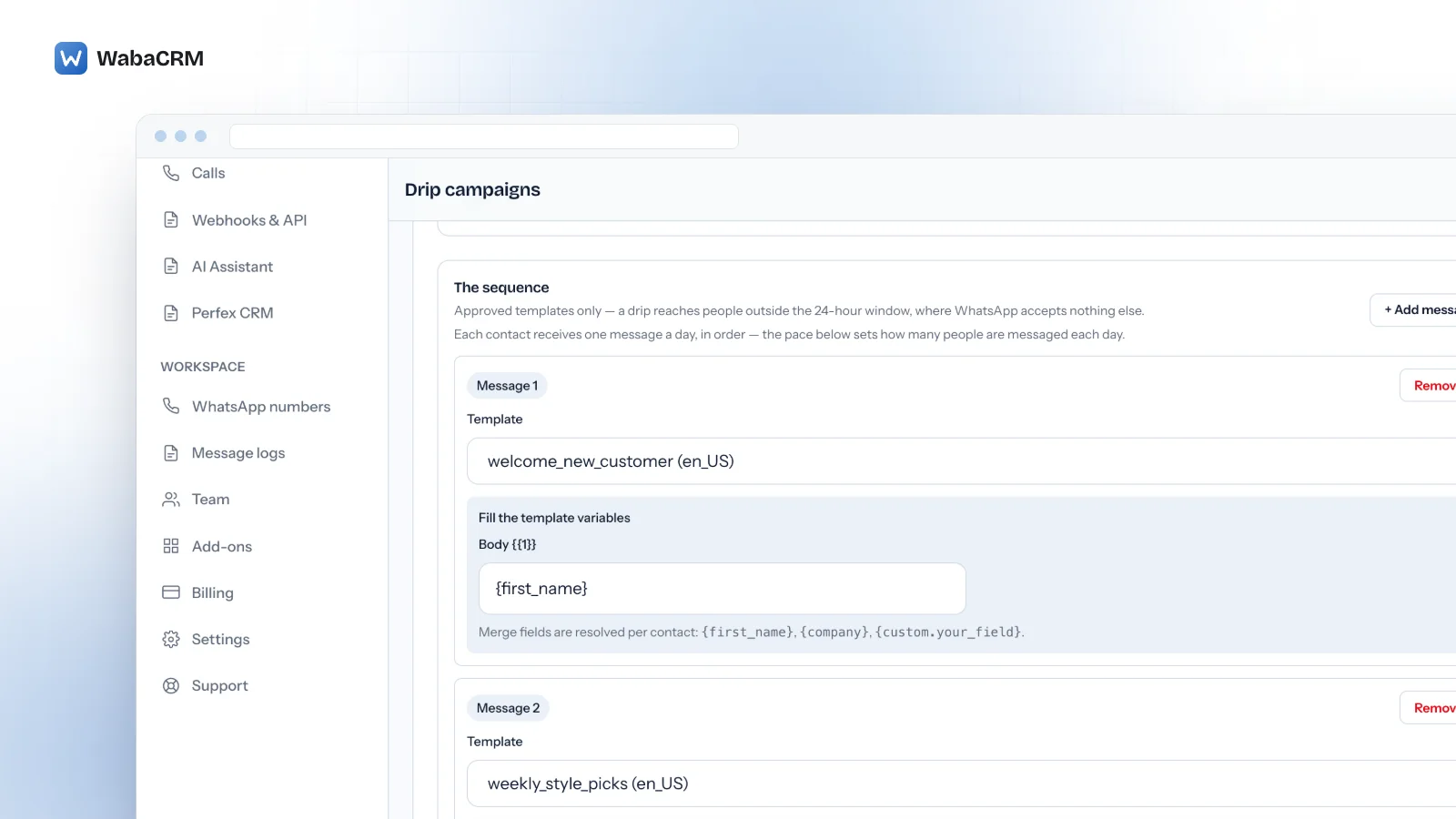
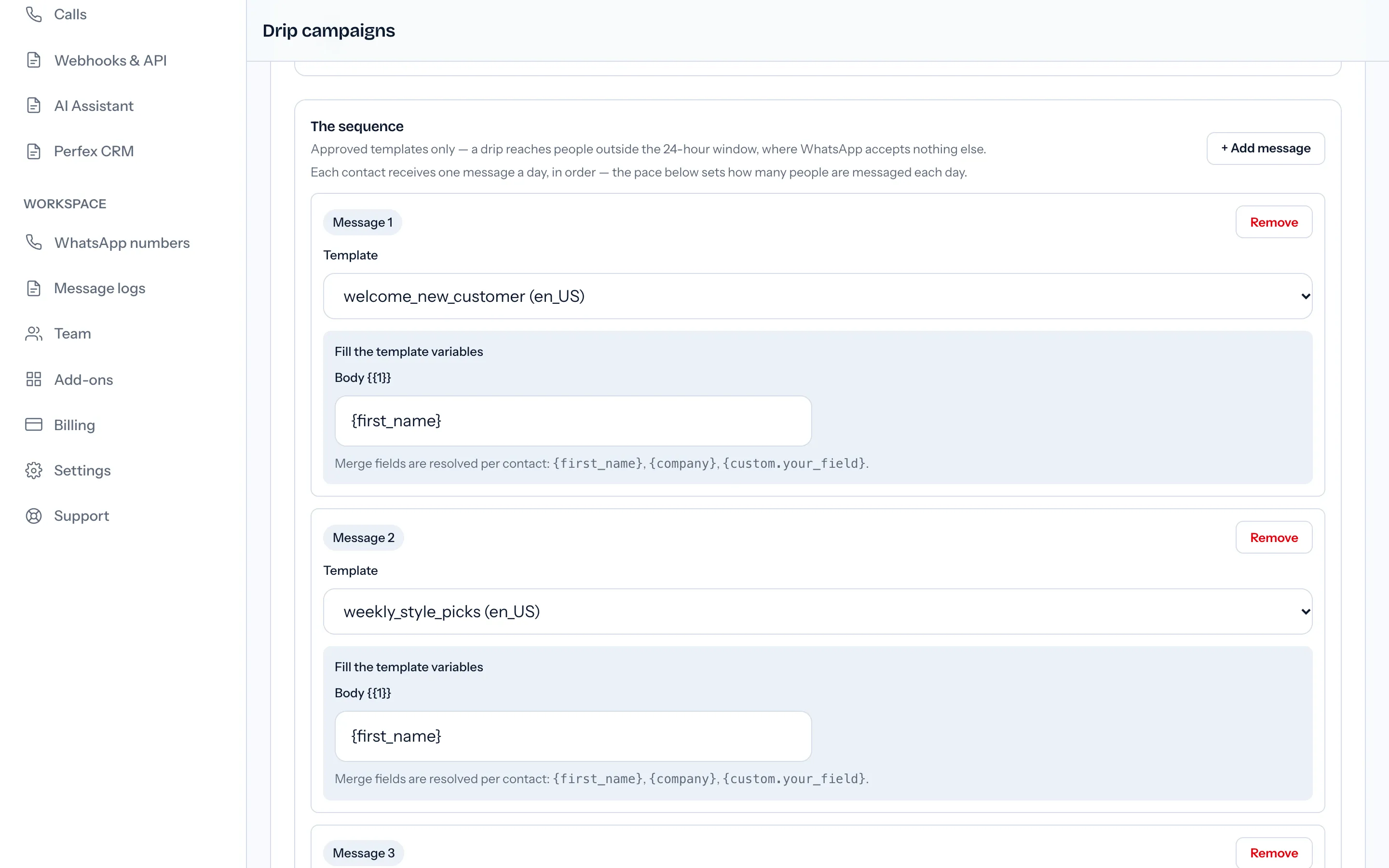
So every step in a WabaCRM drip, up to ten of them, is a template approved on the number the drip sends from. There is no free-text step, no plain media message and no step made of buttons alone. A template belongs to the number it was approved on, so the builder's template list follows the "Send from" choice, and switching that number clears any step whose template belongs to another.
Each step asks for exactly the header and body values its template needs, with merge fields such as {first_name} filled per contact. A template with an image, video or document header cannot be saved without a file. The drip keeps that file in the media library and uploads it to Meta again once the stored media ID is 25 days old, because Meta's media IDs expire and a drip can run for months; our note on expiring WhatsApp media has the lifetimes.
How many people can a drip reach in a day under Meta's limits?
Fewer than your list, until Meta decides otherwise. The ceiling is Meta's messaging limit:
"Messaging limits are the maximum number of unique WhatsApp user phone numbers your business can deliver messages to, outside of a customer service window, within a moving 24-hour period." (Meta — Messaging limits)
Three words in it decide how a drip should be set. Unique: it counts people, not messages. Outside: somebody who wrote to you in the last 24 hours does not use it up. Moving: there is no midnight reset. And it belongs to the portfolio, not the number:
"Messaging limits are calculated and set at the business portfolio level and are shared by all business phone numbers within a portfolio." (Meta — Messaging limits)
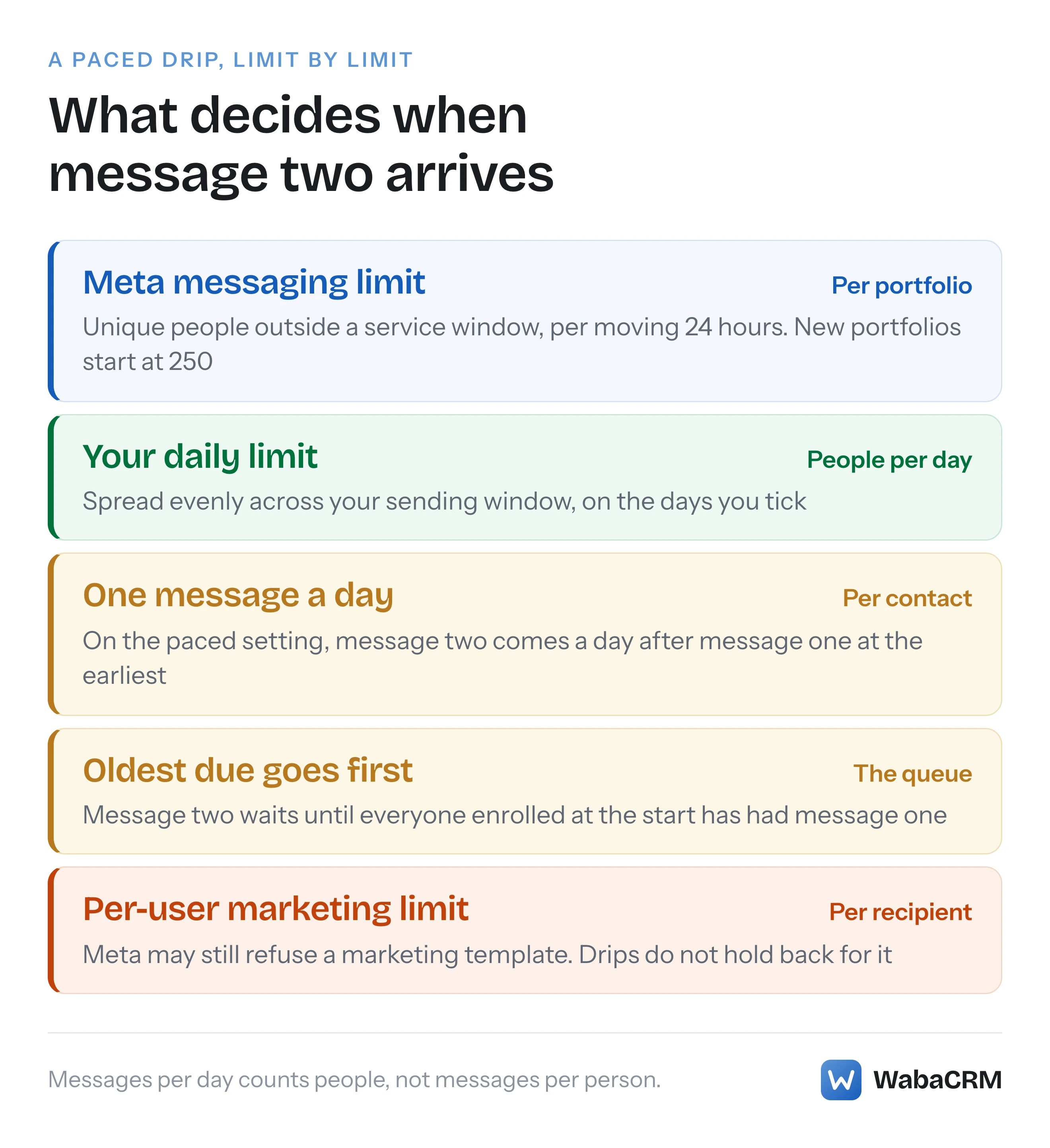
The same page says "Newly created business portfolios have a messaging limit of 250", rising to 2,000 through a scaling path such as verifying your business, then to 10,000, 100,000 and unlimited through automatic scaling. For a 100,000-contact list, assuming the drip's daily figure is set to the whole limit, nothing else uses it, the drip sends every day on the default window and nobody it writes to is inside a service window:
| Meta messaging limit | How a portfolio gets there | Days to send message one to 100,000 |
|---|---|---|
| 250 | Where every new portfolio starts | 400 |
| 2,000 | A scaling path | 50 |
| 10,000 | Automatic scaling | 10 |
| 100,000 | Automatic scaling | 3, as the drip's own ceiling binds first |
Pacing too gently has a cost of its own. One of Meta's two conditions for automatic scaling past 2,000 reads: "In the last 7 days, your business has utilized at least half of your current messaging limit" (Meta — Messaging limits). A drip sending 150 a day through a 2,000 limit uses under a tenth of it on any day, so if it is all you send, it may not meet that condition. Throughput and quality rating are further ceilings, covered in the four WhatsApp broadcast limits.
How do the daily limit and the sending window pace a drip?
On the setting the builder labels "Drip: send a limited number every day (recommended for big lists)", three controls decide when a message leaves:
- Messages per day is how many people the drip messages in a day, across the whole sequence, not how many messages each person gets. It accepts 1 to 100,000 and starts at 150.
- Start sending at and Finish by set a daily window, 10:00 to 18:00 by default, with the quota spread evenly across it. Leave Finish by blank and the whole quota is released at the start time.
- Sending days are ticked per weekday, so a drip can sit out weekends.
A drip started or resumed mid-afternoon trickles at the normal rate rather than releasing the morning's share in one burst. Sends missed after the window closes are not caught up. And there is one window for everybody, in the workspace's time zone, so a contact abroad is messaged on your clock rather than theirs.
One ceiling is not on the form. The drip runs every five minutes and sends at most 500 messages per drip on each run, so the default eight-hour window tops out a little under 48,000 a day, whatever Messages per day says. A longer window raises that ceiling.
Why does message two wait until everyone has had message one?
Because on the paced setting a contact receives at most one message a day, and the queue is served oldest-due first.
Press Start and every matching contact is enrolled at once, all due from that moment. A contact who receives message one is next due a day later, which puts them behind every enrolled contact still waiting for message one. So nobody receives message two until every contact enrolled at the start has received message one or dropped out, and on an audience larger than a day's quota that takes days.
At the default 150 a day, a 100,000-contact audience needs about 667 sending days for message one alone, roughly 22 months with every day ticked. A three-message sequence on that list is not day one, day two, day three. It is a long first wave, then the follow-ups.
So size the daily figure to the audience rather than to a habit: where Meta's limit allows it, 2,000 a day takes the same list through message one in 50 days. Later steps are fixed at one day apart; custom waits exist only on the other pace.
When should a drip run as fast as possible instead?
When the audience is small enough that Meta's limit is the only thing worth pacing against. "Send to everyone as fast as possible" drops the daily figure, the window and the sending days, and it is the only pace with a real wait per step: "Send after" for the first message and "Wait after previous" for each later one, from 0 to 365 days.
The 500-per-run ceiling still holds, so a large audience goes out in waves every five minutes, oldest-due first, and Meta's messaging limit applies exactly as before. With a wait of zero days, a contact's next message is due on the following run, about five minutes later at the earliest, and Meta makes no promise about order:
"When sending a series of messages, the order in which messages are delivered is not guaranteed to match the order of your API requests." (Meta — Service messages)
A drip does not wait for a delivery receipt before the next step, so a sequence that only makes sense in order should keep at least a day between steps.
Who joins a drip, and can anyone get it twice?
A drip's audience is chosen by contact status, source and group, with an optional minimum lead score. It must name at least one status, source or group; the builder refuses a drip aimed at everyone. The screen says "Pick any combination", and the combination has a rule it does not spell out. Two values of one type widen the audience; values of different types narrow it. Ticking one status and one source reaches contacts who have both, not either.
Meta's rule is plain: "Businesses are required to obtain opt-in before messaging people on WhatsApp." (Meta — Get opt-in for WhatsApp) A drip never enrols a contact without a phone number, with broadcasts switched off, who is blocked or who has opted out. It checks those again, bar the phone, before every message, because consent can change halfway through a sequence.
Tick "Keep adding new leads that match these filters" and every five-minute run reads the audience again and enrols anyone who now matches and was never enrolled. Despite the word "new", that covers an existing contact who has just moved into a matching status or group. Without it, the audience is whoever matched when you pressed Start, and the drip marks itself completed once they have all finished.
Nobody gets the same drip twice. The builder says it plainly: "Anyone already enrolled is permanently skipped, including on future daily runs." That cuts both ways, as the next section shows.
What stops one contact's sequence, and what does not?
A drip does not read replies. A contact who answers message one still receives message two on schedule; nothing branches on a reply or a button tap. The exception is an opt-out reply such as STOP, which opts the contact out. Here is what changes one contact's path:
| What happens | What the drip does for that contact |
|---|---|
| They reply or tap a button | Keeps sending, on schedule |
| You move them to another status | Keeps sending |
| They opt out, or broadcasts are switched off | Stops at their next message |
| They are blocked or deleted | Stops at their next message |
| A step's template is no longer approved | Stops, and the list flags that step |
| The send is refused before it leaves | Stops for good |
| Meta reports a failure afterwards | Moves on to the next message |
| They re-subscribe after being stopped | Never re-enrolled in that drip |
| You add a message at the end | Sent only if they have not finished |
Approving a template again does not bring back the contacts its step stopped, because nobody can be enrolled in a drip twice. And if a reply should end the sequence, a person has to act: unticking "Include in marketing broadcasts" on that contact stops the drip at their next message and keeps them out of campaigns.
What happens when Meta refuses a drip message?
It is not re-sent. Meta reports a failure after the message has left, and by then the contact has already moved on to the next step. Two kinds of refusal matter most for a sequence.
The first is Meta's per-user marketing limit:
"WhatsApp may limit the number of marketing template messages a WhatsApp user receives from any business in a given period of time when they are less likely to be receptive and engage with those messages." (Meta — Per-user marketing template message limits)
The same page says "Each marketing template message delivered counts towards the per-user marketing limit", except one sent inside the 24-hour window that opens when the person replies to a marketing message. A refusal under it arrives as error 131049, and Meta's advice is to "wait at least 24 hours before attempting to resend a marketing template message to a user that has reached their limit." Here drips and WabaCRM's one-off campaigns differ: campaigns skip a contact Meta has just refused this way, and drips do not apply that hold. On the paced setting the contact's next marketing template still goes out a day later, and Meta may refuse that one too. What error 131049 means covers the limit in full.
The second is template pacing, which Meta may apply to new templates, to paused templates that are unpaused, and to older ones without a GREEN quality rating. "Template pacing is valid for marketing and utility templates", though utility templates are paced only after one of yours has been paused. When early feedback is negative:
"Each held message will be dropped and trigger a messages webhook with "status":"failed" and "code":"132015" (Cloud API users)." (Meta — Template pacing)
In a drip, each of those contacts moves on without that message. A template that has never been sent is safer proven on a small campaign first; why an approved template can still send nothing explains what pacing holds and releases.
What will a WhatsApp drip not do for you?
Beyond replies and refusals, five limits worth knowing before you build one:
- No Messenger or Instagram. A drip needs a WhatsApp number; a Facebook Page or Instagram account is refused at save.
- No values for template buttons. The builder collects header and body values only, so a template whose URL button ends in a variable, or one with a copy-code coupon, needs a value a drip cannot supply.
- No shortening a running drip. You can edit a message or add one at the end; removing one would strand everybody past it, so the builder says "Pause it first if you need to shorten the sequence."
- No deleting a running drip. Pause it first; its enrolment history goes with it.
- No building on the phone. The drip builder is a web screen, and the Android app opens it in the browser.
What does Meta charge for each drip message?
Every step is a template, so Meta bills each one it delivers, on two rules from its pricing page:
"Businesses are only charged when a message is delivered. Meta does not charge for messages sent." (Meta — Pricing on the WhatsApp Business Platform)
"Rates for messages vary based on 2 factors: a. the message category (“category”) and b. the recipient WhatsApp phone number’s country calling code (“market”)." (Meta — Pricing on the WhatsApp Business Platform)
The exception that can apply to a drip is a contact still inside a free entry point window, which can follow a click-to-WhatsApp ad. The WhatsApp pricing calculator estimates what Meta would charge by recipient country and category.
Meta bills the payment method on your own WhatsApp Business Account. WabaCRM is a Meta-verified Tech Provider, which cannot resell those fees, so it adds 0% markup to them. The add-on's own price is on the add-ons page linked above.
Every Meta quotation on this page was read from Meta's own documentation on 15 October 2026. Meta changes that documentation without notice; the linked pages are authoritative and this one is not.