The inbox in your pocket
WhatsApp Business API Mobile App: The Inbox on Android
Last checked · 14 min read
The short answer
A Cloud API reply is a request to Meta's Messages API, so on a phone it goes through your platform's app. WabaCRM's Android app, on Google Play, works the shared inbox with media, quick replies, assignment and push alerts. As of 15 October 2026 there is no WabaCRM iPhone app. Coexistence keeps the WhatsApp Business app on the owner's handset.
Is there a WhatsApp Business API mobile app?
Yes, if your platform builds one: a Cloud API reply is a request to Meta's Messages API, so the phone app that sends it is one your platform makes, not a WhatsApp app. WabaCRM's is an Android app on Google Play that works the same shared inbox as the browser, and as of 15 October 2026 there is no WabaCRM iPhone app in the App Store.
The question usually arrives once a team that passed one handset around moves its conversations into a platform, and somebody away from the desk still needs to answer.
There are two honest answers. Coexistence keeps the WhatsApp Business app working on the owner's handset, on the same number as the API. A platform's mobile app puts the shared inbox, with its assignments and its record of who said what, on every teammate's phone. A team can use both, but Meta does not treat a reply typed into one the way it treats a reply typed into the other.
- Is there a WhatsApp Business API mobile app?
- Why does a Cloud API reply need your platform's app on a phone?
- Should the owner keep replying from the WhatsApp Business app?
- What can you do in the WabaCRM Android app?
- How live is the inbox on the phone?
- Can you send photos, documents and library files from a phone?
- What does a push notification show on a locked phone?
- What stays on the web, and how does the app hand it over?
- Does a member's role change what the app shows them?
- What about the people on your team with iPhones?
Why does a Cloud API reply need your platform's app on a phone?
Because a Cloud API message is an API call, not a button in a WhatsApp app. Meta's page on service messages, updated 21 May 2026, is plain about the route:
"Service messages can only be sent via the Messages API." (Meta — Service messages)
Every Cloud API reply, typed in a browser on a laptop or in an app on a phone, ends as the same request to Meta:
POST /<WHATSAPP_BUSINESS_PHONE_NUMBER_ID>/messages
A phone app for the API is therefore a client of your platform, not of WhatsApp. It has to show each customer message as it arrives, send that request when someone presses Send, and then wait for proof that the message landed, because Meta's answer to the request is not that proof:
"This response only indicates that the API successfully accepted your request — it does not indicate successful delivery of your message." (Meta — Service messages)
It also has to respect the clock. The same page says that when a customer messages or calls you, "a 24-hour timer called a customer service window starts", and that "When the window closes, you can only send pre-approved template messages." A phone app that hides that rule lets agents type replies that cannot be sent.
Whether the WhatsApp Business app can still be used on the same number is a separate, checkable fact. Meta's coexistence documentation gives the test as two fields on the phone number:
"If is_on_biz_app is true and platform_type is CLOUD_API, the business phone number is able to use Cloud API and the WhatsApp Business app" (Meta — Onboard WhatsApp Business app users)
That is the arrangement Meta documents for using both on one number, and this guide claims nothing about a number that fails the test. Whatever the answer for yours, a reply your team sends through the Cloud API goes through the Messages API, so on a phone it needs your platform's app. The longer comparison of the two products is in the WhatsApp Business app versus the API.
Should the owner keep replying from the WhatsApp Business app?
Under coexistence the owner can, and Meta describes that as the point of the arrangement:
"They can still send messages on a one-to-one basis using the WhatsApp Business app, and WhatsApp keeps messaging history between both apps in sync." (Meta — Onboard WhatsApp Business app users)
Two other sentences on that page, updated 26 June 2026, decide which phone a reply should come from, and they are rarely quoted together. The first is about money:
"After a business customer has been onboarded to Cloud API, messages sent by the business via the WhatsApp Business app will continue to be free, but messages sent via Cloud API will be subject to Cloud API pricing." (Meta — Onboard WhatsApp Business app users)
The second is about the clock:
"Messages sent from the WhatsApp Business app are not subject to the customer service window and do not create, extend, or affect Cloud API conversation windows or Cloud API pricing." (Meta — Onboard WhatsApp Business app users)
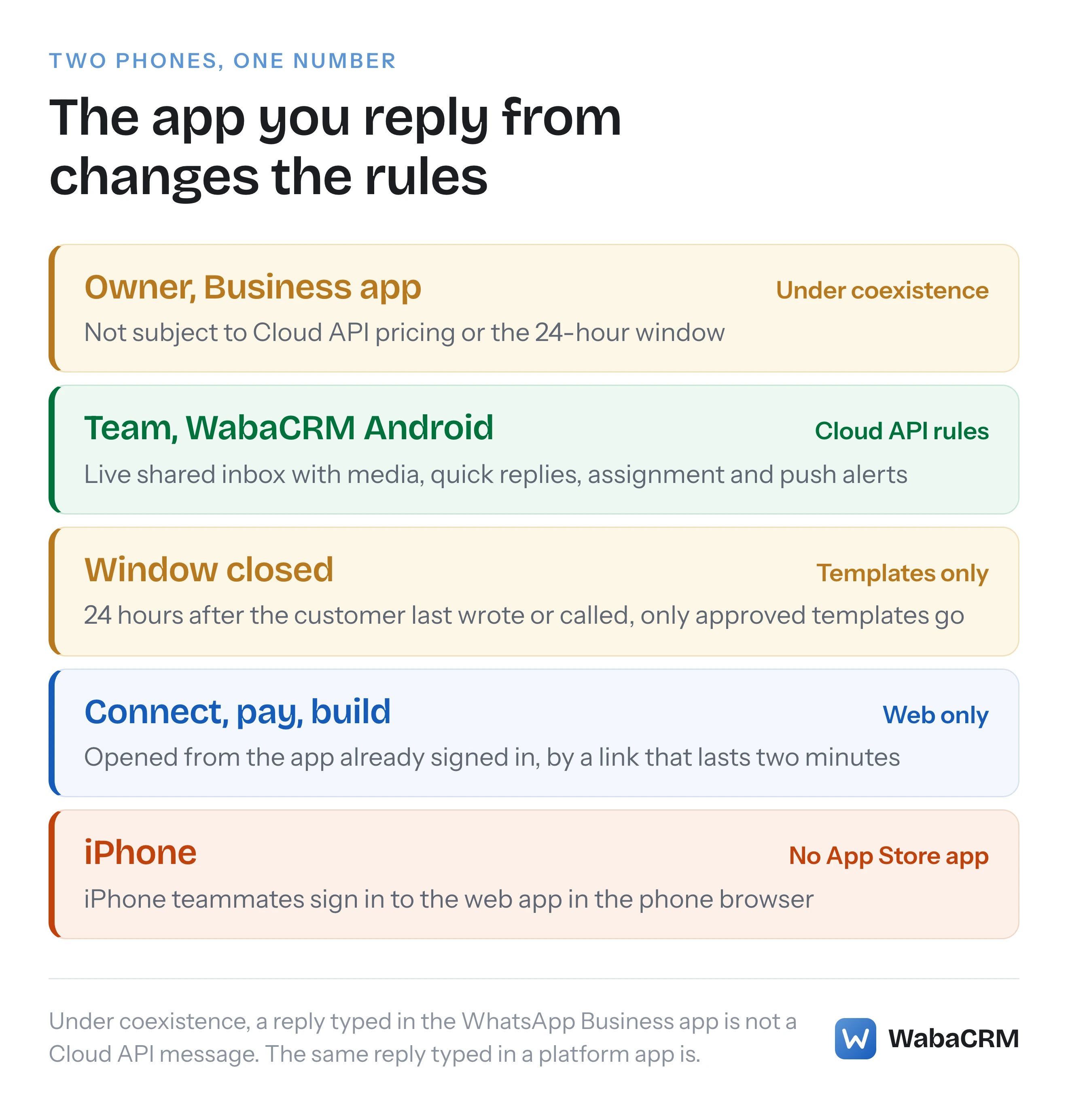
Read together, they make the same reply two different events, depending on which app it is typed in. The first carries no Cloud API price and does nothing to the 24-hour window. The second is a Cloud API message, and Meta's page says "The 24-hour customer service window restriction applies to messages sent via Cloud API." Neither is the wrong phone: the handset suits an owner answering a long-standing customer, and the platform's app suits an agent who needs assignment, templates and a record of the thread.
The WabaCRM app shows both in one thread. A message the owner sends from the handset arrives labelled "From WhatsApp on the phone", so an agent reading the chat on Android can see that the customer was already answered, and by which route. The app's Google Play listing puts the arrangement in one line:
"A number already live in the WhatsApp Business app can keep running on the phone and mirror into WabaCRM." (Google Play — WabaCRM)
One change on the handset is worth knowing before relying on it. Meta's page says that at onboarding "all companion apps will be unlinked from the account, and the business can then re-link any supported companion apps", and it names WhatsApp for Windows and WhatsApp for WearOS as the two companions it does not support. Setting coexistence up is covered in the coexistence guide, and the features that switch off in the phone app are listed in what stops working under coexistence.
What can you do in the WabaCRM Android app?
The app signs in to a workspace that already exists; its first screen reads "Sign in to your workspace.", and workspaces are created on wabacrm.com. After that it opens on an Overview, an Inbox, Contacts and a More tab that holds everything else. The Android app comes with every WabaCRM plan, the free plan among them.
| Task | Android app | Web app |
|---|---|---|
| Reply inside the window | Yes | Yes |
| Send an approved template | Yes, with its values | Yes |
| Photos, video, documents | Send from the phone | Yes |
| Media library files | Send up to 10, add, remove | Yes |
| Quick replies | Use and edit | Also attach files |
| Assign, pin, remind, resolve | Yes | Yes |
| Contacts | Search, add, edit, delete | Also CSV import, export |
| Campaigns | Watch, start, pause, cancel | Build and schedule |
| Templates | List, sync from Meta | Build and submit |
| Message chatbots | Build and edit | Also template and flow chatbots |
| WhatsApp numbers | Health, read-only | Connect and manage |
| Plan and invoices | Read-only | Pay |
| Team | Roster, who takes chats | Invite, change roles |
| Support tickets | Open, reply, close | Yes |
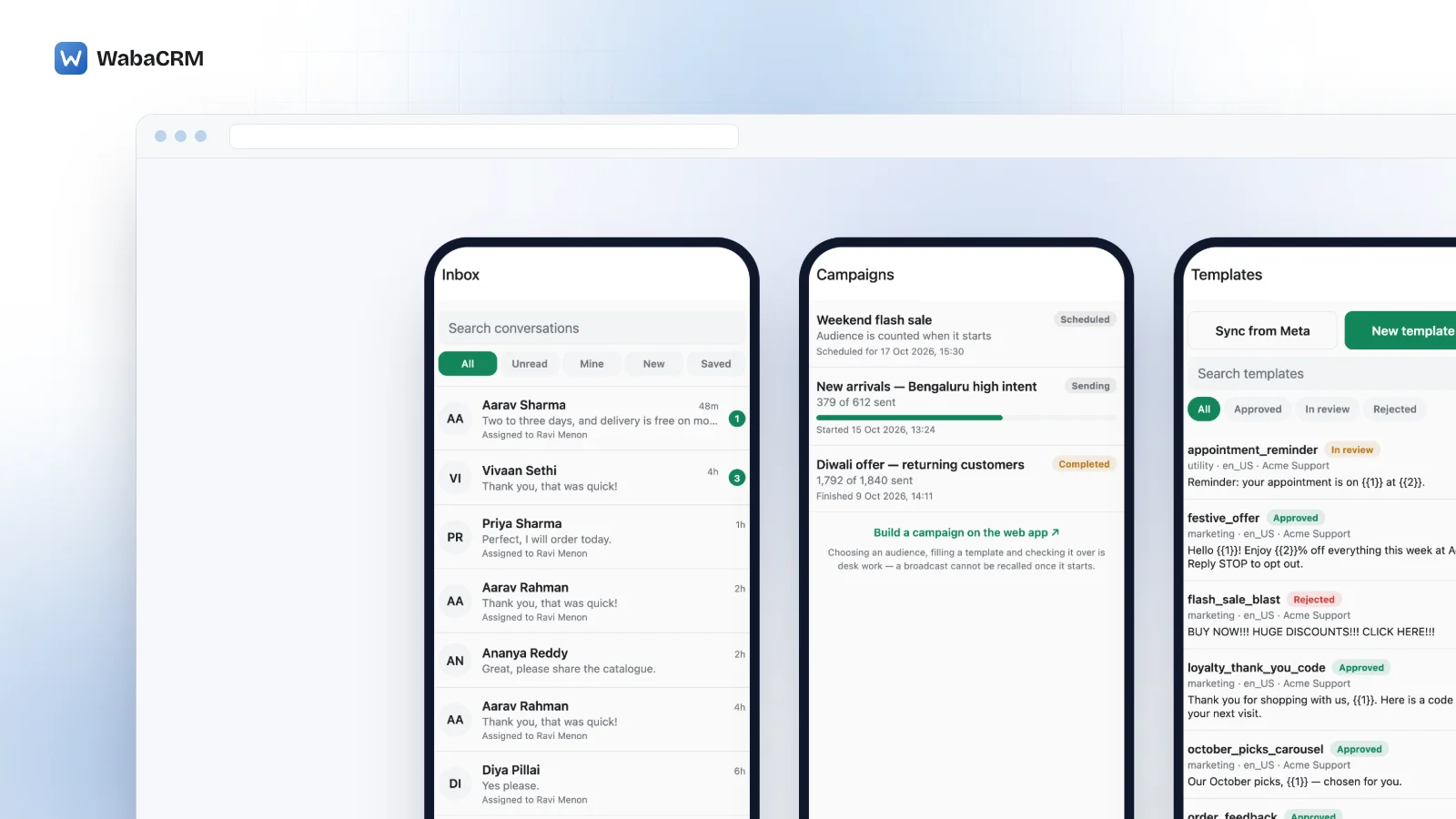
The inbox filters by All, Unread, Mine, New and Saved, and orders chats the way the web inbox does: unread first, then pinned, then most recent. Each conversation has an options sheet (Assign to, Pin to the top, Mark as resolved, Mark as pending, View contact), plus a private reminder that reads "Private to you. Nothing is sent to the customer." and offers In 3 hours, Tomorrow morning, In 3 days or Next week. A member's own "Available for new chats" switch sits on the More tab; when it is off, new chats are not routed to them, and chats already assigned to them stay where they are. The Overview tab shows new contacts, messages sent, delivery rate and read rate for the range you pick.
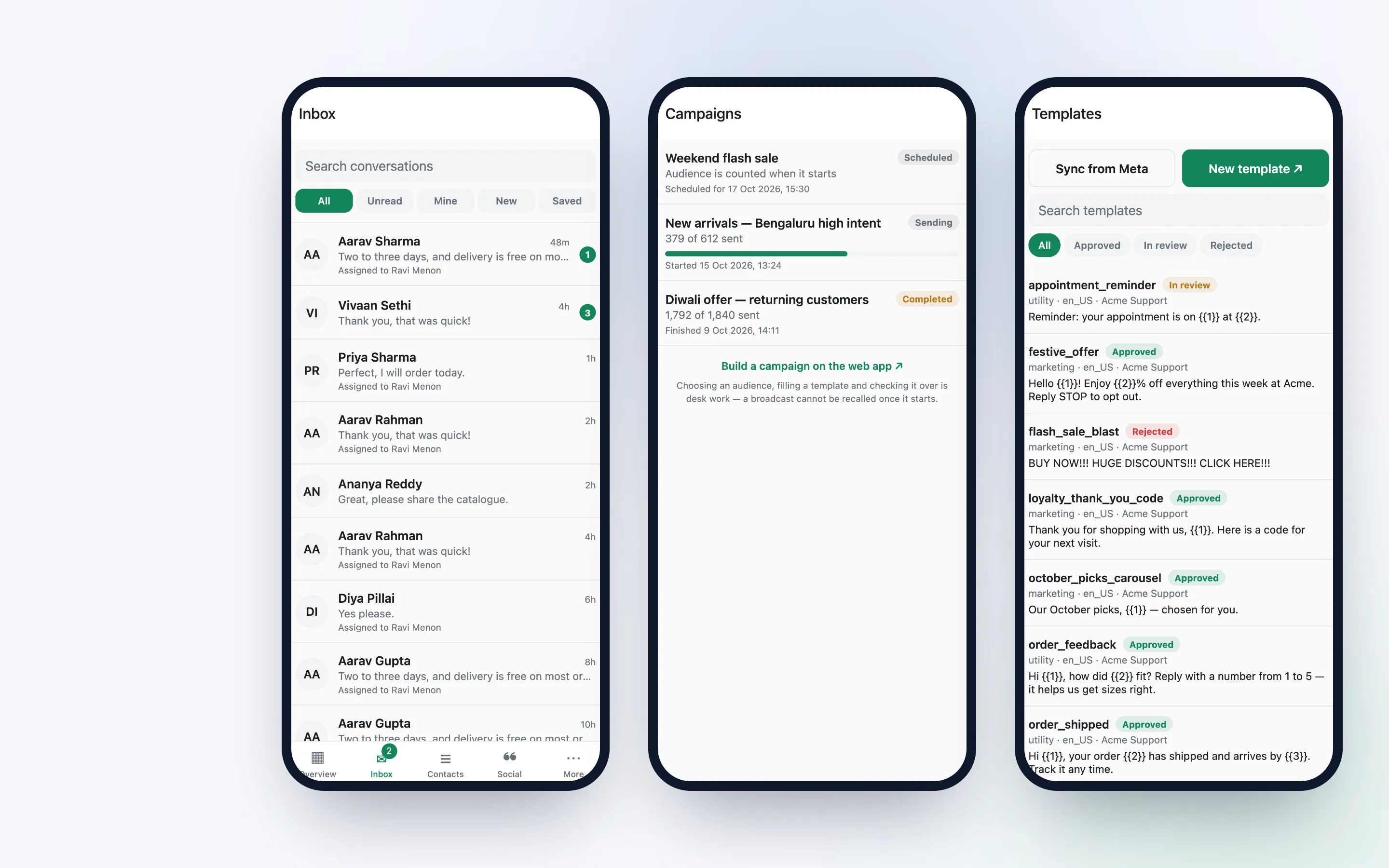
Two parts of the app belong to optional add-ons rather than to the plan: AI help in the chat composer needs the AI Assistant add-on, and a Social tab appears only if your workspace uses the Messenger & Instagram add-on. On the web, several builders are optional add-ons too, the flow builder and drips among them. What each costs is on the add-ons page, never in this guide.
How live is the inbox on the phone?
Google Play's listing describes the inbox as "your workspace's conversations, with new messages and delivery receipts arriving live, the 24-hour reply window shown on each chat, and an unread badge on the tab."
The live connection carries identifiers only, and the text of each message is then fetched from the server by the signed-in app. And when the connection drops, the chat says so rather than going quietly stale: "Live updates are reconnecting — checking every few seconds."
The window rule is on screen too. When the 24 hours have run out, the chat reads "The 24-hour reply window has closed — only approved templates can be sent." and the message box gives way to the template picker; inside the window, "Use a template" opens the same picker. It is searchable, and the template's header, body and button values are filled in on the phone before Send template.
There is no offline mode. Without a signal the app shows only what its screens had already loaded, and a text reply that never reached the server stays in the thread, marked as not sent, until you retry or discard it.
Can you send photos, documents and library files from a phone?
Yes, and since version 1.3.0, which Google Play serves as of 15 October 2026, those uploads arrive. The release notes on the listing say so directly:
"Fixed: attachments from the phone failing with a network error." (Google Play — WabaCRM)
The attach button offers four routes: From the media library ("Files your team already uploaded"), Take a photo, Photo or video, and Document, which covers PDF, Word, Excel, PowerPoint or text files. Up to 10 library files go in one send, and the picker shows, beside any file that cannot go to that conversation, the reason why.
For a quick reply, type / in the composer or tap the quick replies button, and its text lands in the message box. Text replies can be created and edited on the phone. A file is attached to a quick reply on the web, and the phone puts only the words in the box, not the file.
A reply the server refuses comes back into the message box with the reason, rather than vanishing. On WhatsApp an agent can reply to a specific message so it is quoted in the customer's chat. Reactions from either side are shown on the message, but the app has no control for sending one, and no undo for a reply once it is sent. Voice notes the customer sends appear in the thread and open with a tap, but the app has no recorder, so one cannot be recorded and sent from it.
With the AI Assistant add-on installed, the composer gains Fix grammar, Translate and a drafted reply from one of your AI agents, each costing one credit and refunded if the AI fails. The result lands in the message box for the agent to edit and is never sent on its own.
What does a push notification show on a locked phone?
The contact's name, and a line that says what happened without quoting it. A customer's message arrives as "Sent you a message.", "Sent you an attachment." or "Shared a location."; an assignment as "This chat is now assigned to you."; a reminder as "Your reminder on this chat is due." A lock screen is public, and a printed message would be read by anyone glancing at the handset on a desk.
Notifications go out for three things: a customer writing in, a chat assigned to you, and a reminder you set falling due. An assigned chat alerts its assignee and nobody else, and the badge counts the recipient's own unread chats. A member walled off from a number by a department is not told about its conversations, and a member who is deactivated or removed stops receiving notifications on their phone.
The app never asks for notification permission the moment it opens; the request sits on the More tab under "Turn on notifications". There are no call alerts; WhatsApp calling is a web screen.
What stays on the web, and how does the app hand it over?
These are deliberately left to the browser:
- signing up for a workspace, and connecting, refreshing or disconnecting a WhatsApp number
- paying an invoice; Plan and invoices is read-only, with an "Open billing on the web" button
- building campaigns, templates, flows, drips and automations, some of them optional add-ons
- workspace settings, the add-on store, webhooks and WhatsApp calling
- CSV contact import and export, and changing a contact's broadcast consent, which the app shows but cannot switch
The ones a signed-in member needs open from the app, marked with an arrow, and land already signed in. The app asks the server for a one-time link that works once, expires after two minutes and can only open a page inside the WabaCRM workspace. If the link cannot be made, the plain address opens and the website asks you to sign in.
Likewise, "Delete my account or data" on the More tab sends a request that opens a support ticket; nothing is deleted automatically from a tap on a phone.
Does a member's role change what the app shows them?
Yes, and the server enforces it, not the app. The app hides what a role cannot use, so an agent never sees a tab that would only refuse them, and every action is checked again on the server whichever app sent it.
On the default roles, an Agent can read and reply in the inbox but not assign, can work contacts but not delete them, can watch campaigns without pausing or cancelling them, and does not see billing, the team roster, chatbots or the add-on store. A Manager adds assignment, campaign sending, chatbots, the team roster and template management. Owners and Admins have the rest.
The browser applies the same split, so a phone is never a way around a permission. How departments decide which agents can see which number is covered in the shared inbox guide. WabaCRM charges nothing per seat, with unlimited team members on every plan, so a login on every agent's phone adds nothing to the bill.
What about the people on your team with iPhones?
They use the web app. As of 15 October 2026 there is no WabaCRM app in Apple's App Store, and nothing on this page should be read as a date for one. An iPhone teammate signs in at wabacrm.com in the phone's browser and works the same conversations, assignments and contacts the Android app shows.
Coexistence is a different thing, because it is about the number rather than the teammate: the WhatsApp Business app keeps running on the owner's handset alongside the Cloud API, under the throughput and feature limits Meta sets for it. A team can have an owner replying from the Business app, agents on Android in the WabaCRM app, and an iPhone user in the browser, all on one number and one thread history.
Pricing shows what the workspace itself costs; the app adds nothing to it.
Every Meta quotation on this page was read from Meta's own documentation on 15 October 2026. Meta changes that documentation without notice; the linked pages are authoritative and this one is not.