Answers from your own documents
WhatsApp AI Agent for Business: Answers From Your Documents
Last checked · 14 min read
The short answer
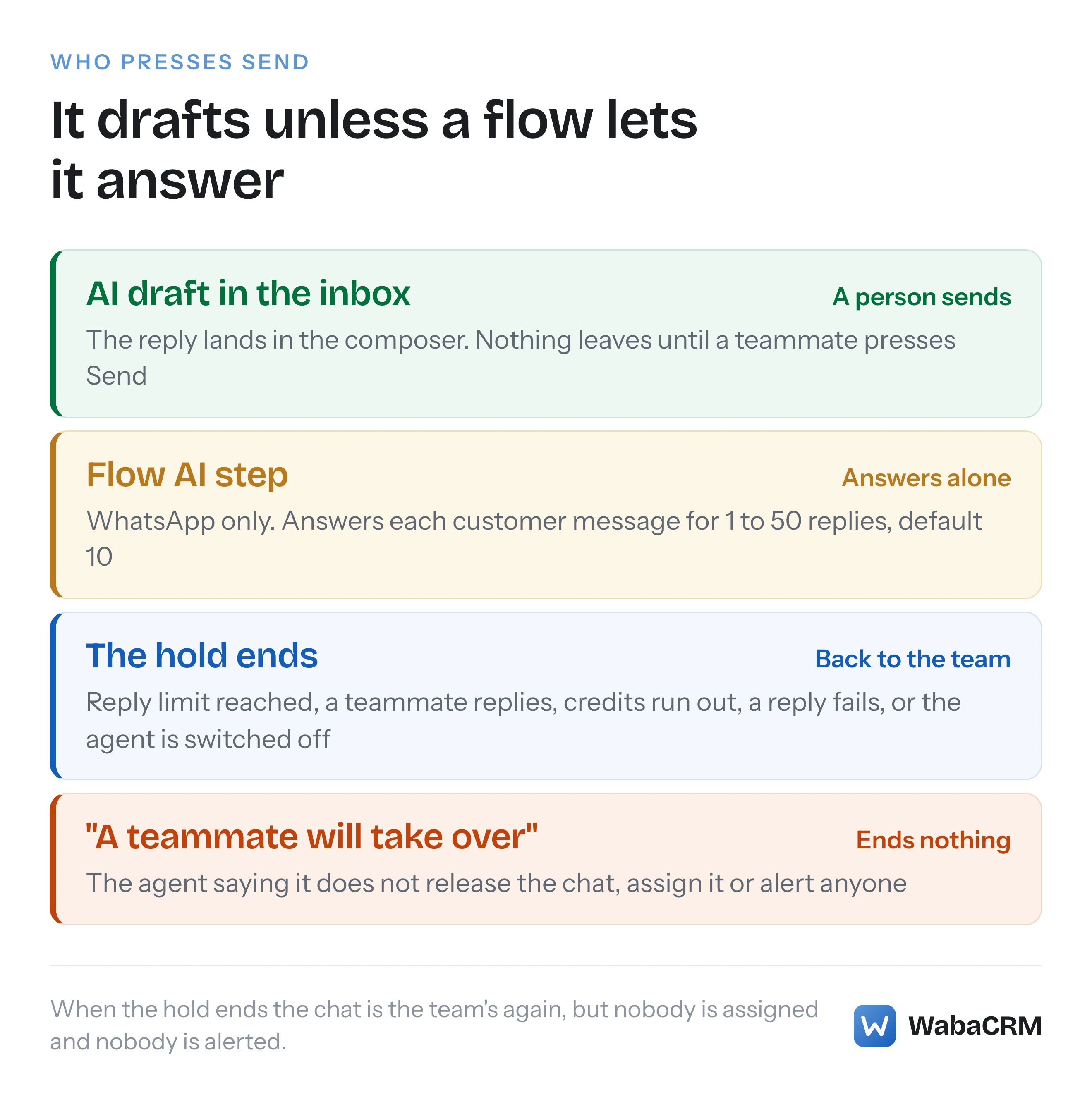
WabaCRM's AI agents are personas you write, answering from your instructions, your documents and the recent conversation. By default an agent drafts a reply for a person to send; it answers alone only inside a WhatsApp bot flow step, for up to 50 replies. Every draft or reply spends AI credits. Meta Business Agent is a separate Meta product.
What is a WhatsApp AI agent for business?
A WhatsApp AI agent for business is software that writes replies to your customers on WhatsApp from instructions and information you supply. In October 2026 two quite different products answer to that name: Meta Business Agent, Meta's own AI service, and agents that a platform runs for you, whose replies leave your number as ordinary service messages.
The difference decides what the agent reads, who presses Send, whether Meta collects your chats for its own AI, and how Meta bills each reply. This page keeps the two apart.
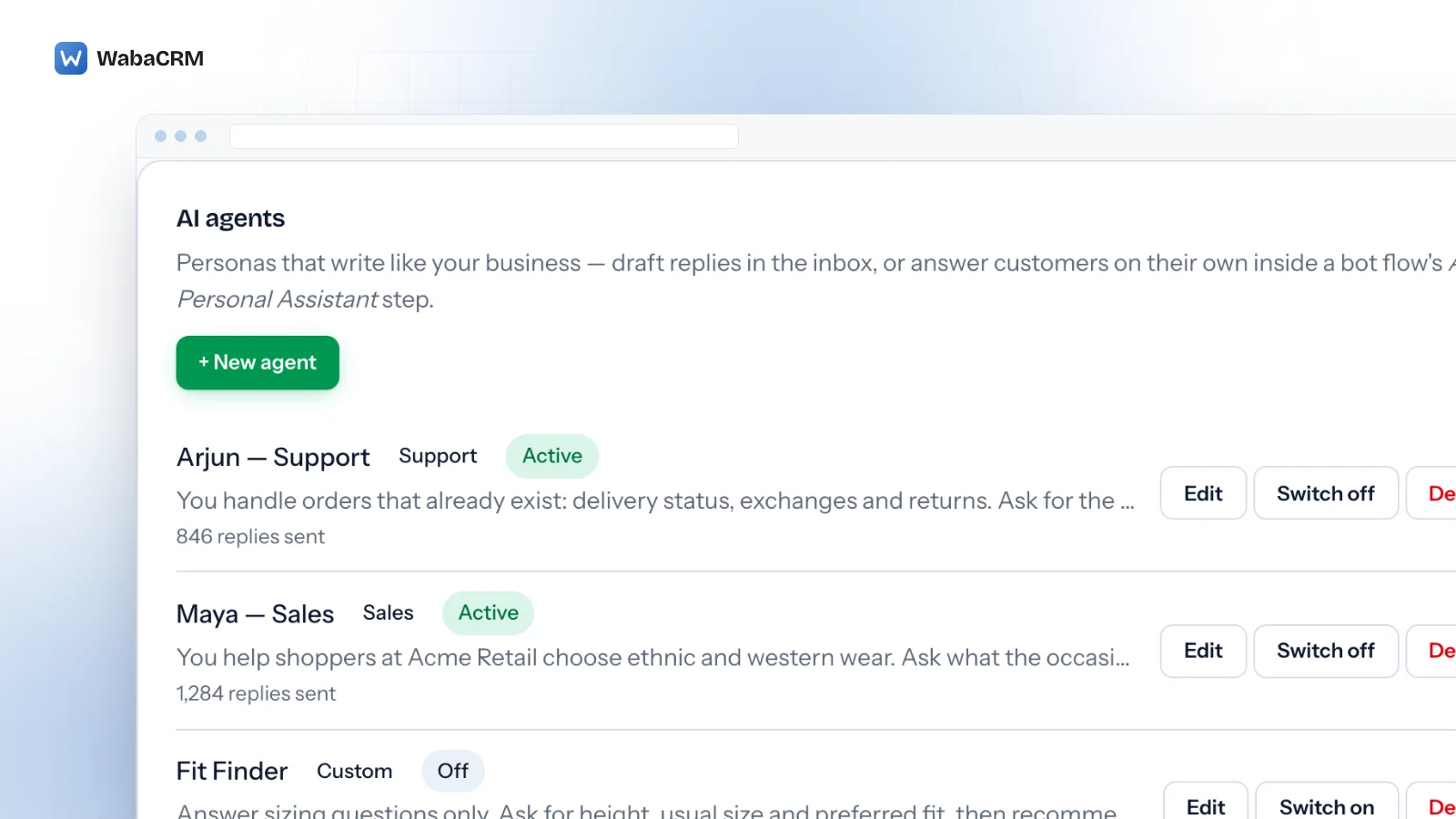
WabaCRM's agents belong to the AI Assistant, an optional add-on. You write each agent yourself: a name, a role and a page of instructions. It answers from those instructions, the conversation's recent messages and a knowledge base of text you add. By default it drafts and a person sends. It replies by itself only inside one step of a WhatsApp bot flow, for a number of replies you set, and every draft or reply it writes spends AI credits.
- What is a WhatsApp AI agent for business?
- What does Meta Business Agent do, and who can switch it on?
- How does Meta bill a Meta Business Agent reply against a third-party AI reply?
- What goes into a WabaCRM AI agent?
- When does the agent reply on its own instead of drafting?
- What happens when the agent cannot answer the customer?
- What can the AI knowledge base read, and how does it search it?
- How many AI credits does each action spend?
- Does the 24-hour customer service window still apply to AI replies?
- What can the agent not see or do?
- Should you choose Meta Business Agent or an agent you write?
What does Meta Business Agent do, and who can switch it on?
"Meta Business Agent is an artificial intelligence (AI) service from Meta for businesses." (WhatsApp Help Center — About using Meta Business Agent to chat with customers)
Once connected, the same article says, it can answer questions about your hours and location, your products and services, pricing, discounts, payment and shipping, and recommend products, based on information you or your customers provide. It names its sources:
"Meta Business Agent uses your public profiles, websites, and catalog to answer questions." (WhatsApp Help Center)
The Help Center also lists a separate article on how to teach Meta Business Agent. In the WhatsApp Business app the instruction is "Tap the Tools tab > AI agent." (WhatsApp Help Center) If that entry is not on your phone, the note at the top of the article gives the likely reason:
"This feature is currently only available in limited countries to select businesses. It might not be available to you yet." (WhatsApp Help Center)
Meta links a waitlist from that note. It is not only an app feature either: the article points businesses using it on the WhatsApp Business Platform to developer documentation.
Three sentences in the article describe costs that are not money:
"Turning on Meta Business Agent may impede your ability to use certain features of the WhatsApp Business app, including broadcast lists, disappearing messages, and greeting and away messages." (WhatsApp Help Center)
"Turning on Meta Business Agent will disconnect any existing linked devices." (WhatsApp Help Center)
"Messages sent or received in chats that have connected Meta Business Agent will still be collected by Meta to improve AI at Meta, even when you mute Meta Business Agent." (WhatsApp Help Center)
A fourth applies to any AI agent: "AI-generated messages may not be accurate or appropriate." (WhatsApp Help Center)
How does Meta bill a Meta Business Agent reply against a third-party AI reply?
Meta's pricing page, updated 30 September 2026, splits non-template messages into two categories by what powers them:
"Service – Any non-template message not powered by the Meta Business Agent Platform. These can be powered by a 3rd-party AI solution or people (like customer service representatives)." (Meta — Pricing on the WhatsApp Business Platform)
"Meta Business Agent – Any non-template message powered by the Meta Business Agent Platform." (Meta — Pricing)
A reply written by a WabaCRM agent and sent on WhatsApp is a third-party AI reply, so Meta files it as a service message, exactly as it would one a person typed. Meta's own agent is charged per token instead:
"One global rate of $2.00 USD per 1 million (M) tokens. One message typically consumes 20,000–25,000 tokens, which translates to approximately 4–5 cents (USD) per message." (Meta — Pricing)
The free allowances run the opposite way. Service messages have one:
"Each business phone number has one free tier of 1,000 delivered service messages per month." (Meta — Pricing)
Meta Business Agent messages have none, and stay charged even inside the free entry point window that follows a click-to-WhatsApp ad: "Meta continues to charge for Meta Business Agent messages in the FEP window." (Meta — Pricing)
| Point | Meta Business Agent | A WabaCRM agent's reply |
|---|---|---|
| Meta's category | Meta Business Agent | Service |
| How Meta charges | Per token, one global rate | Per delivered message, by market |
| Monthly free tier | None | 1,000 per business number |
| Free entry point window | Still charged | Not charged |
Meta's message fees do not pass through WabaCRM. As a Meta-verified Tech Provider it may not resell them, so Meta bills service messages to your own WhatsApp Business Account with no markup. What has changed for service messages since 1 October 2026 is in the service message pricing explainer.
What goes into a WabaCRM AI agent?
Three fields and a switch. On the Credits & agents tab of the AI Assistant screen, an Owner or Admin (by default) gives an agent a name of up to 80 characters, a role of Sales, Support or Custom, and instructions of 20 to 4,000 characters. The form's placeholder says what belongs there: "What you sell, your prices, your policies, your tone."
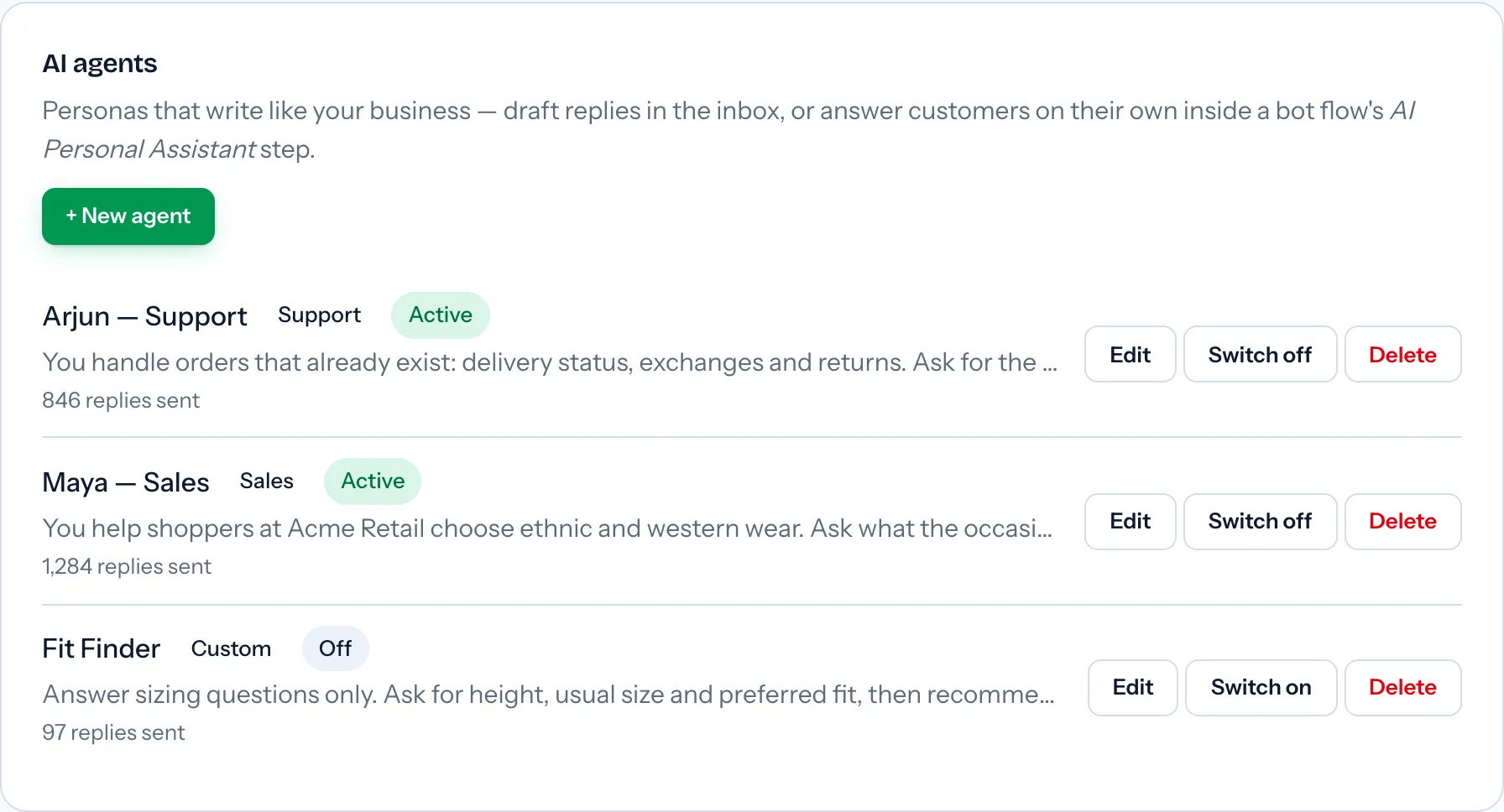
The platform adds rules you cannot edit out, summarised on the form: "The agent is told to never invent prices or policies, to keep replies short, and to hand over to your team when it can't help or the customer asks for a person." It is also told to reply in the customer's language. These are instructions to a language model, not guarantees.
An active agent appears in the AI draft menu of the inbox composer, and a bot flow's AI Personal Assistant step is pointed at one by name. Deleting an agent switches off any flow that uses it.
The add-on also puts two buttons under the composer for anyone allowed to reply. Fix grammar corrects the draft you have typed. Translate rewrites your draft into the contact's language, or a default you set; it never translates what the customer sent. Both are told to keep merge fields such as {first_name} as written.
When does the agent reply on its own instead of drafting?
Only inside a bot flow, and only on WhatsApp. Everywhere else it drafts.
A teammate picks an agent from the AI draft menu; the agent reads the recent messages and any matching knowledge passages and writes the next reply into the composer, replacing what was there. Nothing is sent until the teammate presses Send.
Answering alone needs the AI Personal Assistant step, and bot flows come from the Bot Flow Builder, an optional add-on of its own. A chatbot starts the flow, on a keyword or on any message. When the flow reaches the step, the agent answers the customer, then holds the conversation and answers each further customer message, for 1 to 50 replies, 10 unless you change it. It replies only when the customer's message is the latest in the thread, so put it straight after the trigger or after a buttons choice, not after a step that sends a message and moves on. Nothing can be connected after the step. How the rest of a flow is drawn is in the WhatsApp chatbot builder guide.
| Point | AI draft | Flow AI step |
|---|---|---|
| Who sends | A person, after reading it | The agent |
| Channels | Threads in the inbox | WhatsApp only |
| Started by | A teammate's click | A chatbot's trigger |
| Length | One reply | 1 to 50 replies, default 10 |
| Credits | 2 per draft | 2 per reply |
Both read the same context: the last 12 messages of the thread, not its whole history.
What happens when the agent cannot answer the customer?
It is told to say a teammate will take over, and then it keeps holding the conversation.
That instruction covers a question it cannot help with and a customer asking for a person. Saying it does not end the flow step. The hold ends when:
- the step's reply limit is reached;
- a teammate sends a reply in that conversation;
- the workspace runs out of AI credits;
- the AI request fails or the reply cannot be sent;
- the agent is switched off or deleted, or the AI Assistant itself is switched off.
The conversation then belongs to your team again. Ending the hold does not assign the chat or alert anyone. Someone has to be watching, which is a job for assignment and filters in a shared team inbox, not for the agent.
Meta's product handles that moment differently: "You will receive a notification on your device if Meta Business Agent determines that a customer needs your attention." (WhatsApp Help Center) Both stop when a person steps in; Meta's wording is "If at any point you choose to respond to your customers' messages manually, the AI will stop generating responses on your behalf unless you unmute it or update your settings for AI replies." (WhatsApp Help Center)
What can the AI knowledge base read, and how does it search it?
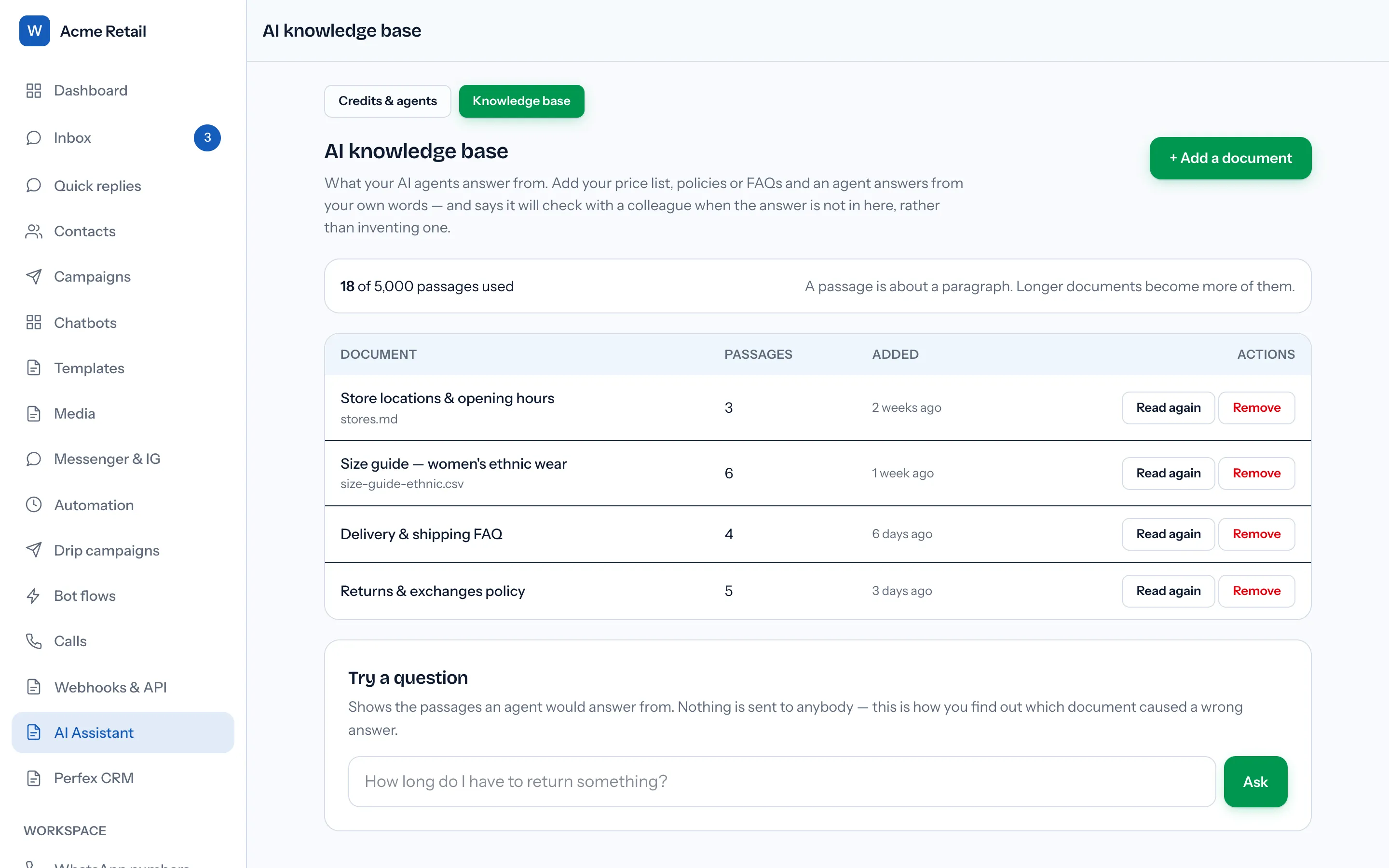
Plain text. You paste text into the Knowledge base tab or upload a .txt, .md or .csv file, and it is split into passages of about 1,200 characters that overlap by 180. Each document is read and indexed, using the platform's AI provider, as soon as it is added.
| Limit | Value |
|---|---|
| Formats | .txt, .md, .csv or pasted text |
| File size | Up to 5 MB |
| One document | Up to 400,000 characters |
| Whole workspace | 5,000 passages by default |
| Passages per reply | The best 5 |
PDF and Word files are refused, and the screen says why: they are containers it cannot open, and "a scanned PDF is a picture of words rather than words". Websites and links are not read either.
Three things decide whether answers come out right:
- There is one knowledge base per workspace. A sales agent and a support agent search the same documents, so write each one for any agent to quote.
- The search question is what the customer has written since the last reply. If a customer asks about returns, gets an answer, then writes "and for sale items?", the documents are searched for that second message alone. The agent still sees the last 12 messages when it writes.
- You can test it without sending anything. Try a question shows the passages an agent would be given for any wording you type, each with a match score. The screen calls it "how you find out which document caused a wrong answer".
When the passages it is given do not cover a question, the agent is told to say it will check with a colleague, and to "not invent an answer, a price, a policy or a date." Adding a document and trying a question spend no credits; the allowance is counted in passages. By default only Owners and Admins can open the tab.
How many AI credits does each action spend?
Every grammar fix, translation, draft and flow reply is paid from one credit balance per workspace, charged before the AI provider is asked and given back if the request fails or is refused.
| Action | Credits | What you get |
|---|---|---|
| Fix grammar | 1 | Your draft, corrected |
| Translate | 1 | Your draft, in the contact's language |
| AI draft in the inbox | 2 | A reply for a person to send |
| Reply from a flow AI step | 2 | A message sent to the customer |
A workspace receives a single starter grant of credits the first time someone opens the AI Assistant screen. After that, the Owner, or anyone given billing permission, buys packs on the same screen; each is raised as an ordinary invoice, the credits arrive when it is paid, and the screen states that credits never expire. Nothing resets monthly. The add-on's current terms are on the add-ons page, and the contact-based subscription is on pricing.
There is no field for your own API key and no choice of model: the platform runs every workspace's requests on one key with one AI provider.
Credits are WabaCRM's charge; Meta's is separate. A reply a flow step sends spends credits here and, once the number's monthly free tier is used, is a charged service message at Meta.
Does the 24-hour customer service window still apply to AI replies?
Yes, to every one. An agent writes free-form text, and Meta accepts free-form text only while the window is open:
"When a WhatsApp user messages you or calls you, a 24-hour timer called a customer service window starts." (Meta — Service messages)
"When the window closes, you can only send pre-approved template messages." (Meta — Service messages)
A flow step rarely meets this, because it answers messages the customer has just sent. A draft can: if a teammate leaves one and presses Send after the window has closed, the send is refused with "This contact has not messaged in the last 24 hours. Use an approved template instead." How these errors read on WhatsApp and Messenger is in the 24-hour window error guide.
What can the agent not see or do?
- It cannot act. It writes text and nothing else. It cannot look up an order, check stock, book an appointment, tag or assign a contact, or update a CRM record.
- It does not see media. A customer's photo, video, voice note or document reaches it as a placeholder such as "[sent a photo]". It does not read the invoice in a screenshot.
- It skips some of the thread. Reactions, system notices and deleted messages are never shown to it.
- It cannot send a template or reopen the window. Outside the 24 hours, an approved template has to be sent instead, and the agent cannot choose one.
- It does not guarantee accuracy. A model can still get things wrong, which is what the knowledge base's test box is for.
Should you choose Meta Business Agent or an agent you write?
Where do your answers live? Meta's agent draws on your business information, public profiles, websites and catalogue, which is less work if those already answer most questions. A WabaCRM agent reads only your instructions, your documents and the recent conversation: more work, more control.
Who else sees the chats? Meta states that chats connected to its agent are collected to improve AI at Meta, even while the agent is muted, and that deleting the agent ends that sharing. A WabaCRM agent still sends text outside WabaCRM: each draft or flow reply passes the thread's last 12 messages, and any matching passages, to the platform's AI provider. Read both against the promises you make your own customers.
Is a person in the loop? Meta's agent replies on its own and notifies you when it decides a customer needs you. A WabaCRM agent drafts by default, replies alone only inside a capped flow step, and alerts nobody when it stops.
Availability may settle it first. As of 15 October 2026, WhatsApp's Help Center says Meta's agent is only available in limited countries to select businesses, and Meta warns that in the WhatsApp Business app it may get in the way of broadcast lists and of greeting and away messages.
Every Meta quotation on this page was read from Meta's own documentation on 15 October 2026. Meta changes that documentation without notice; the linked pages are authoritative and this one is not.