Comment a word, get a DM
Instagram Comment to DM Automation: Meta's Real Rules
Last checked · 14 min read
The short answer
Instagram comment-to-DM automation sends a private message to anyone whose comment matches words you choose, through Meta's Private Replies API. Meta allows exactly one such message per comment, sent within 7 days of the comment, and the conversation can only continue once the person responds, so the first message has to earn that response. Checked 15 October 2026.
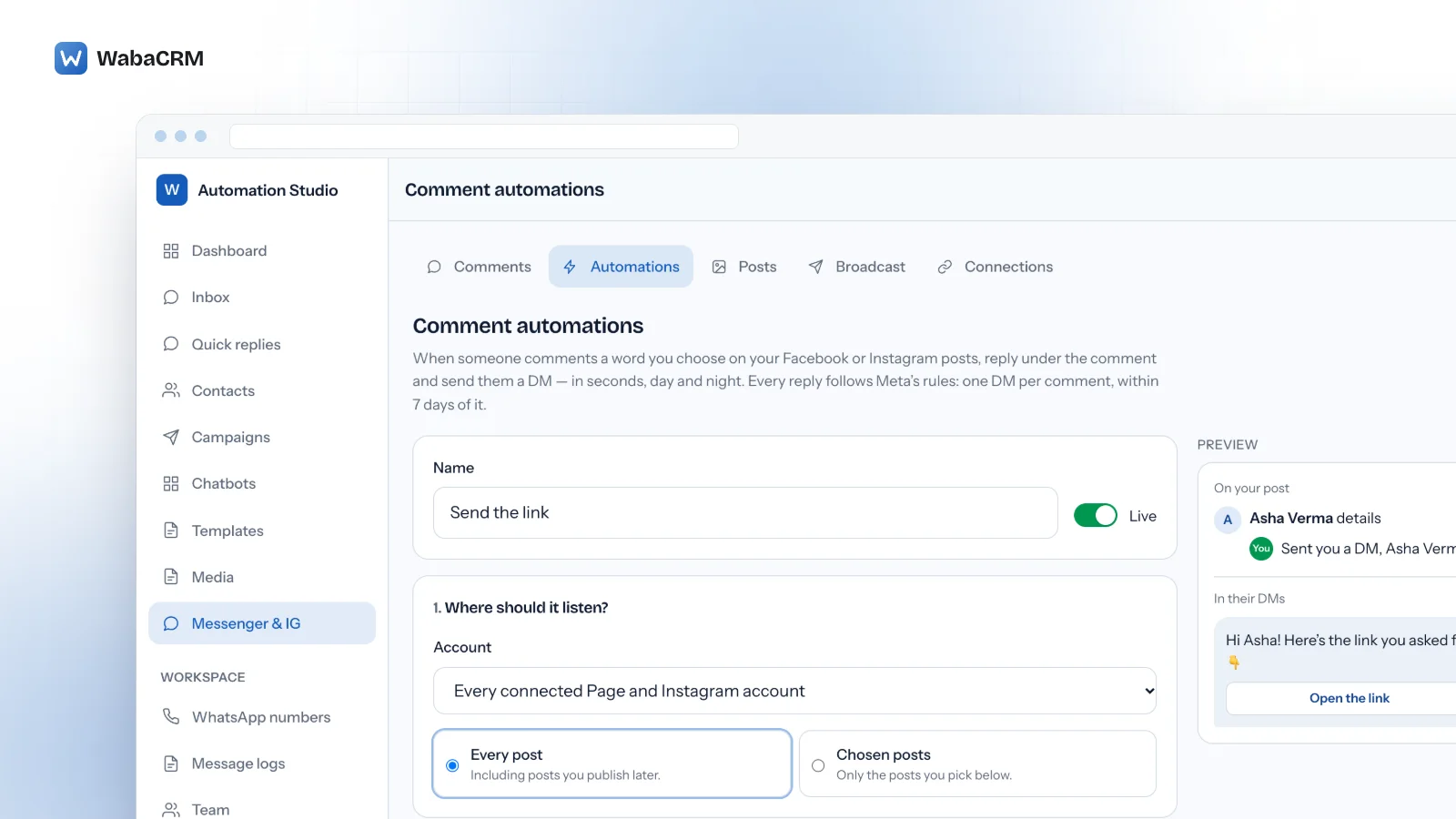
How does Instagram comment to DM automation work?
Someone comments a word you chose under your post, and within seconds of Meta's webhook arriving they receive a direct message from your account, sent through Meta's own Private Replies API. Meta allows exactly one such message per comment, within 7 days of it, and the conversation can only continue once the person responds.
That is the whole mechanism behind "comment LINK and I'll DM you". It is a documented Meta feature, not a trick played on Instagram from outside, and the documentation that describes it also sets its limits. Meta's comment-moderation guide describes the matching step in one sentence, written about replying under the comment, before it points to Private Replies for messaging the commenter:
"Your app can parse the API or webhook notification for comments that match your app user’s criteria then use the comment’s ID to reply to that comment." (Meta — Comment Moderation)
What matters is what happens after the match, starting with the part that is easiest to miss: sending the DM opens nothing on its own.
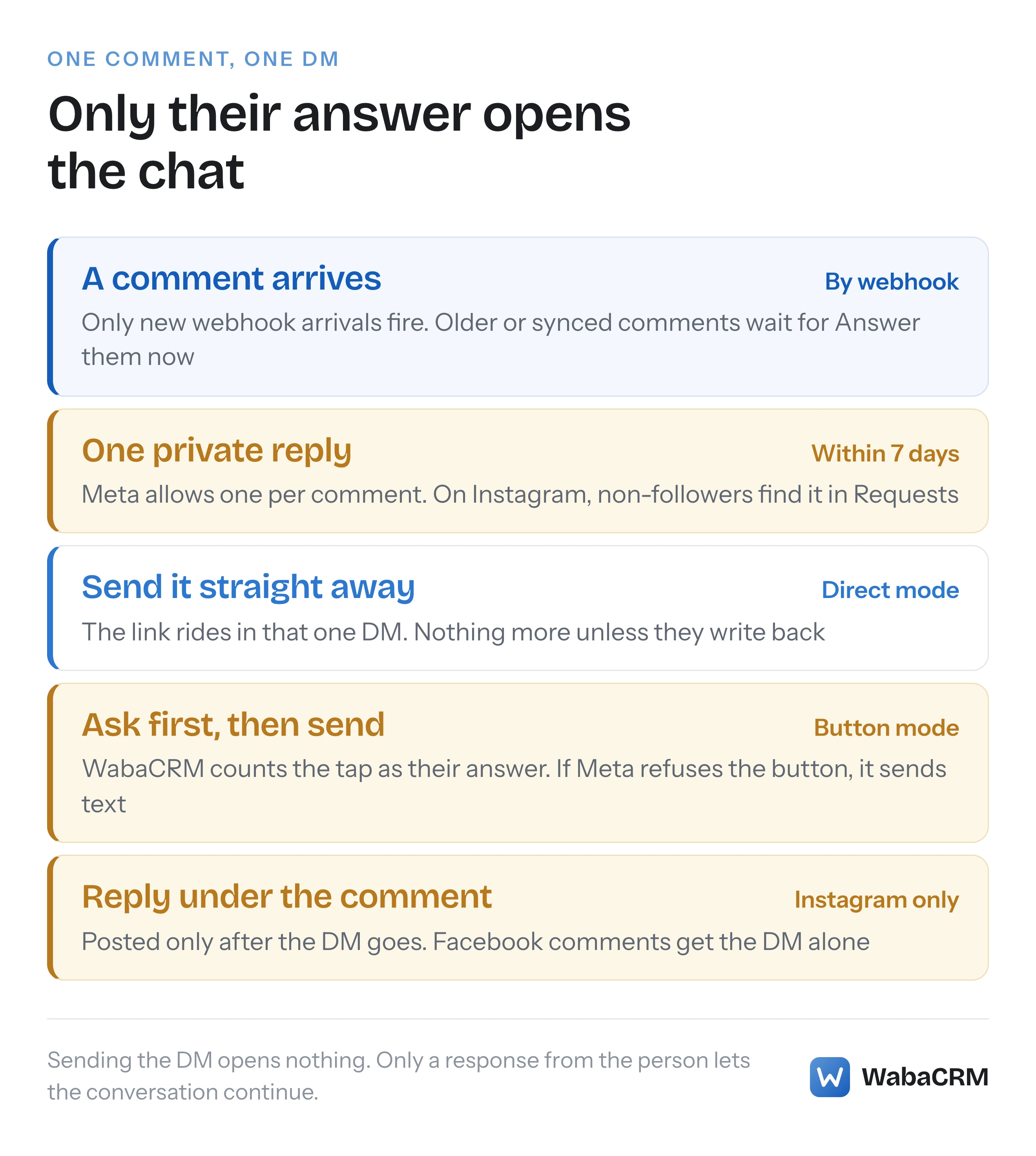
- How does Instagram comment to DM automation work?
- What does Meta allow a DM sent from a comment to do?
- Should the automated DM send the link or ask first?
- Where does a comment DM land if they do not follow you?
- What does follow to unlock do when Instagram will not say?
- How does an automation decide which comments to answer?
- Why does a Facebook comment get a DM but no public reply?
- What happens to comments posted before the automation went live?
- How many comment DMs can one account send in an hour?
- Which comments will a comment automation never answer?
- Does an automated comment DM need to say it is automated?
What does Meta allow a DM sent from a comment to do?
Less than the name suggests. Meta's Instagram guide opens its limitations with this:
"Only one message can be sent to the commenter" (Meta — Send a Private Reply to a Commenter)
The deadline, on the same page: "Your app can send this private reply within 7 days of the creation time of the comment, excepting Instagram Live, where replies can only be sent during the live broadcast." And what may follow: "Follow-up messages can only be sent if the recipient responds, and must be sent within 24 hours of the response".
Facebook Pages work the same way. Meta's Messenger guide says Private Replies "allows a business to send a single message to a person who published a post on your business’ Facebook Page or who commented on a post or comment on the business’ Facebook Page or Group", and adds: "Only when a person responds to the private message can you continue the conversation within the 24-hour messaging window." (Meta — Private replies, Messenger Platform)
| Meta's rule | Instagram comment | Facebook comment |
|---|---|---|
| Private replies per comment | One | One |
| Deadline | 7 days; Live only during the broadcast | 7 days |
| Where a non-follower sees it | Request folder | Not stated in Meta's guide |
| What the reply may carry | Text, in Meta's reference | Any Send API message type |
| Conversation continues | Only if they respond | Only if they respond |
The row people misread is the last one. The DM does not open a 24-hour window. Until the person answers, that message is everything the comment lets you say. The wider window rules are in our explainer on the Instagram DM 24-hour window; this page is about an automation that works inside them.
Should the automated DM send the link or ask first?
That depends on whether you want anything after the first message.
WabaCRM's comment automations belong to its Messenger and Instagram inbox, an optional add-on sold separately through the add-on store, and they offer two DM modes.
Send it straight away. The private reply is the message: your words, the commenter's name merged in if you want it, and an optional link button. It is instant and it is final. Unless the person writes back, nothing else can follow.
Ask first, then send. The private reply carries a button, such as "Send it to me", and WabaCRM sends the full message as soon as the person taps it, treating the tap as their response. Meta's policy page lists, among its examples of user actions that open the standard messaging window, "User clicks a call-to-action button like Get Started" (Meta — Messenger Platform and IG Messaging API policy), and states that "Messages sent within the standard messaging window may contain promotional content."
Where the tap counts as that response, it buys a 24-hour window for the full message and a reply from your team. On Facebook, Meta's private-reply guide says "All messaging types available for using the Send API are available for private replies", and the button template "sends a text message with up to three attached buttons" (Meta — Button template).
Instagram is less clear-cut. Meta's Instagram private-reply reference shows only a text body, and Meta's Instagram webhook reference documents the postback event like this: "A notification is sent when a customer clicked an Icebreaker option or Generic Template button" (Meta — Webhooks for Instagram Messaging). Neither page says a button can ride in an Instagram private reply, or that a tap on one counts as the person responding, and this page does not claim either.
WabaCRM therefore plans for a refusal. If Meta refuses a button, the message goes as plain text with the link written in, and an Ask-first rule sends its main message straight away instead of waiting for a tap that cannot happen.
Every DM an automation sends is filed in the shared team inbox beside your WhatsApp chats, labelled "Sent by a comment automation", so when the person taps or replies your team sees the whole exchange. A DM starts a thread, not a mailing list: a commenter new to you is filed as a contact with broadcasts switched off until your team decides otherwise.
Where does a comment DM land if they do not follow you?
In their message requests. Meta says so in the private-replies guide:
"This reply appears in the person’s Inbox, if the person follows the Instagram professional account, or to the Request folder, if they do not." (Meta — Send a Private Reply to a Commenter)
That should change how the DM is written. For a non-follower, your one permitted message arrives among requests from strangers. Meta adds that "The private reply message includes a link to the commented post", which is the context they get for why you wrote.
So make the first line stand on its own. Name what they asked for, in the words of their comment. "Hi Asha, here is the syllabus you asked for under our course post" reads as an answer; "Check this out" above a bare link reads like every other request they ignore.
Meta's Facebook guide mentions no requests folder, only that "The message will contain a link to the post or comment that the person published."
What does follow to unlock do when Instagram will not say?
It sends the message anyway. That is deliberate.
Follow to unlock is an option on Ask-first rules, for Instagram only. When the commenter taps the button, WabaCRM asks Instagram whether they follow your account. If they do not, they get a short prompt to follow, with an "I'm following" button to tap afterwards, at most three times. Facebook commenters skip the check.
When Instagram will not say, the message goes and the outcome is recorded as unknown rather than as a follow. The alternative is a person who commented and tapped as asked, then received nothing and never learned why. A link withheld from a real customer costs more than a link given to someone who has not followed yet.
So the gate is a nudge, not a guarantee:
- It rides on the Ask-first button, so it inherits the uncertainty above. If Meta refuses the button and the rule falls back to plain text, the link goes immediately, with no tap and no check.
- After three prompts, someone who still does not follow is sent nothing more.
- It never applies to Facebook comments.
How does an automation decide which comments to answer?
By words you choose, matched as whole words. A rule listening for "price" answers "Price?" but not "prices". Matching ignores capitals and works in any script, emoji too, so one rule can listen for "details" and "विवरण" side by side. A rule takes up to 20 words, and its list of words to ignore overrides a match, which keeps a comment mentioning "refund" away from that rule's cheerful automated reply. Or a rule can answer any comment at all.
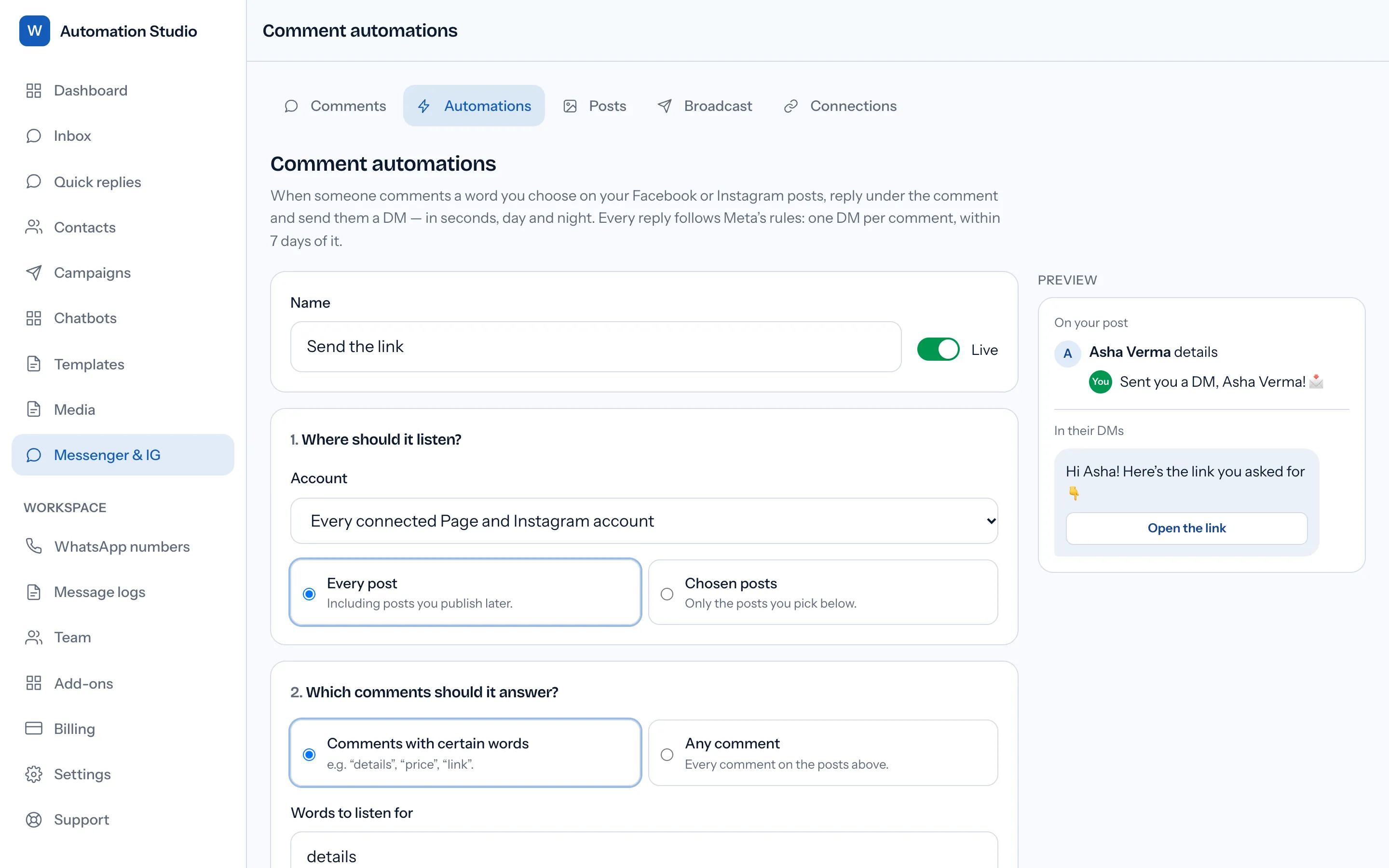
Each rule listens on one Page or Instagram account, or every connected one, and on every post, including posts published later, or on up to 50 chosen posts synced from Meta. Four starting templates cover the common cases: send a link when someone comments a word, ask first and then send, follow to unlock, and thank everyone who comments. Templates that send a link leave it blank, so a rule cannot go live pointing nowhere.
Two rules stop a busy post becoming a spam engine:
- Only one automation acts on a comment, the most specific first: a keyword rule before an any-comment rule, chosen posts before every post, then the oldest.
- Once per person per post, on by default. Someone who comments five times on one post gets one DM, not five. If their DM fails, their next comment may try again.
The builder's "Try a comment" box checks a sample against the words and exclusions only, not the scope or competing rules, so treat it as a test of your word list.
Why does a Facebook comment get a DM but no public reply?
Because replying publicly under a Facebook comment needs a Meta permission that WabaCRM does not hold. On Instagram an automation can reply under the comment and send the DM; on Facebook it sends the DM only.
So the "Thank everyone who comments" template, which only replies publicly, does nothing on Facebook. A public-reply-only rule aimed at a Facebook Page is refused when you save it, and one aimed at every connected account passes over Facebook comments.
On Instagram the public reply works like this:
- It goes after the DM, when the rule sends one, and only if the DM did not fail, so "check your DMs" never points at a message that never arrived.
- Up to three versions, each up to 300 characters, one picked at random so the post does not fill with the same sentence.
- Keep links out of it. The builder advises putting them in the DM instead.
When Messenger refuses a reply because the window has shut, the error codes differ from WhatsApp's; our comparison of WhatsApp and Messenger window errors sets them out.
What happens to comments posted before the automation went live?
They wait for you. Automations fire only on comments that arrive by Meta's webhook after the rule is live. Edits, redelivered notifications and comments read in by "Sync from Meta" never trigger one.
A webhook is a live feed, not an archive: "Webhooks do not provide a historical notification store, so retain the event data required by your product." (Meta — Instagram Webhooks) Comments made before you connected never arrive that way, and the choice not to fire on comments read in later is WabaCRM's: anything already waiting is answered only when you ask.
For comments already waiting, each automation offers Answer them now. It counts the matching comments from the last 7 days that are still open, unanswered and untouched by any automation, asks you to confirm, and answers up to 100 per press. It works only while the automation is switched on.
On Facebook, reading the comments already on a Page's posts needs a Meta permission WabaCRM does not hold, so comments from before you connected cannot be brought in. On Instagram, a sync reads the 10 newest posts and up to 50 comments on each.
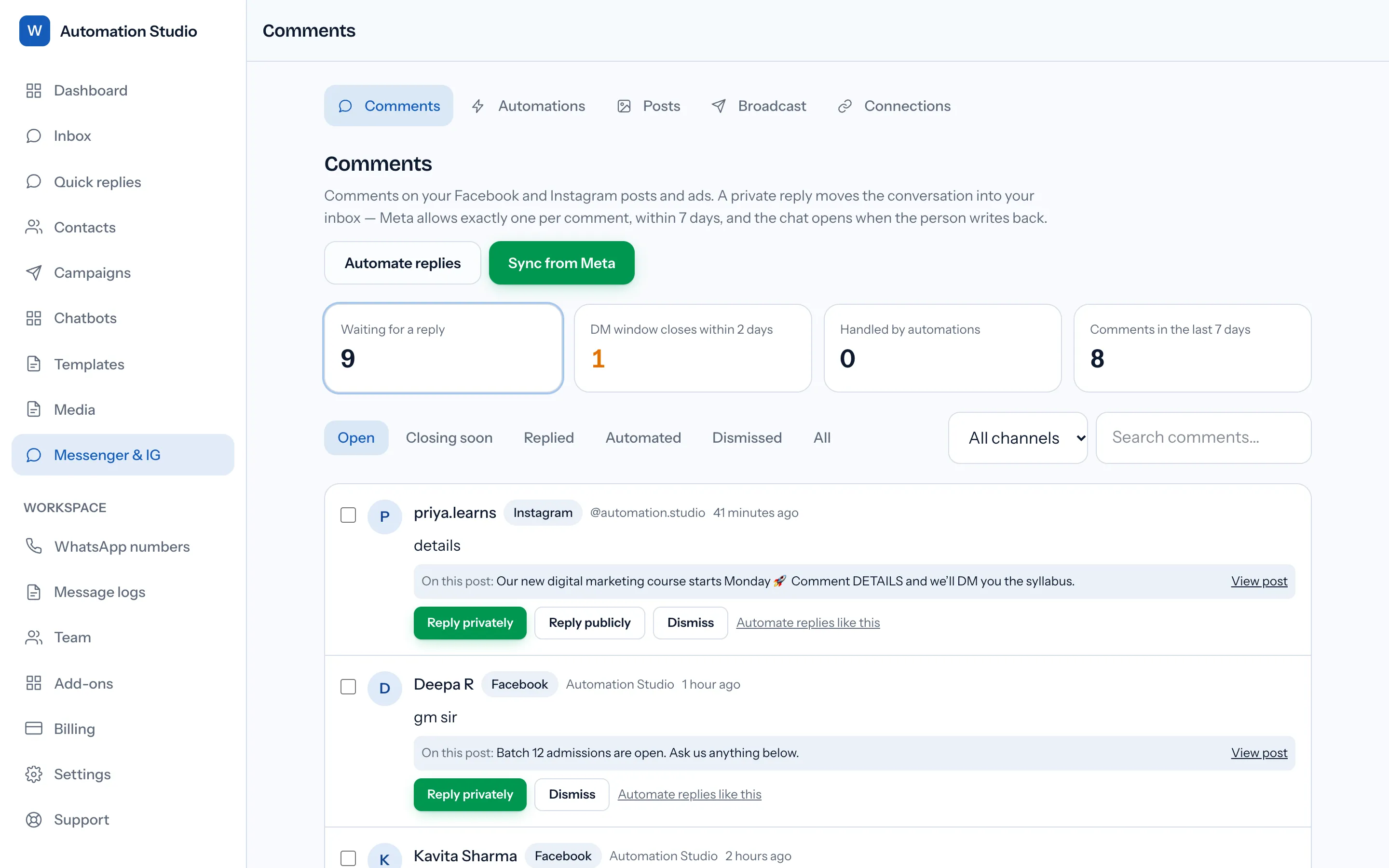
Whatever no rule answers waits on the Comments screen, where a "Closing soon" filter shows comments whose 7-day window ends within 48 hours and a bulk private reply handles up to 25 at once.
How many comment DMs can one account send in an hour?
Meta's figure is 750 calls an hour:
"Your app can make 750 calls per hour per Instagram Professional account for private replies to comments on Instagram posts and reels." (Meta — Messenger Platform rate limits)
The page's Messenger API section has a per-Page entry too: "Your app can make 750 calls per hour per Facebook Page for private replies to comments on Instagram posts and reels." It is counted per Facebook Page and still names Instagram posts and reels, and the page gives no separate figure worded for comments on Facebook posts.
WabaCRM stops short. Once an account has sent 700 automated private replies in the past hour, its automations hold back further comments and retry each one ten minutes later, rather than spending a refusal. The ceiling counts automation DMs only, so private replies your team sends by hand on the same account count towards Meta's 750 but not WabaCRM's 700. A post that takes off, plus an afternoon of manual replies, can reach Meta's limit first.
Ads add a wrinkle: "The ad_id and ad_title will be returned in the media object when an Instagram user comments on a boosted Instagram post or Instagram ads post. Commenting on a boosted or ads post may result in duplicate webhook notifications." (Meta — Private replies, Instagram Messaging) Each comment can be claimed by one automation run only, so a duplicate notification never sends a second DM. On the Comments screen an Instagram ad comment also carries an "On an ad" label with the ad's title; Facebook comments carry none.
Which comments will a comment automation never answer?
Several, by design.
| Comment or message | What happens instead |
|---|---|
| Story replies and mentions | Arrive as DMs; a keyword chatbot can answer them |
| Instagram Live comments | Not processed |
| Edited or redelivered comments | Do not trigger a run |
| Your own account's comments | Skipped |
| Comments read in by a sync | Wait for Answer them now |
| Older than 7 days | Skipped; Meta's deadline has passed |
| Instagram with no linked Page | Cannot be connected |
Meta permits a private reply to a Live comment only during the broadcast, and WabaCRM does not process Live comments, so a Live session is outside what an automation here can answer. The last row is a connection rule: the Instagram professional account must be linked to a Facebook Page.
Does an automated comment DM need to say it is automated?
Sometimes by law, and Meta recommends it either way. Meta's policy says "When required by applicable law, automated chat experiences must disclose that a person is interacting with an automated service", including "at the beginning of any conversation or message thread" (Meta — Messenger Platform and IG Messaging API policy). It singles out the "California market or California users" and the "German market or German users", then adds: "Even where not legally required, we recommend informing users when they’re interacting with an automated chat as best practice".
A comment DM is often the first message in a thread, so that is where any disclosure belongs. The words in each automation are yours to rewrite, and a short clause such as "automated reply; a person will pick up anything you send back" costs a few characters. Check what applies in the markets you sell into; this page is not legal advice.
The add-on's current price is on the pricing page.
Every Meta quotation on this page was read from Meta's own documentation on 15 October 2026. Meta changes that documentation without notice; the linked pages are authoritative and this one is not.