Signed events out, messages in
WhatsApp Business API with n8n, Zapier and Make
Last checked · 7 min read
The short answer
There are two routes. Connect n8n straight to Meta's Cloud API, which means your own Meta app, a webhook endpoint Meta can reach and a Meta access token held in n8n. Or keep the number on WabaCRM: its optional Webhooks & API add-on posts signed WhatsApp events to your workflow, which replies through WabaCRM's REST API. Checked 15 October 2026.
How do you connect the WhatsApp Business API to n8n?
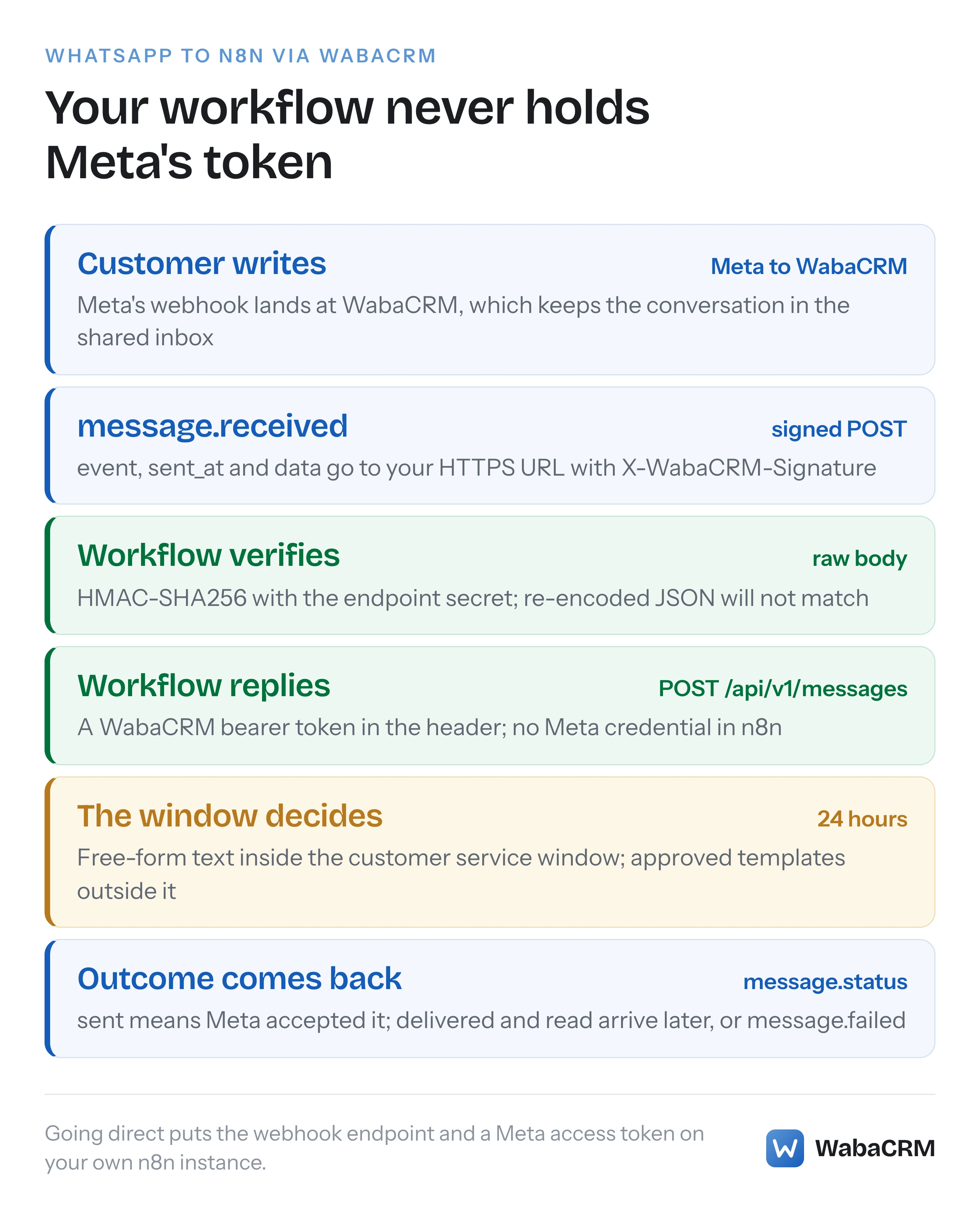
There are two ways, and they differ in who holds Meta's side of the connection. Either n8n talks to Meta's Cloud API directly, which makes you responsible for a Meta app, a webhook endpoint Meta can reach and a Meta access token held in n8n, or the number stays on a platform that already holds those, and n8n exchanges ordinary HTTP requests with that platform.
On WabaCRM the second route is two exchanges. In the first, WabaCRM posts a signed JSON event to a URL your workflow exposes; that forwarding comes with Webhooks & API, an optional add-on. In the second, your workflow sends WhatsApp messages by calling POST /api/v1/messages with a bearer token, which is WabaCRM's REST API rather than the add-on. Meta's webhook, the Meta token and the shared inbox stay where they are.
Neither route is wrong. Going direct gives you everything Meta sends and an endpoint to keep alive. Going through a platform gives you a team inbox beside the automation and a narrower, signed stream of events.
- How do you connect the WhatsApp Business API to n8n?
- What does n8n's WhatsApp Business Cloud node actually do?
- What does receiving Meta's webhook directly involve?
- Direct to Meta or through WabaCRM: which should you build?
- How does a WabaCRM event reach an n8n webhook?
- How should an n8n workflow check X-WabaCRM-Signature?
- How do you send a WhatsApp message from n8n through WabaCRM?
- Can Zapier or Make receive WabaCRM events without an app?
- Which WhatsApp events never reach your workflow?
- What happens to events while your n8n instance is down?
- Who in a workspace can create tokens and endpoints?
What does n8n's WhatsApp Business Cloud node actually do?
n8n's own documentation opens with this:
"Use the WhatsApp Business Cloud node to automate work in WhatsApp Business, and integrate WhatsApp Business with other applications." (n8n — WhatsApp Business Cloud node)
The page lists six operations. Under Message: Send, Send and Wait for Response, and Send Template. Under Media: Upload, Download and Delete. For anything else it points to its general-purpose HTTP step:
"If this node doesn't support the operation you want to do, you can use the HTTP Request node to call the service's API." (n8n — WhatsApp Business Cloud node)
For what each operation does, the page refers you to WhatsApp Business Platform's Cloud API documentation, and for authentication to a separate credentials page. Read that page before planning, because on the direct route the node works with access to your own Meta setup. Every operation listed is something the workflow does. A customer's message arriving reaches n8n, as it reaches anyone, as a webhook from Meta, and that is where most of the direct route's work sits. For WabaCRM's API, the HTTP Request node is the step to try; confirm it can send your token in an Authorization header.
What does receiving Meta's webhook directly involve?
Meta describes the mechanism in a sentence:
"Webhooks are HTTP requests containing JSON payloads that Meta’s servers send to a server of your designation." (Meta — WhatsApp webhooks)
On the direct route, that server is your n8n instance, so it has to be one Meta's servers can reach, not only something running inside your own network. Meta is plain that this part is yours to build:
"To receive webhooks, you must create and configure a webhook endpoint." (Meta — WhatsApp webhooks)
It allows a test endpoint that logs payloads to the console, then adds:
"Note, however, that before you can use your app in a production capacity, you must create your own endpoint." (Meta — WhatsApp webhooks)
If Meta will not accept your callback URL when you save it, why a callback URL fails Meta's validation walks through the causes. Every event notification after that should be proven to be Meta's before a workflow acts on it, which is the subject of why X-Hub-Signature-256 never matches.
Receiving also needs permissions, whatsapp_business_messaging among them for message webhooks, and Meta tells a direct developer where they come from:
"If you are a direct developer, use your system user to grant your app these permissions when generating your system token." (Meta — WhatsApp webhooks)
Sending on the direct route authenticates with a Meta access token as well, so which kind of token you hold, and what kills one becomes yours to watch. The webhooks page adds a rule that catches people leaving testing:
"Make sure your app is in Live mode; some webhooks will not be sent if your app is in Dev mode." (Meta — WhatsApp webhooks)
Direct to Meta or through WabaCRM: which should you build?
Here is what each route hands you to look after.
| What you take on | Direct to Meta's Cloud API | Through WabaCRM |
|---|---|---|
| Meta app and permissions | Yours to create and configure | WabaCRM's, as a Meta-verified Tech Provider |
| Endpoint Meta calls | Yours to build and keep up | WabaCRM's |
| Meta access token | Held in your workflow tool | Not given to your workflow |
| What the workflow receives | Every field you subscribe to | Eight signed events, WhatsApp only |
| People answering the same number | Build an inbox or go without | The shared inbox, alongside |
| Your endpoint goes down | Meta retries for up to 7 days | 4 attempts; paused after 20 failures in a row |
| Cost beyond Meta's message fees | Your hosting and your time | Your WabaCRM plan, plus the add-on for events |
Going direct is the better choice in four cases.
You need what WabaCRM does not forward. Meta's webhooks carry, in its words, "incoming messages, the status of outgoing messages, call events, and other important information, such as changes to your account status, messaging capability upgrades, and changes to your template quality scores." (Meta — WhatsApp webhooks) WabaCRM forwards eight events. Calls, template quality changes and account status are not among them.
You want Meta's longer retry window. Meta keeps retrying for up to 7 days; WabaCRM gives up on an event after four attempts.
Nobody needs an inbox. If no person will read these conversations, a platform's inbox is a room nobody enters.
You need more than 120 API requests a minute. That is WabaCRM's limit.
Going through WabaCRM is the better choice when people answer the same number while the workflow handles the repetitive part, and when you would rather no Meta access token sat in an automation tool. A workflow that only sends, such as one posting order confirmations, then needs a WabaCRM token and an approved template: no Meta app, and no inbound endpoint of any kind.
How does a WabaCRM event reach an n8n webhook?
You add an endpoint on the Webhooks & API screen: a name, an HTTPS endpoint URL, the events it subscribes to, and an Active tick box. The signing secret, a whsec_ string, appears when you save and again from the row's Secret button.
There are eight events: message.received, message.sent, message.status, message.failed, contact.created, contact.updated, conversation.assigned and campaign.completed. When one fires, the delivery is queued and posted with three X-WabaCRM- headers and a body of exactly three keys:
POST https://automation.example.com/wabacrm
Content-Type: application/json
X-WabaCRM-Event: message.received
X-WabaCRM-Forward: <the endpoint's id>
X-WabaCRM-Signature: <HMAC-SHA256 of the raw body>

{"event":"message.received","sent_at":"…","data":{…}}
For a message, data carries id, wamid, conversation_id, direction, type, body, status, source, the error fields, a contact object with id, name and phone, and created_at. The X-WabaCRM-Event header lets one workflow branch on the event before parsing anything.
Each attempt has 5 seconds to connect and 8 seconds for the whole request, and never follows a redirect, so give it the final URL. Anything other than a 2xx answer in that time counts as a failed attempt.
How should an n8n workflow check X-WabaCRM-Signature?
X-WabaCRM-Signature is the HMAC-SHA256 of the raw request body, keyed with the endpoint's signing secret. Compute the same over the bytes exactly as they arrived and compare the two in constant time. The screen spells out the trap: parse the JSON and encode it again, and the signature will not match.
So whichever tool you use, the receiving step has to give your code the body as received, before any JSON parsing. If it only hands you a parsed object, you can read the event but cannot prove it came from WabaCRM.
sent_at sits inside the signed bytes, so a workflow can refuse a delivery whose timestamp is far from its own clock; the time cannot be altered without breaking the signature. Check it after the signature, never instead of it. Code in PHP and Node, and what rotation does, are in how to verify X-WabaCRM-Signature.
How do you send a WhatsApp message from n8n through WabaCRM?
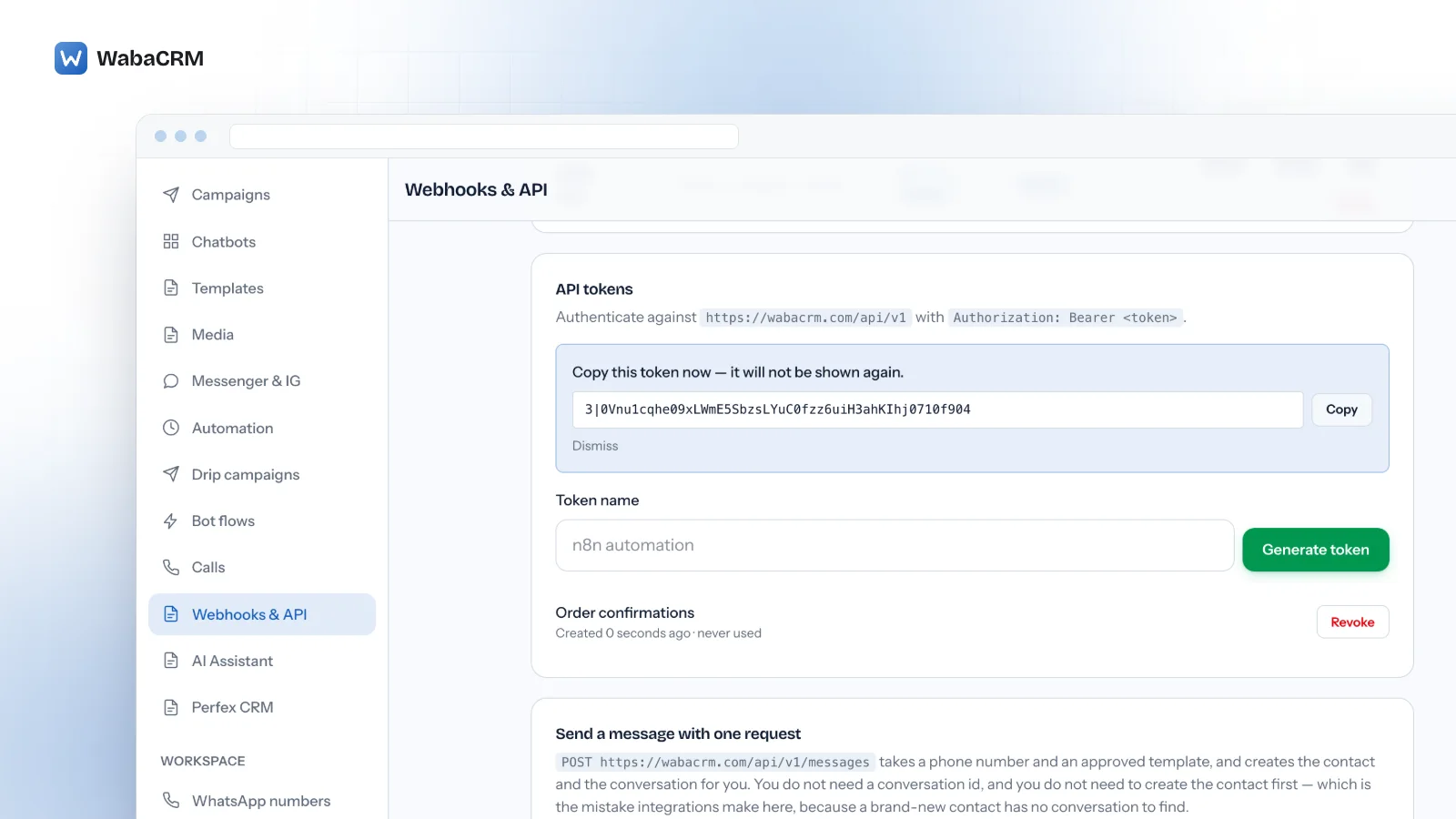
Create a token on the same screen. Under API tokens, type a token name (the field suggests "n8n automation") and press Generate token. The token is shown once and only its hash is kept, so copy it into your tool's credential store straight away.
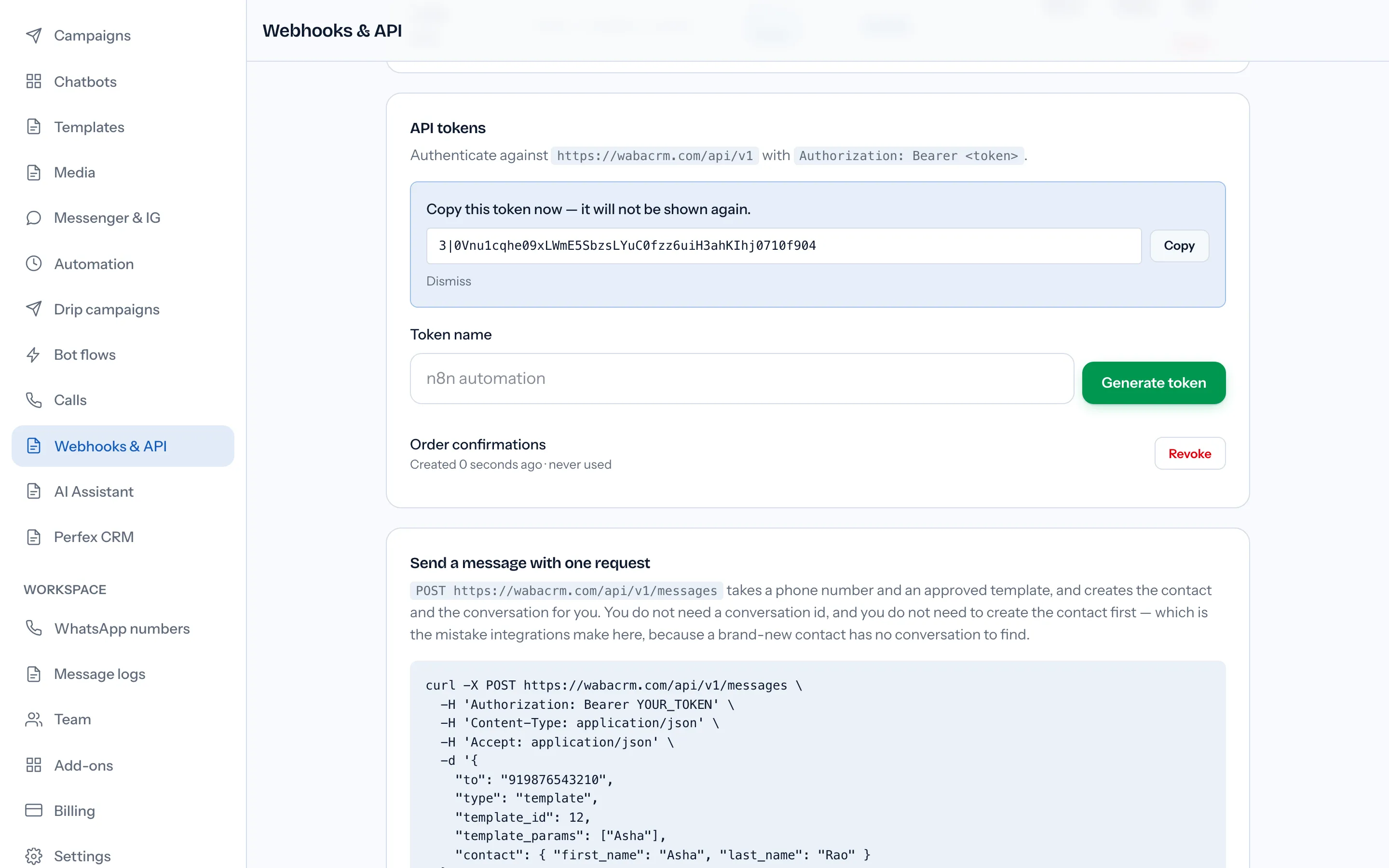
Every request carries Authorization: Bearer <token>. To send a template to a number, one call is enough:
POST https://wabacrm.com/api/v1/messages
Authorization: Bearer YOUR_TOKEN
Content-Type: application/json
Accept: application/json

{
  "to": "919876543210",
  "type": "template",
  "template_id": 12,
  "template_params": ["Asha"],
  "contact": { "first_name": "Asha", "last_name": "Rao" }
}
It takes the number and an approved template and creates the contact and the conversation for you, so the workflow never needs a conversation id. The step-by-step version, including where template ids come from, is sending a WhatsApp template to a new number through the API. A template to a new number still needs that person's permission:
"Businesses are required to obtain opt-in before messaging people on WhatsApp." (Meta — Get opt-in for WhatsApp)
Plain text works with "type": "text" and a body, but only inside the window Meta opens when a customer writes:
"When a WhatsApp user messages you or calls you, a 24-hour timer called a customer service window starts." (Meta — Service messages)
"When the window closes, you can only send pre-approved template messages." (Meta — Service messages)
Four things to build around before the workflow goes live:
- There is no idempotency key. Two identical POSTs are two WhatsApp messages. If the workflow retries a request that timed out, keep your own record of what was sent.
- A success answer is not delivery. The 201 means the message is stored and queued, and
sentmeans Meta accepted it and nothing more;deliveredandreadarrive from Meta afterwards. Follow up withGET /api/v1/messages/{id}, or subscribe the endpoint tomessage.statusandmessage.failed. - A template whose header is an image, video or document cannot be sent through the API. Send that one from the inbox or as a campaign.
- The limit is 120 requests a minute. A batch that runs faster gets 429 answers and has to slow down.
Can Zapier or Make receive WabaCRM events without an app?
Only if the tool, on your plan, can do four things. WabaCRM has no app on Zapier, Make or n8n, and neither half of the connection needs one, so this is a checklist to run against your own tool rather than a promise about it.
| The step must be able to | Because |
|---|---|
| Accept a POST at an HTTPS URL | WabaCRM refuses to save, or deliver to, plain HTTP |
| Answer with a 2xx within 8 seconds | Anything else counts as a failed attempt |
| Hand over the body exactly as received | The signature is computed over those bytes |
| Send a request with a custom header | The API reads the token from Authorization |
Check all four before you build. The third is the easy one to miss, because a tool that only exposes parsed fields still shows you a perfectly readable event.
Which WhatsApp events never reach your workflow?
Several things a workflow might expect are deliberately not forwarded:
- Facebook and Instagram. Messages and conversations on those channels are not forwarded.
- Edits and deletions. The
message.receivedormessage.sentyou already have keeps the text as first sent. - Bulk arrivals. A CSV import fires no
contact.created, so ten thousand rows do not become ten thousand deliveries. Contacts brought in from a phone's address book or chat history after a coexistence connection, and contacts pulled from Perfex CRM, are silent the same way. - Unassignment.
conversation.assigneddoes not fire when a chat is unassigned, given to the person who already has it, or sent back to the queue because its member was removed or deactivated. - A second
campaign.completed. It fires once, and itsawaiting_metafigure counts recipients whose messages had no delivery receipt or failure yet, so the other figures can still move. - Anything outside the eight. No calls, comments, support tickets or billing events.
If a workflow must know about every contact however it arrived, read the contact list through the API on a schedule.
What happens to events while your n8n instance is down?
Each event gets up to four attempts, with waits of 10 seconds, 60 seconds and 300 seconds between them. Twenty failed attempts in a row switch the endpoint off, and any success resets the count. The row then reads Paused, shows the failure count and offers Re-activate.
Meta is more patient on the direct route:
"If a webhook request to your endpoint receives an HTTP status code other than 200, or if the webhook cannot be delivered for another reason, Meta retries delivery with decreasing frequency until the request succeeds, for up to 7 days." (Meta — WhatsApp webhooks)
Meta adds: "These retries can result in duplicate webhook notifications." (Meta — WhatsApp webhooks) WabaCRM duplicates too. A workflow that processed an event but answered too slowly gets it again, and a delivery has no id of its own: every retry and redelivery carries a fresh sent_at and a fresh signature. De-duplicate on what the event describes. For a message status that is the event name, the message id and the status together, because one message reports delivered and then read under the same id.
After an outage, Re-activate the endpoint, then Redeliver the failed attempts under Recent deliveries; Redeliver sends nothing while the endpoint is paused, so the order matters. Two limits apply. Events from while it was paused were never attempted, so there is nothing to redeliver. And the list shows only the 30 most recent attempts across all endpoints, though logs are kept for 30 days by default. For the rest, read back through the API: GET /api/v1/messages/{id}, or a conversation's messages polled with ?after_id=.
Who in a workspace can create tokens and endpoints?
Adding, editing and deleting endpoints, revealing or rotating a secret, redelivering, re-activating, and generating or revoking tokens all need the "Manage outgoing webhooks" permission. Of the built-in roles, only Owner and Admin hold it.
A token carries the permissions of the member who created it. It does not expire on a timer; it stops when it is revoked, when its member's password changes, or when the member is deactivated. Each member sees and revokes only their own tokens, so a workflow built on a leaver's token stops when they are switched off. Give each automation its own named token from someone who will be around to look after it.
One distinction matters for budgeting. The REST API at /api/v1 is not the add-on: it works on every plan, and WabaCRM's own Android app runs on it. The optional add-on is what issues named integration tokens from this screen, shows the API reference, and signs and forwards events to your endpoint. Its terms are on the add-ons page.
Every Meta quotation on this page was read from Meta's own documentation on 15 October 2026. Meta changes that documentation without notice; the linked pages are authoritative and this one is not.