Why Meta Says Your WhatsApp Callback URL Couldn't Be Validated
The short answer
Meta verifies a WhatsApp callback URL with one synchronous GET request carrying hub.mode, hub.verify_token and hub.challenge. Your endpoint must confirm hub.mode is subscribe, check hub.verify_token against the string typed into the App Dashboard, and respond with the hub.challenge value as raw plain text, not JSON. The same URL must also accept POST, and it must already be live over HTTPS the instant you click Verify and Save.

What does Meta actually send when you click Verify and Save?
The instant you type a callback URL into the App Dashboard's Webhooks configuration and click Verify and Save, Meta's servers make one HTTP request to that exact URL. Meta's own documentation is specific about when this fires: "Anytime you configure the Webhooks product in your App Dashboard, we'll send a GET request to your endpoint URL" (Meta — Graph API Webhooks, Getting Started). Nothing about this step is asynchronous or queued — the dashboard is waiting on your server's response before it will let you proceed.
That GET request carries three parameters appended as a query string on the URL you gave: hub.mode, hub.verify_token, and hub.challenge. There is no request body and no JSON payload to parse — everything the handshake needs is already in the URL. If your server logs incoming requests, this is the first thing worth checking when validation fails: did anything reach the endpoint, and what did the query string contain.
Because the check is synchronous, three things have to be true in the same moment: the endpoint must exist, be reachable over a valid HTTPS connection, and answer correctly — all before the dashboard's request times out. Get any one wrong and the dashboard reports the same generic failure, which is why this article treats each cause separately rather than as one problem.
The diagram further down traces that single request through the three checks Meta's servers run against it, and which line the dashboard shows for each kind of failure.
- What does Meta actually send when you click Verify and Save?
- What are hub.mode, hub.verify_token and hub.challenge for?
- Why does returning JSON break the handshake?
- Does the verify token have to match anything on Meta's side?
- Why must one URL answer both GET and POST?
- Does your endpoint need a public HTTPS address, or will a tunnel do?
- What does a minimal working handler look like?
- How do you tell a token mismatch from an unreachable endpoint?
- Does validating the callback URL mean you will receive messages?
- What changes when you host the same endpoint for many accounts?
What are hub.mode, hub.verify_token and hub.challenge for?
Each of the three query parameters does a distinct job in the handshake, and mixing up what they're for is a common source of bugs in a first implementation.

| Parameter | What Meta sends | What your endpoint must do |
|---|---|---|
hub.mode |
Always the literal string subscribe |
Confirm it equals subscribe; anything else means this isn't a real verification request |
hub.verify_token |
The string you typed into the App Dashboard's Verify Token field | Compare it, byte for byte, against the value your server has stored |
hub.challenge |
A value your server has never seen before | Echo it back unchanged in the response body |
Meta documents hub.mode plainly: "hub.mode - subscribe - This value will always be set to subscribe" (Meta — Graph API Webhooks, Getting Started). It never varies for a WhatsApp callback URL verification, so the check exists mainly to reject stray or malformed requests rather than to distinguish between real modes.
hub.verify_token is documented as "a string that we grab from the Verify Token field in your app's App Dashboard" — in other words, Meta is not generating this value or checking it against anything on its own side. It is purely a shared secret between the App Dashboard field and whatever your server has stored, and the comparison itself is entirely your code's responsibility.
hub.challenge is where the type matters. Meta's documentation calls it "an int you must pass back to us". That single word — int — is the detail that trips up a surprising number of implementations, because it invites treating the value as something to parse, validate, or reformat, when the correct move is simply to hand it back exactly as received. Meta's own separate webhook-endpoint guidance confirms the response side of this: "If the request is valid, respond with HTTP status 200 and the hub.challenge value" (Meta — Business Messaging, Create a Webhook Endpoint). Not a JSON object containing it. Not a stringified, re-typed version of it. The value.
Checked against Meta's documentation on 4 September 2026.
Why does returning JSON break the handshake?
Most web frameworks make it slightly easier to return JSON than plain text, because most of what a webhook endpoint does the rest of the time — receiving the POST notifications Meta sends after verification — is JSON. A framework's default response helper (res.json() in Express, a dict return in a Python framework that auto-serializes, a struct marshalled by a Go JSON encoder) wraps whatever you hand it in an object and sets the Content-Type header to application/json.
That is exactly the wrong shape for this one response. Meta's instruction is to respond with the hub.challenge value — not a JSON document that contains it under some key. If your handler does res.json({ challenge }) or return jsonify(hub_challenge=challenge), Meta's servers receive a body like {"challenge":"1158201444"} rather than the bare digits 1158201444, and the comparison Meta runs against what it sent fails.
A verification GET that returns anything other than the literal hub.challenge value as the response body — braces, quotes, a wrapping object, or a key name attached to it — reads to Meta as a failed validation, indistinguishable from no response at all.
This is also why testing the route in a browser can be misleading, covered further down: a browser showing "1158201444" rendered on the page proves the bytes look right to a human eye, but it does not prove the Content-Type and exact body match what a strict plain-text comparison expects. The safest pattern in every framework is to bypass the JSON helper entirely for this one route and write the string directly to the response body.
Checked against Meta's documentation on 4 September 2026.
Does the verify token have to match anything on Meta's side?
No — and this is worth being precise about, because it's easy to assume Meta generates or validates the token against some registry. It does not. The Verify Token field in the App Dashboard is free text that you choose. Meta's documentation describes its origin plainly: it is "a string that we grab from the Verify Token field in your app's App Dashboard" and sends back unchanged as hub.verify_token on the verification request.
The entire security property of this handshake rests on that string being known only to you and your server — Meta's role is limited to typing it into a field and echoing it back, then trusting your endpoint to reject anything that doesn't match. There is no format requirement, no minimum length documented, and no expiry.
In practice, most failed matches are transcription errors rather than conceptual ones: a trailing space copied into an environment variable, a variable that loaded locally but was never set on the deployed server (so the comparison runs against an empty string), or a .env file that quoted the token differently than a secrets manager did, leaving stray quote characters as part of the stored string.
None of these produce a distinct error message from Meta — the dashboard reports the same generic failure whether the token is wrong by one character or entirely absent. Logging the received hub.verify_token value on your server, even temporarily, and diffing it character by character against the dashboard field is the fastest way to rule this cause in or out.
Why must one URL answer both GET and POST?
A webhook endpoint has exactly one job description in Meta's own words: "you must create and configure your own webhook endpoint on a public server that can accept and respond to GET and POST requests, and that can validate and capture webhook payloads" (Meta — Business Messaging, Create a Webhook Endpoint). One URL, two methods, two different jobs.
GET is the verification handshake this article is about — it happens once per Verify and Save click, and again any time you change the callback URL. POST is the ongoing job: every message, status update, and template event Meta delivers after verification succeeds arrives as a POST to that same address, carrying a JSON payload in the request body rather than a query string.
This is where a lot of scaffolding code goes wrong, because many webhook tutorials and framework generators default to a single route registered for POST only — reasonably, since POST is what carries the interesting data long-term. If the GET method on that route isn't explicitly handled, most frameworks respond with a 404 or 405 by default, and Meta's verification request dies before your application code ever gets a chance to look at hub.mode or compare a token.
The fix is mechanical rather than conceptual: register both methods on the identical path, and route each to its own logic — GET runs the three checks and returns the challenge, POST parses the event payload and returns a 200 acknowledging receipt. Confusing the two, or building only one, is the single most common reason a webhook that "looks right" in the codebase never verifies.
Does your endpoint need a public HTTPS address, or will a tunnel do?
Both requests — the verification GET and every subsequent event POST — travel over HTTPS, and Meta is explicit that this is non-negotiable: "Since both requests use HTTPs, your server must have a valid TLS or SSL certificate correctly configured and installed. Self-signed certificates are not supported" (Meta — Graph API Webhooks, Getting Started). A self-issued certificate, an expired one, or a plain HTTP address all fail before your application code runs at all, because the TLS handshake itself is where the request would be rejected.
A tunneling service that terminates TLS with a certificate from a public certificate authority — the kind most popular tunnel tools provide by default — satisfies that requirement during development, and using one to expose a local server for verification is common and works. What it does not relax is the synchronous nature of the check: the endpoint has to be listening at the exact moment the Verify and Save request is sent, not eventually. A tunnel that has restarted since you last opened it, assigned a new subdomain, or simply isn't running because the local process stopped, produces exactly the same failure as no endpoint existing at all.
"It worked five minutes ago" is not evidence the endpoint works now. Tunnels are ephemeral by design and rarely alert you when they die quietly in the background — confirming the tunnel's current public URL matches the dashboard, and that a manual request against it right now gets a response, rules out the most common false assumption in this whole checklist.
What does a minimal working handler look like?
The logic is identical regardless of language: read three query parameters on GET, compare two of them, echo the third as plain text; accept and acknowledge whatever arrives on POST. Here it is in three different stacks.
Node.js (Express):
const express = require('express');
const app = express();

const VERIFY_TOKEN = process.env.WHATSAPP_VERIFY_TOKEN;

app.get('/webhooks/whatsapp', (req, res) => {
  const mode = req.query['hub.mode'];
  const token = req.query['hub.verify_token'];
  const challenge = req.query['hub.challenge'];

  if (mode === 'subscribe' && token === VERIFY_TOKEN) {
    res.status(200).type('text/plain').send(challenge); // raw text, never res.json()
  } else {
    res.sendStatus(403);
  }
});

app.post('/webhooks/whatsapp', express.json(), (req, res) => {
  // handle event notifications here
  res.sendStatus(200);
});

app.listen(3000);
Python (Flask):
import os
from flask import Flask, request, Response

app = Flask(__name__)
VERIFY_TOKEN = os.environ["WHATSAPP_VERIFY_TOKEN"]

@app.route("/webhooks/whatsapp", methods=["GET"])
def verify():
    mode = request.args.get("hub.mode")
    token = request.args.get("hub.verify_token")
    challenge = request.args.get("hub.challenge")
    if mode == "subscribe" and token == VERIFY_TOKEN:
        return Response(challenge, status=200, mimetype="text/plain")
    return Response(status=403)

@app.route("/webhooks/whatsapp", methods=["POST"])
def receive():
    # handle event notifications here
    return Response(status=200)
Go (net/http):
var verifyToken = os.Getenv("WHATSAPP_VERIFY_TOKEN")

func webhookHandler(w http.ResponseWriter, r *http.Request) {
    switch r.Method {
    case http.MethodGet:
        q := r.URL.Query()
        if q.Get("hub.mode") == "subscribe" && q.Get("hub.verify_token") == verifyToken {
            w.Header().Set("Content-Type", "text/plain")
            w.WriteHeader(http.StatusOK)
            w.Write([]byte(q.Get("hub.challenge")))
            return
        }
        w.WriteHeader(http.StatusForbidden)
    case http.MethodPost:
        // handle event notifications here
        w.WriteHeader(http.StatusOK)
    }
}
Every version does the same three things in the same order: check hub.mode, compare hub.verify_token, write hub.challenge back as an unadorned plain-text body. Nothing here needs a WhatsApp-specific SDK — this is a generic HTTP route, which is also why so many tools built around n8n, Make, or a bare reverse proxy can implement it without any Meta library at all, provided the response format rule is respected.
How do you tell a token mismatch from an unreachable endpoint?
Meta's dashboard is not diagnostic. Whether your token is wrong, your endpoint returned JSON instead of plain text, your server never received the request, or your certificate is self-signed, the dashboard shows the same generic validation-failure message regardless of which of those it actually was. That one message covers every cause in this article, which is exactly why guessing at the fix from the dashboard alone rarely works — it doesn't distinguish a one-character token typo from a server that was never listening.
Separating the causes has to happen on your side, by checking what evidence exists at each layer:
| Symptom on your server | Likely cause |
|---|---|
| No log entry at all for the GET request | DNS, firewall, TLS certificate, or the tunnel/server not actually running |
A log entry, but hub.verify_token doesn't match your stored value |
Token mismatch — check for whitespace, an unset environment variable, or case sensitivity |
| A log entry, token matches, response was JSON or wrapped | Response format — return the raw hub.challenge value with no JSON wrapper |
| A log entry, everything matches, but the route only exists for POST | Missing GET handler on the same path |
The fastest way to populate that table is to add temporary logging to the GET handler specifically — the full query string received, and the exact response body sent — before clicking Verify and Save again. If nothing appears in the log, the problem is network or TLS, not application code, and no amount of adjusting the token comparison will fix it. If the log shows the request arriving with a token that clearly doesn't match what you expect, the problem never reaches your response logic at all.
Does validating the callback URL mean you will receive messages?
Not automatically, and conflating the two is a common next mistake once verification succeeds. The GET handshake proves exactly one thing: that Meta's servers can reach your endpoint and that it answers a verification challenge correctly. It says nothing about whether a particular WhatsApp Business Account is subscribed to send events to that endpoint, or which event types will arrive once it does.
A verified callback URL is a prerequisite, not a guarantee — the App Dashboard's Webhooks configuration is app-level, and an account still has to be connected with its messaging permissions in place before real messages generate POST requests to that address. If your endpoint validates cleanly but no events ever arrive, the fault has moved one layer up, into account connection and field subscription rather than the handshake covered here — a distinct failure with its own diagnosis, covered in why a verified WhatsApp webhook still isn't receiving messages.
It's worth naming who runs this endpoint at all. Meta's Tech Provider tier has no credit line with Meta and cannot resell per-message fees, which is one reason platforms built on it, including WabaCRM, operate their own callback URL rather than routing it through a shared intermediary. That distinction from a Business Solution Provider's model is covered in BSP vs Tech Provider, and why the difference matters — but for this handshake, the party operating the endpoint is simply whoever controls the App Dashboard entry.
What changes when you host the same endpoint for many accounts?
Nothing about the verification handshake itself changes for a multi-tenant platform — it is still one App Dashboard entry, one callback URL, one verify token, checked once per Verify and Save click. What changes is everything downstream of that single GET request. Once verified, the same URL receives POST notifications for every WhatsApp Business Account connected to that app, and disambiguating which customer, which number, and which conversation a given payload belongs to becomes the platform's job rather than Meta's — the incoming JSON body carries a phone_number_id, and the receiving code has to look it up rather than assume a single destination.
This is also where the inbound handshake covered in this article and a platform's own outbound webhook forwarding are easy to conflate, despite being unrelated mechanisms answering different questions. Meta's GET/POST pair is Meta talking to your server. A separate, entirely optional feature — forwarding the events your server already received on to a customer's own systems — is your server talking outward, and it signs with its own header rather than reusing anything from the hub.verify_token handshake. WabaCRM's own forwarding, for example, signs the exact bytes of every delivery with a platform-specific X-WabaCRM-Signature header:
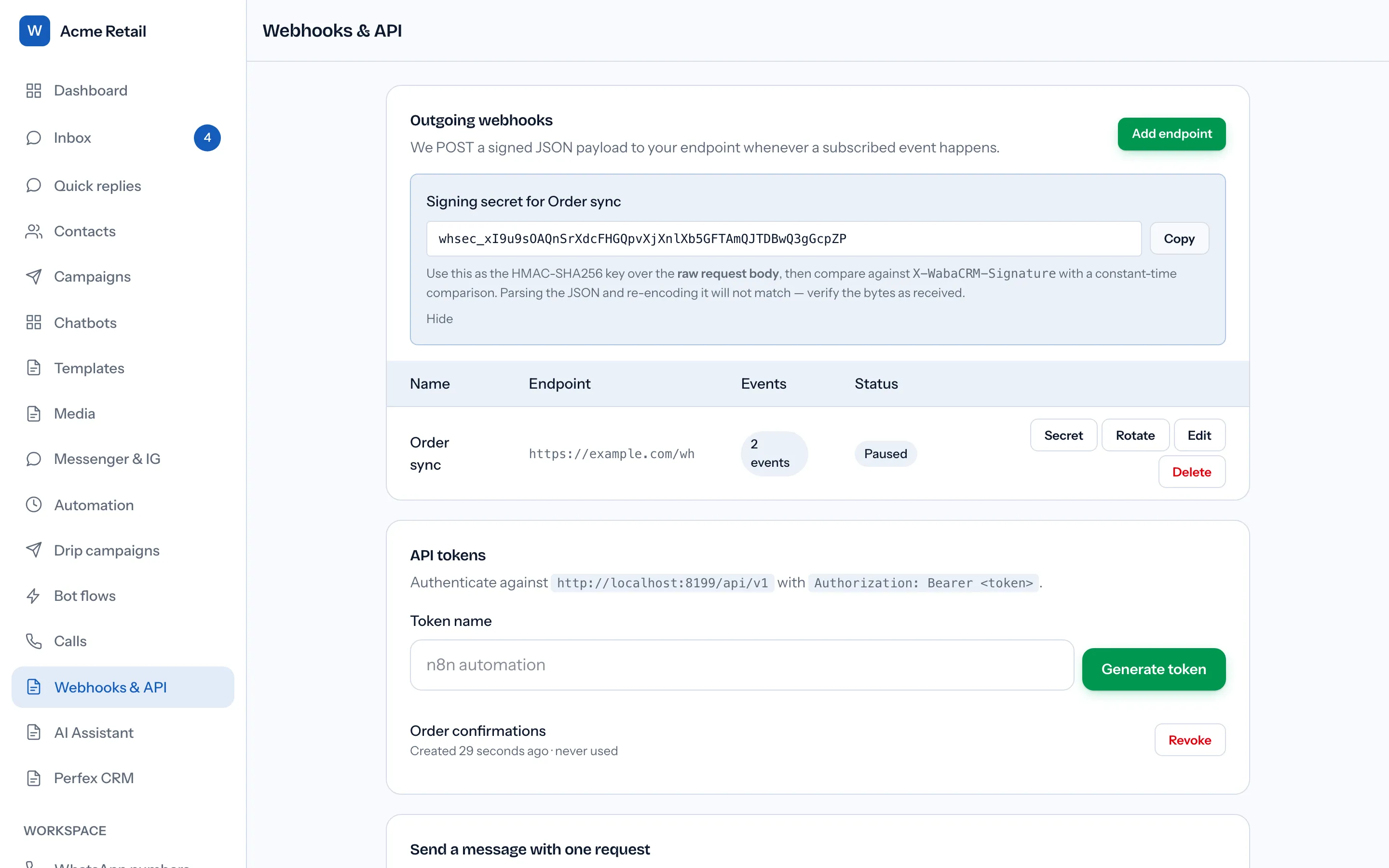
The row above is an endpoint a tenant configures to receive events from the platform — its subscribed events, its status, and a Secret button that reveals that endpoint's own signing secret. It answers a different question than this article does: not "did Meta's callback URL validate," but "can the receiver of our forwarded payload prove it came from us" — and the signature it checks is unrelated to Meta's own. Meta signs the payloads it sends to your inbound webhook with a different header entirely, X-Hub-Signature-256, and troubleshooting a mismatch there — on Meta's inbound payload, not a platform's outbound forwarding — is covered separately in why an X-Hub-Signature-256 header doesn't match on the receiving end.
For a platform sitting between many WhatsApp numbers and many customers — the shape WabaCRM's own shared inbox takes — this means the GET handshake is solved exactly once, centrally, by whoever operates the app; every tenant added afterward rides on that same verified URL. Migrating the whole setup to a different provider later is a separate operation with its own failure modes, covered in switching WhatsApp API providers without losing message history.
Every Meta quotation on this page was read from Meta's own documentation on 4 September 2026. Meta changes that documentation without notice; the linked pages are authoritative and this one is not.
Questions people also ask
Can I use the same verify token for more than one Meta app?
Does the verify token expire or need rotating?
Why does verification succeed in a browser but fail in the dashboard?
Can I change the callback URL after the webhook is verified?
Does the challenge need to be returned as a number or a string?
- whatsapp webhooks
- hub.challenge
- verify token
- meta app dashboard
- cloud api setup