Features Pricing Use cases Compare Blog

Every feature. On every plan.

There is no Pro tier here. The free plan and the largest paid plan are the same software — the only difference is how many contacts you can hold. Everything below works on the free plan today.

Shared team inbox

One WhatsApp number, your whole team, and no confusion about who is answering.

Unlimited agents
Every plan, including free. Adding people never changes your bill.
24-hour window, on screen
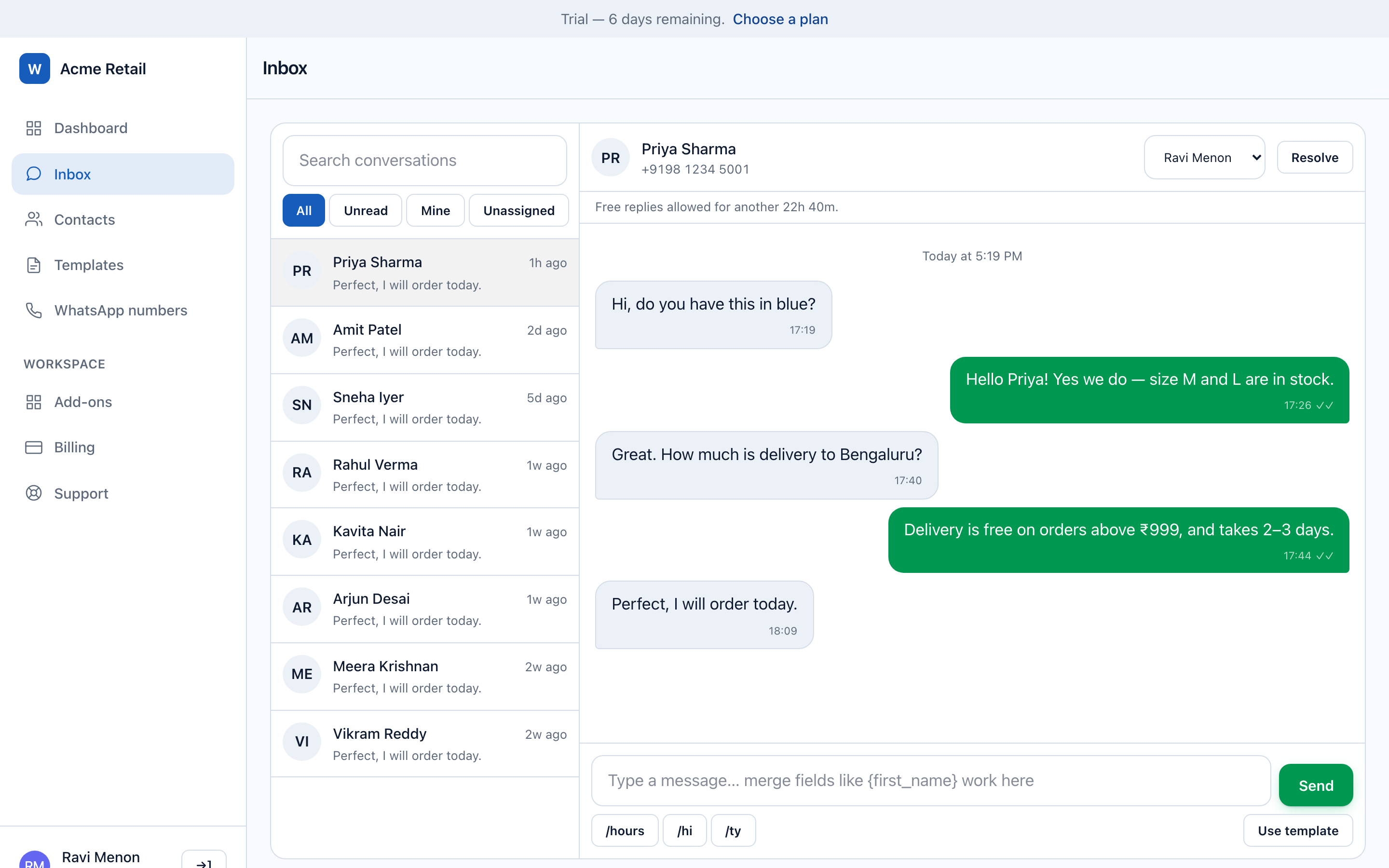
WhatsApp only allows free-form replies within 24 hours of a customer's message. The countdown is visible on every conversation, and the composer switches to templates automatically when it closes — so a message never silently fails.
Assignment and auto-routing
Assign by hand, or let each new conversation go to the least-busy eligible agent, respecting departments, permissions and availability.
Quick replies
Saved answers with /shortcut autocomplete and a picker in the composer. Share them across the team or keep them personal.
Media, replies and reactions
Photos, voice notes, video and PDFs both ways, with in-thread replies and emoji reactions.
Real-time, with sound
New messages appear the moment they arrive over websockets — no refresh, no polling — with a per-user choice of alert sound and a live unread badge.
Departments
Control which agents can see which number, so support cannot read the sales pipeline.
AI drafting
Fix grammar, translate, or have an AI agent persona draft a reply for a human to review before it sends.
The shared inbox with a customer conversation, delivery receipts, the 24-hour window countdown and quick replies in the composer.

Contacts and CRM

Every enquiry becomes a record you can work, not a message you scroll past.

Automatic lead capture
A message from an unknown number creates a contact with its source attached, so you can tell which campaign produced which customer.
Drag-and-drop pipeline
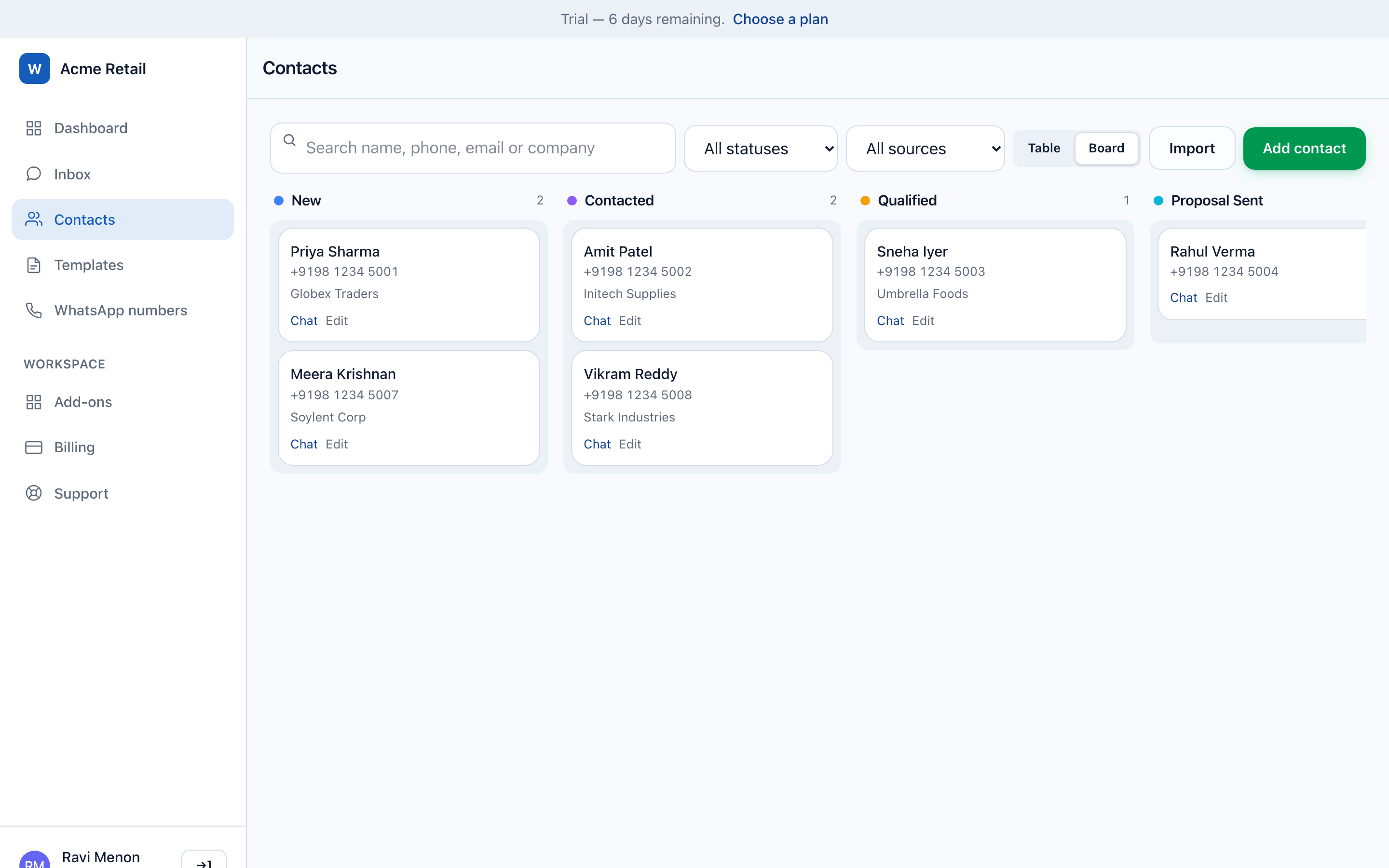
A Kanban board using your own statuses. Drag a lead from New to Qualified to Won.
Your own statuses and sources
Not a fixed list. Name the stages your business actually uses.
Groups and tags
Build segments once and target campaigns at them.
Lead scoring
Every contact carries a 0–100 engagement score, recalculated on every message, consent change and status move. Target campaigns by minimum score.
Custom fields
Store the things your business needs — order number, property type, batch, policy number.
CSV import
Column names matched automatically, numbers normalised to E.164, duplicates caught. One bad row never costs you the rest of the file.
Consent, handled
An inbound STOP opts a contact out immediately, and opted-out contacts are excluded from every broadcast automatically.
The contacts Kanban board with leads across New, Contacted, Qualified and Proposal Sent columns, each showing a lead score.

Campaigns and drip

Broadcast to thousands, then see exactly what happened to every single message.

Template campaigns
Send Meta-approved templates to a filtered audience — by status, source, group, consent or lead score.
Merge fields
Every recipient gets their own name, order number or appointment time.
Scheduling, pause and cancel
Schedule ahead, and stop a campaign mid-flight if something is wrong. The dispatcher sends a chunk then re-queues itself, which is what gives pause somewhere to take effect.
Consent re-checked at send time
Not at launch. Someone who opts out while a campaign is running stops receiving it.
Drip sequences
A series of messages over days, with a daily send limit — so a 50,000-contact list goes out at the pace you set rather than all at once.
Per-recipient reporting
Sent, delivered, read, failed and skipped, each with the reason. "5,000 selected, 4,812 sent" is never unexplained.
Rate limiting
Sending is paced per number to protect your quality rating, including the 20 messages-per-second cap Meta applies to coexistence numbers.
A completed campaign report showing recipients, sent, delivered, read, failed and skipped counts with a per-recipient reason table.

Chatbots and automation

Answer the questions you get fifty times a week without being awake for them.

Keyword bots
Multiple trigger keywords, exact or contains matching, per-number scoping, cooldowns and cloning. At most one bot fires per inbound message, and none of them ever answer a consent keyword.
Visual flow builder
Drag steps onto a canvas and join them: text, image, audio, video, document, location, call-to-action and button steps, plus an AI assistant step for questions a script cannot cover.
Greeting messages
Welcome a first-time customer, or greet a returning one after a gap you choose.
Business-hours away messages
Timezone-aware, with a cooldown so nobody gets the same auto-reply five times.
Automated follow-ups
Reopen a conversation that went quiet — as a free-form message if the window is open, as a template if it has closed and the contact still consents.
AI agent personas
Author a sales or support persona with its own guardrails, and let it hold a conversation for a set number of turns. Any human reply immediately takes the thread back.
The drag-and-drop bot flow builder canvas with connected message, button and media steps.

Templates and media

Meta's template rules are strict. The builder knows them so you do not have to.

Template builder
Headers, body, footer and buttons, with variable placeholders and a live preview.
Full button support
Quick replies, URL buttons, phone-number buttons, copy-code and one-tap authentication buttons.
Media headers
Image, video and document headers, uploaded the way Meta requires for template creation.
Approval status synced
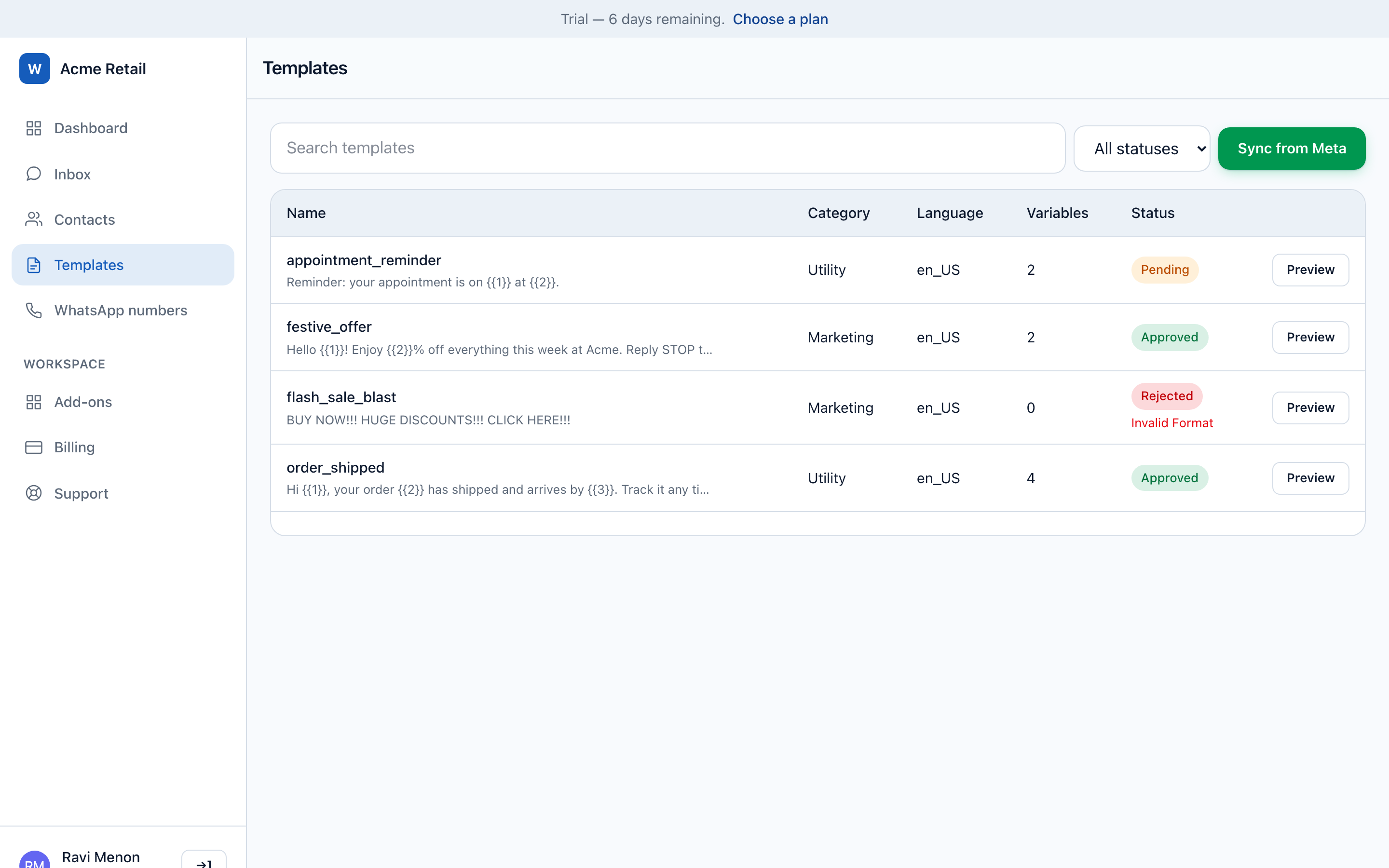
Approved, pending and rejected pulled from Meta, with the rejection reason where Meta gives one.
Media library
Upload once and reuse. Media handles are refreshed before Meta expires them, so a reused item cannot 404 mid-campaign.
The template library showing approved, pending and rejected WhatsApp message templates.

Numbers, API and operations

The unglamorous half: connecting numbers, watching their health, and getting data out.

Three ways to connect
Meta's one-click Embedded Signup, coexistence for a number you still use on your phone, or your own API credentials.
Multiple numbers
Run several WhatsApp numbers in one workspace, with departments controlling who sees which.
Health monitoring
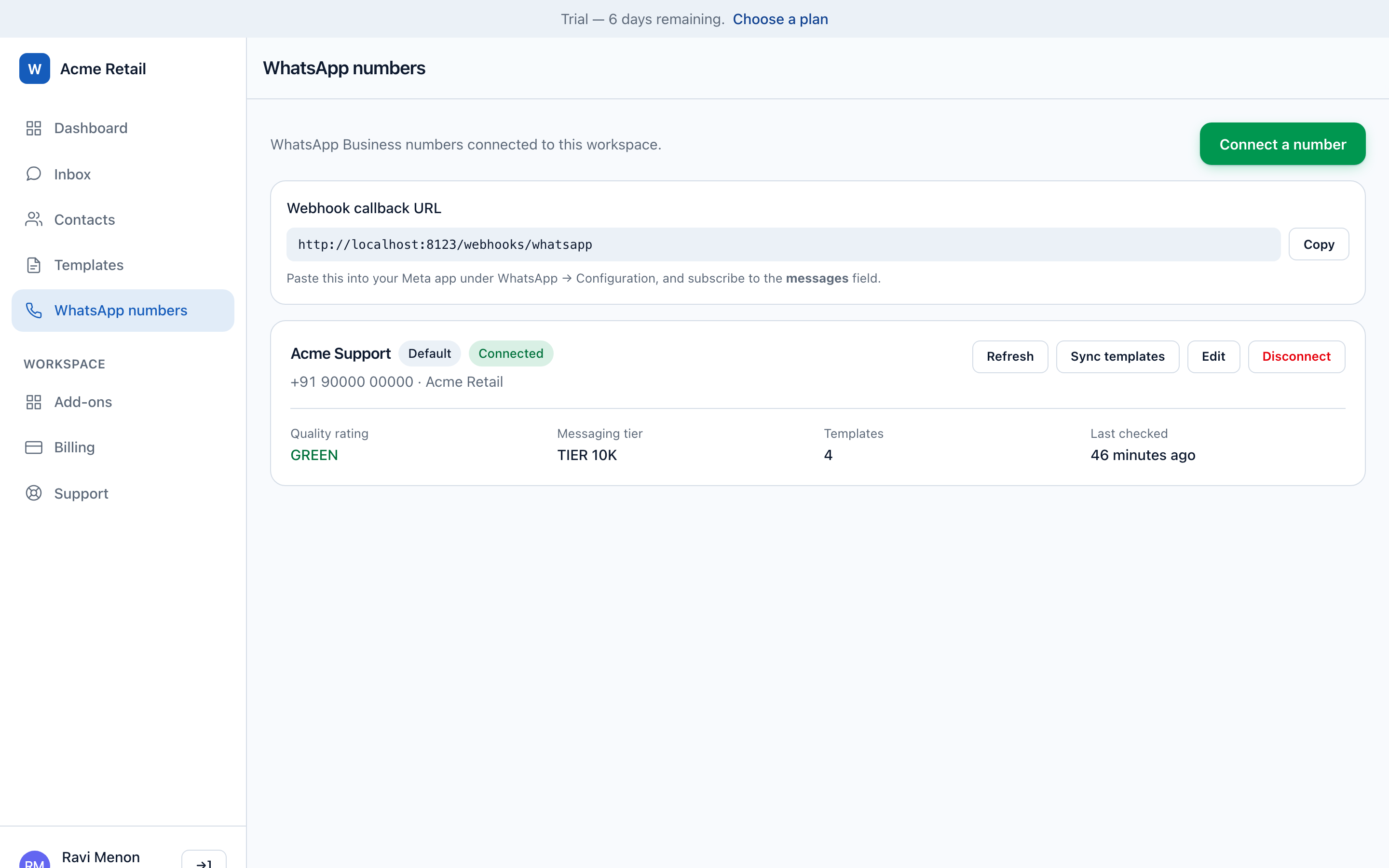
Quality rating, messaging tier, token expiry and connection state checked hourly, with an email to owners before Meta restricts the number rather than after.
REST API v1
Send messages, launch campaigns and manage contacts and groups programmatically, on Sanctum tokens.
Signed webhooks
Forward inbound events to n8n, Zapier or your own endpoint, HMAC-signed over the exact bytes, with redelivery, logs and automatic disabling after repeated failures.
Message logs
Every message, filterable and exportable to CSV, with department walls enforced in the query.
WhatsApp Business Calling
Answer WhatsApp calls in the browser and call customers back once they permit it, with a full call log Meta itself does not keep.
Team permissions
Per-user permissions re-authorised on every privileged action, not just hidden in the UI.
The WhatsApp number screen showing connection status, quality rating, messaging tier and the webhook callback URL.

Also included, on every plan

Android app on Google Play Support ticketing Activity log per workspace Encrypted credentials Add-on module system Multi-number support CSV export everywhere Per-number departments Impersonation-safe audit trail

Everything above, free for 1,000 contacts

Free for your first 1,000 contacts, with no time limit and no card. Setting up the workspace takes minutes; connecting a number takes as long as Meta's own review of it.

Sign up with your company email address. No sales call, no onboarding fee, nothing to schedule.

Why this is safe to point your customer list at

Payments are processed by Razorpay on their own checkout — your card details are never entered on, or stored by, WabaCRM. Every inbound WhatsApp webhook is checked against its signature before it is trusted.

Tech Provider is a Meta platform access tier — not a partnership, a reseller agreement or an endorsement.