Keyword bots and flows
WhatsApp Chatbot Builder: Keyword Bots and Flows
Last checked · 15 min read
The short answer
A WhatsApp chatbot builder sets the replies your number sends automatically when a customer writes. On the official API those free-form replies only go inside the 24-hour window the customer's message opens, and a reply-button message carries at most three buttons. WabaCRM's keyword chatbots come with every plan; its drag-and-drop flow builder is an optional add-on. Checked 15 October 2026.
What is a WhatsApp chatbot builder?
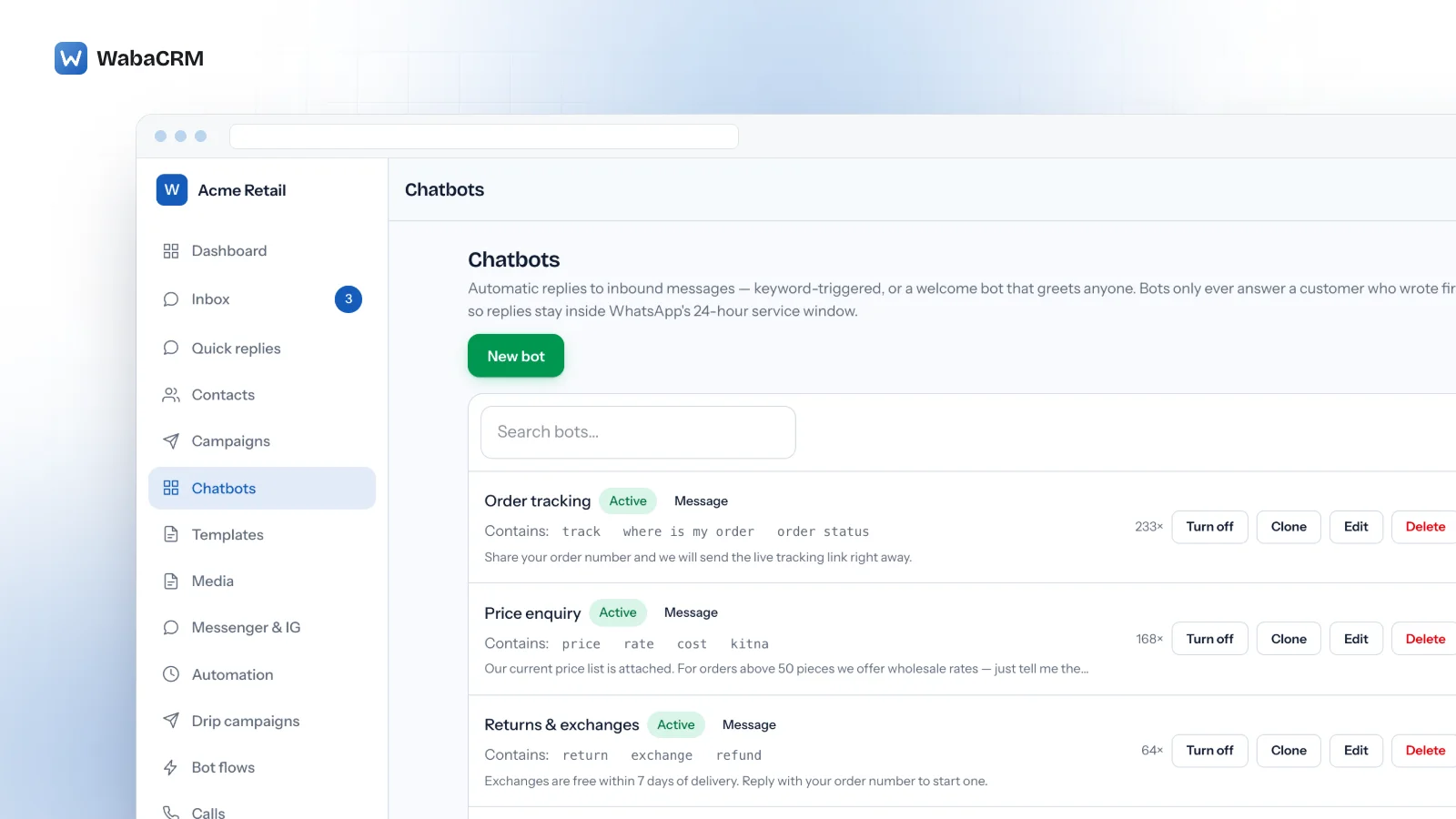
A WhatsApp chatbot builder is the screen where you decide what your number says automatically when a customer writes to it: which words it listens for, what it replies and which buttons it offers. On the official WhatsApp Business Platform its free-form replies can only reach someone who has messaged or called you in the last 24 hours, so a chatbot answers; it does not start conversations.
Everything else follows from that. A bot is a set of rules that run in the seconds after a message arrives, in the shapes Meta's interactive message references allow: up to three reply buttons, a list, or a link button.
WabaCRM ships both halves. Keyword chatbots, which answer chosen words or any message, are part of the core product. The drag-and-drop canvas that strings steps together, with media, locations, link buttons and menus that branch, is the Bot Flow Builder, an optional add-on.
- What is a WhatsApp chatbot builder?
- When is a WhatsApp chatbot allowed to reply?
- How many buttons can a WhatsApp chatbot send?
- How does a WhatsApp keyword auto-reply bot pick its answer?
- What does the drag-and-drop flow builder add?
- What happens when a customer types instead of tapping a button?
- Why does a WabaCRM chatbot stay silent when someone sends STOP?
- Can a flow hand the chat to an AI agent and then back to your team?
- Does the same chatbot answer on Messenger and Instagram?
- What does a WhatsApp chatbot flow deliberately leave out?
- What does Meta charge for a chatbot's replies?
When is a WhatsApp chatbot allowed to reply?
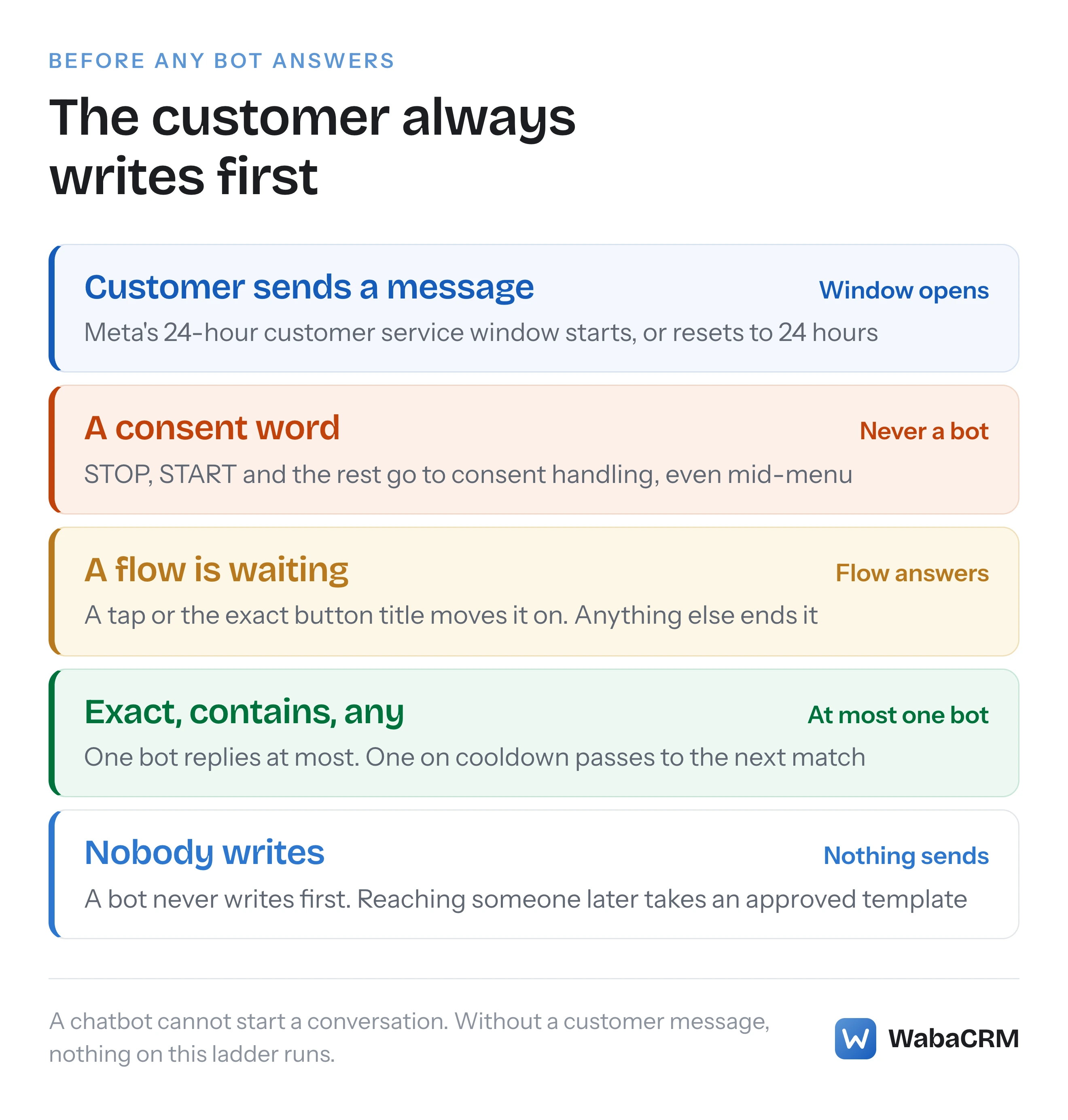
With a free-form message, only while the customer service window is open, and only the customer can open it. Meta's service messages guide defines the window exactly:
"When a WhatsApp user messages you or calls you, a 24-hour timer called a customer service window starts. If the user messages or calls you again before the timer expires, the timer resets to 24 hours." (Meta — Service messages)
Outside it the same page is blunt: "When the window closes, you can only send pre-approved template messages." (Meta — Service messages) Meta's pricing page states the rule from the other direction:
"Note that a business can also choose to use template messages to respond to users; however, non-template messages cannot be used to reach out to users." (Meta — Pricing on the WhatsApp Business Platform)
A bot that fires on an inbound message is inside the window by construction, and WabaCRM's keyword chatbots fire on nothing else.
So a bot cannot write first to a lead who has gone quiet, run on a schedule or be pushed to a contact list. That takes an approved template, so a chatbot sold as one that starts conversations is really sending templates.
How many buttons can a WhatsApp chatbot send?
Three, when they are reply buttons, and the number is Meta's rather than the builder's:
"Interactive reply buttons messages allow you to send up to three predefined replies for users to choose from." (Meta — Interactive reply buttons messages)
The same reference caps each label at 20 characters, allows a body of 1,024 characters above the buttons, and adds a rule that is easy to break in a hurry: "Button label text. Must be unique if using multiple buttons." (Meta — Interactive reply buttons messages)
A builder promising a ten-option menu is using a different message type, the list:
"Interactive list messages support up to 10 sections, with up to 10 rows for all sections combined, and can include an optional header and footer." (Meta — Interactive list messages)
The third shape is the link button, which keeps a long URL out of the text. In Meta's words, "CTA URL button messages allow you to map any URL to a button so you don’t have to include the raw URL in the message body." (Meta — Interactive CTA URL button messages)
| Message type | Meta's limit | Used in WabaCRM by |
|---|---|---|
| Reply buttons | 3 buttons, 20-character unique labels, 1,024-character body | Keyword chatbots and flow menus |
| List | 10 rows across all sections, 24-character row titles | Not offered |
| CTA URL button | 20-character label, 1,024-character body | The flow's link step |
| Location | Latitude and longitude | The flow's location step |
WabaCRM refuses a button title longer than 20 characters when a bot or flow is saved, and drops a fourth button typed into a keyword bot. There is no list step, so a menu with more than three choices is built by chaining one three-button menu into the next.
How does a WhatsApp keyword auto-reply bot pick its answer?
On the core Chatbots screen, each bot has a trigger and a reply. The trigger is either specific keywords or any message, which the screen calls a welcome bot. A keyword matches when the whole message equals it, or when the message contains it, ignoring letter case. Exact means exact: price? with a question mark does not equal price.
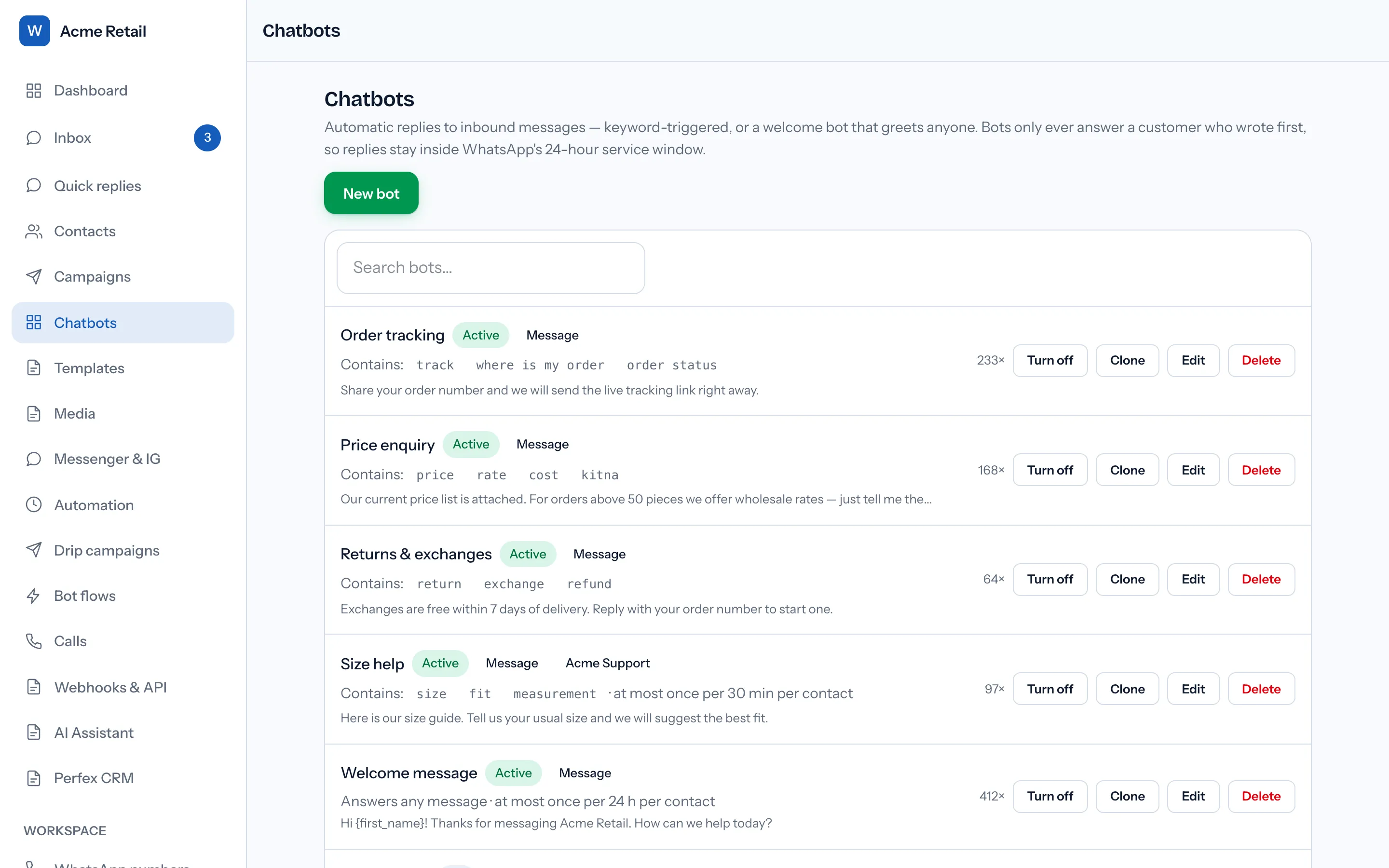
Contains means anywhere, even inside a longer word, so a contains-match on hi also fires on this and which. Keep it for distinctive words such as a product name.
At most one bot answers any message, chosen in a fixed order:
- An exact keyword match beats a contains match, and both beat an any-message bot.
- A bot limited to the number the message arrived on beats one set to every connected number.
- The oldest bot wins any remaining tie.
Each bot carries a cooldown in minutes per contact, from 0 to 43,200 (30 days). The default, 0, answers every time; the screen suggests 1440, once a day, for a welcome bot. If the winner is still cooling down for that person, the next-best match may answer instead.
The reply is a free-form message with merge fields such as {first_name} and up to three quick-reply buttons, or an approved template with its body values filled in. A tapped button comes back as a message carrying the button's text, so a title that matches another bot's keyword chains the two into a menu. A keyword bot cannot attach an image or a PDF; media replies are a flow step. Message chatbots can also be created and edited from the WabaCRM Android app.
A welcome bot is the first thing most people build, and Meta's guidance on message quality has a line that applies to it: "Avoid sending open-ended welcome or introductory messages." (Meta — Service messages) Give it a question and two or three buttons, and a cooldown so nobody is welcomed on every message.
What does the drag-and-drop flow builder add?
A flow is a conversation drawn on a canvas instead of a single reply. The Bot Flow Builder, an optional add-on priced on the add-ons page, puts it on the Bot flows screen: drag steps from a palette, or click to add them, then join a step to the next by clicking its port dot and then the step it should lead to. The side panel's Leads to list shows where each step goes.
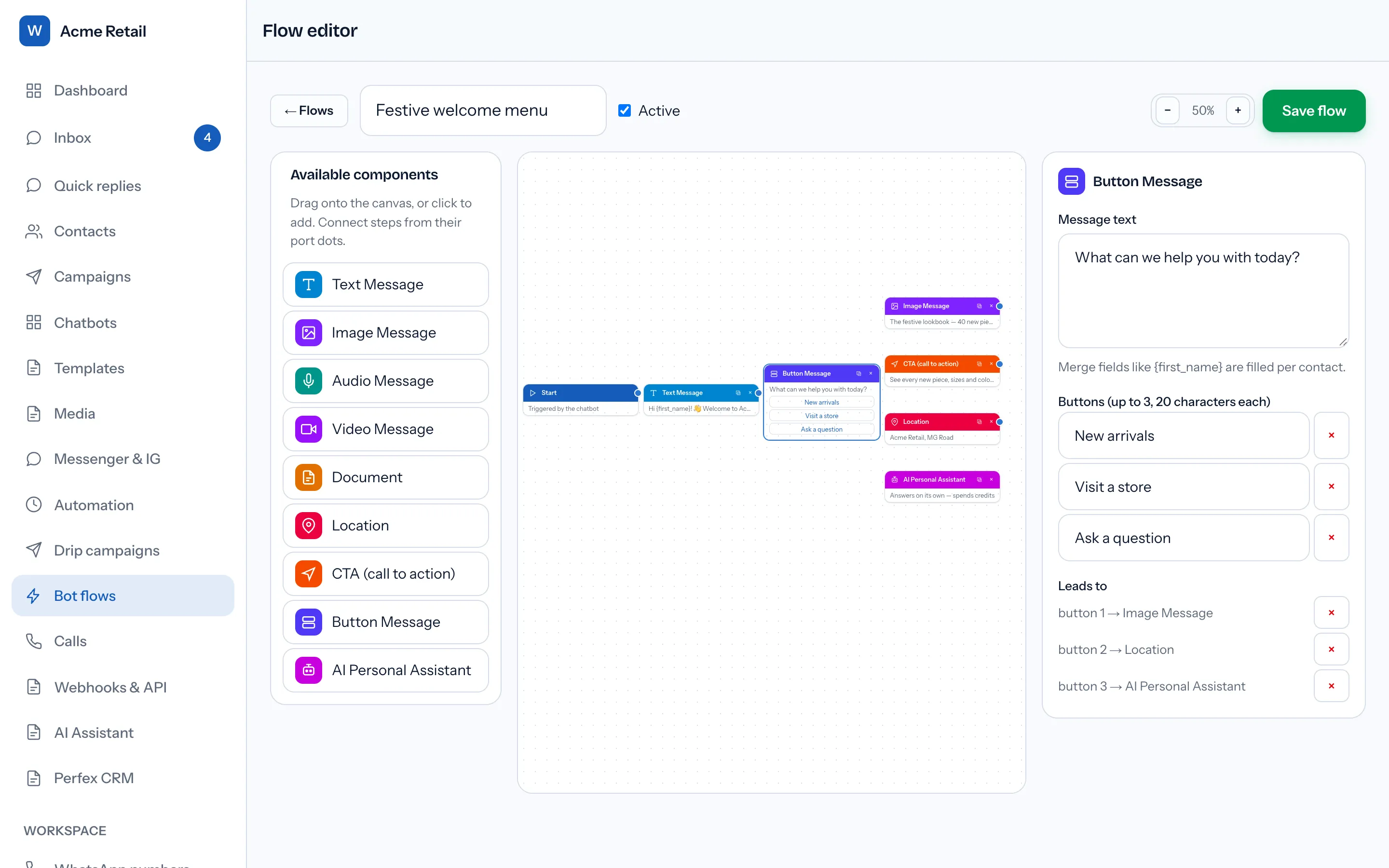
After a fixed Start step, the step types are exactly these: Text Message, Image Message, Audio Message, Video Message, Document, Location, CTA (call to action), Button Message and AI Personal Assistant. Media comes from the workspace media library, and merge fields work in message text, in menu and link-step bodies, and in captions. The Button Message step is the one that branches: it sends up to three buttons, parks the conversation, and gives each button its own outgoing connection.
| What you want the bot to do | Keyword chatbot (core) | Flow builder (add-on) |
|---|---|---|
| Answer a keyword or any message | Yes | Started by a chatbot |
| Offer up to three reply buttons | Yes | Yes, each with its own branch |
| Send an image, video, audio or document | No | Yes, from the media library |
| Send a location or a link button | No | Yes |
| Reply with an approved template | Yes, body values only | No template step |
| Hand the chat to an AI agent | No | With the AI Assistant add-on |
Three rules shape every flow. It never starts by itself: it runs when a chatbot whose Reply with is A multi-step flow matches a message, so the chatbot's keyword, or its any-message trigger, starts it. It holds at most 50 steps, counting Start. And it walks at most 20 steps in total, counted across button taps until it ends, which stops a loop drawn by mistake from flooding a customer; an AI step's replies are capped by its own turn limit instead. New and duplicated flows start switched off, and a chatbot pointed at a switched-off flow sends nothing.
Keep the chain before a menu short. Meta's service messages guide warns that "When sending a series of messages, the order in which messages are delivered is not guaranteed to match the order of your API requests." (Meta — Service messages) Text, image and menu sent back to back are three requests, so put what the customer must read before choosing into the menu's own body.
What happens when a customer types instead of tapping a button?
A tap is unambiguous: "When a WhatsApp user taps on a reply button, WhatsApp triggers a messages webhook that describes their selection in a button_reply object" (Meta — Interactive reply buttons messages). People type anyway. At a waiting Button Message step, WabaCRM moves the flow on for a tap, or for the button's exact title typed in any letter case. Anything else ends the flow quietly and hands the conversation back to your team and to keyword chatbots. That is deliberate: a real question typed past the menu stays in the inbox for a person to answer.
Two details matter once a flow is live. If the add-on is switched off, a conversation parked at a menu is released on the customer's next message rather than frozen. And a parked customer reads the live flow on their next tap, so deleting the step they wait at ends their flow. To rework a busy flow, duplicate it, edit the copy, switch the copy on, then point the chatbot at it.
Why does a WabaCRM chatbot stay silent when someone sends STOP?
Because consent words belong to consent handling, not to bots. A message consisting only of an opt-out word opts the contact out of broadcasts, and a resubscribe word opts them back in. The default opt-out words are stop, unsubscribe, cancel, quit, end, optout, opt out and opt-out; the resubscribe words are start, subscribe, unstop and resume. A workspace can change both lists.
No bot answers those words, including while a flow is waiting at a menu, and a chatbot keyword that equals one of them is refused at save, with a message saying a bot can never answer it. The same check catches button titles: a tap on a button labelled Cancel, End or Start, all on the default lists, reaches no bot and no flow, so nothing answers it. Write Not now or Back instead.
Meta's opt-in page advises businesses to "Provide clear instructions for how people can opt out of receiving specific categories of messages, and honor these requests." (Meta — Get opt-in for WhatsApp) What counts as opt-in is set out in what WhatsApp actually requires from an opt-in.
Can a flow hand the chat to an AI agent and then back to your team?
Yes, with a second add-on. The AI Personal Assistant step needs both the flow builder and the AI Assistant add-on, plus AI credits. The chosen agent answers and then holds the thread, replying to each new message until its turn limit is reached (1 to 50 replies, 10 by default), a teammate replies, the credits run out, or the agent or add-on is switched off.
Four facts about it are easy to get wrong:
- It reads the last 12 messages, not the whole conversation.
- Each reply spends AI credits, two per reply as of 15 October 2026.
- It is the last step. Nothing can be connected after it.
- Handing back assigns nobody. When the hold ends, the step assigns and alerts no one; it simply stops answering. An agent writing a colleague will take over does not end the hold either. Keep the turn limit low.
On Meta's bill these are ordinary service messages. The pricing page defines that category as "Service – Any non-template message not powered by the Meta Business Agent Platform. These can be powered by a 3rd-party AI solution or people (like customer service representatives)." (Meta — Pricing on the WhatsApp Business Platform) WabaCRM's AI step does not use the Meta Business Agent Platform. How the agents themselves are set up is covered in the WhatsApp AI agent guide.
Does the same chatbot answer on Messenger and Instagram?
Partly. If the workspace also runs the Messenger & Instagram inbox add-on, a keyword chatbot set to every connected number, or to that Page, answers DMs there too, but only with plain text. A message bot's reply buttons are dropped there and its text goes out on its own, while template bots and flow bots do not answer on those channels at all.
Those channels keep their own messaging windows and error codes, compared in WhatsApp error 131047 against Messenger's window codes.
What does a WhatsApp chatbot flow deliberately leave out?
A flow has no list message step, no conditions that branch on what a customer typed, no timed delays, no question whose answer is saved to the contact, no tagging or assignment step, no step that calls your own API, no template step and no jump into another flow. The nine step types above are the whole palette.
A form is a different Meta product with a confusingly similar name: "WhatsApp Flows is a way to build structured interactions for business messaging." (Meta — WhatsApp Flows) Those are screens inside the chat that collect fields, covered in the WhatsApp Flows guide.
Replies that depend on the clock rather than on a keyword, such as after-hours away replies and a follow-up when a conversation goes quiet, come from a separate add-on, described in WhatsApp Business API auto-replies. Its rules do not check what the chatbots did, so an away reply can go out on the same message a bot answers.
What does Meta charge for a chatbot's replies?
The same as for a person's. A bot's free-form replies are service messages, a template reply is charged by its category, and Meta's pricing page sets a monthly allowance per number:
"Each business phone number has one free tier of 1,000 delivered service messages per month. Meta charges as of the 1,001st service message per month, after the free tier has been used." (Meta — Pricing on the WhatsApp Business Platform)
The same section adds the sentence that matters most for an always-on bot: "If businesses do not have a payment method for their Messaging account(s), Meta will deliver service messages within the free tier but not deliver them after the free tier has been used." (Meta — Pricing on the WhatsApp Business Platform) With no payment method on file, a welcome bot stops reaching customers once the number's 1,000 free service messages for the month are used, with nothing about the bot changed.
Meta bills those messages to your own WhatsApp Business Account. WabaCRM is a Meta-verified Tech Provider, which may not resell Meta's message fees, so it adds 0% markup. A cooldown on a welcome bot is the simplest saving: one hello a day per person, not one per message.
Every Meta quotation on this page was read from Meta's own documentation on 15 October 2026. Meta changes that documentation without notice; the linked pages are authoritative and this one is not.