Three channels, one inbox
WhatsApp, Instagram and Messenger in One Inbox
Last checked · 14 min read
The short answer
Instagram and Messenger DMs can share an inbox with WhatsApp, but they follow Meta's Messenger Platform rules. The person writes first, and replies go inside the standard messaging window: 24 hours for most actions, up to 7 days when their first message follows a Click-to-Messenger or Click-to-Direct ad. Marking a contact opted in opens no window. Checked 15 October 2026.
Can WhatsApp, Instagram and Messenger share one inbox?
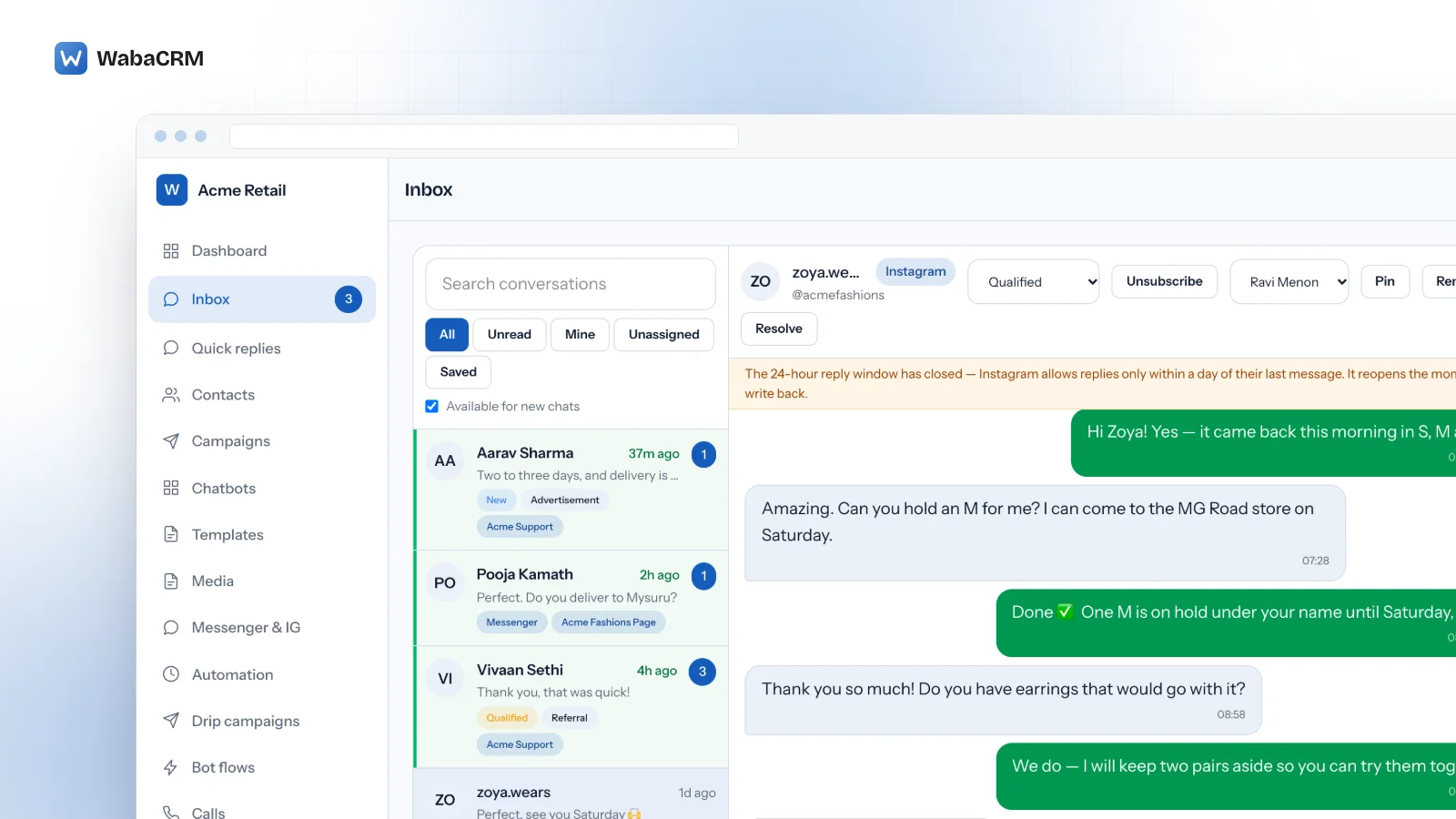
Yes. WabaCRM's Messenger & Instagram Inbox, an optional add-on, connects a Facebook Page and the Instagram professional account linked to it through Facebook's own login, and their DMs land in the same inbox your team already answers WhatsApp in, each thread labelled Messenger or Instagram.
The screen is the easy part; the three channels do not share a rule book. On WhatsApp, a business that writes first sends an approved template: "To message WhatsApp users outside of a customer service window, use template messages instead." (Meta — Service messages). Messenger and Instagram run on Meta's Messenger Platform, and its overview puts the opposite rule in six words:
"A person must initiate the conversation." (Meta — Overview for the Messenger Platform)
This page covers the rules behind the screen, and exactly what the add-on does and refuses to do on each channel.
- Can WhatsApp, Instagram and Messenger share one inbox?
- What does Meta let a business send on Messenger and Instagram?
- Why can't you opt everyone in and broadcast to them?
- Who does a Messenger or Instagram broadcast actually reach?
- Does anything reopen a closed Messenger or Instagram thread?
- How long does the ad-click window last, and when does it apply?
- What arrives in the shared inbox, and what can an agent send back?
- Who on the team sees these conversations?
- What does a Page or Instagram account need before it connects?
- Do WhatsApp campaigns, chatbots and automations reach these channels?
- Where do comments and posts fit beside the DMs?
What does Meta let a business send on Messenger and Instagram?
Ordinary messages, promotions allowed, inside a window the person opens; outside it, only the specific routes Meta's policy names. Meta's policy page, updated 28 September 2026, defines the standard messaging window in one passage:
"Businesses have the duration of the standard messaging window to respond to a user. The duration of the standard messaging window depends on the user action that opens it. For most user actions, it lasts 24 hours. When the user action is a person sending their first message after clicking a Click-to-Messenger or Click-to-Direct ad, the window may last up to 7 days from that message. Messages sent within the standard messaging window may contain promotional content." (Meta — Messenger Platform and IG Messaging API policy)
Two things in that passage matter more than the numbers. Promotional content is allowed, so a broadcast to people inside their window is legitimate. And the window belongs to a user action. Every example Meta gives of what opens it is something the person does: sending a message to the Page, tapping a call-to-action button such as Get Started, starting a conversation from a plugin, clicking an m.me or ig.me link with a ref parameter on an existing thread, or reacting to a message.
The two accounts are also separate worlds. Meta's overview states that "A person logged in to Facebook cannot message your Instagram Professional account. Similarly, a person logged in to Instagram cannot message your Facebook Page using the Messenger Platform." (Meta — Overview for the Messenger Platform). A window open on the Page is not a window on the Instagram account.
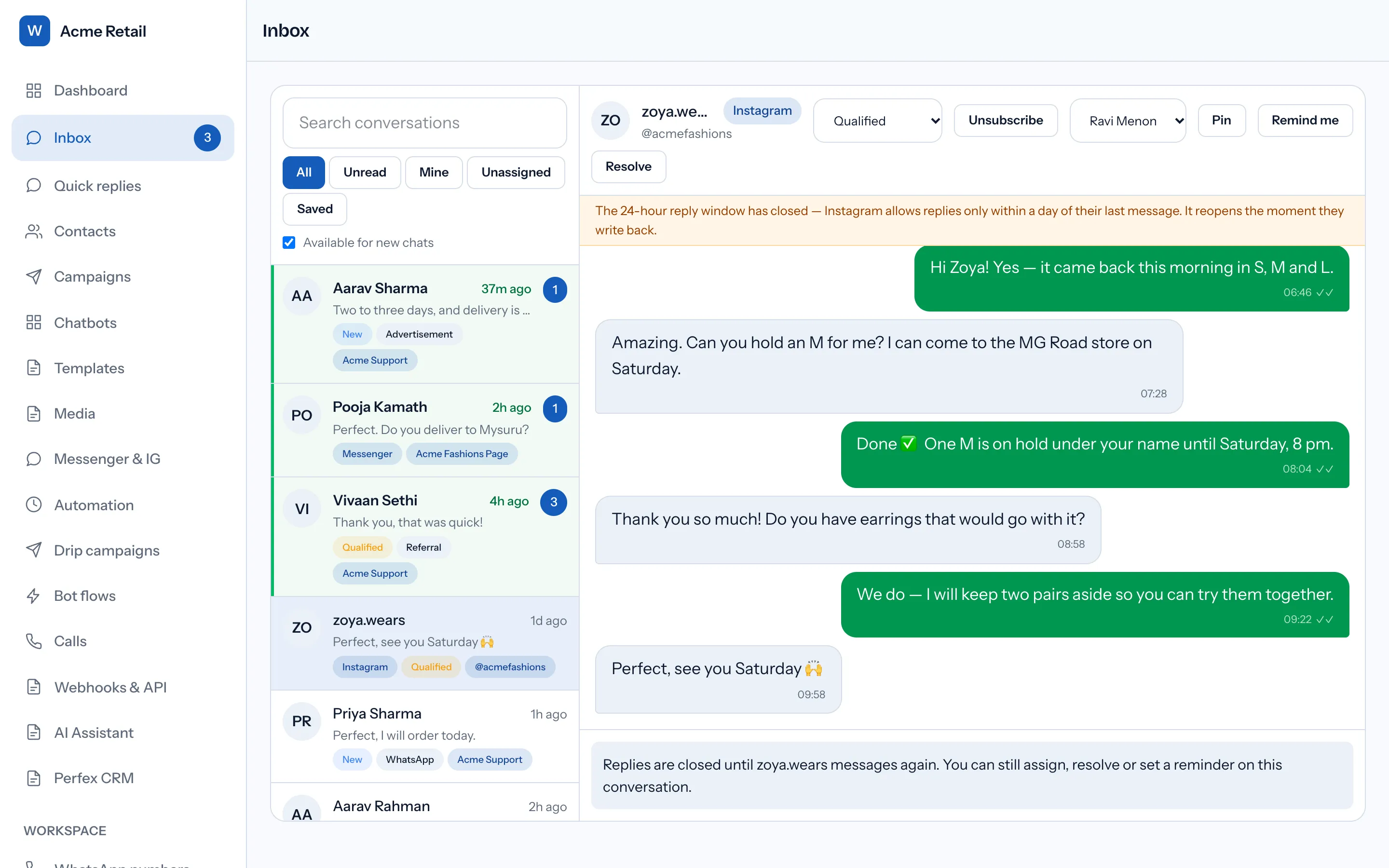
In the inbox, each Messenger and Instagram thread shows its own window, as a WhatsApp thread does. The finer points of Instagram's clock are in the Instagram DM 24-hour window explained.
Why can't you opt everyone in and broadcast to them?
Because consent and the window are two separate gates, and only the person can open the second one.
On WhatsApp, an opted-in contact can be sent an approved template days later, which is what makes opting everyone in and then broadcasting sound reasonable. It does not carry across. The Contacts screen has a bulk switch that turns broadcasts on for Messenger and Instagram contacts who have it off. It skips anyone opted out or blocked, applies only to the current filter, and is written to the activity log, and its card says plainly that it makes nobody reachable who is outside Meta's window.
It changes who is counted when a window is open, and opens none.
Two details decide who starts where. A person who sends your Page or account a DM is filed with broadcasts on, because they wrote first. A person reached only through a private reply to their comment is filed with broadcasts off: their reply may open a window, but it grants no consent. And a STOP sent in a Messenger or Instagram DM opts the person out under the same rules as WhatsApp, with START bringing them back.
Who does a Messenger or Instagram broadcast actually reach?
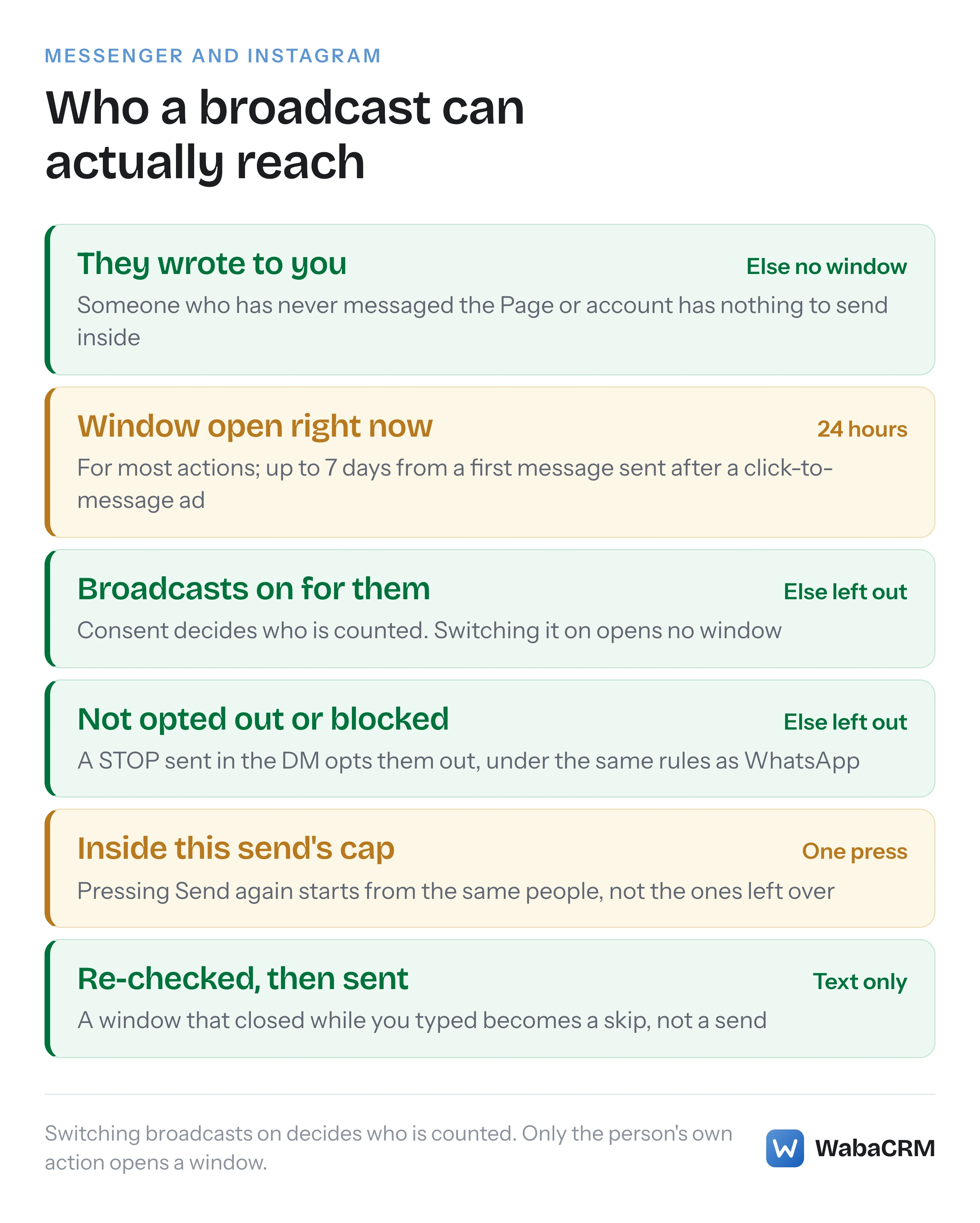
Only the people on one Page or account who can be written to right now. The Broadcast screen counts the conversations on one connected Page or Instagram account where four things hold: the window is open now, broadcasts are switched on for the person, they are not blocked, and they have not opted out. Its headline reads "N of M can be reached right now", and the people left out are counted by cause: wrote too long ago, never wrote, broadcasts switched off, unsubscribed or blocked.
A follower who has never written to the account is not in the count at all, because there is no window to send inside.
The send itself is narrower than a WhatsApp campaign in three deliberate ways.
- Text only. One plain-text message of 2 to 2,000 characters. No images, no buttons, and nothing waiting on Meta's approval.
- A cap per send. One press writes to at most the number its button shows, and never past a per-send ceiling. When more people can be reached than that, the screen says how many will not receive the message.
- A second press is not a continuation. Each send starts from the same first recipients, so pressing Send again reaches the people who already have the message, not the ones left over. For an audience bigger than one send, write to support instead.
Every recipient is re-checked as the message goes out, so a window that closed while someone was typing becomes a counted skip. A member who cannot view every conversation broadcasts only to their own and unassigned threads, sending needs the campaigns.send permission, and every send that reaches anyone is written to the activity log.
Does anything reopen a closed Messenger or Instagram thread?
Within this add-on, only the person acting again: a new message, a tap on a button such as Get Started, or a reaction, each of which Meta lists as opening the window. Besides the private reply to a comment, Meta's policy describes four routes outside the window, and Instagram is shut out of three of them.
| Route outside the window | What Meta's policy says it is for | |
|---|---|---|
| Message Tags | "important and personally relevant 1:1 updates" | Some tags only |
| One-time Notification | One follow-up, requested by the person | Not available |
| News messaging | "non-promotional news messages" from registered news Pages | Not available |
| Sponsored Messages | "promotional content outside the standard messaging window" | Not available |
Every row comes from Meta's Messenger Platform and IG Messaging API policy, read on 15 October 2026.
The page also names two more without describing them there: "For information on how you may be able to send messages outside the standard messaging window, see Message Tags, Utility Messaging, Marketing Messages, and Sponsored Messages." (Meta — Messenger Platform and IG Messaging API policy). And Meta's Messenger webhook reference lists a field for when "a utility message template’s review status has changed" (Meta — Meta Webhooks for Messenger Platform). So this page does not claim that Messenger has no templates of any kind, only that the add-on uses neither route.
What is safe to say is about the product. Apart from the one private reply Meta allows per comment, the add-on sends nothing outside the window. It sends no message tags, including the Human Agent tag that Meta describes as one that "allows businesses to manually respond to user messages within a separate 7-day period" (Meta — Messenger Platform and IG Messaging API policy). From the inbox, WhatsApp's template, location, interactive, Flow and product messages are refused on these channels. A closed thread stays closed until the person acts again. What each channel's refusal looks like is covered in WhatsApp error 131047 against Messenger's window codes.
How long does the ad-click window last, and when does it apply?
Up to 7 days, and only from the person's first message after clicking a Click-to-Messenger or Click-to-Direct ad. Meta's trigger is precise: "When the user action is a person sending their first message after clicking a Click-to-Messenger or Click-to-Direct ad" (Meta — Messenger Platform and IG Messaging API policy). On Instagram, the click arrives inside the messages webhook, which Meta says fires when "a customer clicks an ad that goes to an Instagram Messaging conversation" (Meta — Webhooks for Instagram Messaging), with a referral marked "source": "ADS" and an ad_id.
The add-on reads that literally:
- The longer window is granted only when the referral's source is
ADSor it carries an ad id. Referrals from m.me short links or the website chat plugin stay at 24 hours. - A click that arrives before the message, as a separate referral event or alongside a Get Started tap, is held, and the person's next real message is what spends it.
- A Get Started tap or a reaction on its own never earns the 7 days, because Meta's sentence is about a person sending their first message.
- The window only moves forward, so a later ordinary message cannot shrink seven days back to one.
When the click arrives as an event of its own, the thread shows it as a system line, "Came from an ad" or "Came from a link".
What arrives in the shared inbox, and what can an agent send back?
Inbound, the add-on stores text; image, video and audio attachments; files as documents; stickers; story mentions and story replies; and shared posts and reels as links. Unsupported content is kept, not dropped. Attachments are downloaded when they arrive. Delivery and read receipts are applied to the thread, and replies your team sends from Meta Business Suite or the Instagram app appear labelled "From the Page inbox" or "From the Instagram app".
Outbound is text and media:
| What an agent sends | Messenger and Instagram threads |
|---|---|
| Text | Yes, inside the window |
| Images | JPEG or PNG, up to 8 MB |
| MP4 video, audio, PDF | Up to 25 MB |
| Captions | Sent as a second message |
| Reactions | Not sent |
| Templates, buttons, location | WhatsApp only |
New DM contacts are created without a phone number, under a source named after the channel. Auto-assign and push notifications to the Android app fire for these DMs as they do for WhatsApp. There is no channel filter in the inbox list; each thread carries its badge instead.
Who on the team sees these conversations?
The same people, under the same walls. The department wall that decides which WhatsApp numbers a member can see covers connected Pages and Instagram accounts as well: a member restricted to departments sees and acts only on their own accounts, across comments, posts, comment automations and broadcasts. Pages and accounts sit beside the numbers in the Team screen's department list, so a member limited to WhatsApp numbers sees no Messenger or Instagram thread until one is ticked for them too. Ask the same of any shared WhatsApp team inbox.
Default roles divide the work:
- Owner and Admin can connect and disconnect Pages, and hold every permission the add-on uses.
- Manager can work comments, build comment automations and send broadcasts, but cannot connect or disconnect a Page.
- Agent can read and reply to comments and view Broadcast, but cannot send. Agents also have no web menu link to these screens, so they reach comments from the Android app's Social tab or a direct link.
On the Android app, the comments, automations, posts and broadcast tools sit in a Social tab, while connecting or disconnecting a Page opens the web.
What does a Page or Instagram account need before it connects?
A Facebook Page, and for Instagram a professional account linked to that Page. An Instagram account with no Page cannot connect; the Instagram-only login route is not built.
The connection runs through Facebook's own login. The picker lists the Pages that login manages, with a Messenger box for each and an Instagram box where a professional account is linked, so the two can come in together or separately. Leave every permission ticked: the only optional one is Instagram comment access, and without it DMs work while Instagram comments do not appear.
The connection is checked rather than assumed:
- The add-on re-reads the Page's webhook subscription after connecting, and refuses to call the connection healthy until WabaCRM's app is listed on it.
- A Page already connected to another workspace is refused.
- Each connection shows when Meta last delivered a message or comment. If nothing at all has arrived two days after connecting, the line turns amber: expected if nobody has written, worth raising with support if they have.
Each side also identifies people separately. Meta's overview says that "Each person who messages your Facebook Page or Instagram Professional account is assigned a scoped ID unique to that account" (Meta — Overview for the Messenger Platform), so the same customer writing to both arrives under two different IDs. Disconnecting a Page keeps its conversations in the inbox; new messages simply stop arriving.
Do WhatsApp campaigns, chatbots and automations reach these channels?
Partly, and the parts that do not are deliberate.
- WhatsApp campaigns and drips. A Messenger or Instagram contact can never enter a WhatsApp campaign, because a campaign audience requires a phone number. A drip cannot be aimed at a Page.
- Keyword chatbots. A bot set to every connected number, or to a particular Page or account, answers there too, with text or media by URL. Bots built in the WhatsApp chatbot flow builder, including its AI step, and bots that send a template skip these channels; a bot with buttons sends its text without them.
- Greeting, away and follow-up automations run on WhatsApp numbers only.
- Webhook forwarding to your own systems does not carry Messenger or Instagram events.
Where a bot does answer, Meta's policy has a disclosure rule worth knowing: "When required by applicable law, automated chat experiences must disclose that a person is interacting with an automated service" (Meta — Messenger Platform and IG Messaging API policy).
Where do comments and posts fit beside the DMs?
On their own screens, feeding the same inbox. The Comments screen collects comments on your Facebook and Instagram posts and ads, and a private reply to one opens a DM thread. Meta caps that tightly: "Private replies are currently allowed within 7 days of the referenced user action" (Meta — Messenger Platform and IG Messaging API policy), and Instagram's reference adds that "Follow-up messages can only be sent if the recipient responds, and must be sent within 24 hours of the response" (Meta — Send a Private Reply to a Commenter).
Public replies under a comment work on Instagram only; a Facebook comment gets the private reply. Comments already on a Facebook Page's posts before connecting cannot be brought in, only new ones. The Posts screen reads the latest 10 posts per account when someone presses Sync from Meta, and never on a schedule. Answering matching comments automatically, with the limits Meta puts on it, is covered in comment-to-DM automation for Instagram, and what the add-on costs is on the add-ons page.
Every Meta quotation on this page was read from Meta's own documentation on 15 October 2026. Meta changes that documentation without notice; the linked pages are authoritative and this one is not.