Countdowns and coupon codes
WhatsApp Limited-Time Offer Template: Countdown and Code
Last checked · 14 min read
The short answer
A WhatsApp limited-time offer template is a marketing-only template showing an offer line of up to 16 characters, an optional expiry countdown, and a copy-code button with a code of up to 15 characters. The expiry is a Unix timestamp in milliseconds sent with each message, and WhatsApp Web and desktop do not show the offer. Checked 15 October 2026.
What is a WhatsApp limited-time offer template?
A WhatsApp limited-time offer template is a marketing template message that carries an offer line, an expiry with a countdown timer, and a button that copies an offer code to the customer's clipboard. Meta approves the template once, and the code and its expiry are filled in each time it is sent.
Meta defines the feature in one sentence:
"Limited-time offer templates allow you to display expiration dates and running countdown timers for offer codes in template messages." (Meta — Limited-time offer templates)
The same page, updated 17 June 2026, lists its limits straight after that sentence. "Only templates categorized as MARKETING are supported." "Footer components are not supported." And the one that catches people testing on a laptop:
"Users who view a limited-time offer template message using the WhatsApp web app or desktop app will not see the offer. Instead, they see a message indicating that they have received a message but that the limited-time offer is not supported." (Meta — Limited-time offer templates)
Everything else on this page follows from one detail. The expiry is not part of the approved template. It is a timestamp sent with every message, so the question of when the offer ends can have a different answer for every person who receives it, and that is exactly where Meta's own send example trips up.
WabaCRM builds these templates through Carousel & Offer Templates, an optional add-on. Meta's rules come first below, then the choices WabaCRM made.
- What is a WhatsApp limited-time offer template?
- What does a limited-time offer template contain?
- How does Meta define the offer expiry and the countdown timer?
- Why does Meta's own send example expire in January 1970?
- Should a WhatsApp offer end on a date or after a set number of hours?
- What happens to the countdown when Meta paces the template?
- Does a WhatsApp offer stop being delivered once it expires?
- How is a coupon code template different from a limited-time offer?
- Can each customer get a unique WhatsApp offer code?
- What does a limited-time offer message cost to send?
- How do you build a limited-time offer template in WabaCRM?
What does a limited-time offer template contain?
Four parts, in the order Meta's creation request lists them:
- A header, if you want one. Image or video only; Meta's format field "Can be IMAGE, or VIDEO."
- The offer component. An "Offer details text." of at most 16 characters (Meta's example is "Expiring offer!"), plus a
has_expirationflag that Meta documents as "Set to true to have the offer expiration details appear in the delivered message." - The body. Variables are allowed, with a "Maximum 600 characters."
- The buttons. A copy-code button whose example code has a "Maximum 15 characters.", and a URL button whose label is capped at 25 characters and whose address may end in one variable.
There is no footer. The offer component on its own, as Meta's example creates it, looks like this:
{
  "type": "limited_time_offer",
  "limited_time_offer": {
    "text": "Expiring offer!",
    "has_expiration": true
  }
}
Meta describes the result: "The delivered message can display an offer expiration details section with a heading, an optional expiration timer, and the offer code itself."
How does Meta define the offer expiry and the countdown timer?
As a moment, not a length, and as something you supply at send rather than at approval. The send parameter is called expiration_time_ms, and Meta's definition is exact:
"Offer code expiration time as a UNIX timestamp in milliseconds." (Meta — Limited-time offer templates)
The timer itself is Meta's to draw, not yours to word:
"The expiration timer is a text string that is not customizable, but the expiration timer will change to red text if the message is viewed and the offer code is expiring within the next hour." (Meta — Limited-time offer templates)
And the sentence that settles when the expiry is decided sits in brackets right after it: "You include the actual offer code and its expiration timestamp when you send the template in a template message."
So you cannot reword the countdown, a message viewed in its final hour shows the timer in red, and because a Unix timestamp counts from 1 January 1970, the number you send is a fixed moment that opening the message does not move.
Why does Meta's own send example expire in January 1970?
Because, read the way Meta defines the field, the value it sends is a length of time rather than a moment. Meta's parameter table gives 1698562800000 as the example value, which is 29 October 2023 at 07:00 UTC. The worked example request further down the same page sends this instead:
{
  "type": "limited_time_offer",
  "parameters": [
    {
      "type": "limited_time_offer",
      "limited_time_offer": {
        "expiration_time_ms": 1209600000
      }
    }
  ]
}
1,209,600,000 milliseconds is exactly fourteen days. Read as Meta defines the field, a Unix timestamp in milliseconds, it is 15 January 1970 at midnight UTC, so a script that copies that request sends offers that ended decades before they were sent.
Meta's page does not say what WhatsApp displays when the expiry is already in the past, which is not something to discover on a live campaign. Both of Meta's example values are in the past today, and that is the general lesson: a hard-coded expiry outlives the moment it names.
Should a WhatsApp offer end on a date or after a set number of hours?
Meta's field holds a moment, so the sender decides how to compute it: one end date for everybody, or the send time plus a fixed length.
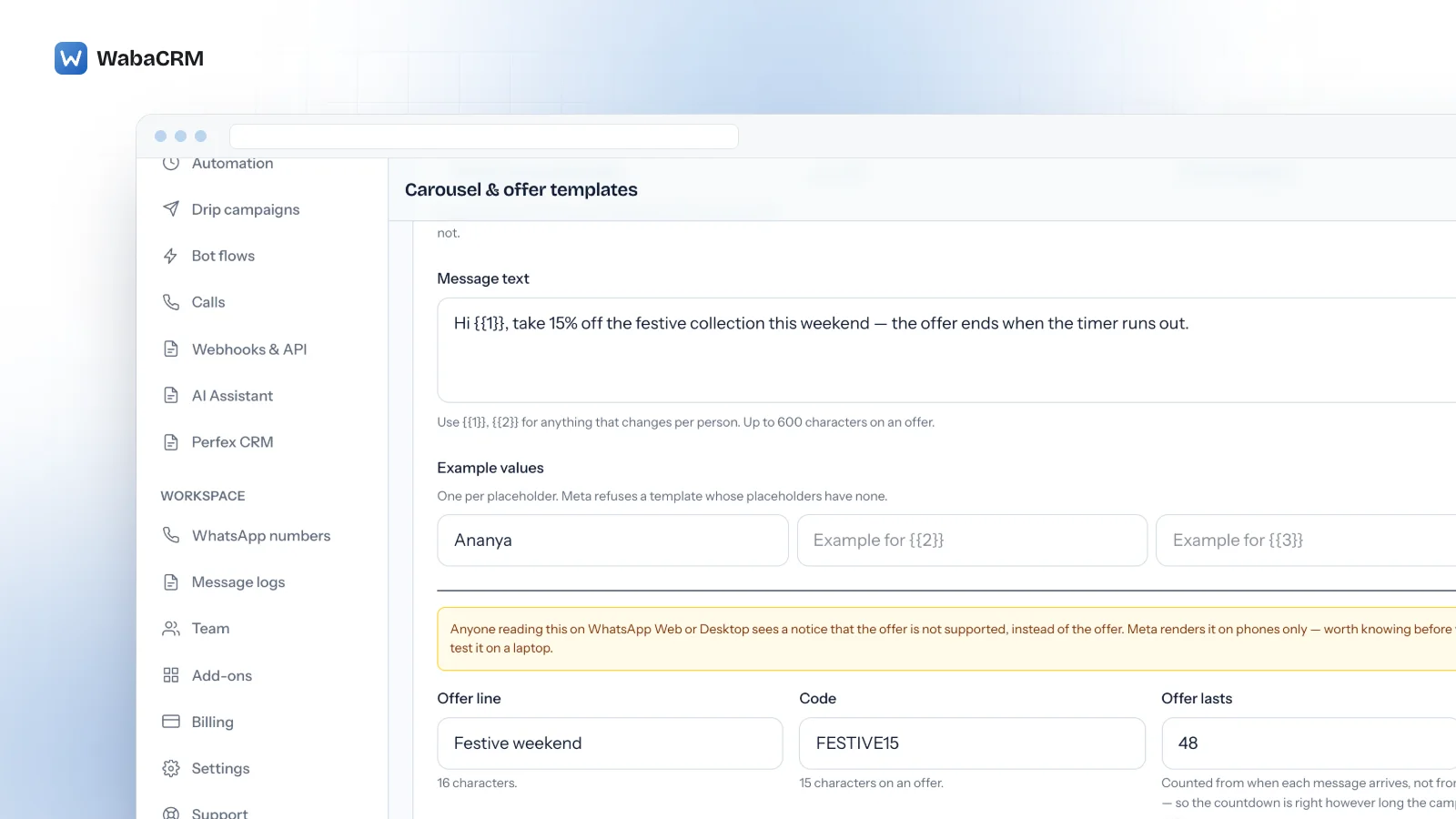
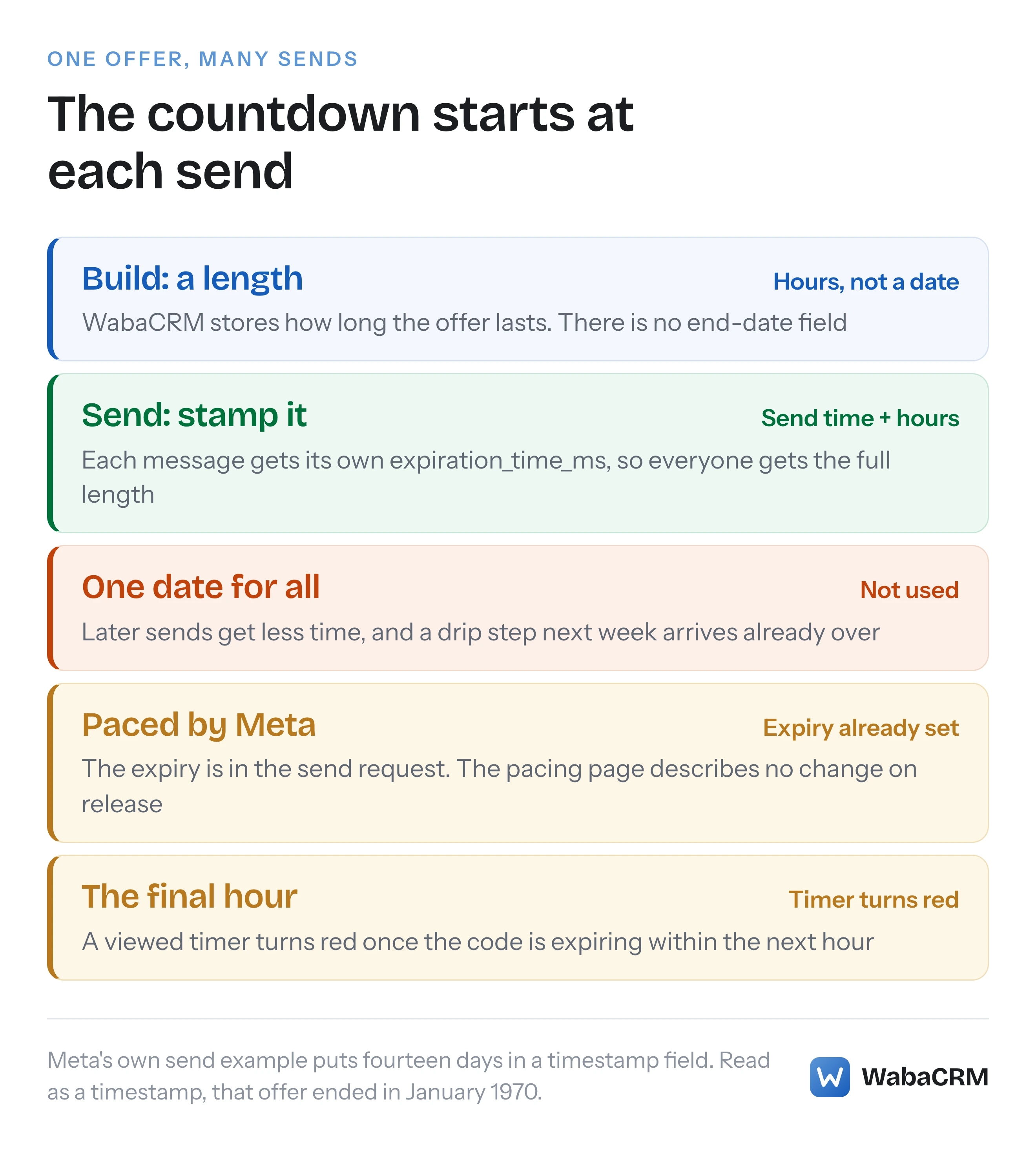
WabaCRM stores a length. Its offer form asks how long the offer lasts in hours (between 1 and 720 in the form, 48 unless you change it), and there is no end-date field anywhere. When each message is sent, WabaCRM sets its expiry to that moment plus the hours you chose. The form's hint speaks of when each message arrives, but the clock starts at the send.
The reason is that one approved template is sent by many paths at many times: a campaign, a drip sequence that enrols people over weeks, an agent in the inbox, a keyword bot, the API. A date frozen when the template was built gives every later send less time, and eventually none. Here is a template sent three times, with a fixed Friday 18:00 end against a 48-hour length:
| When it was sent | Fixed end, Friday 18:00 | Length of 48 hours |
|---|---|---|
| Monday 10:00, campaign | 104 hours left | Ends Wednesday 10:00 |
| Thursday 09:00, drip step | 33 hours left | Ends Saturday 09:00 |
| Next Monday 09:00, drip step | Over before it was sent | Ends next Wednesday 09:00 |
The cost of the length approach is that the offer has no single end. Each customer gets the full length from their own send, and the last person to receive it gets the last countdown. If the promotion behind it genuinely stops on Friday, either keep the code working in your shop for the longest countdown you handed out, or stop sending the template at least the full length before the promotion closes. A single Friday deadline for everyone is not something you can set in WabaCRM.
What happens to the countdown when Meta paces the template?
Meta does not say, and the safe assumption is that it keeps running while the message waits. Meta's template pacing page, updated 21 May 2026, says "Template pacing is valid for marketing and utility templates.", and every limited-time offer is a marketing template. Newly created templates are among those Meta lists as potentially subject to it. Meta describes what pacing does:
"When a template is paced, messages will be sent normally until an unspecified threshold is reached. Once this threshold is reached, subsequent messages using that template will be held to allow enough time for customer feedback." (Meta — Template pacing)
On how long a hold lasts, Meta offers a goal rather than a guarantee: "Our goal is that even if paced, campaign messages with highest throughput still get delivered within an hour (99 percentile)."
Put that next to the expiry. The expiry travels in the send request, and Meta reports a hold in "The immediate response from the messages endpoint", so the timestamp is set before any hold begins. On good feedback "the held messages will be released and sent normally", and the page says nothing about changing an expiry on release. Neither page says whether a held message keeps its timestamp, so treat this as a planning assumption: if nothing adjusts it, a held 48-hour offer loses a little time, while a two-hour flash offer held for most of an hour could arrive inside its final hour. If the feedback goes badly instead, Meta says "Each held message will be dropped", and those sends fail with code 132015.
So the first send of a brand-new offer template is the wrong place for a very short countdown. The pattern of approved-but-held messages is covered in why an approved template's messages can be accepted and still not arrive.
Does a WhatsApp offer stop being delivered once it expires?
Meta's limited-time offer page does not say so. It says nothing about delivery once the expiry passes, or about the code being switched off. The code is a string you supplied, and whether it still works at checkout is decided by your own shop, not by WhatsApp.
Nor does WabaCRM set a delivery time-to-live on these templates: its ordinary template builder offers that field only for authentication and utility templates, never marketing ones.
How is a coupon code template different from a limited-time offer?
A coupon carries a code and no clock. Meta's coupon page, updated 28 May 2026, opens with the definition:
"Coupon code templates are marketing templates that display a single copy code button. When the app user taps the button, WhatsApp copies the coupon code to the clipboard." (Meta — Coupon code templates)
Its limitations are three short sentences: "Coupon code templates are currently not supported by the WhatsApp web client." "Copy code button text cannot be customized." "Templates are limited to one copy code button."
| Rule | Limited-time offer | Coupon code |
|---|---|---|
| Category | Marketing only | Marketing |
| Countdown | Yes, set per send | None |
| Code length | 15 characters | 20 characters |
| Body | 600 characters | 1,024 characters |
| Header | Image or video | Text, 60 characters |
| Other button shown | URL, after the code | Quick reply, before it |
| WhatsApp Web | Offer not shown | Not supported |
The coupon column is what Meta's coupon page documents; it does not discuss other header or button types.
The row that bites is code length. It is the same copy-code button with two different limits, so WINTERSALE2026XL (16 characters) is a valid coupon and an invalid offer. WabaCRM checks this before Meta sees the template and refuses a code over 15 characters on an offer, noting that a plain coupon allows 20.
Button positions matter too, because each button value in a send names its button by index. On an offer, Meta says of the URL button: "If the template uses a copy code button, value must be 1." On a coupon the index "Indicates the order in which a button appears, if the template uses multiple buttons.", and Meta's own coupon example sends the copy-code button at index 1, behind a quick reply. WabaCRM sends an offer's code at index 0, and moves a coupon's code to index 1 when a quick reply comes first.
Can each customer get a unique WhatsApp offer code?
Meta's documentation does not answer that directly. What it does say is that the code belongs to the send, not to the approval. The coupon page lists "Coupon code (copy code button value)" among the properties provided when you send, and the offer page says "You include the actual offer code and its expiration timestamp when you send the template in a template message." Neither page discusses giving each recipient a different code, so do not read per-customer codes as something Meta promises.
WabaCRM's add-on does not do it. Each offer or coupon template carries one code, written when you build it and sent to every recipient. Unique codes need a stored pool and a decision about what happens when the pool runs out, and this add-on has neither.
Treat a shared code as public, because a customer can forward it, and set redemption limits in your own shop. The body's {{1}} placeholders still personalise the message text that goes with the code, such as the customer's name.
What does a limited-time offer message cost to send?
The marketing rate for the recipient's country, per delivered message. Meta's pricing page, updated 30 September 2026, is explicit about when it charges:
"Businesses are only charged when a message is delivered. Meta does not charge for messages sent." (Meta — Pricing on the WhatsApp Business Platform)
Two lines on that page decide the rest. Volume discounts do not reach an offer: "Volume tiers only apply to utility and authentication messages." And the one case where a delivered offer goes uncharged is a free entry point window, which opens when you answer someone who messaged you from a click-to-WhatsApp ad, and about which Meta states: "In this window, Meta does not charge for marketing, utility, authentication or service messages."
Meta bills those fees to the payment method on your own WhatsApp Business Account. WabaCRM is a Meta-verified Tech Provider, which cannot resell Meta's message fees, so it adds 0% markup to them. How category and country combine into a per-message price is worked through in what decides your WhatsApp message cost; the offer builder's own price is on the add-ons page.
How do you build a limited-time offer template in WabaCRM?
On the Carousel & offer templates screen, press + New template and choose Limited-time offer under "What kind?".
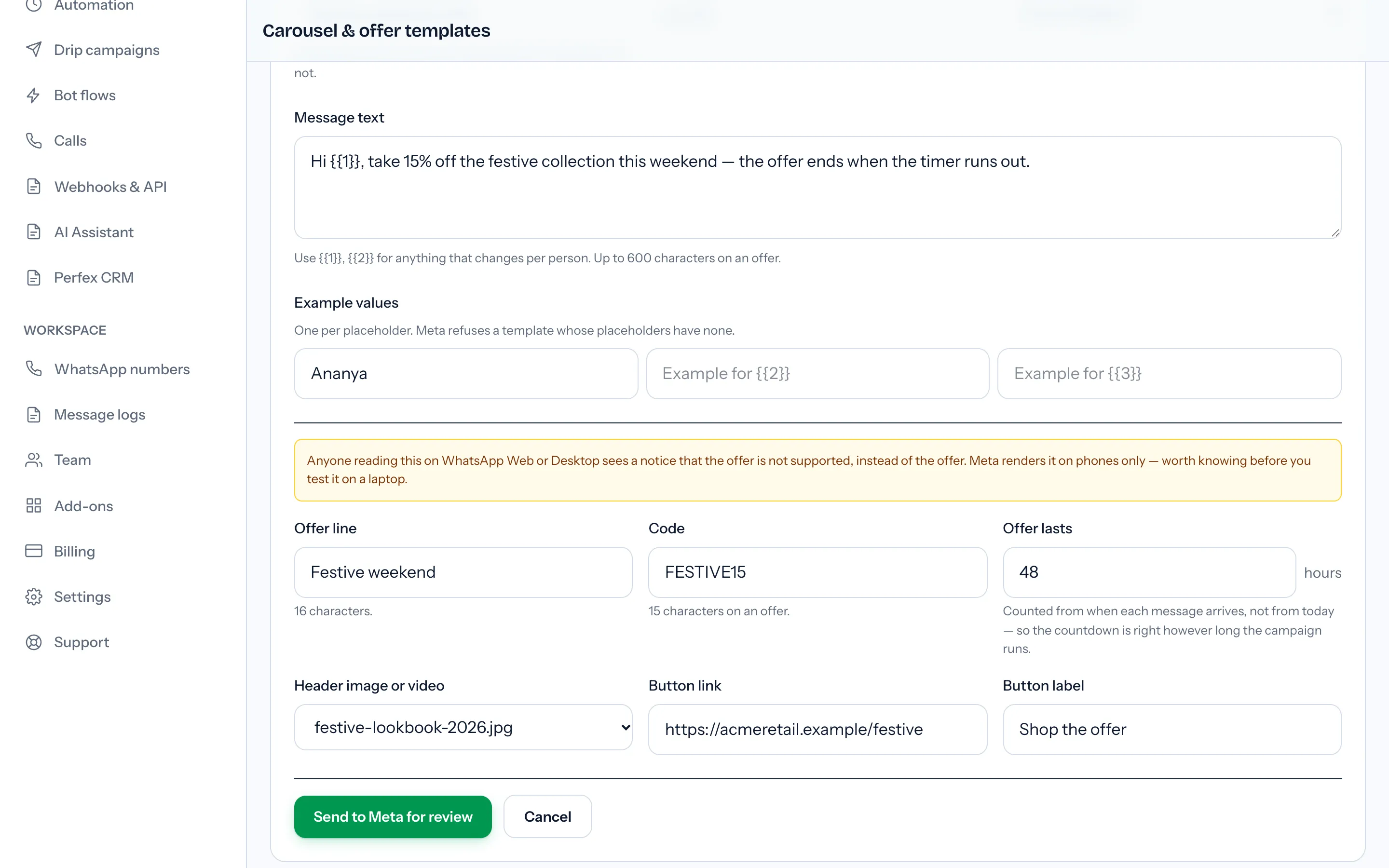
The form asks for a template name in lowercase with underscores, a language, the WhatsApp number to submit it from, the message text with an example for each placeholder, the offer line (16 characters), the code (15 characters), how many hours the offer lasts, an optional image or video header, and an optional link button with its label. Header media is picked from your media library, so upload the image or video there first. The category is always marketing, and the expiry details are always switched on.
Before anything reaches Meta, the builder checks the form and lists what it finds in an error box: a missing offer line, a code over 15 characters, a length of zero hours, or a placeholder in the button link. That last one is the builder's own limit, not Meta's: Meta's offer page allows one variable at the end of the URL, but WabaCRM's link button is a fixed address. Then Send to Meta for review submits it. The template list shows Meta's status as it arrives, green only once approved; what each status means is in every status a WhatsApp template can be in.
A few things to know before the first one:
- Building needs the template management permission, which owners, admins and managers hold by default.
- The offer screen has no edit or draft. The code and the length are fixed when you submit, so a change means a new template. Offers also appear on the ordinary Templates screen, which is where one is deleted.
- Once approved, it sends from anywhere a template does: campaigns, the inbox, keyword bots, the API, and drip sequences if you also have the separate drip sequence add-on. Each of those sends gets its own expiry.
- The coupon form's heading has no length check of its own, so keep it within Meta's 60 characters for a text header.
If you want several products in one message rather than one code, the same add-on also builds Meta's media card carousels, covered in the WhatsApp carousel template guide.
The short version: let Meta draw the timer, give each message its own expiry, keep the code within 15 characters, and test on a phone.
Every Meta quotation on this page was read from Meta's own documentation on 15 October 2026. Meta changes that documentation without notice; the linked pages are authoritative and this one is not.