A Permanent WhatsApp Token, and What Error 190 Means
The short answer
WhatsApp error 190 is the Graph API's authorisation refusal — Meta's error-code table gives it as "Your access token has expired." The right fix depends on which token you hold: the dashboard's temporary token, a system user token generated in Business settings, or an Embedded Signup token that dies on events rather than time. Checked 25 September 2026.
How do you get a permanent access token for the WhatsApp Cloud API?
Generate a system user token in Meta Business settings and assign your app and your WhatsApp Business Account to that system user. That is not vendor folklore — it is Meta's own instruction, in Meta's own words. The getting-started guide for the WhatsApp Business Management API first warns you off the token everyone begins with:
"The temporary access token you created to send the
hello_worldtemplate message expires quickly and is not suitable for development purposes." (Meta — Business Management API, Get Started)
and then says directly: "So you should create a permanent token for use across the WhatsApp Business Platform." (Meta — Business Management API, Get Started) The word permanent is Meta's, and the thing it names is a system user token.
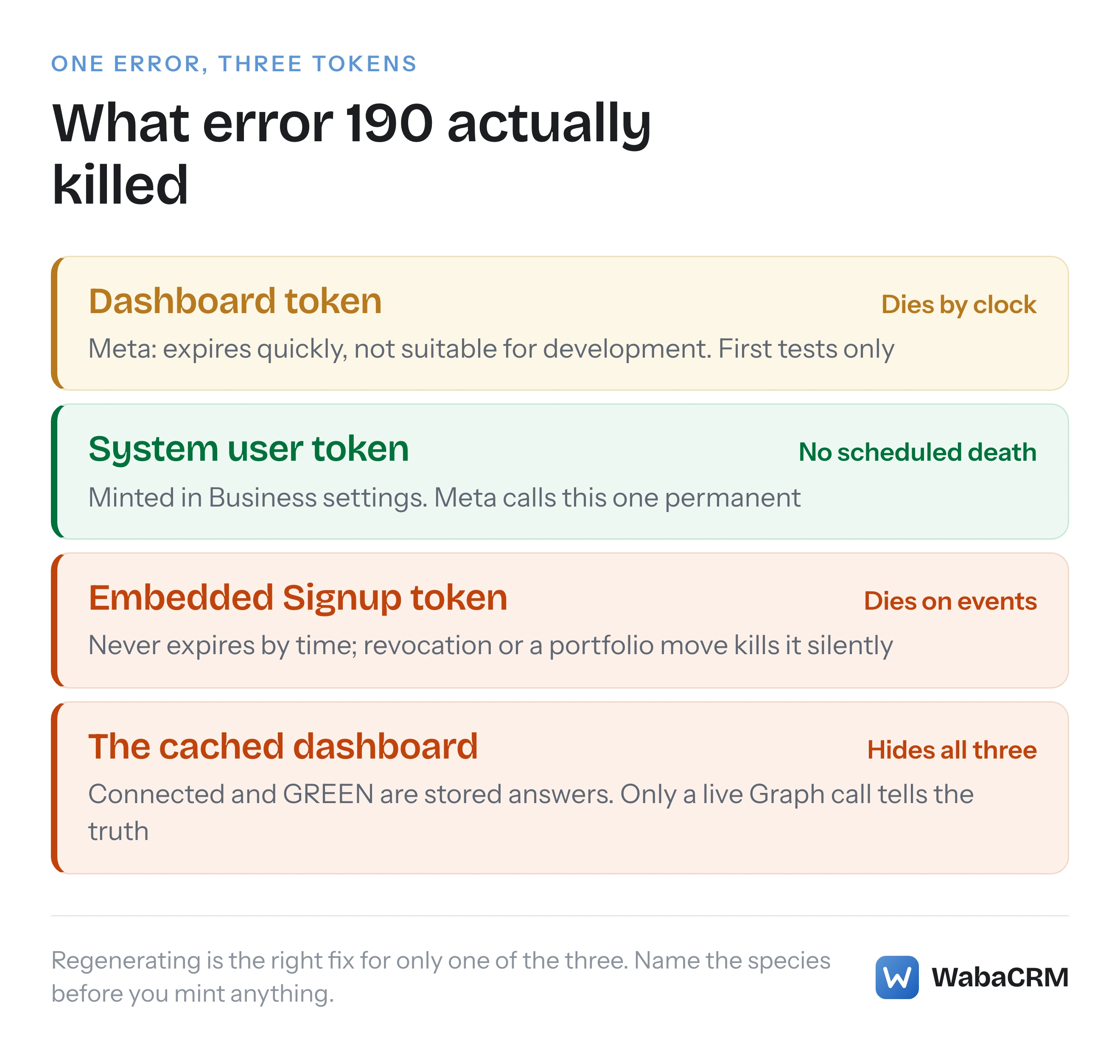
The reason most people search for that phrase, though, is not the setup guide. It is the error that arrives when a token dies: code 190. Every vendor helpdesk answers it the same way — regenerate your token — and that answer is sometimes right, sometimes a stopgap, and sometimes a complete non-sequitur, because it skips the only question that matters: which of the three token species are you actually holding? Regenerating fixes one of them, papers over another, and does nothing whatsoever for the third.
- How do you get a permanent access token for the WhatsApp Cloud API?
- What does WhatsApp error 190 actually say?
- Which of the three token species are you holding?
- How long does the dashboard's temporary token last?
- Can a never-expiring token still be killed?
- What does debug_token tell you about the token you hold?
- What killed every connected token on 28 July 2026?
- Why should a health check stop calling a dead token?
- What should you do instead of blindly regenerating?
What does WhatsApp error 190 actually say?
Meta's error-code reference for the WhatsApp Business Platform files 190 under a section headed Authorization errors, and the entry itself is one sentence:
"Your access token has expired." (Meta — WhatsApp error codes)
with the recommended action given as "Get a new access token." Its sibling in the same section, code 0, is broader and worth reading alongside it:
"We were unable to authenticate the app user." — "Typically this means the included access token has expired, been invalidated, or the app user has changed a setting to prevent all apps from accessing their data." (Meta — WhatsApp error codes)
Code 0 is the honest version of the family: it admits, in Meta's own words, that invalidated and expired are different fates that produce the same refusal. Keep that admission in mind when a 190 arrives on a token that was supposed to never expire — the code's one-line description names the commonest cause, not the only one.
The response shape is the Graph API's standard error object. Meta's own worked example on the same page shows the fields, including the type that authorisation failures carry:
{
  "error": {
    "message": "(#130429) Rate limit hit",
    "type": "OAuthException",
    "code": 130429,
    "error_data": {
        "messaging_product": "whatsapp",
        "details": "Cloud API message throughput has been reached."
    },
    "error_subcode": 2494055,
    "fbtrace_id": "Az8or2yhqkZfEZ-_4Qn_Bam"
  }
}
A 190 wears the same shape with its own code and message. Two of the page's field notes matter for anything you build on top: the message field is a "Combination of the error code and its title," and the guidance on code is explicit — "Build your app's error handling around error codes instead of subcodes or HTTP response status codes." (Meta — WhatsApp error codes) The same page also notes that "Cloud API errors are returned either synchronously as a Graph API response, asynchronously via Webhook, or sometimes through both methods" — so do not assume a token failure will only ever surface where the request was made.
Checked against Meta's documentation on 25 September 2026.
Which of the three token species are you holding?
Three different tokens can be behind a WhatsApp integration, and they come from different places, live different lengths of time, and die of different causes.
| Token | Comes from | Default lifetime | What ends it |
|---|---|---|---|
| Temporary | App Dashboard, API Setup | "Expires quickly" | The clock, within hours |
| System user | Business settings, System users | No expiry unless you chose one | Regeneration; asset removal |
| Business integration (Embedded Signup) | A client business installing your app | "Defaults to never expire" | Events, not time |
The first two belong to a business running its own integration. The third belongs to platforms: when a customer connects their number to a WhatsApp platform built on the Cloud API through Embedded Signup, the platform receives a Business Integration System User access token scoped to that one customer. Meta's Facebook Login for Business documentation describes what makes it distinct:
"When a client business installs an app through Facebook Login for Business and generates a business integration system user access token, the token includes a client business ID." (Meta — Facebook Login for Business)
That client business ID is the tell in a debug_token response that you are holding the third species — and the third species is the one where "regenerate your token" is a non-answer, because there is no button on your side that mints another one. Only the customer going through the install again does that.
Checked against Meta's documentation on 25 September 2026.
How long does the dashboard's temporary token last?
Meta does not put a number on it. The Business Management API's getting-started page says only that it "expires quickly and is not suitable for development purposes," and no figure appears anywhere on that page — we looked for one on 25 September 2026 and it is not there, so any page telling you the dashboard token lasts exactly 24 hours is quoting something other than Meta's current text.
What Meta does publish is a general statement about Facebook Login tokens, on the access tokens guide rather than anywhere WhatsApp-specific:
"Short-lived tokens typically last about one to two hours, while long-lived tokens last about 60 days." (Meta — Access tokens)
immediately followed by a sentence most integrations ignore:
"Do not depend on these lifetimes remaining the same — they may change without warning or expire early." (Meta — Access tokens)
The practical rule falls out of those two quotations: a token whose expires_at is a real timestamp a few hours out is a login or dashboard artefact, useful for the first hello_world and nothing after it. If your production .env holds one, the 190 is not a fault — it is the design working as documented.
Can a never-expiring token still be killed?
Yes, and this is the misunderstanding that generates most of the confusing 190s. For the Business Integration System User token a platform receives from Embedded Signup, Meta states the default plainly: it
"Defaults to never expire for the common offline server-to-server communication." (Meta — Facebook Login for Business)
An optional parameter changes that at generation time — set_token_expires_in_60_days, which you "set to true so that the token expires in 60 days" (Meta — Facebook Login for Business). Left at the default, the token has no expiry timestamp at all.
No expiry timestamp does not mean no death. The same page documents one explicit kill switch: the client business can remove your app under Business Manager's Connected apps, which revokes the token. Beyond that, the page does not enumerate the other events that end one — we checked it on 25 September 2026 and it lists the removal path, not a catalogue of security events — so what follows is WabaCRM's production experience rather than Meta's documentation: these tokens die on events. The granting relationship changing is the death; the token string is just where you find out. The event we can date precisely is an app moving between business portfolios, covered two sections down. The lesson generalises: a never-expiring token is a token with no scheduled death, and every death it does have is unscheduled.
What does debug_token tell you about the token you hold?
Before touching anything, ask Graph what the token actually is. The endpoint is debug_token, called with the token under investigation as input_token:
GET /v26.0/debug_token?input_token={input-token} HTTP/1.1
Host: graph.facebook.com
authenticated with a valid access token of your own. The reference documents the fields that settle a 190 investigation: is_valid is "Whether the access token is still valid or not," expires_at is the "Timestamp when this access token expires," and scopes is the "List of permissions that the user has granted for the app in this access token" (Meta — Debug Token, Graph API Reference). The granular_scopes field goes further, listing per-scope target_ids — the specific account ids the grant actually covers.
Run it on the literal string your server sends, not a token you believe is equivalent. Ten minutes with this endpoint answers the species question definitively: a short expires_at means the temporary kind, a token whose response carries a client business ID is an Embedded Signup grant, and is_valid: false on a token you never scheduled to expire means an event killed it — at which point the question stops being "how do I refresh this" and becomes "what changed at the business that granted it."
What killed every connected token on 28 July 2026?
A portfolio move. On 28 July 2026 WabaCRM's Meta app was transferred from one business portfolio to another — a supported, documented operation done through Business Suite — and every customer token issued through Embedded Signup died in the same moment. Not one of those tokens had an expiry date. Nothing errored at the time of the move. No webhook announced it.
What made it expensive was the silence afterwards. The numbers screen for every affected customer still read Connected, quality GREEN, templates synced — because every one of those values was cached from health checks run before the move. The token was dead; the record of the token being alive was intact. Only forcing a live Graph call flipped the card to an error reading "The WhatsApp connection has expired. Reconnect the account to resume sending." Until someone forced that call, the first monitoring system in line was a customer noticing their messages had stopped — the exact failure mode we later wrote up in the dashboard says connected and nothing is sending.
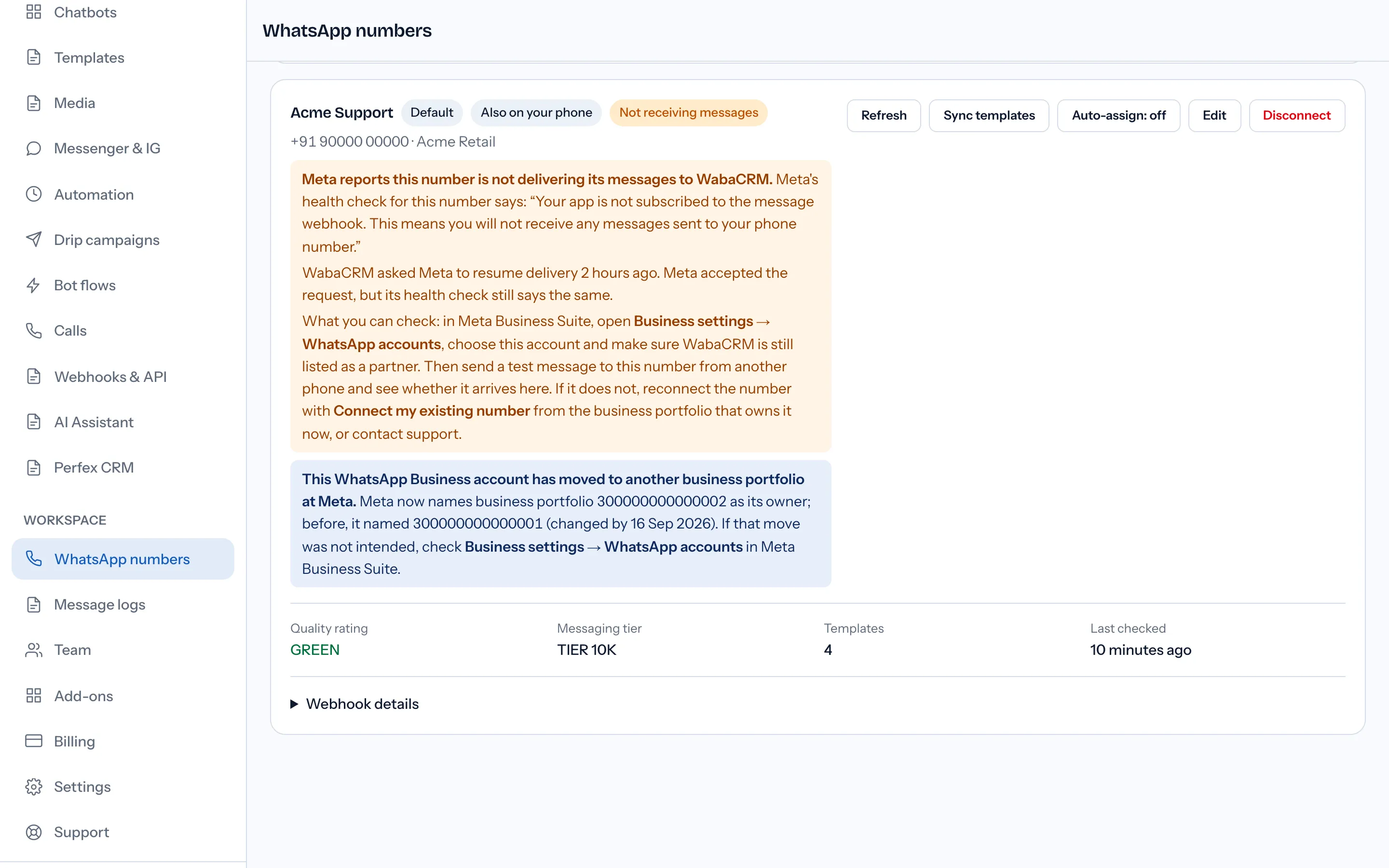
Two durable lessons came out of that afternoon. First, after any portfolio or ownership event, trust nothing cached — force a live call per number and read the answer, because a grant is scoped to the app within the business that owned it at the time, and the grant does not follow the app. Second, the remedy for this species is not on your side of the fence: each customer had to run Embedded Signup again to mint a fresh grant. There was no regenerate button, because the thing that died was the relationship, not the string.
Why should a health check stop calling a dead token?
Because a dead token answers every call identically, forever, and each call costs you something. In WabaCRM's production logs, one disconnected number's row absorbed 282 Graph calls from an hourly health sweep before backoff logic existed — 282 identical authorisation refusals, hundreds of log lines that buried real incidents, and zero new information after the first one.
An authorisation-coded answer — 190, or its sibling 0 — is not a transient fault. Retrying it does not resolve it; only a new grant does. So the health check that finds one should do three things: mark the row failed immediately, so nothing else spends sends against it; alert a human once, not once per hour; and back off the polling schedule — hourly, then six-hourly, then daily — because the only thing that changes a dead token's answer is an action no poll can perform.
It is worth separating this family from refusals that look similar but are aimed at the account rather than the credential. A WABA that answers "not allowed to create or update templates" is refusing an account-level capability while the token itself may be perfectly healthy; a 190 refuses the credential and takes every capability with it. The fix paths never overlap, so classify before you act.
What should you do instead of blindly regenerating?
In order, and only moving to the next step once the previous one has an answer:
- Run
debug_tokenon the literal token your server sends. Readis_validandexpires_atbefore forming a theory. A valid token means your 190 came from a different token somewhere in the stack — a stale value in a second config file is a classic. - Identify the species from expiry and provenance: hours-scale
expires_atmeans dashboard token; generated under System users in Business settings means system user; carries a client business ID means Embedded Signup. - Apply the remedy that fits the species. A dashboard token is not repaired but replaced — mint the system user token Meta's guide told you to create, assign the app and the WABA to that system user, and retire the temporary one. A system user token is regenerated in Business settings, after checking that the asset assignment behind it still exists, because regenerating a token whose WABA was unassigned reproduces the failure with a fresh string. An Embedded Signup token is re-granted only by the customer running the flow again — and if what actually happened is the business leaving one provider for another, what carries over when you switch WhatsApp API providers covers which side owns each piece of that handoff.
- Force a live health check after the fix, and distrust every cached status until it passes. A connection is proven by a fresh authenticated call, not by a screen that remembers one.
The one-line vendor answer is not wrong so much as incomplete: "get a new access token" is Meta's own recommended action for 190. The word doing all the work is which.
Every Meta quotation on this page was read from Meta's own documentation on 25 September 2026. Meta changes that documentation without notice; the linked pages are authoritative and this one is not.
Questions people also ask
Is there a truly permanent access token for the WhatsApp Cloud API?
Does error 190 always mean the token reached its expiry date?
Should I set my WhatsApp token to expire in 60 days?
Why does my dashboard still say connected after error 190?
How do I tell which kind of WhatsApp access token I hold?
- whatsapp permanent access token
- error 190
- system user token
- whatsapp cloud api
- access token expired
- embedded signup token