This WABA Is Not Allowed to Create or Update Templates
The short answer
The refusal is about the WhatsApp Business account, not the template's wording. WabaCRM shows it under Send from with Meta's code, 100/2494160, and a trace id. Press Refresh on the number's card: Setup not finished at Meta means run Connect my existing number again; Account rejected at Meta means only Meta's review can clear it. Checked 19 September 2026.
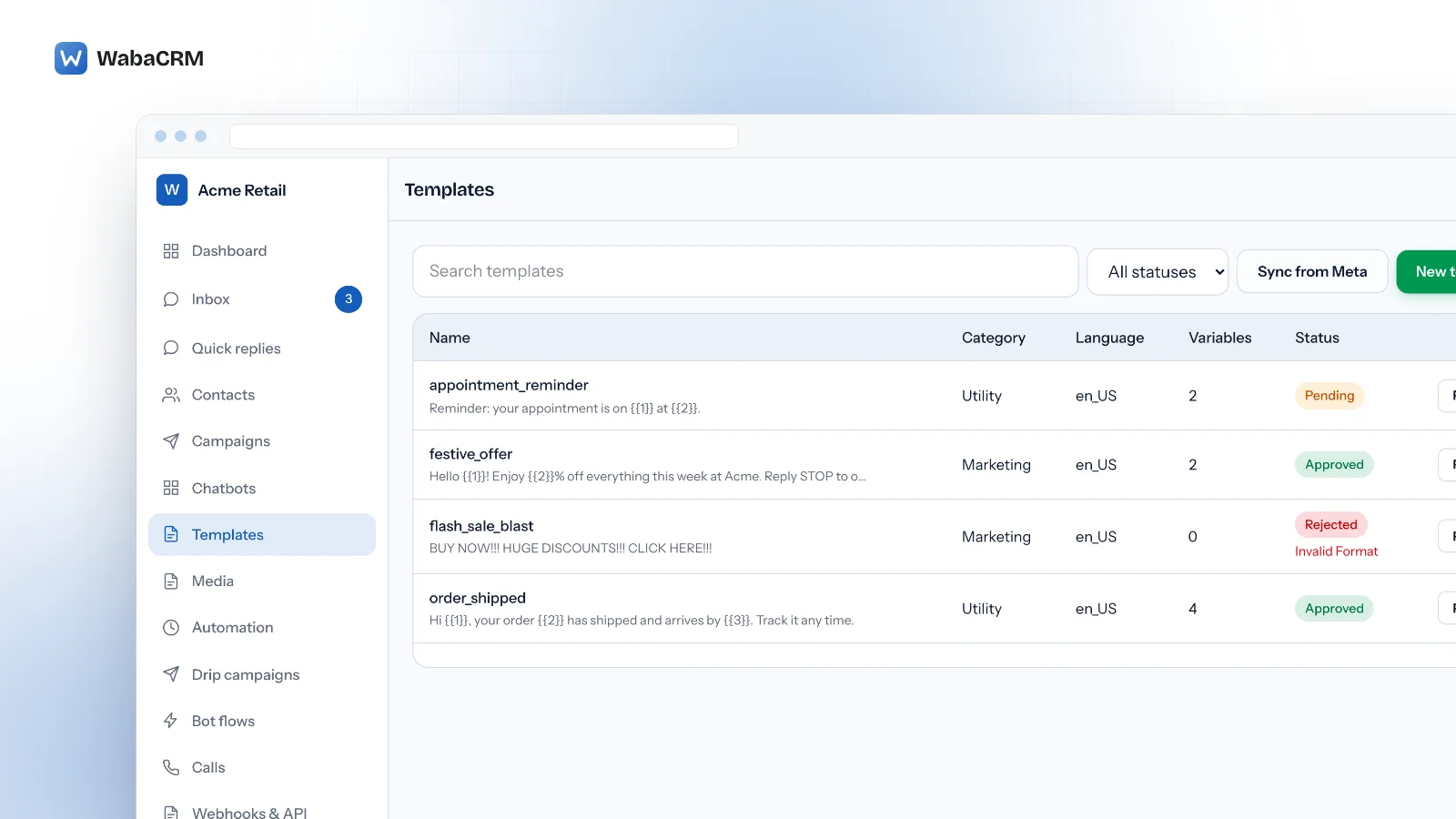
What does "This WABA is not allowed to create or update templates" mean?
It means Meta is refusing the WhatsApp Business account itself any template management, so no rewording will get the template through. One customer saw the same refusal in Meta's own WhatsApp Manager, which shows the tool submitting the template is not the problem.
A related refusal at account level looks different: templates approved, the card saying Connected, and messages failing with error 131031. WabaCRM's number card reads the three places Meta keeps the answer: whether Meta finished setting the number up, Meta's review of the account, and the problems Meta's health check lists against it.
Every 2494160 refusal in our logs came from one of two coexistence numbers, numbers that stay in the WhatsApp Business app on the phone, and Meta's review of both accounts reads APPROVED. So for a template refusal, look first at whether the number's setup finished. For 131031, check the account review first, but a clean review does not rule it out.
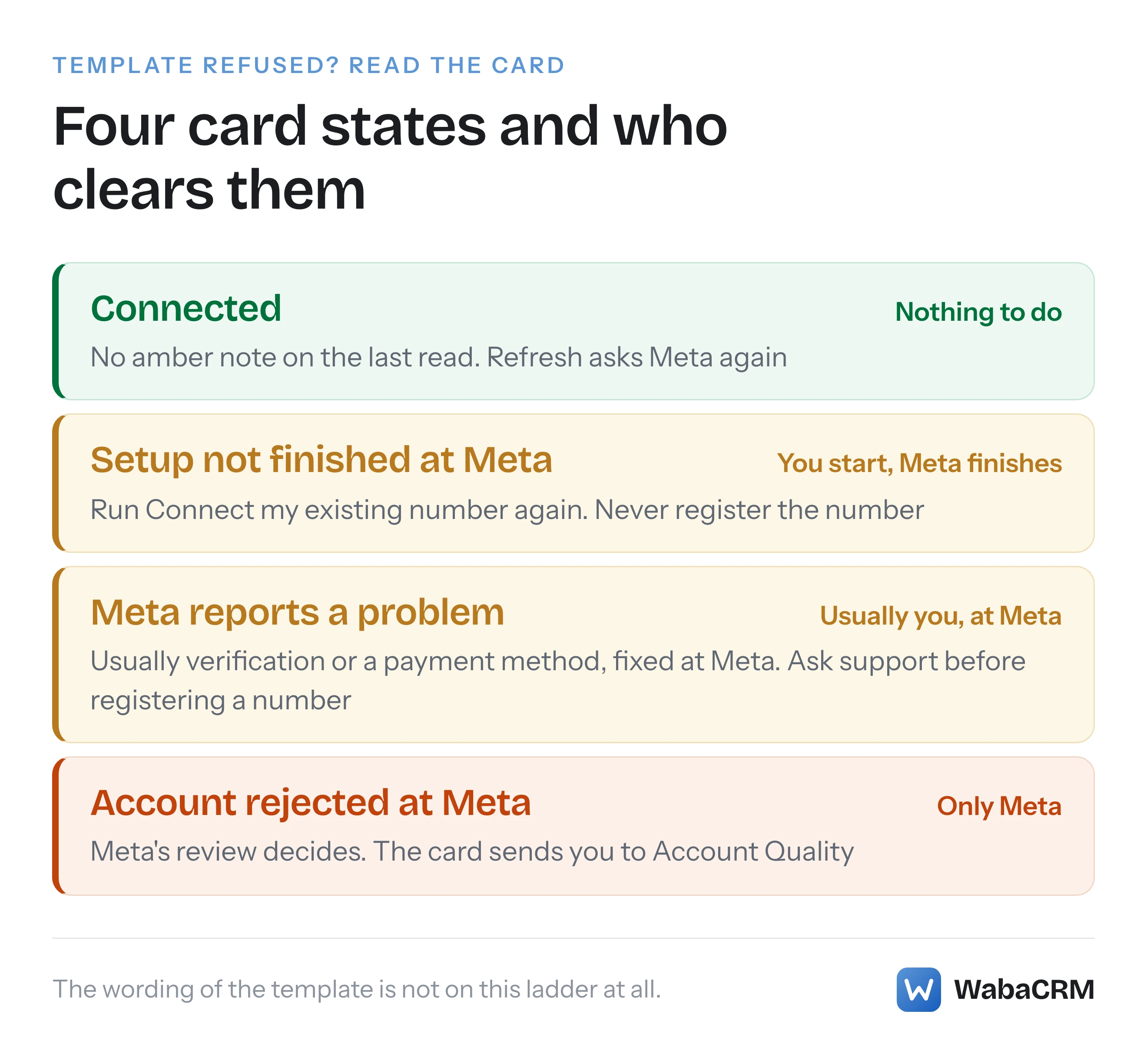
- What does "This WABA is not allowed to create or update templates" mean?
- Where does WabaCRM show the template refusal?
- Which badge on the number's card explains the refusal?
- How do you clear Setup not finished at Meta?
- What does Account rejected at Meta mean for sending?
- How do you fix the problems Meta lists under the badge?
- What does error 131031 look like in the inbox and logs?
- Does a declined display name cause this?
- Is error 2494160 on Meta's error-code page?
- What can WabaCRM fix, and what only Meta can?
Where does WabaCRM show the template refusal?
Step 1. Open Templates, press New template, fill in the form and press Send for review. The Send from field at the top of the form decides which number, and so which WhatsApp Business account, the template is submitted to.

When Meta refuses the account, WabaCRM prints the refusal in red under Send from, naming the number by its label:
Meta is refusing to let the WhatsApp Business account behind "Acme Support" create templates. The refusal is about the account, not the wording of this template. (Meta error 100/2494160 · trace …)
If Meta is also reporting that the number's setup is unfinished, one more passage sits before the code:
Meta also reports this number's setup is not finished — it is not on the Cloud API yet. Run "Connect my existing number" on the Numbers screen for it.
That Numbers screen is WhatsApp numbers in the menu. Other refusals from Meta appear in a red box just above the Send for review button instead, so where the message lands tells you whether Meta objected to the account. Two exceptions also land under Send from: a token or permission refusal, which starts with the number's label, and "That number is not connected to WhatsApp yet."
This is what Meta actually returned to WabaCRM, with the trace id removed:
{
  "error": {
    "code": 100,
    "type": "OAuthException",
    "message": "Invalid parameter",
    "is_transient": false,
    "error_subcode": 2494160,
    "error_user_msg": "This WABA is not allowed to create or update templates.",
    "error_user_title": "WABA not allowed to manage templates"
  }
}
Three things in it mislead. The message says "Invalid parameter", and Meta's error-code page describes code 100 as a request that "included one or more unsupported or misspelled parameters" (Meta — WhatsApp error codes), which sends you back to the template. Only error_subcode identifies the refusal, yet the same page lists that field as "Deprecated. Will not be returned in v16.0+ responses." WabaCRM calls Graph API v25.0 and received it anyway. And the readable fields are localised: one of the four refusals in our logs came back with its user-facing title and message in Portuguese, though message still read "Invalid parameter". So WabaCRM recognises the refusal by code alone and prints the code and trace, which Meta describes as a "Trace ID you can include when contacting Direct Support."
Which badge on the number's card explains the refusal?
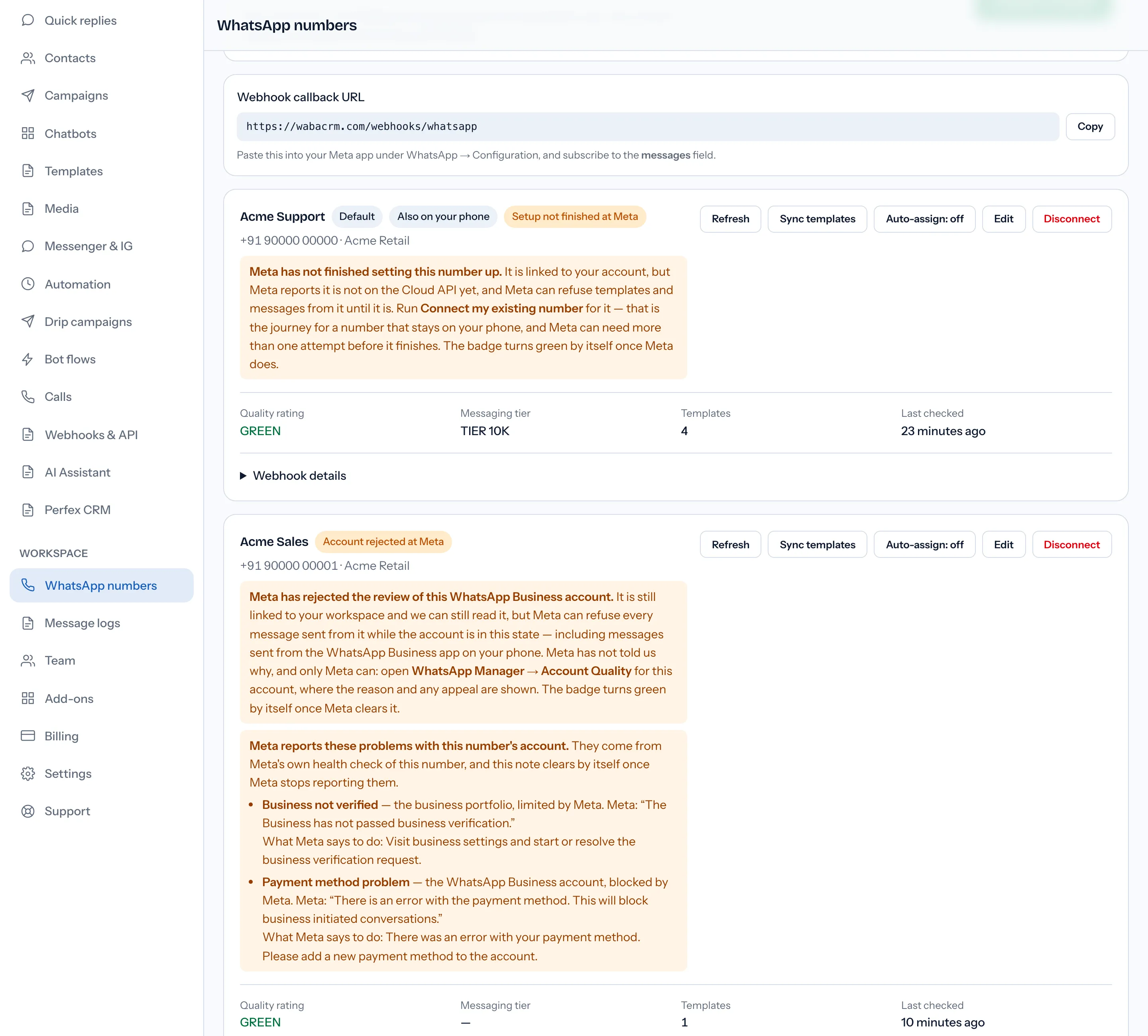
Step 2. Open WhatsApp numbers, find the card for the number named in the error, and press Refresh. WabaCRM asks Meta again for the number's platform type, the account's review status and its health check. The toast "Health refreshed." appears whether or not anything was found, so read the badge beside the number's name and the note under it, not the toast.
| Badge or note | What Meta reported | What to do |
|---|---|---|
| Setup not finished at Meta | A phone-app number Meta still reads as ON_PREMISE |
Run Connect my existing number again (Step 3) |
| Account rejected at Meta | The account's review status reads REJECTED |
Only Meta's review clears it (Step 4) |
| Not registered | Not registered for the Cloud API; WhatsApp Manager shows Pending | Read the note, and Meta's reason if it gave one |
| Connected, with "Meta reports a problem" | Meta's health check lists a limited or blocked part of the account | Fix it at Meta (Step 5) |
| "No approved templates on this account yet." | WabaCRM holds no template of any status for this connected number (hidden while Setup not finished at Meta shows) | Create one, then Sync templates |
The badge shows one state at a time, in a fixed order: Account rejected at Meta outranks Setup not finished at Meta, which outranks Not registered. A number can be in two of them at once, so after clearing the one shown, press Refresh again before you conclude the account is healthy.
How do you clear Setup not finished at Meta?
Step 3. This badge only appears on a number connected to stay on your phone. The card's note reads:
"Meta has not finished setting this number up. It is linked to your account, but Meta reports it is not on the Cloud API yet, and Meta can refuse templates and messages from it until it is. Run Connect my existing number for it — that is the journey for a number that stays on your phone, and Meta can need more than one attempt before it finishes. The badge turns green by itself once Meta does."
Meta's own test for a finished phone-app number is two fields read together: "If is_on_biz_app is true and platform_type is CLOUD_API, the business phone number is able to use Cloud API and the WhatsApp Business app" (Meta — Onboard WhatsApp Business app users). On the number we investigated, templates were refused with 2494160 for 31 hours, every health read in that window said ON_PREMISE, and the first read saying CLOUD_API came minutes after the business ran the connect journey again. That is an observation, not a cause Meta has documented.
To run it: on WhatsApp numbers, under Keep the number on your phone, press Connect my existing number and complete Meta's window for the same number. A clean connect reloads the page by itself. If the connect finished with warnings, the card lists them and offers Show my number instead of reloading, so read them before you press it. Then press Refresh on the number's card. If it is still amber, run it again; in the case above, once was not enough. If you closed Meta's window without finishing, the button keeps reading "Waiting for Meta…", and after two minutes the card says it is still waiting and keeps both connect buttons disabled until you press Start again. The note under Connect my existing number, at the end of the paragraph about moving from another provider, reads "If this number already appears below as connected, it is done: don’t run this again." That is meant for a green card. For Setup not finished at Meta, the card's own note asks you to run it.
Do not register the number to hurry things along. Meta's guide says to "skip the phone number registration step, as the number is already registered", and registration attempts are rationed: error 133016 means "Registration or Deregistration failed because there were too many attempts for this phone number in a short period of time" (Meta — WhatsApp error codes).
If Meta's window refuses the reconnect because the number is already shared with a partner, that is a separate error with its own fix: error 2655093 when connecting an existing number. What the coexistence journey changes on the phone, and what it switches off, is in the WhatsApp coexistence guide.
What does Account rejected at Meta mean for sending?
Step 4. This badge reads Meta's review of the WhatsApp Business account. Its note warns that "Meta can refuse every message sent from it while the account is in this state — including messages sent from the WhatsApp Business app on your phone", and sends you to "WhatsApp Manager → Account Quality for this account, where the reason and any appeal are shown." The badge turns green by itself once Meta clears it.
Meta documents the field and very little else: "The account_review_status property can have one of the following values: PENDING, APPROVED, and REJECTED." (Meta — Manage WhatsApp Business accounts) The page does not say what REJECTED stops. On the rejected accounts we have seen, the failure that concerns the account itself is error 131031, which Meta's error-code page describes this way:
"The WhatsApp Business Account associated with the app has been restricted or disabled for violating a platform policy, or we were unable to verify data included in the request against data set on the WhatsApp Business Account (e.g, the two-step pin included in the request is incorrect)." (Meta — WhatsApp error codes)
A message send carries no two-step PIN, so when 131031 arrives on a failed message, it is the account half of that description that applies.
The warning about the phone is borne out: on one rejected coexistence account, all 350 of the 131031 failures Meta reported were for messages WabaCRM had never sent, which on a phone-app number points to the phone. The reverse does not hold, though: 131031 has also appeared on accounts whose review reads APPROVED or PENDING today, so a missing badge does not rule out a lock.
The card names Account Quality, and Meta's own health-check text calls business.facebook.com/accountquality Business Support Home. If Business Support Home lists the account as restricted, Meta's Business Help Centre gives the review steps: "Go to Business Support Home", "click on the restricted WhatsApp Business account", then "Click Request review on the right-hand side of the screen." Meta asks for a confirmation code by phone and a photo ID, and "aims to provide a decision within 48 hours, but some reviews may take longer." (Meta — Why your WhatsApp Business account is restricted) Which restriction you have and how the appeal goes is covered in what to do when a WhatsApp Business account is restricted.
How do you fix the problems Meta lists under the badge?
Step 5. On any connected number, including one with a green Connected badge, the card can show an amber box headed "Meta reports a problem with this number's account." or "these problems" when there are several. It comes from Meta's own health check and "clears by itself once Meta stops reporting them." Each line gives a short title, which part of the account Meta limited or blocked, Meta's own words after "Meta:", and a line beginning "What Meta says to do:".
| Title on the card | Meta's code | Part of the account | Where the fix is |
|---|---|---|---|
| Business profile incomplete | 131000 | Business portfolio | Meta Business Suite, Business Info |
| Business not verified | 141010 | Business portfolio | Business verification at Meta |
| Payment method problem | 141006 | WhatsApp Business account | A new payment method at Meta |
| WhatsApp Business account banned | 141014 | WhatsApp Business account | Business Support Home |
| Number not linked to the account | 141000 | Phone number | Ask support first (below) |
The descriptions and remedies are runtime text from Meta's health check, not documentation: no 141000-range code appears on Meta's error-code page, and the health-status page shows only 141002, as an example. On the error-code page, 131000 means "Message failed to send due to an unknown error."
The two lines that turn up most often read, in Meta's words, "The Business has not passed business verification." and "There is an error with the payment method. This will block business initiated conversations." For the first, see Meta business verification documents and appeals; for the second, error 131042 and the payment method.
Two cautions. First, "limited" is not "blocked": Meta defines LIMITED as a node that "meets messaging or calling requirements, but has some limitations" (Meta — Messaging and Calling Health Status), and Business not verified usually arrives on a portfolio marked limited. The card says which. Second, Meta's remedy for Number not linked to the account is "Register and finish the OTP authentication process for your phone number." On a number that stays on your phone, that contradicts Meta's own instruction to skip registration, so contact support before registering anything.
What does error 131031 look like in the inbox and logs?
Meta accepts the message when it is sent and reports the failure afterwards, on the status webhook. This is the error object that arrives (some deliveries also carry an href field):
{
  "code": 131031,
  "title": "Business Account locked",
  "message": "Business Account locked",
  "error_data": {
    "details": "Business account has been locked."
  }
}
In the Inbox, the failed message shows a warning sign where the ticks would be, with Meta's text in a red strip under it: "Business Account locked". In Message logs, set the status filter from Any status to Failed. Each failed row shows the red status failed and, under it, "[131031] Business Account locked", with the Source column showing where the send came from, such as campaign, api or manual. A message sent from the phone app that Meta refuses usually never reaches WabaCRM, so it will not appear in the Inbox or in Message logs.
Neither string is on Meta's error-code page, whose details for 131031 is the policy sentence quoted in Step 4, so treat "Business Account locked" as a runtime label, not a documented title.
Does a declined display name cause this?
Not on the evidence we have, which is why WabaCRM's card does not flag it. Meta's display names page says that when a name is rejected, "the name_status field on your business phone number is set to DECLINED" (Meta — Display names), and it states no sending consequence for an ordinary number. What we have seen agrees: every account whose review read REJECTED also had a declined name, but a declined name on an approved account kept delivering. The full state machine is in error 131037 and why name_status says DECLINED.
Is error 2494160 on Meta's error-code page?
No. Checked on 19 September 2026, against the page dated "Updated: Jun 18, 2026": its Template creation errors table lists seven codes, all beginning 2388, and 2494160 is not one of them. The phrase "not allowed to create or update templates" appears nowhere on the page. Meta's Embedded Signup errors page lists several other codes beginning 2494, and not this one.
The refusal text turns up at runtime, in WabaCRM and in WhatsApp Manager. Neither of Meta's error pages carries it, and we found it on no other Meta page, so a page claiming to quote Meta's documented cause should say where Meta published it.
What can WabaCRM fix, and what only Meta can?
| Task | Who |
|---|---|
| Re-read Meta's view of the number now | You, with Refresh |
| Show Meta's code, trace and health-check words | WabaCRM, on the form and the card |
| Finish a phone-app number's move to the Cloud API | Meta, after Connect my existing number |
| Verification, payment method, business profile | You, at Meta |
| Lift a lock, reverse a rejected review, decide an appeal | Only Meta |
WabaCRM also re-reads each number by itself, hourly while it is healthy. It cannot file your appeal, because Meta's review asks for the account holder's own photo ID, and it cannot speed Meta's setup of a number. If the badges are clear and templates are still refused, open Support, press New ticket, and include the full "Meta error 100/2494160 · trace" line, the number's label and the time you pressed Send for review. The trace id is the part Meta says "may help debug the error."
Every Meta quotation on this page was read from Meta's own documentation on 19 September 2026. Meta changes that documentation without notice; the linked pages are authoritative and this one is not. Strings described as runtime text were copied from responses Meta returned to WabaCRM, not from documentation.
Questions people also ask
Is a 2494160 refusal caused by the wording of my template?
Will adding a new payment method clear the 2494160 refusal?
Should I register my coexistence number again to finish its setup?
Why do messages sent from my phone fail with 131031 too?
What is the trace id in WabaCRM's template error for?
- whatsapp error 2494160
- waba not allowed to create templates
- whatsapp error 131031
- business account locked
- account review rejected
- coexistence


