Which ad, and what it became
Click-to-WhatsApp Ads Conversion Tracking With ctwa_clid
Last checked · 14 min read
The short answer
To track a Click-to-WhatsApp ad past the click, keep the ctwa_clid from the referral object on the customer's first message. When the chat converts, send a Conversions API event to the advertiser's own dataset with action_source business_messaging, the click ID unhashed, and an event_time no more than seven days old. Meta leaves deduplication to you. Checked 15 October 2026.
How does click to WhatsApp ads conversion tracking work?
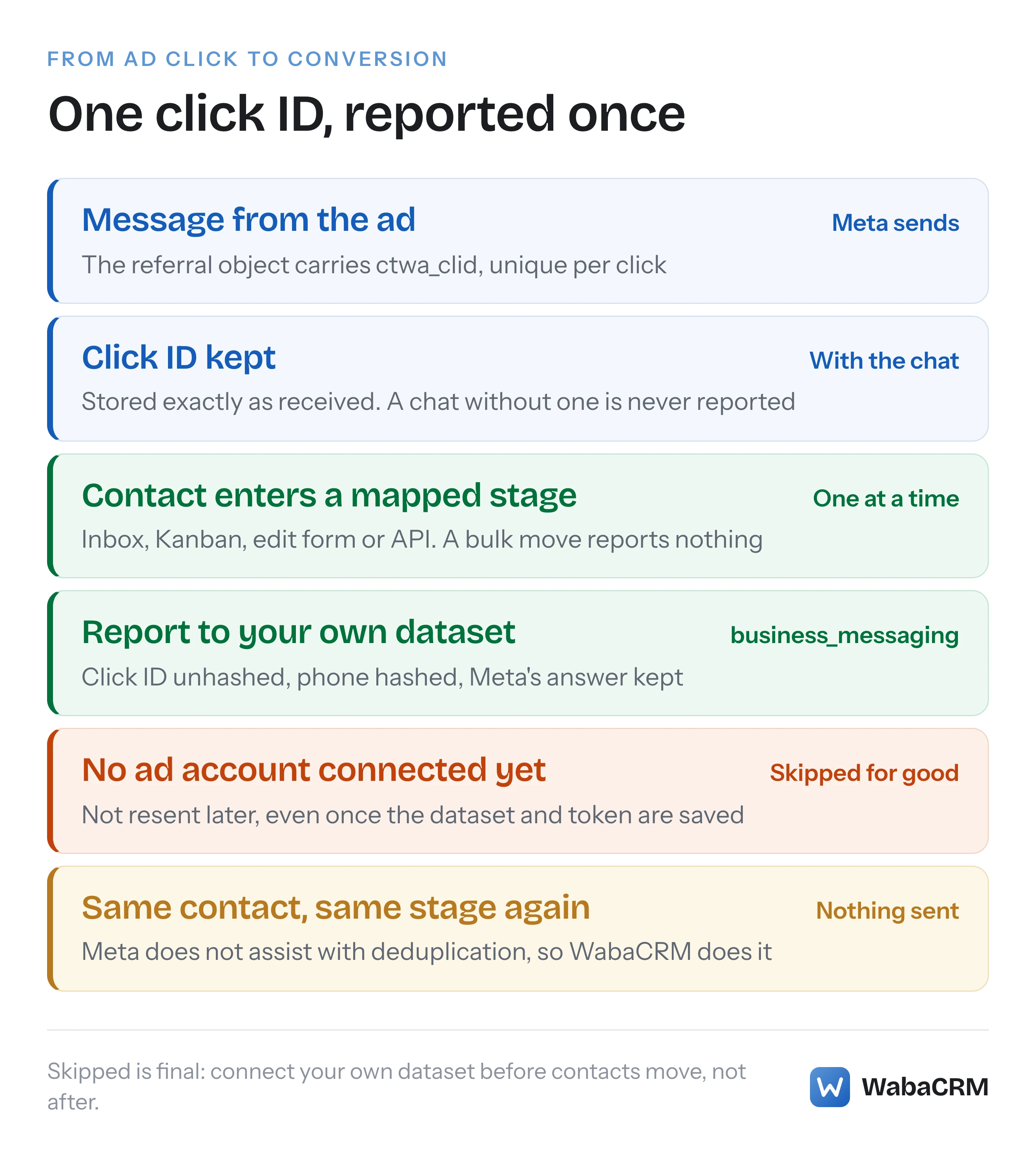
Meta hands you a click ID on the message a customer sends from your ad, and you send that same ID back in a Conversions API event when the conversation turns into something worth counting. Meta's onboarding guide says the Conversions API is what opens purchase optimisation to Click-to-WhatsApp ads, and the click ID is what ties an event to the ad.
The ID is called ctwa_clid, and Meta's onboarding guide defines it in one sentence:
"The Click-to-WhatsApp Click ID (ctwa_clid) is a personal identifier, unique per click, that is exposed to the business when the user entering the conversation originated from a click to WhatsApp ad." (Meta — Conversions API for Business Messaging: Onboarding Guide)
The same guide says what to do with it:
"Upon receiving the ctwa_clid, store it with the conversation. When a conversion has happened within a conversation, send the corresponding ctwa_clid via the Conversions API." (Meta — Conversions API for Business Messaging: Onboarding Guide)
It goes wrong in four places: the ID is never kept, the event leaves out what Meta's guide asks for, the event describes something more than seven days old, or the same conversion is sent twice. This page quotes Meta on each, then describes what Click-to-WhatsApp Attribution, an optional add-on for WabaCRM, records and sends.
- How does click to WhatsApp ads conversion tracking work?
- What arrives with the first message from an ad?
- What does a Click-to-WhatsApp Conversions API event contain?
- How old can a Click-to-WhatsApp conversion event be?
- Which events does Meta support for business messaging?
- Which pipeline stage should count as a conversion?
- Who removes duplicate conversions before Meta sees them?
- What does WabaCRM record when an ad brings someone in?
- Whose ad account does the add-on report into?
- Which contact moves report a conversion, and which stay silent?
- What does the add-on leave out on purpose?
What arrives with the first message from an ad?
An ordinary inbound message with one extra object on it. Meta's webhook reference says the shape does not change with how the conversation started:
"Messages webhooks describing a message sent by a WhatsApp user — either directly, via an ad, or via a UI component in a previously received message — all have the same common structure." (Meta — messages webhook reference)
The ad arrives as a referral object. This is Meta's own sample, as the onboarding guide prints it:
"referral": {
  "body": "This is a great product",
  "ctwa_clid": "ARAkLkA8rmlFeiCktEJQ-QTwRiyYHAFDLMNDBH0CD3qpjd0HR4irJ6LEkR7JwFF4XvnO2E4Nx0-eM-GABDLOPaOdRMv-_zfUQ2a", // <CLICK_TO_WHATSAPP_CLICK_ID>
  "headline": "Our new product",
  "image": {
    "id": "e144be57-12b1-4035-a520-703fcc87ef45"
  },
  "source_id": "1234567890",
  "source_type": "ad",
  "source_url": "https://fb.me/AAAAA"
},
The field that decides whether anything can be reported later is the click ID, which the guide describes as the ctwa_clid "that’s required to make a Conversions API call to send an event". A system that files the message and drops the referral has lost the conversion before anybody has replied.
What does a Click-to-WhatsApp Conversions API event contain?
Meta's guide names the three things the request is built from:
"In the final stage of integration, it is now possible to send events via the Conversions API with all information (waba_id, dataset_id, ctwa_clid) obtained in the previous steps." (Meta — Conversions API for Business Messaging: Onboarding Guide)
Here is the event inside Meta's WhatsApp sample, as printed:
      "event_name": "Purchase",
      "event_time": 1675999999,
      "action_source": "business_messaging",
      "messaging_channel": "whatsapp",
      "user_data": {
        "whatsapp_business_account_id": <WHATSAPP_BUSINESS_ACCOUNT_ID>,
        "ctwa_clid": "ARAkLkA8rmlFeiCktEJQ-QTwRiyYHAFDLMNDBH0CD3qpjd0HR4irJ6LEkR7JwFF4XvnO2E4Nx0-eM-GABDLOPaOdRMv-_zfUQ2a", // <CLICK_TO_WHATSAPP_CLICK_ID>
      },
      "custom_data": {
        "currency": "USD",
        "value": 123
      }
Its ctwa_clid is the same string, character for character, as the one in the referral above. Meta's parameter pages then say how each field is handled:
| Field | What Meta's pages say |
|---|---|
action_source |
business_messaging for click-to-WhatsApp ads |
messaging_channel |
whatsapp in the WhatsApp sample |
ctwa_clid |
Do not hash |
whatsapp_business_account_id |
In the sample's user_data |
event_time |
When it happened, at most 7 days back |
ph (phone) |
Hashing required |
custom_data |
Optional |
The two definitions that link the event to an ad, word for word:
"business_messaging — Conversion was made from ads that click to Messenger, Instagram or WhatsApp." (Meta — Server Event Parameters)
"Do not hash. Click ID generated by Meta for ads that click to WhatsApp." (Meta — Customer Information Parameters)
One trap is Meta's own: as rendered on 15 October 2026, the full WhatsApp sample opens "data" twice and carries // comments and a trailing comma, so it does not parse as printed. The Messenger sample on the same page shows the single "data" array a request needs.
The add-on's event is marked business_messaging on the whatsapp channel. It carries the click ID exactly as received and the customer's phone number hashed with SHA-256 over its digits, and it goes to the workspace's own dataset with the access token in the request body, not in the address where Meta's sample URL puts it.
How old can a Click-to-WhatsApp conversion event be?
Seven days, counted back from when you send it. Meta's server event parameters page defines event_time as the moment the thing happened, not the moment you report it:
"A Unix timestamp in seconds indicating when the actual event occurred. The specified time may be earlier than the time you send the event to Facebook." (Meta — Server Event Parameters)
The same entry sets the limit:
"The event_time can be up to 7 days before you send an event to Facebook. If any event_time in data is greater than 7 days in the past, we return an error for the entire request and process no events." (Meta — Server Event Parameters)
Note "the entire request": one stale event in a batch takes the others down with it. So report a conversion when it happens, and then check that it arrived. The guide's own check is the right one:
"After an event has been sent to Meta over the Conversions API successfully, you should be able to see that event reflected in Events Manager for the particular dataset." (Meta — Conversions API for Business Messaging: Onboarding Guide)
WabaCRM keeps Meta's answer to every request it makes. The "Recently reported" list on the Ad attribution screen shows each event's status, and an event Meta refused carries the reason Meta gave.
Which events does Meta support for business messaging?
Meta's guide answers this in its FAQ:
"The Conversions API for Business Messaging now supports the following types of events for business messaging:" (Meta — Conversions API for Business Messaging: Onboarding Guide)
Purchase, LeadSubmitted, InitiateCheckout, AddToCart, ViewContent, OrderCreated, OrderShipped, OrderDelivered, OrderCanceled, OrderReturned, CartAbandoned, QualifiedLead, RatingProvided, ReviewProvided.
The lead events on this list are LeadSubmitted and QualifiedLead. The same FAQ is clear about which kind of event optimisation is built on:
"The Conversions API enables access to purchase optimization for ads that click to Messenger and ads that click to WhatsApp only, but is not available for Instagram ad optimization at this time." (Meta — Conversions API for Business Messaging: Onboarding Guide)
Purchase is the event this guide ties to optimisation, so the stage most worth reporting is the one that records a sale.
Which pipeline stage should count as a conversion?
Only a stage that records something that happened in the WhatsApp thread. Meta draws the line in its own FAQ:
"Please note that messaging events should only represent customer interactions that occur in the messaging thread, not conversions that occur on other channels like websites." (Meta — Conversions API for Business Messaging: Onboarding Guide)
"If a conversion happens outside of the messaging thread, you should still send that event back to Meta using the relevant Conversions API product." (Meta — Conversions API for Business Messaging: Onboarding Guide)
A payment confirmed in the chat belongs here. A checkout on your website after the chat belongs to the Conversions API for web, which this add-on does not send: every event it sends is business_messaging.
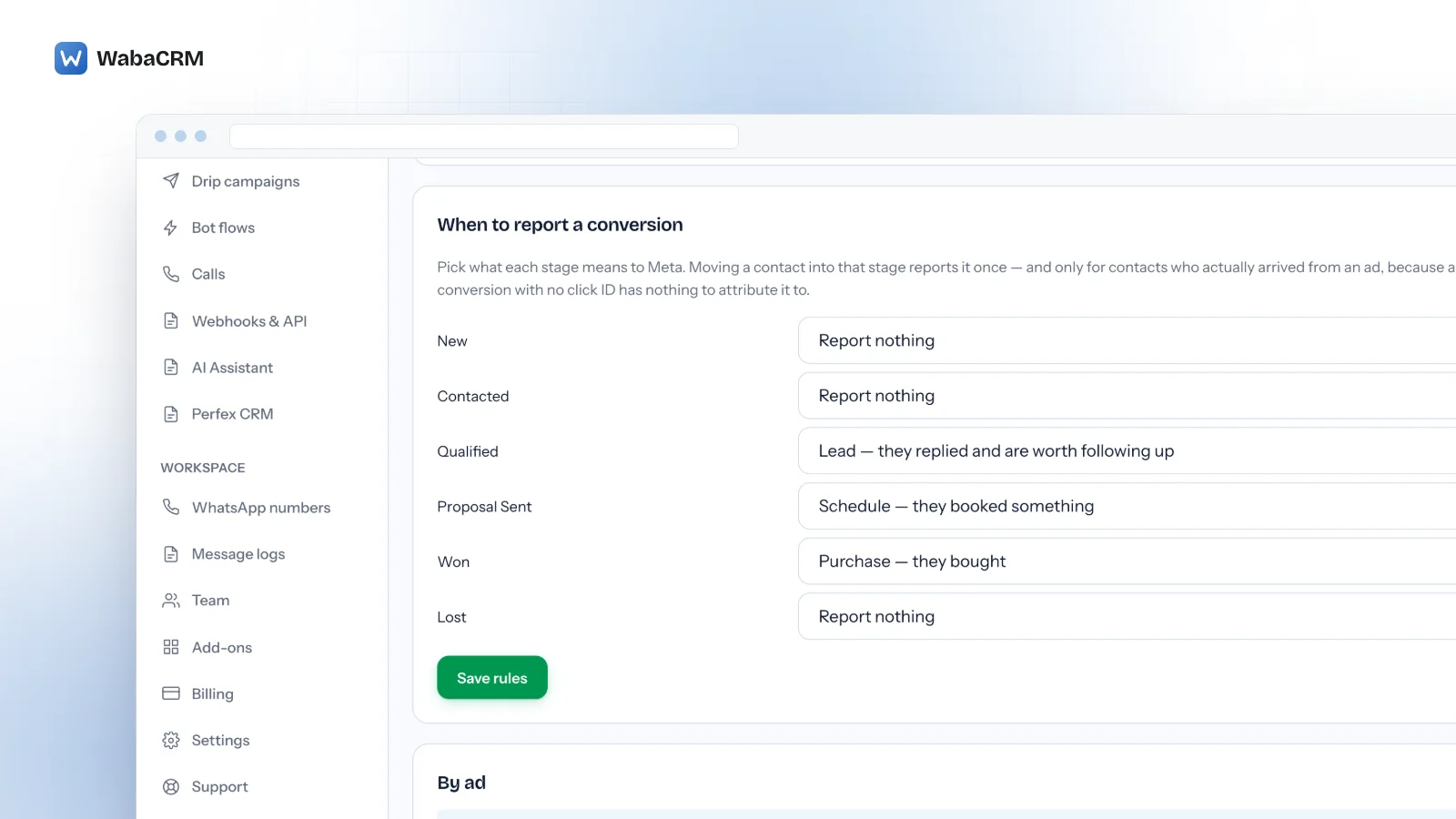
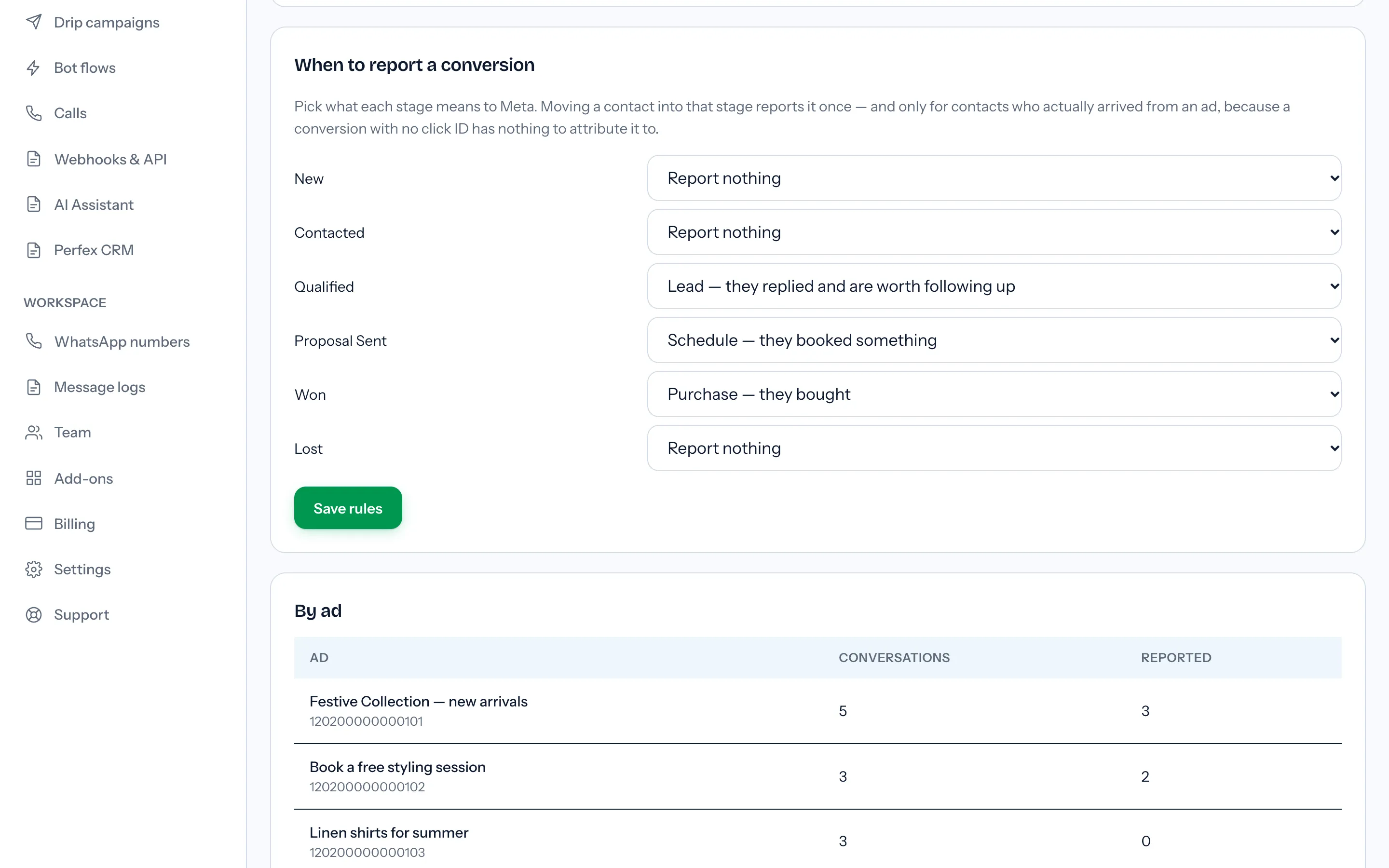
On the Ad attribution screen, the card "When to report a conversion" lists every contact stage, each with a select whose first option is "Report nothing". The stage that records a sale made in the chat is the one to set to "Purchase — they bought". Moving a contact into a mapped stage sends one report, and only for a contact who arrived through an ad click carrying a click ID.
Who removes duplicate conversions before Meta sees them?
You do. Meta says so outright:
"Meta does not assist with deduplicating events for Conversions API for Business Messaging so we highly encourage advertisers to perform deduplication before sending them over Conversions API for Business Messaging." (Meta — Conversions API for Business Messaging: Onboarding Guide)
So a retried job, a double click or a contact dragged back and forth across a board can put one sale in your dataset twice. In WabaCRM every report is claimed in a ledger before anything is sent, keyed on a stable event ID, so a retry, a double save or two workers racing produce one report.
For a stage move, that event ID is built from the workspace, the contact and the stage, so each contact reports each stage once, ever. Move a contact out of the paying stage and back in, and nothing goes the second time. The manual report buttons beside each click work the same way, once per click and event. The trade-off is deliberate: a returning customer who buys again into the same stage is not reported again.
The outcome is final the other way too. A conversion recorded as skipped or failed is never resent, and pressing a manual button again shows the old result.
What does WabaCRM record when an ad brings someone in?
Each ad click becomes its own row: the ad ID, headline, body, source URL, media type, a thumbnail link kept only if it is https, the click ID unaltered, and the contact, conversation and message it belongs to. A referral with neither a click ID nor a source_type of ad, such as a shortlink or a chat plugin, is dropped, because filing it would put a conversation under an ad that did not bring it. The ad's full image and video are not kept.
With the add-on on, the conversation header in the inbox shows "From your ad:" and the ad's headline, or its ad ID when there is no headline. The badge names the conversation's first ad, and anyone who can see the conversation sees it, so the person replying knows which offer the customer saw. How a team shares those conversations is in the WhatsApp shared inbox guide.
The Ad attribution screen, which has its own sidebar link once the add-on is installed, lists the latest 100 clicks by contact, ad and time. A click with no click ID reads "No click ID — Meta cannot attribute a conversion to this one." A "By ad" table counts, for each ad, the conversations and how many conversions were sent, over those same latest 100 clicks rather than all time. "Recently reported" shows the last 25 events with their status and any failure reason.
Clicks have been recorded since 14 October 2026, when capture shipped. Earlier referrals were not kept, so installing the add-on later shows clicks back to that date and no further.
Whose ad account does the add-on report into?
Your own. Meta's guide is plain about whose the dataset is:
"Datasets are owned by the client, and can be accessed by Meta Business Solutions Partners with necessary permissions." (Meta — Conversions API for Business Messaging: Onboarding Guide)
The add-on works from the client's side. The "Your ad account" card asks for a Dataset (pixel) ID, a Conversions API token and, optionally, a test event code, and says: "These are yours, from your own Events Manager — not ours. Nothing is reported anywhere until you put them here."
Until both the dataset ID and the token are saved, every conversion is recorded as skipped with the reason "This workspace has not connected an ad account." WabaCRM never substitutes an ad account of its own. And because skipped is final, connect the account before you start moving contacts, not after.
The token is stored encrypted and never shown again; a blank field on a later save keeps it. The test event code is optional, and the screen's own help text says to clear it when you are done testing.
In the default roles, only an Owner or Admin can save the connection or the stage rules, or press a manual report button. A Manager can open the screen and read it. An Agent cannot open it at all, and sees the ad only as the badge in the conversation.
Which contact moves report a conversion, and which stay silent?
Only a change made one contact at a time, into a stage you mapped.
| How the stage changes | Sends a report? |
|---|---|
| Status select in the inbox | Yes, once |
| Dragging a card on the Kanban board | Yes, once |
| Saving the contact edit form | Yes, once |
| Status change through the API | Yes, once |
| Bulk "move to status" on Contacts | No |
| Contacts moved when a stage is deleted | No |
| A reply, campaign response or order | No |
| Contact with no click ID | Recorded as skipped |
The bulk row surprises people. Move fifty leads to the paying stage at once and none of them is reported, so move contacts whose conversions matter one at a time. The report carries the click ID of the contact's earliest ad click, so a customer who came through two ads is reported against the earlier one.
What does the add-on leave out on purpose?
Each of these is absent by design:
- No ads. It does not create, launch or edit ads. Those stay in Ads Manager.
- No ad filter on contacts. The ad shows in the conversation header and on the Ad attribution screen, not as a contact field or a list filter.
- No Messenger or Instagram ads. Capture runs on the WhatsApp webhook and every event says
messaging_channel: whatsapp. - No automatic reports from replies, campaign responses or orders. Only a stage change and the manual buttons report anything.
- No purchase value. A Purchase goes without
valueorcurrency, so revenue and return on ad spend cannot be read from these events. - No history before 14 October 2026. Earlier referrals were not kept.
- No free entry point indicator. Meta's pricing page says that when a customer messages you from a Click-to-WhatsApp ad on WhatsApp's Android or iOS app and you reply inside the customer service window, that reply opens a free entry point window, and "The FEP window may remain open for up to 7 days." (Meta — Pricing on the WhatsApp Business Platform) What that window does to your bill is in what decides the cost of a WhatsApp message.
Two notes before switching it on. The click ID is, in Meta's words, a personal identifier, and the event also carries a hashed phone number, so read what the DPDP Act asks of a WhatsApp contact list if you sell in India. And the add-on is sold separately, so its current price is on the add-ons page, not in this article.
Every Meta quotation on this page was read from Meta's own documentation on 15 October 2026. Meta changes that documentation without notice; the linked pages are authoritative and this one is not.