Carts arrive as orders
WhatsApp Catalog Orders API: Turning Carts Into Orders
Last checked · 16 min read
The short answer
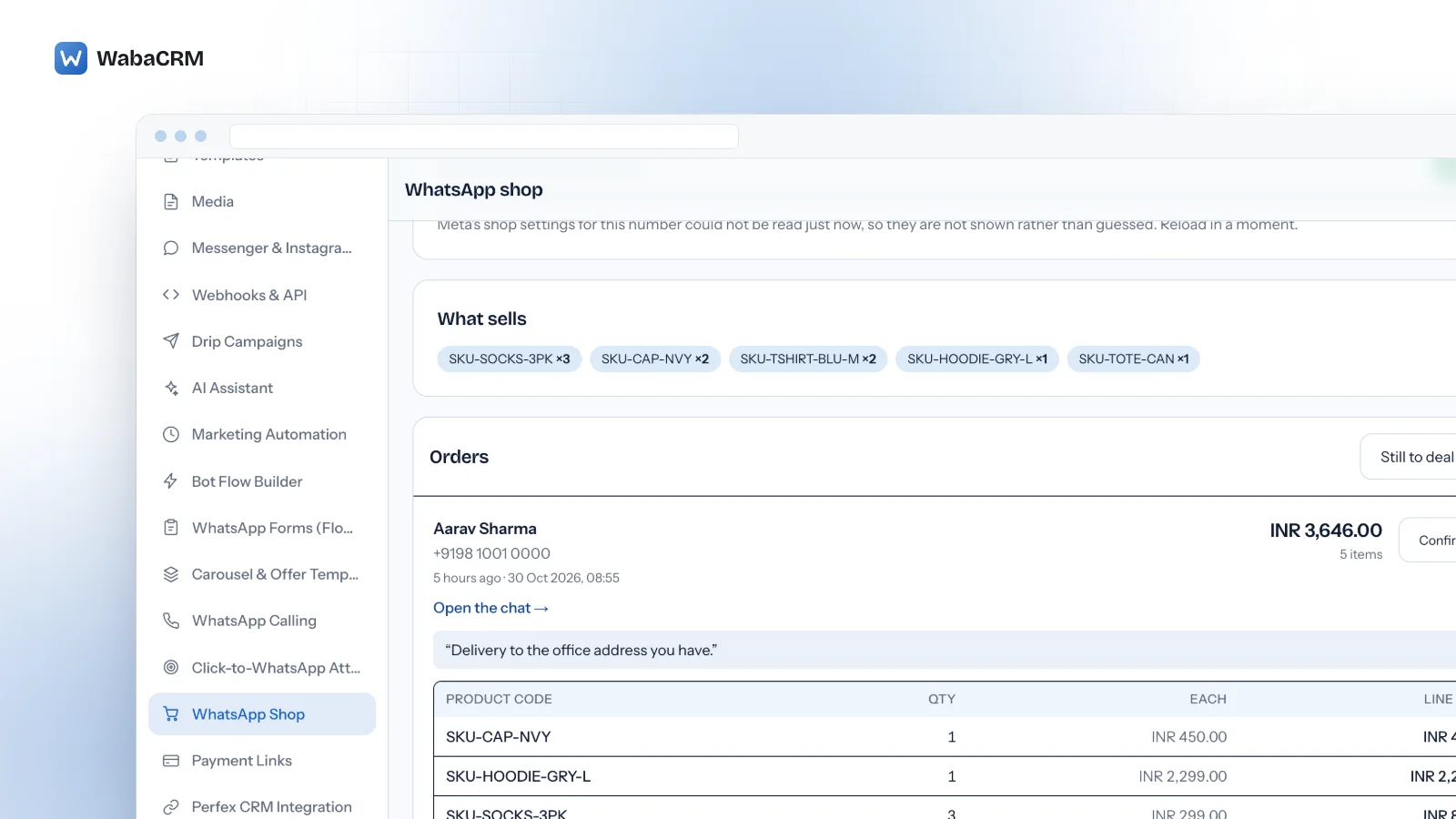
When a customer adds items from your Meta catalog to a WhatsApp cart and sends it, WhatsApp delivers the cart through the messages webhook as an order. A sent cart cannot be edited, and a business cannot send one. WabaCRM files each cart as an order with SKUs, quantities and a total. Checked 15 October 2026.
How do WhatsApp catalog orders work through the API?
A customer opens your Meta catalog inside WhatsApp, adds products to a cart and sends it, and WhatsApp delivers that cart to your business as an order message on the messages webhook. Everything after that is your own process.
Meta's page on receiving responses puts the whole contract in two sentences:
"When a WhatsApp user adds one or more products to their WhatsApp shopping cart and places an order, WhatsApp triggers the order messages webhook, which describes the contents of the order. Use the order contents to fulfill the order." (Meta — Receive responses from customers)
That page is written about customers who have just received a single- or multi-product message. The catalogs overview is the page that covers a customer who simply browses:
"When cart functionality is enabled, customers can add multiple products to a cart while browsing your catalog and submit a single order." (Meta — Catalogs overview)
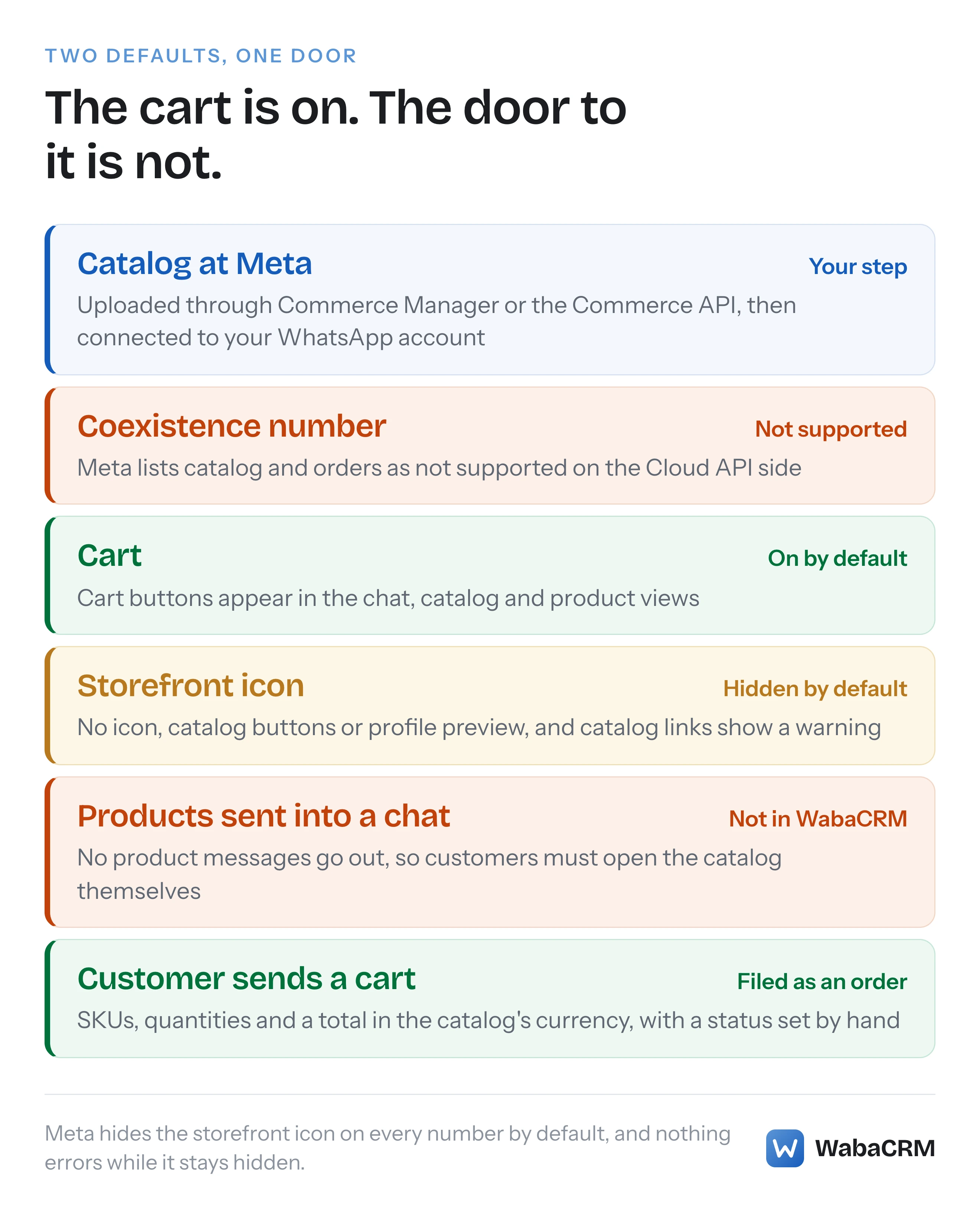
Whether any order arrives at all is decided earlier, by two settings on each business phone number whose defaults point in opposite directions. The cart starts switched on. The storefront icon, which puts the catalog on the business profile and in the chat, starts hidden. Connect a catalog, change nothing, and every route to it that Meta's settings page describes stays shut.
This page sets out that asymmetry, then what WabaCRM's WhatsApp shop, an optional add-on, does with an order once it lands, and just as plainly what it does not do.
- How do WhatsApp catalog orders work through the API?
- What is a WhatsApp Business API catalog?
- What do the cart and storefront icon settings change?
- Why does the storefront icon start hidden?
- What are the rules of a WhatsApp cart?
- What does WabaCRM file when a cart arrives?
- How do you manage WhatsApp orders once they arrive?
- Can WabaCRM send products into a chat?
- Can this add-on take orders on a coexistence number?
- How do you set up catalog orders on a WabaCRM number?
- What does the WhatsApp shop add-on leave to you?
What is a WhatsApp Business API catalog?
It is an inventory you keep at Meta. Meta's catalogs overview defines it:
"A catalog is a structured inventory of products or services that you upload to Meta and connect to your WhatsApp account (WAAC) hierarchy." (Meta — Catalogs overview)
You build it through the Commerce API or Meta Commerce Manager, and if you already have one, Meta's upload guide says to reuse it: "If a business already has a Meta catalog set up, use that catalog for WhatsApp commerce use cases." (Meta — Upload inventory to Meta). The same guide carries the rule that matters to anyone with more than one number:
"You can only upload one catalog per WhatsApp account hierarchy. Each WhatsApp account in the hierarchy is linked to one business phone number, so the same catalog serves every phone number in that hierarchy." (Meta — Upload inventory to Meta)
For Indian sellers, Meta's policies section adds: "Businesses based in India must comply with all online selling laws" (Meta — Catalogs overview).
So the catalog is Meta's object, kept and edited at Meta. WabaCRM does not hold your products. Its screen holds the catalog's ID against a number.
What do the cart and storefront icon settings change?
Two switches on each business phone number decide what a customer can see and do. Meta's commerce settings page opens with both, and with their defaults:
"You can enable or disable the shopping cart and the product catalog on a per-business phone number basis. By default, the shopping cart is enabled and the storefront icon is hidden for all business phone numbers in a WhatsApp account hierarchy." (Meta — Set commerce settings)
| Setting | Meta's default | Switched on | Switched off |
|---|---|---|---|
| Cart | On | Cart buttons in chat, catalog and product views | Products show, no cart buttons |
| Storefront icon | Hidden | Icon and catalog buttons in chats and on the profile | No icon, no catalog buttons, no profile preview |
Each cell paraphrases that one page, read on 15 October 2026. The sentence about the cart, in full:
"When the cart is disabled, customers can see products and their details, but cart-related buttons do not appear in any view." (Meta — Set commerce settings)
Each is one call against the number, with the setting passed as a query parameter. Meta's syntax for the storefront:
POST /<BUSINESS_PHONE_NUMBER_ID>/whatsapp_commerce_settings
  ?is_catalog_visible=<IS_CATALOG_VISIBLE>
The cart uses the same endpoint with is_cart_enabled. Because the settings belong to the phone number, two numbers on one account can carry different ones.
Why does the storefront icon start hidden?
Meta's page gives no reason. It states only the default:
"Set to true to show catalog storefront icon or false to hide it. Default value is false." (Meta — Set commerce settings)
Hidden means more than a missing icon:
"When the catalog is disabled, the storefront icon and catalog-related buttons do not appear in any views and the catalog preview with thumbnails does not appear in the business profile view." (Meta — Set commerce settings)
It even reaches links you have already handed out:
"If you disable the catalog, wa.me links to your catalog, as well as the View catalog button that appears when you send your catalog link in a message will display an Invalid catalog link warning when tapped." (Meta — Set commerce settings)
A business sending product messages from its own code has a second route to its customers, and Meta's settings page does not mention those messages at all. As of 15 October 2026 WabaCRM cannot send products into a chat, so for a WabaCRM workspace the visibility switch is the door. Left at Meta's default, the icon, the catalog buttons, the profile preview and catalog links are all shut while the cart behind them waits. Nothing errors, so it looks like a slow week rather than a closed shop.
What are the rules of a WhatsApp cart?
The cart lives in the customer's chat on one device, and Meta's overview spells out its rules. On size:
"Customers can add up to 99 units of each single catalog item to a shopping cart, but there is no limit on the number of distinct items that can be added to a cart." (Meta — Catalogs overview)
On where it lives:
"Only one cart is created per chat thread between you and a customer, and carts do not persist across multiple devices." (Meta — Catalogs overview)
And on what happens once it is sent, the rule that shapes your order list:
"Once a cart has been sent, no edits can be made. Customers can send a new cart if they need new items or would like to change their order. You cannot send carts to customers." (Meta — Catalogs overview)
So a customer who changes their mind sends a second cart, and you receive a second order.
What does WabaCRM file when a cart arrives?
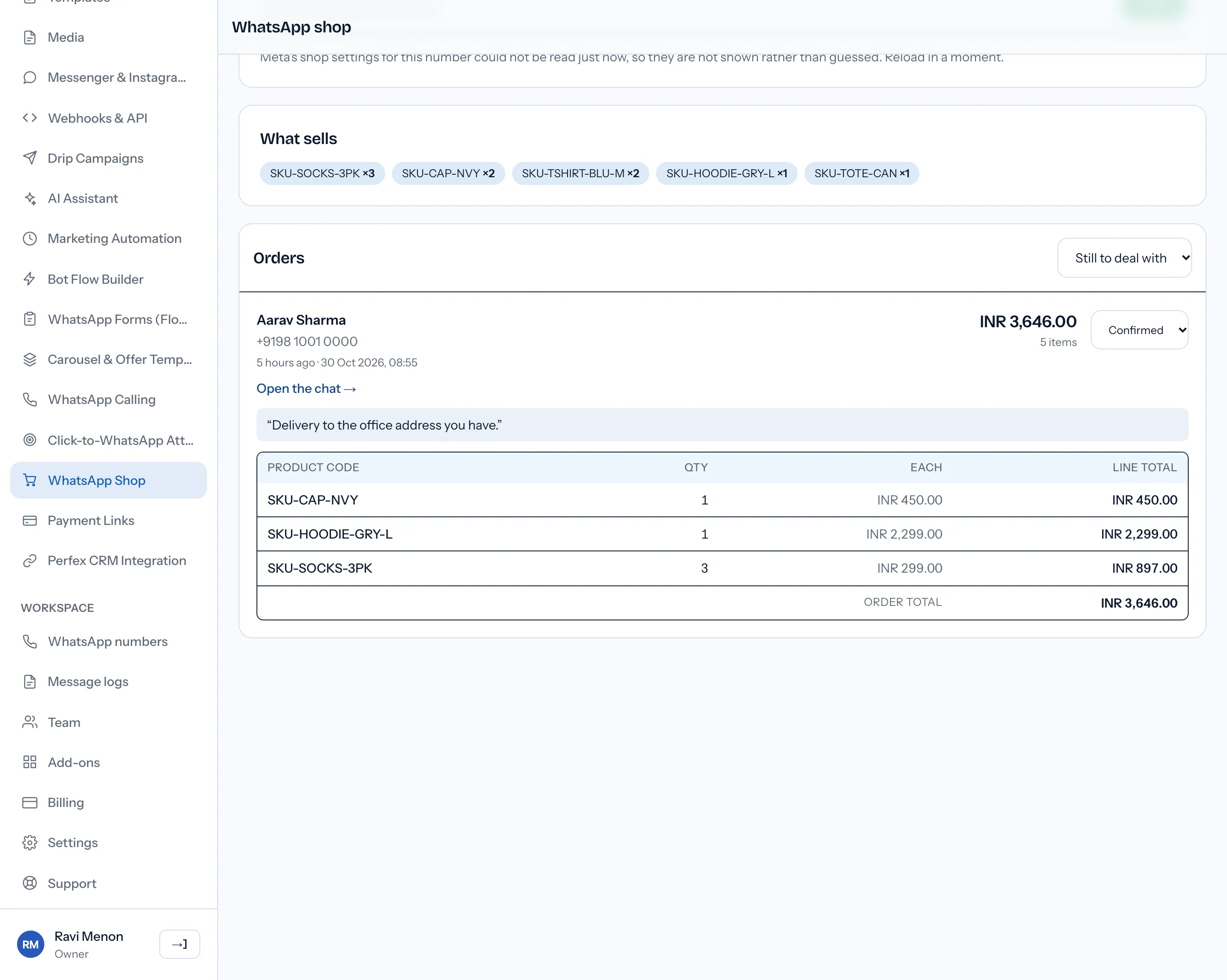
An order, built from the cart message itself. WabaCRM recognises the incoming message by its type, order, and writes one order with a line for each item.
| What is kept | Where it comes from |
|---|---|
| Contact and conversation | The customer who sent the cart |
| SKU and quantity per line | Each item in the cart |
| Unit price per line | The cart, in the catalog's currency |
| Total | Worked out by WabaCRM from price and quantity |
| Note | The text the customer sent with the cart |
| Status | Your team: New, Confirmed, Sent or Cancelled |
The total is WabaCRM's arithmetic. Each line's unit price is read as the decimal amount the cart carries, multiplied by its quantity, and the lines are added up. Nothing checks the result against Meta. A cart of two items at 7.99 and one at 12.50, from a catalog priced in pounds, is filed as:
2 × 7.99 + 1 × 12.50 = GBP 28.48
The currency is the catalog's. WabaCRM reads it from the items, shows the code beside the figure, and converts nothing.
A cart is filed once. If the same delivery reaches WabaCRM twice, it finds the order it already wrote. A second order only ever comes from a second cart.
The order exists whether or not the add-on is on. WabaCRM files every cart it receives as an order, and the conversation shows the cart in the inbox, line by line with the total. The add-on is the screen where orders are listed and worked.
How do you manage WhatsApp orders once they arrive?
By hand, on the shop screen, one status at a time. Meta's documentation describes the order and leaves fulfilment to you, so WabaCRM keeps four statuses of its own: New, Confirmed, Sent and Cancelled. The list opens on "Still to deal with", which shows New and Confirmed, with "All" beside it for the rest.
Each order is a card rather than a row, because an order is several facts and a row of five columns could not carry them. The card names the customer and their number, says when the cart was sent, links straight to the conversation it arrived in, quotes the note they typed, and then lists every line it contained with its quantity, its unit price and its line total, adding up to the order total above. The status saves the moment it changes.
That itemised list is the part worth insisting on. Until 29 October 2026 the screen showed an item count and up to three SKUs, and named every customer "Unknown" — not because the name was missing but because the column read an attribute that does not exist on a contact, and Eloquent answers an unknown attribute with null rather than an error. A business cannot pick and pack from a count, and it cannot address a parcel to Unknown.
The list holds the newest 100 orders for the WhatsApp number chosen at the top of the screen. Above them, a "What sells" strip shows up to eight SKUs ordered in the largest quantities on that number, counting every order, even cancelled ones.
Anyone who can see conversations, agents among them, can open the screen and change an order's status. Since 29 October 2026 it has its own link in the sidebar, under the core screens, for every member whose permissions let them open it — until then the only route was the Add-ons screen or typing the address, which is a poor way to reach something a shop looks at several times a day. Saving the catalog ID and changing Meta's two settings need permission to manage settings, which by default only the Owner and Admin roles hold.
Plan around one thing: a status is a note to yourselves. Marking an order Confirmed or Sent messages nobody. If the customer should hear about it, someone replies in the conversation the cart arrived in, inside Meta's ordinary window rules:
"When a WhatsApp user messages you or calls you, a 24-hour timer called a customer service window starts." (Meta — Service messages)
"When the window closes, you can only send pre-approved template messages." (Meta — Service messages)
Those replies come out of the same shared team inbox as every other conversation. What Meta charges for each one depends on its category and the customer's country, set out in how Meta prices a WhatsApp message.
Can WabaCRM send products into a chat?
No, and this is the gap to weigh before switching anything on. Meta's sharing page lists several ways to put products in front of a customer, and as of 15 October 2026 none of the four below can be sent from WabaCRM's inbox, API or bots.
| Meta format | What the customer gets | From WabaCRM |
|---|---|---|
| Catalog message | A thumbnail, text and a View catalog button | Not available |
| Single-product message | One product with its image, title and price | Not available |
| Multi-product message | Up to 30 products in sections | Not available |
| Product carousel | Up to 10 product cards, scrolling sideways | Not available |
Each row paraphrases Meta's page on sharing products with WhatsApp users. Meta is candid that the API alone does not hand these to a team inbox:
"Multi-Product Messages can also be used as part of a human agent flow. However, you need to build the tooling to allow the human agent to generate a Multi-Product Message in thread." (Meta — Multi-product messages)
WabaCRM has not built that control into its inbox. The interactive versions also stay inside a conversation; Meta's single-product page says "They can only be sent as part of existing chat threads." (Meta — Single-product messages). Meta's sharing page lists a template version of each format as well, and WabaCRM's template builder offers none of them. WabaCRM's carousel templates are a different thing: Meta's media card kind, with an image or video on each card rather than products from this catalog.
One route on that page is not a product message at all:
"Use Catalog link messages to send a link to your entire product catalog by assembling a wa.me link and including it in a standard text message." (Meta — Share products with WhatsApp users)
WabaCRM has no control that builds that link for you.
So a WabaCRM workspace takes orders only from customers who open the catalog themselves, through the storefront icon on the business profile, the catalog buttons in the chat or a wa.me link to the catalog, all of which work only once the catalog is visible. For a shop whose customers already know what they want, that can be enough. For one that sells by recommending products in conversation, it is not.
Can this add-on take orders on a coexistence number?
No. A coexistence number is one that still runs in the WhatsApp Business app on a phone while it is connected to the Cloud API, and Meta's feature comparison for those numbers rules commerce out. Its third column asks "Is the WhatsApp Business app feature supported on Cloud API?", and the row for "Business tools (for example, catalog, orders, status)" reads "No change." for the app and "Not supported." for the Cloud API (Meta — Onboard WhatsApp Business app users).
So this add-on cannot take orders on a coexistence number. A catalog run inside the WhatsApp Business app carries on there, and the API side does not pick it up.
Be careful, because WabaCRM's shop screen does not tell coexistence numbers apart. It lists every WhatsApp number, saves a catalog ID against any of them and sends Meta a settings change for any that is connected, with no warning. The rest of what changes when one number lives in both places is in what stops working under coexistence.
How do you set up catalog orders on a WabaCRM number?
Five steps, and only the first happens away from WabaCRM:
- Build or reuse a catalog in Commerce Manager, and connect it to your WhatsApp account at Meta as Meta's upload guide describes.
- Get the add-on from Add-ons in your workspace. It then appears in the sidebar as WhatsApp Shop.
- Choose the WhatsApp number, which must not be a coexistence number, paste the catalog ID and save. WabaCRM does not check the ID against Meta, so copy it carefully.
- Read the two settings, which WabaCRM asks Meta for whenever a number is shown. If it cannot read them, it says so rather than showing two switches it has guessed.
- Tick "Show the shop icon on this number's profile", and leave "Let customers build a cart" ticked.
Those ticks are saved at Meta, not in WabaCRM, and only for a number that is connected. A refusal appears as a message beginning "Meta refused that".
What does the WhatsApp shop add-on leave to you?
More than its name suggests:
- Putting products in a chat. No screen, API route or bot in WabaCRM sends a product or a selection of products.
- Creating the catalog. It is built, reviewed and connected at Meta. WabaCRM cannot create one for you.
- Reading the catalog. WabaCRM reads nothing from it, so orders and the best-seller strip show each item's SKU, the retailer ID it carries in your catalog.
- Telling the customer. Changing a status sends no message.
- Taking payment. Nothing in it takes or records a payment.
- Stock and delivery. No stock levels, couriers or fulfilment tools are connected to it.
- Changing an order. Only the status changes. The cart itself is final, by Meta's rule.
- Coexistence numbers. Meta lists catalog and orders as not supported on the Cloud API side of one.
- Other channels. WhatsApp numbers only, not Messenger or Instagram.
The add-on is sold separately, and the panel under the short answer at the top of this page shows what the store says about it today, as does the add-ons store. How the rest of WabaCRM fits an online shop, from the inbox to campaigns, is on the ecommerce use case.
Every Meta quotation on this page was read from Meta's own documentation on 15 October 2026. Meta changes that documentation without notice; the linked pages are authoritative and this one is not.