Connect an Existing WhatsApp Number: Error 2655093 and More
The short answer
On WabaCRM's WhatsApp numbers screen, press Connect my existing number under Keep the number on your phone. Meta's window takes over, you confirm on the phone, and the number appears with an Also on your phone badge. Most failures, 2655093 and 1752206 among them, happen inside Meta's window and carry Meta's code. Checked 19 September 2026.
Why does Meta say my WhatsApp Business account is already shared with a partner?
Error 2655093 means the WhatsApp Business account behind your number is still connected to a partner platform, and Meta will not switch partners inside this window. First check the number is not already listed as connected in WabaCRM. If it is not, Meta's fix is to disconnect that partner in the WhatsApp Business app on your phone, then press Connect my existing number again.
Meta's row for it, on its Embedded Signup errors page, reads:
"The business is already sharing this WhatsApp Business account with a partner. Switching partners is not supported in this flow. Disconnect the current partner in the WhatsApp Business App, then return here to connect a new partner." (Meta — Embedded Signup Flow Errors)
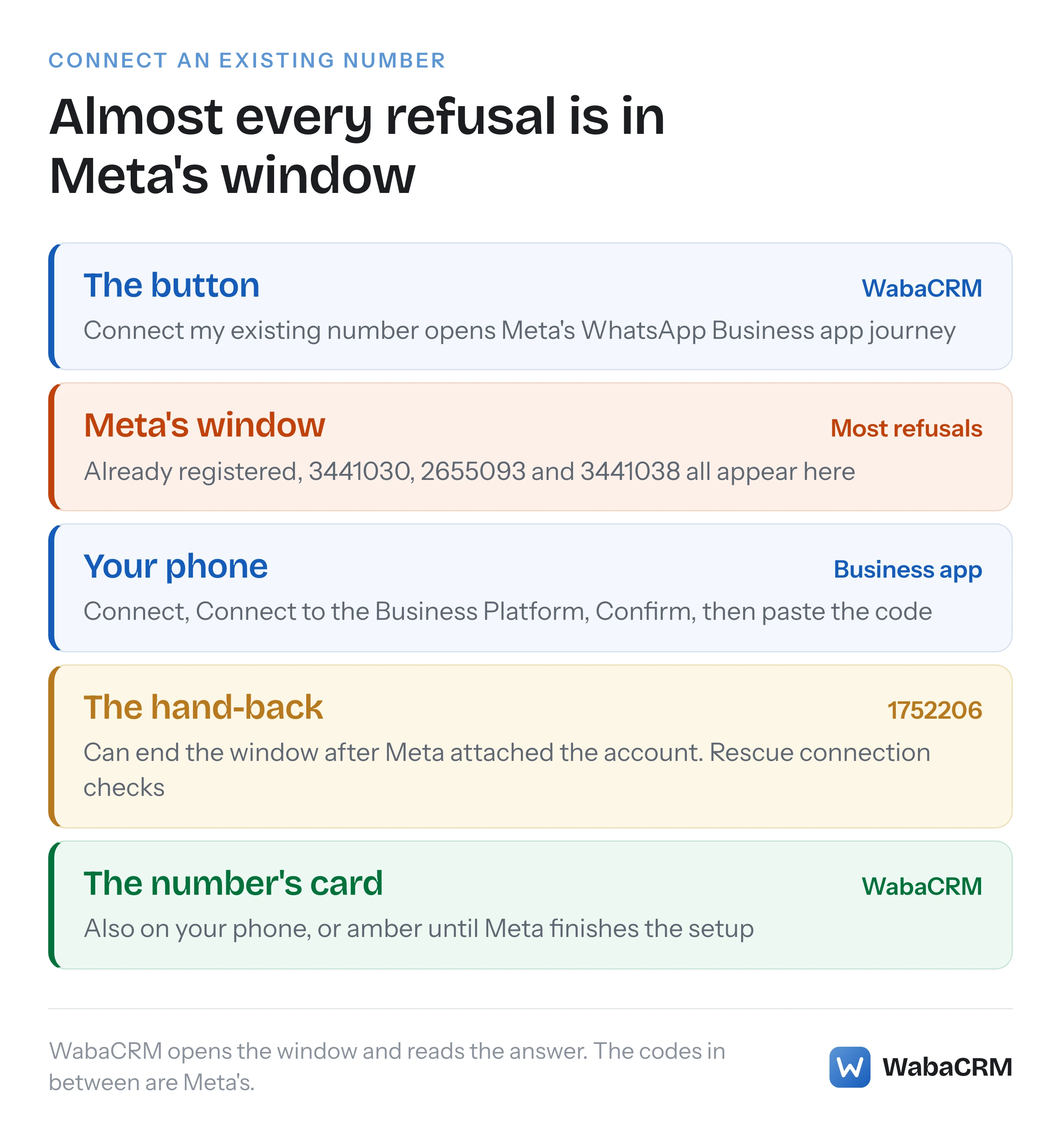
Like every refusal on this journey, it happens inside Meta's window, before WabaCRM is told anything. The codes are Meta's, and so are most of the fixes.
Meta calls this arrangement coexistence, and what it changes on the phone is covered in the WhatsApp coexistence guide.
- Why does Meta say my WhatsApp Business account is already shared with a partner?
- How do you connect an existing number in WabaCRM?
- Is WabaCRM opening the right Meta window for coexistence?
- Which code did Meta show, and what fixes it?
- Why does Meta ask for a new number or call yours already registered?
- What are Meta's steps for switching partners after error 2655093?
- What should you do when the window ends on error 1752206?
- What does #3441038, "You don't have permission to view this resource", mean?
- Why does the card say Setup not finished at Meta?
- Does WabaCRM register a coexistence number or ask for its PIN?
- How do you reconnect after the account moved to another portfolio?
How do you connect an existing number in WabaCRM?
Before you start
- The number is on the WhatsApp Business app, not ordinary WhatsApp.
- The app is recent enough. "The business customer must use WhatsApp Business app version 2.24.17 or higher." (Meta — Onboard WhatsApp Business app users)
- Your chats are backed up. Meta's switch-partners guide starts with a backup, so take one before you disconnect anything.
- The right person signs in: the Facebook account that manages the business portfolio which should own the WhatsApp account. In WabaCRM you also need the Connect a WhatsApp number permission, which Owners and Admins hold by default.
Two facts to know first. Straight after the connect, WabaCRM asks WhatsApp for up to six months of one-to-one chats from the phone — so tap Confirm when Meta's steps ask about sharing your chat history, and leave the WhatsApp Business app open for a few minutes afterwards. Your phone's address book is counted but held: nothing from it is added to Contacts unless you approve it on the numbers screen. WhatsApp allows the import once per number and only in the first 24 hours. And Meta gives these numbers "a fixed throughput of 20 mps" (Meta — Onboard WhatsApp Business app users).
Step 1: open WhatsApp numbers and press Connect my existing number
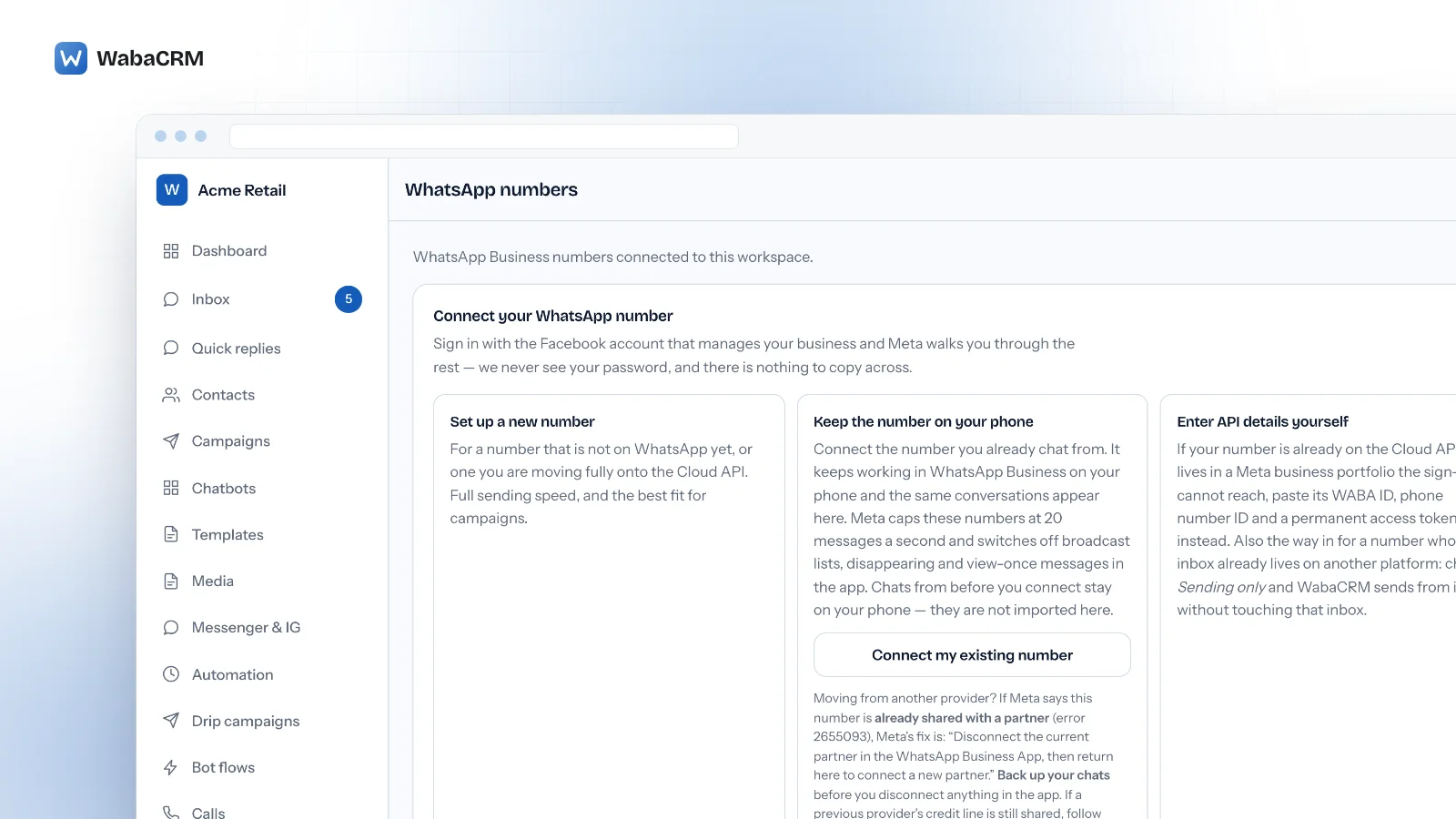
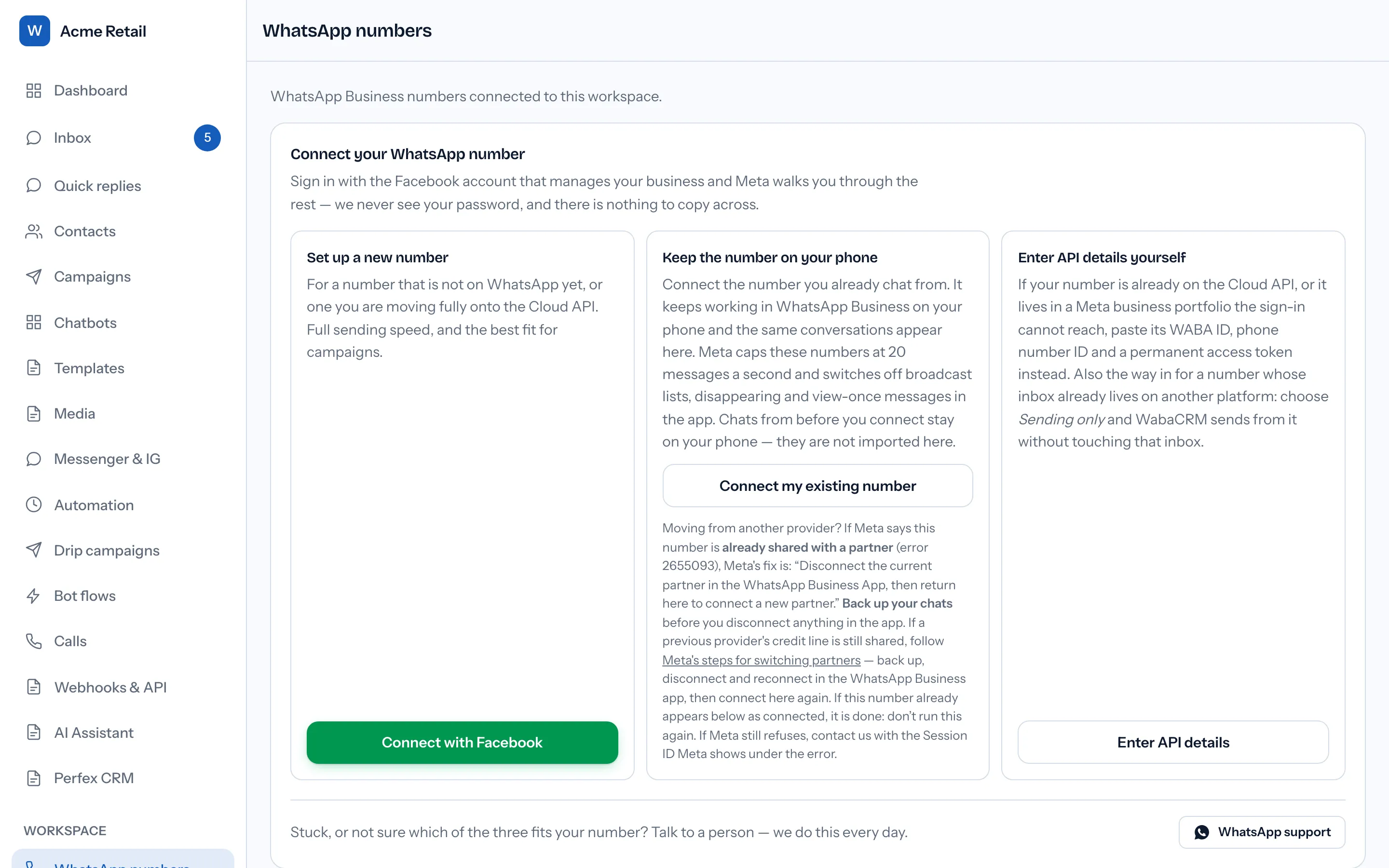
Go to WhatsApp numbers (/app/numbers). The panel headed Connect your WhatsApp number shows three cards, three different routes:
| Card | Button | For |
|---|---|---|
| Set up a new number | Connect with Facebook | A number not on WhatsApp yet, or moving fully to the Cloud API |
| Keep the number on your phone | Connect my existing number | A number you keep using in the WhatsApp Business app |
| Enter API details yourself | Enter API details | A number already on the Cloud API |
Press Connect my existing number. While Meta's window is open the button reads Waiting for Meta… and both connect buttons stay disabled. After two minutes the panel adds "Still waiting for Meta." with a Start again button. If you are still working in Meta's window, finish there; the page picks it up. Press Start again only if you closed that window or it never opened.
What can go wrong before Meta is involved:
- The button reads Not available yet, over the line "Waiting on Meta to approve this platform for existing-number onboarding." On wabacrm.com it has been on since 13 August 2026.
- Nothing opens. If an ad blocker stops Facebook's sign-in script, the panel says "Facebook's sign-in script could not load. Disable any ad blocker for this page and try again." A popup blocker shows no message at first: the button stays on Waiting for Meta… until the two-minute Start again appears. Allow popups for the page, press Start again, then try once more.
- You are unsure which card fits. Under "Stuck, or not sure which of the three fits your number?", WhatsApp support reaches a person.
Step 2: finish Meta's window and confirm on the phone
Once you enter the number in Meta's window, "WhatsApp presents a verification code to enter" (Meta — Onboard WhatsApp Business app users). When Meta asks which business portfolio the account belongs to, choose the one that owns the number today.
A message then arrives on the phone from the official Facebook Business Account. Meta lists the taps in the app as Connect, Connect to the Business Platform and Confirm, then "Paste the verification code", the one Meta's window showed you.
Step 3: check the number's card
When Meta hands the connection back, a green confirmation reads "Your WhatsApp number is connected." The page then reloads by itself and shows the number. If something still needs attention it reads "Connected, but some steps need attention." with each reason beneath it in amber, and the page stays put so you can read them. Press Show my number when you are done. The setup warning reappears on the number's card as Setup not finished at Meta. If Meta refused WabaCRM's subscription to the number's messages, the card says "WabaCRM could not subscribe to this number's messages when it was connected." Sending still works, but messages sent to this number may not reach the WabaCRM inbox until Meta accepts the subscription. WabaCRM asks Meta again once a day; to try sooner, connect the number again with the button the note names.
The number's card carries an Also on your phone badge beside its status, whose tooltip repeats the 20-messages-a-second cap.
Is WabaCRM opening the right Meta window for coexistence?
Yes. Both buttons open the same Meta sign-in with the same Embedded Signup configuration and differ in one setting. Connect with Facebook sends the version, v4, on its own. Connect my existing number adds a feature type of whatsapp_business_app_onboarding, which is what Meta asks for:
"Add a featureType property set to whatsapp_business_app_onboarding to the extras object in the launch method and callback registration portion of the Embedded Signup implementation code." (Meta — Onboard WhatsApp Business app users)
We checked the setting on wabacrm.com on 19 September 2026.
Which code did Meta show, and what fixes it?
Match the code, or the wording where Meta showed no code.
| Code | Meta's words, shortened | What to do |
|---|---|---|
| 2655093 | "already sharing this WhatsApp Business account with a partner" | Disconnect that partner in the app, wait 15 minutes, connect again |
| 3441049 | "already registered with the product" | Disconnect in the app, wait 15 minutes, retry |
| 2655094 | "Please disconnect your business platform to continue." | The same |
| No code on Meta's page (2494064 when reported to us) | "registered to an existing WhatsApp account" | Check the button, the app and its version. Do not deregister |
| 3441030 | "The phone number you entered is already registered." | The same checks |
| 1752206 | "The user cannot be added to the business." | Rescue connection if it shows, then support |
| 3441038 | Not on Meta's errors page | Owner's sign-in once, then support with the Session ID |
Why does Meta ask for a new number or call yours already registered?
Meta's errors page has a row for this in its phone setup section:
"This number is registered to an existing WhatsApp account. To use this number, disconnect it from the existing account. Then, return to this page and re-enter the number. Note: It may take up to 3 minutes for the number to become available." (Meta — Embedded Signup Flow Errors)
Its explanation: "You already registered the phone number on our platform (that is, WhatsApp Messenger, WhatsApp Business App, or WhatsApp Business API). Suggested Solution: Deregister the number if you want to use it, or register a new number."
Meta prints that row with no code; reported to us from Meta's window, the same refusal arrived as error 2494064, worded slightly differently. The page's WhatsApp Business app section carries a close relative, 3441030:
"The phone number you entered is already registered. To proceed, enter a different phone number or deregister the current one." (Meta — Embedded Signup Flow Errors)
Both remedies take the number off the phone or swap it for another. If you want to keep using the number in the app, do not deregister it or disconnect the phone's WhatsApp account to get past this. Meta does not say why its window takes this route for a particular number. Check what you control:
- You pressed Connect my existing number, not Connect with Facebook.
- The number is on the WhatsApp Business app. Meta's row lists WhatsApp Messenger separately.
- The app is version 2.24.17 or later.
If all three hold, contact support with the Session ID Meta shows. Moving a number fully between API providers is a different job, covered in switching WhatsApp API providers.
What are Meta's steps for switching partners after error 2655093?
Meta's resolution column for 2655093 reads: "1. Disconnect the current partner in the WhatsApp Business App 2. Connect a new partner." Its support page for onboarded clients has a longer procedure, under Switch partners and remove previous line of credit, though it does not tie it to 2655093 by number:
"If your client worked with a partner in the past and still shares the previous credit line, the client may see an error when attempting to switch to a new partner." (Meta — Support for onboarded clients)
Four steps follow, word for word:
- "Backup your client’s messages."
- "Disconnect from WhatsApp Business app."
- "Reconnect in WhatsApp Business app."
- "Start onboarding process using the WhatsApp Business app user onboarding flow."
In WabaCRM, step four is Connect my existing number. Step two happens on the phone: Meta describes clients disconnecting "by navigating to the Settings > Account > Business Platform and clicking the Disconnect Account button" (Meta — Onboard WhatsApp Business app users). Then wait. Meta's row 3441049, for the same disconnect, ends: "Please wait 15 minutes before retrying this process." (Meta — Embedded Signup Flow Errors) Row 2655094 asks the same.
Three things Meta's steps leave out:
- WabaCRM cannot do this part for you. Meta refuses 2655093 inside its own window, before anything is shared with us, so there is no connection on our side to remove. WabaCRM is a Tech Provider, holds no credit lines, and cannot see or remove a previous provider's.
- No Rescue connection button appears for this code, because a rescue works from an account Meta named and 2655093 names none.
- Check the list below the panel first. We have seen 2655093 arrive shortly after a connection had already succeeded, which is why the card says: "If this number already appears below as connected, it is done: don’t run this again."
If Meta still refuses after all four steps, contact support with the Session ID. If you reported the error from Meta's window, the red error message includes it.
What should you do when the window ends on error 1752206?
Meta's row gives the description "The user cannot be added to the business." and the resolution "Contact Business Support.", with those last two words linking to Meta's Business Support Home (Meta — Embedded Signup Flow Errors).
Meta passes an error on only when you report it from its window: it sends "An error ID, if they encountered an error and used the flow to report it" (Meta — Embedded Signup implementation). If you report it before closing the window, WabaCRM's panel shows the code with Meta's words and three buttons:
- Rescue connection (it reads Checking Meta… while it works) finishes the connection from an account Meta named before the window failed, if there is one, without calling Meta's registration step.
- Enter API details, for a number already on the Cloud API.
- Get help on WhatsApp, which reaches a person.
When Meta passed the Session ID on, the red message includes it, and that is what to send support if the rescue finds nothing. If you close the window without reporting it, WabaCRM hears nothing: the panel stays blank and the button comes back. Contact support with the Session ID from your screenshot.
We have seen this error end a window after Meta had already attached the account, with only the hand-back to WabaCRM missing. If the rescue answers "Nothing to rescue: Meta did not name a WhatsApp Business account for this sign-in.", contact support. If Meta did share the account with WabaCRM, support can attach the number to your workspace by hand.
What does #3441038, "You don't have permission to view this resource", mean?
It is a permission refusal inside Meta's window that Meta does not document: it is not on the Embedded Signup errors page, which we checked on 19 September 2026. The English wording above is as a business reported it to us; the copy Meta sent us was in another language and cut off.
It is not WabaCRM's own Connect a WhatsApp number permission: without that, the panel does not appear at all. Meta does not say which permission it means. The wording points at the resource's owner, so sign in to Facebook as someone with full control of the business portfolio that owns the number. In the one case reported to us, that was not enough on its own. If it fails, contact support with the Session ID rather than retrying.
Why does the card say Setup not finished at Meta?
Because Meta has linked the number but not yet moved it onto the Cloud API. Meta's test for a ready coexistence number is two fields at once:
"If is_on_biz_app is true and platform_type is CLOUD_API, the business phone number is able to use Cloud API and the WhatsApp Business app" (Meta — Onboard WhatsApp Business app users)
WabaCRM reads both when it checks the number. When a number is on the WhatsApp Business app but Meta reports its platform as ON_PREMISE, the badge turns amber, reads Setup not finished at Meta, and the card says:
"Meta has not finished setting this number up. It is linked to your account, but Meta reports it is not on the Cloud API yet, and Meta can refuse templates and messages from it until it is."
Its advice is to run Connect my existing number again for the same number, because "Meta can need more than one attempt before it finishes." We have seen it take two. Until then new templates can be refused with Meta's error 2494160, which is about the account rather than the template's wording.
Does WabaCRM register a coexistence number or ask for its PIN?
No. Registration is the Cloud API step where a two-step verification PIN comes in, and Meta tells platforms to skip it for these numbers:
"Capture the customer’s asset IDs and exchangeable token code and use them to onboard the customer as you normally would, but skip the phone number registration step, as the number is already registered." (Meta — Onboard WhatsApp Business app users)
WabaCRM skips it whenever Meta reports the number as on the WhatsApp Business app, or Meta's window reports that the Business app journey finished, and the rescue path never registers anything. So a connection Meta identifies as coexistence does not ask for your PIN or spend Meta's registration attempts. For a number connected the ordinary way, error 133005 covers a PIN nobody remembers.
How do you reconnect after the account moved to another portfolio?
Run Connect my existing number again and, in Meta's window, choose the business portfolio that owns the account now.
If Meta still reports the same phone number ID, the existing entry is simply updated. If the number now sits in a different WhatsApp Business account under a new ID, reconnecting creates a second entry, and the old one points at the account the number has left. Once it fails while a live entry holds the same number, the old card says "This number is now connected under" and names the live entry, and its button reads Remove instead of Disconnect. Remove moves the old entry's conversations and messages to the live one and deletes the dead entry. Templates stay with the account they were created in, so press Sync templates on the live entry.
Every Meta quotation on this page was read from Meta's own documentation on 19 September 2026. Meta changes that documentation without notice; the linked pages are authoritative and this one is not.
Questions people also ask
Does WabaCRM need my two-step verification PIN to connect an existing number?
Why is there no Rescue connection button after error 2655093?
Why does the Connect my existing number button say Not available yet?
Can I run Connect my existing number again after a failed attempt?
Where do I find the Session ID Meta shows with a signup error?
- error 2655093
- already sharing this whatsapp business account with a partner
- connect existing whatsapp business app number
- whatsapp coexistence
- error 1752206


