Send a WhatsApp Template to a New Number Through the API
The short answer
POST /api/v1/messages with to, template_id and template_params sends an approved WhatsApp template to a number that has never messaged you, in one call. It finds or creates the contact and the conversation, and answers 201 with data.id and data.conversation_id. You do not need to create a conversation first. Checked against WabaCRM on 19 September 2026.
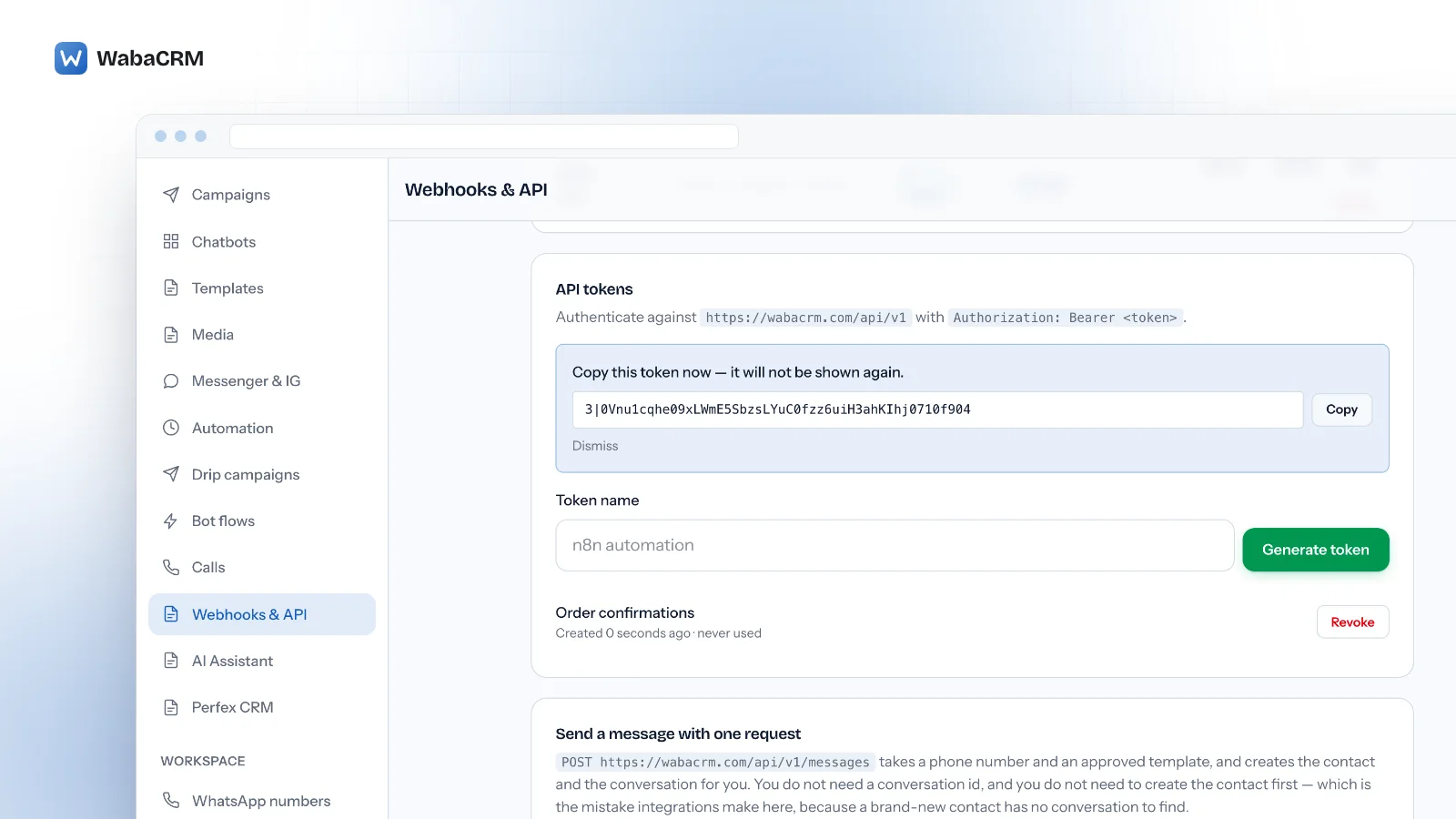
How do I send a WhatsApp template to a new number through the API?
Post it to POST /api/v1/messages with the phone number in to, the template's id in template_id and its values in template_params. That one request finds or creates the contact, finds or creates the conversation, queues the send, and answers 201 with the message's data.id and data.conversation_id.
The approach that does not work is one integrations often try first. They search contacts, then search conversations, then post to /conversations/{id}/templates. For a customer who placed their first order a minute ago there is nothing to find: a contact has no conversation until a first message, or an explicit request, opens one. The integration stops at an empty search result, or creates the contact and never messages it.
The four steps below follow one send from token to final status.
- How do I send a WhatsApp template to a new number through the API?
- Where do I get an API token for WabaCRM?
- How do I find a template's id and its variable counts?
- What does the one-call send request look like?
- How do I follow a message after the 201?
- Why does body_params fail on the one-call endpoint?
- Can my own backend send from a number WabaCRM connected?
- What do the error answers from the send endpoint mean?
- Which sending rules does Meta set, and which does WabaCRM?
- What happens to a national number sent without a country code?
- Will a contact created through the API receive my campaigns?
Where do I get an API token for WabaCRM?
From the Webhooks & API screen. It is an add-on, so if it is not in your menu, open Add-ons and install it first. Installing needs Install and remove add-on modules, which Owners and Admins hold by default; a member without it reads "Ask the workspace owner or an admin to install add-ons." beside an add-on that is not installed. A paid add-on's Buy & install button opens the pay dialog for its invoice on the Billing screen, and from there you finish on the secure payment page. The add-on switches on as soon as that invoice is paid. By default only the workspace owner can pay it.
- Open Webhooks & API and find the API tokens card.
- Type a name you will recognise later into Token name, for example "Order confirmations", and click Generate token.
- A panel appears reading "Copy this token now — it will not be shown again." Click Copy, put the token in your server's secret store, then click Dismiss.
- The token now sits in the list under the form, reading Created … · never used until your server first calls the API, with a Revoke button beside it.
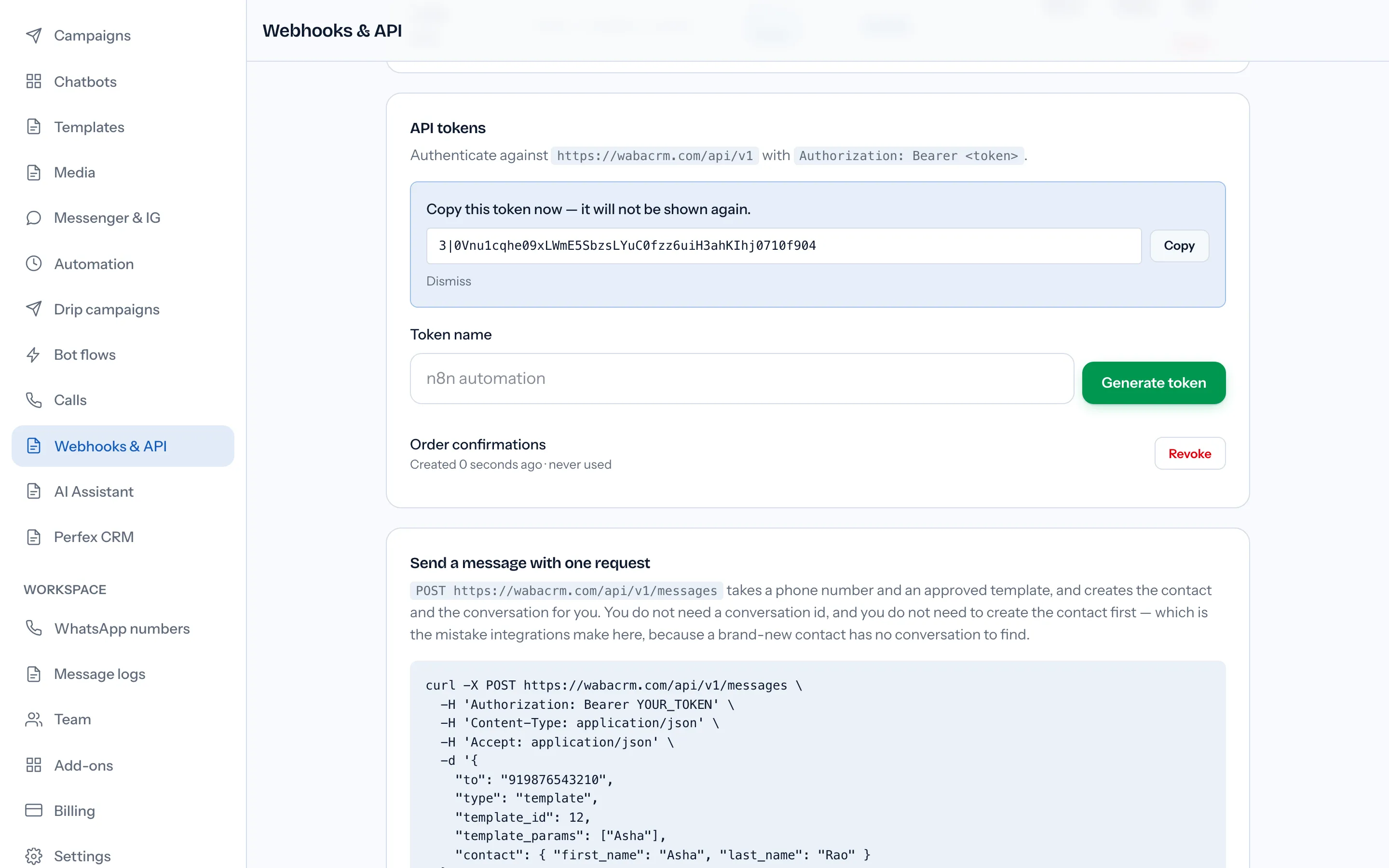
Every request then carries Authorization: Bearer <token> against https://wabacrm.com/api/v1. Three things about tokens decide whether an integration keeps working:
- A token carries the permissions of the member who created it. Generating one needs Manage outgoing webhooks. Sending needs Reply to conversations, and sending to a number that is not yet a contact also needs Create contacts. Owners and Admins hold all three by default.
- Only a hash is stored. A lost token cannot be shown again; generate a new one and revoke the old.
- Tokens do not expire, but they do end. Revoke asks "Revoke this token? Anything using it stops working immediately." A password change for the member who created it, or deactivating or removing that member, ends every token they hold, and your server starts receiving
401. Each member sees and revokes only their own tokens, so an integration built on a colleague's token lives and dies with their account.
How do I find a template's id and its variable counts?
Ask the API. The Templates screen lists each template's name, category, language, a Variables count and its status, but not its id, which is the one thing the send needs.

curl https://wabacrm.com/api/v1/templates \
  -H 'Authorization: Bearer YOUR_TOKEN' -H 'Accept: application/json'
Each entry in data carries, among other fields, id, name, language, category, status, header_type, body_variables, header_variables and whatsapp_account_id. Only approved templates are listed unless you add ?include_unapproved=1, and ?search= matches the name or the body text. Reading it needs View message templates.
Read the two counts separately. The Variables column on screen is header and body placeholders added together, while the send counts template_params against body_variables and header_params against header_variables. A template showing 2 on screen may need one of each.
What does the one-call send request look like?
This is the example the Webhooks & API screen itself gives, with the production address:
curl -X POST https://wabacrm.com/api/v1/messages \
  -H 'Authorization: Bearer YOUR_TOKEN' \
  -H 'Content-Type: application/json' \
  -H 'Accept: application/json' \
  -d '{
    "to": "919876543210",
    "type": "template",
    "template_id": 12,
    "template_params": ["Asha"],
    "contact": { "first_name": "Asha", "last_name": "Rao" }
  }'
| Field | When | What it must be |
|---|---|---|
to |
Unless contact_id is sent |
Full international number, digits only |
country_code |
Optional | Only when to is a national number |
contact_id |
Instead of to |
An existing contact's id |
type |
Optional | template or text; a template_id implies template |
template_id |
For a template | An id from GET /templates, status APPROVED |
template_params |
Body has placeholders | Body values in order: the first fills {{1}} |
header_params |
Header has placeholders | Same rules, counted against header_variables |
contact.first_name, contact.last_name |
Optional | Used only when the number is new here |
whatsapp_account_id |
Optional | Which of your numbers sends |
The details that trip people up:
- Counts must match exactly. A template with one body placeholder and no values is refused before it reaches Meta with
Template [...] expects 1 value, 0 given. - Values are strings. Quote numbers:
"4021", not4021. - Single braces are merge fields.
{first_name}is filled from the contact at send time, and a braced word that is not a merge field becomes nothing, so never pass literal braces. - A send never renames an existing contact.
contact.first_nameapplies only to a number WabaCRM has not seen, and with no first name the number itself becomes the name. - Leave
whatsapp_account_idout for a template. It then leaves from the number it was approved on, shown aswhatsapp_account_idinGET /templates. Meta calls templates "WhatsApp Business Account assets", so another account's number does not hold them.
How do I follow a message after the 201?
Keep two ids from the response, shown here trimmed:
{
  "data": {
    "id": 1045,
    "conversation_id": 318,
    "direction": "out",
    "type": "template",
    "status": "queued",
    "source": "api"
  }
}
data.id is how you follow the send; data.conversation_id is how you reply later. To read a message back, which needs Open the chat inbox:
curl https://wabacrm.com/api/v1/messages/1045 \
  -H 'Authorization: Bearer YOUR_TOKEN' -H 'Accept: application/json'
The answer has the same shape with the current status, the sent_at, delivered_at and read_at times, and, when it failed, an error object with Meta's code when Meta gave one, and an explanation.
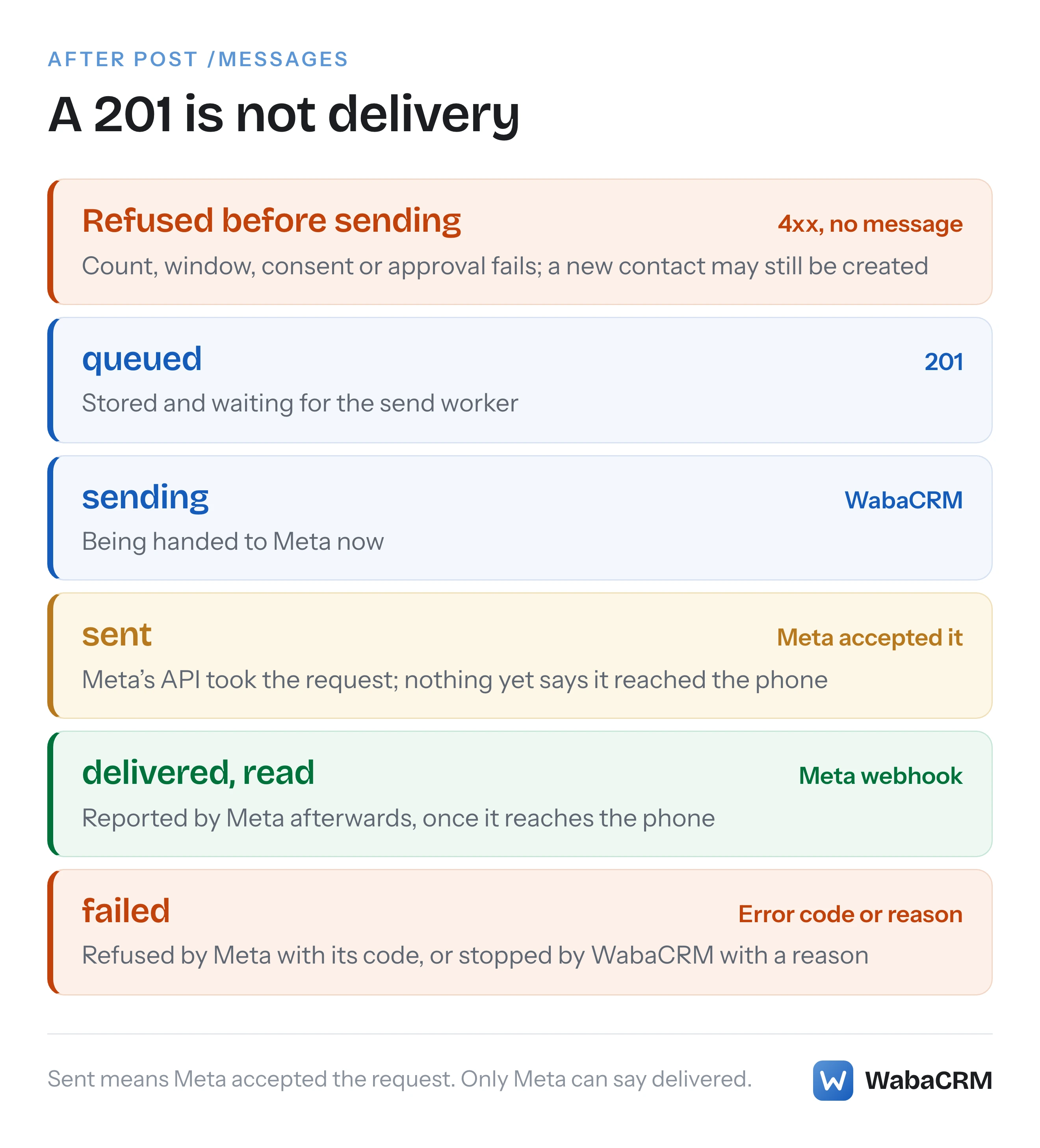
| Status | What it means | Who moves it there |
|---|---|---|
queued |
Stored, waiting for the send worker | WabaCRM |
sending |
Being handed to Meta now | WabaCRM |
sent |
Meta accepted the request | Meta's API response |
delivered, read |
Reached the phone, then read | Meta's status webhook |
failed |
Refused by Meta (with its error code), or not sent by WabaCRM (with a reason, sometimes no code) | Meta or WabaCRM |
Polling works, but a webhook is better. Under Outgoing webhooks click Add endpoint, tick message.status and message.failed, and WabaCRM posts delivered, read and failed to you as they happen, with error_code and error_message when there is one. Tick message.sent too if you also want the moment Meta accepted the request. No delivery carries its own id, and a retry or Redeliver sends the same event and data with a new sent_at, and so a new signature. So treat event, data.id and data.status together as the duplicate check, and never move a status backwards: one message's delivered and read share an id, and a failure arrives once as message.status and once as message.failed when you tick both. Verify every delivery with the endpoint's signing secret as checking the X-WabaCRM-Signature header explains.
Why does body_params fail on the one-call endpoint?
Because that endpoint never reads it. Two send endpoints take the same values under different names:
| Endpoint | Body values | Header values |
|---|---|---|
POST /messages |
template_params |
header_params |
POST /conversations/{id}/templates |
body_params |
header_params |
A payload written for the conversation endpoint and pointed at /messages is not rejected for its unknown field. body_params is dropped, the template is counted as having received no values, and the send is refused as expects 1 value, 0 given. It reads like a template problem and is a field-name problem.
If you do want the thread before the first message, POST /api/v1/conversations/open with a contact_id (and optionally whatsapp_account_id) returns the existing thread or creates one. It needs Open the chat inbox, it answers 422 with "No connected WhatsApp number is available." when there is none, and its session_open field says whether free text would be accepted. For a customer you have only just met, /messages does all of that in one request.
Can my own backend send from a number WabaCRM connected?
Yes, through this API for sending and outgoing webhooks for everything that comes back: message.received for replies, message.status and message.failed for delivery, contact.created for new contacts. Your backend never needs the number's Meta access token.
You may also subscribe your own Meta app to the same WhatsApp Business Account. Meta allows more than one app, and says so while describing retries:
"Note that Meta sends retries to all apps that have subscribed to webhooks (and their appropriate fields) for the WhatsApp Business account. These retries can result in duplicate webhook notifications." (Meta — Webhooks)
Give that app its own callback URL, never WabaCRM's. WabaCRM checks every incoming payload's signature against the app secrets it holds and refuses one it cannot verify, which for a number connected through Meta's sign-in means anything your app signs. A refused delivery is not dropped quietly either: Meta "retries delivery with decreasing frequency until the request succeeds, for up to 7 days" (Meta — Webhooks). If your app's endpoint verified and still receives nothing, that failure has its own checklist.
Two arrangements differ. A number added with Enter API details can receive here with a token from your own Meta app too, but only when that app's webhook points at the Callback URL under Webhook details and you enter its App secret in the same dialog. Without the secret, Connect & verify with Sending and receiving stops and says Meta delivers the number's messages to your app, not to WabaCRM. With it, the number connects and a notice says its messages reach this inbox once your app's webhook points at that Callback URL. The hourly health check then watches where the events go and turns the card amber if they cannot reach WabaCRM. And if your system keeps the inbox while WabaCRM only sends, choose Sending only in that dialog; its sends then read sent, never delivered, because the receipts go to your system.
What do the error answers from the send endpoint mean?
Branch first on whether a 422 carries an errors object. With one, the request was malformed:
{
  "message": "There is no such template in this workspace. A template deleted here, or no longer listed by Meta, cannot be sent — use the id of a current one.",
  "errors": { "template_id": ["There is no such template in this workspace. A template deleted here, or no longer listed by Meta, cannot be sent — use the id of a current one."] }
}
Without one, the request was fine and WabaCRM declined to send it: wrong value count, window closed, contact opted out, template not approved, no number ready.
{ "message": "This contact has not messaged in the last 24 hours. Use an approved template instead." }
| Answer | What it means | What to do |
|---|---|---|
401 |
Token revoked, or its member's password changed, or they were deactivated or removed | Generate a new token |
402 |
Contact allowance full, and the number is new | Raise the plan, or send to an existing contact |
403 |
The token's member lacks a permission, or the template's number is outside the numbers they may use | Check the member on Team |
404 |
This number already has a thread that member may not read | Send with a member who can see it |
422 with errors |
Malformed request | Fix the field it names |
422 without errors |
Send declined | Fix what message names before retrying |
429 |
More than 120 requests in a minute | Wait, then retry |
An id from another workspace, or a whatsapp_account_id outside the numbers that member may use, is a 422 with errors naming the field, never a 404. The one exception to the branching rule is an invalid to: it arrives as a bare 422 although the request was malformed, with a message beginning "That phone number is not valid", so check for that before treating a bare 422 as a declined send.
The 120-a-minute limit is counted per member, so every token that member generated, and their mobile app, share it.
Is it safe to retry a send that timed out?
Not blindly, but there is a header for it. Since 21 October 2026 this endpoint takes an Idempotency-Key: a retry carrying the same key replays the first attempt's response with Idempotent-Replayed: true rather than sending a second message, and the same key carrying a different request is refused with 409 instead of being answered with the first message's id. Without the header, two identical POSTs are still two WhatsApp messages. The contact and conversation are found or created either way, so a retry never duplicates those. A refusal is not free either: one for the value count or a closed window comes after the contact and thread are found or created, so a first attempt at a new number can add that contact to your workspace, counting against your allowance, with nothing sent. Keep your own "already sent" marker per order and store data.id against it. If a request timed out and you never saw the 201, look before you resend: GET /api/v1/conversations?search=919876543210 finds the thread, and GET /api/v1/conversations/{id}/messages shows whether the template is already in it.
Which sending rules does Meta set, and which does WabaCRM?
The rule that shapes this whole endpoint is Meta's customer service window. How it opens:
"When a WhatsApp user messages you or calls you, a 24-hour timer called a customer service window starts." (Meta — Service messages)
and what happens when it closes:
"When the window closes, you can only send pre-approved template messages." (Meta — Service messages)
The template documentation says the same from the other side: "Template messages are the only type of message that can be sent to WhatsApp users outside of a customer service window." (Meta — Template fundamentals) A new customer has never messaged you, so no window is open, and WabaCRM refuses free text before sending it. When a free-form message does reach Meta after a window has closed, Meta's code is 131047:
"More than 24 hours have passed since the recipient last replied to the sender number." (Meta — WhatsApp Cloud API error codes)
with the solution "Send the recipient a template message instead." How that code compares with Messenger's window errors is covered in error 131047 against Messenger's window codes.
| Rule | Set by | What you see |
|---|---|---|
| Only a template outside the window | Meta | 422 before sending |
| Template must be APPROVED | Meta | 422 naming the status |
| Value counts must match | Meta | 422 naming the count |
| No image, video or document header | WabaCRM's API | 422 naming the header |
sent is not delivery |
Meta | Status stays sent until a webhook |
The last row is the one integrations misread. Meta states that a successful send response "only indicates that the API successfully accepted your request — it does not indicate successful delivery of your message" (Meta — Service messages). WabaCRM's sent is exactly that response. When messages sit at sent for an approved template, template pacing is one of the causes worth ruling out. WabaCRM checks value counts before Meta does, but if Meta itself answers 132000 after a 201, how Meta counts template parameters explains why a correct-looking count can still fail.
What happens to a national number sent without a country code?
It goes out wrong and nothing says so. "to": "9876543210" passes the 8 to 15 digit check, so it is stored and sent as though its first digits were a country code. Meta accepts it, the message typically stops at sent, and your customer never receives it. WabaCRM does not guess the country from your workspace, because a ten-digit number is a real international address in some countries.
Send "country_code": "91" with it and the number becomes 919876543210. A leading trunk zero is dropped first, and a +, spaces or a leading 00 are stripped either way. One trap remains: a national number that already begins with the country code's digits is taken as international and left alone, so an Indian mobile number beginning 91 must be sent in full. Capture numbers in international form at the source and treat country_code as the fallback.
Will a contact created through the API receive my campaigns?
Yes, unless you say otherwise. A contact created by a send is broadcast-eligible, because that setting defaults to on. Campaigns and drips draw only from broadcast-eligible contacts, and so does a follow-up sent after the window has closed. If a customer agreed to order updates and nothing more, create them first with POST /api/v1/contacts and "allow_broadcast": false, then send by contact_id. The one-to-one send still goes; campaigns and drips leave them out. What Meta requires of that consent is set out in what WhatsApp actually requires from an opt-in.
An inbound STOP, or one of its siblings such as UNSUBSCRIBE or CANCEL sent as the whole message, opts the contact out, and every later send to them, this API included, is refused with a 422 saying they have opted out. It stays that way until the customer sends START (or SUBSCRIBE, UNSTOP or RESUME), or someone in your workspace reverses it by hand, which should only ever follow the customer asking. Either way, re-subscribing makes the contact broadcast-eligible again, even if you created them with allow_broadcast false.
Every Meta quotation on this page was read from Meta's own documentation on 19 September 2026. Meta changes that documentation without notice; the linked pages are authoritative and this one is not.
Questions people also ask
Do I have to create a contact before sending a template through the WabaCRM API?
Why does the WabaCRM API say my template expects 1 value, 0 given?
Can I send an ordinary text message to a new customer through the API?
Why did my WabaCRM API token suddenly start returning 401?
Can the WabaCRM API send a template with an image or document header?
- wabacrm api
- send whatsapp template api
- template_params
- whatsapp api new contact
- conversation id


