Webhook Signing Secret: Verify X-WabaCRM-Signature
The short answer
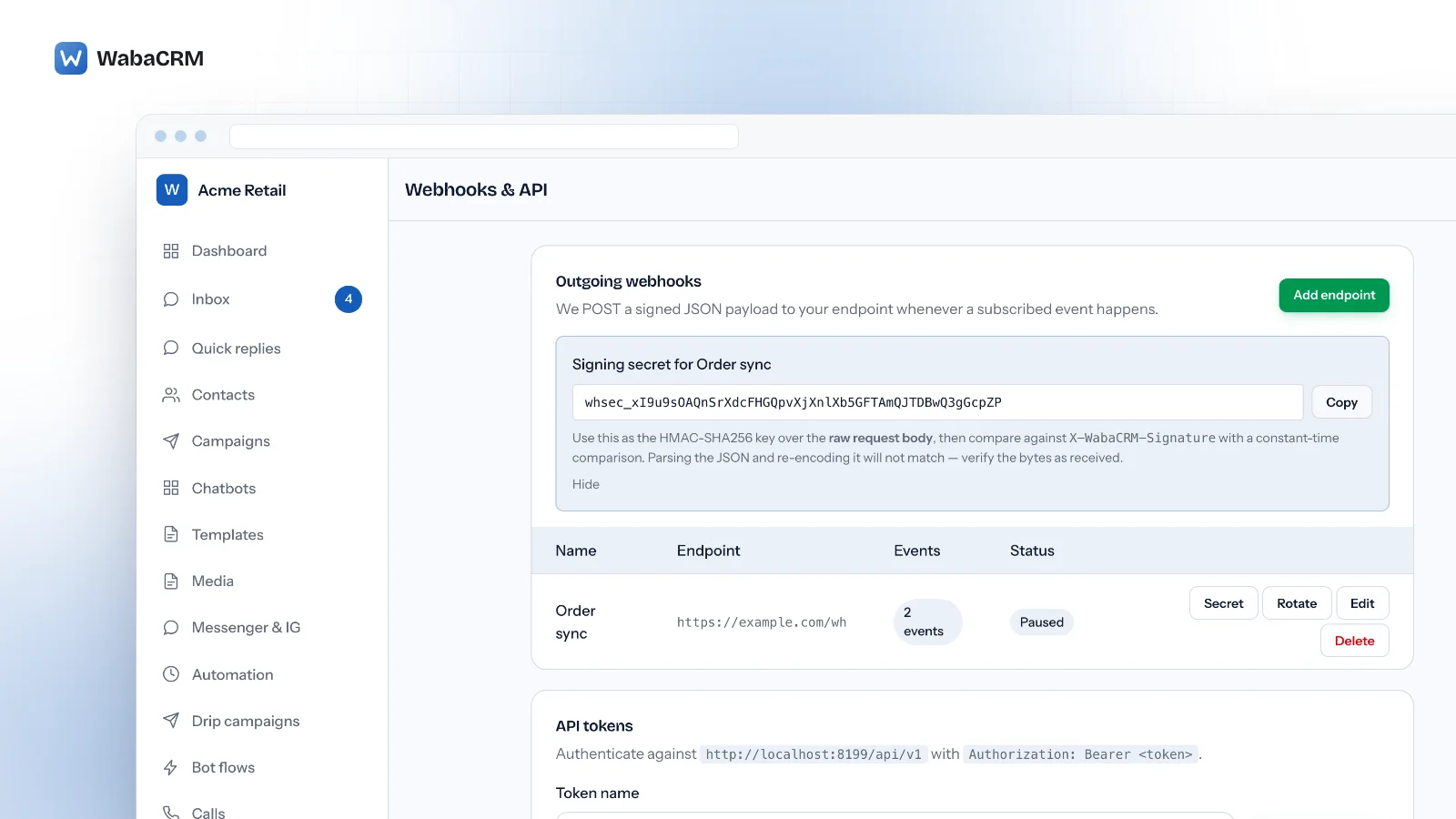
Open Webhooks & API and click Secret on the endpoint's row. The secret also appears the moment you save a new endpoint, and Rotate replaces it. X-WabaCRM-Signature is the lowercase hex HMAC-SHA256 of the raw request body, keyed with the whole whsec_ secret. Compare it in constant time before you parse the JSON.
Where is the webhook signing secret for X-WabaCRM-Signature?
On the Webhooks & API screen, click Secret on the endpoint's row and a panel opens with the value. The same panel appears on its own the moment you save a new endpoint, and Rotate on the row replaces the secret.
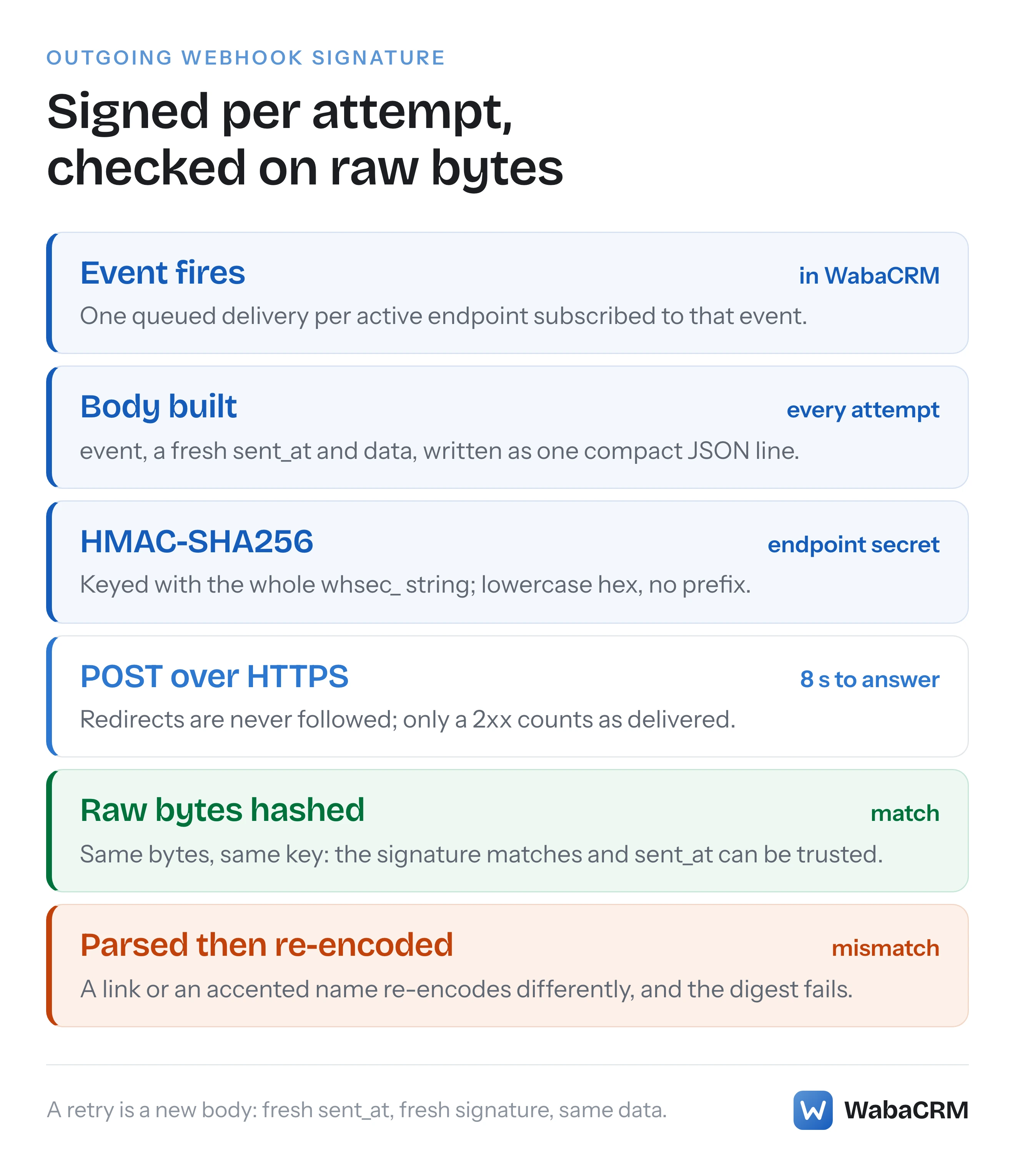
The header it protects, X-WabaCRM-Signature, is the lowercase hex HMAC-SHA256 of the raw request body, keyed with that secret. There is no prefix, and no header goes into it.
Until August 2026 this screen said every delivery was signed but gave no way to see the secret; the Secret and Rotate buttons fixed that.
One correction belongs at the top. Earlier WabaCRM guidance said the signature carries no timestamp. That was wrong. Every body carries a sent_at field and the HMAC covers the whole body, so sent_at is signed. It is also rebuilt on every attempt, so a retry carries a new sent_at and a new signature. Both facts matter for replays, below.
- Where is the webhook signing secret for X-WabaCRM-Signature?
- What do you need before a Secret button appears on the endpoint row?
- How do you add an endpoint that stays paused until your receiver is ready?
- How do you reveal and copy the signing secret?
- How do you verify X-WabaCRM-Signature in PHP or Node?
- Why does a re-encoded WabaCRM body stop matching the signature?
- How do you test the receiver and switch the endpoint on?
- What happens to deliveries when you rotate the signing secret?
- How should a receiver handle replays and duplicate deliveries?
- Is X-WabaCRM-Signature the same as Meta's X-Hub-Signature-256?
What do you need before a Secret button appears on the endpoint row?
Two things. Without the add-on there is no Webhooks & API screen at all; without the permission the screen opens with none of its buttons.
- The Webhooks & API add-on. Open Add-ons, find Webhooks & API and click Install, or Buy & install if the card shows a price. A paid add-on raises an invoice and opens the pay dialog for the Owner (an Admin is asked to pass it to them); paying a WabaCRM invoice for an add-on walks through that screen. Once it is on, the card reads Installed with an Open button, and Webhooks & API appears among the app's screens. Those buttons need the "Install and remove add-on modules" permission, which the Owner and Admin roles hold; anyone else sees "Ask the workspace owner or an admin to install add-ons." on the card instead.
- The "Manage outgoing webhooks" permission. The Owner and Admin roles hold it by default. The Manager and Agent roles do not. Without it the screen still opens, but Add endpoint, Secret, Rotate, Edit, Delete, Re-activate and Redeliver are all missing. An Owner or Admin can grant it to one person from Team: click Access on that member's row, tick Manage outgoing webhooks, then Save access.
Grant it deliberately: whoever holds it can point an endpoint at any HTTPS address and receive every payload, customer phone numbers and message text included.
How do you add an endpoint that stays paused until your receiver is ready?
Step 1 of 4. Create the endpoint switched off, so nothing is sent while verification is still being built.
- On Webhooks & API, click Add endpoint. A dialog titled New endpoint opens.
- Name: anything your team will recognise, up to 80 characters.
- Endpoint URL: your receiver's address. The help text under the field begins "Must be HTTPS. Each request carries an X-WabaCRM-Signature header". An
http://address is refused with "The endpoint must be HTTPS — payloads contain customer data." - Events: tick the ones you want.
message.receivedis ticked for you, and at least one is required. - Active is ticked by default. Untick it. A paused endpoint is sent nothing at all.
- Click Save endpoint. The toast reads "Webhook saved." and the signing secret panel opens above the table.
The eight events, and what makes each one fire:
| Event | Fires when |
|---|---|
message.received |
A customer's WhatsApp message arrives |
message.sent |
A message goes out from your number |
message.status |
A sent message's status changes, for example to delivered or read |
message.failed |
That status becomes failed, alongside message.status |
contact.created |
A contact is created, except by CSV import |
contact.updated |
An edited field changes, such as name, phone, email, owner or consent |
conversation.assigned |
A WhatsApp conversation gets a new assignee: chosen in the inbox (including taking it yourself), set through the API, or picked by auto-assign |
campaign.completed |
A campaign has nothing left to send |
Unassigning a chat, assigning it to the person who already has it, or a removed or deactivated member's chats going back to the queue sends nothing. The message and assignment events cover WhatsApp only; Messenger and Instagram threads are not forwarded. Contact events are not limited this way: a contact first seen on Messenger or Instagram fires contact.created with phone set to null, and so does a WhatsApp customer who writes from a username rather than a phone number. Message counters ticking over do not fire contact.updated.
How do you reveal and copy the signing secret?
Step 2 of 4. Right after Save endpoint the panel is already open. Any time later, click Secret on the endpoint's row. The panel is headed "Signing secret for Order sync" when the endpoint is called Order sync, and holds:
- the secret, which starts
whsec_and continues with 48 letters and digits; - Copy, which puts it on your clipboard and reads "Copied" for a moment;
- the guidance: "Use this as the HMAC-SHA256 key over the raw request body, then compare against X-WabaCRM-Signature with a constant-time comparison. Parsing the JSON and re-encoding it will not match — verify the bytes as received.";
- Hide, which closes the panel.
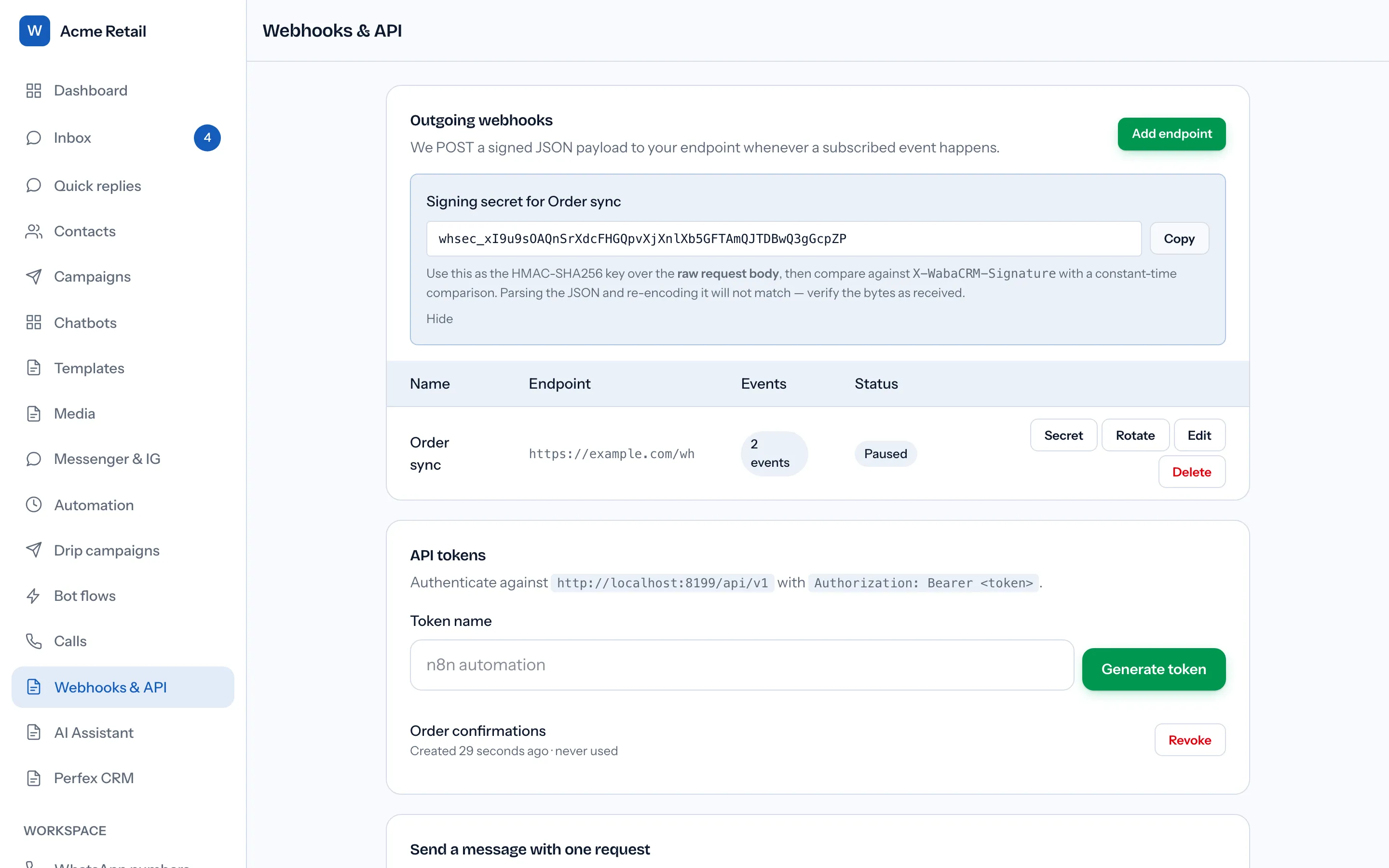
Keep the value in a secret store or an environment variable, never in source control. The key is the whole string, whsec_ included, as plain UTF-8 bytes. The Edit dialog never shows it. WabaCRM records every use of Secret and Rotate, though no screen in your workspace lists those records. The display right after saving a new endpoint is not recorded.
How do you verify X-WabaCRM-Signature in PHP or Node?
Step 3 of 4. Every delivery is a POST with a JSON body and these parts:
| Header or field | What it carries | How to use it |
|---|---|---|
X-WabaCRM-Signature |
64 lowercase hex characters, no prefix | Recompute over the raw body, compare in constant time |
X-WabaCRM-Event |
The event name | Convenient for routing, but not signed |
X-WabaCRM-Forward |
The endpoint's numeric id | Choose the secret when endpoints share one URL |
event |
The same name, inside the body | The signed copy: trust this one |
sent_at |
The time of this attempt, in UTC | Signed, so safe to reject stale requests on |
data |
The event's payload | Holds the keys you de-duplicate on |
The endpoint id is not displayed anywhere on screen, so if several endpoints post to one receiver, read it from each endpoint's first delivery.
Shown indented here for reading, a message.status body looks like this. The real one arrives as a single line with no spaces between fields.
{
  "event": "message.status",
  "sent_at": "2026-09-19T09:30:02+00:00",
  "data": {
    "id": 4812,
    "wamid": "wamid.HBgM…",
    "conversation_id": 903,
    "direction": "out",
    "type": "text",
    "body": "Your order has shipped",
    "status": "delivered",
    "source": "manual",
    "error_code": null,
    "error_message": null,
    "contact": {
      "id": 377,
      "name": "Asha Rao",
      "phone": "919876543210"
    },
    "created_at": "2026-09-19T09:29:41+00:00"
  }
}
In PHP, read the body before anything decodes it:
$raw = file_get_contents('php://input');
$secret = getenv('WABACRM_WEBHOOK_SECRET'); // whsec_…

$expected = hash_hmac('sha256', $raw, $secret);
$received = $_SERVER['HTTP_X_WABACRM_SIGNATURE'] ?? '';

if (! hash_equals($expected, $received)) {
    http_response_code(401);
    exit;
}

$payload = json_decode($raw, true);
In Laravel, $request->getContent() returns the same raw string. In Node with Express, give the route the raw body rather than parsed JSON:
import crypto from 'node:crypto';
import express from 'express';

const app = express();
const secret = process.env.WABACRM_WEBHOOK_SECRET;

app.post('/hooks/wabacrm',
  express.raw({ type: 'application/json' }),
  (req, res) => {
    const got = Buffer.from(req.get('X-WabaCRM-Signature') || '');
    const want = Buffer.from(crypto
      .createHmac('sha256', secret)
      .update(req.body)
      .digest('hex'));

    if (got.length !== want.length
        || !crypto.timingSafeEqual(got, want)) {
      return res.sendStatus(401);
    }

    const payload = JSON.parse(req.body.toString('utf8'));
    res.sendStatus(200);
  });
The length check matters because timingSafeEqual throws on buffers of different lengths. Answer quickly: WabaCRM waits 8 seconds for a response, so do slow work after replying.
Why does a re-encoded WabaCRM body stop matching the signature?
Because the bytes WabaCRM signs have two habits that a second serialiser will not reproduce.
- Forward slashes are escaped. A link in a message body arrives as
https:\/\/example.com\/track. Node'sJSON.stringifywriteshttps://example.com/track, so a Node receiver that re-encodes the parsed object fails on every message containing a link. - Non-ASCII text is left as raw UTF-8. A contact named Zoë arrives with the
ëas UTF-8 bytes, not as a\u00ebescape. PHP'sjson_encodewith default flags writes the escape, so a PHP receiver that re-encodes fails on every accented name. Meta does the reverse for its own webhooks: "we generate the signature using an escaped unicode version of the payload, with lowercase hex digits" (Meta — Messenger Platform webhooks). Code copied from a Meta verifier therefore carries the wrong assumption here, and why X-Hub-Signature-256 never matches explains Meta's side in full.
Neither shows up reliably in a test message with no link and no accented name, which is how a receiver passes its first deliveries and then rejects a real customer.
One more trap sits in the prefix. The Standard Webhooks specification describes its secrets as "base64 encoded, prefixed with whsec_ for easy identification", and its scheme signs the message's "ID, timestamp and body", concatenated with full stops (Standard Webhooks specification). A library built for that format will not verify a WabaCRM delivery, however similar the secret looks. Use a plain HMAC-SHA256 over the body with the whole string as the key.
How do you test the receiver and switch the endpoint on?
Step 4 of 4. A paused endpoint cannot be tested from WabaCRM. Events that fire while it is paused are never queued, and Redeliver sends nothing to a paused endpoint, even though its toast still reads "Queued for redelivery." So the safe order is to make the receiver harmless first, then switch the endpoint on.
- Deploy the receiver in a verify-and-log mode: check the signature, answer
200when it matches and401when it does not, and take no action on the payload yet. - Click Edit on the row, tick Active, then Save endpoint. The status badge changes from Paused to Active.
- Make an event happen that you control. With
message.receivedticked, send a WhatsApp message to your business number from your own phone. - Read Recent deliveries at the bottom of the screen. The list refreshes every 5 seconds while it is on screen, except while the endpoint dialog is open, so a new attempt appears within a few seconds. Each line is one attempt: the status code, the event, the endpoint's name, the time taken in milliseconds and how long ago it happened.
| Recent deliveries shows | What it means |
|---|---|
200 (any 2xx) |
Your receiver accepted the signature |
401 |
Your receiver computed a different signature |
301, 302, 308 |
Your URL redirects, and redirects are never followed |
no response |
Nothing answered within 8 seconds, or the connection failed |
No line after a few seconds, with the message in your inbox, usually means the endpoint is not Active or not subscribed to that event. If the message never reaches your inbox, the problem is upstream of forwarding; why WhatsApp messages are not showing in your WabaCRM inbox walks through the checks.
Once you see a 2xx, switch the receiver from logging to acting. Redeliver on any line sends the same data again with a fresh sent_at and signature, which also tests your de-duplication.
Fix a rejecting receiver quickly. Each event is attempted up to four times and 20 failed attempts in a row pause the endpoint, so a broken receiver switches itself off after about five events.
What happens to deliveries when you rotate the signing secret?
Rotate asks first, naming the endpoint:
"Rotate the signing secret for Order sync? Deliveries are signed with the new secret from the next attempt, so anything still verifying with the old one starts rejecting immediately."
Confirm, and the toast reads "Signing secret rotated. Update your receiver now." The panel opens with the new value.
"From the next attempt" includes retries: a delivery waiting for its retry goes out under the new secret, and so does anything you redeliver. WabaCRM never signs with both secrets. The retry schedule is the only automatic buffer. An attempt rejected during the changeover is retried after 10, 60 and 300 seconds, so WabaCRM stops retrying an event by itself about six minutes after its first attempt. After that, Redeliver can still send it while its line is among the 30 most recent. Each rejection counts towards the 20 that pause the endpoint.
So rotate when you can act at once: have the receiver read its secret from configuration you can change without a deploy, click Rotate, paste the new value, and watch Recent deliveries return to 2xx. Do not pause the endpoint to rotate in peace, because events during a pause are dropped, not held. Rotate whenever a secret has been pasted somewhere it should not be, such as a ticket, a chat or a repository, and when someone who held the permission leaves.
How should a receiver handle replays and duplicate deliveries?
Because sent_at is inside the signed body, a receiver can reject a request whose sent_at is, say, more than five minutes from its own clock, knowing the time cannot be altered without breaking the signature. Check it after the signature. Every retry and redelivery is re-signed with a fresh sent_at, so a tight window does not break legitimate retries.
A window does not stop duplicates, though. If your server processed a delivery but answered too slowly, WabaCRM counts it as failed and retries with a new sent_at, which passes the window. There is no delivery id, so de-duplicate on what the event describes:
| Event | De-duplicate on | Why |
|---|---|---|
Every message.* event |
event + data.id + data.status |
One message reports delivered, then read, under the same data.id |
conversation.assigned |
data.conversation_id + data.assignee.id |
The payload has no data.id at all |
contact.created |
data.id |
One per contact |
contact.updated |
Last write wins | Each carries the contact's fields, not a diff |
campaign.completed |
data.id |
One per campaign |
Keying on data.id alone is the common mistake: it keeps a message's first status and silently drops delivered and read. For the two state-like events, a retry can arrive after a newer event: an assignment handed back to the same person looks like a duplicate, and a retried contact.updated can carry older fields than one already applied. Where order matters, re-read the record instead: GET /api/v1/contacts/{id}, or GET /api/v1/conversations/{id}, whose assigned_to names the current assignee. Unassignments send no webhook, so reading the conversation is the only way to see them.
The delivery rules:
- Up to 4 attempts per event, with waits of 10 s, 60 s and 300 s between them.
- 8 seconds to answer. Only a 2xx counts as delivered; a redirect is never followed and counts as a failure.
- HTTPS only, checked when you save and again before every attempt.
- 20 failed attempts in a row, retries included, pause the endpoint. The row then shows Paused, the failure count and Re-activate. Any success resets the count to zero.
Use Re-activate after an automatic pause, not Edit. Re-activate switches the endpoint on and resets the failure count (the toast reads "Endpoint re-activated."). Ticking Active in the edit dialog leaves the count at 20, so the very next failure pauses the endpoint again. Re-activate first, then Redeliver one line per event you missed. Each failed attempt has its own line, so one event can appear up to four times, and only the 30 most recent lines across all endpoints are listed.
Is X-WabaCRM-Signature the same as Meta's X-Hub-Signature-256?
No. They sign two different journeys, with different keys and formats. Meta signs what it sends to a Meta app's callback URL:
"We sign all Event Notification payloads with a SHA256 signature and include the signature in the request's X-Hub-Signature-256 header, preceded with sha256=." (Meta — Graph API webhooks, getting started)
WabaCRM receives Meta's notifications for the numbers you connect and verifies those itself. What reaches your endpoint is WabaCRM's own delivery, signed with your endpoint's secret.
| X-WabaCRM-Signature | X-Hub-Signature-256 | |
|---|---|---|
| Key | Your endpoint's whsec_ secret |
A Meta app's App Secret |
| Value | Lowercase hex, no prefix | "preceded with sha256=" |
| Setup check | None; a POST is sent when an event fires | A GET with hub.challenge first |
| Retries | 4 attempts over about six minutes | "over the next 36 hours" |
The retry figure is from the same Meta page: "If any update sent to your server fails, we will retry immediately, then try a few more times with decreasing frequency over the next 36 hours." WabaCRM's window is far shorter, so a receiver that is down for more than a few minutes should expect to catch up through the API, or with Redeliver for anything still among the 30 most recent lines. If you also run your own Meta app, keep the two secrets and code paths apart. Meta's handshake is explained in why Meta says your callback URL couldn't be validated; a WabaCRM endpoint needs no such step.
Every Meta quotation on this page was read from Meta's own documentation on 19 September 2026. Meta changes that documentation without notice; the linked pages are authoritative and this one is not.
Questions people also ask
Can I see a webhook signing secret again after hiding it?
Does rotating the secret affect retries that are already waiting?
Why does my signature check pass on some deliveries and fail on others?
Are events that happen while an endpoint is paused sent later?
Can a Manager or Agent see the webhook signing secret?
- x-wabacrm-signature
- webhook signing secret
- verify webhook signature
- hmac-sha256
- outgoing webhooks


