WhatsApp Messages Not Showing in Your WabaCRM Inbox
The short answer
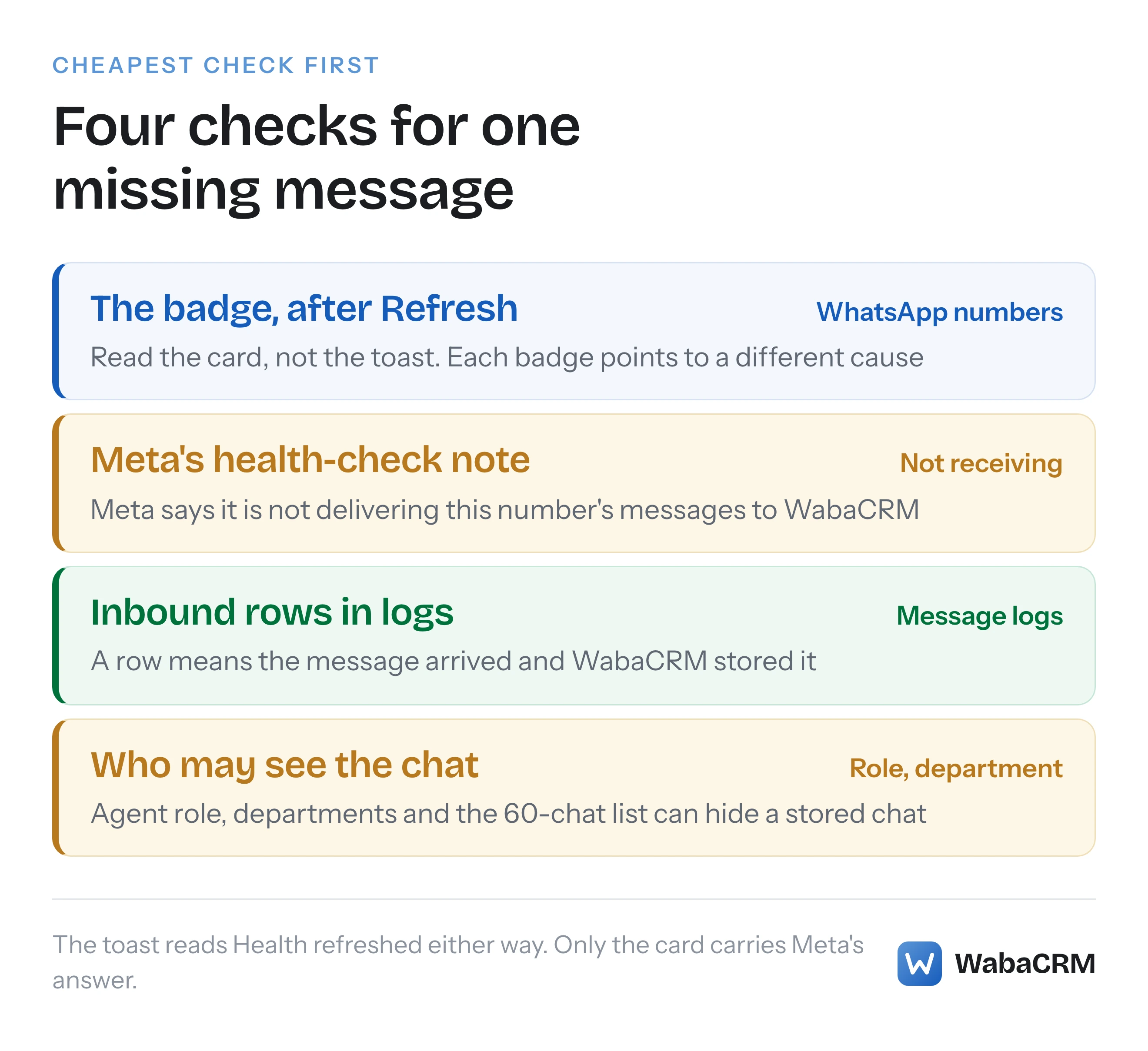
Open WhatsApp numbers, copy any red text on the number's card, press Refresh and read the card, not the toast. Since 19 September 2026 it quotes Meta's health check and reads Not receiving messages when Meta says it is not delivering the number's messages to WabaCRM. Then filter Message logs to Inbound, and last, check who can see the chat.
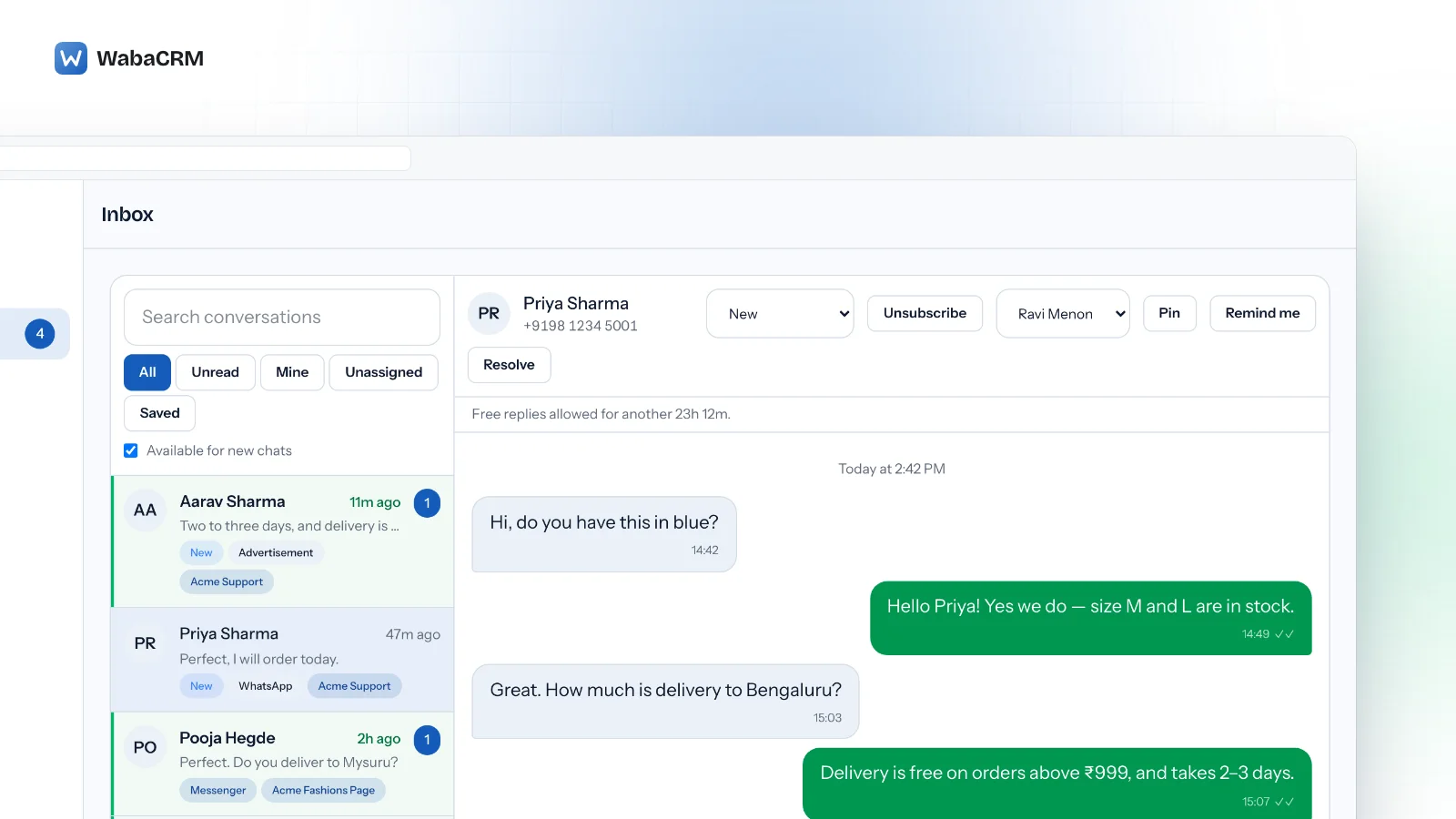
Why do WhatsApp messages reach my phone but not the WabaCRM inbox?
Usually either Meta is not handing that number's messages to WabaCRM, which the number's card has said since 19 September 2026 whenever Meta reports it, or the message did arrive and a role, a department or the length of the chat list is keeping it off your screen. A number set up with your own Meta app has a third cause, covered below.
Find out which before changing anything. A message passes three points on its way to you, and there are four checks, cheapest first: Meta delivers it to WabaCRM (the badge and Meta's health-check note on the number's card), WabaCRM stores it (Message logs), and the inbox shows it to someone allowed to see it (your team settings). A green Connected badge only ever proved that WabaCRM could read the number over Meta's API, which is why the card now also reads Meta's own health check.
- Why do WhatsApp messages reach my phone but not the WabaCRM inbox?
- What does each badge on the WhatsApp numbers card mean?
- What does Not receiving messages mean on a WabaCRM number?
- What are the other Meta notes that can appear on the card?
- How do you check Message logs for incoming messages?
- Why do some WhatsApp customers arrive with no phone number?
- Why can a chat exist and still be missing from your inbox?
- Why do chats from before connecting stay on the phone?
- Can a number on your own Meta app receive messages here?
- Why does a message arrive with no content at all?
- What should you send support if nothing arrives?
What does each badge on the WhatsApp numbers card mean?
Step 1. Open WhatsApp numbers. If the number's card already shows red text, copy it before pressing Refresh, because a successful refresh replaces it. Then press Refresh on the card. WabaCRM asks Meta about the number again, health check included, as it does by itself every hour for a working number, and redraws the card.
A toast reading "Health refreshed." appears every time, including when the check found a problem. It confirms the check ran, not that it passed. Read the badge beside the number's name and any box printed under it. Last checked, at the bottom of the card, tells you how fresh that answer is.
| Badge | What it means for incoming messages | What to do |
|---|---|---|
| Connected (green) | WabaCRM read the number and Meta's health check flagged nothing; it does not prove delivery | Send a test from another phone, then Step 4 |
| Not receiving messages (amber) | Meta says it is not delivering this number's messages to WabaCRM, or, on your own Meta app's token, that they go somewhere WabaCRM cannot accept them | Step 2, or the own-app section below when the box names your app |
| Disconnected | Switched off in WabaCRM, which has asked Meta to stop delivering here | Edit, then Connect & verify |
| Sending only | Incoming messages go to the platform that runs this number's inbox, by design | Edit, choose Sending and receiving |
| Account rejected at Meta, Setup not finished at Meta, Not registered (amber) | Mostly about sending, not receiving | Do what the amber box says |
| Error (red), with red text | The last check failed, and the red text says why | Do what the red text says, then Step 4 |
The box that opens "Meta reports this number is not delivering its messages to WabaCRM." can sit under those three amber badges too; if it is there, follow Step 2.
If the red text says WabaCRM was removed as a partner of the account, it names the button that reconnects the number. A number that has been failing for a while is checked less often, and the red text then says so and points you back to Refresh.
What does Not receiving messages mean on a WabaCRM number?
Step 2. The amber badge appears when Meta's health check for the number says Meta is not delivering its messages to WabaCRM. The box under it opens with "Meta reports this number is not delivering its messages to WabaCRM." and then quotes the sentence Meta returned, exactly as Meta wrote it. On the numbers where we have seen it, that sentence read:
Your app is not subscribed to the message webhook.
This means you will not receive any messages sent
to your phone number.
The number can still send. What has stopped is Meta handing its incoming messages to WabaCRM, so customer replies never reach the inbox, and bots stay quiet because they only answer messages WabaCRM has received.
When a health check sees that sentence, WabaCRM asks Meta to resume delivery, at most once every 24 hours per number. The box then adds a line starting "WabaCRM asked Meta to resume delivery", saying when, and one of three outcomes:
| The line ends | What it tells you |
|---|---|
| "Meta accepted the request; the next check shows whether it worked." | Press Refresh again in five minutes or so |
| "Meta accepted the request, but its health check still says the same." | Asking again will not help; check the business side |
| "Meta refused the request", followed by the reason when there is one | Act on that reason, then reconnect as below |
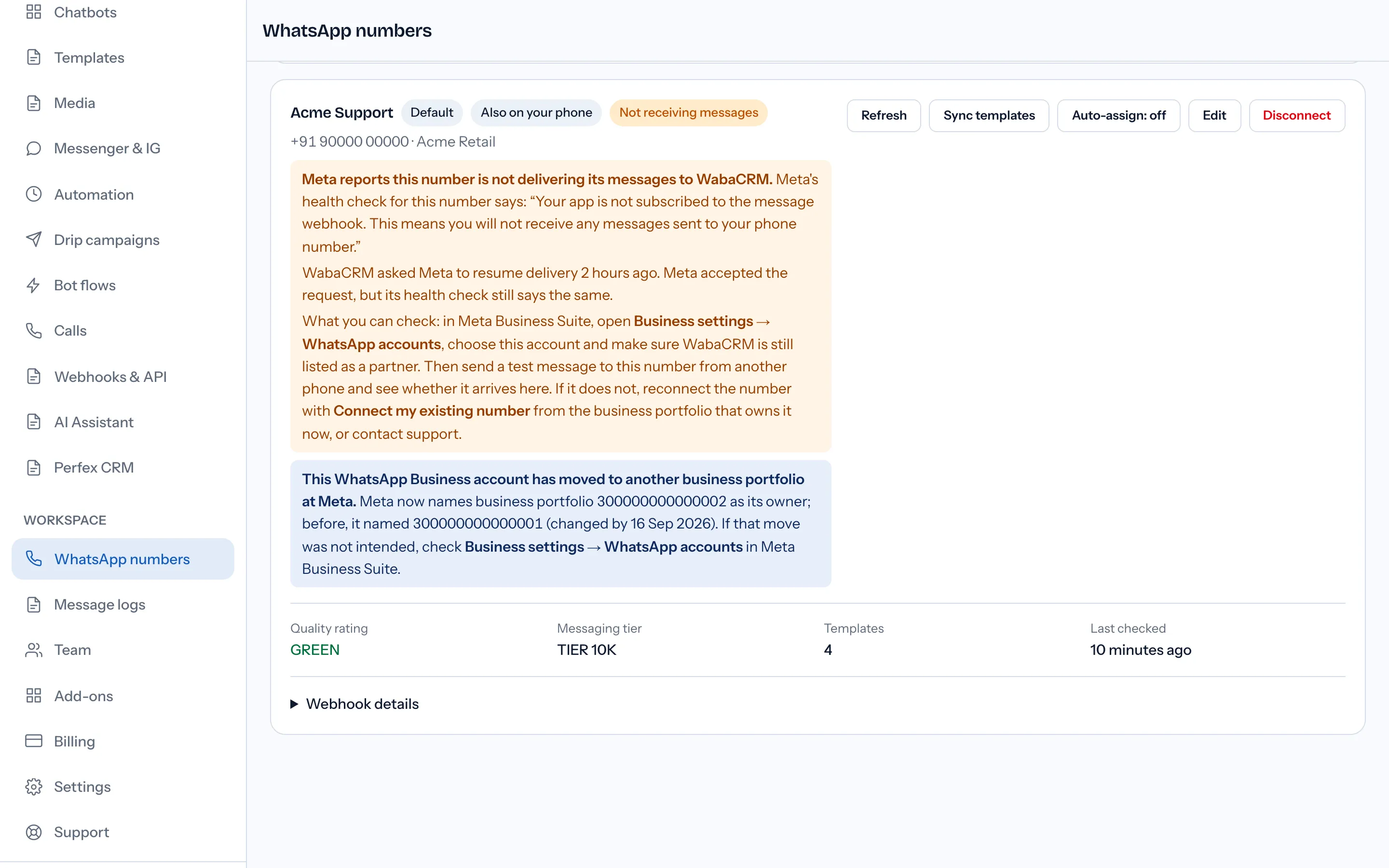
The box ends with what you can check. Do it in this order:
- In Meta Business Suite, open Business settings → WhatsApp accounts, choose this account and make sure WabaCRM is still listed as a partner. At Meta the business behind it is named Waba CRM, so look for either spelling.
- Send a test message to the number from a different phone, and note the time.
- If it does not arrive, reconnect the number with the button the card names: Connect my existing number for a number that also runs in the WhatsApp Business app on your phone (its card carries the Also on your phone badge), Connect with Facebook for any other. Do it while signed in to the business portfolio that owns the account now. The connect card's line about not running it again for a number already connected means a green Connected badge; it does not apply while the badge reads Not receiving messages. If Meta answers that the account is already shared with a partner, see what to do about error 2655093.
- If the test still does not arrive, contact support with the details in the last section.
Why can Meta say not subscribed while it still lists the app?
Because the two answers come from different places, and on the numbers behind this article they disagreed.
Meta's Messaging and Calling Health Status page defines three values for can_send_message. AVAILABLE "Indicates that the node meets all messaging or calling requirements." LIMITED "Indicates that the node meets messaging or calling requirements, but has some limitations." BLOCKED "Indicates that the node does not meet one or more messaging or calling requirements." It lists five entity types (PHONE_NUMBER, MESSAGE_TEMPLATE, WABA, BUSINESS and APP), and it describes additional_info only for a limited node:
"If a given node's
can_send_messageorcan_receive_call_sipproperty is set toLIMITED, theadditional_infoproperty will be included, which provides additional context for the limitation." (Meta — Messaging and Calling Health Status)
The page's text never mentions webhooks or subscriptions; we searched it for both on 19 September 2026. Yet the "not subscribed" sentence arrived in additional_info on an APP entity that read AVAILABLE, not LIMITED. That is Meta's API output on numbers WabaCRM monitors, and no Meta page we found documents it.
The account's subscribed-apps edge, which Meta's reference describes as a way to "Retrieve a list of all applications currently subscribed to webhook events for the specified WhatsApp Business Account" (Meta — Subscribed Apps), still listed WabaCRM's app. A fresh subscribe request that Meta accepted did not clear the sentence straight away. On those numbers nothing arrived, so the health check matched what customers saw and the card believes it. For your number, the test message in step 2 settles it.
What are the other Meta notes that can appear on the card?
Step 3. Three more notes can sit under the badge. The first is about incoming messages; the other two come from what Meta reports about the account.
An amber box opening "WabaCRM could not subscribe to this number's messages when it was connected." means Meta refused WabaCRM's request for the number's messages at the end of Connect with Facebook or Connect my existing number, and it quotes Meta's answer when there was one. Sending works, but incoming messages may not reach the inbox until Meta accepts. WabaCRM asks again once a day and the box clears once Meta accepts; to try straight away, reconnect with the button the box names.
The second is a blue note reading "This WhatsApp Business account has moved to another business portfolio at Meta." It names the old and new owning portfolios and asks you to check Business settings → WhatsApp accounts if the move was not intended. It records a fact, not a fault.
The third is an amber box headed "Meta reports a problem with this number's account." (or "these problems" when there are several). Each line gives a short title, whether Meta limited or blocked that part of the account, Meta's own words, and "What Meta says to do" when Meta offered a remedy. Titles include Number not linked to the account, Business profile incomplete, Business not verified, Payment method problem and WhatsApp Business account banned; anything else appears in Meta's own words. The box "clears by itself once Meta stops reporting them."
Meta reports these under can_send_message, so read them as reasons campaigns and replies fail rather than as the reason incoming messages are missing. The fixes are in why Meta refuses templates and sends on a new account.
How do you check Message logs for incoming messages?
Step 4. Message logs lists every message WabaCRM stored, in and out. Opening it needs the permission "View reports and analytics", which the Owner, Admin and Manager roles carry by default and the Agent role does not. An owner or admin can add it for one person from Team → Access.
- Set In & out to Inbound.
- Leave Any source alone. Customer messages are logged with the source
manual; Phone app lists messages typed in WhatsApp on your phone, which are outgoing. - If the workspace has more than one number or Page connected, pick the number in All numbers. The filter does not appear when there is only one.
- Set the two date fields around your test. Both count in UTC, so for a test sent before 05:30 in India, start the range a day earlier. The When column shows UTC too, so a test sent at 15:30 in India is listed at 10:00.

An inbound row for your test but no chat in the inbox means the message arrived, and the problem is who can see it (two sections down). No inbound row at all means the message never made it into WabaCRM: go back to step 2, and if the number was connected with a token from your own Meta app, see the section on that below. The search box finds a message by its words or the contact's name.
Why do some WhatsApp customers arrive with no phone number?
Because they turned on WhatsApp's username feature. Meta's business-scoped user IDs page says that when a user enables it, "their phone number will not be included in webhooks, unless you have interacted with the user before". Interacting means you messaged or called that phone number, or it messaged or called you, within 30 days, or the user is in your contact book, and:
"Note that the 30-day lookback conditions above are evaluated per business phone number." (Meta — Business-scoped user IDs)
In place of the number, the webhook carries a business-scoped user ID, and "BSUIDs are scoped to individual business portfolios." Meta's page still carries the line "our APIs will not support sending messages targeted to the BSUIDs until July 2026." That date has passed, and the same page documents replying to one with a recipient field instead of to. One exception stands: "BSUIDs can be used to send any type of message except for one-tap, zero-tap, and copy code authentication templates, which require user phone numbers."
WabaCRM has stored these messages since 16 September 2026, under a contact named after the customer's WhatsApp profile name, or their @username when there is no profile name, or, when Meta sends neither, the ID itself, which starts with a two-letter country code and a dot. Earlier ones were recovered from WabaCRM's copies of Meta's deliveries and filed at the time they were sent, so such a thread can show messages older than the day you first saw it. The thread carries this banner:
This customer messaged from a WhatsApp username, so Meta gave us no phone number for them. Replies go back on this number only, and they cannot be added to a campaign.
Find these chats with Search conversations by the name the contact was saved under: their WhatsApp profile name, their @username, or the ID when Meta sent neither. Searching an ID finds the chat only in that last case, and there is no phone number to search for.
Why can a chat exist and still be missing from your inbox?
If Message logs shows the message, it arrived. Four things decide whether a given person sees the chat:
- Role. The Agent role lists only chats assigned to that person plus Unassigned ones, unless Team → Access adds "View other agents' conversations" for them. Owner, Admin and Manager have it already.
- Departments. Once a workspace has more than one number, a member's Edit form on Team shows tick boxes under Departments: "Tick departments to limit this member to those numbers' chats. Tick none and they see everything."
- The tab. Mine lists chats assigned to you and Unassigned lists chats with nobody on them, so a chat assigned to a colleague is on neither.
- The length of the list. Each tab lists 60 conversations. Unread chats sort first on every tab, and in the Android app, so a chat that has already been read can fall below the cut. Type the customer's name or number into Search conversations instead of scrolling.
How chats reach people in the first place, including auto-assign and "Available for new chats", is covered in assigning WhatsApp chats to team members.
Why do chats from before connecting stay on the phone?
Because the window to bring them over is Meta's, it is 24 hours long, and it can be used once. Meta's page on onboarding WhatsApp Business app users says:
"All chat messages in the most recent 6 months can be synchronized." (Meta — Onboard WhatsApp Business app users)
and, of the deadline:
"After you onboard the business customer, you have 24 hours to synchronize their contacts and messaging history, otherwise they must be offboarded and complete the flow again." (Meta — Onboard WhatsApp Business app users)
WabaCRM asks for the contacts and the history automatically the moment a number is connected with Connect my existing number, and the number's card on Numbers shows what happened — how many contacts and chats came across, or that the phone had history sharing switched off, or that the window closed before anything was asked for. Until 20 September 2026 it asked for neither, so a number connected before then has an inbox that starts at its connect date and no way back except Meta's own: disconnect the number in the WhatsApp Business app under Settings → Account → Business Platform → Disconnect Account and connect it here again. No platform can do that part for you.
Two things to expect even on a successful import. Group chats are never included, and Meta sends no file for a photo or document older than fourteen days at onboarding, so those arrive as placeholders. Everything from the connect onwards is unaffected: what you type in the app on your phone appears in the thread labelled "From WhatsApp on the phone", and in Message logs under the source Phone app. The trade-offs of running a number both ways are laid out in our guide to WhatsApp coexistence.
Can a number on your own Meta app receive messages here?
Numbers connected through Connect with Facebook or Connect my existing number are wired up already. A number added with Enter API details receives here in one of two ways: its token comes from WabaCRM's own Meta app, or it comes from your own Meta app whose webhook points at the Callback URL shown under Webhook details, with that app's secret entered in the App secret field. Meta signs every message your app delivers with that secret, and without it WabaCRM refuses each one as unverifiable.
So with a token from your own app, Connect & verify with Use this number for set to Sending and receiving saves when the App secret is filled in, and says:
Number connected. Its messages come through your own
Meta app "<your app>" — they reach this inbox once that
app's webhook points at the Callback URL under Webhook
details.
WabaCRM cannot see where your app's webhook points, so a test message from another phone is the only proof that part is right.
If the App secret is empty, or Meta says your app's deliveries for this account go to another server, the save stops with the reason under the token field, for example:
Meta delivers this number's messages to "<your app>", not
to WabaCRM. If that is your own Meta app and its webhook
points at the Callback URL under Webhook details, enter its
App secret below and save again. If it points anywhere
else, choose "Sending only".
Enter the secret and save again, or choose Sending only if the inbox should stay where it is.
The hourly health check asks the same question of a number already connected this way. When the messages cannot reach WabaCRM, the badge turns amber and reads Not receiving messages, and the box under it says where Meta delivers them instead, that sending still works, and whether to add the App secret with Edit or switch the number to Sending only.
A number saved as Sending only never receives here, by design. Its card says where its incoming messages go instead.
Why does a message arrive with no content at all?
Because Meta delivered the envelope and not the contents. Meta's error-codes page lists 131051 as:
"Unsupported message type." (Meta — WhatsApp Cloud API error codes)
Its suggested fix is written for the sender, telling them to check the supported types "before trying again with a supported message type." On an incoming message, the sender is your customer, so there is nothing for you to retry. The bubble in the inbox says what to ask for instead:
The customer sent something WhatsApp cannot pass on to a
business account — a poll, a view-once photo, or a message
from an unsupported app version. Ask them to resend it as
text, a photo or a file.
What should you send support if nothing arrives?
Open Support, choose New ticket, and include three things:
- which WhatsApp number is affected;
- the time you sent a test message to it from a different phone, with your time zone;
- what the card said after you pressed Refresh, copied word for word if there was a box under the badge.
Every Meta quotation on this page was read from Meta's own documentation on 19 September 2026. Meta changes that documentation without notice; the linked pages are authoritative and this one is not.
Questions people also ask
Does the Health refreshed message mean my number is working?
How often does WabaCRM ask Meta to resume message delivery?
Why does a WhatsApp chat in WabaCRM have a name but no phone number?
Why does a message show in Message logs but not in my inbox?
What should I tell support when messages stop arriving?
- whatsapp messages not showing
- wabacrm inbox
- coexistence not receiving messages
- whatsapp health status
- message logs
- whatsapp username


