Variables Can't Be at the Start or End: WhatsApp 2388299
The short answer
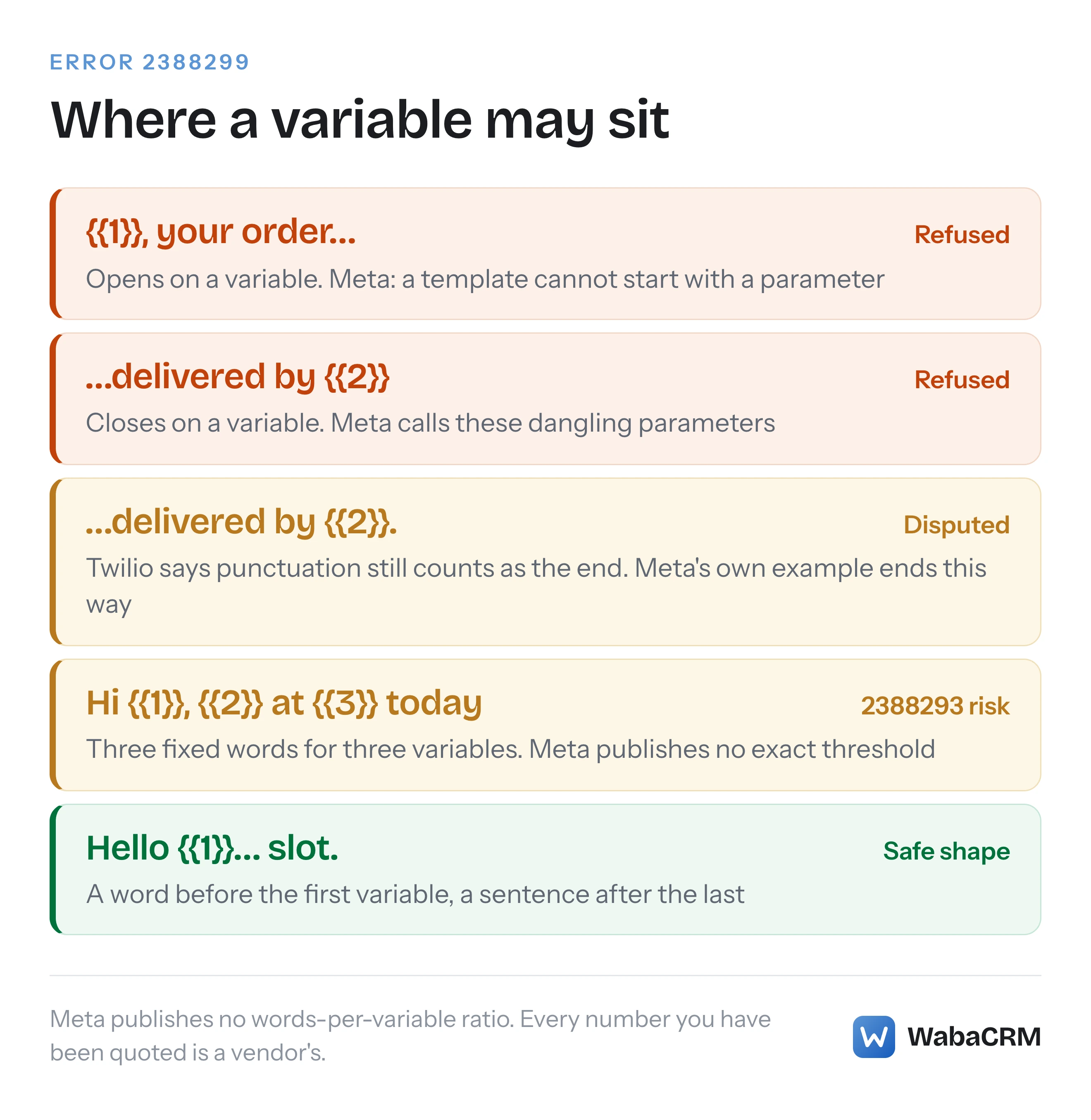
WhatsApp error 2388299, "Leading or trailing parameters not allowed", rejects a template whose text begins or ends with a variable such as {{1}}, which Meta calls dangling parameters. Its sibling 2388293 rejects too many variables for the length. Meta publishes no words-per-variable ratio, so put fixed words before the first variable and after the last (checked October 2026).
What does "variables can't be at the start or end of the template" mean?
It means Meta refuses a WhatsApp template whose text begins or ends with a variable placeholder, and it reports that refusal as error 2388299. Meta's error-codes page lists it in the table of template creation errors with the title "Leading or trailing parameters not allowed" and a one-line description:
"Variables cannot be at the start or end of the template." (Meta — WhatsApp error codes)
The same page lists a sibling directly above it, 2388293, titled "Parameters words ratio exceeds limit":
"This template has too many variables for its length. Reduce the number of variables or increase the message length." (Meta — WhatsApp error codes)
Both are refusals at creation. Nothing has been sent and no customer has seen anything. The only cost is the round trip of fixing the wording and submitting again, which is why it is worth understanding what the two checks actually look at before the first submission rather than after the third.
The two checks are about different things. 2388299 looks at position: what sits at the very edges of the text. 2388293 looks at density: how much of the text is variable and how much is fixed. A template can fail one and pass the other, and the advice that circulates for 2388293 is the weaker of the two, because Meta never published the number everyone is trying to hit.
- What does "variables can't be at the start or end of the template" mean?
- Which Meta error codes cover variable placement and density?
- What does Meta's template review page say about parameter formatting?
- How many words does a WhatsApp template need per variable?
- Does a full stop after the last variable count as the end?
- Can a WhatsApp template start with {{1}}?
- Why does Meta list 2388299 as a number when it says subcodes are deprecated?
- How do you fix a rejected template without starting again?
- What does WabaCRM check before a template goes to Meta?
- Which rewrites keep the meaning and still pass review?
Which Meta error codes cover variable placement and density?
Meta's error-codes page lists seven errors under the heading "Template creation errors", and two of them are about variables. Two of the others are worth knowing because they come from the same moment, the template being written, and are easy to confuse with these.
| Code | Meta's title | What it refuses |
|---|---|---|
| 2388299 | Leading or trailing parameters not allowed | A variable at the start or end of the template |
| 2388293 | Parameters words ratio exceeds limit | Too many variables for the length of the text |
| 2388072 | Message body format is incorrect | Invalid formatting in the body |
| 2388040 | Character limit exceeded | A field over its character limit |
Three of those four rows carry the same remedy on Meta's page, word for word: "Refer to the error message for specific details on valid formatting." The fourth, 2388040, points to "the affected field and its corresponding character limits". That remedy is the honest summary of the situation. The code tells you which check failed, and the text of the error tells you where.
The table also explains why searching for these numbers lands on so many identical helpdesk pages. Meta publishes a one-line description per code. Anything longer than that line, including every ratio you will be quoted, comes from somebody other than Meta.
What does Meta's template review page say about parameter formatting?
Meta's template review page lists five parameter formatting mistakes under "Common rejection reasons", and the start-and-end rule is the last of them. All five are quoted here because together they are the complete published list:
"Variable parameters are missing or have mismatched curly braces. The correct format is {{1}} for positional parameters." (Meta — Template review)
"Variable parameters contain special characters such as a #, $, or %." (Meta — Template review)
"Variable parameters are not sequential. For example, {{1}}, {{2}}, {{5}}, {{4}}." (Meta — Template review)
"The template contains too many variable parameters relative to the message length. You need to decrease the number of variable parameters or increase the message length." (Meta — Template review)
"The message template cannot start or end with a parameter (dangling parameters are not allowed)." (Meta — Template review)
"Dangling parameters" is Meta's own name for what 2388299 refuses, and it is a useful phrase because it describes the shape: a variable hanging off the edge of the message with nothing fixed to hold it.
The special-characters rule is narrower than it first reads. Meta's own order-delivery example on its Template components page writes "Your order #{{2}} is on its way", with a hash immediately before the braces. That suggests the rule is about characters inside the placeholder, such as {{#1}}, rather than a symbol written next to it. Meta does not spell this out, so treat it as a reading of Meta's example rather than a rule.
The review page sits in a wider process. Meta says a submitted template is checked "through a combination of automated systems and manual reviews", and that "It can take up to 24 hours for an approval decision to be made." Meta files 2388299 and 2388293 under template creation errors, apart from the send-time errors on the same page. What the statuses look like once a template is in review, and after, is covered in every status a WhatsApp template can be in.
How many words does a WhatsApp template need per variable?
Meta does not say. Its template review page and its error-codes page describe the check only as too many variables "relative to the message length". I searched both pages, along with Template components and Template fundamentals, on 16 October 2026, and none of them gives a number, a ratio or a definition of a word. Every figure you will be quoted is a vendor's.
Four vendor figures circulate. Here is what each vendor's page says, read on 16 October 2026, and what it would require of a template with three variables:
| Source | Rule as that vendor writes it | Fixed words for 3 variables |
|---|---|---|
| Meta | "too many variable parameters relative to the message length" | Not stated |
| Twilio | "for every 'x' variables, there must be 2x+1 non-variable words" | 7 |
| Syniverse | "3 times + 1 the number of parameters (including variables)" | 10 in all, so 7 fixed |
| Hello Charles | "3 times more words than the number of variables" | About 9 |
| Chakra | "at least 2–3 words of static text per variable" | 6 to 9 |
These look like four different rules, and that is the part the helpdesk pages miss: the two most specific ones are the same rule. Twilio counts only the fixed words and asks for 2x+1. Syniverse counts fixed words and variables together and asks for 3n+1. Subtract the n variables from 3n+1 and you get 2n+1 fixed words, which is Twilio's number. Syniverse's own worked example has five variables and sixteen counted items, which is eleven fixed words, which is exactly 2 × 5 + 1. Syniverse attributes the figure to "our findings" and cites no Meta source for it.
The other two are looser and vaguer. Hello Charles calls its figure "the consensus", says in the same paragraph that Meta's documentation is not specific on the point, and does not say whether the variables count as words. Chakra's "2–3 words" per variable falls below the Twilio figure at the low end.
The practical reading is that two vendors arrive at the same threshold of two fixed words per variable plus one. I found no published evidence that Meta applies a fixed ratio at all, as opposed to a judgement about how much of the message is open to change. Meta's own examples clear every one of these rules with room to spare. Its seasonal promotion example, "Shop now through {{1}} and use code {{2}} to get {{3}} off of all merchandise.", has twelve fixed words for three variables. If you write templates that read like sentences a person would send, you will not be near any of these thresholds.
Does a full stop after the last variable count as the end?
Possibly, and this is the one shape where the sources genuinely disagree. Twilio's documentation is explicit:
"Meta considers variables strings ending in a variable followed by punctuation as a variable at the end of a string." (Twilio, "Using Variables with Content Templates", read 16 October 2026)
Twilio's bad-practice example is "Hi {{1}}, flight will depart from gate {{2}}.", which ends on a variable followed by a full stop.
Chakra's help page, describing the same error, recommends the opposite. Its suggested fix for a trailing variable is to change "Your order is {{1}}" into "Your order ID is {{1}}." with a full stop, which is precisely the shape Twilio says Meta treats as dangling.
Meta's own documentation does not settle it, and it leans the other way. The body example on Meta's Template components page is "Thank you, {{first_name}}! Your order number is {{order_number}}." That ends on a variable followed by a full stop, in Meta's own reference material. A documentation example is not evidence of what the review accepts, but it is not nothing either.
So the honest position is that the sources conflict, and I found no published test that settles it. The decision does not need a test, though, because the safe shape costs one sentence. End the template with fixed words, such as a line telling the customer what to do next, and the question never arises. That closing line usually improves the message too, because a template that ends on an order number leaves the customer to work out why they were sent it.
Can a WhatsApp template start with {{1}}?
No. Meta's rule names both edges, and a template whose very first characters are a placeholder is refused the same way as one that ends on a placeholder. The usual reason a template starts with a variable is a name-first greeting, and the fix is one word in front of it.
These are the shapes to look for, with a rewrite that keeps the meaning. The first two come naturally in templates written for Indian customers, where a respectful suffix such as ji, or a sign-off with the team's name, is part of how many businesses write:
| Refused shape | Why | Rewrite that keeps the meaning |
|---|---|---|
{{1}} ji, your booking is confirmed |
Starts with a variable | Namaste {{1}} ji, your booking is confirmed |
…Regards, {{2}} |
Ends with a variable | Put the business name in the fixed text |
Your OTP is {{1}} |
Ends with a variable | Use an authentication template instead |
{{1}} alone |
Both edges, no fixed words | Write the sentence around the value |
The sign-off case deserves a note. A template that ends "Regards, {{2}}" is usually trying to sign with the agent's or the branch's name. If the name never changes, write it into the fixed text. If it genuinely varies, move it inside the message, where it has words on both sides: "This is {{2}} from our Andheri branch. Reply here if…".
The one-time passcode row points somewhere else entirely. Meta's authentication templates page says that "If your mobile app offers users the option to receive one-time passwords or verification codes via WhatsApp, you must use an authentication template", and that such a template consists of "Fixed, non-customizable preset text: <VERIFICATION_CODE> is your verification code." That preset begins with the code itself, and it is Meta's wording rather than yours. If you are building a passcode message as a utility template, you are fighting the wrong rule.
Why does Meta list 2388299 as a number when it says subcodes are deprecated?
Because Meta's own pages disagree about it, and the practical consequence is that you should log the whole error rather than branch on one field. The error-codes page describes the error_subcode property like this:
"Deprecated. Will not be returned in v16.0+ responses." (Meta — WhatsApp error codes)
The changelog entry for Graph API version 16, dated 2 February 2023, says the same in other words: "Error subcodes, which are rarely used and should not be relied upon, will no longer be included in v16.0+ error responses." (Meta — WhatsApp changelog) Yet the example response near the top of the error-codes page still carries "error_subcode": 2494055, and the template creation errors on that same page, 2388299 and 2388293 among them, are seven-digit numbers of the same kind Meta documents elsewhere arriving as a subcode. Meta's Template management page, updated 2 July 2026, describes one member of the same family in exactly that form:
"Creating a template with a name that already exists for the same language returns error code 100, subcode 2388024, with message “Content in This Language Already Exists”." (Meta — Template management)
Meta does not show a response body for 2388299 itself, so I will not invent one. What is checkable is the direction Meta gives for error handling in general, on the error-codes page:
"In general, Meta recommends that you build your app’s error handling logic around code values and details payload properties. These properties and their values are more indicative of the underlying error." (Meta — WhatsApp error codes)
For template creation, that means storing the entire error object your request returned, showing its message text to whoever wrote the template, and treating any seven-digit number in it as a helpful label rather than the only key. If your code recognises 2388299 only by an exact subcode match, it depends on a field Meta's own page already calls deprecated.
How do you fix a rejected template without starting again?
Edit it. Meta's Template management page is unusually generous on this point:
"Rejected or paused templates can be edited an unlimited number of times." (Meta — Template management)
The instinct after a rejection is to delete the template and start again. There is no need: a rejected template can be corrected and resubmitted under its existing name. An approved template is different, because it has a limited edit budget: "Approved templates can be edited up to 10 times in a 30-day window, or 1 time in a 24-hour window." Spend that budget deliberately, because an edit to an approved template is reviewed again: "After you edit an approved or paused template, the API automatically re-approves the template unless it fails template review."
A creation payload that clears both checks looks like this. The body opens with a word, closes with a sentence, and carries eighteen fixed words for four variables:
{
  "name": "delivery_slot_update",
  "language": "en_US",
  "category": "UTILITY",
  "components": [
    {
      "type": "BODY",
      "text": "Hello {{1}}, your order {{2}} will be delivered on {{3}} between {{4}}. Reply to this message if you need a different slot.",
      "example": {
        "body_text": [["Priya", "AC-1042", "24 October", "10am and 1pm"]]
      }
    }
  ]
}
The example block is not optional decoration. Meta's Template components page says "If your templates use variables, you must include sample variable values upon template creation", and the nested array shape above is the one Meta's own creation examples use. If you send values at a different count from the template's variables later, that is a different error at send time, covered in WhatsApp error 132000 with the right number of parameters.
What does WabaCRM check before a template goes to Meta?
WabaCRM's template builder checks the body before submission and refuses to send it to Meta if the blanks are not numbered {{1}}, {{2}}, {{3}} in order, if two blanks sit side by side with nothing between them, or if the message starts or ends with a blank. The point is timing: a refusal shown beside the text box costs seconds, while the same refusal from Meta costs a resubmission.

Two limits are worth stating plainly. The builder does not count words per variable, because Meta publishes no ratio to count against, and inventing one would refuse templates Meta would accept. And its end-of-message check looks for a blank as the final characters, so a blank followed only by a full stop passes it. Given the disagreement described above, the advice on this page is stricter than the builder: end with words.
Which rewrites keep the meaning and still pass review?
The fixes are small, and almost all of them make the message better for the customer as well as acceptable to Meta. Three principles cover nearly every case.
First, lead with a word that belongs there. "Hello", "Hi", "Dear" and "Namaste" are not padding; they are what a person would say before a name. A message that opens with the name is the only kind that needs fixing.
Second, end with the next step. The last sentence of a utility template should tell the customer what to do or what happens next: "Reply here if the slot does not suit you", "Show this message at the counter", "Your receipt is attached above". That sentence clears 2388299, adds fixed words for 2388293, and answers the question the customer would otherwise ask by replying.
Third, merge values that always travel together. A template with {{1}} for the date and {{2}} for the time doubles the variable count for no gain if the two are always filled from the same field. One variable holding "24 October, 10am to 1pm" carries the same information and halves the density.
Category is a separate question from wording, and it is worth getting right at the same time, because a rewrite that adds a promotional closing line can move a utility template into marketing. That trap is covered in why WhatsApp changed your utility template to marketing.
Every Meta quotation on this page was read from Meta's own documentation on 17 October 2026. Meta changes that documentation without notice; the linked pages are authoritative and this one is not.
Questions people also ask
Does a greeting like Dear {{1}} count as a template starting with a variable?
Can a WhatsApp template body be nothing except a single variable?
Do named parameters like {{first_name}} follow the same placement rule as {{1}}?
Will editing an approved template run the variable checks again?
Does the words-per-variable check count emojis and punctuation as words?
- whatsapp error 2388299
- whatsapp error 2388293
- variables can't be at the start or end
- dangling parameters
- whatsapp template rejected


