WhatsApp Error 132001: Template Name Does Not Exist
The short answer
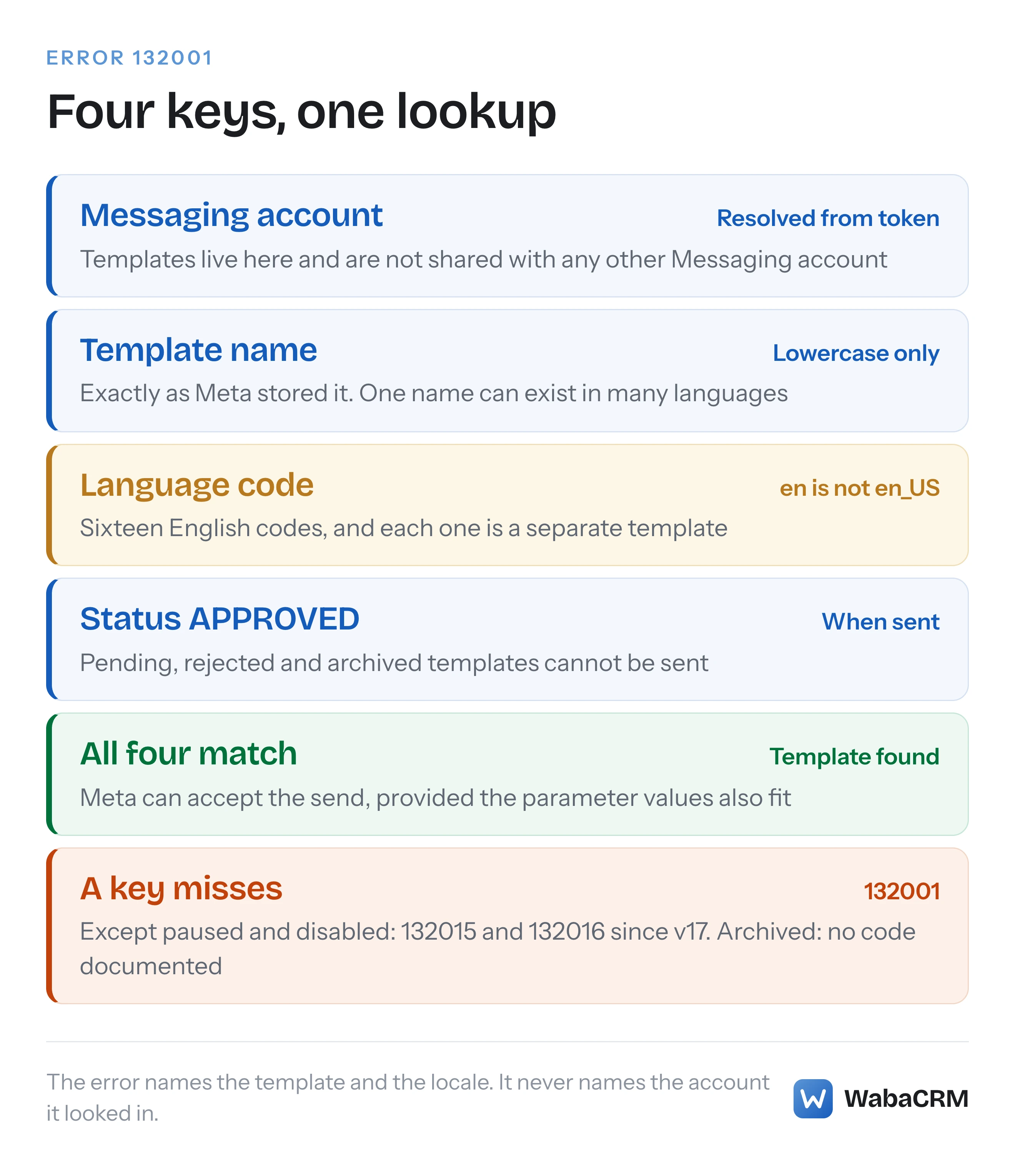
WhatsApp Cloud API error 132001 means Meta found no approved template with that exact name, in that exact language code, in the Messaging account the send resolved to. en, en_US and en_IN are separate templates, and Messaging accounts do not share templates. Since v17, paused or disabled templates return 132015 or 132016 instead (checked October 2026).
What does WhatsApp error 132001 mean?
WhatsApp error 132001 means Meta looked for an approved template with the exact name and the exact language code in your send request, inside the Messaging account that request resolved to, and found none. Meta's error reference compresses that into one line:
"The template does not exist in the specified language or the template has not been approved." (Meta — WhatsApp Cloud API error codes)
The remedy beside it is just as short: "Make sure your template has been approved and the template name and language locale are correct." (Meta — WhatsApp Cloud API error codes) That names three things to check: the status, the name and the language. It leaves out a fourth, which matters more since Meta split the WhatsApp Business Account in two: which account holds the template.
The maddening part is that the template often does exist. You can see it in WhatsApp Manager, it reads Approved, and the send still fails. When that happens, look for the one key in the lookup that is different from what you believe it is. The name is spelled differently. The language code is a sibling of the one you created, such as en against en_US. The template lives in a different Messaging account from the one the send resolved to. Or its status is not APPROVED at the moment of sending.
Checked against Meta's documentation on 16 October 2026.
- What does WhatsApp error 132001 mean?
- What does a 132001 response look like in practice?
- Why are en, en_US and en_IN three different templates?
- Which language code should the send request carry?
- Can a template that works on one number fail with 132001 on another?
- Does the new account model add another way to hit 132001?
- Why does an approved template still return 132001?
- Why do older answers about 132001 blame paused templates?
- Which error codes look like 132001 but mean something else?
- How does WabaCRM keep the template name and language together?
- In what order should you work through a 132001?
What does a 132001 response look like in practice?
In the responses developers have posted, it comes back as the HTTP error answer to POST /<PHONE_NUMBER_ID>/messages, and its details field names the template and the locale Meta looked in. Meta's error page publishes no title and no example payload for 132001, so the clearest specimen is one a developer posted on Meta's own community forum, for a request sent with the language code en_US:
HTTP 404
{
  "error": {
    "message": "(#132001) Template name does not exist in the translation",
    "type": "OAuthException",
    "code": 132001,
    "error_data": {
      "messaging_product": "whatsapp",
      "details": "template name (movie_ticket_confirm) does not exist in en_US"
    },
    "fbtrace_id": "<FBTRACE_ID>"
  }
}
That body is quoted from a developer's post on Meta's developer community forum, reformatted as JSON with the trace id replaced; the post logged the status as 404. Three things in it are worth knowing.
First, the message carries the phrase most people search for, "Template name does not exist in the translation". It appears in the response, not on Meta's error page, which describes the code but gives it no title.
Second, details is the field to read. It puts the template name in brackets and the locale at the end. Meta tells integrators to lean on exactly this field:
"In general, Meta recommends that you build your app’s error handling logic around code values and details payload properties." (Meta — WhatsApp Cloud API error codes)
Third, there is no error_subcode, which fits Meta's reference: it describes that field as "Deprecated. Will not be returned in v16.0+ responses." (Meta — WhatsApp Cloud API error codes) Do not wait for one to tell you which of the four keys missed.
A second thread on the same forum carries a stranger body. The request sent "code": "en_US", and the details came back as "template name (ticket_confirm_message) does not exist in en" (Meta developer community forum). Nobody answered it, and Meta has not explained it. The practical lesson is to log the request body your server actually sent, rather than treating the locale in details as proof of what left it.
Why are en, en_US and en_IN three different templates?
Because the language code is part of the template's identity, not a display preference. Meta says plainly that a name can repeat across languages:
"Every template must have a name, but names are not unique. This flexibility allows you to create multiple templates with the same name, but in different languages." (Meta — Template fundamentals)
And it ties the language to the moment of creation:
"You must assign a template language code upon template creation. Template strings and variables are not translated by Meta, so you are responsible for supplying strings and example parameters in their appropriate language." (Meta — Template fundamentals)
Meta's supported languages table, read on 16 October 2026, lists 111 language codes, and sixteen of them are English: en, en_GB, en_US, en_AE, en_AU, en_CA, en_GH, en_IE, en_IN, en_JM, en_MY, en_NZ, en_QA, en_SG, en_UG and en_ZA. Each is a separate slot under the same name. A template created as plain English (en) cannot be sent as en_US, and the reverse is just as true, because from Meta's side the one you asked for was never created.
| Meta's label | Code | A mismatch to watch for |
|---|---|---|
| English | en |
Sent as en_US by a hard-coded default |
| English (US) | en_US |
Sent as en after codes are "tidied up" |
| English (IND) | en_IN |
Created for India, sent as en or en_US |
| Hindi | hi |
There is no hi_IN in the table at all |
| Bengali, Bengali (IND) | bn, bn_IN |
Two codes, so two separate templates |
| Portuguese (BR) | pt_BR |
There is no bare pt to fall back to |
The table matters most for teams in India, where one business may send in English, Indian English and Hindi side by side. Hindi has exactly one code. Bengali has two. English has its own Indian code, which is easy to choose in WhatsApp Manager and then forget when the integration is written against en_US.
The last column also points at a quieter failure. A code built automatically, for example by stripping pt_BR down to pt or adding a region to hi, may not exist in Meta's table at all. At creation Meta refuses such a code outright: "Invalid categories or unsupported language codes return error code 100." (Meta — Template management) At send time Meta's error reference lists no code specifically for a language code that is not in the table. 132001's description fits that case, and so does the generic 131009, "One or more parameter values are invalid." (Meta — WhatsApp Cloud API error codes) Which of the two you get is not documented, so treat either as a reason to check the code against the table.
Which language code should the send request carry?
Exactly the one the template was created with, read back from Meta rather than typed from memory. The Message Templates API returns each template's name, language and status together:
curl 'https://graph.facebook.com/v23.0/<WABA_ID>/message_templates?fields=name,language,status' \
  -H 'Authorization: Bearer <ACCESS_TOKEN>'
Meta's own example response on its template management page is a useful warning. It lists two approved templates in the same account, one with "language": "en_US" and the other with "language": "en". A real account can look like that once different people have created templates over time, so treat it as normal rather than as an edge case.
Store the name and the language as a pair, from that response, and send them as a pair:
"template": {
  "name": "order_confirmation",
  "language": { "code": "en_US" }
}
A template list that keeps only the name and adds the language at send time from a setting is an easy way to produce a 132001 on a template that is plainly approved.
Can a template that works on one number fail with 132001 on another?
Yes, when the two numbers send through different Messaging accounts. Meta defines templates as belonging to the account, not to the number:
"Templates are Messaging account assets that can be sent in template messages via Cloud API or Marketing Messages API for WhatsApp." (Meta — Template fundamentals)
The Messaging account is the half of Meta's new account model that holds templates and billing, and it carries the id most integrations still call the WhatsApp Business Account (WABA) ID. Meta's account documentation says so directly: "Your existing WABA ID now identifies your Messaging account." (Meta — WhatsApp accounts and Messaging accounts) And the page describing the new account model is explicit that accounts do not share templates:
"Template isolation: Templates belong to the Messaging account in which they were created and are not shared across Messaging accounts." (Meta — Updates to WhatsApp Business accounts)
So a business portfolio with two WABAs, each holding its own number, has two separate template libraries. A template created and approved in the first is invisible to a send from a number in the second, and "does not exist" is the literal truth from that number's side. The same page names the two ways out: create the template in each account, or copy it with the Template Migration API, at a price Meta states plainly: "When templates are migrated to a new Messaging account, their quality ratings and messaging tier reset to baseline, requiring a ramp-up period of approximately 2–4 weeks." (Meta — Updates to WhatsApp Business accounts)
This is also how people convince themselves the template is approved when the send keeps failing. WhatsApp Manager shows one account at a time, and Meta's instructions say: "If you have multiple Messaging accounts, use the dropdown menu in the top-right corner to select the account whose templates you want to manage." (Meta — Template review) The green Approved badge you are looking at may belong to the other account.
A third forum thread fits the same shape: a template that sent with the temporary token from the API Setup panel and failed with 132001 under a system user token (Meta developer community forum). The post does not say which phone number id each call used, and that is the first thing worth comparing whenever a token change and a 132001 arrive together.
Does the new account model add another way to hit 132001?
It can, on a phone number shared with more than one partner. Meta's page on managing Messaging accounts starts with the sentence that changes the picture: "A business phone number can have more than one Messaging account." Each partner on the number gets its own:
"Each partner working with a client gets their own Messaging account, which ensures complete isolation of templates, billing, and metrics between partners." (Meta — Updates to WhatsApp Business accounts)
A send then has to resolve to one of those accounts, and Meta resolves it from the token: "The access token is the only thing in a send message request that identifies you, so it is what Meta resolves the Messaging account from." (Meta — Managing messaging accounts) Where the token can reach more than one, Meta says to name the account with messaging_account_id, and warns what happens if you do not:
"When your token reaches more than one Messaging account and you omit messaging_account_id, the outcome is not guaranteed: the message may be billed and attributed to a Messaging account you did not intend, or the request may be rejected." (Meta — Managing messaging accounts)
Meta does not say which error code a template send returns when it resolves to an account that does not hold the template. Given template isolation, 132001's description is the one that fits, and this is our reading rather than a sentence Meta wrote. Two practical consequences follow. A business that adds a new partner to a number it already uses starts that partner in a Messaging account of its own, which holds none of the templates created in the old one, so the old template names will not resolve there until they are created again or migrated. And a direct developer holding several Messaging accounts on one number should send messaging_account_id naming the account that holds the template.
Meta's rollout note, read on 16 October 2026, said the new model became generally available on 23 September 2026 and would reach all businesses by mid-October 2026, with the parameter optional for now and, on Meta's published timeline, required by the newest Messages API version for multi-Messaging-account setups from the first half of 2027. If you are weighing a change of provider, what carries over when you switch WhatsApp API providers covers the rest of that move.
Why does an approved template still return 132001?
Usually because the template that is approved is not quite the one the request asked for. Status is part of the match, and what counts is the status the exact name and language pair has when the request arrives:
"Templates must have a status of APPROVED before they can be sent in template messages." (Meta — Template fundamentals)
Run through the variations that look approved and are not:
- It is approved in the other language. The
enversion cleared review and theen_USversion you are sending is still pending, or was never created. - It is still in review. WhatsApp Manager shows it as In-Review, and Meta says "Review can take up to 24 hours." (Meta — Template fundamentals)
- It is approved in another Messaging account, as described above.
- The name is not the stored name. Meta's naming rule is strict: "Template names can only contain lowercase alphanumeric characters and underscores (regex: ^[a-z0-9_]+$)." (Meta — Template management) A request naming
Order_Confirmationororder confirmationis asking for something no template can be called. - It was archived. "Archived templates cannot be sent in template messages and are scheduled for deletion after 28 days." (Meta — Template archival) Neither the archival page nor the error reference says which error code that send returns. Auto-archival takes templates inactive for longer than 12 months (Meta counts creating, editing, sending, appealing and unarchiving as activity). That is exactly the kind of template a seasonal campaign suddenly needs. The archive clock is covered in every status a WhatsApp template can be in.
Why do older answers about 132001 blame paused templates?
Because they were right at the time. On API versions before v17, a paused or a disabled template also came back as 132001. Meta's changelog entry dated 23 May 2023 records the split:
"Attempting to send a paused template in a template message using v17 or later now returns error code 132015 instead of 132001." (Meta — WhatsApp changelog)
"Attempting to send a disabled template in a template message using v17 or later now returns error code 132016 instead of 132001." (Meta — WhatsApp changelog)
So a forum answer from before mid-2023 that says "your template is probably paused for low quality" was diagnosing a failure that now has its own codes. On v17 or later, a 132001 is not a paused or disabled template. If quality is the issue you will see 132015 or 132016, and Meta's remedies for those are to edit the template (132015) or create a new one (132016), not to check its name. Paused templates and how a rating drop leads to them are covered in what a yellow quality rating costs you now.
Which error codes look like 132001 but mean something else?
Five codes in the 132000 range of Meta's error reference are easy to confuse with 132001, and they answer different questions. None of them sits under the reference's template headings: they are in its "Other errors" table, with 132005 and 132007 between them. The descriptions below are condensed from Meta's, except where quoted, read on 16 October 2026 from the error codes page.
| Code | Meta's description, condensed | What to check |
|---|---|---|
| 132000 | Parameter values did not match the template's count | Values supplied per component |
| 132001 | Template does not exist in that language, or not approved | Name, language, account, status |
| 132012 | "Variable parameter values formatted incorrectly." | The shape of each value |
| 132015 | Paused due to low quality | Template quality, then edit |
| 132016 | Paused too many times, now permanently disabled | Create a new template |
The first and third rows are about the values you sent, checked against what the template defines. Our reading is that either of them means the template itself was found, which rules out the causes on this page; Meta does not state that ordering in words. The parameter codes have their own write-up in WhatsApp error 132000 with the right number of parameters.
The fifth row has a consequence worth remembering here. Meta's remedy for 132016 is "Create a new template with different content", and a new template is a new name and language pair, which brings you straight back to sending that pair correctly.
How does WabaCRM keep the template name and language together?
By never asking anyone to type the language at send time. WabaCRM's templates screen reads each template from Meta with Sync from Meta and files it against the number it was synced through, with the language code exactly as Meta returned it. The Language column shows that code on every row.

When a template is sent from the inbox or a campaign, the language travels from that stored record, so the pair that leaves for Meta is the pair Meta itself reported. The inbox's template picker and the campaign builder list only approved templates that belong to the number doing the sending, so a template from another number's account is never offered in the first place. Teams calling WabaCRM's own REST API pass a template id rather than a name and a language, as described in sending a WhatsApp template to a new number through the API.
None of that can create a template in an account that lacks it. If the template exists only in another Messaging account, it has to be created there, or copied with Meta's migration tooling, before any platform can send it.
In what order should you work through a 132001?
From the cheapest check to the one that needs someone with access to WhatsApp Manager:
- Read
details, then read your own request log. Note the template name and the language code your server actually sent, not the ones you intended. - List the account's templates through the API with
fields=name,language,status, using the WABA ID behind the sending number. Look for the exact name and the exact code together. - If the name exists in a sibling code, such as
enagainsten_US, send the code Meta returned or create the template in the code you need. - If the pair is missing entirely, check which Messaging account the sending number uses. A template approved in another account is not available here.
- If the pair exists but is not APPROVED, wait for review, edit a rejected template, or unarchive an archived one within its 28 days.
- If the number is shared with a partner, confirm which Messaging account your token resolves to, and send
messaging_account_idwhere more than one is reachable.
Stop any campaign that is returning 132001 while you work through this. Every recipient will fail for the same reason, and nothing about the next send will be different.
Every Meta quotation on this page was read from Meta's own documentation on 16 October 2026 and re-checked word for word on 17 October 2026. Meta changes that documentation without notice; the linked pages are authoritative and this one is not.
Questions people also ask
Is the WhatsApp template name case-sensitive when you send it?
Do I have to create a separate template for every language I send in?
Will retrying a 132001 ever make the send succeed?
Can templates be copied to another Messaging account instead of recreated?
Why does the 132001 error name a different language from the one I sent?
- whatsapp error 132001
- template name does not exist in the translation
- whatsapp template language code
- whatsapp template en vs en_us
- messaging account templates


