Button at Index 0 of Type Url Requires a Parameter: 131008
The short answer
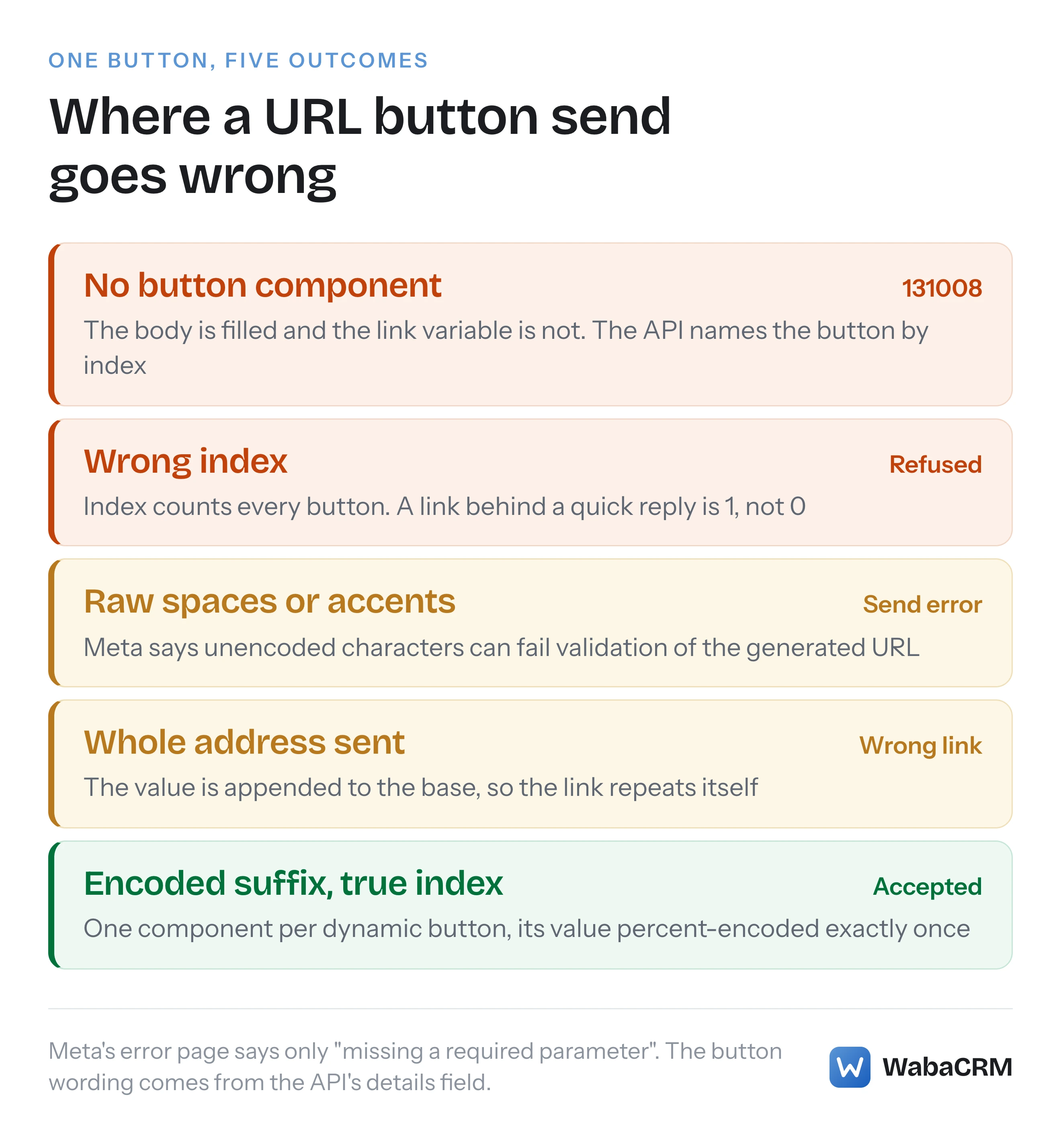
WhatsApp Cloud API error 131008 with the detail "Button at index 0 of type Url requires a parameter" means the template's first button is a URL ending in a variable and the send carried no value for it. Add a button component with sub_type url, that button's zero-based index, and only the percent-encoded suffix (checked October 2026).
What does "Button at index 0 of type Url requires a parameter" mean?
It means the template you sent has a URL button whose link ends in a variable, and your send request carried no value for that variable. The WhatsApp Cloud API refuses the message with error 131008, and the details field names the button by its position: index 0 is the first button on the template.
Meta's own error reference describes 131008 in one generic line, written for every endpoint at once:
"The request is missing a required parameter." (Meta — WhatsApp error codes)
Its suggested fix is just as general: "See the endpoint’s reference to determine which parameters are required." Nothing on that page mentions buttons. I searched it on 17 October 2026 for "button", "requires a parameter" and "index 0 of type", and found none of them. The sentence in your logs comes from the API's response, not from Meta's documentation, which is why searching the documentation for it returns nothing useful.
The shape of the failure is nearly always the same. The template was approved with a link such as https://example.com/track?id={{1}}. The body variables were filled correctly, so the request looks complete to anyone reading it. But a dynamic link is a separate kind of value from header and body parameters, and it travels in a component of its own. Leave that component out and the template is missing a parameter, even though every placeholder you can see in the message text has a value.
- What does "Button at index 0 of type Url requires a parameter" mean?
- Where does the button wording come from if Meta's error page never prints it?
- What does a correct dynamic URL button send look like?
- Which index does a URL button have when the template has other buttons?
- Do you send the whole link or only the part that changes?
- Why does a value with spaces, colons or accents break the link?
- Which other buttons need a value at send time?
- Why does the delivered link have a slash you never typed?
- How do you catch a missing button value before Meta does?
Where does the button wording come from if Meta's error page never prints it?
It comes from the details property of the error object, which is the field Meta tells you to build on. The error reference is explicit about which properties deserve your logic:
"In general, Meta recommends that you build your app’s error handling logic around code values and details payload properties. These properties and their values are more indicative of the underlying error." (Meta — WhatsApp error codes)
Meta defines details as an "Error description and a description of the most likely reason for the error. May also contain information on how to address the error, such as which parameter is invalid or what values are acceptable." For this failure, that is where the button wording sits. The message field is something else: a "Combination of the error code and its title", and Meta warns that "titles will eventually be deprecated", so nothing should parse them.
Put together, the response has this shape. The envelope is Meta's documented error syntax; the details string is the text the API returned for this failure in a refused send, not wording from any Meta page:
{
  "error": {
    "message": "(#131008) <TITLE>",
    "type": "<TYPE>",
    "code": 131008,
    "error_data": {
      "messaging_product": "whatsapp",
      "details": "Button at index 0 of type Url requires a parameter"
    },
    "fbtrace_id": "<FBTRACE_ID>"
  }
}
Two practical consequences follow. First, match on code 131008 and read the index out of details, rather than matching the whole sentence, because the index changes with the template. Second, watch both delivery routes. Meta says "Cloud API errors are returned either synchronously as a Graph API response, asynchronously via Webhook, or sometimes through both methods", and the page does not say which route 131008 takes. If you send from a queue, the refusal appears whenever the job runs, which can be minutes after someone pressed Send.
What does a correct dynamic URL button send look like?
A correct send carries one button component per dynamic link, with sub_type set to url, an index matching the button's position, and a single text parameter holding the value. Meta's limited-time offer reference shows the pairing end to end. The template is created with the variable at the very end of the address:
{
  "type": "url",
  "text": "Book now!",
  "url": "https://awesomedestinations.com/offers?code={{1}}",
  "example": ["https://awesomedestinations.com/offers?ref=n3mtql"]
}
And the send fills it like this, beside the body parameters, with the copy-code button sitting at index 0 and the link at index 1:
{
  "type": "button",
  "sub_type": "url",
  "index": 1,
  "parameters": [
    { "type": "text", "text": "n3mtql" }
  ]
}
Both snippets are taken from Meta's limited-time offer templates page. Notice the send component's type is button, singular, one per button that needs a value, while at creation every button sits together inside a single buttons component. Also notice that the body parameters and this button component are siblings in the same components array. Teams that build the send from a helper written for body variables tend to produce a perfect body array and no button entry at all, which is exactly the request that earns this error.
Body variables have their own failure modes, covered in why error 132000 fires with the right number of parameters. A send can have every body parameter right and still be missing the button value, which is why the two errors are worth telling apart.
Which index does a URL button have when the template has other buttons?
Its zero-based position among all of the template's buttons, counted in the order they were defined, whatever their type. A quick reply or a copy-code button in front of the link pushes the link's index up by one. Meta's coupon reference defines the field like this:
"Indicates the order in which a button appears, if the template uses multiple buttons. Buttons are zero-indexed, so setting the value to 0 causes the button to appear first, and another button with an index of 1 appears next, and so on." (Meta — Coupon code templates)
Meta's own examples confirm that every button counts. The coupon template is created with a quick reply first and a copy-code button second, and the send addresses the copy-code button at index 1. The limited-time offer reference states the rule for its link outright: "URL button index. If the template uses a copy code button, value must be 1." And the media card carousel reference walks through the exact mistake:
"For example, if the template defines a phone number button first (which equates to index 0) and a URL button that supports a single variable second (which equates to index 1), if you attempt to send the template with the URL button index set to 0 , the API would return an error (“Parameter value for URL was expected but was not found”) because it’s expecting a button object with an index of 1 to be present in the post body payload." (Meta — Media card carousel templates)
That example is the useful one, because it shows the wrong index does not produce a friendly "index mismatch". Meta reads it as the button at the expected position having no value, so an index mistake reads like a forgotten component. Meta's example gives the wording but not the error code, so do not assume it matches the details string above word for word.
| Buttons on the template, in order | Index of the URL button | Source of the rule |
|---|---|---|
| URL | 0 | Zero-based counting |
| Copy code, URL | 1 | Limited-time offer reference |
| Phone number, URL | 1 | Carousel reference example |
| Quick reply, quick reply, URL | 2 | Zero-based counting |
| URL, URL | 0 and 1 | Two components, one each |
One more wrinkle. The components reference says that for a template with several quick replies, "you can use the index property to designate the order in which buttons appear in the template message." The carousel reference closes that door as soon as a variable is involved: "if any buttons use variables, the type and order of buttons must match the type and order defined on the template". For a dynamic link, treat the index as a fixed address, never as a sort key.
Do you send the whole link or only the part that changes?
Only the part that changes. The template components reference describes the button URL as one that "Supports 1 variable, appended to the end of the URL string." The value you send is appended to the base the template already holds. Send the whole address and the link the customer receives contains the base twice, and the https:// inside the value brings a colon, which is one of the characters Meta lists as needing encoding.
The length rule follows from the same design. On a limited-time offer, Meta describes the URL variable as having "No maximum, but value counts against URL string maximum of 2000 characters." The components reference gives the same "2000 characters maximum" for a URL button in general, so a long tracking token is fine until base plus value passes 2,000 characters.
The creation side is where people get confused, because Meta's examples disagree with each other. The components reference's property table gives the example as a finished Lucky Shrub shop address ending in ?promo=summer2023, while the JSON sample directly beneath it gives only summer2023. The limited-time offer sample uses a full address. Both forms appear in Meta's own documentation for template creation. The send side has no such ambiguity: the parameter is only the suffix in every send example on the pages cited here.
Why does a value with spaces, colons or accents break the link?
Because it is substituted into an address, and Meta requires URL-safe characters there. The components reference says so directly:
"If your URL button parameter values contain special characters, you must percent-encode them before including them in your send template message request. Unencoded special characters can cause the generated URL to fail validation, resulting in a message send error." (Meta — Template components)
Meta lists the characters that are, in its words, "common sources of encoding issues":
| Character | Encoded value | Meta's example |
|---|---|---|
| Space | %20 |
New York → New%20York |
: |
%3A |
x:key → x%3Akey |
| |
%7C |
9|DL → 9%7CDL |
ç |
%C3%A7 |
Gonçalves → Gon%C3%A7alves |
ñ |
%C3%B1 |
Peña → Pe%C3%B1a |
For senders in India the same rule catches city names (New Delhi becomes New%20Delhi), order references built with pipes (ORD|2291 becomes ORD%7C2291), and any name in Devanagari, where each character becomes several encoded bytes (राम becomes %E0%A4%B0%E0%A4%BE%E0%A4%AE). Use your language's component encoder: encodeURIComponent in JavaScript, rawurlencode in PHP (not urlencode, which writes a space as + rather than Meta's %20), or quote(value, safe='') in Python.
Encode exactly once. A value that is already encoded and gets encoded again turns %20 into %2520, and the customer lands on a page looking for a reference that does not exist. This is a different failure from 131008: the value is present, so nothing is missing, and the problem shows only when someone taps the button.
One caution about scope. The encoding rule is written about URL button values that become part of a link you defined. Meta's copy-code authentication example sends the code J$FpnYnP on a url sub-type button without encoding the dollar sign. Meta does not reconcile the two pages, so follow the encoding rule for marketing and utility links, and Meta's authentication example for one-time codes.
Which other buttons need a value at send time?
Three kinds of button carry a send-time value, and each one needs its own component. Everything else is fixed at approval and is simply left out of the send.
| Button on the template | Value at send time? | What the component carries |
|---|---|---|
| URL ending in a variable | Yes | sub_type url, one text parameter |
| URL with no variable | No | Nothing; omit it |
| Copy code | Yes | sub_type copy_code, a coupon_code |
| Authentication code button | Yes, the code | sub_type url, the code as text |
| Quick reply | No | Omitted in Meta's coupon send |
The copy-code row comes from the components reference, which says the string to copy is "defined when the template is sent in a template message". The authentication row is the one that surprises people. Meta describes one-time password buttons as "a special type of URL button component used with authentication templates", and its copy-code authentication example sends the code on a button whose sub_type is url, with a note: "this value must appear twice in the payload." Once in the body, once on the button. Meta does not say what the API answers if the code appears only once, so send it in both places, as the example does.
Why does the delivered link have a slash you never typed?
That one is not 131008, and none of the Meta pages cited here describes it. One developer on Meta's community forum reported, in a thread the forum showed as about two years old when this was written, that a template URL ending in ?reference={{1}}, created in Meta's web interface, was saved after submission as ?reference=/{{1}}, so every delivered link carried a stray slash before the value. A second user later asked whether anyone had found a solution, and the thread on Meta's developer forum is marked unresolved. It is one user's report, not a documented rule.
The check is cheap either way. Read the approved template back from the API and compare the stored url with what you typed. If the stored address differs, nothing you change in the send request will fix it, because the value is appended to whatever the template holds. The template itself has to be corrected and approved again.
How do you catch a missing button value before Meta does?
Read the approved template, walk its buttons in order, and refuse to send until every button that needs a value has one. In outline:
const buttons = template.components
  .find((c) => c.type === 'BUTTONS')?.buttons ?? [];

buttons.forEach((button, index) => {
  const dynamicUrl = button.type === 'URL' && button.url.includes('{{');
  if ((dynamicUrl || button.type === 'COPY_CODE') && !values[index]) {
    throw new Error(`Button ${index} (${button.type}) needs a value`);
  }
});
The position comes from the loop, not from a count of URL buttons, which is what keeps a link behind a quick reply at index 1. Run this once per template, before a campaign starts, rather than per recipient. A missing button value lives in the payload every recipient shares, so a campaign that omits it fails every single send in the same way. The first refusal is the signal to stop, not something to retry.
The value is easy to miss for a reason worth knowing. A template list that counts variables from the message text will not count it, because a link's {{1}} is not in the text. WabaCRM's templates screen is an example: its Variables column adds the header and body placeholders, and a URL button's variable is not part of that figure.

So WabaCRM collects it separately. When a template has a URL button ending in a variable, the inbox composer and the campaign builder each show a "Link value" field for that button and percent-encode what you type before it reaches Meta, so you type New Delhi rather than New%20Delhi (typing the encoded form would encode it twice). The inbox composer refuses to send while that field is empty. The REST API takes the same values in button_params, keyed by button index, and refuses a send that leaves one out, naming the index, rather than letting Meta answer with 131008. If you are sending to a contact your system has never messaged, sending a template to a new number through the API covers the rest of that request. The features page lists where templates are used across the product.
Every Meta quotation on this page was read from Meta's own documentation on 17 October 2026. Meta changes that documentation without notice; the linked pages are authoritative and this one is not.
Questions people also ask
Can one WhatsApp template carry two dynamic URL buttons?
Can the variable in a WhatsApp URL button sit in the middle of the address?
Should the button index be sent as a string or a number?
Can a URL button use a named parameter instead of a numbered one?
Does a URL button without a variable need anything in the send request?
- button at index 0 of type url requires a parameter
- whatsapp error 131008
- whatsapp dynamic url button
- whatsapp url button parameter
- whatsapp template button index