WhatsApp Error 131016 and Code 2: Is the Cloud API Down?
The short answer
WhatsApp Cloud API error 131016 means "A service is temporarily unavailable", and code 2 means downtime or overload. Meta's remedy for both is to check the WhatsApp Business Platform Status page before retrying. Meta documents up to 5 minutes of downtime during API updates, and its availability figure ignores outages shorter than 10 consecutive minutes (checked October 2026).
What does WhatsApp error 131016 service unavailable mean?
WhatsApp error 131016 means "A service is temporarily unavailable." That sentence is the whole of Meta's description on its WhatsApp error codes page, and the remedy printed beside it is a single instruction:
"Check the WhatsApp Business Platform Status page to see API status information before trying again." (Meta, WhatsApp error codes)
That link resolves to Meta's WhatsApp Business Platform Status page. So Meta's own answer to 131016 is "go and look at whether we are down". The difficulty is that the status page's headline figure is built to count long, total failures, and the errors you are holding may come from short or partial ones that it does not count.
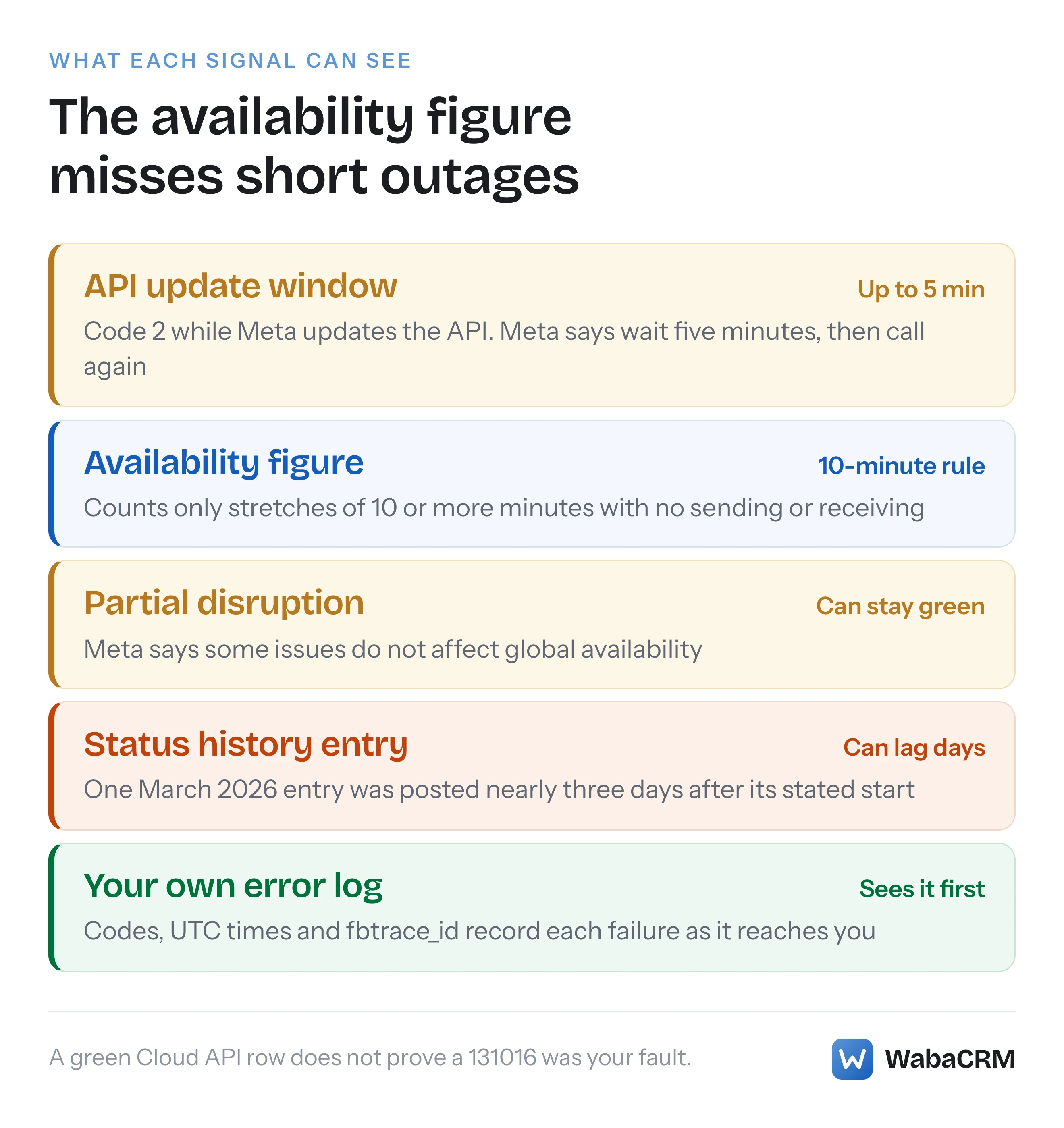
Meta names three more codes in the same family, and documents exactly one duration for any of them: an API update can cause "up to 5 minutes of downtime". It also defines availability so that nothing shorter than 10 consecutive minutes counts. Put those two facts together and a whole class of real failures can never appear in the availability figure on the page Meta tells you to check.
- What does WhatsApp error 131016 service unavailable mean?
- Which WhatsApp error codes point to Meta's side rather than yours?
- Why can error code 1 be an outage or your own malformed request?
- What happens to the WhatsApp Cloud API during one of Meta's updates?
- How do you check if the WhatsApp Business API is down?
- Why can the status page show 100% availability while your sends fail?
- How long does a WhatsApp Cloud API outage usually last?
- When should a send be retried after a server-side error?
- When should you open a Direct Support ticket, and at what severity?
- What should you log so the next outage can be proven?
- What happens to incoming messages and webhooks during an outage?
Which WhatsApp error codes point to Meta's side rather than yours?
Four codes on Meta's error page send you to the status page first: 1, 2, 131016 and 133004. Two more are easily mistaken for them. Here is each one with Meta's own wording, read on 16 October 2026:
| Code | Meta's details | Meta's remedy, in short |
|---|---|---|
| 1 | "Invalid request or possible server error." | Status page, then check your request |
| 2 | "Temporary due to downtime or due to being overloaded." | Status page before trying again |
| 131016 | "A service is temporarily unavailable." | Status page before trying again |
| 133004 | "Server is temporarily unavailable." | Status page, and the details value |
| 131000 | "Message failed to send due to an unknown error." | "Try again", then Direct Support |
| 2494100 | "The business phone number is in maintenance mode." | "Try again in a few minutes." |
The first four are the outage family. The 133004 remedy adds one step the others lack: "check the response details value before trying again", so read error_data.details on that one rather than treating it as a twin of 131016. 133004 sits beside the phone number registration codes on Meta's page, and its neighbours are covered in the registration errors around 133005.
Code 131000 is a generic failure Meta tells you to retry, with no mention of the status page. Maintenance mode, 2494100 for a number and 131057 for an account, is a state of your own account; for 131057 Meta says "One reason for this could be that the account is undergoing a throughput upgrade." Why 131057 looks like a rate limit covers it. Maintenance mode is not a platform outage, and the status page has no row for a single account.
Meta lists no HTTP status for any of these codes, and tells you not to lean on one: "Build your app’s error handling around error codes instead of subcodes or HTTP response status codes." (Meta, WhatsApp error codes)
Why can error code 1 be an outage or your own malformed request?
Because Meta wrote it that way. The details read "Invalid request or possible server error", and the remedy covers both:
"Check the WhatsApp Business Platform Status page to see API status information. If there are no server outages, check the endpoint reference and verify that your request is formatted correctly and meets all endpoint requirements." (Meta, WhatsApp error codes)
So code 1 is the one member of the family where a green status page should send you back to your own request rather than to a retry loop. The practical test is breadth. If code 1 arrives on every call from every number, including requests that worked an hour ago, suspect Meta. If it arrives on one kind of request, such as one template or one media type, suspect the request.
Meta adds a warning that makes code 1 harder to pin down. Its support FAQ says "Cloud API validates each message request through multiple checks", that "the order in which these checks are performed may change", and that "you might receive different error codes for the same API request, depending on which validation fails first" (Meta, WhatsApp support). A request that returned code 1 yesterday and a different code today has not necessarily changed. Log the request alongside the code so you can tell.
What happens to the WhatsApp Cloud API during one of Meta's updates?
It can stop answering for up to five minutes, and Meta's documented fix is to wait. This is the only outage duration Meta publishes, on its support page under the heading "Error code 2 - API service":
"When we update the API, you might experience up to 5 minutes of downtime. During this period of time, the service is unavailable. We try to make these updates with minimal disruption to businesses, but you might end up being affected." (Meta, WhatsApp support)
The debugging step under it is one line: "Wait 5 minutes and try to make the API call again."
Two things follow for anyone building a send queue. First, a retry policy for code 2 that gives up inside a minute or two will turn a routine update into permanent failures; the backoff has to reach past five minutes before the message is marked failed. Second, Meta gives no schedule for these updates and no advance notice on the page that describes them, so you cannot plan around them. You can only make sure five minutes of refusals cost you a delay rather than a lost message.
How do you check if the WhatsApp Business API is down?
Open Meta's WhatsApp Business Platform Status page and read every row, not only "Cloud API". Meta's documentation for the page says to use it "to determine if the problem is on our end or if it is your business implementation, hardware, or your network" (Meta, API status page).
Each service carries its own indicator. Meta's definitions:
- Green checkmark: "The service is up, running, and has no known issues or a recent issue has been resolved."
- Yellow triangle: "The service is in recovery from disruptions or the service is experiencing some disruptions."
- Red stop-sign: "The service is currently down or experiencing major disruptions."
Read the rows separately, because Meta says "these services run independently" and "one service could be functioning normally, while the other is experiencing a minor or major disruption." When I opened the page on 16 and 17 October 2026 it listed ten services: Cloud API, Cloud API - Calling, WhatsApp Business Account Management, Embedded Signup, WhatsApp Flows, Marketing Messages API for WhatsApp, Direct Send API, Coexistence - Messaging, Coexistence - Onboarding and Meta Business Agent Platform. Meta's documentation page names five, including a "Cloud API - Localized Storage" row I did not see on the live page, so trust the page over its description.
A failure in a row other than Cloud API can still stop your sends. The history for 6 January 2026 records this under WhatsApp Business Account Management, not Cloud API: "Some WABAs using credit lines from organizations based in India are currently unable to send messages if their account currency is not INR, due to a payment method issue." Some WhatsApp Business Accounts (WABAs) were unable to send, and the Cloud API row carries no entry for that day. Meta's separate requirement that eligible Indian accounts move to INR billing is covered in Meta's INR billing migration.
Then rule out your own account. Meta's health status field, requested on a phone number, returns a can_send_message value for the number, the WABA, the business portfolio and the app (Meta, health status):
curl 'https://graph.facebook.com/v26.0/<PHONE_NUMBER_ID>?fields=health_status' \
  -H 'Authorization: Bearer <ACCESS_TOKEN>'
If any of those reads BLOCKED, you are looking at a block on that number, WABA, portfolio or app rather than a Meta outage. The difference between a cached "connected" label and a live check like this one is the subject of why a dashboard can say connected while nothing sends.
Why can the status page show 100% availability while your sends fail?
Because Meta's availability figure only counts long, total failures. The definition, from Meta's status documentation:
"Cloud API is considered available unless it has been unable to send or receive messages for at least 10 consecutive minutes." (Meta, API status page)
The formula beside it is Availability = 100 * (A - B)/A, where B is the minutes the Cloud API "is not available to send or receive messages, as detected by WhatsApp in the calendar month." A five-minute update window, Meta's own documented outage, is shorter than ten minutes and can never enter B. Nor can a disruption that slows sends or breaks one message type without stopping sending entirely. When I read the live page it reported Cloud API availability of "100.00% last 31 days".
Meta's reliability FAQ says this directly. Under the question "Meta Status Page reflects no issues for Cloud API, yet I am still facing issues." the answer begins: "There may be issues that do not impact our global availability." and ends: "Please submit a Direct Support ticket to investigate further." (Meta, WhatsApp support).
The same FAQ lists failures that are not automatically tracked, including "Network issues causing requests to fail before they reach the Graph API layer (first layer)." It adds that "Availability is updated once a day", that where user errors were counted towards downtime by mistake Meta "will override the downtime to uptime after detailed analysis within a week", and that some failures, such as "Validation that rejects legitimate requests", are accounted for "after the fact, near real time, but not real time." The figure you read today can be revised later.
How long does a WhatsApp Cloud API outage usually last?
Meta publishes no typical duration and no uptime commitment. Its reliability FAQ says: "We do not currently offer commercially available product service level agreements for uptime and/or latency." The only durations the same support page gives are the five-minute update window and, for regional failover, "less than a minute to less than five minutes."
What the status page's history does show is how long its own incidents stayed open. Meta's documentation says the View History button shows "the history from the past seven days"; when I opened it, it covered a whole year instead (17 October 2025 to 16 October 2026, read on 17 October 2026). These are the ten entries filed under the Cloud API row. The history is drawn in the browser. Mine, set to India time, labelled every time GMT+5:30, so the dates and times below are IST as displayed. A browser set to another time zone may show the same entries at other clock times, and near midnight on other dates:
| Date (2026, IST) | Severity | What Meta said was affected | First post to resolved (IST) |
|---|---|---|---|
| 24 Jun | Medium | The Cloud API | 02:08 to 03:30 |
| 12 Jun | High | The Cloud API | 20:00 to 22:40 |
| 19 May | High | Webhook delivery, media sends | 10:29 to 11:24 |
| 30 Apr | Medium | Sending messages | 15:58 to 18:03 |
| 27 Mar | Low | Sending messages | 00:41 to 03:46 |
| 18 Mar | Low | Message sending | 07:30 to 10:10 |
| 9 to 10 Mar | Medium | URL-button templates with media headers | 19:25 to 17:33 next day |
| 1 to 3 Mar | High | Marketing messages | 1 Mar 01:02 to 3 Mar 00:18 |
| 19 to 21 Feb | High | Messages on Coexistence | 19 Feb 23:54 to 21 Feb 12:34 |
| 4 to 10 Feb | Low | Cloud API, Coexistence | 4 Feb 02:17 to 10 Feb 06:42 |
Read the last column carefully. It measures how long the entry was open, not how long the problem lasted. The 9 March entry, posted at 19:25 IST (13:55 UTC), says: "This issue started at Mar 06 2026 20:00:00 UTC." By Meta's own stated start, the problem was almost 66 hours old, nearly three days, before the status page mentioned it. Under Cloud API - Calling, an entry posted in November 2025 reported "low disruptions from July 15 to Nov 13". The page is a record Meta curates, sometimes after the fact, not a live sensor.
Two more details are worth knowing before you build a timeline. None of the entries names an error code, so you cannot match 131016 to an incident by searching for it. And the entries mix time zones in their own text, citing PST, GMT, SGT and UTC in different updates, so convert everything to UTC before comparing it with your logs. The in-text times do not always agree with the posting times either: the 24 June Cloud API entry, posted at 02:08 IST (20:38 UTC on 23 June), says the issue "started at 2:24PM GMT on June 24th", a time after the post itself.
When should a send be retried after a server-side error?
Retry the outage family with a backoff that outlasts five minutes, never on HTTP status alone, and never by burning through the rest of a campaign while the errors are arriving. A policy that follows Meta's remedies code by code:
- Code 2: wait, then retry. Meta's instruction is to "Wait 5 minutes", so the backoff schedule must extend past that before a message is marked failed.
- 131016: check the status page, then retry with an increasing delay. Meta gives no duration, so cap the total wait at whatever delay your message can still tolerate.
- 133004: read
error_data.detailsfirst, as Meta's remedy says, then treat it like 131016. - Code 1: retry once after checking the status page. If the page is green and the second attempt fails the same way, stop retrying and inspect the request.
- 131000: Meta says "Try again"; if it persists, collect the
fbtrace_idvalues for a ticket.
Two rules apply across all of them. When many sends fail with these codes within a few minutes, pause the campaign instead of letting every recipient fail in turn, because the list is not the problem. And before resending, check whether an earlier attempt returned a message id. Meta's send-messages reference says a success response "only indicates that the API successfully accepted your request — it does not indicate successful delivery of your message" (Meta, send messages), so a send that timed out on your side may still have been accepted on Meta's.
Meta's error-codes page also notes that errors arrive "either synchronously as a Graph API response, asynchronously via Webhook, or sometimes through both methods." A retry decision made on the response alone can be overtaken by a webhook for the same message, so key both paths to one record per message.
When should you open a Direct Support ticket, and at what severity?
Open one when your errors persist and the status page shows no matching incident, which is exactly what Meta's reliability FAQ tells you to do. Meta's support page sets out who can file and how tickets are ranked:
"If you are an enterprise developer, such as a partner or managed partner, you can open a Direct Support ticket using the link below. If you have multiple Meta business accounts, be sure to select the appropriate account." (Meta, WhatsApp support)
It adds: "Note that if you are an end-client of a Solution Partner or managed partner, contact your Solution Partner or managed partner for support directly." Every WhatsApp Business Platform developer can also use Meta developer support and the developer community forum.
Severity is assigned from what you submit. Meta says "Ticket severity is generated based on the type of issue selected and information provided in your submission", against these definitions:
| Severity | Meta's definition, in short |
|---|---|
| 1 - Critical | API not functioning at all; no messages sent and/or numbers cannot be added or registered |
| 2 - Urgent | API functions impeded, "resulting in a majority of message send failures" |
| 3 - Standard | "minor or intermittent issues, resulting in some message send failures" |
Describe your impact in the terms of that table, because those are the terms the severity is generated from. Include the fbtrace_id from failed responses, which Meta describes as a "Trace ID you can include when contacting Direct Support. The ID may help debug the error." Meta's stated response time is modest: "We do our best to provide an initial response to your ticket within 24 hours on business days."
What should you log so the next outage can be proven?
Log enough that you can lay your failures on a timeline beside Meta's status history: the time in UTC, the error code, error_data.details, the fbtrace_id, the phone number id, and whether the request returned a message id. Meta documents the error body in this shape (Meta, WhatsApp error codes):
{
  "error": {
    "message": "<MESSAGE>",
    "type": "<TYPE>",
    "code": <CODE>,
    "error_data": {
      "messaging_product": "whatsapp",
      "details": "<DETAILS>"
    },
    "error_subcode": <ERROR_SUBCODE>,
    "fbtrace_id": "<FBTRACE_ID>"
  }
}
Keep code, details and fbtrace_id. Skip error_subcode, which Meta marks "Deprecated. Will not be returned in v16.0+ responses." With those fields stored, three questions answer themselves. Did the failures cluster in time? Did they cluster on one number or one message type? Did they start before Meta's first status post?

That timeline is also what a Direct Support ticket needs, since the severity table turns on whether failures were total, a majority, or some. In WabaCRM, the message logs screen shows every message in and out with its delivery status, and its CSV export dates each row in the reader's own time zone, names that zone in the header, and carries Meta's error code on each failed message, which is the raw material for that comparison.
What happens to incoming messages and webhooks during an outage?
Inbound traffic and webhooks can be disrupted on their own, and Meta's metrics measure them only partly. Some Meta incidents are specifically about webhooks: the 19 May 2026 entry reported "high disruptions impacting webhook delivery and sends of media messages on Whatsapp Cloud API."
Meta's latency figures cover the time from receiving a customer's message to "the first attempt to send a corresponding messages webhook", but they exclude "Messages status webhooks (sent, delivered, read, and so on)." So the P90 and P99 numbers on the status page say nothing about how late your delivery receipts are. Meta's reliability FAQ also lists "Network issues causing outbound webhooks not to reach business’s webhook endpoint" among failures that are not automatically tracked, while noting that a webhook which fails after its first attempt "will continue to be retried, until it is successfully delivered to the webhook endpoint." How long those retries continue, and why Meta's documents disagree on it, is covered in how long Meta retries a failed WhatsApp webhook.
The practical consequence is that an outage can end for sending before it ends for status updates. Expect delivery receipts for messages sent during a disruption to arrive late, and do not mark a message failed only because its delivered status has not arrived yet.
Every Meta quotation on this page was read from Meta's own documentation on 16 October 2026 and checked again on 17 October 2026. Meta changes that documentation without notice; the linked pages are authoritative and this one is not.
Questions people also ask
Does Meta offer an uptime SLA for the WhatsApp Cloud API?
Can I get an alert when the WhatsApp Business Platform status changes?
Why would 131016 hit media messages or one number while text still sends?
Is an HTTP 503 the same thing as WhatsApp error 131016?
Are messages that failed with 131016 delivered once the service recovers?
- whatsapp error 131016
- whatsapp cloud api down
- whatsapp business api status page
- whatsapp error code 2
- whatsapp error 133004