Param Text Cannot Have New-Line/Tab Characters: WhatsApp Fix
The short answer
"Param text cannot have new-line/tab characters or more than 4 consecutive spaces" is the WhatsApp Cloud API's reason, under code 100 "Invalid parameter", when a template variable's value holds a line break, a tab or a long run of spaces. No Meta documentation states the rule. Flatten the value or move line breaks into fixed text (checked October 2026).
What does "Param text cannot have new-line/tab characters or more than 4 consecutive spaces" mean?
It means the WhatsApp Cloud API refused a template message because one of the text values you supplied for its variables contains a line break, a tab, or a run of more than four spaces. The message is not sent, and nothing reaches the customer.
The error arrives under code 100, one of Meta's most general codes, with the title "Invalid parameter". A user in the Make Community quoted the whole thing as their scenario reported it, in a February 2025 thread asking how to put line breaks into a WhatsApp message. This is a community report of the response, not text from Meta's documentation:
The operation failed with an error. [400] [100] (#100) Invalid parameter Param text cannot have new-line/tab characters or more than 4 consecutive spaces.
The opening sentence and the two bracketed numbers are Make's labels: the HTTP status, then the error code Meta returned. Everything from "(#100)" onward is the text of Meta's response. That user was building an order summary, one line per item chosen, and the line breaks between the items were the problem.
This error tells you precisely what is wrong and is still hard to solve. It is precise because the reason is in the sentence. It is hard because the obvious fixes, escaping the character or swapping it for something that looks like a line break, do not work, and because the rule appears nowhere in Meta's documentation, so there is no page that explains what the alternative is.
- What does "Param text cannot have new-line/tab characters or more than 4 consecutive spaces" mean?
- What does the full error response look like?
- Why is this error code 100 and not a template error code?
- Where does Meta document the new-line and tab rule?
- Which characters trigger it, and which ones are only suspected?
- Can a WhatsApp template variable contain a line break?
- How do you clean a value before it reaches the template?
- How do you keep line breaks the customer needs to see?
- Can a free-form text message carry the line breaks instead?
- What does WabaCRM do with a line break in a template variable?
What does the full error response look like?
Meta documents the shape of a code-100 error on its error-codes page, and the reason for this one sits in the details property, not in the title. The example Meta gives for a code-100 error, in the section on the Marketing Messages API, looks like this; below, the community-reported reason has been put in place of Meta's example details string, with an ordinary trace id placeholder:
{
  "error": {
    "message": "(#100) Invalid parameter",
    "type": "OAuthException",
    "code": 100,
    "error_data": {
      "messaging_product": "whatsapp",
      "details": "Param text cannot have new-line/tab characters or more than 4 consecutive spaces."
    },
    "fbtrace_id": "<FBTRACE_ID>"
  }
}
I have not captured this exact body myself, so treat the details line as the string users have reported, inside the structure Meta documents. Meta's description of the two properties that matter is worth reading closely:
"Combination of the error code and its title. For example: (#130429) Rate limit hit." (Meta — WhatsApp error codes)
That is message. And for details:
"Error description and a description of the most likely reason for the error. May also contain information on how to address the error, such as which parameter is invalid or what values are acceptable." (Meta — WhatsApp error codes)
Any tool that shows you only message shows you "(#100) Invalid parameter" and nothing else. In an n8n Community thread from August 2025, a user's WhatsApp template step failed with a 400 Bad Request. An n8n team member found the cause, a single new-line character at the end of one value, and noted that "doing the same from Postman returns the detailed reason for the failure". If your tool hides details, send the same request from a plain HTTP client and read it there.
Why is this error code 100 and not a template error code?
Because Meta folded many differently titled code-100 errors into one title in 2023 and moved the old titles into details. The changelog entry for 2 February 2023, when Graph API version 16 was released, says so directly:
"Error code 100 ("code":100) had multiple unique titles which indicated the nature of a given 100 error. All code 100 errors will now use Invalid parameter as their title. Old titles that described the nature of a given code 100 error have been moved to the details property." (Meta — WhatsApp changelog)
So searching the template-error rows of Meta's error-codes page, the 132000 family, finds nothing about line breaks. The error-codes page describes code 100 only in general terms, as "The request included one or more unsupported or misspelled parameters", and among its remedies is "Ensure your parameter is under any length restriction for the type."
That breadth is why "(#100) Invalid parameter" means different things on different help pages. Zapier's own help article for that exact title, in its WhatsApp Notifications app, attributes it to a message longer than 1,024 characters. The n8n and Make threads trace it to line breaks. Both can be right, because the title is shared and only details tells them apart. Meta's guidance follows from the same design:
"In general, Meta recommends that you build your app’s error handling logic around code values and details payload properties. These properties and their values are more indicative of the underlying error." (Meta — WhatsApp error codes)
One more sentence complicates the picture. Meta's Template management page says: "Starting with v23.0, template component parameter issues at send time return error code 132018." The error-codes page lists 132018 only in its Marketing Messages API table, and the reports of the new-line string I read that give a code all give 100. I cannot tell you which code a v23 or later request returns for this specific case, which is one more reason to match on the text of details, not on the number.
Where does Meta document the new-line and tab rule?
Nowhere I could find. On 16 and 17 October 2026 I searched the rendered text of Meta's Template components, Template fundamentals, Template review, Template management, WhatsApp error codes, Service messages and Text messages pages, and of the Cloud API Message API reference, for "consecutive", "new-line", "newline", "new line" and "line break". None of them contains the rule or any of those terms. I searched every dated entry of the WhatsApp changelog, back to 21 October 2021, for the same terms and found none of them either.
The only changelog entry that mentions a line break character at all is the 12 November 2024 release of Flow JSON version 6.0, for WhatsApp Flows:
"String values in component properties can't be empty. Previously values such as “”, “ “, “\n”, “\t”, “\n” were accepted; from version 6.0 these are no longer valid." (Meta — WhatsApp changelog)
That is about a Flow screen's properties being empty or nothing but whitespace. It says nothing about a line break inside a template variable's value, so it does not document this rule.
So the only places the rule exists are the error response itself and vendor documentation paraphrasing it. Twilio's "Using Variables with Content Templates" page, read on 17 October 2026, puts it in one line: "Content variables in approved WhatsApp templates can't contain newlines." That is Twilio describing Meta's behaviour for its own customers, not Meta documenting it.
This matters for two practical reasons. First, there is no Meta page to show a colleague who insists the line breaks "should" work. Second, the boundaries are known only from the wording of the error. "More than 4 consecutive spaces" reads as five or more, but nothing published by Meta confirms that four is safe, so a robust fix does not rely on it.
Which characters trigger it, and which ones are only suspected?
The error names three things: new-line characters, tab characters, and more than four consecutive spaces. Here is each, with where it usually comes from and how firmly it is established:
| What is in the value | Where it usually comes from | How firm |
|---|---|---|
A line break (\n) |
Textarea fields, sheet cells, AI output, email bodies | Named in the error, reproduced by an n8n team member |
A tab (\t) |
Text copied out of a spreadsheet or table | Named in the error |
| Five or more spaces in a row | Fixed-width exports, padded columns | Named in the error |
| Exactly four spaces | Indented text | Not covered by the wording |
A carriage return (\r) |
Windows text, where each line ends \r\n |
Not named; one user reports no success with it |
The single most useful line in that table is the second half of the first row. In the n8n thread, the failing value had one new-line character at the very end, which the user had not noticed until the team member pointed to it, and the team member replicated the refusal "when adding a \n to the end of a variable value". A trailing line break is the commonest form of this problem, because nobody sees it.
Line breaks in values are usually accidental, which makes them hard to spot by reading the message. A customer presses Enter at the end of an address field. A spreadsheet cell holds a postal address on three lines because that is how it was typed. A summary from an AI step can end with a new line that nobody typed. A multi-line Indian postal address, flat and building on one line, road and area on the next, city and PIN on the third, is the natural trigger for any business that sends delivery or appointment templates from form data.
Can a WhatsApp template variable contain a line break?
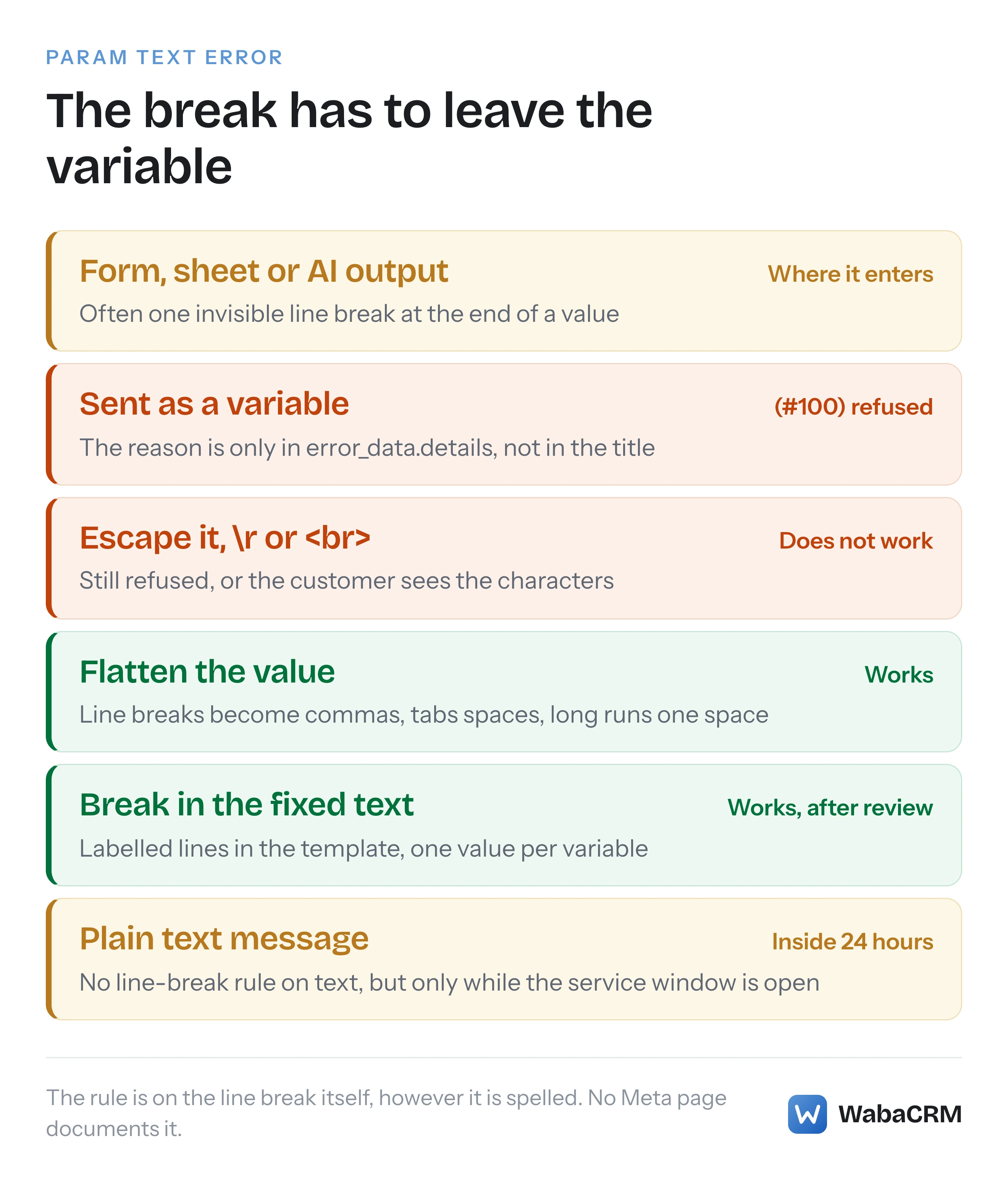
No. The restriction is on the line break itself, so every way of spelling it fails in one of two directions: either it is still a line break and is refused, or it is no longer a line break and the customer sees the spelling.
The Zapier Community thread on line breaks failing with error 100 is a useful record of the attempts. The user had used \n for line breaks, it had worked "till end of 2024", and then every send failed with error 100. They tried a carriage return and an HTML <br>, and neither worked. A suggestion to put spaces around \n, or to double it, did not work either.
Double-escaping deserves a specific warning, because it appears to succeed. If your JSON contains \\n instead of \n, the value holds a backslash followed by the letter n. That is not a line break, so the check has nothing to object to, and the message goes out with a visible backslash and n in the middle of the customer's address. A fix that makes the error disappear by printing junk is worse than the error.
What can carry the line break is the template's fixed text, the part that was reviewed and approved. The welcome template WabaCRM sends its own new customers, which Meta approved, separates its paragraphs with blank lines in exactly that fixed text. The variable has to stay on one line; the template around it does not.
How do you clean a value before it reaches the template?
Replace each line break with a separator that reads naturally on one line, turn tabs into spaces, collapse runs of spaces, and trim the ends. Trim first, so that a trailing line break disappears rather than becoming a trailing comma:
// Flatten one template parameter before it is sent to WhatsApp.
function flattenParam(value, joiner = ', ') {
  return String(value ?? '')
    .trim()                                   // drop leading/trailing breaks
    .replace(/[,;]?\s*[\r\n]+\s*/g, joiner)   // each line break becomes the joiner
    .replace(/\t/g, ' ')                      // tabs become spaces
    .replace(/ {2,}/g, ' ')                   // runs of spaces become one
    .trim();
}

flattenParam('Flat 4B, Lotus Residency\nLink Road, Malad West\nMumbai 400064\n');
// → 'Flat 4B, Lotus Residency, Link Road, Malad West, Mumbai 400064'
The optional comma or semicolon before the line break is absorbed, so a line that already ended in a comma does not produce two. Choose the joiner for the content: a comma for addresses, a semicolon or " · " for a list of items, a space for prose an AI step wrote.
In n8n, the same chain works inside an expression on the field that fills the variable, because n8n expressions are JavaScript:
{{ $json.address.trim().replace(/[,;]?\s*[\r\n]+\s*/g, ', ').replace(/\t/g, ' ').replace(/ {2,}/g, ' ') }}
If your workflow sends through a provider rather than straight to Meta, check whether the provider already does this. The way a workflow tool reaches WhatsApp, directly or through an account like WabaCRM's, is set out in the n8n, Zapier and Make guide.
How do you keep line breaks the customer needs to see?
Move the structure into the template and keep only the values in the variables. An order summary that genuinely needs one line per item becomes a template whose fixed text holds the line breaks and labels, with a variable on each labelled line:
Hello {{1}}, your order {{2}} is confirmed.

Items: {{3}}
Delivery address: {{4}}
Expected by: {{5}}

Reply to this message if anything needs changing.
That changes the template, so it goes back through review, and it changes the payload you send. Five values now fill five variables, and the count must match exactly or the send fails with error 132000, which is covered in WhatsApp error 132000 with the right number of parameters. A vendor caution and a Meta rule both apply. Syniverse's help article says "Parameters should not be on a line by themselves or at the very beginning/end of the message body", which is why every variable above sits on a line with a label. And each extra variable needs fixed words around it, because Meta refuses a template with "too many variable parameters relative to the message length".
When the content is genuinely long and genuinely variable, such as a full itemised bill, a variable is the wrong container altogether. Meta's own order confirmation example on its Template components page uses "a document header with a sample value" and a body that tells the customer to "Tap the PDF linked above to view your receipt." A PDF carries any layout you like, and the template text stays short.
Can a free-form text message carry the line breaks instead?
Yes, if the customer has written to you in the last 24 hours. Meta's Service messages page describes the window:
"When a WhatsApp user messages you or calls you, a 24-hour timer called a customer service window starts." (Meta — Service messages)
and what it allows:
"While the window is open, you can send any of the following service message types to the user. When the window closes, you can only send pre-approved template messages." (Meta — Service messages)
A text message is one of those types, and Meta's Text messages page sets its body at "Maximum 4096 characters" with no rule about line breaks. The error under discussion names "Param text", a template parameter. The n8n report is explicitly about template variables, and nothing in the other two shows a plain text message being refused. So inside the window, a multi-line answer can go as an ordinary text message with its line breaks intact: no Meta page restricts them there, and no report I read shows one refused.
Outside it, there is no way round the template, and a send that ignores the window fails with its own error. That boundary, and the code it produces, is explained in WhatsApp error 131047 and the 24-hour window.
What does WabaCRM do with a line break in a template variable?
It flattens it before the request reaches Meta. WabaCRM's sender replaces line breaks and tabs in a template's body values with spaces, collapses runs of whitespace to a single space, and trims the ends. Every template message the workspace sends goes through that one sender: the inbox, campaigns, drip sequences, bots, automations and the REST API's POST /api/v1/messages, whose request shape is in sending a WhatsApp template to a new number through the API.
The trade-off is the one described above. An address sent with line breaks arrives as one line separated by spaces, not as three lines, and the message is delivered rather than refused. If the layout matters, build it into the template's fixed text.

When a send does fail, for this reason or any other, the message logs show the failed message with Meta's error code beside it, and can be filtered by that code. That is the place to look first when a campaign reports failures and you want to know whether they share one cause.
Every Meta quotation on this page was read from Meta's own documentation on 17 October 2026. Meta changes that documentation without notice; the linked pages are authoritative and this one is not.
Questions people also ask
Does the new-line rule apply to header and button variables as well as the body?
Is it safe to send exactly four spaces in a row inside a template variable?
Why did a WhatsApp workflow that used line breaks work last year and fail now?
Does an escaped backslash-n or an HTML br tag get past the check?
How do I find which variable in a template carried the line break?
- param text cannot have new-line/tab characters
- whatsapp template variable line break
- (#100) invalid parameter
- whatsapp api newline in template parameter
- whatsapp template n8n