WhatsApp Error 130497: Which Country Rule Blocked You
The short answer
WhatsApp Cloud API error 130497 means "The WhatsApp Business Account is restricted from messaging to users in certain countries." Meta files it under integrity errors and points to the Business Messaging Policy's allowed countries for your business category. Sanctioned regions and the US marketing pause are documented separately, the latter under error 131049 (checked October 2026).
What does WhatsApp error 130497 mean?
WhatsApp Cloud API error 130497 means Meta refused the message because your WhatsApp Business Account (WABA) is restricted from messaging users in the recipient's country. It is a verdict on the sending account and the destination, not on the person you wrote to, and Meta files it among its integrity errors.
Meta's error reference gives the code a single row, under the heading "Integrity errors":
"The WhatsApp Business Account is restricted from messaging to users in certain countries." (Meta — WhatsApp error codes)
The suggested solution beside it reads: "See WhatsApp Business Messaging Policy for details on allowed countries for messaging in your business category." Its neighbours on that table are 368 and 131031, both about an account "restricted or disabled for violating a platform policy". That placement is the first clue to what 130497 is: an account-level policy decision, scoped to a set of countries.
The short title travels in the message field instead, which Meta defines as a "Combination of the error code and its title". Meta's error page prints no titles, only the details text, so the title cannot be checked there. A vendor's community forum and a vendor knowledge base both carry it as "Business account is restricted from messaging users in this country." Build on code and details either way: Meta warns that "titles will eventually be deprecated".
The difficulty is that Meta runs several country rules, and only one of them is named in the remedy for this code. Some vendor pages file rules under 130497 that Meta itself never connects to the code. They are not the same rule, they are not published on the same page, and they do not all produce the same response.
- What does WhatsApp error 130497 mean?
- Which country rules can stop a WhatsApp Business message?
- Why does Meta's fix for 130497 point at your business category?
- Which countries does Meta sanction across the WhatsApp Business Platform?
- Is Türkiye still blocked for WhatsApp Cloud API messages?
- Does WhatsApp restrict messages into Brazil and Indonesia?
- Is error 130497 the same as the US marketing restriction?
- How do you tell which country rule stopped your message?
- Can you appeal or get a 130497 lifted?
Which country rules can stop a WhatsApp Business message?
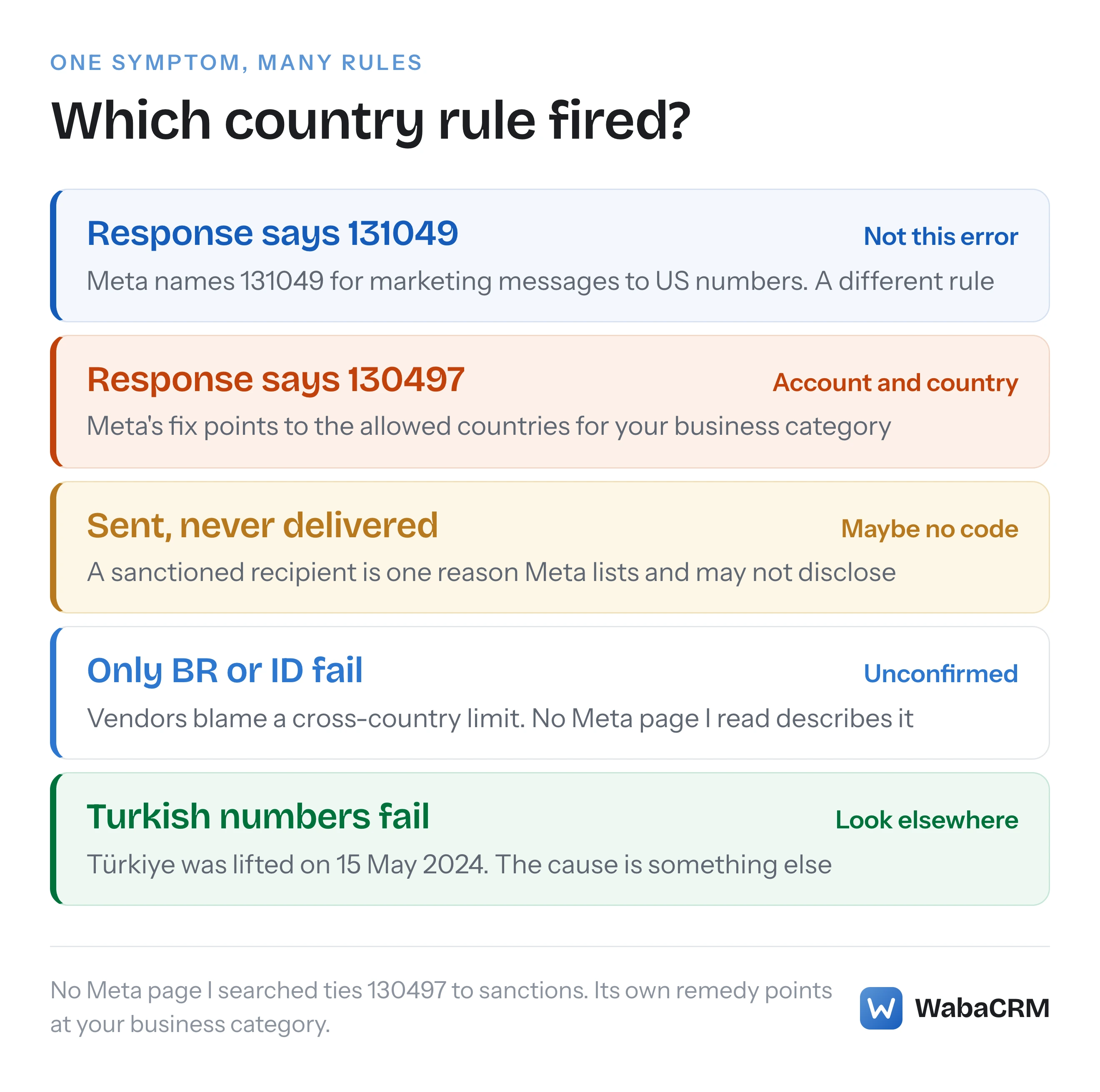
Five are worth knowing, and Meta documents four of them, spread across three different pages. The table lists each with the page that publishes it and what a sender actually sees.
| Country rule | Where Meta publishes it | What the sender sees |
|---|---|---|
| Regulated vertical outside its allowed countries | Business Messaging Policy, updated 23 Sep 2026 | The rule 130497's remedy names |
| Sanctioned countries and regions | Cloud API support page; Marketing Messages API page | Listed among sent but not delivered |
| Marketing to United States numbers | Marketing Messages API page; per-user limits page | Error 131049, per Meta |
| Cross-country messages into Brazil and Indonesia | No Meta page found | One vendor lists 130497 |
| Türkiye | Support page, lifted 15 May 2024 | No longer a restriction |
The column that matters is the last one. Only the first rule is tied to 130497 by Meta's own words, through the remedy text. On 17 October 2026 I searched 22 pages of Meta's WhatsApp developer documentation for "130497", including every Meta page cited here plus the messaging limits, policy enforcement, health status and webhook reference pages, and the Business Messaging Policy as well. The error reference is the only one that contains the code, and it says nothing about sanctions. Meta names a different code for the United States. The fourth row is a claim made by third parties, not by Meta. Each is taken in turn below.
Why does Meta's fix for 130497 point at your business category?
Because the WhatsApp Business Messaging Policy restricts certain kinds of business to certain countries, and the remedy for 130497 sends you to exactly that part of the policy. The policy, last updated on 23 September 2026, sets out a list of regulated verticals and then a narrower exception:
"We allow the use of the WhatsApp Business Platform, for messaging about the Regulated Verticals listed below in this Section 5, in limited countries, and pursuant to applicable law." (WhatsApp Business Messaging Policy)
Among the requirements that follow is the sentence that maps most directly onto this error: "You must not use the WhatsApp Business Platform to send messages about Regulated Verticals outside of the allowed countries." Three verticals carry their own allowed-country lists on that page: online gambling and gaming, over-the-counter drugs, and alcohol. Online gambling has an extra step. To promote it, the policy says a business must "Request permission from Meta Platforms, Inc. using this application form. Note that businesses can only apply to message people in certain countries."
The lists themselves are long and change with the policy, so read them at the source rather than from a copy. For diagnosing 130497 the useful point is narrower: if your business sells or promotes something in a regulated vertical, a refusal for some countries and not others is exactly the shape this rule produces. Meta's error text describes an account restricted "in certain countries", and its remedy talks about "allowed countries for messaging in your business category". Both halves of that sentence describe this mechanism. Meta does not say this is the only thing that can trigger 130497, so treat it as the first suspect, not the only one.
Which countries does Meta sanction across the WhatsApp Business Platform?
Meta's Cloud API support page lists Cuba, Iran, North Korea, Syria and three regions of Ukraine, and the Marketing Messages API page adds Venezuela. The support page, updated 17 June 2026, says under "Country restrictions":
"WhatsApp Messenger (WhatsApp) and WhatsApp Business app users in Cuba, Iran, North Korea, Syria, and three sanctioned regions in Ukraine (Crimea, Donetsk, Luhansk) are not eligible to receive messages sent via the WhatsApp Business Platform." (Meta — WhatsApp support)
The getting-started page for the Marketing Messages API, updated 17 September 2026, gives a longer heading, "Cuba, Iran, North Korea, Syria, Venezuela, and three sanctioned regions in the Ukraine (Crimea, Donetsk, Luhansk)", and says beneath it:
"Businesses in these regions are not eligible to onboard, and messages cannot be sent to a WhatsApp user in these regions. The sanctioned-region restriction is not specific to MM API for WhatsApp - it is in place across all Business Messaging APIs (including Cloud API, see country restrictions)." (Meta — Get started with the Marketing Messages API)
So the two pages disagree, and the page that claims to apply everywhere is the one with Venezuela on it. Meta's changelog records when that happened: an entry dated 15 May 2026 says Meta "added Venezuela to the sanctioned-regions list" on the Marketing Messages API page (Meta — WhatsApp changelog). The Cloud API support page, updated a month later, still lists four countries. Until Meta reconciles them, plan on the longer list.
The more important point is what Meta says a sanctioned recipient looks like from your side. The same support page has a section headed "Message not delivered", and it does not mention 130497:
"The following scenarios can cause a message to appear as sent but not delivered. For many of these reasons, we will not disclose the underlying cause of the error, because of privacy and policy reasons." (Meta — WhatsApp support)
One of the listed reasons is "The customer is in a restricted or sanctioned country." So Meta's own troubleshooting page places a sanctioned recipient among messages that show as sent and never arrive, where it may not disclose the cause. The same section goes on to say that "In some scenarios, the API returns an error code with an error message describing the nature of the error", and lists integrity errors, the family 130497 belongs to, among its examples. It does not tie either list to a specific code. Meta does not say which code, if any, a send to a sanctioned region returns, and none of the pages I searched connects 130497 to sanctions. If your failures are 130497 and your recipients are nowhere near those countries, sanctions are not your answer. If your recipients are there, the absence of a code is not evidence that the message got through.
Is Türkiye still blocked for WhatsApp Cloud API messages?
No. The restriction was lifted on 15 May 2024, and Meta's support page says so plainly:
"As of May 15, 2024, Türkiye is no longer restricted for Cloud API business messaging. Cloud API businesses can now send and receive messages to and from WhatsApp users who have Turkish numbers." (Meta — WhatsApp support)
Meta's own phrase, "no longer restricted", confirms Türkiye was on the list before that date, so a guide written earlier can still name it. If Turkish numbers are failing for you today, the cause is something other than a country block, and it is worth reading the code you actually received rather than the country of the recipient.
Does WhatsApp restrict messages into Brazil and Indonesia?
Some vendor help centres say so, and Meta's own pages, as far as I can find, do not. One vendor help centre describes extra restrictions on cross-country messages to recipients in Brazil and Indonesia, mainly for new businesses based outside those countries, and lists 130497 against them. Another vendor's knowledge base, under the title "Business account is restricted from messaging users in this country", describes a temporary restriction it says took effect on "September 15", without giving the year or an error code. Neither cites a Meta page.
I looked for it in the two places Meta would publish such a rule. Meta's messaging limits page, updated 21 May 2026, mentions neither country and contains no country-specific rule at all. Its subject is something else: "the maximum number of unique WhatsApp user phone numbers your business can deliver messages to, outside of a customer service window, within a moving 24-hour period" (Meta — Messaging limits). Meta's changelog, which runs back to 2021, searched on 17 October 2026 for "Brazil", "Indonesia", "cross-country", "cross-border" and "130497", returned entries about payments, pricing and In-App Signup availability, and none about a messaging restriction into either country.
That is not proof the restriction does not exist. Meta's support page says outright that it will not disclose the cause of some failures, so an undocumented rule is possible. But it does mean no Meta page I could find supports the claim, so it cannot be cited as Meta's rule. If your 130497s cluster on Brazilian or Indonesian numbers sent from a number registered elsewhere, record that pattern, include it in a support ticket, and do not assume the vendor explanation is complete.
Is error 130497 the same as the US marketing restriction?
No. Meta assigns a different code to that rule. The Marketing Messages API getting-started page states:
"Starting April 1, 2025, Meta does not deliver marketing messages sent to WhatsApp users in the United States (error code 131049). The United States marketing message restriction is not specific to MM API for WhatsApp - it is in place across all Business Messaging APIs (including Cloud API, see per-user marketing message template limits)." (Meta — Get started with the Marketing Messages API)
So a marketing message refused under the US rule comes back as 131049, not 130497. Meta's per-user limits page defines the numbers it covers as "numbers composed of a +1 dialing code and a US area code" (Meta — Per-user marketing template message limits). The full picture of that code, including the US rule, is in what WhatsApp error 131049 means and what to do about it. The practical difference from 130497 is scope. The US rule is about one category of message to one country, and Meta's sentence covers marketing messages only. A 130497 says nothing about category in its text: it describes the account as restricted for users in certain countries.
How do you tell which country rule stopped your message?
Work from the response outward: the code first, then the recipients' countries, then your content. In order:
- Read the code, not the title. 130497 and 131049 are different rules. A message that shows as sent and is never delivered may carry no code at all, and Meta lists a sanctioned recipient as one possible cause it may not disclose.
- Check both routes. Meta says "Cloud API errors are returned either synchronously as a Graph API response, asynchronously via Webhook, or sometimes through both methods" (Meta — WhatsApp error codes). A failure you never logged is a failure you cannot group.
- Group the failures by the recipient's country. One country failing while others succeed from the same number points at a country rule. Every country failing points at the account, and what a WhatsApp Business account restriction looks like is the better starting point.
- Compare your content with the regulated verticals. If the product you message about is on the policy's regulated list, the allowed-country lists are the most likely answer.
- Check the recipients against the sanctioned list, using the longer Marketing Messages API version.
- Hold everything else constant and change one thing. The same template, from the same number, to a recipient in a different country, separates a country rule from a content or account problem.
- Escalate with the trace id. Meta describes
fbtrace_idas a "Trace ID you can include when contacting Direct Support. The ID may help debug the error."
Step 3 is the one people skip, usually because the failures are scattered through a long campaign. A few lines group them:
import phonenumbers
from collections import Counter

failed = ['5511900000001', '6281100000001', '919800000001']  # sends that returned 130497

by_country = Counter(
    phonenumbers.region_code_for_number(phonenumbers.parse('+' + n))
    for n in failed
)
print(by_country.most_common())  # e.g. [('BR', 1), ('ID', 1), ('IN', 1)]
A dialling code identifies a country, not a region, so this cannot pick out the three sanctioned Ukrainian regions from the rest of Ukraine. For everything else it turns a list of refusals into a pattern you can match against the table above.
The same pattern is visible without code if your platform reports failures per recipient. WabaCRM's campaign report, for example, lists every recipient of a campaign with its number, its status and the detail behind it, and filters to the failed ones.

Can you appeal or get a 130497 lifted?
Meta publishes no appeal process for this specific code. What it does publish depends on which rule is behind it.
For a regulated vertical, the route is the policy itself. Online gambling and gaming has the permission application quoted above, limited to certain countries. The other listed verticals come with licensing and age-gating duties rather than an application, including the requirement that you "must immediately stop sending messages to users in the allowed country if your required license expires, is modified, or is terminated". Sending regulated content to a country outside its list is not something to engineer around: it breaches the policy, and policy breaches can get the whole account restricted.
For sanctioned regions there is no route. Meta's own wording is that users there "are not eligible to receive messages sent via the WhatsApp Business Platform", and that businesses there "are not eligible to onboard".
For anything that fits none of these, including a 130497 on content that is not a regulated vertical, open a Direct Support ticket with the fbtrace_id of a refused send, the destination countries, and the template name. Until it is answered, suppress that country from that sender rather than letting a campaign keep spending sends on it. Country also decides what each delivered message costs, which what decides your WhatsApp message cost covers, and the pricing calculator prices by destination.
Every Meta quotation on this page was read from Meta's own documentation on 17 October 2026. Meta changes that documentation without notice; the linked pages are authoritative and this one is not.
Questions people also ask
Will a message that failed with 130497 go through if I retry it?
Does error 130497 mean the customer blocked my business?
Can a business based in a sanctioned country use the WhatsApp Business Platform?
Can a WhatsApp Business account be cleared to message more countries later?
Does Meta decide which country a WhatsApp user is in from their phone number?
- whatsapp error 130497
- business account is restricted from messaging users in this country
- whatsapp api sanctioned countries
- whatsapp business api country restrictions
- whatsapp api brazil indonesia


