WhatsApp Errors 131052 and 131053 Point Opposite Ways
The short answer
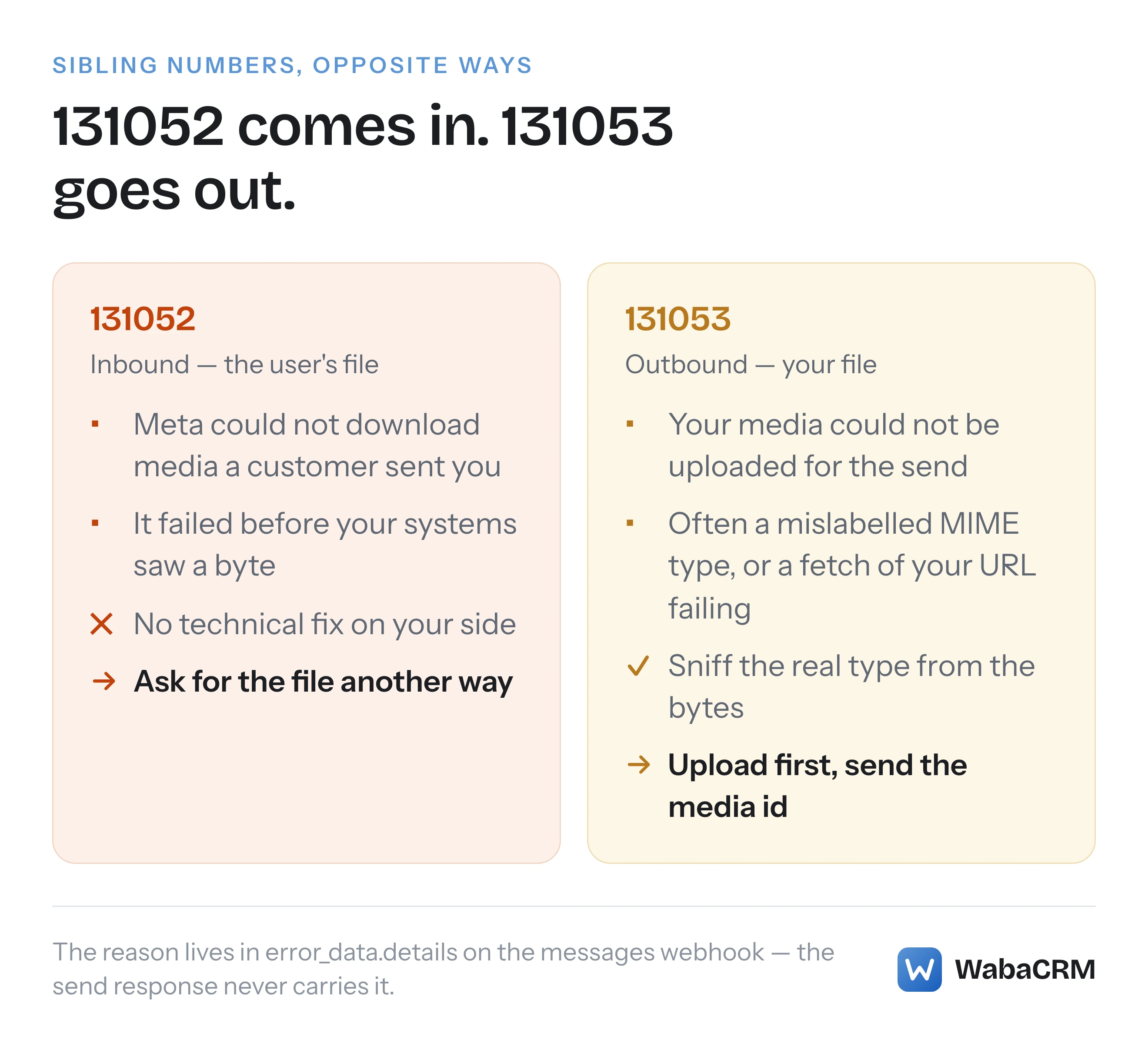
WhatsApp errors 131052 and 131053 point opposite ways. 131052 means Meta could not download media a WhatsApp user sent to you; nothing on your side fixes it. 131053 means your own media could not be uploaded, often because its real MIME type does not match its label. The reason arrives in error_data.details on the messages webhook. Checked 25 September 2026.
What does WhatsApp error 131053, the media upload error, mean?
Error 131053 means the media in a message you tried to send could not be uploaded to WhatsApp. Meta's error code reference gives it as:
"Unable to upload the media used in the message. The media could not be uploaded for one or more reasons, such as an unsupported media type." (Meta — WhatsApp Cloud API error codes)
Its neighbour 131052 reads almost identically at a glance and means the opposite thing:
"Unable to download the media sent by the user. The media included in the WhatsApp user's message could not be downloaded." (Meta — WhatsApp Cloud API error codes)
One is your outbound file failing to go up; the other is a customer's inbound file failing to come down. They are sibling numbers travelling in opposite directions, and that is the whole trap: search either code and the results blur them together, so it is easy to end up applying upload fixes to a download failure that no change on your side can touch. The two errors share a details mechanism, a documentation page and almost nothing else.
- What does WhatsApp error 131053, the media upload error, mean?
- How is error 131052 different from 131053?
- Where does the real reason for the failure arrive?
- Why does a file that looks fine still fail to upload?
- Which media types and sizes does the Cloud API accept?
- Can sending media by link cause intermittent 131053 errors?
- Should you upload media first and send the id?
- What can you do about a 131052 on an inbound file?
- How do you check what a file really is?
How is error 131052 different from 131053?
The difference is whose file failed, which decides what you can do about it. For 131053, the file is yours: you can inspect it, re-encode it, upload it differently. For 131052, the file belongs to the WhatsApp user, it failed inside Meta's infrastructure before your systems saw a byte of it, and Meta's own solution text concedes there is no technical fix on your side:
"Ask the WhatsApp user to send you the media file using a non-WhatsApp method." (Meta — WhatsApp Cloud API error codes)
That sentence is the tell. When Meta's remedy for an error is "ask the customer to use email instead", the error is not a bug in your integration.
| 131052 | 131053 | |
|---|---|---|
| Whose file | The WhatsApp user's | Yours |
| Direction | Inbound to you | Outbound from you |
| What you can do | Nothing technical — ask for it another way | Inspect, re-encode, upload by id |
| Where the reason lives | error_data.details on the webhook |
error_data.details on the webhook |
Neither code says anything about whether the message could be delivered — a text sent to the same person at the same moment would go through fine. If the recipient themselves cannot be reached at all, that is a different code with a different logic, covered in what error 131026 actually tells you about a recipient.
Checked against Meta's documentation on 25 September 2026.
Where does the real reason for the failure arrive?
Not in the send response. Meta's remedy for both codes points at the same place, and it is a webhook:
"For more information, refer to the
error.error_data.detailsvalue in any messages webhooks triggered when this message fails to send." (Meta — WhatsApp Cloud API error codes)
The same reference describes what that field carries: "Error description and a description of the most likely reason for the error. May also contain information on how to address the error, such as which parameter is invalid or what values are acceptable." (Meta — WhatsApp Cloud API error codes)
This matters because a send that references media by link is accepted synchronously — the API hands you a message id, and Meta goes off to fetch and process the file afterwards. By the time the upload fails, the HTTP exchange you might have logged is long finished and reported success. The failure arrives minutes or seconds later as a failed status on the messages webhook, and error_data.details on that webhook is the only place the specific reason — which file, which problem — is ever written down.
The practical consequence: if your error handling polls or logs only the send call's response, every 131053 in your system will present as a message that was "sent" and never delivered, with no reason recorded anywhere you are looking. Capture and persist status webhooks before you debug anything else.
Why does a file that looks fine still fail to upload?
Because the thing that "looks fine" is usually the label, and the label is exactly what Meta distrusts. Notice what Meta's own solution for 131053 tells you to do — not to check the extension, not to check what your upload form said, but to interrogate the bytes:
"Inspect any media files that are causing errors and confirm that they are in fact supported." (Meta — WhatsApp Cloud API error codes)
We have watched this play out in WabaCRM's own production logs. A file uploaded through a browser arrives with the MIME type the browser claimed, not the file's real type — and the two disagree more often than anyone expects, because files get renamed, exported by tools that write the wrong extension, or forwarded through systems that guess. A document labelled as an image sails through the upload step, sits happily in storage, and dies days later at send time with an error that names neither the file nor the field it came from. Nothing about the failure points back at the upload where the lie was told.
The fix WabaCRM landed on is to sniff the stored file's actual MIME type at every upload site — every one, not just the screen that happened to surface the bug — and to keep one copy of each file that is uploaded once, verified once, and reused everywhere.
If you run your own integration, apply the same rule: never trust Content-Type from a form post or an extension from a filename. Read the type from the bytes on disk, and refuse the mismatch at upload, where the person who chose the file is still watching.
Which media types and sizes does the Cloud API accept?
Meta publishes the authoritative table on its supported media types page — the same page the 131053 solution text links. As read on 25 September 2026:
| Category | Formats | Cap |
|---|---|---|
| Image | JPEG, PNG | 5 MB |
| Audio | AAC, AMR, MP3, M4A, OGG (OPUS only) | 16 MB |
| Video | MP4, 3GPP | 16 MB |
| Document | PDF, TXT, DOC(X), XLS(X), PPT(X) | 100 MB |
| Sticker | WebP | 500 KB animated, 100 KB static |
Three absences are worth naming, because each one is a recurring 131053. GIF is not in the image row — animated content ships as MP4 or 3GPP video. SVG appears nowhere. And OGG audio is supported only with OPUS codecs, so an OGG file encoded with Vorbis carries a supported extension, a supported MIME type, and still fails.
Read the caps per category, not as one number: a 20 MB PDF is comfortably legal while a 6 MB photograph is not, and an integration that enforces a single "max upload size" will let through files Meta refuses and block files Meta would take.
Can sending media by link cause intermittent 131053 errors?
There is a credible community report that it can, and it is worth knowing about because the failure it describes is intermittent — the same file succeeds one hour and fails the next, which defeats every debugging instinct that starts with the file.
When you send media by link, Meta's servers fetch your URL. A chatwoot GitHub issue from February 2026 reports intermittent 131053 failures on exactly that fetch, with the webhook's error_data.details reading:
Downloading media from weblink failed with http code 429, status message
Too Many Requests, ratelimit reason: Request ratelimit by fwdproxy.
The issue's diagnosis is that Meta's internal download service rate-limits by the hosting provider's network (its ASN) rather than per account, so unrelated instances sharing the same cloud provider can exhaust a shared budget. Treat that mechanism as the report's claim, not Meta's: none of it appears in Meta's own documentation, and Meta publishes no rate figures for its link fetcher. What is solid is the webhook evidence in the thread and the shape of the failure — a 429 inside error_data.details means Meta's fetch of your URL was refused, and your file was never even examined.
The fix the issue converges on does not depend on the diagnosis being right, which is what makes it safe advice: stop making Meta fetch anything.
Should you upload media first and send the id?
Yes, for every file you control. The Cloud API's media endpoint takes the file directly:
curl -X POST 'https://graph.facebook.com/v21.0/<PHONE_NUMBER_ID>/media' \
  -H 'Authorization: Bearer <ACCESS_TOKEN>' \
  -F 'messaging_product=whatsapp' \
  -F 'file=@./receipt.pdf;type=application/pdf'
and answers with a media id, which you then reference in the send instead of a link. This closes both failure classes at once. The fetch step that the rate-limit report describes no longer exists, because there is no URL for Meta to fetch. And an unsupported type fails here, synchronously, at a moment when you know exactly which file is on the table — instead of asynchronously at send time against a message that already reported success.
To be precise about what Meta does and does not say: the supported media types page states that "All media files sent through this API are encrypted and persist for 30 days, unless they are deleted earlier" (Meta — supported media types), and on our 25 September 2026 read of that page it expresses no preference between sending by id and sending by link — the preference argued here is operational, built from the failure modes above, not a quoted Meta recommendation.
The 30-day figure has its own consequences — an uploaded id is not permanent, and inbound media URLs die far faster — and those lifetimes are their own subject, covered in how long WhatsApp media ids and URLs actually live. The one-sentence version: upload-and-send-by-id fixes reliability; it does not make an id eternal, so long-running sequences must re-mint ids from stored files rather than hoarding them.
What can you do about a 131052 on an inbound file?
Operationally, three things — none of which is retrying the download, because there is nothing on your side to retry.
First, make sure the failure is visible to a human rather than swallowed. A customer who sent a photo believes you have it. If the error lands in a log while the conversation shows nothing, the customer waits on a reply to a file nobody received; a shared team inbox should show the thread with an explicit marker that media failed to arrive, so whoever answers knows to ask again.
Second, ask the way Meta suggests — for the file through another channel. That is genuinely the documented remedy, not a shrug: the failure happened between the user's device and Meta's servers, and nothing you rebuild changes that path.
Third, confirm you are actually looking at a 131052 and not at one of its lookalikes. A message that arrives with no visible content has several unrelated causes — an unsupported message type, a download your own code never ran, an expired URL fetched too late — and each points at a different fix. The sorting of those cases is covered in why a WhatsApp message shows up empty or not at all; the short version is that 131052 is the one variant where the evidence says Meta failed, not you.
How do you check what a file really is?
With the file itself, on a command line. Meta's own solution text for 131053 gives the exact command:
"For example, in UNIX you can use file inspection via the command line to determine its MIME type:
file -I rejected-file.mov. You can then confirm if its MIME type is supported." (Meta — WhatsApp Cloud API error codes)
One portability note: the capital -I flag is the macOS spelling. On most Linux systems the same inspection is lowercase:
file -i rejected-file.mov
file --mime-type rejected-file.mov
Either way, the output names the type the bytes actually are — video/quicktime on a .mov that no row of the supported table accepts, application/pdf on a "photo" someone renamed, audio/ogg on a file whose codec the command cannot see, which is the one case where inspection alone is not conclusive and a re-encode to a known-good format settles it.
The habit worth building is running this check at ingestion, in code, not at debugging time by hand. Every 131053 story in this article — the mislabelled browser upload, the renamed file, the wrong-codec OGG — is caught by reading the real type at the moment the file enters your system, when the mismatch is one refused upload instead of a failed message to a customer days later.
Every Meta quotation on this page was read from Meta's own documentation on 25 September 2026. Meta changes that documentation without notice; the linked pages are authoritative and this one is not.
Questions people also ask
Can I retry a send that failed with 131053?
Does 131052 mean my webhook or server is broken?
Why does the send response not include the media error?
Can I send a GIF or SVG through the WhatsApp Cloud API?
Is error 131053 caused by the file being too large?
- whatsapp error 131053
- whatsapp error 131052
- media upload error
- whatsapp cloud api media
- mime type
- supported media types