WhatsApp Message Template Limit Exceeded: 250 or 6,000?
The short answer
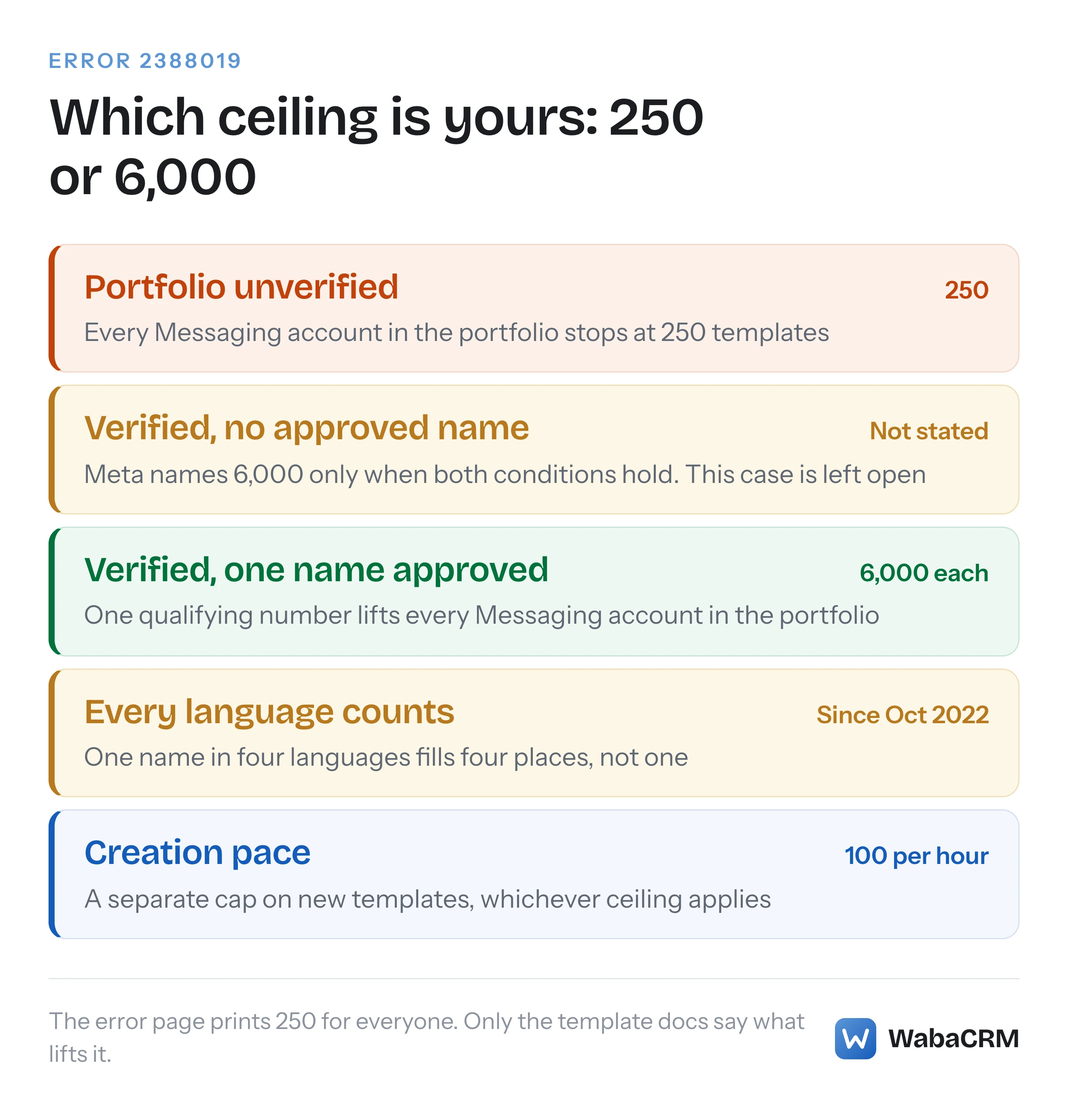
WhatsApp Cloud API error 2388019, Message Template Limit Exceeded, means the Messaging account (your WABA) already holds as many templates as Meta allows. The error page says 250. Meta's template documentation says 250 applies to an unverified business portfolio, and up to 6,000 once the portfolio is verified and one number has an approved display name (checked October 2026).
What does WhatsApp message template limit exceeded mean?
WhatsApp message template limit exceeded is error 2388019: the WhatsApp Business Account you tried to add a template to already holds as many templates as Meta allows it to hold. Meta's error reference states the condition plainly:
"You have exceeded the maximum number of message templates you can have for this WhatsApp business account." (Meta — WhatsApp error codes)
The trouble starts in the next column of the same row, which gives the remedy as a single number:
"A Messaging account can have up to 250 message templates. See Template limits." (Meta — WhatsApp error codes)
Follow that "Template limits" link and you land on a page that says 250 is the ceiling only for an unverified business, and that a verified one can hold up to 6,000. So the error shows every reader the same number, and the page it points to says the number depends on who you are. The helpdesk pages that rank for this code mostly repeat the error table's 250; two I read on 16 October 2026 never mention 6,000 or verification at all.
The two numbers lead to different fixes. At 250, deleting old templates buys some room for a while, and the lasting fix is a verified business portfolio with one approved display name. At 6,000 you have a large account with a housekeeping problem, and verification has nothing more to give you.
- What does WhatsApp message template limit exceeded mean?
- Why does Meta's error page say 250 when the template docs say 6,000?
- What has to be true for a WABA to get 6,000 templates?
- Do translations count against the WhatsApp template limit?
- Is the template limit per number, per WABA or per business portfolio?
- How do you count the templates a WABA already holds?
- Which templates should you delete to get back under the limit?
- Is the 100-templates-per-hour cap the same error?
- Why does the number 250 keep appearing in WhatsApp limits?
- How do you keep an account well under its template limit?
Why does Meta's error page say 250 when the template docs say 6,000?
Because the error page states one case of a two-case rule, and Meta's template documentation states both. The full rule sits in the "Template limits" section of the template fundamentals page (updated 21 May 2026 when I read it):
"If a parent business portfolio is unverified, each of its Messaging accounts is limited to 250 message templates. However, if the portfolio is verified, and at least one of its WhatsApp accounts has a business phone number with an approved display name, each of its Messaging accounts can have up to 6,000 templates." (Meta — Template fundamentals)
Meta repeats it on the page that explains its account types, under "Limitations":
"If the portfolio is unverified, each Messaging account is limited to 250 message templates. If the portfolio is verified and at least one of its WhatsApp accounts has a business phone number with an approved display name, each Messaging account can have up to 6,000." (Meta — WhatsApp accounts and Messaging accounts)
The higher figure is not new. Meta's changelog entry dated 25 October 2022, headed "Message Template Limit Increased", reads:
"WhatsApp Business Accounts can now have up to 6,000 message templates if their parent business has been verified and at least one of the parent business’s WhatsApp Business Accounts has a business phone number with an approved display name." (Meta — WhatsApp changelog)
So 6,000 has been the documented ceiling for verified businesses since October 2022, and the error table still prints only the lower number. Here is every place Meta states the limit, as I read them on 16 October 2026:
| Meta page | What it says about the limit | Page date |
|---|---|---|
| Error codes, row 2388019 | "up to 250 message templates" | 18 Jun 2026 |
| Template fundamentals | 250 unverified, 6,000 verified with a named condition | 21 May 2026 |
| Accounts page, Limitations | The same two cases and numbers | 5 Aug 2026 |
| Changelog entry | Raised to 6,000; translations now count | 25 Oct 2022 |
| Template status webhook | LIMIT_EXCEEDED, with no number | 21 May 2026 |
Two other oddities on the error page are worth knowing so they do not send you the wrong way. Meta files 2388019 under the heading "Send template errors", although the condition it describes is how many templates the account holds rather than anything about sending one. And the same row says "this WhatsApp business account" in one column and "A Messaging account" in the next. That is Meta's terminology changing mid-row, not two different limits.
What has to be true for a WABA to get 6,000 templates?
Two conditions, both judged at the business portfolio, and Meta's sentence requires both. The portfolio that owns the account must be verified, and at least one WhatsApp account in that portfolio must have a business phone number with an approved display name.
The first is Meta business verification. If you are in India, the documents Meta accepts and the reasons it rejects them are covered in our guide to Meta business verification in India. The second is display name review, which has its own statuses and its own traps; error 131037 and the name_status values walks through them.
Three consequences of Meta's exact wording are easy to miss:
- One qualifying number lifts the whole portfolio. Meta writes "at least one of its WhatsApp accounts" and then "each of its Messaging accounts". A portfolio running five accounts does not need an approved display name on all five for each of them to reach 6,000.
- The count is still per account. 6,000 belongs to each Messaging account. It is not a portfolio-wide pool shared out between them.
- Meta documents two cases and leaves a third unstated. A portfolio that is verified but has no number with an approved display name meets the first condition and not the second. Meta names 250 for unverified and 6,000 for verified with an approved name, and says nothing explicit about verified without one. Treat 6,000 as unavailable until both conditions hold, because that is the only reading the text supports.
Meta also does not publish how long after verification or display name approval the higher ceiling takes effect. If you were verified yesterday and a create call still returns 2388019, that is a gap in the documentation rather than a delay anyone can quote you a figure for.
Do translations count against the WhatsApp template limit?
Yes. Every language version of a template is a separate template for the purpose of the limit. Meta's template fundamentals page says so under "Languages":
"If you create multiple templates with the same name but with different languages, each template counts against your template limit." (Meta — Template fundamentals)
This has been the rule since the same changelog entry that raised the ceiling:
"As part of this change, translated versions of a message template now count against a WhatsApp Business Account’s template limit." (Meta — WhatsApp changelog)
The arithmetic catches people out. Take a hypothetical business with 60 template names, each in English, Hindi, Tamil and Marathi: by Meta's rule it holds 240 templates rather than 60. On an unverified portfolio that is 10 away from 250, while the team believes it has room for 190 more.
Template names do not group anything either. Meta's own description of names is that they "are not unique", which is what allows the same name in several languages, and its management guide adds that names must be unique "within a Messaging account for each language". The name is a label shared across rows; the limit counts the rows.
Is the template limit per number, per WABA or per business portfolio?
Per Messaging account, which for almost every integration today means per WABA. The portfolio decides which ceiling applies, and the account is where the count is kept.
Meta now describes two account types where it used to describe one. On its accounts page:
"A Messaging account holds your message templates and billing details. Each partner you work with has its own Messaging account." (Meta — WhatsApp accounts and Messaging accounts)
And, to stop anyone rewriting working code:
"Your existing WABA ID now identifies your Messaging account. The ID value and the waba_id field name are unchanged, so existing calls continue to work without modification." (Meta — WhatsApp accounts and Messaging accounts)
So the count that matters is the one behind the ID in your create call, POST /<WABA_ID>/message_templates. Phone numbers have no template count of their own: templates belong to the Messaging account, and two numbers on one WABA share its templates and its limit. Two WABAs in one verified portfolio each get their own 6,000. If you work with more than one partner, Meta's sentence above says each has its own Messaging account, so confirm which account a 2388019 came from before deleting anything from the wrong one.
How do you count the templates a WABA already holds?
Ask the Message Templates API for every template with only the fields you need, and follow the pagination to the end. Meta's management guide uses fields=name,category,status with a limit in its own example; add language, because each language is a separate template.
curl 'https://graph.facebook.com/<API_VERSION>/<WABA_ID>/message_templates?fields=name,language,status&limit=100' \
  -H 'Authorization: Bearer <ACCESS_TOKEN>'
Each response carries a data array and a paging object. While paging.next is present, request that URL and save each page, then count across the saved pages:
jq -r '.data[] | .status' pages/*.json | sort | uniq -c
jq -r '.data[] | .name' pages/*.json | sort | uniq -c | sort -rn | head -20
The first count tells you how many templates sit in each status. The second tells you which names carry the most language versions, which is usually where the space went. Run it once rather than on a timer: every page you request is a call to message_templates, an endpoint Meta lists among those limited to "200 requests per hour, per app, per Messaging account, by default" (Meta — About the WhatsApp Business Platform).
Which statuses count? Meta's limit is phrased as the templates a Messaging account "can have", and none of the pages read for this article excludes a status from that. Rejected templates are still returned by the list call; Meta's own management example fetches them by swapping in status=rejected. Meta does not say whether they occupy a place, so the cautious reading is that anything the API still returns is a template the account has.
Which templates should you delete to get back under the limit?
Delete by ID rather than by name, and start with templates nobody has sent in months. Meta's template management guide documents three ways to delete, and they behave very differently:
| How you delete | What it removes | The catch |
|---|---|---|
By name |
Every language with that name | One call can take out four translations |
By hsm_id plus name |
One template | Meta requires the name alongside the ID |
By hsm_ids |
Up to 100 templates | One invalid ID fails the whole request |
The first row is the one that hurts. Meta's wording, under "Delete template by name": "Deleting a template by name deletes all templates that match that name (meaning templates with the same name but different languages will also be deleted)." (Meta — Template management) If you meant to remove one stale Hindi version, delete by ID.
Three more rules from the same page decide what you can actually clear:
"If you delete an approved template, you cannot create a new template with the same name for 30 days." (Meta — Template management)
"Templates that are in a disabled status cannot be deleted." (Meta — Template management)
And a deleted template that was sent but not yet delivered moves to PENDING_DELETION while "WhatsApp attempts delivery for 30 days". Meta does not say whether a disabled or pending-deletion template counts toward the limit. If it does, the disabled one is a place you cannot reclaim by deleting.
Before deleting a rejected template, consider editing it instead. Meta's management guide says "Rejected or paused templates can be edited an unlimited number of times." Editing changes an existing template; submitting the corrected wording under a new name adds another one. Archiving is a separate mechanism with a 28-day clock and its own webhook events, covered in every status a WhatsApp template can be in; Meta's archival page does not mention the template limit at all.
Is the 100-templates-per-hour cap the same error?
No. That is a pace limit, and 2388019 is a size limit. Meta's template fundamentals page puts the pace limit in one line:
"You can create a maximum of 100 templates in a Messaging account per hour." (Meta — Template fundamentals)
It applies whichever ceiling you are on. By simple division, a bulk import of 400 language variants into an account with plenty of room needs four hours' worth of that allowance; Meta does not say whether its hour is a rolling window or a clock hour. Meta's error page lists no code for this cap, and none of the pages read for this article says what a 101st creation in one hour returns, so do not assume it will be 2388019. Log the code you actually get.
Four different limits touch templates, and they are easy to confuse because three of them can stop the same create call:
| Limit | What it caps | Figure Meta publishes |
|---|---|---|
| Template limit (2388019) | Templates an account holds | 250, or 6,000 if verified |
| Creation pace | New templates per account per hour | 100 |
| Editing an approved template | Edits to one template | 10 per 30 days, 1 per 24 hours |
| Management API requests | Calls to message_templates and similar | 200, or 5,000 per hour |
The edit figure is Meta's own: "Approved templates can be edited up to 10 times in a 30-day window, or 1 time in a 24-hour window" (Meta — Template management).
Why does the number 250 keep appearing in WhatsApp limits?
Because Meta has used 250 for several unrelated limits, one of them also tied to verification, and they blur together in search results. None of the others is the template limit, and none of them changes when you delete a template.
- A messaging tier. Meta's
phone_number_quality_updatewebhook reference lists "TIER_250 — Indicates a messaging limit of 250." as a value of itscurrent_limitfield, a field the same page says "will be removed in February, 2026". A messaging limit caps how many people you can message outside a customer service window, not how many templates you can hold (Meta — phone_number_quality_update webhook). - An old conversation allowance. A changelog entry dated 30 January 2023 reads "Unverified businesses can now initiate up to 250 conversations in a rolling 24-hour period." Messaging limits have changed since: an entry dated 8 October 2025 says they "are now business portfolio-based instead of business phone number-based".
- A throughput figure. A changelog entry dated 6 October 2022 records Cloud API moving to "350 (up from 250) messages per second".
If what stopped is sending rather than creating, the limit you hit is a messaging limit, and what actually caps a WhatsApp broadcast is the page for that. If what stopped is a create call returning 2388019, it is the template limit, and the only figures that apply are 250 and 6,000.
How do you keep an account well under its template limit?
Make the higher ceiling available, then stop spending templates on things variables can do. In practice that is five habits.
- Get the portfolio verified and one display name approved. It is the only thing that moves the ceiling, and it moves it 24-fold.
- Write one template per message purpose, not per campaign. An order update with variables for the name, order number and date is one template for every order. "Diwali sale 2026" as a fresh template each year is a new row every year.
- Prune languages nobody receives. Count sends per language before translating a template into a fifth one.
- Fix rejections in place. Editing a rejected template costs nothing against the count; a new name adds to it.
- Alert on
LIMIT_EXCEEDED. Meta's template status webhook defines it as "Indicates the Messaging account template is at its template limit" (Meta — message_template_status_update webhook). Meta's reference does not say which template such an event names, so key the alert on the account ID inentry.id:
{
  "entry": [{
    "id": "<WHATSAPP_BUSINESS_ACCOUNT_ID>",
    "changes": [{
      "value": {
        "event": "LIMIT_EXCEEDED",
        "message_template_name": "<TEMPLATE_NAME>",
        "message_template_language": "<TEMPLATE_LANGUAGE_AND_LOCALE_CODE>"
      },
      "field": "message_template_status_update"
    }]
  }],
  "object": "whatsapp_business_account"
}
That payload is trimmed from the syntax in Meta's webhook reference, with the event value filled in; the placeholders are Meta's.
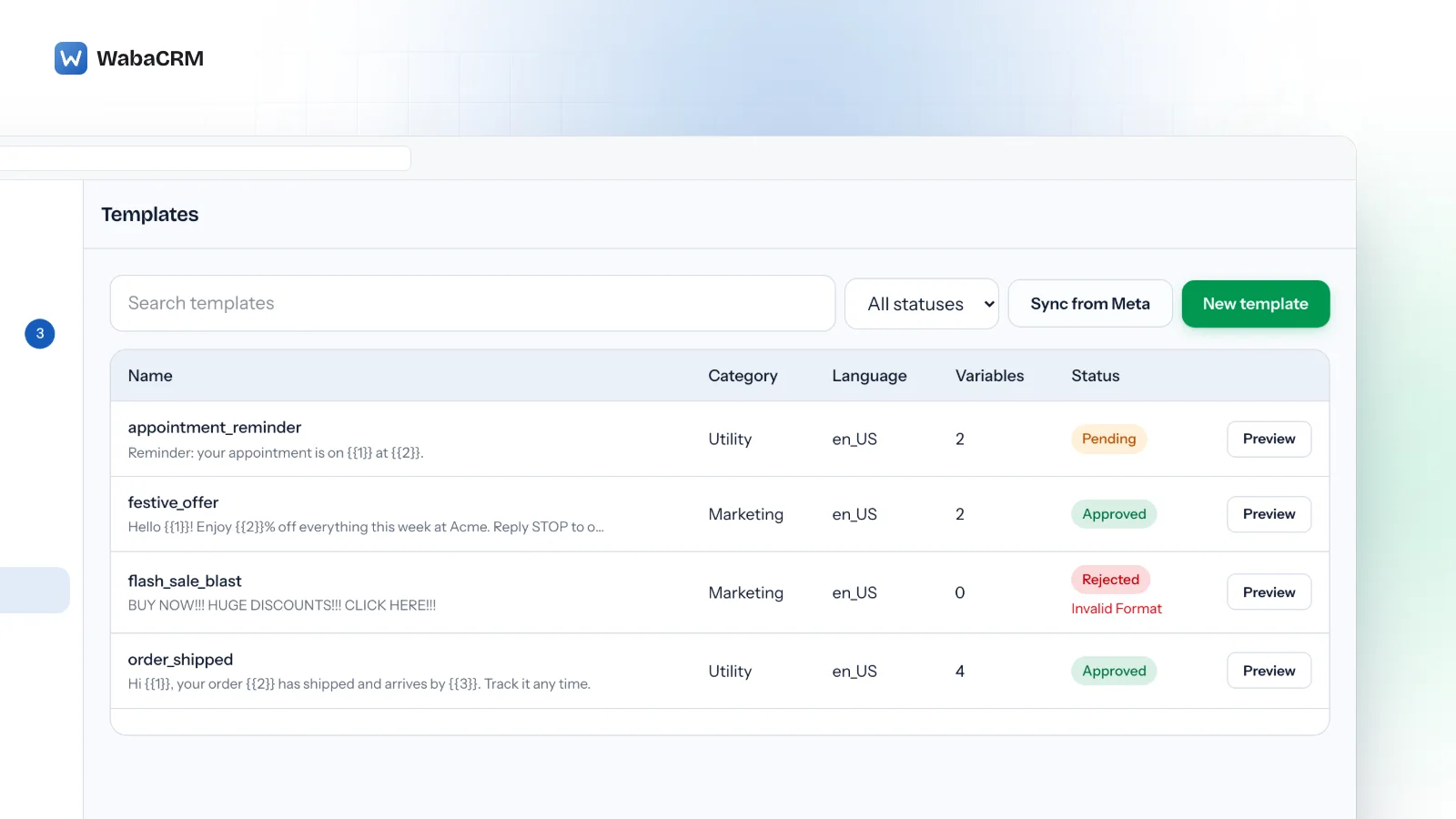
Most of these habits are easier to keep when the language of each template is visible beside its name. In WabaCRM's templates screen every language version is its own row, with its category, its variable count and its review status, and Sync from Meta re-reads the list from the account so a template created in WhatsApp Manager shows up too.

If you are still on an unverified portfolio and close to 250, the order of work is simple: count by language, delete by ID the versions nobody receives, and start verification now rather than after the next 2388019.
Every Meta quotation on this page was read from Meta's own documentation on 16 October 2026. Meta changes that documentation without notice; the linked pages are authoritative and this one is not.
Questions people also ask
Does a rejected template count against the WhatsApp template limit?
Can Meta raise the template limit above 6,000 for one account?
How soon after deleting a template can I create a new one in its place?
Does archiving templates free up room under the 250 or 6,000 limit?
Do two WhatsApp Business Accounts in one portfolio share the same template limit?
- whatsapp message template limit exceeded
- whatsapp error 2388019
- whatsapp 250 template limit
- whatsapp template limit 6000
- whatsapp template translations


