Content in This Language Already Exists: Error 2388024
The short answer
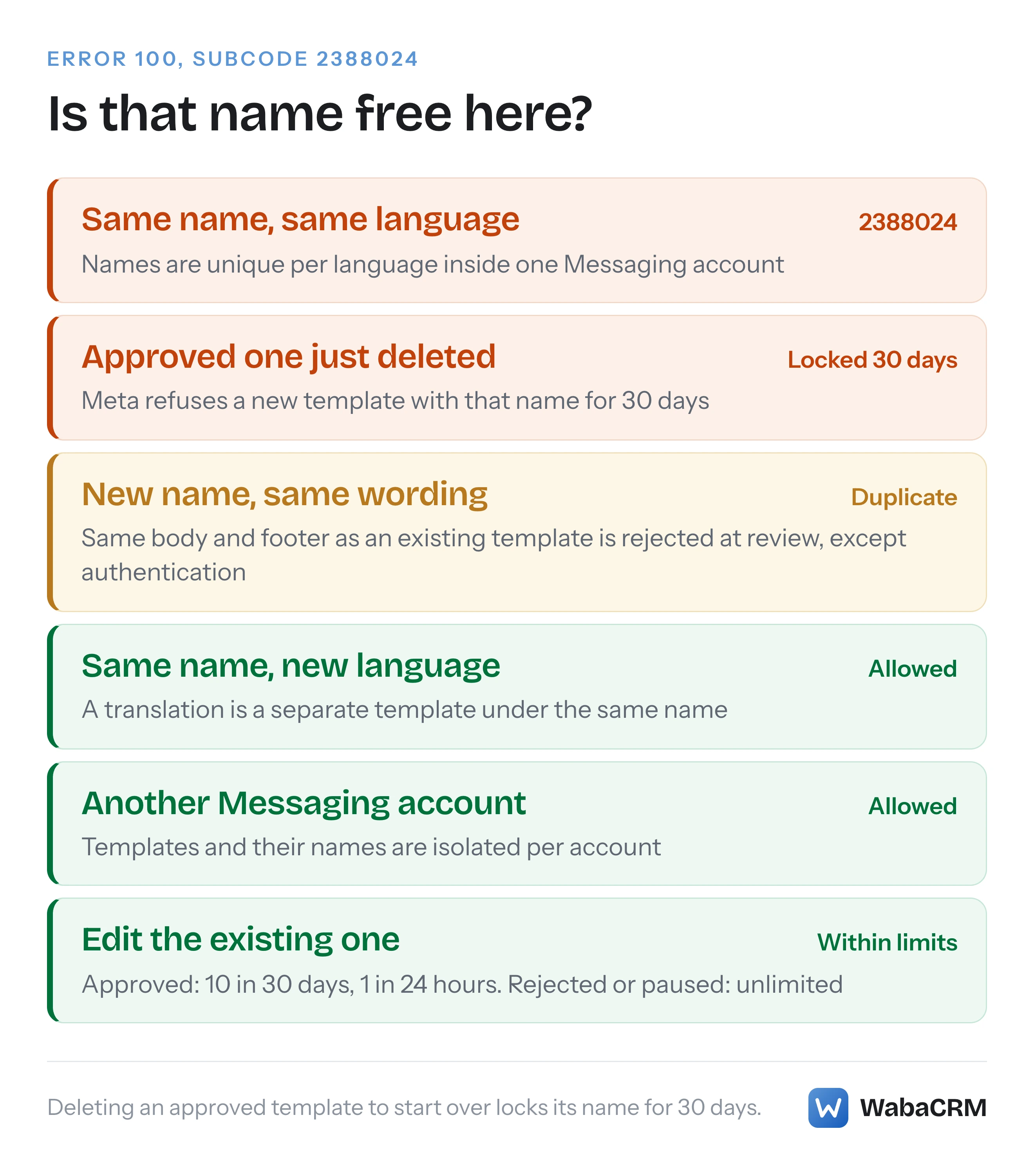
“Content in This Language Already Exists” is WhatsApp Cloud API error code 100, subcode 2388024: a template with that name already exists in that language in that Messaging account (WABA). Edit the existing template, add a different language under the same name, or choose a new name. Deleting an approved template locks its name for 30 days (checked October 2026).
What does "Content in This Language Already Exists" mean?
"Content in This Language Already Exists" means you tried to create a WhatsApp template whose name already belongs to a template in the same language, in the same Messaging account. Meta's template management page states the rule and the error in one breath:
"Template names must be unique within a Messaging account for each language. Creating a template with a name that already exists for the same language returns error code 100, subcode 2388024, with message “Content in This Language Already Exists”." (Meta — Template management)
The Messaging account is the half of Meta's new account model that holds templates and billing, and Meta says "Your existing WABA ID now identifies your Messaging account." (Meta — WhatsApp accounts and Messaging accounts) The uniqueness key is therefore three things together: the account, the name and the language code. Change any one of them and the create is no longer a duplicate.
The error is easy to fix and easy to make worse. The instinctive response to a template with a typo, or one that came back in the wrong category, is to delete it and create it again under the same name. For an approved template that is the one move Meta penalises with a 30-day lock on the name. Most of the time the right answer is to edit the template you already have, or to add the language you actually wanted alongside it.
Checked against Meta's documentation on 16 October 2026.
- What does "Content in This Language Already Exists" mean?
- Why is 2388024 missing from Meta's error-code page?
- Where in the error response does 2388024 appear?
- Can two WhatsApp templates share a name in different languages?
- Can you reuse the name of a deleted WhatsApp template?
- Why does deleting a template by name remove every language?
- How many times can an approved WhatsApp template be edited?
- Should you edit, translate, or create a new name?
- Will a renamed copy be rejected as a duplicate?
- What does WabaCRM do when you edit or delete a template?
- What should you check before creating a template again?
Why is 2388024 missing from Meta's error-code page?
Because, in Meta's WhatsApp documentation, it appears in only one place we could find, and that place is not the error reference. The error codes page has a section of template creation errors, and on 16 October 2026 it listed seven of them: 2388039, 2388040, 2388047, 2388072, 2388073, 2388293 and 2388299 (Meta — WhatsApp Cloud API error codes). The template limit error, 2388019, sits in the section after it, headed "Send template errors". The string 2388024 appears nowhere on that page, and nowhere in the WhatsApp changelog either (both searched on 17 October 2026). It lives in the name-validation paragraph of the template management page quoted above.
That matters for two kinds of reader. A developer who searches the error page for the subcode finds nothing and concludes it is undocumented. And an error-handling table built from the error page alone has no row for a refusal that any code creating templates by name can run into. If your code maps codes to friendly messages, add this one by hand.
The same page also refuses several neighbouring mistakes with the same top-level code, which is why the subcode is worth reading at all:
"Template names can only contain lowercase alphanumeric characters and underscores (regex: ^[a-z0-9_]+$). The maximum length is 512 characters. If a name contains uppercase letters, spaces, or special characters, the API returns error code 100." (Meta — Template management)
A malformed name, an invalid category, an unsupported language code and a duplicate name all come back as code 100. Only the duplicate is documented with a subcode, 2388024.
Where in the error response does 2388024 appear?
Meta's pages do not agree on that, so do not hang your handling on one field. The template management page says the refusal is code 100 with subcode 2388024 and a particular message. Meta's error reference, describing the response format, says this of the subcode field:
"Deprecated. Will not be returned in v16.0+ responses. Graph API subcode. Not all responses will include a subcode, so build your error handling logic around code and details properties instead." (Meta — WhatsApp Cloud API error codes)
Yet the example response on that same page still carries an error_subcode value. Meta's changelog entry for version 16 adds a second complication: "All code 100 errors will now use Invalid parameter as their title. Old titles that described the nature of a given code 100 error have been moved to the details property." (Meta — WhatsApp changelog) Read strictly, that puts "(#100) Invalid parameter" in the message and the descriptive wording in details.
| Field | What Meta's pages say | How to use it |
|---|---|---|
code |
100 | Branch on it first |
error_subcode |
2388024, though marked deprecated | Use it when present; never rely on it |
error_data.details |
Where v16 moved code 100's descriptive titles | Log it and read it |
| Human-readable text | "Content in This Language Already Exists" | Do not match on the English |
fbtrace_id |
A trace id for Direct Support | Log it with the request |
The human-readable wording is the weakest of these for a reason Meta gives on its Graph API error page. Of the user-facing fields error_user_msg and error_user_title, it says: "The language of the message is based on the locale of the API request." (Meta — Graph API, Handle errors) A handler that looks for the English phrase can break on the first request made with another locale. So branch on code 100, treat subcode 2388024 as confirmation when it arrives, and settle any doubt with a fresh read of the account's templates, which tells you directly whether that name and language pair exists.
The create request that provokes it is the ordinary one, sent a second time:
curl 'https://graph.facebook.com/v23.0/<WABA_ID>/message_templates' \
  -H 'Authorization: Bearer <ACCESS_TOKEN>' \
  -H 'Content-Type: application/json' \
  -d '{
    "name": "order_confirmation",
    "language": "en_US",
    "category": "UTILITY",
    "components": [ ... ]
  }'
Can two WhatsApp templates share a name in different languages?
Yes, and that is how Meta intends translations to work. Uniqueness is per language, so a second language under the same name is a new template, not a duplicate:
"Every template must have a name, but names are not unique. This flexibility allows you to create multiple templates with the same name, but in different languages." (Meta — Template fundamentals)
To add Hindi to an English order_confirmation, send the same create request with "language": "hi" and the Hindi text. Two cautions come with it. Each language is a full template in its own right, so it is reviewed separately and counts separately: "If you create multiple templates with the same name but with different languages, each template counts against your template limit." (Meta — Template fundamentals) And close language codes are different languages to Meta. en, en_US, en_GB and en_IN are four separate codes in Meta's supported languages table, so creating en_IN beside an existing en_US succeeds, while a second en_US is refused.
The account boundary works the same way. Meta's page on the new account model says templates "belong to the Messaging account in which they were created and are not shared across Messaging accounts" (Meta — Updates to WhatsApp Business accounts). A name taken in one Messaging account is free in another, which is why two partners on the same phone number can each hold an order_confirmation of their own.
Can you reuse the name of a deleted WhatsApp template?
Not for 30 days, if the template you deleted was approved. Meta's delete limitations say so in a single sentence:
"If you delete an approved template, you cannot create a new template with the same name for 30 days." (Meta — Template management)
Two details in that sentence are worth reading closely. It names approved templates only, and says nothing either way about deleting a rejected or pending one. And it says "the same name" without mentioning languages. Meta publishes no exception for either case, so treat both as unknown rather than as permission.
The delete also does not finish at once when a send is still in flight. Meta: "If you delete a template that has been sent in a template message but has yet to be delivered (for example, because the WhatsApp user’s phone is turned off), the template’s status is set to PENDING_DELETION and WhatsApp attempts delivery for 30 days." (Meta — Template management) Where PENDING_DELETION sits among the other statuses is covered in every status a WhatsApp template can be in.
Recreating inside the window is reported to produce a different refusal, whose wording is on no Meta page we could find. At least two integration help centres publish it: egrow's under the title "Message Template Language Is Being Deleted", and GoHighLevel's with the full text: "New English (US) content can't be added while the existing English (US) content is being deleted. Try again in 4 weeks or consider creating a new message template." Neither gives an error code or subcode for it. That is third-party reporting rather than Meta's documentation, we have not captured the response ourselves, and four weeks is 28 days against Meta's documented 30, so plan to the longer figure.
Why does deleting a template by name remove every language?
Because that is what the name-based delete is defined to do. A delete addressed by name takes every language that shares it:
"Deleting a template by name deletes all templates that match that name (meaning templates with the same name but different languages will also be deleted)." (Meta — Template management)
So a business that meant to drop a broken Hindi version of order_confirmation and sent DELETE …/message_templates?name=order_confirmation has just deleted the working English one as well, and if that English one was approved, the name is now locked for 30 days. To remove one language, address it by id. Meta's rule is that the id travels with the name: "To delete a template by ID, include the template’s ID along with its name in your request; only the template with the matching template ID will be deleted." (Meta — Template management)
This request deletes every language of order_confirmation:
curl -X DELETE 'https://graph.facebook.com/v23.0/<WABA_ID>/message_templates?name=order_confirmation' \
  -H 'Authorization: Bearer <ACCESS_TOKEN>'
This one deletes only the template with that id:
curl -X DELETE 'https://graph.facebook.com/v23.0/<WABA_ID>/message_templates?hsm_id=<TEMPLATE_ID>&name=order_confirmation' \
  -H 'Authorization: Bearer <ACCESS_TOKEN>'
Two more rules belong next to these. A bulk delete with hsm_ids takes up to 100 ids, and "If any of the template IDs are invalid, the entire request fails and no templates are deleted." And some templates cannot be deleted at all: "Templates that are in a disabled status cannot be deleted." (Meta — Template management) A disabled template keeps its name in that language for as long as it exists.
How many times can an approved WhatsApp template be edited?
Meta caps edits to an approved template and leaves the others uncapped:
"Approved templates can be edited up to 10 times in a 30-day window, or 1 time in a 24-hour window. Rejected or paused templates can be edited an unlimited number of times." (Meta — Template management)
The "or" in the first sentence is read two ways. Our reading, and the safe one, is supported by Meta's own remedy for error 2388039, which notes "templates have a daily limit on the number of edits", so we treat both caps as applying together: at most one edit in any 24 hours and at most ten in any 30 days (Meta — WhatsApp Cloud API error codes). Batch your corrections into one edit rather than spending a day's allowance on each.
The same page sets the boundaries of what an edit can do:
- "Only templates with an APPROVED, REJECTED, or PAUSED status can be edited." A template still in review cannot, and trying returns 2388039.
- "You can only edit a template’s category, components, or time-to-live." The name and the language are not editable, which is why changing either is always a new template.
- "You cannot edit individual template components; the API replaces all components with the components in the edit request payload." Send the whole template, every time.
- "You cannot edit the category of an approved template." A wrong category on an approved template means a new template under a new name, or the same name in a language you do not yet have. Category disputes are covered in why WhatsApp changed your utility template to marketing.
An edit is reviewed like a new submission. Meta says the API "automatically re-approves the template unless it fails template review" after you edit an approved or paused template (Meta — Template management), so an edit is not risk-free. It is, though, the only route that keeps the same template under the same name and language.
Should you edit, translate, or create a new name?
The answer depends on what you were trying to achieve when 2388024 stopped you. This table covers the common cases, using only the rules quoted above.
| What you want | What to do | What to watch |
|---|---|---|
| Fix wording on an approved template | Edit it | 1 edit per 24 hours, 10 per 30 days |
| Fix a rejected or paused template | Edit it | No edit cap; still reviewed |
| Offer the template in another language | Create same name, new language code | Counts against the template limit |
| Change an approved template's category | New name | Category is locked once approved |
| Retire one language of a template | Delete by id and name | 30-day name lock if approved |
| Reuse a name you deleted this week | Choose another name | Wording must not duplicate a live template |
The pattern in the table is that deletion is rarely the right first move. It is the only action in those rules that removes the template outright, and for an approved one it also blocks the name for 30 days.
Will a renamed copy be rejected as a duplicate?
It can be, if the original still exists. Picking a new name such as order_confirmation_v2 gets you past 2388024, but template review runs a separate check on the content itself:
"If a template is submitted with the same wording in the body and footer of an existing template, the duplicate template will be rejected." (Meta — Template review)
So creating a renamed copy alongside the original, with identical body and footer text, trades a create-time refusal for a review-time rejection. Meta adds that the rejection notice in Business Support Home shows "the name and language of the existing template with the same content as the rejected duplicate template", and that "This check does not apply to templates categorized as AUTHENTICATION." Meta's sentence is about an existing template, and it does not say whether a deleted one still counts.
A renamed template is also a brand-new template in every other respect. Meta lists newly created templates among those its template pacing can apply to (marketing templates, and utility ones once a utility template has been paused), which is covered in template approved, messages accepted, nothing arriving. Every campaign, bot or integration that sends the old name also has to be pointed at the new one.
What does WabaCRM do when you edit or delete a template?
It applies Meta's rules before the click rather than after the refusal. On WabaCRM's templates screen, the edit dialog for an existing template says that Meta replaces the whole template with what is on the form and sends it back through review, and states the limit of 10 edits in 30 days and once in any 24 hours.

Delete asks for confirmation first, and for an approved template the confirmation says that Meta reserves the name for 30 days, so a replacement cannot reuse it until then. When WabaCRM holds the template's Meta id, the delete sends that id with the name, so Meta removes that one language and leaves its siblings alone. Delete is unavailable on a disabled template, with Meta's reason given. When Meta refuses a new template, the refusal is shown in the builder with Meta's error code and trace id appended, the trace id being what Meta suggests including when you contact Direct Support.
One WabaCRM behaviour is worth knowing in this context. The builder tidies a typed name into Meta's format, lowercasing it and turning spaces and other characters into underscores, so "Order Shipped" is submitted as order_shipped. If an order_shipped already exists in the language you chose, that tidy name is what Meta refuses with 2388024, even though what you typed looked different.
What should you check before creating a template again?
Read the account first, then decide. A single request answers most of the questions on this page:
curl 'https://graph.facebook.com/v23.0/<WABA_ID>/message_templates?fields=name,language,status,category' \
  -H 'Authorization: Bearer <ACCESS_TOKEN>'
- Does the name already exist in the language you want? If it does, edit that template rather than creating a second one.
- What is its status? APPROVED, REJECTED and PAUSED can be edited, and a template still in review cannot. For DISABLED, Meta's pages disagree. The template management page says "Only templates with an APPROVED, REJECTED, or PAUSED status can be edited." The template review page says "If an approved template has become disabled, you may also edit it and resubmit it for approval." Either way it cannot be deleted.
- Have you deleted this name recently? If an approved version was deleted in the last 30 days, choose another name now rather than discovering the lock on submit.
- Is this the right Messaging account? Names are unique only inside one account, and WhatsApp Manager shows one account at a time.
- Is the wording identical to a template that still exists? Change the body or footer, or the new template will be rejected as a duplicate.
If the account turns out to be refusing template creation of any kind, the problem is not the name. That is a different refusal, covered in this WABA is not allowed to create or update templates.
Every Meta quotation on this page was read from Meta's own documentation on 16 October 2026 and re-checked word for word on 17 October 2026. Meta changes that documentation without notice; the linked pages are authoritative and this one is not.
Questions people also ask
Does the 30-day name lock cover every language of that template name?
Does archiving a template free its name for a new one?
Can two different Messaging accounts use the same template name?
Does an edited WhatsApp template go back through review?
What is the difference between error 2388024 and error 2388039?
- content in this language already exists
- whatsapp error 2388024
- whatsapp template name already exists
- reuse deleted whatsapp template name
- whatsapp template edit limit