WhatsApp Error 80007: API Requests, Not Messages
The short answer
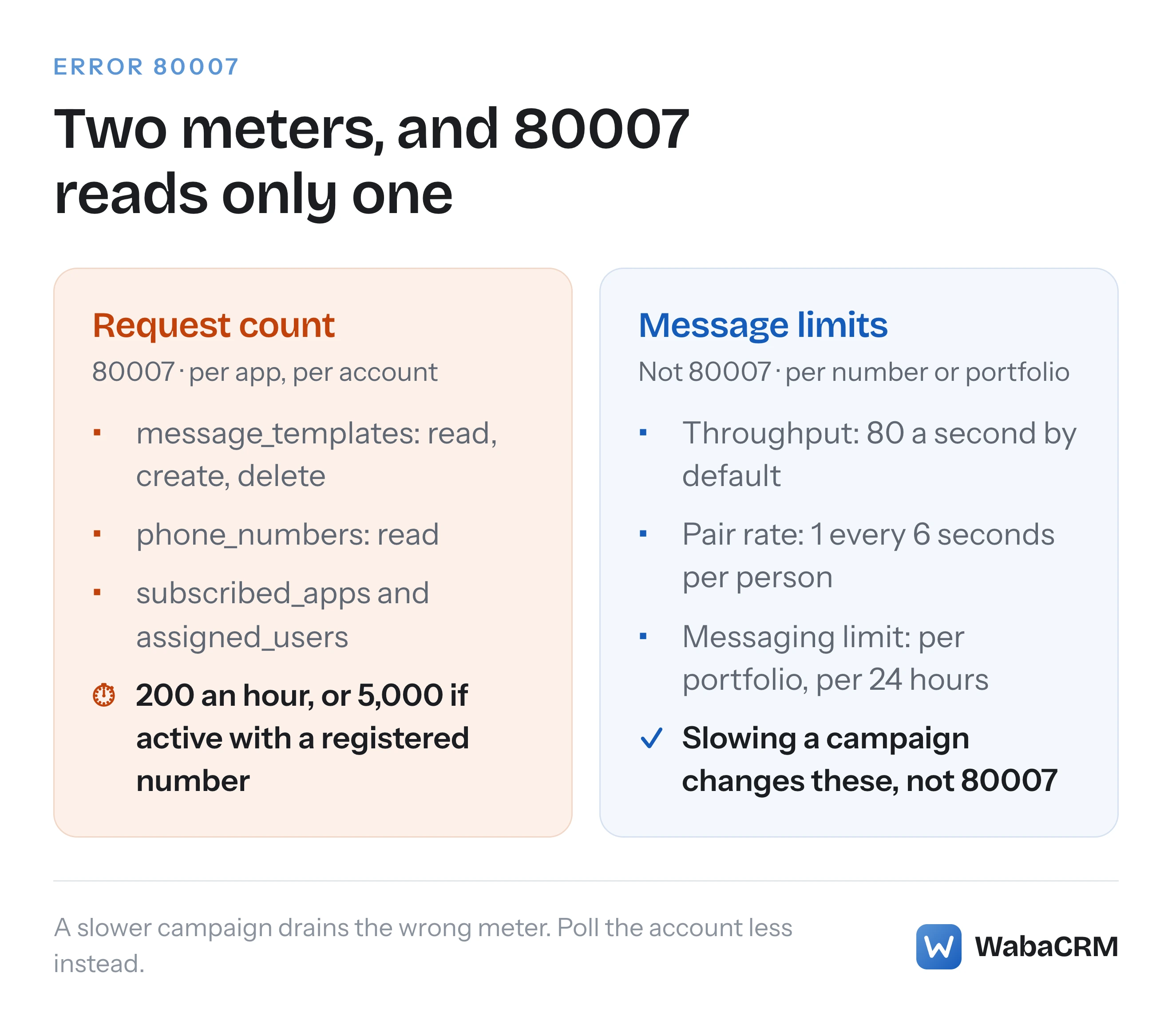
WhatsApp Cloud API error 80007 means your app has used up its hourly request budget for one WhatsApp Business Account's management endpoints, such as message_templates and phone_numbers. Meta allows 200 requests an hour per app per account, or 5,000 for an active account with a registered phone number. Sending messages has separate limits (checked October 2026).
What does WhatsApp error 80007 mean?
WhatsApp error 80007 means your app has made too many requests to one WhatsApp Business Account's management endpoints within a rolling hour. Meta's error reference files it under "Throttling errors" and gives it one line of description and one line of remedy:
"The WhatsApp Business Account has reached its rate limit." (Meta — WhatsApp error codes)
"See WhatsApp Business account Rate Limits. Try again later or reduce the frequency or amount of API queries the app is making." (Meta — WhatsApp error codes)
The word that matters is "queries". On a messaging platform, "rate limit" reads like "you are sending too fast", and the instinct is to slow the campaign down. That does nothing here. The limit behind 80007 counts requests to a short list of endpoints for managing the account: reading and creating templates, listing phone numbers, subscribing apps, assigning users. Messages are counted somewhere else entirely.
So the usual cause of 80007 is not a broadcast. It is a loop: a dashboard polling the template list every minute, a health check reading the phone numbers every few seconds, or a deployment script that subscribes the app to the account again every time a worker starts.
- What does WhatsApp error 80007 mean?
- Which API calls count toward the 200 or 5,000 requests per hour?
- Why doesn't slowing down a campaign clear error 80007?
- What is the difference between error 4 and error 80007?
- Why does Meta's Graph rate-limit page say 80008?
- What makes a WhatsApp Business Account "active" for the 5,000 limit?
- When does the 80007 request count reset?
- Which integration habits usually trip error 80007?
- How can you see how close an app is to the limit?
- How should code that manages WhatsApp accounts avoid error 80007?
Which API calls count toward the 200 or 5,000 requests per hour?
The calls that count are the account management calls Meta lists in the "Rate limits" section of its platform overview, and the budget is per app, per account. Meta's definition first:
"Requests made by your app on your Messaging account are counted against your app’s request count. An app’s request count is the number of requests it can make during a rolling one hour." (Meta — About the WhatsApp Business Platform)
Then the figures:
"For the following endpoints, your app can make 200 requests per hour, per app, per Messaging account, by default. For active Messaging accounts whose WhatsApp account hierarchy has at least one registered phone number, your app can make 5000 requests per hour, per app, per active Messaging account." (Meta — About the WhatsApp Business Platform)
"Messaging account" is Meta's newer name for what your code still calls the WABA; Meta says the existing WABA ID now identifies the Messaging account and calls keep working unchanged. The endpoints the figures apply to, exactly as Meta lists them on 16 October 2026:
GET                     /<WHATSAPP_BUSINESS_ACCOUNT_ID>
GET, POST, and DELETE   /<WHATSAPP_BUSINESS_ACCOUNT_ID>/assigned_users
GET                     /<WHATSAPP_BUSINESS_ACCOUNT_ID>/phone_numbers
GET, POST, and DELETE   /<WHATSAPP_BUSINESS_ACCOUNT_ID>/message_templates
GET, POST, and DELETE   /<WHATSAPP_BUSINESS_ACCOUNT_ID>/subscribed_apps
GET                     /<WHATSAPP_BUSINESS_ACCOUNT_TO_NUMBER_CURRENT_STATUS_ID>
Read it for what is missing as much as for what is there. The endpoint that sends messages, POST /<PHONE_NUMBER_ID>/messages, is not on the list. Neither are media uploads. Every entry is an account-level management call, which is what the error's "API queries" is pointing at.
Meta's Graph API rate-limiting page carries the same list and the same 200 and 5,000 under a heading of its own, "WhatsApp Business Management API", in its older wording of "per app, per WABA" (Meta — Graph API rate limits). Both pages also give the Credit Line API calls a separate figure of 5,000 an hour, which matters only to providers that share credit lines.
Meta does not say how calls outside the list are counted against this budget. Reading a single phone number by its own ID, for example, is not on it. Treat the list as the calls you know count, not as a promise that everything else is free.
Why doesn't slowing down a campaign clear error 80007?
Because the budget behind 80007 does not count messages. Meta's platform page lists the message limits separately, after the request figures, introduced with the words "In addition, the platform applies several message rate limits":
"Throughput: Business phone numbers can send up to 80 messages per second by default, with capacity upgrades available. Set per business phone number." (Meta — About the WhatsApp Business Platform)
The same section names messaging limits, the number of unique people you can reach outside a customer service window in a moving 24 hours, and pair rate limits, one message every six seconds to the same person. Each of those has its own error code, and none of them is 80007. Here is how Meta's throttling codes divide, from its error reference:
| Code | What it counts | What clears it |
|---|---|---|
| 4 | Calls by the whole app | Fewer calls from the app overall |
| 80007 | Management requests, per app, per account | Fewer calls to that one account |
| 130429 | Messages per second from a number | Sending more slowly |
| 131056 | Messages from one number to one person | Waiting before messaging that person |
| 131048 | Sends from a number restricted after blocks or spam flags | Better quality, not slower sending |
If a slower send rate is the fix you need, the code you are looking at is one of the bottom three. What actually caps a WhatsApp broadcast covers throughput and messaging limits, error 131056 covers the pair limit and Meta's prescribed backoff, and a messaging limit cut by template classification covers the restriction that arrives as 131064.
What is the difference between error 4 and error 80007?
Error 4 is the whole app hitting its call limit; 80007 is one account hitting the limit your app has on it. Meta's error page gives code 4 this description and remedy:
"The app has reached its API call rate limit." (Meta — WhatsApp error codes)
"Load the app in the App Dashboard and view the Application Rate Limit section to verify that the app has reached its rate limit. If it has, try again later or reduce the frequency or amount of API queries the app is making." (Meta — WhatsApp error codes)
Code 4 belongs to Graph API's general "Platform Rate Limits", which Meta describes as "tracked on an individual application or user level, depending on the type of token used in the request". The per-account WhatsApp limit sits in a different family, the Business Use Case limits, and the Graph page says how the two interact: "If both Platform and Business Use Case rate limits can be applied to a request, BUC rate limits will be applied." (Meta — Graph API rate limits)
The diagnostic that follows is simple. If one account returns 80007 while your other accounts are fine, something is calling that account too often, and the fix is local to it. If calls fail with code 4 across many accounts at once, the app as a whole is over its budget, and the App Dashboard's Application Rate Limit section is where Meta says to look.
Why does Meta's Graph rate-limit page say 80008?
Because two of Meta's pages give different codes for what reads as the same limit, and neither mentions the other. The WhatsApp error reference lists 80007 as "The WhatsApp Business Account has reached its rate limit". The Graph API rate-limiting page has a table headed "Error Code" and "BUC Rate Limit Type", one row per Business Use Case limit, and the row for this one pairs "error code 80008" with "WhatsApp Business Management API".
Meta's own links do not settle it. On the WhatsApp error page, the 80007 row links to the "Rate limits" section of the platform overview, which gives the 200 and 5,000 figures and names no error code at all. It is the code 4 row whose "rate limit" link goes to the Graph page, at the anchor #wa-biz-api: the "WhatsApp Business Management API" section, with the same figures. The table that pairs this limit with 80008 sits further down that Graph page, under its Business Use Case error codes. Follow either link and you reach a page on which the code 80007 does not appear.
I have no way to tell from documentation alone which code a live response carries today, and Meta does not say whether the two are synonyms, one replacing the other, or two distinct conditions. The safe handling is to treat 80007 and 80008 identically: both mean "stop calling this account's management endpoints for a while". Meta's error body syntax, filled in with the one value Meta publishes for 80007, looks like this:
{
  "error": {
    "message": "<MESSAGE>",
    "type": "<TYPE>",
    "code": 80007,
    "error_data": {
      "messaging_product": "whatsapp",
      "details": "The WhatsApp Business Account has reached its rate limit."
    },
    "error_subcode": <ERROR_SUBCODE>,
    "fbtrace_id": "<FBTRACE_ID>"
  }
}
The message, type and error_subcode stay as placeholders because Meta does not publish them for this code. Meta's error page does say what to branch on: "Build your app’s error handling around error codes instead of subcodes or HTTP response status codes." The code is the field to switch on, and here that means two values.
What makes a WhatsApp Business Account "active" for the 5,000 limit?
Meta names two conditions and its rate-limit pages say nothing more about either: the account must be "active", and its hierarchy must hold at least one registered phone number. The sentence that sets the higher figure applies it to "active Messaging accounts whose WhatsApp account hierarchy has at least one registered phone number". Meta does not say what makes an account "active" beyond that, so a registered number is the one condition you can check.
The consequence is easy to miss. A freshly onboarded account whose number has not been registered yet sits on the default of 200 requests an hour, and that is exactly the moment integration code is busiest with it: subscribing the app to its webhooks, reading its phone numbers, pulling its templates for the first time, perhaps retrying each of those while the onboarding settles. A provider onboarding a run of new accounts can meet 80007 on the newest ones while the established ones never come close.
The two budgets are far apart in practice. By simple division, not a figure Meta publishes, 200 requests an hour averages one request every 18 seconds and 5,000 an hour one every 0.72 seconds. A sync loop that is harmless on an active account can exhaust a new one within minutes. If you onboard accounts in bulk, space the first sync for each new account rather than running them all in the same minute.
When does the 80007 request count reset?
It does not reset at a fixed time. Meta describes the count as the requests an app "can make during a rolling one hour", so capacity comes back gradually as each request passes the one-hour mark, not all at once on the hour.
What does not help is retrying. Meta's Graph API rate-limiting page is blunt about it, in its Best Practices section:
"When the limit has been reached, stop making API calls. Continuing to make calls will continue to increase your call count, which will increase the time before calls will be successful again." (Meta — Graph API rate limits)
That is the trap a generic retry wrapper falls into. A job that catches 80007 and tries again every five seconds keeps the account throttled for as long as the job keeps running. The WhatsApp error page gives no waiting time, only "Try again later". Stop the management calls for that one account, then probe with a single request at widening intervals.
Which integration habits usually trip error 80007?
Polling, almost always. Meta counts a request each time you look, whether or not anything has changed. The figures below are my own worked examples, not Meta's, and they assume 100 templates per page, the page size a sync asking for limit=100 requests:
| Habit | Requests per hour | Against 200 or 5,000 |
|---|---|---|
| Template list every minute, 1 page | 60 | Fits both |
| Template list every minute, 12 pages | 720 | Over 200 |
| Template list every minute, 60 pages | 3,600 | 72 percent of 5,000 |
| Phone numbers every 30 seconds | 120 | 60 percent of 200 |
Every page of a paginated list is its own request, so an account with 1,200 templates costs twelve times what an account with 80 does for the same polling interval. Meta's Graph FAQ also closes the obvious workaround: "you can make a single API request specifying multiple IDs, but each ID counts as one API call." Packing more into one request does not shrink the count.
The other habits that show up in practice:
- Subscribing on every boot.
POST /<WABA_ID>/subscribed_appsis on the list. Calling it from every worker as it starts turns a deployment of twenty workers into twenty requests against every account at once. - Health checks that read the account. A check that confirms an account is healthy by calling
GET /<WABA_ID>orphone_numberson a short timer spends budget around the clock. - Several tools on one account. A dashboard, a reporting script and a sync service each polling the same account all draw from the same app's budget if they share an app.
- Retry wrappers. Covered above: retrying on 80007 extends it.
How can you see how close an app is to the limit?
Meta points to response headers, and the documentation is thinner than it looks. The WhatsApp platform page says only "For more information on how to get your current rate usage, see Headers", linking to the Graph API rate-limiting page. That page documents two headers:
X-App-Usage, for the platform limit behind code 4, carryingcall_count,total_cputimeandtotal_time, each a percentage of the app's allowance.X-Business-Use-Case-Usage, for Business Use Case limits, carrying acall_countpercentage, anestimated_time_to_regain_accessin minutes, and atype.
Here is the gap. Meta's list of values for that type field is "ads_insights, ads_management, custom_audience, instagram, leadgen, messenger, or pages". WhatsApp is not on it. So Meta does not document what, if anything, a WhatsApp management response carries in that header. The practical answer is to log both headers whenever they appear on a WhatsApp management call, and to find out from your own logs rather than from the documentation.
For code 4 there is also the dashboard view, which Meta describes as follows: "The app dashboard displays the number of rate limited app users, the app’s current Application Rate Limits usage percentage, and displays average activity for the past 7 days." (Meta — Graph API rate limits) None of the pages read for this article describes an equivalent per-account view for 80007.
How should code that manages WhatsApp accounts avoid error 80007?
Let Meta tell you what changed instead of asking it repeatedly. Two webhooks replace most of the polling that causes 80007:
"The message_template_status_update webhook notifies you of changes to the status of an existing template." (Meta — message_template_status_update webhook)
"The phone_number_quality_update webhook notifies you of changes to a business phone number’s throughput level." (Meta — phone_number_quality_update webhook)
Meta's template documentation states the trade-off directly: status changes "are communicated via message_template_status_update webhooks, but you can use the Template API and request the status field to get the status of a template at any time" (Meta — Template fundamentals). The API is for when you need to check; the webhook is for staying current. The fourteen events the template webhook can carry are listed in every status a WhatsApp template can be in. If you switch to webhooks and nothing arrives, a verified webhook that still receives nothing covers the usual causes before you go back to polling.
Then put the brakes in the right places. A throttle on the management API should pause management calls for that account, never mark messages as failed, and never be retried in a tight loop:
// Route Meta throttling codes to the brake that matches what they count.
function brakeFor(error, wabaId) {
  switch (error.code) {
    case 80007:          // WhatsApp error reference
    case 80008:          // Graph rate-limit page's code; treat alike
      return { scope: `account:${wabaId}`, stop: 'management calls only' };
    case 4:
      return { scope: 'app', stop: 'all Graph calls from this app' };
    case 130429:
    case 131056:
      return { scope: 'sending', stop: 'messages, not management calls' };
    default:
      return null;
  }
}
Around that, four habits: cache the template list and refresh it on a slow clock or when a webhook says something changed; subscribe the app once, at onboarding, not at every start-up; ask only for the fields you use; and give a newly onboarded account time before its first full sync, because it is probably still on 200 an hour.
WabaCRM leans on the webhook in the same way. It takes template status changes from the message_template_status_update webhook as they arrive. It re-reads a number's full template list in the background only when someone opens the dashboard or the numbers screen, at most once every ten minutes per workspace, and only for a number whose stored templates were last refreshed more than an hour ago. On the numbers screen, Sync templates is the manual version of that read, and Refresh re-checks the number's health on demand, for when you have just changed something in WhatsApp Manager and do not want to wait.

If you are reading this because 80007 is in your logs right now, the order is: confirm the code is 80007 or 80008 rather than a messaging code, find which account it is coming from, stop the loop that is calling that account, and let the rolling hour bring the budget back.
Every Meta quotation on this page was read from Meta's own documentation on 16 October 2026. Meta changes that documentation without notice; the linked pages are authoritative and this one is not.
Questions people also ask
Do two apps calling the same WhatsApp Business Account share one 80007 budget?
Do incoming WhatsApp webhooks count toward the request limit?
How long should I wait after error 80007 before calling again?
Can I request more than 5,000 management API requests per hour?
Does error 80007 stop my WhatsApp number from sending messages?
- whatsapp error 80007
- whatsapp business account rate limit
- whatsapp api error code 4
- message_templates rate limit
- whatsapp business management api limits


