WhatsApp Error 131051: Message Type Unknown
The short answer
WhatsApp error 131051 means an unsupported message type, and it travels two ways. On an outbound send, your payload named a type the Cloud API does not accept, so fix the request. On an inbound webhook, the customer sent something the API will not pass to a business; that content never reached you. Checked 25 September 2026.
What does WhatsApp error 131051 message type unknown mean?
Error 131051 means the WhatsApp Cloud API was handed a message type it does not support — Meta's error code reference describes it in three words, "Unsupported message type.", with the remedy "See Messages for supported message types before trying again with a supported message type." (Meta — WhatsApp Cloud API error codes). What that terse entry does not tell you is that the same code arrives from two opposite directions, and the fix for one direction does not exist for the other.
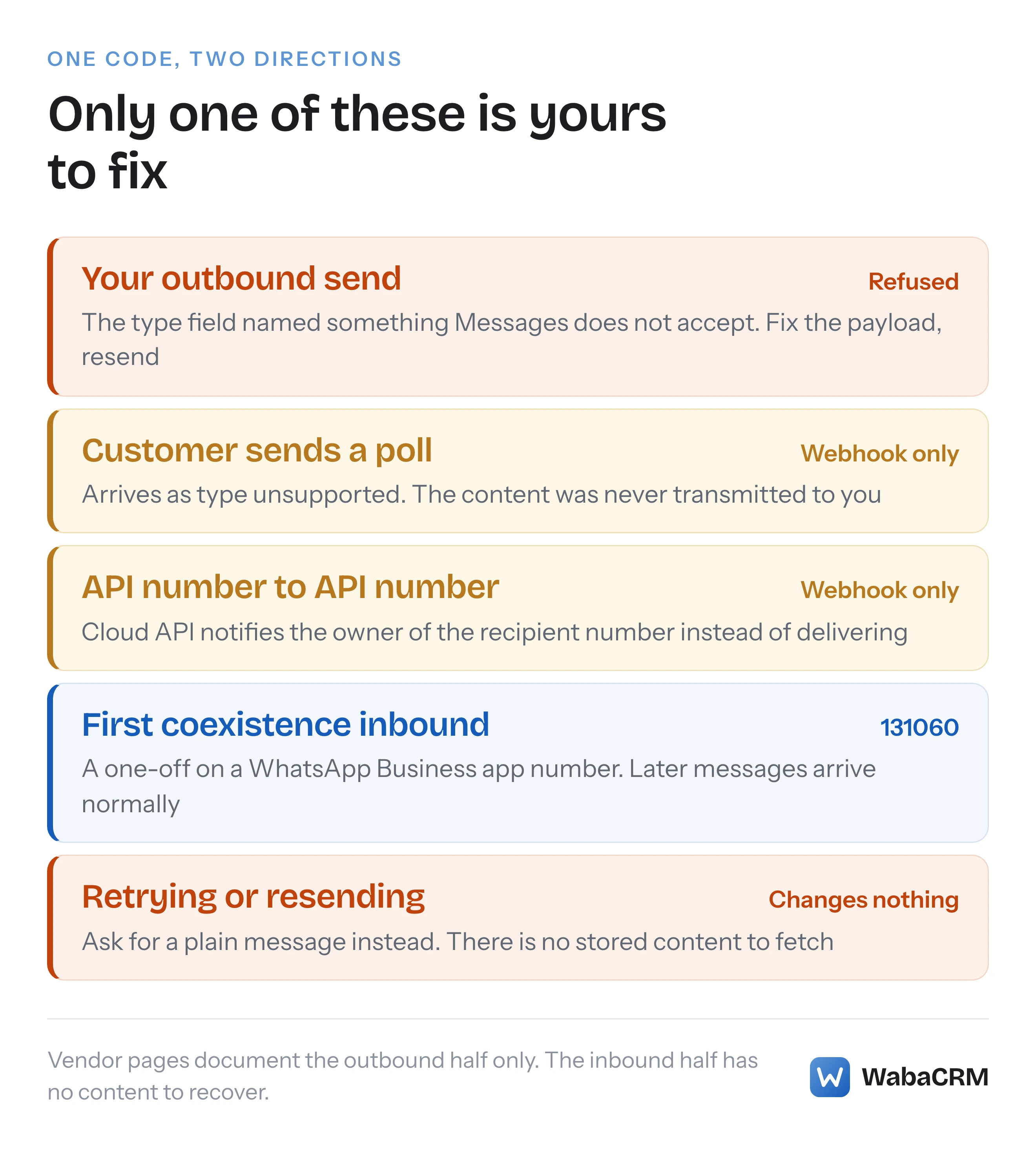
Sent outbound, 131051 is a refusal of your own API request: the type field named something the messages endpoint does not accept, and correcting the payload resolves it. Arriving inbound, 131051 rides a webhook whose message type is literally the string unsupported, and it means the customer sent something — WabaCRM has watched polls, view-once photos and messages from very old app versions do this in production — that Cloud API will not pass through to a business account. The content of that message never reached your server. It is not queued, not delayed, not fetchable by id. There is nothing to retry, and nothing on your side to fix.
Every vendor helpdesk page ranking for this error documents only the first direction. The second is the one that lands in a support ticket, because it looks like your inbox is broken when nothing is.
- What does WhatsApp error 131051 message type unknown mean?
- Is 131051 an outbound refusal or an inbound webhook?
- What did the customer actually send when a chat says unsupported?
- Which type values can the unsupported field carry?
- Why can the unsupported content never be recovered?
- What happens when one API number messages another?
- Why does a coexistence number's first inbound arrive this way?
- How do you fix an outbound 131051 in your own payload?
- What should an agent do with a message type unknown bubble?
- How should a webhook handler treat an unsupported message?
Is 131051 an outbound refusal or an inbound webhook?
It is both, and telling them apart takes one look at where the code appeared.
If 131051 came back in the HTTP response to your own POST /{phone-number-id}/messages call, it is the outbound case. Your request declared a type the endpoint does not recognise, and the error names your payload, not the recipient.
If 131051 arrived inside a webhook — a messages delivery whose message object reads "type": "unsupported" — it is the inbound case. Meta's webhook reference for unsupported messages shows the exact shape (Meta — Unsupported messages webhook):
"errors": [
  {
    "code": 131051,
    "title": "Message type unknown",
    "message": "Message type unknown",
    "error_data": {
      "details": "Message type is currently not supported."
    }
  }
]
Note that the string "Message type unknown" appears twice, as both title and message — if you grep your logs for it, expect pairs. And note what the payload does not contain: any body, any media id, any caption. The webhook is a notification that a message existed, not a delivery of it.
The same reference lists three triggers for this webhook, quoted verbatim:
"A WhatsApp user sends a message type not supported by Cloud API." (Meta — Unsupported messages webhook)
"You use the API to send a message to a number already in use with the API. When the number is already in use, Cloud API sends the webhook to the owner of the recipient number." (Meta — Unsupported messages webhook)
"A WhatsApp user messages a business onboarded with a WhatsApp Business app phone number for the first time." (Meta — Unsupported messages webhook)
Only the first is about message types at all. The second and third are situations no vendor page mentions, and both get their own sections below.
| Route | What arrives | What fixes it |
|---|---|---|
| Your outbound send | 131051 in the API response | Correct the type field, resend |
| Customer sends a poll or similar | Webhook with "type": "unsupported" |
Nothing — ask for a plain message |
| API number to API number | Webhook to the recipient's owner | A different channel between the two systems |
| First message to a coexistence number | Webhook, typically code 131060 | Nothing — a one-off; later messages arrive |
Checked against Meta's documentation on 25 September 2026.
What did the customer actually send when a chat says unsupported?
You cannot know for certain from the payload alone, and that is by design: the content was withheld, and the webhook tells you only that something arrived which Cloud API declined to carry.
What WabaCRM has seen produce it in production, matched against what customers later described sending: polls, view-once photos and videos, and messages from WhatsApp versions old enough that the API no longer understands their format. Community reports add events and other newer consumer features that reach the WhatsApp apps before they reach the Business Platform. The pattern is consistent — features built for person-to-person chat, where both ends run the full WhatsApp client, arrive at a business number as an empty unsupported notification because the API on the business's side has no representation for them.
The practical consequence for whoever answers the chat: the customer believes they sent you something, their own app shows it delivered, and your side shows a placeholder. Neither party has an error in front of them that explains the mismatch. That asymmetry, not the code itself, is what turns 131051 into support tickets.
Which type values can the unsupported field carry?
The webhook reference documents a companion field inside the unsupported message object that sometimes names what kind of thing was refused. Meta describes it as:
"Contains the type of message that is unsupported. Values can be: button, edit, errors, gif, group_invite, hsm, image, interactive, keep_in_chat, link_preview, list, location, media_placeholder, order, pin, poll_creation, poll_update, product, reaction" (Meta — Unsupported messages webhook)
Read that list carefully before drawing conclusions from it. It is the set of values one field can be set to when a message has already arrived as unsupported — it is not a claim that these things fail in general. An ordinary photo or a shared location from a customer is a normal, supported inbound message; image and location appear on this list for the specific contexts in which such content arrives inside something the API cannot carry. poll_creation and poll_update, by contrast, line up exactly with the polls WabaCRM has watched arrive empty.
The honest summary: when the field is present, it is a useful hint about what the customer tried; when it names something that surprises you, read Meta's page rather than reasoning from the label.
Why can the unsupported content never be recovered?
Because it was never transmitted to you. This is the single most misunderstood fact about inbound 131051, and it changes what a sensible response looks like.
For a supported media message, the webhook carries a media id and your server fetches the file from Meta within its retention window. For an unsupported message there is no id, no download URL and no retrieval endpoint — the notification is the entire delivery. Meta's own error_data.details string says exactly this much and no more: "Message type is currently not supported." (Meta — Unsupported messages webhook)
So the two instinctive recoveries both fail:
- Retrying on your side retries nothing, because there is no failed fetch to repeat.
- Asking the customer to "send it again" produces a second identical webhook, because the feature they used is still unsupported.
The only move that works is asking the customer to send the substance in a supported form — the poll question as plain text, the view-once photo as an ordinary photo, the event as a message with the date in it. If your inbox does not say this to the agent, the agent learns it one confused customer at a time. Messages that seem to vanish between a customer's phone and your dashboard have several other causes too, catalogued in why WhatsApp messages sometimes do not show in an inbox — but this is the one cause where the message provably never arrived at any layer you control.
What happens when one API number messages another?
The send appears to work and the message never usefully arrives. Meta's second trigger, quoted in full above, is precise about the mechanics: when the recipient number is already in use with the API, "Cloud API sends the webhook to the owner of the recipient number." The recipient's system gets an unsupported-message notification; it does not get the message.
This surfaces in real operations more often than it sounds like it should. Two businesses that both run on the Cloud API try to coordinate over WhatsApp — a supplier messaging a retailer, a logistics partner pinging a store — and each side's dashboard shows nothing wrong while the actual text falls into the gap. It also appears inside a single company when a test script sends from one of the company's API numbers to another and the engineer concludes the webhook is broken, because the "message" only ever materialised as an unsupported event.
If both ends of a conversation are machines, WhatsApp between two API numbers is the wrong transport, and no payload adjustment changes that. The trigger is about what the recipient number is, not about what you sent.
Why does a coexistence number's first inbound arrive this way?
Meta's third trigger covers numbers connected in coexistence mode — still live in the WhatsApp Business app on a phone, mirrored to the Cloud API. The reference states the webhook fires when "A WhatsApp user messages a business onboarded with a WhatsApp Business app phone number for the first time." (Meta — Unsupported messages webhook)
On this trigger the errors array typically carries the webhook's other code, 131060, whose title is "This message is currently unavailable." — the same page ties that code to exactly this first-contact case. The distinction matters when you are writing alerting rules:
| Code | Title | Typical trigger |
|---|---|---|
| 131051 | Message type unknown | A message type Cloud API does not support |
| 131060 | This message is currently unavailable. | First message to a WhatsApp Business app number |
A 131060 on the very first message from a new customer to a coexistence number is a known one-off, not a fault to escalate: the conversation exists, and subsequent messages flow normally. It belongs on the same list as the other trade-offs of running a number in both places at once — what stops working under WhatsApp coexistence collects the rest, and the coexistence guide covers how the arrangement is set up in the first place.
How do you fix an outbound 131051 in your own payload?
Start from Meta's remedy — check the Messages endpoint reference for the types it actually accepts — and then look for the three mistakes that produce this code from otherwise sane code:
- A misspelt or invented
type. The endpoint documents schemas for text, image, audio, video, document, sticker, location, contacts, reaction, interactive and template messages. Anything else in thetypefield — a typo like"txt", or a construct borrowed from another platform — is refused with 131051. - A
typethat does not match its object. Declaring"type": "image"while the payload carries adocumentobject, or vice versa, is the same refusal wearing a subtler coat, and it is common in code that builds payloads from user-selected files. - A channel mix-up. Multichannel systems that route Messenger or Instagram constructs through the WhatsApp endpoint hand it types that exist only on the other channel. The WhatsApp endpoint answers for itself only.
{
  "error": {
    "code": 131051,
    "message": "Unsupported message type"
  }
}
The refusal is deterministic — the same payload always fails the same way — so this is a bug-fix, never a retry policy. That determinism is also the cleanest way to tell 131051 apart from its neighbours: error 131026 arrives later, on the status webhook, about a message the API had already accepted, whereas an outbound 131051 refuses the request on the spot and nothing is ever queued.
What should an agent do with a message type unknown bubble?
Tell the customer what happened, in their language, and ask for a supported form — because the customer's own phone is telling them everything worked.
"Message type unknown" was reported to WabaCRM as an inbox bug, which is worth admitting because it is instructive: the string is Meta's own title text for 131051, surfaced verbatim, and to anyone who has not read the webhook reference it reads like the product failed to parse something it was holding. It was not holding anything. WabaCRM's inbox now explains the situation in the thread instead of repeating Meta's title — the agent sees that the customer sent something WhatsApp will not pass to a business account, along with what to ask for instead.

The reply that resolves it is one sentence: "That message type doesn't come through to our system — could you send it as a normal message?" In a shared team inbox, it is worth making that a saved quick reply, because every agent will eventually meet this and the untrained response — silence, or "we didn't get anything" — reads to the customer as being ignored.
How should a webhook handler treat an unsupported message?
As a real inbound event with no content, which is a category most handlers were never written for. Four rules keep it from causing quiet damage:
- Acknowledge it like any other delivery. It arrives on the ordinary
messagesfield with a normal signature; return your 200 and record it. Dropping it on the floor means the conversation timeline silently misses a moment the customer remembers. - Render a placeholder, not nothing. Store the message with its
unsupportedtype and show something in the thread. An agent who can see that something arrived at 14:32 can ask about it; an agent looking at a gap cannot. - Do not branch on the title string. Match on
code— 131051 versus 131060 — rather than on "Message type unknown", which is display text Meta could reword. The two codes deserve different handling: one may warrant a canned explanation to the customer, the other is a first-contact one-off. - Keep automation away from it. A keyword bot or auto-reply has no text to match against; the safe behaviour is to treat the message as content-free rather than as an empty string that might accidentally match a catch-all rule.
None of this recovers the content, because nothing can. What it does is make the failure legible — to your logs, to your agents, and through them to the one person who actually knows what the message said.
Every Meta quotation on this page was read from Meta's own documentation on 25 September 2026. Meta changes that documentation without notice; the linked pages are authoritative and this one is not.
Questions people also ask
Is error 131051 caused by something my customer did?
Should I ask the customer to resend an unsupported message?
Can two Cloud API numbers message each other?
Is 131060 the same as error 131051?
Should I retry an outbound send refused with 131051?
- whatsapp error 131051
- message type unknown
- unsupported message type
- whatsapp cloud api errors
- whatsapp webhooks