WhatsApp Business Username API: Errors 147001 to 147005
The short answer
WhatsApp Cloud API errors 147001 to 147005 are refusals from the Username API when a business claims a username for its phone number: the name is unavailable, the portfolio needs "a higher messaging limit", a Facebook Page or Instagram account must be linked first, or another number in your own portfolio holds it, cleared with force_transfer (checked October 2026).
What do WhatsApp business username errors 147001 to 147005 mean?
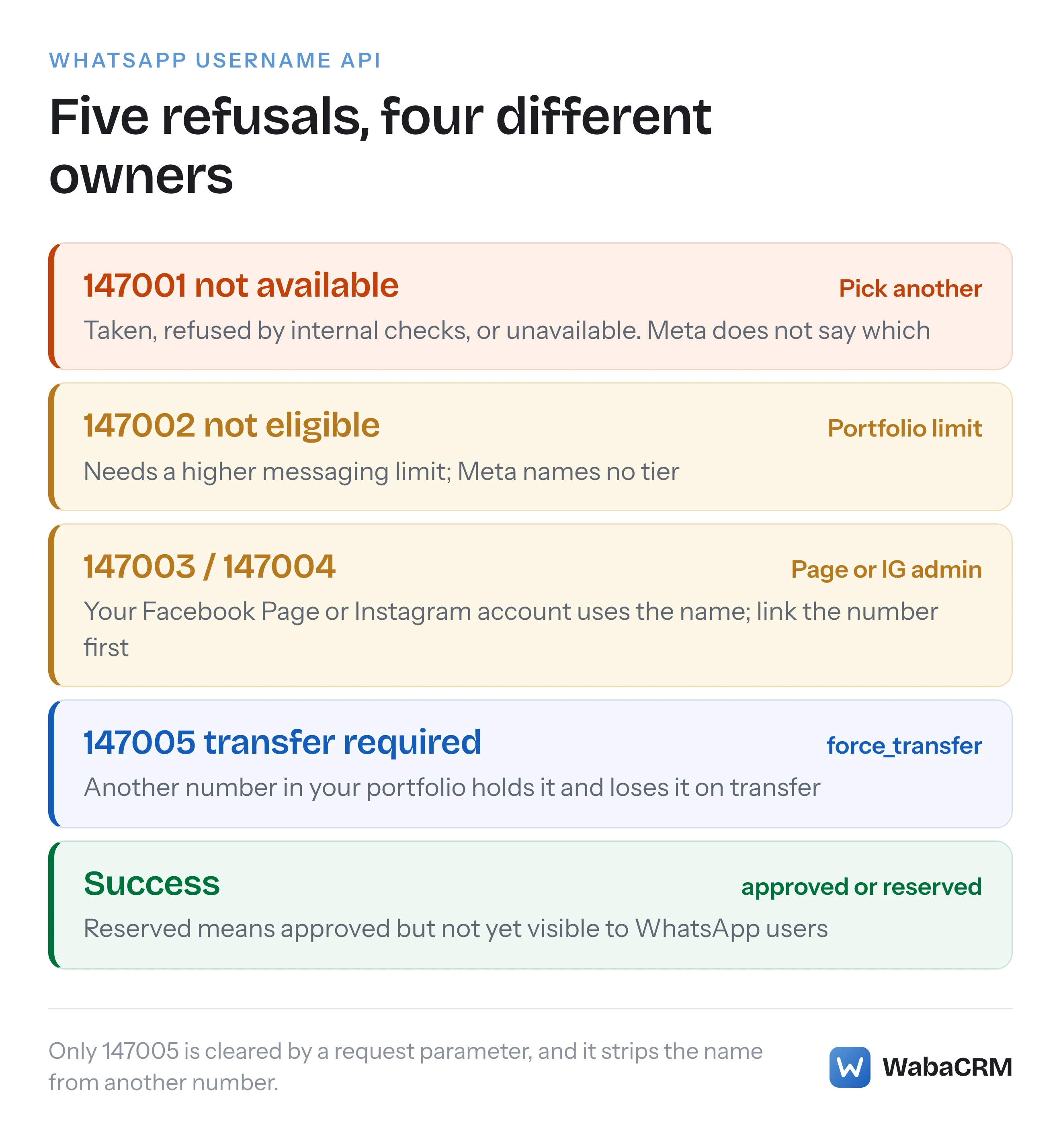
Errors 147001 to 147005 are the five username-specific refusals Meta's Username API can return when a business tries to adopt or claim a username for one of its phone numbers. In order, they say the username is not available, the business portfolio is not eligible, a Facebook Page must be linked first, an Instagram account must be linked first, and another number in your own portfolio already holds the name.
None of the five is on Meta's general error-code reference. On 16 October 2026 that page, marked "Updated: Jun 18, 2026", contained no code from 147001 to 147005 (Meta — WhatsApp error codes). Their meanings are documented in the business usernames section of Meta's business-scoped user IDs page, and when I read it, that error table was rendering as raw markdown, pipes and all, inside a single paragraph. The only other Meta page I found naming any of them is the WhatsApp platform changelog, whose 10 June 2026 entry records "the new 147005 “Username transfer required” error code"; it explains none of the others.
The five codes look like one family, but they have four different owners. The first is a naming problem, the second sits with your messaging limit, the third and fourth need whoever administers the Page or Instagram account, and the fifth is a choice between two of your own numbers.
- What do WhatsApp business username errors 147001 to 147005 mean?
- What is a WhatsApp business username, and does it hide your number?
- When could businesses start claiming a WhatsApp username?
- Which characters and lengths does Meta accept in a business username?
- How do you claim a business username through the Username API?
- What does every error the Username API returns mean?
- Why does error 147002 say the account is not eligible?
- What do errors 147003 and 147004 want you to link?
- How does force_transfer clear error 147005, and what does it cost?
- How do you learn that Meta approved or revoked a username?
- How do business usernames relate to BSUIDs and user usernames?
What is a WhatsApp business username, and does it hide your number?
A business username is a unique handle attached to one business phone number, and it does not hide that number. Meta says so twice, in nearly the same words.
The opening of Meta's page sets out the difference between the two:
"Username adoption is optional for users and businesses. If a username is adopted by a WhatsApp user, their username will be displayed instead of their phone number in the app. Business usernames are not intended for privacy, however. If you adopt a business username, it will not cause your business phone number to be hidden in the app." (Meta — Business-scoped user IDs)
The business usernames section then defines the one-to-one rule that error 147005 enforces:
"A business username is mapped to a single business phone number across all of WhatsApp; that is, a phone number can have only one username at a given time, and no two WhatsApp phone numbers (consumer or business) can have the same username." (Meta — Business-scoped user IDs)
Note "consumer or business": a business competes for the name with every WhatsApp user, not only with other businesses.
Where the username appears is ranked. Meta lists the order in which the app chooses which business profile information to show in a chat window, highest priority first: "Saved contact name", "Verified business name or Official Business Account name", "Username", "Phone number". The FAQ at the foot of the same page adds: "When a business has both a username and display name, display name will be shown first". Meta adds: "Your business phone numbers will always appear in your business profile." The verified business name above it is a separate approval with its own failure modes, covered in why name_status says DECLINED for error 131037.
When could businesses start claiming a WhatsApp username?
Since 29 June 2026, by Meta's own documentation. The date was moved there from "later in 2026", and the username becoming visible to customers is a separate, later step that Meta tied to a gradual rollout.
The page's banner, read on 16 October 2026 on the version marked "Updated: Sep 15, 2026", says: "Starting June 29, 2026 you can begin reserving your business username." The reserved usernames section says the same thing in more detail:
"Starting June 29, 2026, you will have the option to claim a username that WhatsApp has reserved for you. Alternatively, you can adopt a different username that aligns with your branding requirements. A reserved username can be claimed through WhatsApp Manager, Meta Business Suite, or via the Username API. Claimed usernames that are approved will become active once the username feature is made available." (Meta — Business-scoped user IDs)
The page's own changelog records the move, under its 29 June 2026 entry: "businesses can reserve and claim usernames starting June 29, 2026 (previously “later in 2026”)."
On visibility, Meta's wording when I read it was still forward-looking: "WhatsApp will start rolling out usernames gradually in 2026." It also qualifies the whole page with "Any changes described in this document are subject to change." Until that rollout reaches your customers, a successful claim can come back as reserved rather than approved, so check the live page before telling a customer their username is visible.
Which characters and lengths does Meta accept in a business username?
Meta accepts 3 to 35 characters drawn from English letters, digits, the period and the underscore, with at least one letter and no domain-like ending. Meta's error table maps an invalid format to error 100, "Param Invalid", not to one of the 147 codes.
The format list, quoted from the business usernames section:
- "may only contain English letters (a-z), digits (0-9), period (.) and underscore (_) characters"
- "non-English characters (such as ñ, é, ü) are not supported and will cause the request to fail"
- "must be between 3-35 characters in length"
- "must contain at least one English letter (a-z, A-Z)"
- "must not start or end with a period or have 2 consecutive periods"
- "must not start with www."
- "must not end with a domain (for example, .com, .org, .net, .int, .edu, .gov, .mil, .arpa, .html, .htm, .txt, .xml)"
The last rule on Meta's list is the one most likely to surprise a developer writing a uniqueness check: "case is ignored when comparing usernames, but period and underscore characters are not; for example, myID and myid are the same username but myid, my.id, and my_id are all distinct". Lower-case the name before comparing, and leave the punctuation alone.
How do you claim a business username through the Username API?
You POST the username to the phone number's /username edge with a token that has access to that number. A success returns a status of approved or reserved; a failure returns a standard Graph error object carrying one of the codes in the next section.
Meta's request syntax, with the optional transfer parameter included:
curl -X POST 'https://graph.facebook.com/<API_VERSION>/<BUSINESS_PHONE_NUMBER_ID>/username' \
  -H 'Content-Type: application/json' \
  -H 'Authorization: Bearer <ACCESS_TOKEN>' \
  -d '{
    "username": "acmeretail",
    "transfer_action": "none"
  }'
username is required and transfer_action is optional, defaulting to none. The two success statuses mean different things, and Meta defines them on the same page: approved is "The requested username has been approved and will be visible to WhatsApp users once the usernames feature is made available", and reserved is "The requested username has been reserved and approved but not yet visible to WhatsApp users. It will appear to WhatsApp users once the feature is available for everyone."
Two companion calls are worth knowing. A GET on the same edge returns the current username and status, with username omitted when the number has none, and a DELETE removes it. The Username Suggestions API, a GET on /username_suggestions, returns the names WhatsApp reserved for your portfolio, which Meta describes as usernames that "have a higher chance of approval." Meta's sequence for those is: claim one, wait for approval, and "Once approved and usernames become available in your country, it will move to an “active” status, meaning the business username will start appearing on your business profile, and users will be able to search for it using exact match search."
What does every error the Username API returns mean?
Meta's table lists nine codes for the username endpoint: three generic Graph errors, the registration error 133010, and the five username-specific ones. The table below reproduces Meta's "Details" text verbatim and summarises the remedy column, which is quoted in full in the sections after it.
| Code | Meta's details | What it is really about |
|---|---|---|
| 10 | Application does not have permission for this action | The token's system user lacks asset access to the number |
| 33 | Invalid ID | Wrong or deleted number, or a missing management permission |
| 100 | Param Invalid | The username breaks the format rules |
| 133010 | Account not registered | The number is not registered for API use yet |
| 147001 | Username not available | Taken, refused by checks, or unavailable |
| 147002 | Account not eligible to request a username | The portfolio's messaging limit |
| 147003 | FB Account not linked | A Facebook Page already uses the name |
| 147004 | IG Account not linked | An Instagram account already uses the name |
| 147005 | Username transfer required | Another of your own numbers holds it |
147001 is the code that offers least to act on. Meta's remedy text, reproduced with its own slip intact, reads: "The username has already been claimed, doesn’t pass our internal checks, or is not available for on the platform. Try requesting another username." Three causes, no way to tell them apart, one remedy. Meta does not publish what its internal checks test.
133010 is worth a separate note because it is not a username problem at all. Meta's remedy reads: "The business phone number must first be registered for API use." A number added to WhatsApp Manager but never registered through the /register endpoint cannot hold a username through the API.
The generic codes also carry username-specific remedies. For code 10, Meta says to "Confirm that the system user whose token is used in the request has appropriate business asset access on the WhatsApp account and Messaging account: either Full control or Partial access for Phone numbers." For code 33, the causes include "the user whose token was used in the request has not granted the app the whatsapp_business_management permission (which requires Advanced Access if you are a solution provider)".
Why does error 147002 say the account is not eligible?
Because Meta wants the business portfolio to have "a higher messaging limit", and it does not say how high. No Meta page I could find names the threshold.
The remedy text in full:
"The business portfolio that owns the WhatsApp account and business phone number must have a higher messaging limit." (Meta — Business-scoped user IDs)
Meta's messaging limits page ("Updated: May 21, 2026") defines the levels a portfolio can be on. It says "Newly created business portfolios have a messaging limit of 250", which can rise to 2,000 "by completing a scaling path", and then to 10,000, 100,000 and Unlimited "via automatic scaling". "Higher" than which of those, though, is not stated. Meta's remedy links its words "messaging limit" to that page, which does not answer the question either. On 16 October 2026 I read the business usernames section, its error table, the messaging limits page and the error-code reference, and none of them names the limit that makes a portfolio eligible. The word "username" does not appear on the messaging limits page at all. At least one vendor guide states a threshold of 2,000 messages a day, citing Meta's messaging limits and business-scoped user IDs pages; 2,000 is a level on the first, but neither page ties any level to username eligibility.
Two facts from the messaging limits page do narrow the problem. The limit belongs to the portfolio, not to the number: "Messaging limits are calculated and set at the business portfolio level and are shared by all business phone numbers within a portfolio." So a brand-new number added to an established portfolio shares that portfolio's limit from the start. And the old per-number field is gone: "The messaging_limit_tier field, which used to return a business phone number’s messaging limit, has been deprecated. Request the whatsapp_business_manager_messaging_limit field instead."

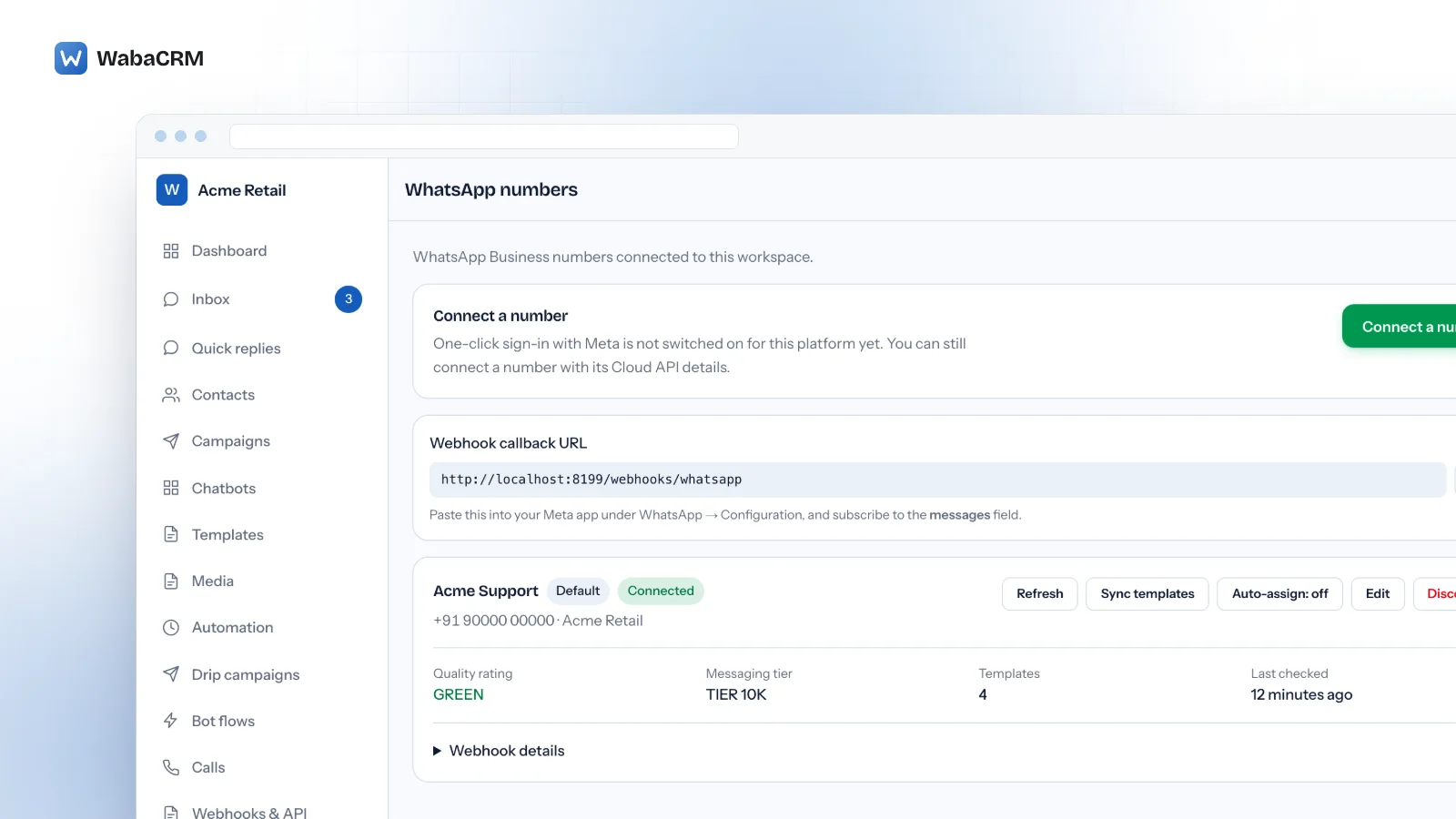
On WabaCRM, the WhatsApp numbers screen shows the quality rating and the messaging tier Meta last reported for each connected number, which is a quick first look before you retry a 147002. WabaCRM has no username control of its own; the username is set at Meta, which lists WhatsApp Manager, Meta Business Suite, the WhatsApp Business app and the Username API for adopting one. How that limit grows, and what holds it back, is covered in what actually caps your WhatsApp broadcast reach.
The practical reading: if the portfolio is still on its starting limit of 250, completing a scaling path is the one move Meta's wording clearly points to. Above that there is no published line, and the only test is the request itself.
What do errors 147003 and 147004 want you to link?
They mean the username you asked for is already in use on your own Facebook Page (147003) or Instagram account (147004), and WhatsApp wants the phone number linked to that Page or account before it will let the number take the same name. Neither is a refusal of the name.
Meta's remedies are short: for 147003, "You must link the phone number to the Facebook Page that already uses the requested username." and for 147004, "You must link the phone number to the Instagram account that already uses the requested username". The reserved usernames section explains the rule behind both:
"If a reserved username is already in use with your Facebook Page or Instagram account, you must link your business phone number to your Facebook Page or Instagram account before you will be able to claim the username." (Meta — Business-scoped user IDs)
There are three places to make the link: "You can link your phone number when claiming the username in Meta Business Suite or WhatsApp Manager, or by accessing your Facebook Page or Instagram account and adding your phone number directly." The person doing it needs the right access: "To link your phone number, you must have full control of the page or account, or basic partial access with the manage_phone permission."
So the work for 147003 or 147004 lands on someone with control of the Page or Instagram account, who may not be the developer who sent the request. A WhatsApp number does not otherwise need a Facebook Page, as covered in whether the WhatsApp API needs a Facebook Page at all; this is one of the few places where an existing Page changes what the API will do.
How does force_transfer clear error 147005, and what does it cost?
Resending the request with transfer_action set to force_transfer moves the username from your other number to this one. The cost is that the other number loses it, and Meta documents no confirmation step in between.
Meta's remedy for 147005 reads:
"The requested username is currently in use on another business phone number within your business portfolio. To transfer it to this phone number, resend the request with transfer_action set to force_transfer." (Meta — Business-scoped user IDs)
And the parameter's definition states the consequence: "force_transfer — Transfer the username from the other business phone number to this business phone number. The username is removed from the other phone number and assigned to this one." The default, none, is the safe one: "Do not transfer the username. If the username is already in use on another business phone number in the same business portfolio, the request fails with error code 147005." The page's changelog records both the parameter and the code being documented on 10 June 2026.
Read that way, 147005 is a guard rather than a fault. In effect it stops a script from silently taking a brand name off the number customers already know. Before sending force_transfer, decide which number the name should live on, and remember the one-username-per-number rule: the number that loses the name is left with none until you give it another.
Meta documents the transfer only "within the same business portfolio". For a username held by a number in a different portfolio, Meta describes no transfer at all. My own inference, which Meta does not state anywhere, is that this case most likely comes back as 147001, whose wording "already been claimed" fits it; treat that as a reading of the documentation, not as Meta's word.
How do you learn that Meta approved or revoked a username?
Through the business_username_updates webhook, which fires when a business username's status changes. It reports approved, deleted or reserved, and since Meta's documentation update of 15 September 2026 it can also carry a context of revoked when the change was Meta's doing.
Meta's payload template for the field:
{
  "object": "whatsapp_business_account",
  "entry": [
    {
      "id": "<WHATSAPP_BUSINESS_ACCOUNT_ID>",
      "time": <WEBHOOK_TRIGGER_TIMESTAMP>,
      "changes": [
        {
          "field": "business_username_updates",
          "value": {
            "display_phone_number": "<BUSINESS_DISPLAY_PHONE_NUMBER>",
            "username": "<USERNAME>",
            "status": "<STATUS>",
            "context": "<CONTEXT>"
          }
        }
      ]
    }
  ]
}
Meta notes that entry.id is the Messaging account ID, and that username is omitted when the status is deleted. The field has to be switched on: "Please subscribe each of your apps to this webhook field to be notified of username changes."
The context property is the one to read carefully. Meta says revoked "is currently the only value", and adds a warning: "An absent context does not by itself identify who initiated the change, because most transitions carry no context — including Meta-side ones such as a reserved username becoming approved." A revocation with status deleted means the name was removed; with any other status, "it was replaced with a generated username." Meta's 15 September 2026 changelog entry says the property "distinguishes a revocation from a change the business made itself", so a handler written before it existed has no way to tell the two apart and should be updated.
How do business usernames relate to BSUIDs and user usernames?
They are two halves of the same Meta change. Business usernames are the handle a business can show; user usernames let WhatsApp users hide their phone number, and the business-scoped user ID (BSUID) is how the API keeps identifying those users when the number is gone.
Meta's page explains the order of events: "To support usernames, Meta began sharing in April 2026 a new backend user identifier called business-scoped user ID, or BSUID." A BSUID is tied to your business, not global: "BSUIDs are scoped to individual business portfolios." The page's 29 June 2026 changelog entry records that "sending messages to a BSUID is supported starting in July 2026 (previously listed as May 2026)."
None of that affects claiming your own username, and none of the 147 codes concerns customers. The customer-side effect is the one an inbox notices first: a person who adopts a username can arrive with no phone number at all. What that looks like in practice, and how those chats are stored, is covered in why some WhatsApp customers arrive with no phone number.
The one rule that spans both sides is the format. Meta's changelog for 18 March 2026 says it "Clarified that user usernames have the same format restrictions as business usernames", so a validator written for your own username claims is also the right check for the usernames that appear in your webhooks. Whether a username or a green tick is the better trust signal for your brand is a separate question, set out in WhatsApp green tick, blue tick and Meta Verified explained.
Every Meta quotation on this page was read from Meta's own documentation on 16 October 2026. Meta changes that documentation without notice; the linked pages are authoritative and this one is not.
Questions people also ask
Does a WhatsApp business username hide our phone number from customers?
Can we claim a business username from the WhatsApp Business app instead of the API?
Can a WhatsApp business username use Hindi, accented or other non-English characters?
What happens to our WhatsApp business username if Meta revokes it?
Where do we report another account impersonating our WhatsApp business username?
- whatsapp business username
- whatsapp error 147005
- whatsapp error 147002
- force_transfer whatsapp username
- claim reserved whatsapp username