WhatsApp Direct Send API: Not Really Without a Template
The short answer
WhatsApp Direct Send is a Cloud API feature that sends business-initiated utility messages by adding a category field to a send request. Meta auto-generates and matches the template, bills it at utility rates and refuses the marketing category. Utility sending is generally available, but only portfolios with a 100,000 or unlimited messaging limit are generally eligible (checked October 2026).
What is the WhatsApp Direct Send API?
WhatsApp Direct Send is a Cloud API feature that sends a business-initiated utility message, and in beta an authentication message, by adding one category field to an ordinary send request instead of naming a template you had approved. Meta's own summary is two sentences long, and the end of the second is the part that is easiest to skim past:
"Direct Send simplifies WhatsApp utility and authentication integration. Instead of pre-creating and managing message templates, you send business-initiated messages directly and Meta auto-generates the matching templates behind the scenes." (Meta — Direct Send messages)
For as long as the WhatsApp Business Platform has existed, a message to someone outside the 24-hour customer service window has followed one sequence: write a template, submit it, wait for review, then send it by name and language. Direct Send takes the first three steps out of your integration. It does not take templates out of the system. It moves their creation inside Meta, after the message is written, and it keeps everything that comes attached to a template: a category, a price, a quality rating, a pause state and an enforcement record.
That distinction decides whether Direct Send is useful to you, and it is why the question "can I send a WhatsApp utility message without template approval?" has a more interesting answer than yes. Everything below was read from Meta's Direct Send pages on 16 October 2026; the overview page carried "Updated: Oct 8, 2026" and the limits page "Updated: Oct 15, 2026", so this is a moving feature and the dates matter.
- What is the WhatsApp Direct Send API?
- Does Direct Send really send WhatsApp messages without a template?
- Who is eligible for Direct Send, and is it still in beta?
- What does a Direct Send request look like?
- Which message formats and limits does Direct Send support?
- Why do Direct Send reply-button taps break existing webhook handlers?
- Can Direct Send send marketing messages?
- What do errors 139200, 131064 and 132021 mean for Direct Send?
- What does "direct send" mean in the 131064 error text?
- How is a Direct Send message billed?
- Should you wait for Direct Send or keep creating templates?
Does Direct Send really send WhatsApp messages without a template?
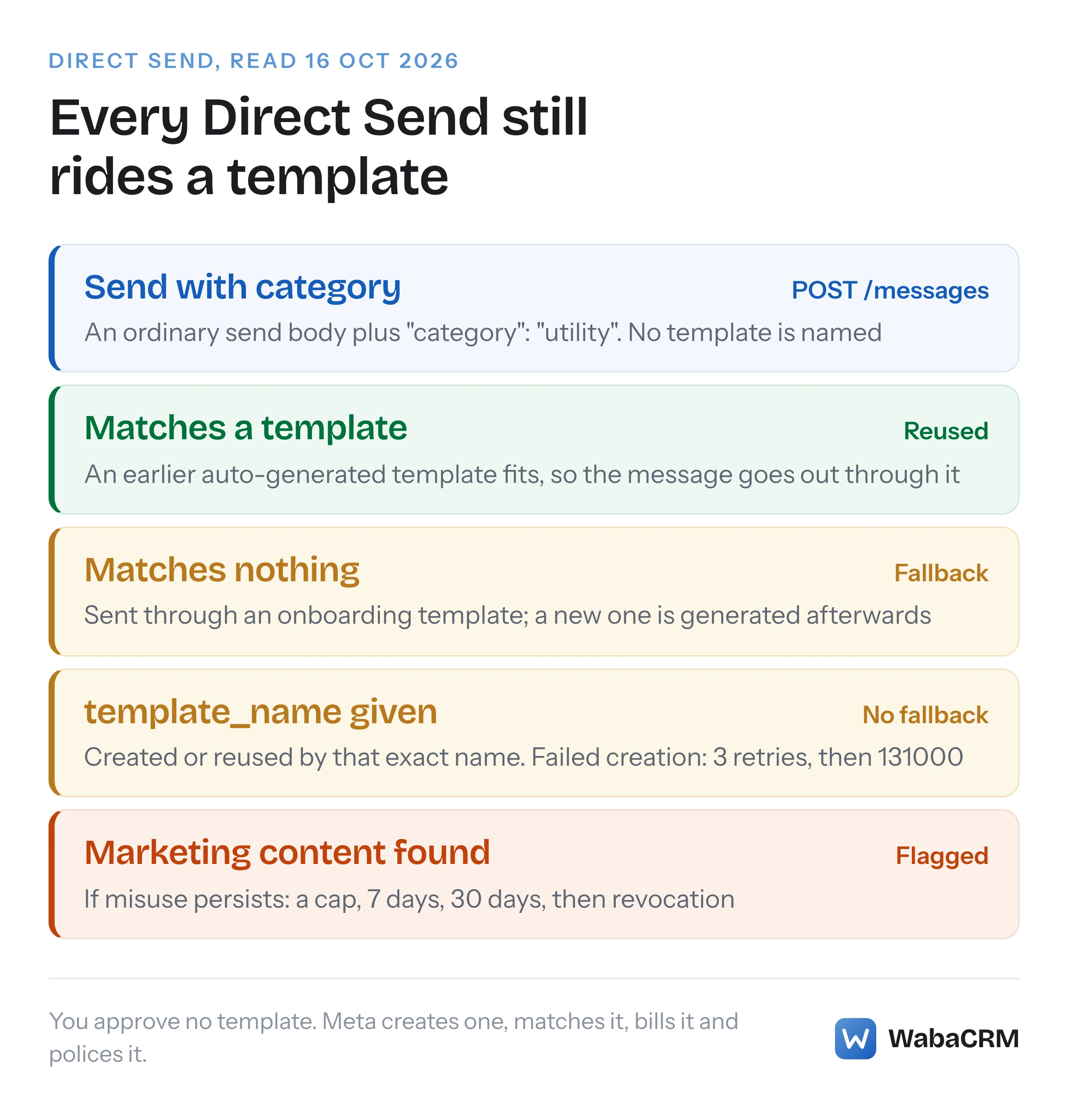
No, only from your side of the request. Your request names no template, but Meta sends every Direct Send message through one. Meta says both things on the same page. It describes the call as a way "to send business-initiated messages without a template, adding a category field to the request body", and a few paragraphs later explains what actually happens:
"Direct Send auto-creates templates on the fly and matches incoming messages against those templates before sending." (Meta — Direct Send messages)
The routing, in Meta's own words and order:
- "When a Messaging account is onboarded to Direct Send, Meta adds a small set of fallback templates to the Messaging account."
- "Direct Send first checks whether the message matches an existing template."
- "If no matching template is found, Direct Send falls back to the onboarding templates and the message is still sent."
- "When there's no match, Direct Send asynchronously triggers creation of a new template from the message. The message content is PII-redacted and its language is detected before the template is created."
"Messaging account" is the newer name Meta's pages use for the account that "holds your message templates and billing details" (Meta — WhatsApp accounts and Messaging accounts). The API paths on the Direct Send pages still address it as <WABA_ID>, so for most integrations it is the WhatsApp Business Account (WABA) you already know.
The generated templates are not hidden. Meta says they appear "both in WhatsApp Manager and through the API", with content-based names "starting with auto_generated, for example auto_generated_1234567890" (Meta — View templates generated by Direct Send). Do not filter on that prefix. The same page says a template created from a business-supplied name is "named exactly as provided", with no prefix at all, and Meta's integrity page shows a flagged generated template called direct_send_text_…. The reliable marker is the one Meta states: "Direct Send templates are identified by a source field with the value AUTO_GENERATED."
GET /<WABA_ID>/message_templates?source=AUTO_GENERATED
Meta's example of a generated template has a body reading "Hi 1, Your order is delivered.", which looks like what its PII redaction leaves behind. Two more facts change how you live with these templates. Meta's page on generated templates says "You cannot edit or delete templates generated by Direct Send", and the FAQ says Meta removes them on its own schedule: "Templates created but never used to send a message are deleted after 24 hours" (Meta — Direct Send FAQ). Meta's stated reason for generating them at all is insight and policing: "Templates are created so that you keep access to insights and granular troubleshooting, helping ensure messages sent through Direct Send comply with utility category guidelines."
Who is eligible for Direct Send, and is it still in beta?
Utility sending is no longer a beta. Authentication sending is. Meta's changelog entry for 31 July 2026 reads:
"WhatsApp Direct Send utility messaging is now generally available. Authentication messaging with Direct Send remains in beta." (Meta — WhatsApp changelog)
Generally available is not the same as available to you. The overview page calls Direct Send "a premium solution for businesses that meet the prerequisites" that "is rolling out in phases", and the prerequisite it names is volume: "Business portfolios with a messaging limit of 100,000 or unlimited are generally eligible for Direct Send utility messaging." That is the top end of the messaging limits Meta assigns, which our guide to WhatsApp broadcast limits explains in full, so "generally available" here means available to the largest senders, not to most businesses. Below that line, the only route the overview offers is that "you can express your interest". Authentication is narrower still: "Access restricted — contact your partner or client manager to get access" (Meta — Send utility and authentication messages).
Seven of Meta's changelog entries mentioned Direct Send when this was read. These five carry the story, and they are the fastest way to date anything else you read about it:
| Changelog date | What Meta recorded |
|---|---|
| 17 April 2026 | Error 131064 added, naming "direct send messages" |
| 15 June 2026 | Direct Send documentation added "for the open beta" |
| 31 July 2026 | Utility generally available; authentication still beta |
| 8 October 2026 | Eligibility set at a 100,000 or unlimited messaging limit |
| 15 October 2026 | Business portfolio pacing added to Direct Send |
To check your own account, Meta says to "Confirm Direct Send availability in WhatsApp Manager — a banner tells you whether your account is eligible." If you send a category from an account that is not eligible, the refusal is synchronous and tells you exactly what to do instead:
{
  "error": {
    "message": "(#100) Invalid parameter",
    "type": "OAuthException",
    "code": 100,
    "error_data": {
      "messaging_product": "whatsapp",
      "details": "Parameter Invalid: The 'category' value requires Direct Send, which isn't enabled for this account. Use an approved message template instead."
    },
    "fbtrace_id": "<FBTRACE_ID>"
  }
}
What does a Direct Send request look like?
It is the ordinary POST /<WHATSAPP_BUSINESS_PHONE_NUMBER_ID>/messages call with a category field added. This is Meta's own example, including the optional block that names the template:
{
  "messaging_product": "whatsapp",
  "recipient_type": "individual",
  "to": "<WHATSAPP_USER_PHONE_NUMBER>",
  "type": "text",
  "text": {
    "body": "Hi Jane, your order #12345 has been shipped and is expected to arrive on March 20."
  },
  "category": "utility",
  "direct_send_config": {
    "template_name": "order_shipment_update"
  }
}
Meta says "The category field indicates the category of the message to send as a template", which is as plain an admission as you will find that a template is still involved. The value you send decides everything that follows:
category value |
What Meta does with the request |
|---|---|
utility |
Direct Send; "Charged at utility rates." |
authentication |
Direct Send in beta, access restricted; not to a business-scoped user ID |
service or omitted |
Not Direct Send; fails with 131047 if no service window is open |
marketing |
Refused at once with error 100 |
The direct_send_config.template_name field exists for attribution. Meta says "Direct Send creates (or reuses) a template with that exact name, and all messages using that name are attributed to it" (Meta — Business-named templates). It is utility-only, must match ^[a-z0-9_]+$, and may run to 512 characters. It also changes the failure mode. A named send gets "No fallback to placeholder templates"; if creation fails, "the message is retried up to 3 times", and after that you receive error 131000, "Something went wrong".
The trap is the name itself. If you pass the name of a template you created the ordinary way, Meta answers asynchronously with error 132021, and the FAQ is blunt about why: "The name must be unique within your Messaging account, and non–Direct Send templates can't be used to send Direct Send messages." Your approved order_shipped template cannot be borrowed by Direct Send. Meta's advice is to "Choose a different template_name", and Direct Send then generates a template of its own under that name.
Which message formats and limits does Direct Send support?
Text and a short list of interactive formats, for utility only; authentication gets text and one button. Meta's limits page closes with the sentence that should govern your design: "Note. Any message format or feature not listed here is not yet supported." (Meta — Supported features and limits)
| Format | Utility | Authentication (beta) |
|---|---|---|
| Text | Yes, no link preview | Yes |
| Copy code button | Not listed | English locale only |
| Reply buttons | Yes, up to three | No |
| Mixed CTA URL and reply | Up to 10, max 2 CTA | No |
| Image, video, document header | Yes | No |
| Voice call button | Yes, sent on its own | No |
Marketing is listed as not supported, and so are address, audio, contacts, location, sticker and reaction messages, and phone number (PSTN call) buttons. The link preview line matters if you are porting existing free-form code: "The preview_url field is not currently supported. Messages sent with Direct Send do not render a URL preview" (Meta — Supported message types).
On length, Meta says "Direct Send aligns with the message-length limits for business-initiated template messages" and lists a 1024-character body, a 60-character header, a 60-character footer and "Button text: 20 characters". Meta's general template components page gives button labels 25 characters, so design Direct Send buttons to 20 and you will never meet the difference.
Direct Send also has its own time-to-live field, ttl_seconds. Meta's table gives utility a minimum of 30 seconds and a maximum of "43200 seconds (12 hours)", while listing the utility default as "30 days", which is longer than the maximum on the same row (Meta — Configure message TTL). Meta does not explain it. Set the value explicitly rather than trust the default, because a message "undeliverable within TTL" is simply dropped.
Why do Direct Send reply-button taps break existing webhook handlers?
Because the message went out as a template, the customer's tap comes back in the template format, not the interactive one. Code that handled reply buttons on free-form messages will find nothing to read. Meta spells it out:
"Direct Send delivers your message as a template, so a reply button tap arrives in the template quick-reply format: top-level "type": "button" with a button object. It does not arrive as "type": "interactive" with an interactive.button_reply object, which is the format used for free-form Cloud API interactive messages." (Meta — Supported message types)
The entry you receive looks like this:
{
  "context": {
    "from": "<BUSINESS_DISPLAY_PHONE_NUMBER>",
    "id": "<WHATSAPP_MESSAGE_ID_OF_THE_MESSAGE_YOU_SENT>"
  },
  "from": "<WHATSAPP_USER_PHONE_NUMBER>",
  "id": "<WHATSAPP_MESSAGE_ID>",
  "timestamp": "<WEBHOOK_TRIGGER_TIMESTAMP>",
  "type": "button",
  "button": {
    "payload": "<BUTTON_ID>",
    "text": "<BUTTON_LABEL>"
  }
}
One more difference from ordinary template taps: "That reference shows the same value in payload and text. With Direct Send the two differ, because payload carries the button id you set." If your handler keyed ordinary template buttons on payload because it always equalled the label, Direct Send taps will route differently. Correlate on context.id, which Meta describes as "The ID of the Direct Send message that contained the button."
Can Direct Send send marketing messages?
No, and Meta enforces it twice. The first check is the request: send "category": "marketing" and the API answers synchronously with (#100) Param category must be one of {AUTHENTICATION, SERVICE, UTILITY} - got "marketing". The second check is the content, and it is the one that costs you access:
"Meta monitors how Direct Send messages are categorized. If Meta detects marketing content sent through Direct Send, it notifies you. Persistent misuse results in restrictions to Direct Send access." (Meta — Integrity and content guidelines)
The notification is a template_correct_category_detection webhook, and "For Direct Send, the correct_category in this webhook is MARKETING." You can list everything Meta has flagged with GET /<WABA_ID>/message_templates?source=AUTO_GENERATED&correct_category=MARKETING. If you disagree, Business Support Home has a Direct Send template updates tab. Three rules limit it: request the review "within 60 days of the misclassification notification", each flagged template "can be reviewed once", and "A review restores a template's classification, but doesn't lift account-level restrictions."
The line between utility and marketing is the same one Meta draws for ordinary templates, which our piece on why Meta moves templates from utility to marketing walks through with Meta's own examples. The difference is that with ordinary templates the argument happens before anything is sent. With Direct Send it happens after, against messages your customers already have. Meta's own redirect is unambiguous: "To send promotional content on WhatsApp, use Marketing Messages, a separate product for promotions, offers, and announcements."
What do errors 139200, 131064 and 132021 mean for Direct Send?
They are three different failures. 132021 is a naming conflict, 131064 is a volume cap, and 139200 means the account is under a misclassification restriction and cannot use Direct Send at all; Meta documents it for the 7-day and 30-day stages. The last two sit on a ladder Meta publishes for "persistent misuse":
| Stage | What Meta does | Duration | Error you see |
|---|---|---|---|
| Warning | Notifies you; review possible | Ongoing | None |
| Rate limiting | Caps utility volume | Until under cap | 131064 |
| Messaging restriction | No Direct Send at all | 7 days | 139200 |
| Extended restriction | "final warning" | 30 days | 139200 |
| Permanent revocation | Access removed | Permanent | Not stated |
Meta says that during a restriction "the Cloud API synchronously returns error 139200", with this body:
{
  "error": {
    "message": "(#139200) Direct Send Utility access is blocked",
    "type": "OAuthException",
    "code": 139200,
    "error_data": {
      "messaging_product": "whatsapp",
      "details": "Direct Send Access is restricted: Direct send messaging capability is not available for this WABA right now due to misclassification based enforcements."
    },
    "fbtrace_id": "<FBTRACE_ID>"
  }
}
The same events arrive as account_update webhooks with the restriction type RESTRICTED_DIRECT_SEND_UTILITY_TEMPLATES and an expiration, the value our guide to restricted WhatsApp Business accounts lists among Meta's nine restriction types.
The rest of the Direct Send error vocabulary. The first four are rows in Meta's Direct Send API reference; the last comes from the limits page, because the API reference does not list it:
- 132021: "A template with the same name already exists", delivered asynchronously via the error webhook.
- 131000: a named template could not be created after retries; the business-named templates page puts the number of retries at three.
- 132015: the message matched a template paused for low quality. The FAQ adds that messages that "match or closely resemble the paused template's content" are blocked too.
- 2388318 and 2388330: you tried to update or delete a generated template.
- 135000: on a status webhook, the message was paced and dropped.
On 16 October 2026, neither 139200 nor 132021 appeared anywhere on Meta's general error-codes page. If your error handling is built from that page, it has no entry for either.
What does "direct send" mean in the 131064 error text?
It means the Direct Send API. Meta's general error reference says 131064 "applies to both template messages and direct send messages" (Meta — WhatsApp error codes), and read on its own the lower-case phrase could pass for any message sent directly, such as a free-form reply inside a customer service window. Meta's Direct Send pages settle it. The API reference describes the same code as:
"Direct Send messaging limit reached due to category-misclassification enforcement. The WABA is rate-limited for the current 24h window; further utility Direct Send messages are blocked until the next window opens." (Meta — Direct Send API reference)
The integrity page places it on the rate-limiting rung: "once sends reach the cap, Meta rejects further utility sends with error 131064." The ambiguity has a date attached. The changelog added 131064 on 17 April 2026, two months before Meta published its Direct Send documentation for the open beta on 15 June 2026, so the error text named a product most readers had never heard of. Neither the error-codes page nor any Direct Send page says that 131064 blocks free-form replies inside a customer service window.
How is a Direct Send message billed?
Exactly like the template it rides on. Meta's send page says utility is "Charged at utility rates" and authentication "Charged at authentication rates", and its pricing page says "Effective July 1, 2025 – Meta charges on a per-message basis" and "Businesses are only charged when a message is delivered" (Meta — Pricing on the WhatsApp Business Platform). Direct Send removes an approval wait. It does not remove a charge, and the pricing page says "Meta charges by category–market", which our breakdown of what decides a WhatsApp message's cost covers.
One page reads oddly beside that. The Direct Send FAQ, updated 31 July 2026, still answers a question about "the session-based pricing model" and says that with no open utility conversation, "a new utility conversation opens and lasts 24 hours from the first message." The pricing page, updated 30 September 2026, describes per-message charging. When the two disagree about money, the pricing page is the one to reconcile your invoice against. The status webhook helps: Meta says it is "at parity with the current Cloud API message-status webhook and includes pricing details", plus the template_id that tells you which generated template carried the message.
Should you wait for Direct Send or keep creating templates?
If your portfolio is below a 100,000 messaging limit, the question mostly answers itself: Meta's own refusal says "Use an approved message template instead", and the alternative it offers is registering interest, not access. If you are eligible, Direct Send earns its place when your utility messages vary too much to template in advance, and it costs you four things. You lose control of template names unless you pass template_name. You cannot reuse templates you already have. Your reply-button handler needs a second code path. And a classification mistake is judged after delivery, against a ladder that ends in permanent revocation.
Pacing is not something Direct Send lets you avoid. Meta's limits page says "Direct Send messages are subject to business portfolio pacing. A paced message may be held and delivered later, or dropped." The behaviour of a held template is explained in our piece on templates that are approved and accepted but not arriving.

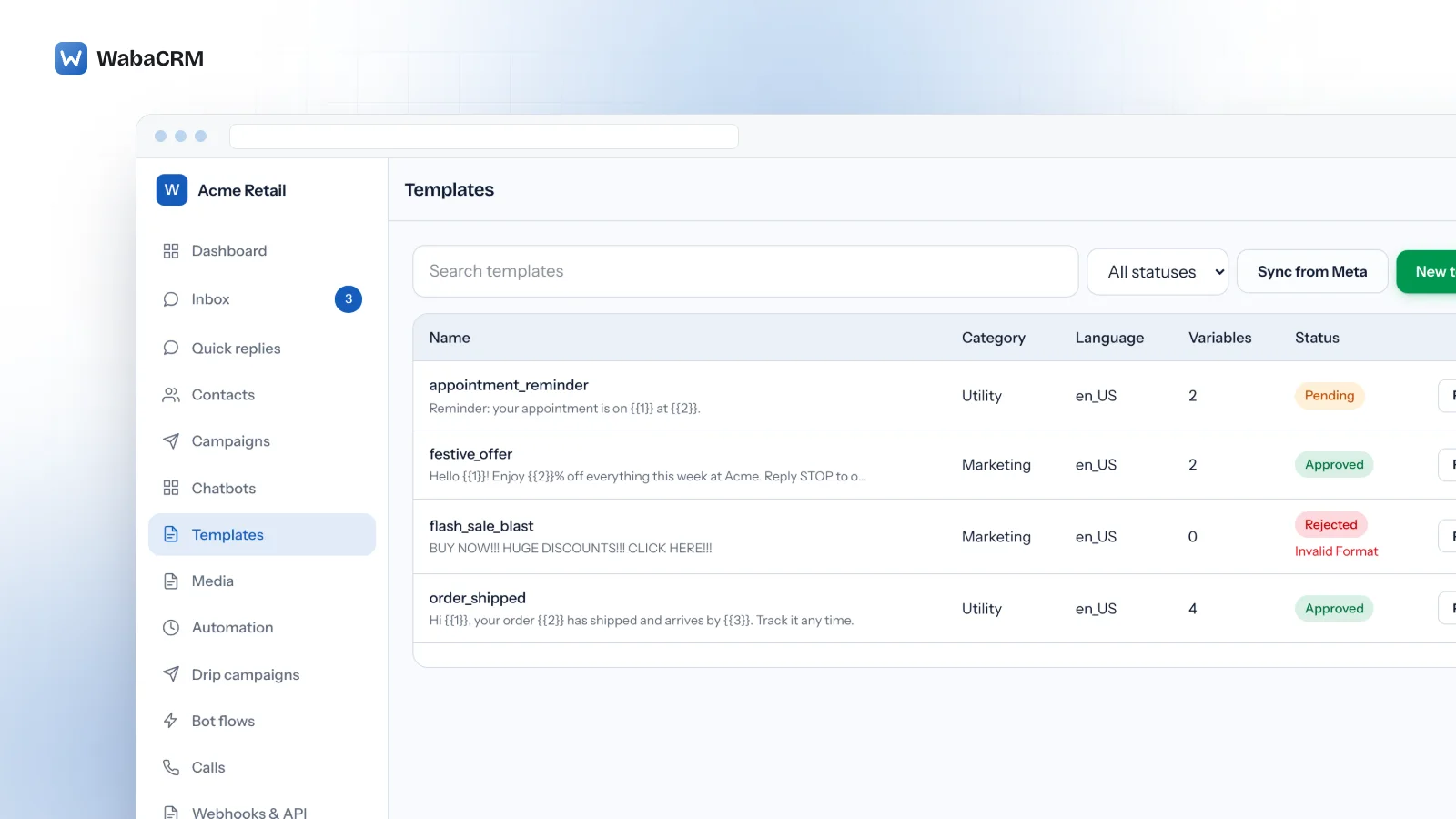
WabaCRM does not send through Direct Send. Every WhatsApp message it sends outside a customer service window, whether a campaign, a drip step or a template picked in the inbox, goes out as a template you created and Meta reviewed, listed with its category, language, variable count and status. That is slower to set up and easier to reason about: the wording Meta judged is the wording that ships, and a rejection arrives before a customer has seen anything. For the full list of states a template can sit in on that path, see every status a WhatsApp template can be in.
Every Meta quotation on this page was read from Meta's own documentation on 16 October 2026. Meta changes that documentation without notice; the linked pages are authoritative and this one is not.
Questions people also ask
Can I delete the auto_generated templates that Direct Send creates?
Can a Direct Send message expire if the customer's phone is off?
What happens when Meta paces a Direct Send message?
How do I find out which template a Direct Send message actually used?
Who can request a review when a Direct Send template is wrongly flagged as marketing?
- whatsapp direct send api
- send whatsapp utility message without template
- whatsapp error 139200
- auto_generated template whatsapp
- whatsapp error 132021
- direct send utility access is blocked