How to Schedule WhatsApp Messages for Your Business
The short answer
The WhatsApp Business app can schedule business broadcasts, where they are available, and away messages. The Cloud API has no send-at field, so your own system holds the message until its time. At that moment a free-form message is accepted only inside the customer's 24-hour service window; outside it, only an approved template is (checked November 2026).
Can you schedule a message on WhatsApp Business?
Partly. The WhatsApp Business app can schedule business broadcasts, in the countries where they exist, and away messages, but WhatsApp documents no way to schedule an ordinary reply in a one-to-one chat. On the API side there is no scheduling at all: the Cloud API sends the moment you call it, so any "send later" belongs to the system making the call.
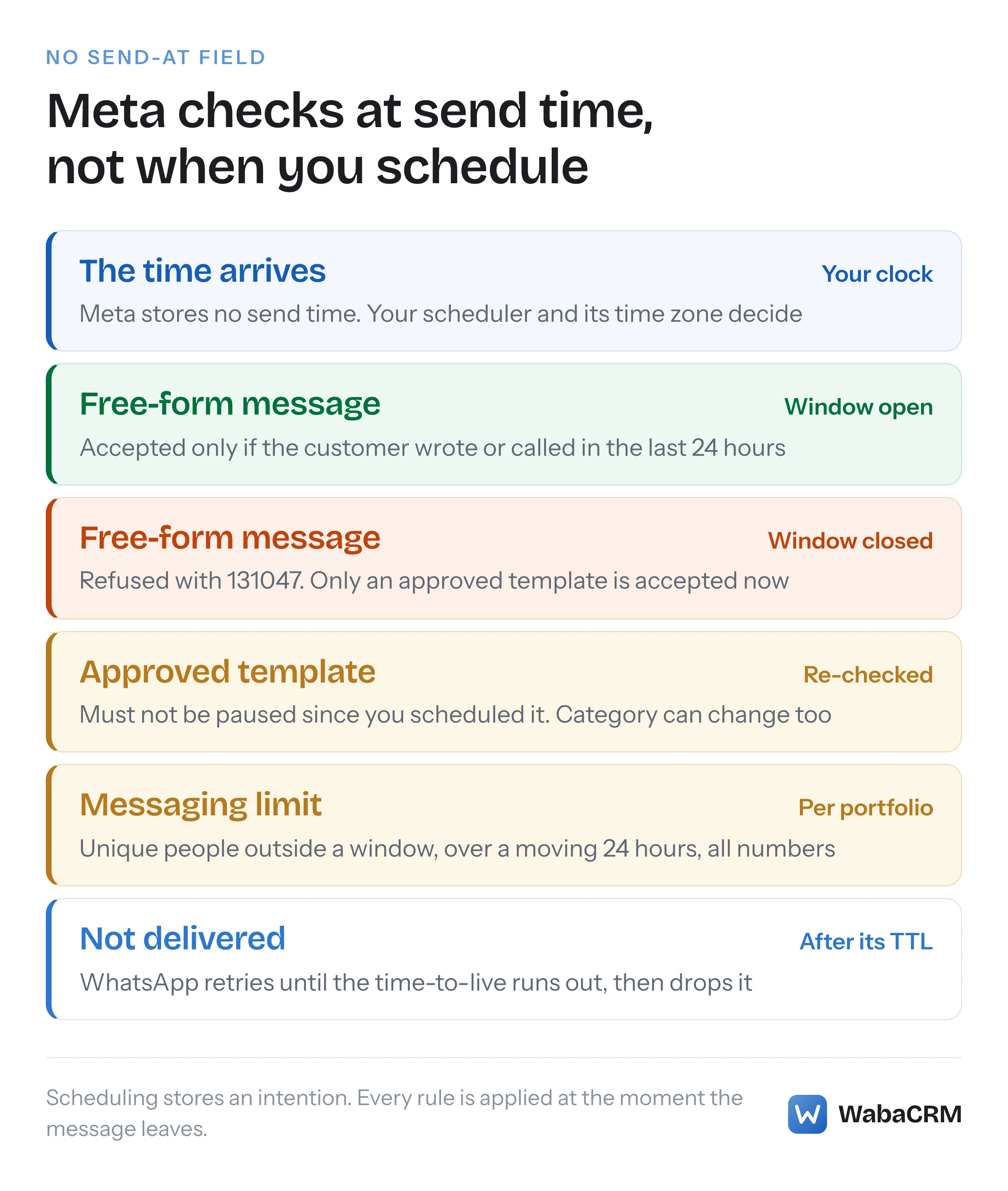
That split matters more than which button you press. Scheduling only stores an intention. Every rule Meta applies, the 24-hour customer service window, the template's status, your messaging limit, is applied at the moment the message actually leaves, which may be days after you set it up. A message that would have been accepted on Monday can be refused on Thursday without anything about it changing.
- Can you schedule a message on WhatsApp Business?
- What can the WhatsApp Business app schedule on its own?
- Why does a scheduled business broadcast need your phone online?
- Does the WhatsApp Cloud API have a send-at field?
- Why does a scheduled free-form message fail with 131047?
- Why is a template the only safe thing to schedule days ahead?
- Whose clock does a scheduled WhatsApp message run on?
- Can one scheduled send use up your messaging limit?
- Is time-to-live a way to delay a message?
- How does WabaCRM schedule campaigns and pace drips?
- What should you check before a scheduled send goes out?
Prefer to watch? The narrated explainer below walks through the same argument, with Meta's own words on screen, in under two minutes.
Read the transcript
Can you schedule a WhatsApp message for your business? Partly. And whether it actually goes out is decided at send time, not when you schedule it. The Business app schedules broadcasts and away messages. The Cloud API has no send-at field, so your own system holds the message until it is due. Nothing is checked when you schedule. When the time arrives, the window, the template's status and your messaging limit are all checked at that moment. On the Business app, your phone does the sending. If it is offline at the scheduled time, the app retries, but only up to ten times. Meta's message request has no field for a send time. A call to the messages endpoint means send now, so the queue is yours to build. A free-form message needs that window open when it leaves. Twenty-five hours after the customer wrote, it fails with error one three one zero four seven. A template is the only message Meta accepts outside the window. It is still checked at send time, and must not have been paused. The time zone is your scheduler's, so use a real zone name, never IST. And every send due that day shares one messaging limit across your portfolio. In WabaCRM, a scheduled campaign applies its audience and rechecks consent at launch. If its template can no longer be sent, the campaign is parked as paused. Schedule templates for anything far ahead, and check the window, the template and your limit for the moment it sends. The full article has a checker.
What can the WhatsApp Business app schedule on its own?
Three things, and each has its own article on WhatsApp's Help Center.
Business broadcasts. These are the Business app's paid promotional messages to an audience you pick. WhatsApp's Android instructions say:
"To schedule your message to automatically send at a later time, tap Schedule. On the Schedule screen, select a date > tap OK > select a time > tap OK > Done." (WhatsApp Help Center — How to create and send a business broadcast)
The same article makes two limits plain: "Sending business broadcasts is exclusively on the WhatsApp Business app", and "Business broadcasts is currently available in limited countries and might not be available to you yet." Broadcasts are also reviewed before they go: "your business broadcasts are subject to review by Meta before you send them in WhatsApp chats."
Away messages. These answer people who write to you, so they are triggered by the customer rather than sent at a time. The schedule decides when the auto-reply is active, with three options, one of which is "Custom schedule: send only during the specified period." (WhatsApp Help Center — How to use away messages)
Group calls. "Use WhatsApp Events to schedule important group calls. Choose a date and time, add a video or audio call link, and get reminded when the call is about to start." (WhatsApp Help Center — About group calls) That schedules a call and a reminder, not a message.
What is missing is the one most people search for: typing a reply to a single customer now and having it delivered at nine tomorrow. None of these articles describes it.
| Where | What it schedules | What holds it | The catch |
|---|---|---|---|
| Business app | Business broadcasts | Your phone | Phone must be online at send time |
| Business app | Away messages | Your phone | Replies only, never outbound |
| Cloud API | Nothing | Your own system | You build the queue |
| WabaCRM | Campaigns and drips | WabaCRM's scheduler | Templates only |
Why does a scheduled business broadcast need your phone online?
Because the app on your phone does the sending when the time comes. WhatsApp says so directly:
"Your device must be connected to the internet at the time your business broadcast is scheduled to send. If it isn't connected, the app will attempt to send your business broadcast after one minute, and then every 10 minutes. The app will try to send your message up to 10 times." (WhatsApp Help Center — How to create and send a business broadcast)
So a phone left switched off over a weekend, or in a basement with no signal, quietly misses the slot. There are two more timing details in that article worth knowing before you schedule anything time-sensitive. The money moves at scheduling, not at sending: "you can send or schedule the business broadcast; you'll be charged when you do so. You'll be refunded for any business broadcasts that aren't delivered in 5 days." And the send itself can lag: "This is typically no more than a few seconds, but could be as long as 3 hours."
Does the WhatsApp Cloud API have a send-at field?
No. Meta's Message API reference defines the properties every outbound message shares, under a schema it describes as "Common properties shared by all message types" (Meta — WhatsApp Cloud API Message API). They are:
{
  "messaging_product": "whatsapp",
  "recipient_type": "individual",
  "to": "<RECIPIENT>",
  "type": "text",
  "context": { "message_id": "<WAMID_YOU_ARE_REPLYING_TO>" }
}
Plus the object for the message type itself (text, template, image and so on). We searched the whole v25.0 OpenAPI specification Meta publishes for that endpoint for anything resembling a schedule, a delay or a send time, and there is nothing. A POST /{Phone-Number-ID}/messages call means "send this now".
That leaves the scheduling to you: a row in your own database with a due time, and a worker that wakes up, finds what is due and makes the call.
Why does a scheduled free-form message fail with 131047?
Because the customer service window it needed had closed by the time the scheduler fired. Meta defines the window like this:
"When a WhatsApp user messages you or calls you, a 24-hour timer called a customer service window starts. If the user messages or calls you again before the timer expires, the timer resets to 24 hours." (Meta — Service messages)
And on the same page: "To message WhatsApp users outside of a customer service window, use template messages instead." A free-form text, image or document sent after the timer has run out comes back as error 131047, which Meta describes as "More than 24 hours have passed since the recipient last replied to the sender number", with the fix "Send the recipient a template message instead." (Meta — WhatsApp error codes)
The trap is arithmetic. A customer writes at 14:00 on Monday. An agent schedules a follow-up "for tomorrow afternoon" at 15:00 on Tuesday. That is 25 hours, and the follow-up fails, although it looked like a reply to a live conversation when it was scheduled. What counts is the time since the customer last wrote or called, plus the time the message waits in your queue. The full family of window errors explains how 131047 differs from Messenger's equivalents.
Check a planned send against that sum before you schedule it:
Will my scheduled message go out?
Choose the kind of message, then enter the two waits in hours.
The time the message waits in your queue counts against the window.
Inside the window at send time, with hours to spare. If the customer writes again before then, the window resets to 24 hours. Expect error 131047. By send time hours will have passed since the customer last wrote, and the window lasts 24. Send an approved template instead, or send sooner. Refused. A customer service window starts only when the customer messages or calls you, so a free-form message has no window to use. Only an approved template can open the conversation. A template does not need an open window. At send time it must still be approved and not paused, and outside a window it counts towards your messaging limit.
Why is a template the only safe thing to schedule days ahead?
Because it is the only kind of message Meta accepts outside the window, and a schedule days out almost guarantees you will be outside it. This is why scheduled campaigns are built from templates. But a template is not a guarantee either, because it is checked again when it sends.
| Checked at send time | Free-form message | Approved template |
|---|---|---|
| 24-hour window | Must be open | Not needed |
| Template status | Not applicable | Must not be paused |
| Template category | Not applicable | Meta can change it |
| Messaging limit | Not counted inside a window | Counted outside a window |
Two things can change while a template waits. Meta can pause it: error 132015 is "Template is paused due to low quality so it cannot be sent in a template message", and 132016 is one "paused too many times due to low quality and is now permanently disabled" (Meta — WhatsApp error codes). And Meta can recategorise it. Its time-to-live page notes that "If a template is reclassified by an automatic category update, the system clears the TTL value by setting it to a null value" (Meta — Configure message time-to-live), which only makes sense because reclassification happens to live templates. Why a utility template becomes marketing covers what that does to the price and the delivery rules.
Marketing templates carry one more send-time risk. Error 131049, "This message was not delivered to maintain healthy ecosystem engagement", can hold back a scheduled marketing template for some recipients, and Meta's advice is to "wait at least 24 hours before resending the template message." What 131049 means has the detail; for scheduling, the point is that a perfectly built send can still be held back for some recipients.
Whose clock does a scheduled WhatsApp message run on?
Yours. Because the Cloud API takes no send time, it takes no time zone either. The only clock that matters is the one your scheduler reads, and the usual failure is that it is UTC while the person who typed "09:00" meant 09:00 in Mumbai, so the message goes out at 14:30 local time. Store the due time in UTC, convert from the zone of the person scheduling it when they type it, and show them that zone beside the field.
Use a full time zone name such as Asia/Kolkata, never an abbreviation. "IST" is ambiguous: PHP's own time zone handling reads it as Israel, which sends a broadcast meant for 21:00 in India several hours late. WhatsApp's business broadcast article does not say which zone its Schedule screen uses, so on the Business app check the time you picked against what you meant.
The recipient's zone is a separate question. A business sending across several countries can only pick one time per scheduled send, so the honest choice is either to split the audience by country or to pick a time that is reasonable everywhere it lands.
Can one scheduled send use up your messaging limit?
Yes, and it is easy to do by accident when several sends are scheduled for the same morning. Meta's definition:
"Messaging limits are the maximum number of unique WhatsApp user phone numbers your business can deliver messages to, outside of a customer service window, within a moving 24-hour period." (Meta — Messaging limits)
The same page adds that limits "are calculated and set at the business portfolio level and are shared by all business phone numbers within a portfolio", and that one number can "consume all of the portfolio's messaging capability within a given period". So two teams each scheduling a 09:00 campaign from different numbers are drawing on one allowance. What actually caps your reach explains the tiers and how they rise. For scheduling, the habit is simple: look at everything due in the next 24 hours together, not one campaign at a time.
Is time-to-live a way to delay a message?
No, it works in the opposite direction. Time-to-live governs how long WhatsApp keeps trying after a message has left, not when it leaves:
"If a message cannot be delivered to a WhatsApp user, WhatsApp retries delivery for a period of time known as time-to-live ("TTL"), or the message validity period." (Meta — Configure message time-to-live)
Meta's table gives defaults of 10 minutes for authentication templates (30 days for ones created before 23 October 2024) and 30 days for utility and marketing, with a customisable range of "30 seconds to 12 hours" for utility templates on Cloud API. Once that runs out, "The system drops messages that cannot be delivered within the default or customized TTL." It pairs well with scheduling: a short TTL on an appointment reminder stops a phone that was off overnight from receiving it after the appointment.
How does WabaCRM schedule campaigns and pace drips?
Campaigns have a "When to send" step with a Schedule it option. The date and time you type are read in the workspace's own time zone, which is printed beside the field, and a sweep that runs every minute launches each campaign whose time has arrived. Campaigns are template-only, for the window reason above.

Three things happen at launch rather than when you pressed Schedule, which is the behaviour this whole article argues for. The audience is still a filter until the campaign launches, so contacts who match by then are included. Consent is checked again for each recipient as the message goes out, so someone who opts out in between is skipped. And if the template can no longer be sent when the time comes, the campaign is parked as paused rather than fired into errors.
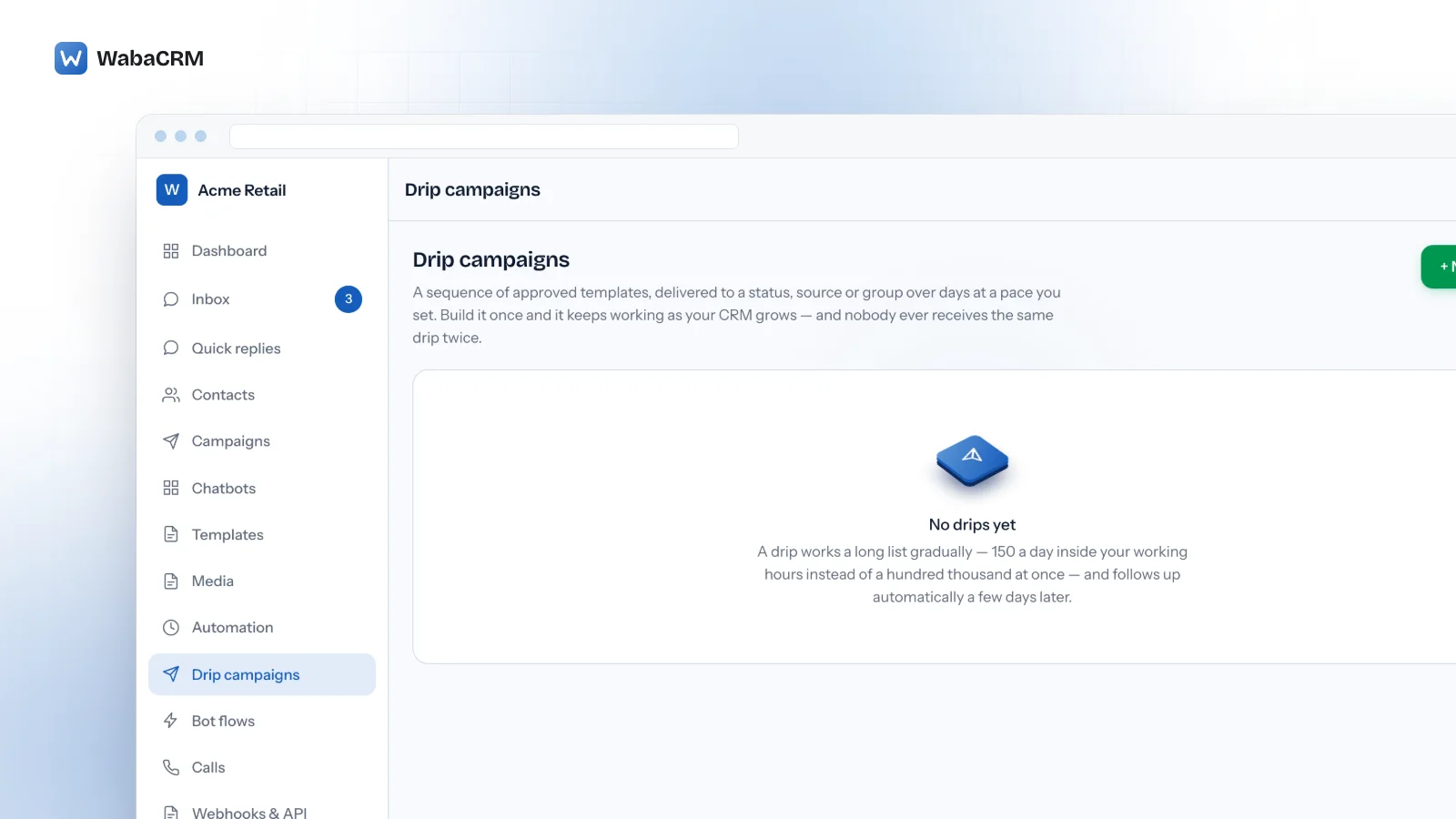
For anything slower than one send, the Drip Campaigns add-on spreads a sequence of templates over days, with Messages per day, a Start sending at and Finish by time, and Sending days. The screen says it plainly: "The daily quota is spread evenly across this window." The drip campaign guide covers sequences in depth. The walkthrough below, about a minute and a half long, shows the drip screen: the daily pace and hours, the audience filter, steps built from approved templates, and why each step points at a file in the media library.
Sending from WabaCRM is unlocked by a one-time payment and add-ons are sold separately; the pricing page has the current figures. Meta's own message fees are billed to your WhatsApp Business Account, with no markup from us.
What should you check before a scheduled send goes out?
A short list, run against the moment of sending rather than the moment of scheduling:
- Window arithmetic. For a free-form message, hours since the customer last wrote plus hours in the queue must stay under 24. Otherwise use a template.
- Template status. Re-read it on the day. A paused template fails every recipient.
- Time zone. Stored in UTC, converted from a real zone name.
- Everything due that day. Add up the unique people across all sends against the portfolio's limit.
- Consent. Read opt-outs at send time.
- On the Business app, keep the phone online and allow for up to three hours of processing.
Every Meta quotation on this page was read from Meta's own documentation on 6 November 2026. Meta changes that documentation without notice; the linked pages are authoritative and this one is not.
Questions people also ask
Can I schedule a reply to one customer in the WhatsApp Business app?
What happens to a scheduled business broadcast if my phone is offline?
Can I add a send time to a WhatsApp Cloud API message request?
Will a scheduled template still send if Meta pauses it before the send time?
Does a scheduled WhatsApp campaign still reach people who opt out before it sends?
- whatsapp business schedule message
- schedule whatsapp messages
- whatsapp business broadcast schedule
- whatsapp api scheduled message
- whatsapp send later