WhatsApp Channel vs Broadcast: Followers Are Not Contacts
The short answer
A WhatsApp Channel is a one-way public feed in the Updates tab: followers cannot reply, notifications are muted by default, and admins see a follower's profile name, not a phone number, unless they are already contacts. Broadcast lists and WhatsApp Business Platform template campaigns reach individual chats, so only they serve an opted-in contact list (checked October 2026).
What is the difference between a WhatsApp Channel and a broadcast?
A WhatsApp Channel is a public, one-way feed that people choose to follow in the Updates tab; a broadcast is a set of ordinary one-to-one messages sent to people already in your contacts. WhatsApp's own description of channels is blunt about the first half:
"While some features might feel familiar to WhatsApp chats, channel updates are a one-way broadcast rather than a conversation. Followers can’t reply directly to updates or send messages to channel admins." (WhatsApp Help Center — About WhatsApp Channels)
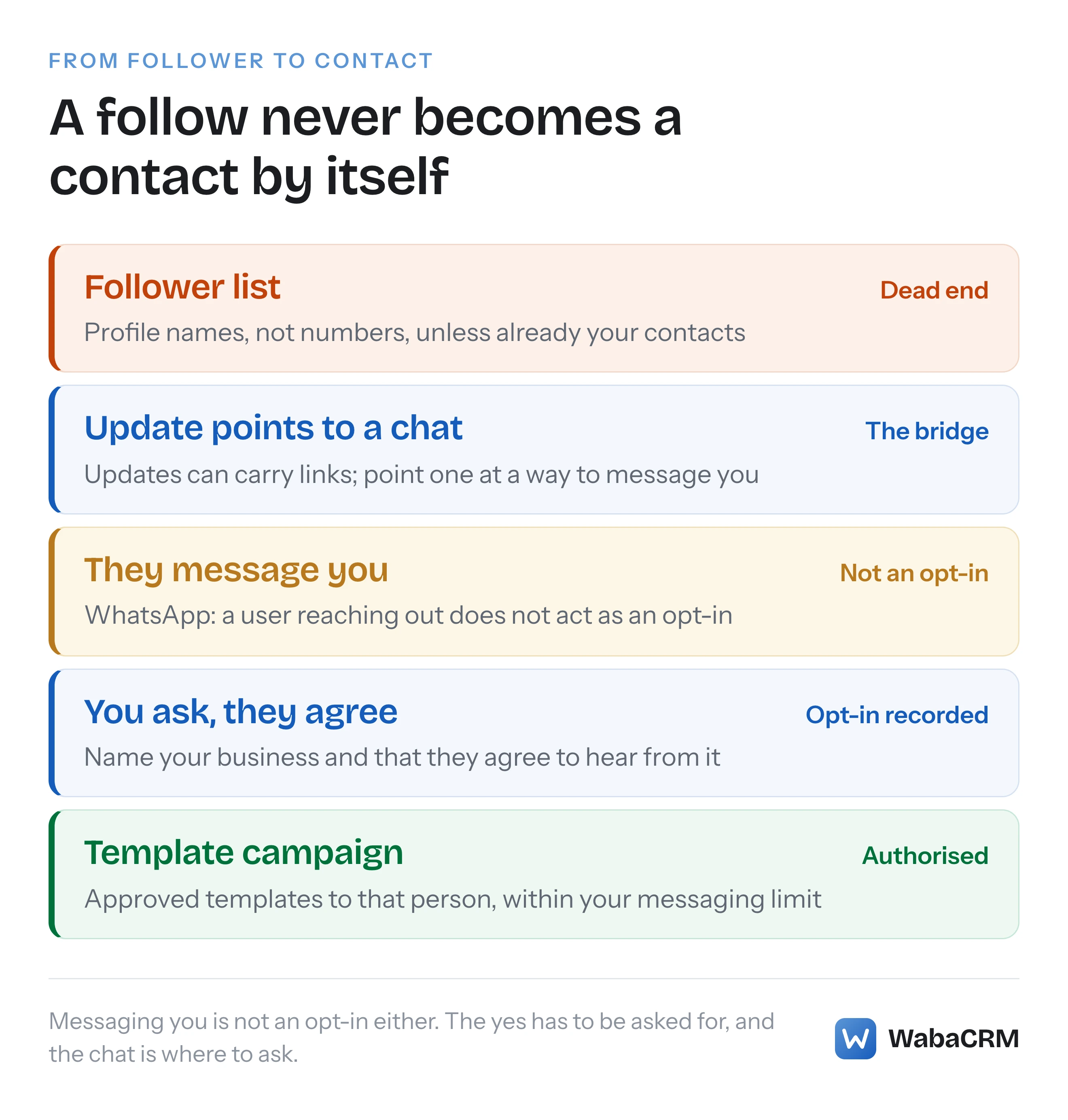
That one design decision settles most of the "channel vs broadcast" question for a business. A channel builds reach: anyone can find it, and WhatsApp says "With a channel, you can share one-way updates to an unlimited audience." (WhatsApp Help Center — About creating a WhatsApp Channel) A broadcast list, or a template campaign on the WhatsApp Business Platform, builds relationships with specific people whose numbers you hold. The two do not convert into each other. A thousand followers do not become a thousand contacts, and nothing on WhatsApp's channel pages offers a way to turn one into the other.
The common mistake is treating a channel as a free broadcast list that has no 256-contact ceiling. It is a different object, aimed at a different audience, and it hands the business a different kind of information about each person.
- What is the difference between a WhatsApp Channel and a broadcast?
- How do channels, broadcast lists, groups and API campaigns compare?
- Where does a channel update land compared with a broadcast message?
- Can WhatsApp Channel followers reply to a business?
- Can a channel admin see followers' phone numbers?
- Can you message channel followers one to one later?
- Is there a WhatsApp Channels API on the Cloud API?
- What do WhatsApp Channel insights show, and when?
- Is everything posted to a WhatsApp Channel public?
- Can a channel help you build an opted-in contact list?
- When is a WhatsApp Channel the right tool for a business?
How do channels, broadcast lists, groups and API campaigns compare?
They differ on three axes that matter to a business: how many people they reach, whether those people can answer, and what the business learns about each one. Read across a row rather than down a column.
| Tool | Audience size | Can people reply? | What the business gets |
|---|---|---|---|
| WhatsApp Channel | "Unlimited audience" | Reactions and polls only | Profile names, not numbers |
| Broadcast list | 256 contacts per list | Yes, in a private chat | Contacts who saved your number |
| Group | Up to 1,024 members | Yes, to the whole group | One shared thread |
| Template campaign | 250 people per 24h at first | Yes, opening a service window | Opted-in numbers you hold |
Each figure comes from WhatsApp's or Meta's own pages. The channel figure is from WhatsApp's page on creating a channel. The broadcast list limit sits beside the requirement that "all contacts in the broadcast list have saved your number in their address book" (WhatsApp Help Center — How to use broadcast lists). Groups: "You can create a WhatsApp group with up to 1024 members" (WhatsApp Help Center — How to create and invite into a group). On the WhatsApp Business Platform, "Newly created business portfolios have a messaging limit of 250", counted in unique people over a moving 24-hour period and rising with quality (Meta — Messaging limits). What each of those ceilings really caps is a longer story, told in what actually caps your WhatsApp reach.
The last column is the one people skip, and it is the one that decides what a business can do next. A channel is the only one of the four that gives you nothing you can message, and only the template campaign rests on a recorded opt-in that lets you start the next conversation yourself.
Where does a channel update land compared with a broadcast message?
A channel update lands in the Updates tab, silently by default; a broadcast or template message lands in the Chats tab as a private message from you. WhatsApp describes the channel side:
"Channel updates appear in a separate tab of the app (the Updates tab), away from your personal chats and calls." (WhatsApp Help Center — About WhatsApp Channels)
And it sets the notification default against the business: "Notifications are muted by default. To get notified about new updates, you can turn on notifications for each channel." A follower who never changes that setting sees your update only when they open the Updates tab and scroll to it.
A broadcast is the opposite placement. WhatsApp says recipients "receive a message from your broadcast list as an individual message from you in their Chats tab. Their reply will also appear as an individual message and won’t be sent to other contacts in the broadcast list." The catch is in the requirements on the same page: "Only people who’ve added you to their phone's contacts will receive your broadcast message."
For time-sensitive messages, that difference is the whole decision. An order update, a payment reminder or an appointment change belongs in the chat, where the person will see it and can answer. A new-arrivals announcement can live in the Updates tab, where people browse when they choose to.
Can WhatsApp Channel followers reply to a business?
No. Followers can react with an emoji or vote in a poll, and that is the full extent of it. WhatsApp's page for channels on the WhatsApp Business app repeats the rule in business terms:
"Customers who follow you can’t reply directly to updates or send messages to channel admins. Instead they can show their interest in a channel’s content by adding emoji reactions to channel updates or voting on polls." (WhatsApp Help Center — About channels on the WhatsApp Business app)
So a channel cannot take an order, answer a question or handle a complaint. Anyone who wants to ask you something has to leave the channel and find another way to reach you. If the update gives them that way, through a link or a number in the text, the question arrives as a normal chat; if it does not, the question is lost.
Groups sit at the other extreme. Unless an admin restricts who can send, every member can talk to every other member, which suits a small community and suits a business announcement badly, because one customer's complaint is now visible to everyone else in the group. The WhatsApp Business Platform has a separate Groups API with rules of its own, covered in the WhatsApp Groups API and its limits.
Can a channel admin see followers' phone numbers?
No, not unless you and the follower are already contacts. WhatsApp's privacy page for channels sets out exactly what an admin sees:
"Admins can see your profile name and, depending on your profile settings, your profile photo and how you interact with their channel content." (WhatsApp Help Center — About safety and privacy on channels)
The exception is the one that creates the confusion: "Channel admins who’re also contacts can see all parts of your profile like your name, full phone number, and profile photo." In other words, a channel shows a full phone number only where a contact relationship already exists. For everyone else it shows a profile name, and a follow does not create that relationship.
The privacy runs the other way too. On the business side, WhatsApp says "Followers won’t see your WhatsApp Business profile name, picture, or your phone number." A channel is deliberately insulated from the account that runs it, which protects both sides and means a follower cannot simply tap through from the channel into a chat with you. Any route into a chat has to be written into the update itself.
Can you message channel followers one to one later?
Only the followers who are already your contacts, and the message then comes from your account, not from the channel. WhatsApp's insights page describes what the follower list lets an admin do:
"Quickly interact with followers who are also your contacts — clicking on a contact will open a new private message in the Chats tab and messages will come from your WhatsApp profile, not your channel." (WhatsApp Help Center — How to see channel metrics and insights)
The same page lists everything else the follower list offers: how many people follow, and each follower's profile name and, where their settings allow, profile photo. Exporting the list is not among them, and nothing on the page offers a number for a follower who is not a contact.
Even with a number in hand, the policy question would remain. WhatsApp's Business Messaging Policy, last updated 23 September 2026 when we read it, says businesses "may only contact people on WhatsApp if: (a) they have given you their mobile phone number or username; and (b) you have received opt-in permission from the recipient confirming that they wish to receive subsequent messages or calls from you" (WhatsApp Business Messaging Policy). A follow meets neither condition. The follower gave you a profile name and a tap, not a number and a permission. What an opt-in has to say covers the second condition in detail.
Is there a WhatsApp Channels API on the Cloud API?
No, and Meta says so in a table rather than leaving it to inference. Its guide to onboarding WhatsApp Business app users lists each Business app feature against the question "Is the WhatsApp Business app feature supported on Cloud API?", and the row for Channels answers "Not supported." (Meta — Onboard WhatsApp Business app users) The rest of the documentation agrees. Read on 17 October 2026, the WhatsApp Business Platform navigation has sections for messages, templates, Groups, Calling, catalogs and payments, and the word "channel" appears nowhere in it. The Messages API itself has two kinds of recipient. Meta's common send syntax:
{
  "messaging_product": "whatsapp",
  "recipient_type": "<RECIPIENT_TYPE>",
  "to": "<WHATSAPP_USER_PHONE_NUMBER>",
  "type": "<MESSAGE_TYPE>",
  "<MESSAGE_TYPE>": {<MESSAGE_CONTENTS>}
}
The page then explains the field that would have to carry a channel if one existed: "The recipient_type property can be either individual for 1:1 messaging, or group for group messages." (Meta — Service messages) There is no third value. Every Platform message is addressed to a person or a group, and a person is addressed by their phone number in the to field or, since Meta added usernames, by a business-scoped user ID in recipient. A channel hands you neither.
Channels are created and run in the apps. WhatsApp's guide to creating one (WhatsApp Help Center — How to create a WhatsApp Channel) walks through "Create channel", a name, an optional description and icon, and invitations to contacts, all inside WhatsApp or the WhatsApp Business app.
Some vendors sell channel posting through an API anyway. Since Meta's own table marks Channels as not supported on the Cloud API, ask any such vendor which Meta API it calls. WhatsApp's Terms of Service forbid people to "create software or APIs that function substantially the same as our Services and offer them for use by third parties in an unauthorized manner" (WhatsApp Terms of Service), so the answer matters to the account you connect.
What do WhatsApp Channel insights show, and when?
They show growth, reach and follower counts, but not below 100 followers and not in real time. The notes on WhatsApp's insights page, read on 17 October 2026:
- "Insights are in development and we’re testing to find the best way to measure and report them."
- "Reported numbers may be delayed by about a week."
- "Channel insights aren’t available for channels with fewer than 100 followers."
The reach figure needs careful reading. "Accounts reached" is "The number of WhatsApp accounts who viewed any of your updates at least once in the past 30 days", and the page says that total "Includes both followers and non-followers" and "Includes admin views". A channel can therefore report more accounts reached than it has followers, and the number includes your own team.
Set that beside what a template campaign on the Platform reports. Meta says the send call only confirms acceptance and that "You receive delivery status via messages webhooks instead" (Meta — Service messages), so each message to each recipient gets its own delivery status, attached to a person you can identify. The channel figures are audience measurement; the campaign figures are delivery records. A business that needs to know whether a specific customer received a specific message needs the second kind.
Is everything posted to a WhatsApp Channel public?
Yes, by design. WhatsApp's Channels privacy policy, effective 4 August 2025, says so near the top:
"Channels are public, meaning that anyone can discover, follow, and view your Channel. Given the public nature and unlimited audience size of Channels, Channel Content will be visible to any user and by WhatsApp." (WhatsApp Channels Supplemental Privacy Policy)
For anyone who has accepted WhatsApp's newer Supplemental Terms of Service for Status and Channels, that document is replaced by the WhatsApp Status and Channels Supplemental Privacy Policy, which says Channel Updates "are public and available to others, subject to any audience, subscription or privacy settings" (WhatsApp Status and Channels Supplemental Privacy Policy). Both versions keep the 30-day limits below.
The original policy sets the retention rule: "In the ordinary course of providing Channels, we store Channel Content and Channel Subscription Updates on our servers for up to 30 days, subject to safety, security and integrity purposes or other legal or compliance obligations that may require longer retention." It also says "Channel Admins can remove Channel Content up to 30 days after posting." Posts can outlive that on followers' phones; the policy notes content "may remain on Viewers’, Followers’ or subscribers’ devices for a longer period".
Two practical consequences follow. Nothing customer-specific belongs in a channel: no names, no order numbers, no prices agreed with one buyer. And the Channels Guidelines set content rules of their own, including that channels "should not be used to facilitate commercial sexual services, or to offer and/or transact in regulated or restricted goods" (WhatsApp Help Center — WhatsApp Channels Guidelines). The same guidelines ask admins to "avoid sending too many or low-quality updates which could lead recipients to unfollow their Channel."
Can a channel help you build an opted-in contact list?
Yes, but only indirectly: the channel can invite people to start a private chat, and the opt-in is then asked for there, never inferred from the follow. Channel updates can carry links, so an update can point people to wherever they can message your business. When someone does, two things are true at once. You now have a way to reach them, usually their number, because they wrote to you. And you still do not have permission to market to them, because WhatsApp says so in its policy guidance:
"Note: A user reaching out to a business doesn’t act as an opt-in. The user must still opt in to receive future proactive messages from the business on WhatsApp." (WhatsApp Help Center — How to comply with the WhatsApp Business Messaging and Commerce policies)
So the chat has two jobs: answer what they asked, and ask, plainly and with your business named, whether they want offers or updates from you on WhatsApp. Only a yes turns a follower into a contact a template campaign may reach. That conversation happens in a one-to-one thread, which is where a shared WhatsApp inbox for a team earns its keep.
In WabaCRM, a campaign's audience is drawn only from contacts who have a phone number, have broadcasts switched on, are not blocked and have not opted out, so a follower who has never written to you cannot be in it. Know one thing about the moment they do write: a contact created by an inbound WhatsApp message starts with broadcasts switched on, because WabaCRM treats an inbound message as the start of a messaging relationship. WhatsApp's note above says that message is not an opt-in by itself, so ask for the yes in the chat and keep broadcasts off on that contact until you have it.

When is a WhatsApp Channel the right tool for a business?
When the message is for anyone who cares to look, needs no answer, and does not depend on reaching a particular person. WhatsApp itself points people to channels when broadcasting runs out. Its page on broadcast limits, which describes a monthly limit "rolling out gradually" in some countries, says "You can send up to 35 free broadcast messages per month" and then: "If you want to send more messages to more people, you can use status updates and channels to message many people at once." (WhatsApp Help Center — About broadcast limits) The page is written for WhatsApp users in general, and adds that businesses "can get more advanced messaging tools on the WhatsApp Business app."
Good channel material looks like a public notice board: new stock, opening hours over a festival, a recipe, a class schedule, a short video. Poor channel material is anything that needs a reply, a personal detail or a guarantee of delivery, which is most of what a business sends day to day. Order confirmations, payment reminders, appointment changes and support answers belong in chats, through templates where the conversation is yours to start and free-form replies where the customer started it. The WhatsApp Business app compared with the API covers which of those two a business needs for the chat side.
WhatsApp is also building commercial features around channels. Its ads page for Status and Channels, read on 17 October 2026, lists promoted channels, which "help businesses and creators get discovered by boosting their channel in the directory", and channel subscriptions, where "people can support their favorite channel by subscribing to receive exclusive updates for a monthly fee" (WhatsApp Business — Ads in Status and Channels). Both make a channel a better place to be found. Neither changes what a follower is: someone who chose to watch, not someone who agreed to be messaged.
The sensible arrangement for most businesses is both, doing different jobs. The channel collects attention from people who do not know your number yet. The chat, with an opt-in asked for properly, turns the ones who write to you into customers you can reach again.
Every Meta quotation on this page was read from Meta's own documentation on 17 October 2026. Meta changes that documentation without notice; the linked pages are authoritative and this one is not.
Questions people also ask
Does posting to a WhatsApp Channel cost anything?
Will customers see my business phone number if they follow my channel?
How many people can help run a WhatsApp Channel?
Can I see who reacted to or voted on a channel update?
Do people need my number saved to follow my WhatsApp Channel?
- whatsapp channel vs broadcast
- whatsapp channels for business
- whatsapp channel api
- whatsapp channel followers phone number
- whatsapp channel insights
- whatsapp broadcast list