Can You Delete a WhatsApp Message Sent by the Cloud API?
The short answer
No. The WhatsApp Cloud API's Message API reference documents a single operation, POST /{Version}/{Phone-Number-ID}/messages, and no delete, edit or recall. A business message that has reached Meta cannot be taken back. Revoke and edit webhooks exist only for Coexistence numbers and only report deletions and edits people make inside WhatsApp (checked October 2026).
Can you delete a WhatsApp message sent through the Cloud API?
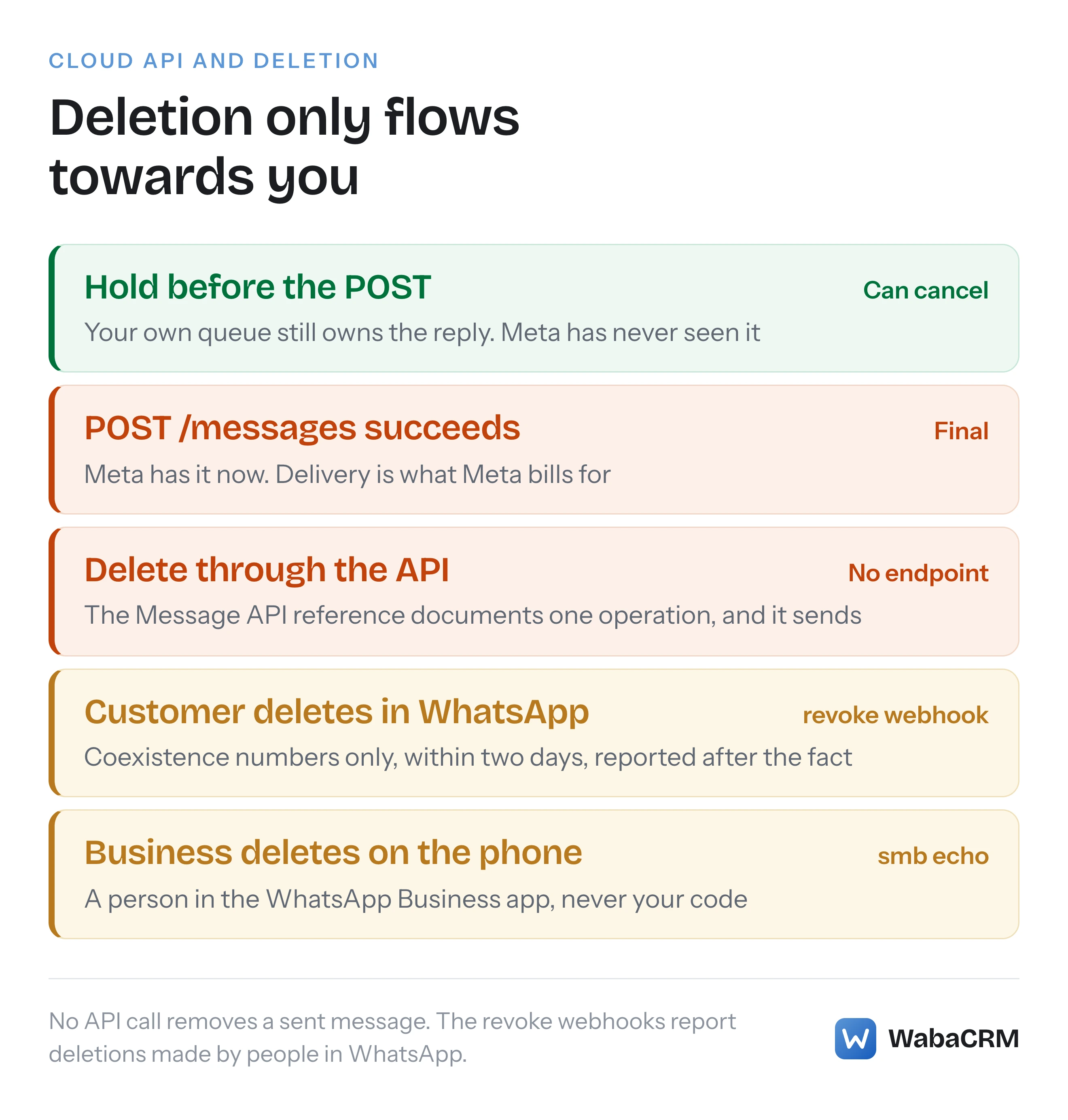
No. The WhatsApp Cloud API gives a business no way to delete, recall or edit a message after sending it. Meta's Message API reference documents a single operation on the messages endpoint, and that operation sends. A reply that went to the wrong customer, or quoted the wrong delivery date, stays on the customer's phone, and no Graph call removes it.
The question gets asked for a good reason. Anyone who uses WhatsApp on a phone has seen "This message was deleted" in a chat and has probably used Delete for everyone themselves. The Cloud API is a different surface with a narrower contract. Deleting and editing do exist on the WhatsApp Business Platform, but only as events reported to you after a person has deleted or edited something inside a WhatsApp app. They flow towards your system, never away from it.
So the useful questions are different ones: what Meta actually documents, what your webhook receives when a customer deletes, the narrow points at which a message can still be stopped, and what to do once it cannot.
- Can you delete a WhatsApp message sent through the Cloud API?
- What does Meta's Message API reference actually list?
- Why can people delete for everyone in WhatsApp but not through the API?
- What do the revoke and edit webhooks tell your system?
- Can a business delete a message from the WhatsApp Business app instead?
- Is there any point at which a sent WhatsApp message can still be stopped?
- Can you edit a WhatsApp message after sending it through the API?
- What should you do after sending the wrong WhatsApp message?
- How does WabaCRM offer an undo if Meta has no delete?
- How should your system store a WhatsApp message the customer deleted?
What does Meta's Message API reference actually list?
One endpoint and one method: POST /{Version}/{Phone-Number-ID}/messages, which Meta summarises as "Send Message." There is no DELETE, no PATCH, and no recall or revoke call anywhere on the page.
Meta's description of the API is broad, which is part of why people expect more from it:
"Send and receive WhatsApp messages including text, media, templates, interactive messages, reactions, and more. Supports message status tracking, delivery receipts, and read confirmations." (Meta — WhatsApp Cloud API, Message API reference)
Read the request examples on that reference and the pattern is plain. Every one is a variation on sending: "Send Text Message", "Send Reply to Text Message", "Send Reply with Reaction Message", "Send Image Message by ID", and on through audio, documents, stickers, video, contacts, locations, templates and Flows. The single entry that is not a send is "Send typing indicator and read receipt", which is a status update on a message the customer sent you. We read the reference in a browser on 17 October 2026 and searched it for DELETE, edit, revoke and recall. The only hits were links in the documentation menu, among them the edit and revoke webhook references.
POST https://graph.facebook.com/{Version}/{Phone-Number-ID}/messages
That line is the whole outbound surface for messages. A text, a template, a reaction and a read receipt are all bodies posted to it, and none of those bodies means "remove".
The status webhook confirms the same contract from the other direction. Meta lists the values a status can carry as delivered, failed, played, read and sent (Meta — Status messages webhook reference). There is no deleted status for a message you sent, because nothing you can do produces one.
Why can people delete for everyone in WhatsApp but not through the API?
Because Delete for everyone belongs to the WhatsApp apps people hold, not to the Business Platform's API. WhatsApp's own help centre describes it in those terms:
"You can delete messages you sent just for yourself or request that messages be deleted for everyone. If you want to edit a message instead, you can for up to 15 minutes after sending." (WhatsApp Help Center — How to delete messages)
The same article sets the limit: "You have two days after you’ve sent a message to request to Delete for everyone." It is also candid that the feature is a request rather than a guarantee: "Recipients might see your message before it's deleted or if deletion wasn’t successful," and "You won’t be notified if deleting for everyone wasn’t successful."
Those two sentences matter even in a world where an API delete existed. A deletion races the reader. A customer with the chat open reads a message within seconds of it arriving, so even the consumer feature is a courtesy, not an eraser.
None of those controls is exposed to a business sending through the Cloud API. The two-day and 15-minute windows describe what a person can do in the app. On the Business Platform they reappear only as the triggers for two webhooks.
What do the revoke and edit webhooks tell your system?
They tell you that a customer deleted or edited a message they had already sent you, and they exist only for numbers onboarded through Coexistence. Neither is something your system can trigger.
Meta's revoke webhook reference opens with its scope:
"The revoke webhook is only available to WhatsApp Business app users (aka “Coexistence”)" (Meta — Revoke messages webhook reference)
Its two triggers are "A WhatsApp user revokes (deletes) a previously sent message." and "A WhatsApp user revokes a previously sent message within two days after being sent." The edit reference is built the same way, with the same Coexistence-only line, and triggers of "A WhatsApp user edits a previously sent message (text, media with caption)." and "A WhatsApp user edits a previously sent message within 15 minutes after it was sent." (Meta — Edit messages webhook reference)
Those windows match the consumer limits exactly: two days to delete, 15 minutes to edit. Meta brought both webhooks to Coexistence on 25 November 2025, in a changelog entry that reads "The following messages event webhooks are now supported for Coexistence in Embedded Signup:" followed by "Edit messages" and "Revoke messages" (Meta — WhatsApp changelog).
The revoke arrives on the ordinary messages field, shaped like any inbound message, with a revoke object pointing at what was deleted. Trimmed to the part that matters, from Meta's syntax:
"messages": [
  {
    "from": "<WHATSAPP_USER_PHONE_NUMBER>",
    "id": "<WHATSAPP_MESSAGE_ID>",
    "timestamp": "<WEBHOOK_TRIGGER_TIMESTAMP>",
    "type": "revoke",
    "revoke": {
      "original_message_id": "<ORIGINAL_WHATSAPP_MESSAGE_ID>"
    }
  }
]
Meta describes original_message_id as the "ID of the original message being revoked (deleted)." The webhook also carries its own id, which Meta's parameter table calls the "WhatsApp message ID for the revoke event". A handler that files every inbound id as a fresh message will add a ghost row to the chat. The edit payload carries the same original_message_id beside a message object holding the new content, such as an image with its updated caption.
One discrepancy is worth building for. The edit reference as rendered in a browser, marked "Updated: Jul 20, 2026", says nothing about edits being unsupported. The "View as Markdown" export linked from the top of that same page still opened, when we fetched it on 17 October 2026, with: "Edit messages are temporarily unsupported. Edited messages are currently delivered as an unsupported message type webhook instead of an edit webhook." The Markdown export of Meta's mark-as-read page was also missing the group-message note that Meta's changelog dates to 14 May 2026, which suggests the exports lag the pages. Trust the rendered page, and let your handler cope with an edit arriving as type: unsupported as well.
On a standard Cloud API number you receive neither webhook. The customer's deletion happens on their phone and your records keep the original. If nothing reaches your endpoint at all, the cause is usually upstream, and why a verified webhook can still receive nothing walks through it.
Can a business delete a message from the WhatsApp Business app instead?
On a Coexistence number, a person holding the phone can delete from the WhatsApp Business app, and your system is told afterwards. That is a human action in the app, not an API call, and it exists only where the number lives in both places.
Meta's smb_message_echoes reference describes the field as one that "notifies you of messages sent via the WhatsApp Business app or a companion (“linked”) device by a business customer who has been onboarded to Cloud API via a solution provider" (Meta — smb_message_echoes webhook reference). Its triggers include "A business customer revokes (deletes) a previously sent message using the WhatsApp Business app." and "A business customer edits a previously sent message using the WhatsApp Business app." The example payload uses the same revoke object and original_message_id as the customer-side webhook.
Two cautions before anyone builds a process around this. It needs a Coexistence number and a person with the handset, so it cannot be scripted through the Cloud API. And Meta's page describes the trigger and nothing more: it does not say whether a message your system sent through the API, rather than one typed on the phone, can be deleted from the app that way. Do not read it as a promise. If Coexistence is new to you, how Coexistence keeps one number on the app and the API covers the setup, and what stops working under Coexistence covers the trade-offs.
| Action | Who does it | What reaches your system |
|---|---|---|
| Send through the API | Your code | A message id in the response |
| Delete through the API | Nobody | No endpoint exists |
| Customer deletes in WhatsApp | The customer | revoke, Coexistence only |
| Customer edits in WhatsApp | The customer | edit, Coexistence only |
| Delete in the Business app | A person on the phone | revoke on the echoes field |
Is there any point at which a sent WhatsApp message can still be stopped?
Only before your server calls the API, or when WhatsApp cannot deliver the message within its time-to-live. Once the POST succeeds there is no cancel, and once the message is delivered there is nothing left to stop.
Time-to-live is the one Meta mechanism that ends a message without delivering it. Meta's TTL page says WhatsApp retries an undeliverable message "for a period of time known as time-to-live (“TTL”), or the message validity period", and then: "The system drops messages that cannot be delivered within the default or customized TTL." (Meta — Configure message time-to-live) What you can change is narrow: "You can customize the default TTL for authentication and utility templates sent via Cloud API, and for marketing templates sent via Marketing Messages API for WhatsApp." A custom TTL is set on the template in advance. It is an expiry date chosen before sending, not a recall you trigger afterwards, and Meta's advice for spotting the outcome says as much: "If you do not receive a delivered message webhook before the TTL is exceeded, assume the message was dropped."
The other point of control is your own queue. Until your server makes the POST, the message is yours. Any honest undo a business tool offers is built here: hold the send for a few seconds and let the person who wrote it cancel during the hold. The cost is that every reply waits that long, which is why a hold measured in minutes is a bad idea.
Billing follows the same line. Meta's pricing page states: "Businesses are only charged when a message is delivered. Meta does not charge for messages sent." (Meta — Pricing on the WhatsApp Business Platform) A reply cancelled in your own queue never reached Meta and is never billed. A message delivered and then regretted has already counted as delivered for billing, and hiding it in your software does not change that.
Can you edit a WhatsApp message after sending it through the API?
No. The reference that has no delete has no edit either, and the edit webhook only describes edits a customer, or a person in the Business app, made inside WhatsApp. A business sending through the Cloud API cannot change a message's text after the fact.
What you can do is send a correction that is visibly tied to the mistake. The reference's request examples include "Send Reply to Text Message" and a reply variant for every media type, which thread a new message onto an earlier one so the customer sees the correction quoted against the original. That is not an edit. Both messages remain, and the first is still on the customer's screen. But it reads as a correction rather than a second, contradictory message, and anyone scrolling the chat later sees which one replaced which.
The same applies to templates. A template's wording is approved in advance and fixed at send time, so a wrong value in a variable, a wrong name or a wrong order number can only be answered by another message. While the customer's service window is open, that can be a free-form reply. Once it has closed, the correction has to be a template too, for the reasons covered in error 131047 and the 24-hour window, so it is worth keeping one approved for exactly this purpose.
What should you do after sending the wrong WhatsApp message?
Act on what the customer has, not on what your database shows. Deleting or hiding the row on your side changes your records and nothing else.
- Stop anything still queued. If the mistake came from a template, a campaign or an automation, pause the rest before more go out. Each one not sent is one fewer to explain, and one fewer billable delivery.
- Send the correction as a reply to the original, quickly and plainly: "Sorry, the delivery date in my last message was wrong. Your order arrives on Friday." Short, specific and owned.
- Do not tell the customer it has been deleted. It has not. Promising that a message is gone while it sits on their phone is worse than the original mistake.
- If someone received another person's details, treat it as a data incident under your own policy rather than as a messaging problem. Nothing in the API can pull the data back, so the response is notification and record-keeping.
- Note what happened on the conversation, so whoever reads the thread next understands why there are two messages and which one stands.
The order matters. Step 1 limits the damage and step 2 repairs what has already landed. Most of the time the customer reads the correction a few seconds after the mistake, and a clear correction resolves it.
How does WabaCRM offer an undo if Meta has no delete?
By holding a reply before it reaches Meta, and by letting an owner hide a message inside the workspace while saying, every time, that the customer keeps it. Neither control touches the customer's copy, because no control can.
The hold is a workspace setting: Settings → Undo send → Hold replies for, anywhere from 0 to 30 seconds, with 10 as the default. While a reply is held, its bubble shows Sending in Ns with an Undo link. Undo inside the hold and the bubble reads "Undone before it was sent. WhatsApp never received it, so the customer never saw it." Press it too late and the answer is "Too late — that message has already gone to WhatsApp. It cannot be taken back." Only replies a person sends from the inbox are held. Campaigns, drip sequences, chatbots, automations and the API are never held, and a hold of 0 removes the Undo control altogether rather than offering one that can only fail.

The second control is Remove from this inbox, which among the built-in roles only Owner and Admin hold. It hides a message's text, caption and file from everyone in the workspace, records who did it in the activity log, and can be reversed with Put it back. The bubble that stands in for the message says: "The customer still has their copy — WhatsApp gives us no way to delete a message once it has been sent." The default Agent role does not hold it, so an agent cannot quietly remove the record of what they said to a customer.
On a Coexistence number, deletions made inside WhatsApp are applied as well. A customer's reads "This message was deleted by the customer." and one made on the business's own phone reads "You deleted this message on the phone." How one inbox serves a whole team is covered in the WhatsApp shared inbox.
| Control | What it changes | What the customer sees |
|---|---|---|
| Undo during the hold | The reply is never sent | Nothing, ever |
| Remove from this inbox | Hidden for the workspace | Their copy, unchanged |
| Customer deletes (Coexistence) | Text hidden, row kept | Their own deletion |
How should your system store a WhatsApp message the customer deleted?
Keep the row and mark it, rather than deleting it. A revoke is an amendment to a message you already hold, not a new message and not an instruction to destroy your records.
A handler that gets this right does five things:
- Matches
original_message_idagainst your stored message ids, scoped to the same business phone number, and marks that message as deleted at the revoke's timestamp. - Hides the text everywhere it can be read, not only in the chat view. Search, exports, API responses, AI transcripts and outgoing webhook forwards all read message bodies, and a deletion hidden in one place leaks through the others.
- Does not treat the revoke as customer activity. It should not raise an unread count, wake a chatbot or trigger an automation. The revoke carries its own message id, and filing it as an ordinary inbound message is the common mistake.
- Copes with a revoke whose original you never stored, for example a message sent before the number was connected. Record it and move on; do not create a placeholder message from nothing.
- Keeps the fact that a deletion happened. The customer chose to remove the words, so hide them. The record that a message existed and was withdrawn is still yours.
In outline:
if (msg.type === 'revoke') {
  const target = findMessage(phoneNumberId, msg.revoke.original_message_id);
  if (target) markDeleted(target, msg.timestamp); // hide body, caption, media
  recordAmendment(msg);                          // never a new chat message
  return;                                        // no unread, no bots
}
Edits follow the same shape, with the new content from edit.message replacing what is shown. It is the same discipline as handling the unsupported message type behind error 131051: the webhook tells you something happened to content, and your job is to record it honestly rather than invent a message that was never sent.
Every Meta quotation on this page was read from Meta's own documentation on 17 October 2026. Meta changes that documentation without notice; the linked pages are authoritative and this one is not.
Questions people also ask
Does removing a WhatsApp message from my CRM remove it from the customer's phone?
How long does a customer have to delete a message they sent to a business?
Does Meta refund a WhatsApp message that was sent by mistake?
Why did my webhook receive a message with type revoke?
Can I stop a WhatsApp campaign template that has already been sent?
- whatsapp cloud api delete message
- whatsapp api delete for everyone
- whatsapp revoke webhook
- whatsapp api edit sent message
- original_message_id