WhatsApp Templates in Hindi: Every Indian Language Code
The short answer
WhatsApp Cloud API templates can be written in Hindi with the code hi. Meta's list also carries Bengali (bn and bn_IN), Gujarati (gu), Kannada (kn), Malayalam (ml), Marathi (mr), Punjabi (pa), Tamil (ta), Telugu (te), Urdu (ur) and English (IND) en_IN. Odia and Assamese have no code, and neither does Hinglish (checked October 2026).
Can a WhatsApp template be written in Hindi?
Yes. Hindi is on Meta's list of supported languages for WhatsApp Cloud API message templates, with the code hi, and a template submitted under that code is expected to carry its text in Hindi. The list opens with one plain sentence:
"Cloud API message templates support the following languages and language codes." (Meta — Supported languages)
When I read that page on 16 October 2026 it was marked "Updated: May 21, 2026" and held 111 language and locale codes, from Afrikaans af to Zulu zu. Twelve of those codes are Indian languages or India-specific locales. Several that people search for are not there at all, and there is no code for Hinglish.
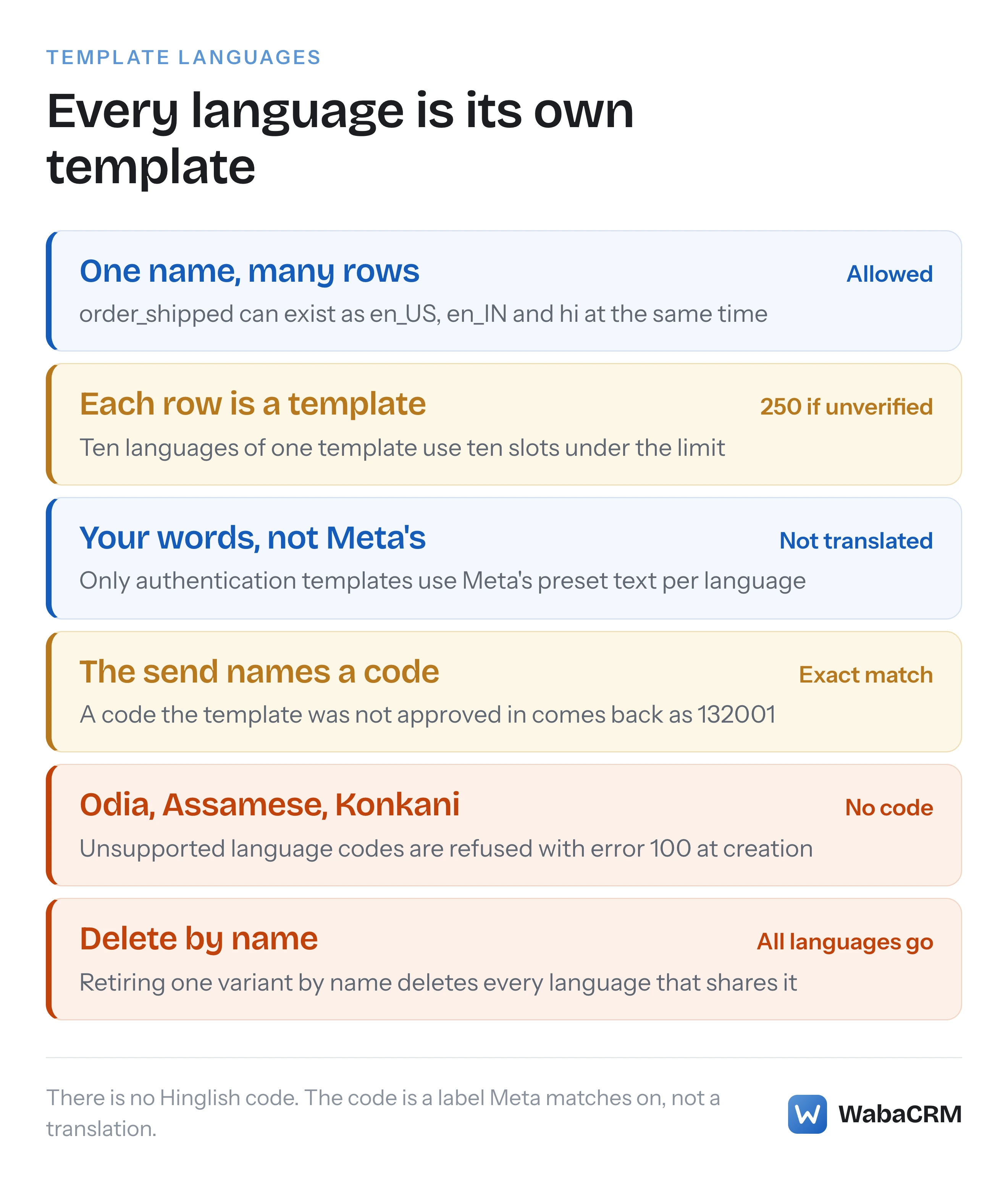
The list is the easy part. What catches Indian businesses out is how the language code behaves once a template exists. The code is a label you attach at creation, Meta matches every send against it exactly, Meta does not translate your words into it, and every language you add is a separate template with its own review and its own slot under your template limit. A campaign planned in five languages is five templates, five reviews and five chances to send a code the template does not exist in.
- Can a WhatsApp template be written in Hindi?
- Which Indian languages can a WhatsApp template use?
- Why are Odia and Assamese missing from Meta's list?
- What language code should a Hinglish template use?
- Is en_IN any different from en or en_US?
- Does Meta translate a template into Hindi for you?
- How do you add a Tamil or Marathi version of an existing template?
- How many template slots do ten languages use?
- Will Meta reject a template whose text does not match its language?
- How does the send request choose which language goes out?
- Does a Hindi template cost more than an English one?
Which Indian languages can a WhatsApp template use?
Ten languages from the Eighth Schedule of India's Constitution have a template code on Meta's list, plus English (IND). The rows below are copied from Meta's page as it read on 16 October 2026, in Meta's own spelling and order:
| Language, as Meta names it | Code | Worth knowing |
|---|---|---|
| Bengali | bn |
Listed alongside an India variant |
| Bengali (IND) | bn_IN |
A separate code from bn |
| English (IND) | en_IN |
A separate code from en and en_US |
| Gujarati | gu |
One code only |
| Hindi | hi |
One code only |
| Kannada | kn |
One code only |
| Malayalam | ml |
One code only |
| Marathi | mr |
One code only |
| Punjabi | pa |
One code only |
| Tamil | ta |
One code only |
| Telugu | te |
One code only |
| Urdu | ur |
One code only |
Bengali and English are the only two in that set with an India-specific locale code. Hindi, Tamil and the rest each have a single code, so there is no regional variant to choose between.
The government's own list of the 22 Languages Included in the Eighth Schedule of the Indian Constitution, published by the Department of Official Language, is the useful comparison. Ten of the 22 appear on Meta's template list. The twelve that do not are Assamese, Bodo, Dogri, Kashmiri, Konkani, Maithili, Manipuri, Nepali, Oriya (Odia), Sanskrit, Santhali and Sindhi. I searched Meta's page for every one of those names, and for the spelling Odia, on 16 October 2026 and found none.
Why are Odia and Assamese missing from Meta's list?
Meta does not say. The supported-languages page is a bare table with no notes, no roadmap and no explanation of how a language gets added, so any reason offered elsewhere is a guess, and this page will not add another one.
What is documented is the consequence. Meta's template management page states how the API treats a code that is not on the list:
"Invalid categories or unsupported language codes return error code 100." (Meta — Template management)
So a template filed under a code that does not appear in the table has nowhere to go. For a business whose customers read Odia or Assamese, two routes remain open, and both are about where a template stops and a conversation starts.
The first is to write the template in a listed language your customers also read. Which one that is depends on your customers, and only you can judge it.
The second is to keep the template short and use it to invite a reply, then continue in the customer's own language once they answer. Meta's template fundamentals page is explicit about where templates are compulsory:
"Template messages are the only type of message that can be sent to WhatsApp users outside of a customer service window." (Meta — Template fundamentals)
Inside an open window, an agent sends free-form text, and a WhatsApp text message has no language field at all: in Meta's text message request syntax the text object holds a body and an optional preview_url flag. The language list governs templates, not every message you send.
What language code should a Hinglish template use?
There is no Hinglish code, and Meta publishes no rule about Hindi written in Latin letters. On 16 October 2026 I searched four of Meta's template pages (supported languages, template fundamentals, template review and template management) for "Hinglish" and "transliteration" and found neither word.
That leaves the choice to you, and it is less fraught than it looks, because the code is a matching label rather than an instruction to Meta. Most businesses file Hinglish under hi or en_IN. The deciding question is how your sending system picks a code for each contact, since the send request must name a code the template exists in.
One thing to avoid is submitting the same Hinglish wording under two codes as a hedge. Meta's duplicate rule is written without any language exception:
"If a template is submitted with the same wording in the body and footer of an existing template, the duplicate template will be rejected." (Meta — Template review)
The same page adds that the rejection notice lets you "see the name and language of the existing template with the same content as the rejected duplicate template", which reads as a check that looks across languages, not within one. Pick one code for a given wording and keep to it.
Some vendor guides say Meta rejects Hinglish templates for a language mismatch. The review page does not list that reason, which is covered in its own section below.
Is en_IN any different from en or en_US?
To Meta's matching, yes: they are three separate codes, and a template approved under one does not exist under the others. Meta's list carries sixteen English codes, from plain English en through English (US) en_US and English (UK) en_GB to English (IND) en_IN. Choosing one changes nothing about your words, because Meta does not rewrite spelling or text for a locale. It only changes which code a send has to name.
The practical consequence is an error at send time. Meta's error reference describes code 132001 like this:
"The template does not exist in the specified language or the template has not been approved." (Meta — WhatsApp error codes)
A template created as en_IN and sent as en_US, or the other way round, fails exactly this way, even though a human would call them the same language. Template names are unique per language, which is why the two can coexist:
"Template names must be unique within a Messaging account for each language." (Meta — Template management)
"Messaging account" is the term Meta's documentation now uses for what most teams still call the WhatsApp Business Account (WABA). Meta's coexistence onboarding page says a converted Messaging account "keeps the existing account ID, which Embedded Signup returns in the waba_id field."
Does Meta translate a template into Hindi for you?
No. Meta files your words exactly as you submit them, and the template fundamentals page puts the responsibility on you:
"You must assign a template language code upon template creation. Template strings and variables are not translated by Meta, so you are responsible for supplying strings and example parameters in their appropriate language." (Meta — Template fundamentals)
Note the last clause: the example parameters too. A Hindi body with English sample values gives the reviewer a preview that does not look like the message a customer will receive, and Meta's review page explains why samples matter: "Providing a sample makes it easier for reviewers to visualize how your template will appear to customers." A creation request for a Hindi utility template with positional parameters looks like this:
{
  "name": "order_shipped",
  "language": "hi",
  "category": "utility",
  "parameter_format": "positional",
  "components": [
    {
      "type": "body",
      "text": "नमस्ते {{1}}, आपका ऑर्डर {{2}} भेज दिया गया है।",
      "example": { "body_text": [["प्रिया", "A1024"]] }
    }
  ]
}
There is one exception to "Meta translates nothing", and it is authentication templates. Their body is not yours to write. Meta's authentication page describes it as:
"Fixed, non-customizable preset text: <VERIFICATION_CODE> is your verification code." (Meta — Authentication templates)
and the same page says "You can generate previews of authentication template text in various languages" through the Message Template Previews API. Meta's previews example shows English and Spanish wording only, so request a preview with hi and read Meta's Hindi text before building on it. If you run OTPs in India, the separate questions about autofill and availability are covered in the OTP template deadline post.
How do you add a Tamil or Marathi version of an existing template?
You create a new template with the same name and the new language code, and it is reviewed on its own. Meta designed names to allow exactly this:
"Every template must have a name, but names are not unique. This flexibility allows you to create multiple templates with the same name, but in different languages." (Meta — Template fundamentals)
Editing the existing template will not do it, because the language is not an editable field. The management page is specific: "You can only edit a template's category, components, or time-to-live." Submitting a second template under the same name and the same code is refused as well, with error 100, subcode 2388024 and the message "Content in This Language Already Exists".
The trap runs the other way when you clean up. Meta's management page warns:
"Deleting a template by name deletes all templates that match that name (meaning templates with the same name but different languages will also be deleted)." (Meta — Template management)
So retiring the English order_shipped by name also deletes its Hindi, Tamil and Marathi siblings. Deleting one language means deleting by the template's id, never by its name.

In WabaCRM, Sync from Meta brings every name and language pair across as its own row, and the template pickers in campaigns and the inbox show each one as the name with its language code in brackets, so the send carries the code of the variant you chose. At the time of writing, October 2026, WabaCRM's own template form submits new templates as en_US, so a Hindi or Tamil variant is created in WhatsApp Manager and then brought in with Sync from Meta.
How many template slots do ten languages use?
One per language. Meta counts every language variant as a template in its own right:
"If you create multiple templates with the same name but with different languages, each template counts against your template limit." (Meta — Template fundamentals)
and the limit itself depends on verification:
"If a parent business portfolio is unverified, each of its Messaging accounts is limited to 250 message templates. However, if the portfolio is verified, and at least one of its WhatsApp accounts has a business phone number with an approved display name, each of its Messaging accounts can have up to 6,000 templates." (Meta — Template fundamentals)
The arithmetic is unforgiving on an unverified portfolio:
| Languages per template | Templates per language | Slots used | Room left under 250 |
|---|---|---|---|
| 1 | 25 | 25 | 225 |
| 3 | 25 | 75 | 175 |
| 6 | 25 | 150 | 100 |
| 10 | 25 | 250 | None |
A modest library of 25 templates in all ten scheduled languages that Meta supports fills an unverified account completely, before a single seasonal campaign is added. Verification is the way out of that ceiling, and the documents Meta accepts from Indian businesses are covered in the business verification guide. Bulk-creating variants also meets a rate limit: Meta's fundamentals page says "You can create a maximum of 100 templates in a Messaging account per hour."
Every one of those variants is also a separate template whose status can change on its own. A Hindi variant can be paused or rejected without the English one changing, which is why it pays to watch every status a template can be in per language, not per name.
Will Meta reject a template whose text does not match its language?
Meta's published review rules contain no such reason. The template review page lists its common rejection reasons under four headings: parameter formatting, content and policy violations, character limits and text format, and duplication. On 16 October 2026 the only sentence on that page that mentions a template's language was the duplicate notice quoted above.
What the page does say about the review process is that it is partly automated:
"Cloud API reviews templates and variable parameters using machine learning to protect the security and integrity of Cloud API services." (Meta — Template review)
That leaves room for outcomes Meta has not written down, and it is a reason to read the actual rejection reason rather than assume one. If a template filed under a code that does not match its text is rejected, the notice in Business Support Home is the evidence to act on. The claim that a mismatch is a standard rejection reason is a vendor claim, not a Meta rule, and I could not find it on any Meta page.
How does the send request choose which language goes out?
Your send request names exactly one code, and Meta delivers the variant with that code or refuses. Meta's own send example, in its utility templates guide, carries a language object holding a code and nothing else. A send of the Hindi template above looks like this:
{
  "messaging_product": "whatsapp",
  "recipient_type": "individual",
  "to": "+919800000000",
  "type": "template",
  "template": {
    "name": "order_shipped",
    "language": { "code": "hi" },
    "components": [
      {
        "type": "body",
        "parameters": [
          { "type": "text", "text": "प्रिया" },
          { "type": "text", "text": "A1024" }
        ]
      }
    ]
  }
}
Two failures live in that one field. A code the template was never approved in produces 132001, as described earlier. A code that is fine but a parameter list that does not fit that variant produces a parameter error instead, and the named-parameter version of that problem has its own post on error 132000 with the right number of parameters. Variants with the same name are separate templates, so each can declare a different number of parameters, and a parameter list built for the English variant will not necessarily fit the Hindi one.
The working pattern is to keep a preferred language on each contact, map it to a code your template definitely exists in, and fall back to a variant you know is approved when the contact has no preference. That decision is yours to make before the request is sent, because the request, as Meta's examples show it, names the code itself.
Does a Hindi template cost more than an English one?
No. Language does not appear in Meta's pricing at all: when I re-read the pricing page on 17 October 2026, the word "language" did not appear on it once. The rate itself rests on two factors:
"Rates for messages vary based on 2 factors: a. the message category (“category”) and b. the recipient WhatsApp phone number’s country calling code (“market”)." (Meta — Pricing on the WhatsApp Business Platform)
A Hindi marketing template to a +91 number is billed at the same rate as an English marketing template to the same number. What can change the price is the category, which you choose and Meta can change on review whatever the language, and the destination country. Volume tiers and free tiers lower some bills, and none of them mentions language either. Both are explained in what decides a WhatsApp message's cost, and the current Indian rates are broken down in the WhatsApp Business API pricing guide for India.
The real cost of a regional-language programme is therefore operational rather than per message: the template slots, the separate reviews, and the discipline of sending each contact a code their template actually exists in.
Every Meta quotation on this page was read from Meta's own documentation on 16 October 2026 and re-checked word for word on 17 October 2026. Meta changes that documentation without notice; the linked pages are authoritative and this one is not.
Questions people also ask
Can one WhatsApp template mix Hindi and English text?
Does the customer's phone language decide which variant they receive?
Can I reply in Odia or Assamese inside the 24-hour customer service window?
Can I change an approved template's language from English to Hindi?
Do authentication OTP templates need their own Hindi translation?
- whatsapp template in hindi
- whatsapp template language code
- en_in language code
- hinglish whatsapp template
- regional language whatsapp templates