WhatsApp Account vs Messaging Account: Meta Split the WABA
The short answer
Meta has split the WhatsApp Business Account (WABA) into two accounts. A WhatsApp account (WAAC) holds a single business phone number; a Messaging account holds templates, billing and webhook subscriptions, and keeps the existing WABA ID. Meta dated general availability to 23 September 2026 and said every business would be reached by mid-October 2026 (checked October 2026).
What is the difference between a WhatsApp account and a Messaging account?
A WhatsApp account holds a business phone number, and a Messaging account holds the templates, billing and webhook subscriptions that number sends with. Both used to live inside one object, the WhatsApp Business Account (WABA). Meta has split it, and states the change in a single sentence:
"The WhatsApp Business account is evolving into two unique accounts: one for phone numbers, one for template messages and billing." (Meta — Updates to WhatsApp Business accounts)
The same page, last updated on 22 September 2026 and read for this article on 16 October 2026, dated the switch like this:
"Rollout in progress — The new account model becomes generally available on September 23, 2026, and reaches all businesses by mid-October 2026. Businesses are migrated in stages, so not every business moves on the same day." (Meta — Updates to WhatsApp Business accounts)
The reason Meta gives is a problem anyone who has run two WhatsApp vendors will recognise:
"Today, the WABA bundles phone numbers, templates, billing, webhooks, and partner access into a single entity. As a result, working with multiple partners requires a separate phone number for each partner." (Meta — Updates to WhatsApp Business accounts)
That is why a business with one tool for marketing and another for support usually ran two numbers, and why, in Meta's words, "clients appear as multiple contacts in a WhatsApp user’s chat list". The new model keeps the number, the thing a customer actually sees, in one account the business owns, and moves everything commercial into a second account that can exist once per partner.
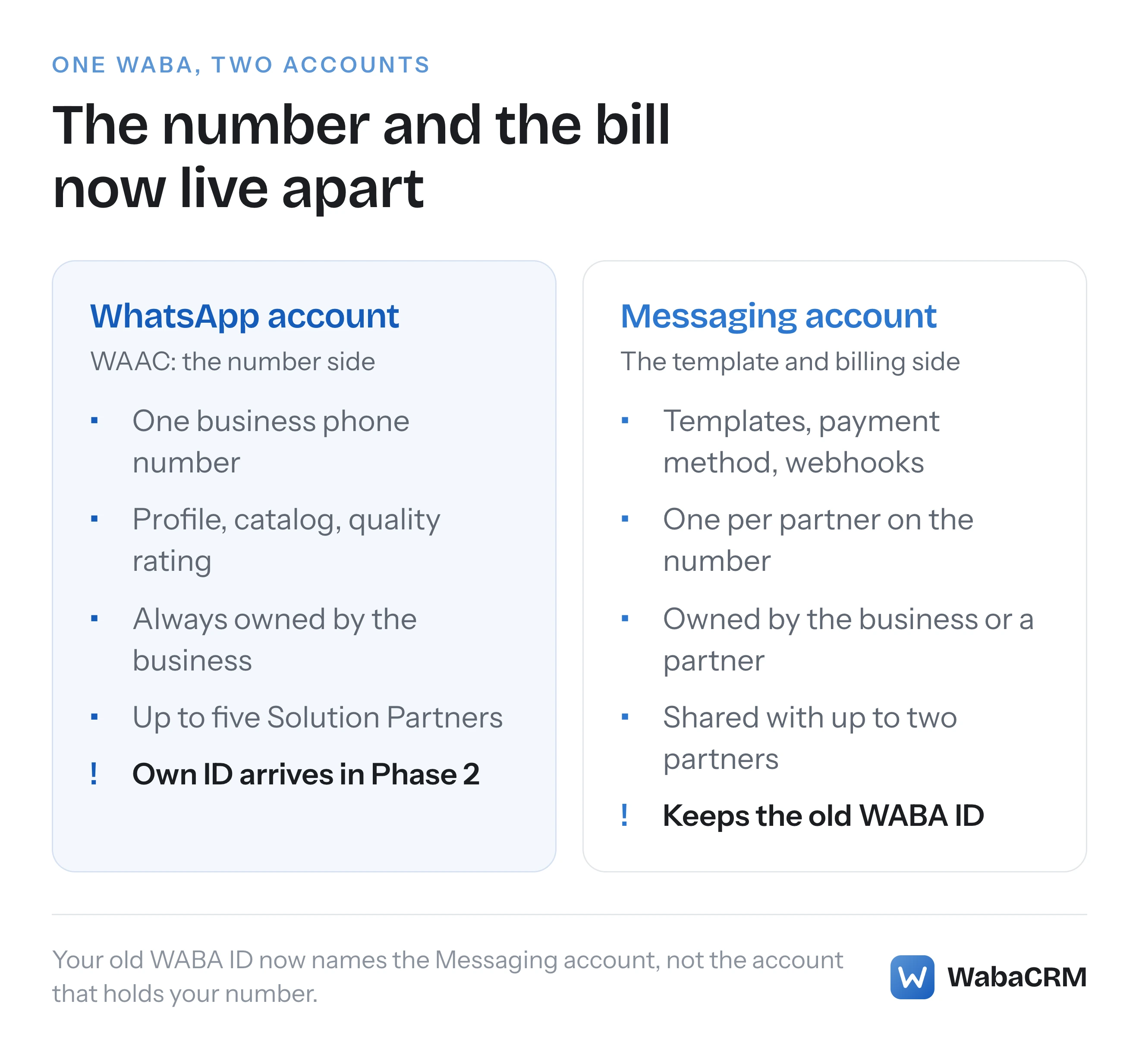
The split is simple; the vocabulary is not. Your "WABA ID" now names the half that does not hold your number.
- What is the difference between a WhatsApp account and a Messaging account?
- What does each account hold, and who owns it?
- Which account does my old WABA ID identify now?
- Where did templates, billing and webhooks move to?
- Can two WhatsApp providers now work on the same phone number?
- What replaced moving a number from one provider to another?
- Can a WhatsApp number move to a different business portfolio?
- What happens to templates when a number gains a new Messaging account?
- When does a send request need messaging_account_id?
- Which lines in Meta's own documentation are already out of date?
- What does the split mean for a business that connects through WabaCRM?
What does each account hold, and who owns it?
The WhatsApp account, which Meta abbreviates to WAAC, is the business's identity on WhatsApp; the Messaging account is the container for everything that is billed or reviewed. Meta's account page draws the line in two sentences:
"A WhatsApp account (WAAC) holds a single business phone number and represents your business presence on WhatsApp." … "A Messaging account holds your message templates and billing details. Each partner you work with has its own Messaging account." (Meta — WhatsApp accounts and Messaging accounts)
Ownership is lopsided. Meta says "A WAAC is always owned by the client or direct developer", while "A Messaging account can be owned by the client or by a partner" (Meta — Updates to WhatsApp Business accounts). A vendor can own the commercial container, never the number.
Because each WhatsApp account holds exactly one number, several numbers are grouped rather than stacked. Meta describes "a WAAC hierarchy — a primary WAAC with linked WAACs (sometimes called a “phone set”)", and sharing the primary one shares the whole set.
| Question | WhatsApp account (WAAC) | Messaging account |
|---|---|---|
| What it holds | One number, profile, catalog | Templates, billing, webhooks |
| Who can own it | Always the business | The business or a partner |
| ID used today | The phone number ID | The old WABA ID |
| Sharing limit | Five Solution Partners | Two partners |
The sharing limits in the last row are Meta's own:
"Sharing a WhatsApp account gives the partner access to the business phone number it contains. You can share a WhatsApp account with up to five Solution Partners." … "Sharing a Messaging account gives the partner access to the templates and billing details it holds. You can share a Messaging account with up to two partners." (Meta — WhatsApp accounts and Messaging accounts)
Notice that the figure of five names Solution Partners specifically; that page gives no separate figure for Tech Providers. The two-partner figure once covered the whole account: on 25 September 2026, when this site quoted the page in its piece on whether the API needs a Facebook Page, it read "You can share a WABA with up to two partners." And a partner needs both halves to send anything: "Messaging does not work unless the partner has access to both — the WhatsApp account provides the business phone number to send from, and the Messaging account provides the templates and the payment method to bill against."
Which account does my old WABA ID identify now?
Your existing WABA ID now identifies your Messaging account, not the account that holds your phone number. Meta is explicit that nothing about the value changed:
"Your existing WABA ID now identifies your Messaging account. The ID value and the waba_id field name are unchanged, so existing calls continue to work without modification." (Meta — WhatsApp accounts and Messaging accounts)
Then comes the collision. The overview adds: "Note that the WhatsApp account (WAAC) is referred to as “WhatsApp Business Account” in the Terms of Service." So the phrase "WhatsApp Business Account" in a contract now points at the number side, while "WABA ID" in an API call points at the template and billing side. A support ticket, an agency contract or an integration spec that uses the two loosely can now mean opposite things.
The API carries the same mismatch. Meta's example for reading a Messaging account still uses the endpoint named after the old object:
curl 'https://graph.facebook.com/v26.0/102290129340398?fields=name,status,currency,country,business_verification_status' \
-H 'Authorization: Bearer EAAJB...'
Meta introduces that request with "Use the WhatsApp Business Account API to get data on a Messaging account." The webhook references have been relabelled to match: in the business_capability_update reference, the <WHATSAPP_BUSINESS_ACCOUNT_ID> placeholder in entry.id is described simply as "Messaging account ID" (Meta — business_capability_update webhook reference).
The number side has no usable ID yet. Meta says "WhatsApp accounts have their own IDs, but these are not available until Phase 2 — New Graph API version", and that when they arrive, "WhatsApp account IDs and phone number IDs have a 1:1 relationship, but are different values".
Where did templates, billing and webhooks move to?
Templates, billing and webhook subscriptions moved into the Messaging account; the phone number, its conversation history and its quality rating stayed with the number. Meta's overview publishes the full mapping:
| Asset | Before (WABA) | After (new model) |
|---|---|---|
| Phone numbers | Under WABA | Under WAAC |
| Message templates | Under WABA | Under Messaging account (per-partner) |
| Billing and payment methods | Under WABA | Under Messaging account |
| Conversation history | Under phone number | Under WAAC / phone number (unchanged) |
| Quality rating | Under phone number | Under WAAC / phone number (unchanged) |
| Business verification | Under Business Portfolio | Under Business Portfolio (unchanged) |
| Access tokens | Under app + WABA | Under app + Messaging account (same tokens work) |
| Webhook subscriptions | Under WABA | Under Messaging account |
This is also the answer to "what is a Messaging account in Meta Business Suite": it is the second tab. Meta says that "After migration, Meta Business Suite displays two separate tabs: WhatsApp Accounts (phone numbers/usernames) and Messaging Accounts (template messages and billing), replacing the current single WABA view." (Meta — Updates to WhatsApp Business accounts) WhatsApp Manager follows the billing half rather than the number half: it "is organized by Messaging account, and the account selector in the top-right corner lets you switch between them" (Meta — WhatsApp accounts and Messaging accounts).
Until a business is migrated, Meta says, both tools keep showing it the old single-WABA view.
Can two WhatsApp providers now work on the same phone number?
Yes, and Meta leads with it: "With the new account model, clients and direct developers can share their phone number with multiple partners, with separate billing for each partner. WhatsApp users see a single trusted contact regardless of how many partners are on the number." (Meta — Updates to WhatsApp Business accounts)
Each provider gets its own commercial container. Meta says "Each partner working with a client gets their own Messaging account, which ensures complete isolation of templates, billing, and metrics between partners", and that the bill follows the sender: "When you send a message, the charge goes to the Messaging account associated with your app." Onboarding creates that container for you: "Updated Embedded Signup flows automatically create a separate Messaging account per partner and return the ID in the existing WABA ID field."
There is one documented exception. For a number that also runs in the WhatsApp Business app, Meta's onboarding page says:
"For coexistence, Meta converts the existing WhatsApp Business account into a backward-compatible Messaging account and shares that account and the associated WhatsApp account with your partner business. No partner-specific Messaging account is created." (Meta — Onboarding changes)
What the partners on one number do not get separately is capacity. Meta's list of things that stay the same includes two that bite in a shared setup: "Throughput — remains at the phone number level. When multiple partners share a phone number, they share the phone number’s throughput capacity", and "Messaging limits — remain at the business portfolio level. When multiple partners share a phone number, the messaging limit (unique users per 24-hour period) is shared across all partners on that number". A marketing vendor and a support desk on the same number draw on one daily allowance, which is the cap explained in what actually limits a WhatsApp broadcast.
What replaced moving a number from one provider to another?
Sharing replaced migration. Meta's overview is direct about it:
"Migrating a business phone number from one Solution Partner to another is not supported in the new account model. A WhatsApp account (WAAC) can be shared with more than one partner, so a client who wants to work with you shares their existing WAAC instead. The number does not move, conversations are uninterrupted, and there is no migration to perform." (Meta — Updates to WhatsApp Business accounts)
It adds that "Sharing is additive. Whether your client keeps their previous partner on the number or removes them later is their decision, and neither is a prerequisite for onboarding you." The registration step that used to strand numbers is softened as well: "Re-registering an already-registered phone number succeeds without resetting the PIN".
Two cautions sit in the same document. The first is for anyone extending credit: "The phone number migration process that previously acted as a natural switching barrier no longer applies." The second is for the business sharing its number: "Phone number deregistration — no changes at this time. Any partner can deregister a phone number". Every provider you add is one more party that can take the number off the platform.
Meta's own migration guide now opens by retiring itself:
"Phone number migration isn’t supported for accounts on the new WhatsApp account model. If the destination WhatsApp account doesn’t already own the phone number, the request is rejected. The number can’t be moved between accounts, and disconnecting it from its current account doesn’t make it available." (Meta — Migrate a phone number via Embedded Signup)
What a provider switch looks like now is covered in this site's guide to switching WhatsApp API providers, and the migration errors Meta used to return are in the nine failures behind error 2388103.
Can a WhatsApp number move to a different business portfolio?
No. Meta's rule for regrouping numbers ends with a flat refusal: "Both hierarchies must belong to the same business portfolio. A number can’t be moved to another business portfolio." (Meta — Updates to WhatsApp Business accounts) The commercial half is locked in the same way: "You cannot migrate a Messaging account from one business to another." (Meta — WhatsApp accounts and Messaging accounts)
What you can do is regroup inside one portfolio. Meta says to "link and unlink WhatsApp accounts in Meta Business Suite instead of migrating the number. The number stays connected and keeps its conversations." The path is Settings > Accounts > WhatsApp Accounts, then the primary WhatsApp account's Linked WhatsApp accounts tab, where "Unlink number" and "Link WhatsApp account" do the work. Four more conditions apply:
- "Partners with access to a hierarchy have access to every number in it, so moving a number changes which partners can use it."
- "A number that isn’t part of a hierarchy can’t be linked while it’s shared with a partner or has its own Messaging accounts."
- "You need permission to manage phone numbers on every hierarchy involved, and the number must be connected."
- "Linking and unlinking are rolling out gradually and may not be available to every business yet." (as read on 16 October 2026)
So where a number is first registered matters. If an agency registers a client's number inside the agency's own portfolio, Meta's documentation offers no route to carry it across later; its migration guide, quoted above, says that "disconnecting it from its current account doesn’t make it available." Decide the owning portfolio, the object Meta's prerequisites hang everything else from, before onboarding.
What happens to templates when a number gains a new Messaging account?
They stay behind. Templates belong to the Messaging account that created them, so a second provider on your number starts with none:
"Template isolation: Templates belong to the Messaging account in which they were created and are not shared across Messaging accounts. If you need the same template in multiple Messaging accounts, you must create it in each Messaging account separately or use the Template Migration API to copy templates between Messaging accounts. When templates are migrated to a new Messaging account, their quality ratings and messaging tier reset to baseline, requiring a ramp-up period of approximately 2–4 weeks." (Meta — Updates to WhatsApp Business accounts)
That last sentence matters most. A copied template starts again rather than inheriting the original's record, so keep the old Messaging account sending your established templates while the new one ramps up.
The template endpoints themselves did not move: "Template management endpoints (GET/POST/DELETE /<WABA_ID>/message_templates) remain on the Messaging account and do not change." Template capacity is also counted per Messaging account now; Meta's account page sets it at 250 for an unverified portfolio and up to 6,000 once the portfolio is verified and has a number with an approved display name.
When does a send request need messaging_account_id?
Only when the access token you send with can reach more than one Messaging account on that phone number, and in that case you should always send it. Meta frames the rule around ambiguity:
"A business phone number can have more than one Messaging account. Billing, spend limits, and analytics belong to the Messaging account rather than to the phone number, so every send message request has to resolve to exactly one Messaging account." (Meta — Managing messaging accounts)
The deciding factor is the token, not the app or your role: "The rule is about ambiguity, not about who you are." Meta lists four common ways a token ends up reaching two Messaging accounts: a direct developer holding several, a direct developer who has added a partner, a partner the client shared several with, and "Multiple billing currencies". That last case is the one Indian businesses meet during the move to INR billing, because Meta says "Each currency gets its own Messaging account, eliminating the need for separate phone numbers per currency."
Omitting it when the request is ambiguous is not a safe default: Meta warns that "the message may be billed and attributed to a Messaging account you did not intend, or the request may be rejected." The request is Meta's ordinary send with one extra field:
curl -X POST \
'https://graph.facebook.com/v22.0/<BUSINESS_PHONE_NUMBER_ID>/messages' \
-H 'Authorization: Bearer <ACCESS_TOKEN>' \
-H 'Content-Type: application/json' \
-d '{
"messaging_product": "whatsapp",
"to": "<WHATSAPP_USER_PHONE_NUMBER>",
"messaging_account_id": "<MESSAGING_ACCOUNT_ID>",
"type": "template",
"template": {
"name": "<TEMPLATE_NAME>",
"language": { "code": "<LANGUAGE_CODE>" }
}
}'
If you wrote against the earlier name, Meta's note covers it in full:
"paid_messaging_account_id is a deprecated, backward-compatible alias for messaging_account_id, so new integrations should use messaging_account_id. Migrate to messaging_account_id by December 31, 2026; after that, paid_messaging_account_id is planned for removal in a future Graph API version. If you supply both messaging_account_id and paid_messaging_account_id, messaging_account_id takes precedence and paid_messaging_account_id is ignored." (Meta — Managing messaging accounts)
| Phase | Meta's timing | messaging_account_id |
|---|---|---|
| 1, general availability | From 23 Sep 2026 | Optional on every version |
| 2, new Graph API version | H1 2027 | Required on the newest version when ambiguous |
| 3, mandatory transition | H1 2028 | Required on every version when ambiguous |
To see whether a Messaging account can be billed at all, request primary_funding_id on it; Meta says "If primary_funding_id is absent, the Messaging account has no payment method attached and cannot send paid messages." And for reconciliation, "Delivery receipts return to the sending app. The payload format is unchanged."
Which lines in Meta's own documentation are already out of date?
At least four, and each can mislead someone who reads it literally. The first is in the overview's list of things that stay the same: "Pricing — conversation-based billing is unaffected". Meta's pricing page says otherwise about the model itself: "Effective July 1, 2025 – Meta charges on a per-message basis, aligned to industry standards." (Meta — Pricing on the WhatsApp Business Platform) Read the overview's line as "the split does not change pricing", not as a description of how pricing works. The pricing page, updated on 30 September 2026, already speaks the new language: its updates "became effective as of October 1, 2026 by Messaging account timezone."
The second is the date of Phase 1. The overview, updated on 22 September 2026, says "Rolling out from September 23, 2026", while the older messaging page (updated 29 August 2026) and onboarding page (updated 26 June 2026) still said "H2 2026" when read in mid-October 2026. Both are true; only the overview is precise.
The third is the registration PIN. Meta's phone numbers page, last updated on 21 May 2026, still says "You must set a two-step verification PIN when registering a business phone number", while the overview says "Meta is deprecating the 6-digit two-factor authentication (2FA) PIN for eligible Cloud API phone numbers". Even the overview hedges for code: it says to "Continue sending a valid 6-digit pin parameter in your POST /<BUSINESS_PHONE_NUMBER_ID>/register calls until a separate API contract change is announced."
The fourth is number migration. The same phone numbers page still ends with "You can migrate phone numbers from one WABA to another", linking to the migration guide quoted earlier, which says migration is not supported on the new model.
What does the split mean for a business that connects through WabaCRM?
There is nothing to reconnect. Meta's position is that "Existing clients do not need to re-onboard; Meta handles the migration automatically", and that "Your existing IDs, endpoints, and access tokens keep working throughout the rollout" (Meta — Updates to WhatsApp Business accounts).
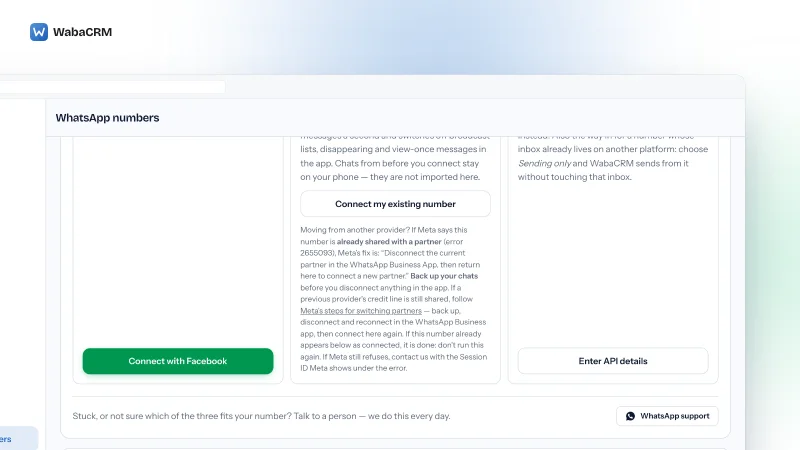
WabaCRM is a Meta-verified Tech Provider, and a number reaches it in one of three ways: Embedded Signup, coexistence with the WhatsApp Business app, or Cloud API credentials entered by hand. Under the new model the first creates a Messaging account for WabaCRM's app, and the second converts the business's existing account into one. Either way the number stays in a WhatsApp account the business owns.

Billing lines up neatly. A Tech Provider cannot resell Meta's message fees, so each business attaches its own payment method, and WabaCRM adds 0% markup to Meta's charges. Under the split, that payment method lives on the Messaging account, which is exactly the container Meta now keeps separate per partner.
The practical change is the one the split was built for: a second tool on the same number, or your own direct integration beside WabaCRM, no longer needs a second number. Each side gets its own templates and bill and shares the number's throughput and the portfolio's messaging limit. If your own token reaches both Messaging accounts, send messaging_account_id now, before Phase 2 requires it on the newest API version.
Every Meta quotation on this page was read from Meta's own documentation on 16 and 17 October 2026. Meta changes that documentation without notice; the linked pages are authoritative and this one is not.
Questions people also ask
Do I need to reconnect my WhatsApp number because of the account split?
Does the account split change what Meta charges per message?
Do quality rating and messaging limits change when a second partner joins my number?
Can a second provider see my templates or my bill?
When will WhatsApp account IDs appear in the API?
- whatsapp messaging account
- whatsapp account waac
- waba id
- messaging_account_id
- meta business suite messaging accounts
- whatsapp business account split