Remove a Number From WabaCRM and Use It in WhatsApp Again
The short answer
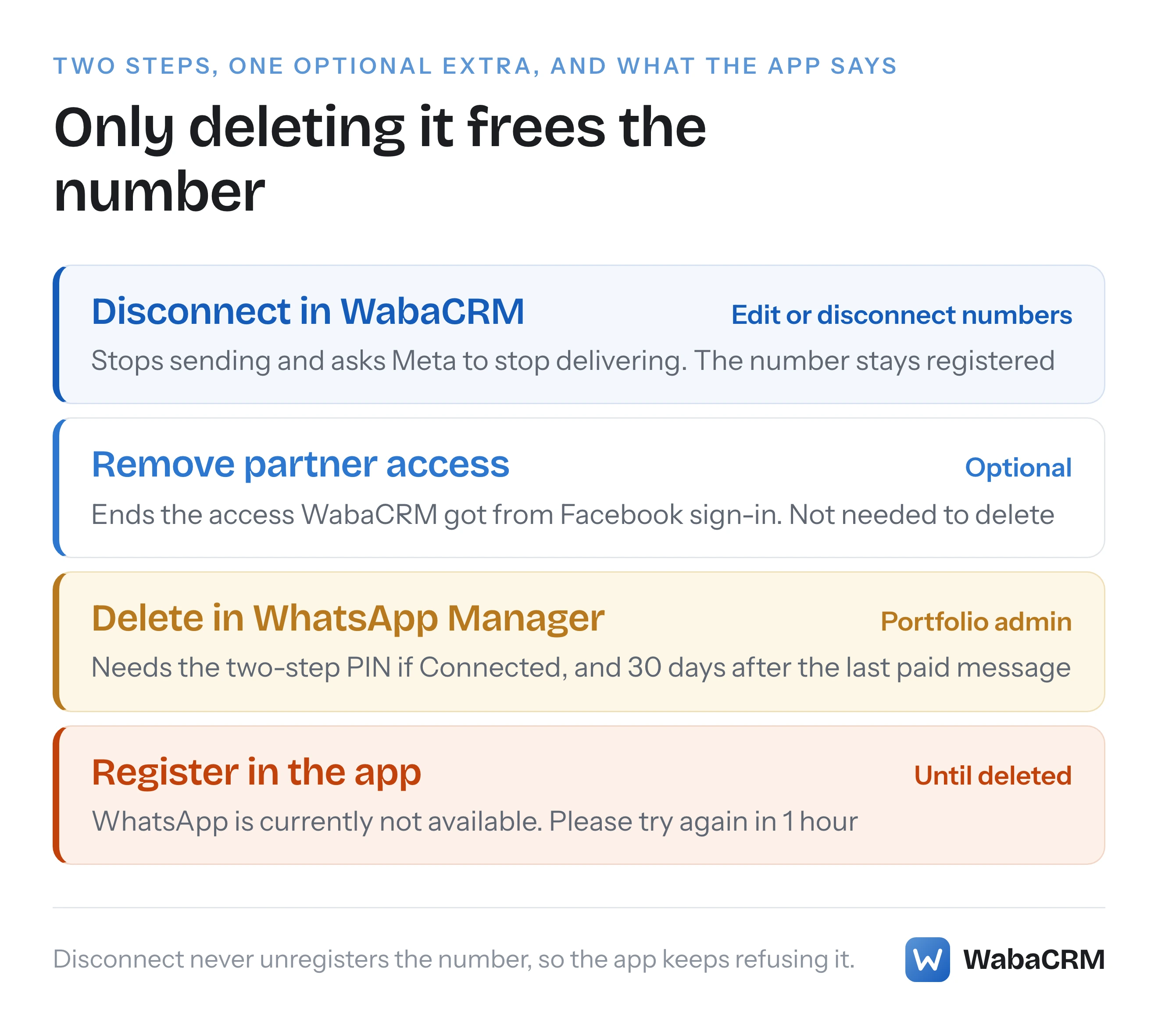
Disconnect on a number's card stops WabaCRM sending and asks Meta to stop delivering its messages here. The number stays on your WhatsApp Business Account. To use it in the WhatsApp app again, a portfolio admin deletes it in WhatsApp Manager. A number that also runs in the Business app is disconnected in that app instead. Checked 19 September 2026.
How do I remove my WhatsApp number from WabaCRM and use it in the WhatsApp app again?
In two places, and the first does not do the second's job. Disconnect on the number's card stops WabaCRM using it. Deleting it in WhatsApp Manager, Meta's own tool, takes it off the WhatsApp Business Platform, and until then the WhatsApp app on a phone will not take it back.
The rule behind the second step is Meta's, in the opening section of its page on business numbers:
"Registered numbers can still be used for everyday purposes, such as calling and text messages, but cannot be used with WhatsApp Messenger (“WhatsApp”)." (Meta — Business phone numbers)
Disconnect does not unregister anything. The WhatsApp Business Account the number lives on sits in a business portfolio at Meta, normally yours, and WabaCRM only holds access to it. Disconnect stops WabaCRM using that access and asks Meta to stop sending the number's messages here. WabaCRM keeps the saved token, which is what lets Edit reconnect later. The number, its registration and its two-step PIN stay as they were. That is why clicking Disconnect again never changes what the phone says.
- How do I remove my WhatsApp number from WabaCRM and use it in the WhatsApp app again?
- How do you disconnect a number in WabaCRM, step by step?
- What does Disconnect change, and what does it leave alone?
- Can you delete the entry from your workspace as well?
- How do you reconnect a number you disconnected?
- Why does the app say "WhatsApp is currently not available. Please try again in 1 hour"?
- How do you delete the number in WhatsApp Manager?
- What does Meta say deleting a number removes?
- What about a number that also runs in the WhatsApp Business app?
- What happens when you remove WabaCRM's partner access to your WhatsApp Business Account?
- What can WabaCRM not do on your behalf?
How do you disconnect a number in WabaCRM, step by step?
You need the permission Edit or disconnect numbers. In the roles every workspace starts with, the Owner and the Admin have it. A Manager or an Agent can open the numbers screen but sees no Edit or Disconnect button.
- Open WhatsApp numbers in your workspace.
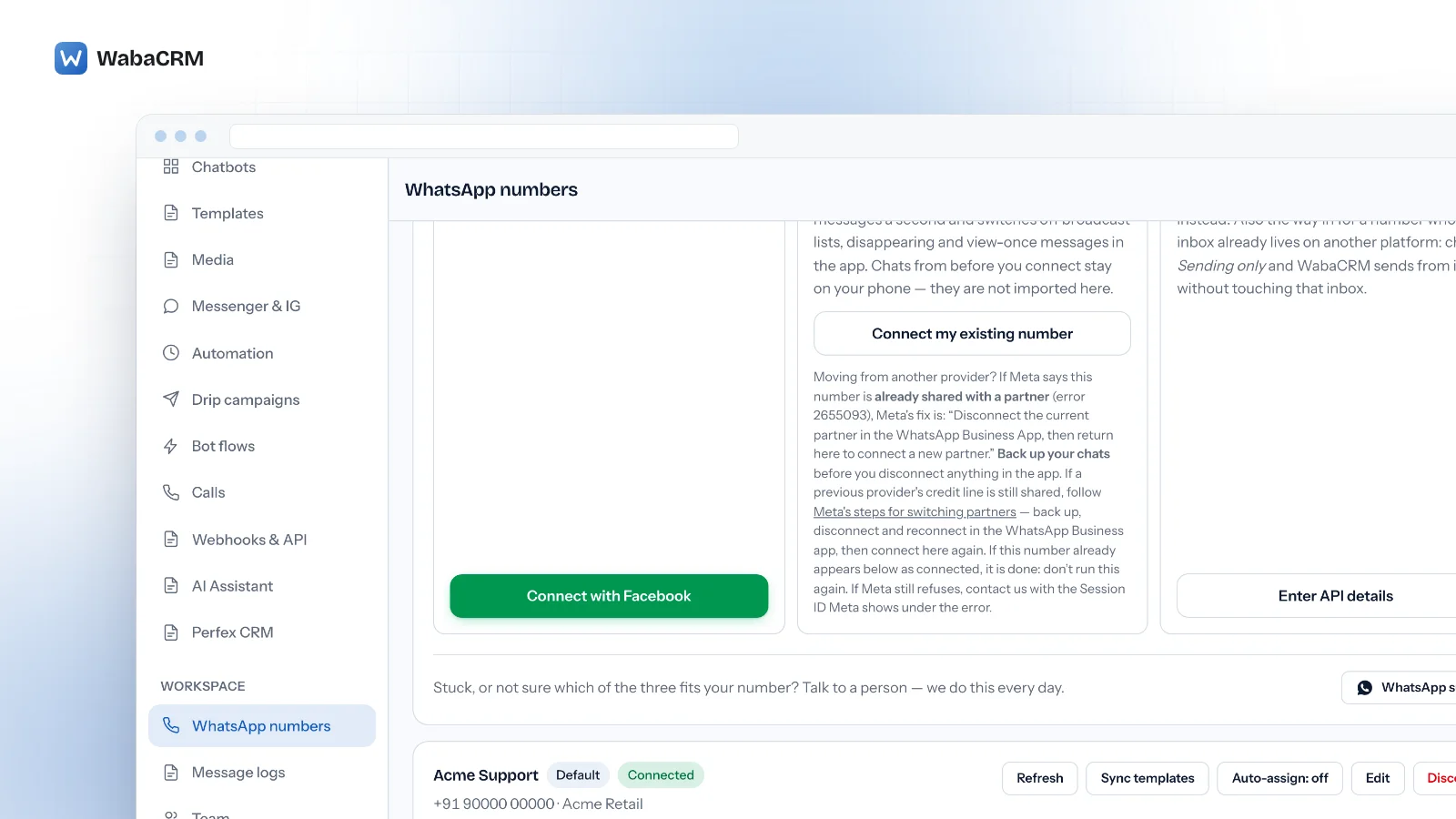
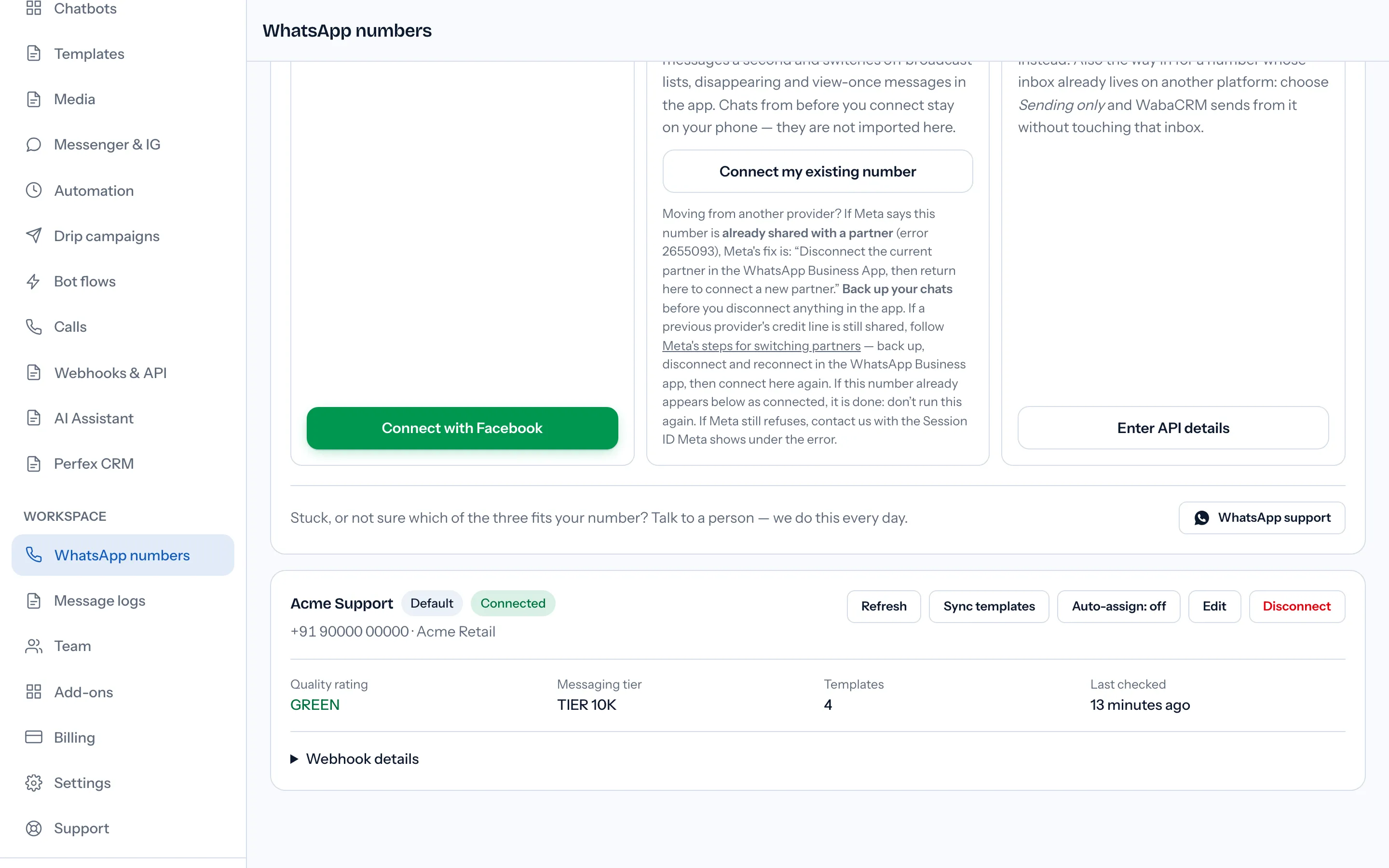
- Find the number's card. Its buttons run along the top: Refresh, Sync templates, Auto-assign: off (or on; not shown for a number connected for Sending only), Edit and, in red, Disconnect.
- Click Disconnect. Your browser asks you to confirm, naming the entry by its label:
Disconnect Acme Support? Queued messages will stop sending. The entry stays so you can reconnect it.
- Confirm. WabaCRM stops sending from the number, asks Meta to stop delivering its events here, and keeps a record of who disconnected it and when.
The message that follows says whether Meta confirmed the request:
Number disconnected. The entry stays so you can reconnect it — its conversations and campaigns are still attached to it.
or, when Meta would not confirm it, which can happen when access was already withdrawn at Meta's end:
Number disconnected here, but Meta would not confirm it has stopped sending us this number's messages. Any that still arrive are kept aside, not added to your inbox, and nothing will send from it. Reconnect it, or contact support if you need them.
Either way the badge now reads Disconnected in grey, the Disconnect button is gone, and a blue note sits under the number:
Disconnected. Nothing sends from this number, and we have asked Meta to stop delivering its messages here. The entry and its conversations are kept — choose Edit and save it again to reconnect.
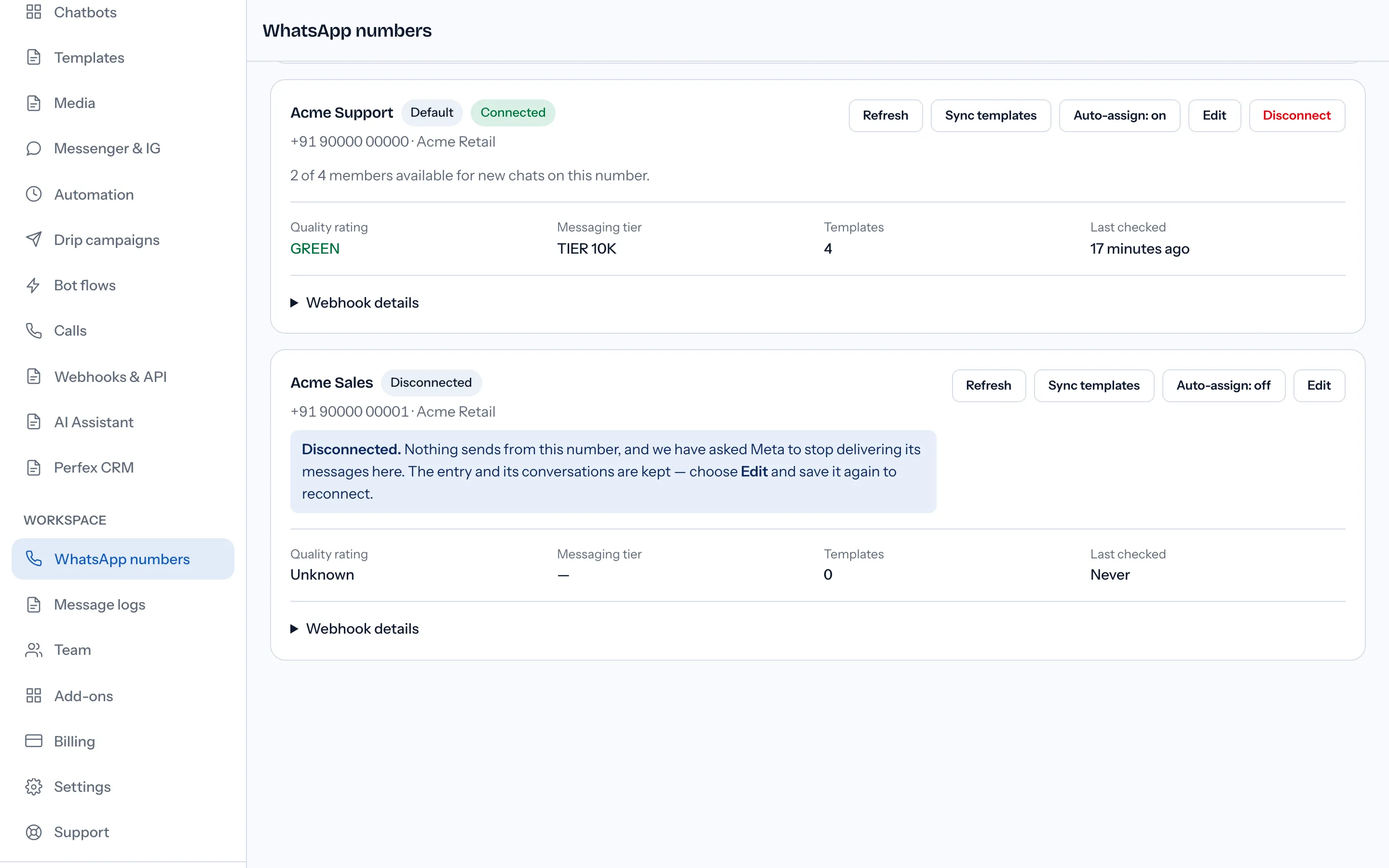
The button goes because there is nothing more for it to do; an old browser tab that still offers it gets This number is already disconnected. and nothing is sent to Meta. If the number was your default and another is connected, the Default badge moves to that one. If it was connected for Sending only, WabaCRM detaches only its own app, so the platform running that number's inbox keeps its messages.
What does Disconnect change, and what does it leave alone?
Less than the word suggests: a switch inside your workspace and one request to Meta.
| Item | After Disconnect | Controlled by |
|---|---|---|
| Sending from WabaCRM | Stops | WabaCRM |
| Meta delivering its messages here | Asked to stop | Meta |
| Entry, conversations, campaigns | Kept | WabaCRM |
| Saved access token | Kept for Edit | WabaCRM |
| Number on your WhatsApp Business Account | Unchanged | Meta |
| WabaCRM as a partner on the account | Unchanged | Your portfolio admin |
| Registration and two-step PIN | Unchanged | Meta |
| Using it in another WabaCRM workspace | Still blocked | WabaCRM support |
The card says "we have asked Meta", not "Meta has stopped", because the request is best effort: the switch in WabaCRM completes even when Meta refuses. Since 4 October 2026 a message that still arrives for a disconnected number is kept aside rather than added to your inbox (until then it was filed under the entry), and WabaCRM also stays subscribed to the account when another connected number still uses it, so that number keeps receiving. Either way, new messages to the disconnected number stop appearing in WabaCRM, so tell customers where to reach you first. And a number is live in one WabaCRM workspace at a time; to move it to another, write to support.
Can you delete the entry from your workspace as well?
Not a lone entry. It holds that number's conversations, campaigns and bots, and removing it would take them with it.
The exception is a dead duplicate. Reconnecting a number through a different WhatsApp Business Account creates a second entry for the same phone number, and the old one can never work again. Its card says so in amber, starting This number is now connected under Acme Support, which is the entry to use., and its red button reads Remove instead of Disconnect:
Remove this dead entry? Its conversations move to Acme Support, which keeps working — it is a different WhatsApp Business account.
Confirm, and the history moves across before the dead entry is deleted; the message reads Entry removed. N conversations and N messages now sit under Acme Support. with your own counts. Templates do not move, because a template belongs to the WhatsApp Business Account it was created in; the surviving entry gets its own with Sync templates.
How do you reconnect a number you disconnected?
With Edit, as long as WabaCRM's saved access still reaches the account.
- On the disconnected card, click Edit. The Edit number dialog opens with the label and both IDs filled in.
- Leave Permanent access token empty. Its placeholder reads
Leave blank to keep the current token. - Check Use this number for: Sending and receiving, or Sending only.
- Click Connect & verify. It reads
Verifying with Meta…while WabaCRM checks the saved access.
Success reads Number connected and verified., or Number connected for sending. Its inbox stays where it is. for a sending-only number. If the saved token belongs to your own Meta app rather than WabaCRM's, a sending-and-receiving number is accepted when that app's secret is stored, and the message instead says its messages come through your own Meta app and reach this inbox once that app's webhook points at the Callback URL under Webhook details. A refusal appears under the token field, as Meta's reason or as Meta did not accept these details. Check the token, the WABA ID and the phone number ID.
If you have since removed WabaCRM's partner access to the account, the saved access usually no longer works, and the way back is the connect journey at the top of the screen: Connect with Facebook, or Connect my existing number for a number that stays on your phone. Our guide to connecting an existing WhatsApp number covers what Meta can refuse on the way.
Why does the app say "WhatsApp is currently not available. Please try again in 1 hour"?
Because the number is still on the WhatsApp Business Platform. WhatsApp's Help Center gives the rule and the message together:
"Numbers registered with the WhatsApp Business Platform cannot also be registered with WhatsApp Messenger or the WhatsApp Business app. Trying to register with WhatsApp Messenger or WhatsApp Business using a number that is already in the WhatsApp Business Platform will lead to the error message "WhatsApp is currently not available. Please try again in 1 hour"." (WhatsApp Help Center — How to delete your phone number from the WhatsApp Business Platform)
The hour is not the remedy. The same page reads the message as meaning "the number was previously registered in the WhatsApp Business Platform", and its next step is deleting the number. Nothing in WabaCRM changes it, because Disconnect never takes the number off your account.
If you cannot see an option to delete the number, the Help Center says to contact Meta's support team from Meta Business Suite. For someone who hits the error on a new SIM or number, it describes a request to have the number deleted, with proof of when the SIM or number was bought, consent, and an acknowledgement that the account's data, insights and message history are deleted with it.
How do you delete the number in WhatsApp Manager?
Check who can first:
"Only business portfolio admins can delete business phone numbers, and numbers can't be deleted if they have been used to send paid messages within the last 30 days." (Meta — Business phone numbers)
Disconnect in WabaCRM before you delete. WabaCRM checks connected numbers with Meta on a schedule, so a deleted number whose entry is still connected turns red at the next check and the workspace's owners and admins get an alert email. A disconnected entry is neither checked nor alerted about.
Meta's steps, from the same page:
- "Load your business portfolio in the WhatsApp Manager."
- "If it doesn't automatically load the Phone numbers panel, navigate to Account tools (the toolbox icon) > Phone numbers."
- "Click the phone number's trash can icon and complete the flow."
Two things can stop the flow. The first is the PIN:
"If your business phone number has a Connected status, you will need your two-step verification PIN to delete your number." (Meta — Business phone numbers)
That is Meta's status in WhatsApp Manager, not WabaCRM's badge, and WabaCRM's Disconnect does not deregister the number. If WabaCRM registered the number when you connected it with Connect with Facebook, and it had no PIN then, it now carries one you have never seen: "If your verified business phone number does not have two-step verification enabled, set this value to a 6-digit number. This will be the newly verified business phone number's two-step verification PIN." (Meta — Register a business phone number). WabaCRM chose those digits, stores them encrypted and shows them on no screen. Meta documents switching two-step verification off in WhatsApp Manager, confirmed through an emailed link sent to your business portfolio's address:
"To disable two-step verification using WhatsApp Manager, follow the steps for changing your PIN, but click the Turn off two-step verification button as the final step instead. An email with a link will be sent to the email address associated with your business portfolio." (Meta — Business phone numbers)
An API route that sets a new PIN without the old one is in our article on resetting a lost two-step PIN.
The second stop is the 30-day rule:
"If the number has been used to send paid messages within the last 30 days, you will be redirected to the Insights panel, showing the date of the last paid message. You can delete the number 30 days from this date." (Meta — Business phone numbers)
Paid messages sent through WabaCRM count like any other: WabaCRM is a Tech Provider, so Meta bills them to your own WhatsApp Business Account. Reading what Meta actually charged you explains how to tell which of your messages Meta billed.
The Help Center describes the same job in different words:
| Point | Developer docs | WhatsApp Help Center |
|---|---|---|
| Who may delete | Business portfolio admins | Admins of the WhatsApp Business App |
| What you may be asked for | Two-step PIN, if Connected | Facebook password, in some cases |
| Where the control is | Trash can icon | Delete icon |
| 30-day block counts | Paid messages from the number | Paid messages from the account |
What does Meta say deleting a number removes?
The developer page's deletion section is silent on consequences. The WhatsApp Help Center is not:
"Once you delete your number, all your WhatsApp Business Platform data will be deleted." (WhatsApp Help Center)
"Phone numbers deleted from a WhatsApp Business Platform account can't be used again for another WhatsApp Business Platform account." (WhatsApp Help Center)
Meta's registration page draws the same line: "Deregistration does not delete a number or its message history. To delete a number and its history, see Delete Phone Number from a WABA." (Meta — Register a business phone number)
Read the reuse sentence literally. It rules out taking the number to another Business Platform account, and none of the pages read for this article says whether the account it left can take it back. Delete when you are finished with the Business Platform for that number. Moving providers is a different job, and what carries over when you switch involves no deletion. WabaCRM's own copy is separate: the entry and its conversations stay in your workspace.
What about a number that also runs in the WhatsApp Business app?
Nothing needs deleting, because the number never left the app. A card with the badge Also on your phone belongs to a number connected to keep running in the WhatsApp Business app, usually through Connect my existing number. Leaving is done from the phone:
"You cannot use the Deregister API to deregister a business phone number from Cloud API if it is already in use with both Cloud API and the WhatsApp Business app." (Meta — Onboard WhatsApp Business app users)
"Instead, your clients can use the WhatsApp Business app to disconnect from Cloud API by navigating to the Settings > Account > Business Platform and clicking the Disconnect Account button." (Meta — Onboard WhatsApp Business app users)
Disconnect the entry in WabaCRM first, so the card settles on Disconnected, then disconnect in the app. What stops working under coexistence lists what the connection switched off in the app, and the coexistence guide explains how it was made.
What happens when you remove WabaCRM's partner access to your WhatsApp Business Account?
It ends the access WabaCRM received when you connected with Facebook. It does not delete the number, and it does not revoke a token your own Meta app issued: a number connected through Enter API details with such a token keeps working for whoever holds it, so revoke it in your own app too.
Meta's pages read for this article do not give the clicks for removing a partner, so none are quoted here. WabaCRM's numbers screen suggests checking Business settings → WhatsApp accounts in Meta Business Suite; where Meta's screens differ, Meta's are right.
Disconnect first, and the entry keeps reading Disconnected whatever Meta reports. Remove that partner access while an entry connected through Facebook is still connected, and once Meta reports it the badge reads Error in red, with a reason such as:
The owner of this WhatsApp Business account removed WabaCRM as a partner at Meta on 19 Sep 2026. WabaCRM can no longer reach this number, so nothing sends from it here. To use it with WabaCRM again, reconnect it with “Connect with Facebook”.
When Meta says it removed WabaCRM itself, or does not say who did, the first sentence changes to match. The workspace's owners and admins are emailed either way.
What can WabaCRM not do on your behalf?
- Delete the number. "You can't delete a business phone number via the API." (Meta — Business phone numbers). No provider can do it through the API either. Deletion happens in WhatsApp Manager, by an admin of the business portfolio that owns the account, or by asking Meta's support team as the Help Center describes.
- Delete your WhatsApp Business Account. It belongs to your business portfolio. WabaCRM can let go of its access, and that is all.
WabaCRM does not show the two-step PIN on any screen; use Meta's switch-off route above.
Support can do a full cut-off: the same disconnect, plus destroying the credentials WabaCRM stores for the number. Ask from Support → New ticket once you have finished at Meta; afterwards Edit alone cannot reconnect the number.
Every Meta quotation on this page was read from Meta's own documentation on 19 September 2026. Meta changes that documentation without notice; the linked pages are authoritative and this one is not.
Questions people also ask
Does Disconnect in WabaCRM delete my WhatsApp number?
Why does my phone say WhatsApp is currently not available when I register the number?
Will deleting the number in WhatsApp Manager erase the chats I have in WabaCRM?
Why will WhatsApp Manager not let me delete the number yet?
Who in my team can disconnect a number in WabaCRM?
- remove number from whatsapp business api
- delete whatsapp business platform number
- whatsapp is currently not available
- disconnect whatsapp number
- whatsapp manager delete phone number


