Multi-Agent on the WhatsApp Business App Is No Longer Free
The short answer
Meta now offers multi-agent chat assignment on the WhatsApp Business app as a paid feature rather than a free one, tied to a Meta Verified for Business or Meta One subscription, with the number of linked devices set by that plan. It is a different thing from the Business Platform: linked devices share a single account rather than holding separate agent logins.

What changed about multi-agent on the WhatsApp Business app?
For most of the WhatsApp Business app's life, a linked device was anonymous. Four people could share one number from four different phones or browsers, but nothing distinguished one from another beyond the name they gave the device — there was no way to hand a specific conversation to a specific person and no way to check afterward who had answered it. Meta's own article on the feature it calls "multi-agent" now draws that exact line as the difference between the free app and a paid subscription:
"With multi-agent, you and your team can handle large numbers of customer inquiries and orders more efficiently by connecting multiple devices to your account and assigning chats to your sales agents" (WhatsApp Help Center — About multi-agent).
The same article lays the two states side by side:
| Without multi-agent | With multi-agent |
|---|---|
| Connect up to four devices to your account | Connect up to 10 devices to your account |
| Name your linked devices | Name your linked devices |
| — | Assign chats to agents |
| — | See which device or agent sent a message |
Chat assignment and per-message attribution are not things the free WhatsApp Business app does at all — they exist only inside a paid subscription tier, not as a setting anyone can switch on. That is the change this page is about, and it is worth being precise about what did not change: the underlying account is still singular, still one phone number, still one WhatsApp identity. What moved behind a paywall is the bookkeeping layer on top of it.
One naming collision is worth clearing up before going further. Meta also ships a product called "Meta Business Agent," which is an AI system that drafts and sends replies on a business's behalf, not a human multi-agent feature at all — its own Help Center article warns that turning it on "will disconnect any existing linked devices" (WhatsApp Help Center — About using Meta Business Agent to chat with customers). It shares a name with the subject of this page and does the opposite job. Nothing below concerns that product.
Checked against Meta's documentation on 4 September 2026.
- What changed about multi-agent on the WhatsApp Business app?
- Which subscription unlocks it, and what does that subscription cost?
- How many devices can be linked under each plan?
- What does assigning a chat to an agent actually do?
- What do linked devices lose compared with the main phone?
- Is a linked device the same as a separate agent account?
- When does the paid app tier work out cheaper than the API?
- What can the app tier never do, no matter what you pay?
- How do you move from linked devices to the Business Platform later?
- Which kind of business is the app tier actually right for?
Which subscription unlocks it, and what does that subscription cost?
Meta's multi-agent article names two subscriptions that can unlock the higher device count: "The maximum number of devices you can assign to your business account is determined by the benefits included in your Meta Verified or Meta One subscription" (WhatsApp Help Center — About multi-agent). Meta Verified for Business is the one documented in detail on WhatsApp's own Help Center, with four named packages — Business Standard, Business Plus, Business Premium and Business Max — each adding benefits on top of the last: a verified badge and impersonation protection at every level, then wider support, more verified channels, protected business accounts, and access to business broadcasts as the tiers go up (WhatsApp Help Center — About Meta Verified for Business on WhatsApp).
What this page will not do is print a price. Meta's own article on the subscription is explicit that there isn't a fixed one to print: "Subscription prices may change as a result of offers that include discounted pricing," and it points readers to Meta's own pricing page rather than stating a figure itself. It goes further on eligibility, too: "Plans and benefits may be limited to select businesses and/or locations. Meta determines plan availability based on your business activity, including the volume of your interactions with consumers on WhatsApp." Two businesses of the same size in different markets may simply not be offered the same package, and neither may be offered any package at all. Applying takes time as well — Meta states the review "may take up to three business days, and may take longer in some instances due to high volumes of submissions."
This subscription fee is also a separate bill from anything Meta already charges for messages themselves. What Meta charges per conversation on the Business Platform side is covered in WhatsApp Business API pricing in India — nothing in that arrangement changes because a business also pays for Meta Verified, and nothing in Meta Verified's own documentation claims otherwise.
Checked against Meta's documentation on 4 September 2026.
How many devices can be linked under each plan?
Below any subscription, the free WhatsApp Business app draws the line at four: "You can use up to four linked devices and one phone at a time" (WhatsApp Help Center — About linked devices on the WhatsApp Business app). Meta Verified for Business raises that ceiling one package at a time:
| Package | Devices you can link | Also included |
|---|---|---|
| Business Standard | Up to four | Verified badge, impersonation protection, one verified channel |
| Business Plus | Up to six | Three verified channels, business broadcasts |
| Business Premium | Up to eight | 10 protected business accounts, five verified channels, business broadcasts |
| Business Max | Up to 10 | 50 protected business accounts, 10 verified channels, business broadcasts |
(Source: WhatsApp Help Center — About Meta Verified for Business on WhatsApp.) The "protected business accounts" figure is a different number from the device count and easy to conflate with it — it covers how many of a business's own accounts are shielded from impersonation bans, not how many phones or browsers can be linked to any one of them.
The device count is also not permanent once granted. Meta's multi-agent article carries a specific reversion rule: "If you cancel your subscription or your subscription benefits change, only your four most recently active devices will remain linked." A team running all 10 devices on Business Max and letting the subscription lapse does not lose multi-agent gracefully — it loses six devices' worth of access outright, keeping whichever four happened to be used most recently.
Checked against Meta's documentation on 4 September 2026.
What does assigning a chat to an agent actually do?
Meta's instructions describe a manual, per-conversation action rather than automatic routing. From the Chats tab, an agent taps and holds a chat, taps any additional chats to add to the selection, taps the menu and "Assign chat," then picks a name and saves. The same tab can be filtered by "Assigned to you," so an agent can see only what has been handed to them rather than the whole list. Separately, opening a chat, tapping and holding a specific message and tapping the info icon shows which agent sent it and from which device (WhatsApp Help Center — About multi-agent).
Every part of that lives inside the app, on the device doing the looking. Meta is direct about the boundary: "Customers won't be able to see which agent or which device a message was sent from. They also won't be able to see who their chat was assigned to." Assignment is bookkeeping for the team, not a status the customer is ever shown.
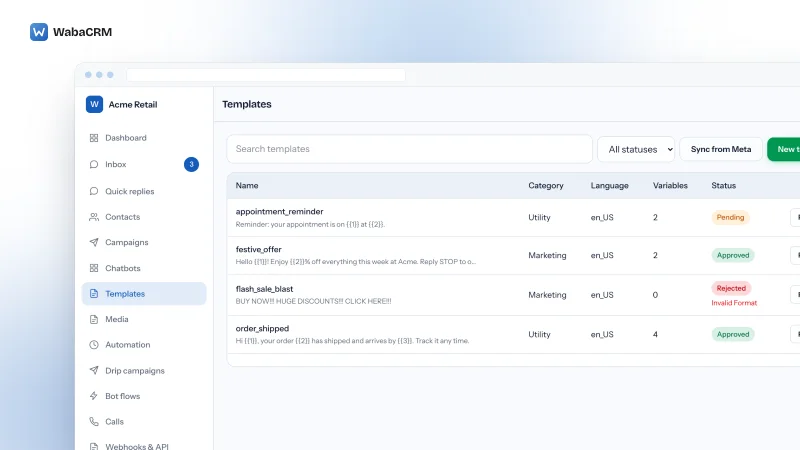
It is worth seeing what a dedicated team inbox does with the same idea once it isn't limited to a name on a shared device. WabaCRM's own team screen, for instance, lists members against a Role, an Extra access column and a Status, with a note that team members are unlimited on every plan rather than metered by device:

The visible difference is what backs the name. A device name on the WhatsApp Business app is just a label; a row on a team screen tied to its own login is an account with its own permissions, and losing that device doesn't have to mean losing that person's access to anything else. More on that distinction is in how a WhatsApp shared inbox actually splits work across a team.
What do linked devices lose compared with the main phone?
Two of Meta's Help Center articles list overlapping but not identical restrictions. The general linked-devices page states that on any linked device — subscribed or not — "these features aren't currently supported: Sharing and viewing live location on linked devices. Creating and viewing broadcast lists on linked devices. Adding and deleting status on linked devices" (WhatsApp Help Center — About linked devices on the WhatsApp Business app). The multi-agent article repeats the same broadcast-list and live-location restrictions for the paid tier specifically, and adds messaging or calling someone on a very old WhatsApp version, and using tablets, to its own list of unsupported features.
Paying for the higher device cap does not lift any of these restrictions — a linked device on Business Max is still a linked device, and the things linked devices cannot do are the same regardless of which subscription unlocked the slot it occupies.
Calls follow a separate rule tied directly to how many devices are linked, subscription or not: "Accounts with no more than 4 linked devices will receive calls on all devices. Accounts with more than 4 linked devices will only receive calls on the primary device." A team that upgrades specifically to add a sixth or eighth device trades away simultaneous call ringing on every device to get it.
Two different inactivity clocks also run in parallel. The multi-agent article warns that "if you don't use your primary device for over 14 days, your linked devices will become disconnected" — the whole fleet depends on the primary phone staying active. Separately, the general linked-devices article states Meta will "automatically disconnect linked devices after 30 days of inactivity" on a per-device basis, regardless of what the primary phone is doing. A device an agent stops using for a month can drop off even while everyone else's stays connected.
Checked against Meta's documentation on 4 September 2026.
Is a linked device the same as a separate agent account?
No, and this is the distinction the device-count headline number tends to obscure. Every linked device — whether it is the free tier's fourth or Business Max's tenth — is a window onto the same single WhatsApp Business account. There is one phone number, one set of chats, one login credential in the sense WhatsApp defines it: the QR-code pairing that links a device to the primary phone. What a device gets, beyond that pairing, is a name someone types in — Meta's instructions literally suggest "you can use the name of the agent who is using the device" as a convention, not because the system requires it.
That means nothing structurally stops one agent from renaming another agent's device, reassigning a chat someone else was working, or reading a conversation nobody handed to them — multi-agent adds a label for who a chat is assigned to, not a wall around who can see it. Contrast that with how the WhatsApp Business app compares against the Business Platform: a platform built on the latter gives each person credentials that are theirs alone, and a permission system can then say what those credentials are allowed to touch. A device name is a courtesy; a login is a boundary.
When does the paid app tier work out cheaper than the API?
This is a question about fit, not about a number this page can print. Meta's own Meta Verified for Business article stops short of stating a fixed subscription price at all, so any comparison against a platform's software cost has to start by acknowledging that half the equation — what the app-tier subscription itself costs a given business, in its market, at its eligibility level — is something only Meta's live pricing page can answer on any given day.
What can be said honestly is where the comparison actually has to happen. A shared-inbox platform's cost usually has two parts: what it charges for the software, and what Meta separately charges once a conversation is open, covered in WhatsApp Business API pricing in India. Some of those platforms price their software per agent seat, which is exactly the number the shared-inbox comparison on this site checked against several vendors' own pricing pages. A business trying to decide between the paid app tier and a platform is really deciding between a subscription fee gated by a device count, and a software fee that may or may not scale with headcount at all — WabaCRM's own pricing, for instance, is set by contact volume with unlimited team members at every level, which removes the per-seat variable from that particular comparison entirely rather than undercutting it on price. The honest framing is that "cheaper" depends on which of those shapes matches the team, not on a rate this page would otherwise have to guess at.
What can the app tier never do, no matter what you pay?
Money buys more devices and a higher protected-account count. It does not buy anything Meta's documentation describes as a capability of the Business Platform instead. Laid side by side, the two paths keep the same shape of gap at every device count:

Reading the multi-agent and Meta Verified articles together, several things stay fixed regardless of package:
- No API, no webhook, no integration. Nothing in either article describes a way for another system to send through, or read from, a multi-agent-enabled number. The app remains an app.
- No permission wall. Assignment is a label, not an access control — see the previous section. Every agent linked to the account can still see every chat.
- No exportable record. Attribution is something one agent checks by tapping a message; nothing in Meta's documentation describes a log, an export, or a report drawn from it.
- Classic broadcast lists stay unsupported on linked devices at every tier. This is easy to conflate with a different, paid benefit on the higher packages: "business broadcasts." Meta Verified's own article describes that as bundled with Click to WhatsApp ads — an advertising tool — not as lifting the restriction on creating and viewing ordinary broadcast lists from a linked device, which both the linked-devices and multi-agent articles list as unsupported regardless of subscription — see why a WhatsApp broadcast only reaches some of a list for what that 256-contact mechanism can and cannot do even on a device that is allowed to use it.
- The assignment record is not documented as portable. Nothing in either article says what, if anything, of the assignment history survives a cancelled subscription beyond the device-count rule already covered above.
None of this is a defect in what Meta shipped — a subscription that raises a device cap and adds a label was never advertised as a replacement for a hosted inbox with its own permissions and API. It is worth being explicit about the boundary rather than letting a device count stand in for capability.
Checked against Meta's documentation on 4 September 2026.
How do you move from linked devices to the Business Platform later?
Meta's multi-agent and Meta Verified articles do not describe a migration path off the app — they describe the app's own ceiling, not what lies past it. Two routes exist on the Business Platform side, and each is covered in full elsewhere on this site rather than restated here. Coexistence keeps the number live in the WhatsApp Business app on the owner's phone while mirroring the same conversations into the Business Platform, so a team can start using a hosted inbox alongside the app rather than replacing it outright. A full migration instead moves the number onto the Business Platform entirely, which is the decision the app-versus-API comparison walks through in detail.
Neither of Meta's own articles says whether a chat's assignment label — who it was handed to, under multi-agent — carries over to either path. Treat that as unaddressed rather than assume it either way: the safest planning assumption is that the assignment history that exists inside the app stays inside the app, and a hosted inbox on the Business Platform starts its own record of who is working what from the day it goes live.
Which kind of business is the app tier actually right for?
Reading Meta's own restrictions together, the paid app tier fits a specific shape of business: small enough that every remaining device fits under whichever package it can get, comfortable with every agent seeing every conversation because there is no permission wall to separate them, not dependent on automation, an API, or a report it can hand to someone outside the team, and willing to run the business off personal phones and browsers rather than a hosted inbox built for the job.
The moment any one of those stops being true — a business needs to keep one department's conversations away from another's, needs a bot or a flow to answer at 2 a.m., needs its message history somewhere a spreadsheet can read it, or simply outgrows the highest device count Meta is willing to sell it — the paid app tier stops being a cheaper version of a shared inbox and starts being a smaller one. That is not a criticism of the subscription; it is what the device count was always describing.
Every Meta quotation on this page was read from Meta's own documentation on 4 September 2026. Meta changes that documentation without notice; the linked pages are authoritative and this one is not.
Questions people also ask
Does the paid app tier give each agent their own login?
Do linked devices work while a number is on the Business Platform?
Does subscribing to Meta Verified for Business change my messaging limits?
What happens to assigned chats if I cancel the subscription?
Can linked devices be in different countries or offices?
Does the app tier keep a record of who replied to which customer?
- whatsapp business app
- multi-agent
- meta verified
- linked devices
- team inbox