WhatsApp Payments API in India: UPI and order_details
The short answer
The WhatsApp Payments API is an India-only part of the WhatsApp Business Platform: you send an order_details message, or an order details template outside the 24-hour window, and the customer pays in any UPI app through a Review and Pay button. In UPI Intent mode your payment gateway, not WhatsApp, reports the payment (checked October 2026).
How does the WhatsApp Payments API work in India?
The WhatsApp Payments API is Meta's India-only way to put a bill inside a WhatsApp chat. You send an order_details message carrying the items, the amount in rupees and a payment method, and the customer taps Review and Pay and settles it in a UPI app without leaving the conversation. Meta's overview puts the scope in one sentence:
"The Payments API enables you to accept payments from your customers through all UPI apps installed on their devices and other payment methods such as cards, NetBanking, and wallets via WhatsApp." (Meta — Payments API, India)
Three parties are involved, and each owns a different piece of the truth. WhatsApp carries the bill. Your payment gateway moves the money. And you are the only one who tells the customer's WhatsApp that the bill is settled. The next sentence on the same page says where the payment news comes from: "You can send invoice (order_details) messages to your customers, then get notified about payment status updates through webhook notifications from the payment gateway."
So a WhatsApp payment is not a switch on your WhatsApp Business Account (WABA). It is a message type you build against, sitting on a gateway contract you already have or have to sign. Every currency field on these pages accepts one value, INR, which is why this is an Indian topic and not a global one.
- How does the WhatsApp Payments API work in India?
- Which payment routes does Meta document for India?
- What goes inside an order_details message?
- Why does Meta's UPI sample include fields it says it does not support?
- Who tells your system that the customer has paid?
- Can you send a payment request after the 24-hour window closes?
- Is a WhatsApp payment reminder a utility or a marketing template?
- What does a payment request cost to send?
- How are Enhanced Payment Links different from a plain payment link?
- What must be in place before the first payment request goes out?
- Where does WabaCRM fit if you take payments this way?
Which payment routes does Meta document for India?
There are five ways from a WhatsApp message to a completed payment, four of them on Meta's payments pages, and only some are open to everyone. Two things decide which one you can use: the gateway you already have, and whether Meta has to switch something on for your account first.
| Route | Customer pays with | Gateways Meta names | Access, read 17 Oct 2026 |
|---|---|---|---|
| order_details, UPI Intent | Any installed UPI app | Any that generates a UPI intent | "Recommended" by Meta |
| order_details, deep integration | UPI, cards, NetBanking, wallets | Razorpay, PayU, BillDesk, Zaakpay | Needs a payment configuration |
| order_details, payment link | Gateway checkout in an in-app browser | Domain enabled by Meta | "Not publicly available yet" |
| Enhanced Payment Links | UPI app or gateway page | Razorpay, PayU, Cashfree | "Not publicly available yet" |
| Template with a link button | Gateway page in the browser | Any | Any approved template |
UPI Intent mode is the open door. Meta's overview says "You can use this mode with any payment gateway that supports UPI Intent generation", and the UPI guide calls its dynamic VPA version "the recommended UPI Intent integration", adding: "Using the older payment configuration method? See previous docs and plan to migrate to dynamic VPA." (Meta — Receive UPI payments through WhatsApp). Its limits, from the overview's comparison table: no native cards or NetBanking, no payment status from WhatsApp, no refunds through WhatsApp.
Deep integration fills those gaps, for four gateways: "Payment Gateway Deep Integration Mode: Currently supported for Razorpay, PayU, Billdesk, and Zaakpay only." It also needs a setup step: "To receive payments on WhatsApp, you must add a payment configuration to the corresponding Messaging account. A payment configuration allows you to link a payment gateway account to WhatsApp." (Meta — Receive payments via payment gateways)
Meta's pages then steer two of those four gateways somewhere else. The UPI guide opens with two notes: "For businesses working with Billdesk or Zaakpay payment gateways, use the deeper integration with these PGs", and "For businesses working with Razorpay, PayU, or Cashfree payment gateways, use a faster integration path. Refer to Enhanced Payment Links". That faster path is one of the two routes Meta marks as not publicly available, so a Razorpay or PayU merchant reading the recommendation literally is sent to a door that may not open for them yet. Pick on what your account can actually get today.
What goes inside an order_details message?
An order_details message is an interactive message whose action, named review_and_pay, carries a reference ID, the kind of goods, a payment setting, the currency and an itemised order. Every amount is an integer of paise. Here is a minimal UPI Intent example with arithmetic that adds up:
{
  "messaging_product": "whatsapp",
  "recipient_type": "individual",
  "to": "<CUSTOMER_PHONE_NUMBER>",
  "type": "interactive",
  "interactive": {
    "type": "order_details",
    "body": { "text": "Invoice INV-2207 for your annual plan is ready." },
    "action": {
      "name": "review_and_pay",
      "parameters": {
        "reference_id": "INV-2207-1",
        "type": "digital-goods",
        "payment_settings": [
          {
            "type": "upi_intent_link",
            "upi_intent_link": {
              "link": "upi://pay?pa=<MERCHANT_VPA>&pn=<MERCHANT_NAME>&mc=<MCC>&purpose=<PURPOSE_CODE>&tr=<PG_REFERENCE>"
            }
          }
        ],
        "currency": "INR",
        "total_amount": { "value": 117882, "offset": 100 },
        "order": {
          "status": "pending",
          "items": [
            {
              "name": "Annual plan",
              "amount": { "value": 99900, "offset": 100 },
              "quantity": 1,
              "country_of_origin": "India",
              "importer_name": "<YOUR_BUSINESS_NAME>",
              "importer_address": {
                "address_line1": "<ADDRESS>",
                "city": "<CITY>",
                "postal_code": "<PIN_CODE>",
                "country_code": "IN"
              }
            }
          ],
          "subtotal": { "value": 99900, "offset": 100 },
          "tax": { "value": 17982, "offset": 100, "description": "GST 18%" }
        }
      }
    }
  }
}
Five rules from Meta's reference decide whether that payload works:
- Money is in minor units. Each amount is a "Positive integer representing the amount value multiplied by offset. For example, ₹12.34 has value 1234", and the offset "Must be 100 for INR". A value of 400 is four rupees, not four hundred.
- The total must reconcile. "total_amount.value must be equal to order.subtotal.value + order.tax.value + order.shipping.value - order.discount.value." Above, 99900 + 17982 = 117882.
- The reference ID is the join key. It "can only contain English letters, numbers, underscores, dashes, or dots, and should not exceed 35 characters", and "The reference_id must be unique for each order_details message for a given business." Resending a bill for the same invoice needs a new suffix, which is why the example ends in
-1. - Goods type matters. The supported options "are digital-goods and physical-goods", and shipped physical goods also need a beneficiaries array whose country "Must be “India”."
- No catalogue means more fields. Without a
catalog_id, each item needscountry_of_origin,importer_nameandimporter_address.
Do not copy the arithmetic in Meta's own sample. The subtotal "must be equal to sum of order.amount.value * order.amount.quantity", yet of sale_amount Meta says "If included, this field is used to calculate the subtotal amount". The sample gives each of its two ₹100.00 items a sale_amount of ₹1.00, then declares a subtotal of ₹200.00: it follows the first rule, ignores the second, and Meta does not say which one WhatsApp enforces. Leave sale_amount out unless you have tested it.
Why does Meta's UPI sample include fields it says it does not support?
Because two parts of the same page disagree, and the disagreement sits exactly where a developer copies and pastes. Step one of Meta's UPI guide shows the kind of intent a gateway returns:
upi://pay?pa=abc@psp&pn=ABC&tr=877376394&
am=10.00&cu=INR&mode=00&purpose=00&mc=5399&tn=877376394
and says "Merchant/Partner could send the entire UPI intent as it is in the upi_intent_link type payload." The parameter table on the same page then says: "The UPI intent only supports the following “&” separated attributes- pa, pn, mc, purpose, and tr". The sample carries four more: am, cu, mode and tn, including the amount.
The page does not say what WhatsApp does with the four it leaves out. The safe reading is that the only amount the order_details reference defines is total_amount and its parts, so the arithmetic belongs there, and the link should be trimmed to the five attributes Meta names. Do not rely on an am= value in the link agreeing with the order total, and do not let the two be built by different code.
Who tells your system that the customer has paid?
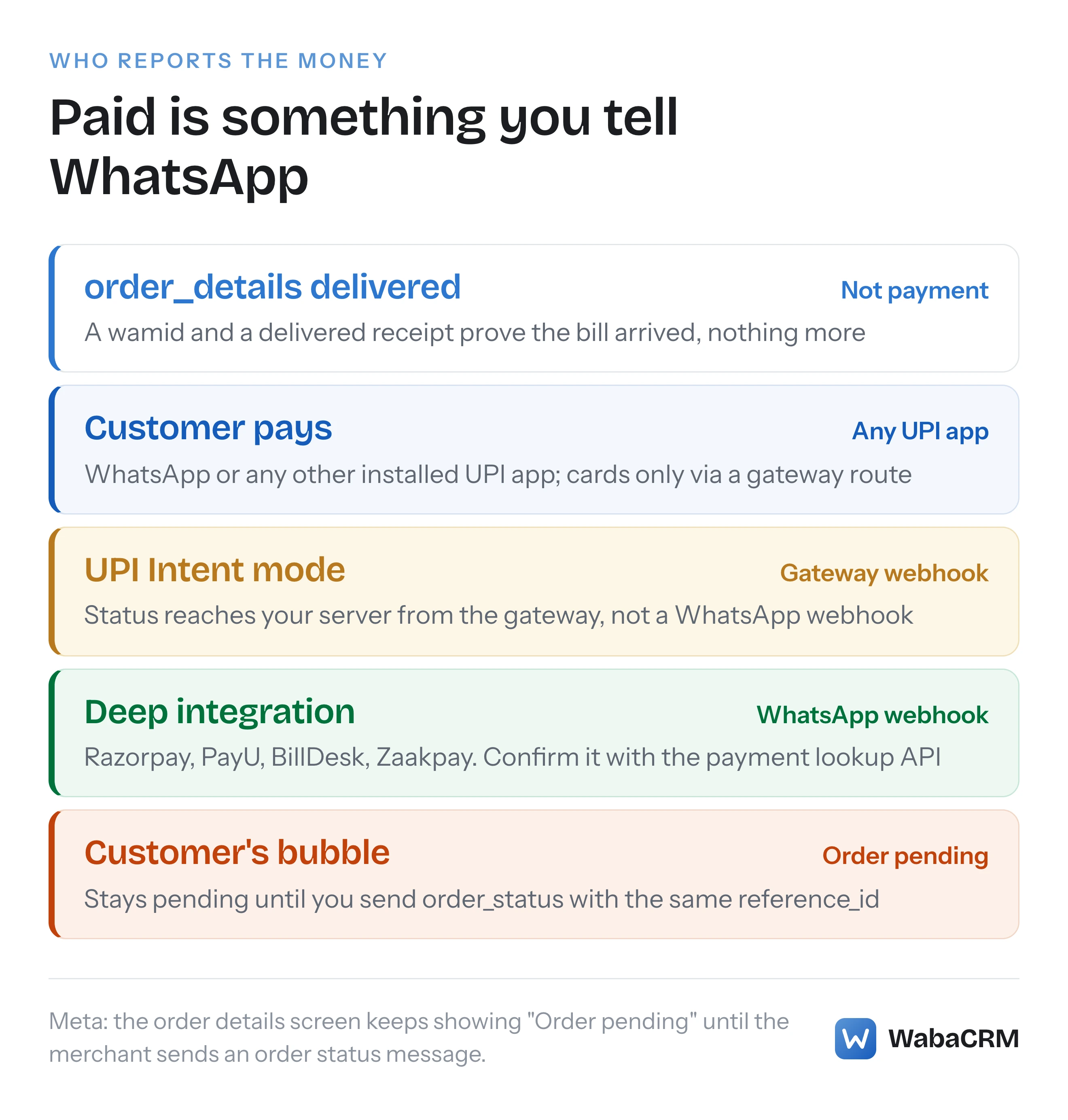
In UPI Intent mode, your payment gateway does, through its own webhook; Meta's comparison table marks payment status from WhatsApp webhooks as unavailable in that mode. In deep integration mode WhatsApp sends payment status itself, and Meta still tells you not to trust that alone:
"Businesses get notified when the payment status changes, but they must not solely rely on these webhooks notifications due to security reasons. WhatsApp also provides a payment lookup API that can be used to retrieve the payment statuses directly anytime." (Meta — Receive payments via payment gateways)
The lookup is keyed on the same two values you put in the message:
GET /<PHONE_NUMBER_ID>/payments/<PAYMENT_CONFIGURATION>/<REFERENCE_ID>
One wrinkle: the UPI guide's own security note says businesses "must use payment lookup API to retrieve the statuses directly from WhatsApp", yet that endpoint is keyed on a payment configuration, which the dynamic VPA route moves away from. The page does not say how to reconcile the two.
The step that is easiest to miss comes after the money arrives. WhatsApp does not mark the bill paid on its own. Meta's UPI guide is specific: "the order details screen order-status will continue to show “Order pending” until the merchant sends order status interactive message." A customer who has paid and still sees "Order pending" may try to pay again or write in. So follow every payment signal with an order_status message carrying the same reference_id. The values Meta lists are:
| order_status value | What it means |
|---|---|
pending |
User has not successfully paid yet |
processing |
Payment authorised, order being fulfilled |
partially-shipped |
Some of the products have shipped |
shipped |
All of the products have shipped |
completed |
Nothing further expected from anyone |
canceled |
Fails if a payment is pending or successful |
Two details to code around. Meta's table spells partially-shipped with a hyphen, while its own example payload a few lines later spells partially_shipped with an underscore; test which one your account accepts before a real shipment depends on it. And reconciliation stays with you: "Businesses should use their bank statements to reconcile the payments using the reference_id provided in the order_details messages." (Meta — Accept payments via payment links)
Can you send a payment request after the 24-hour window closes?
Yes, but only as an order details template. The interactive order_details message is a non-template message, and Meta's pricing page says those "can only be sent in an open 24-hour customer service window, which opens and resets with each user message." Outside that window, a fee reminder or an EMI notice has to be a template.
Meta describes the template version like this:
"Order details template is categorized as “Utility” template and apart from ‘name’ and ‘language’ of choice, it has general template components such as HEADER, BODY, FOOTER, and a fixed BUTTON with “ORDER_DETAILS” type and “Review and Pay” text." (Meta — Send order details template)
{
  "name": "<TEMPLATE_NAME>",
  "language": "<LANGUAGE_AND_LOCALE_CODE>",
  "category": "UTILITY",
  "components": [
    { "type": "HEADER", "format": "TEXT", "text": "<TEMPLATE_HEADER_TEXT>" },
    { "type": "BODY", "text": "<TEMPLATE_BODY_TEXT>" },
    { "type": "FOOTER", "text": "<TEMPLATE_FOOTER_TEXT>" },
    { "type": "BUTTONS", "buttons": [ { "type": "ORDER_DETAILS", "text": "Review and Pay" } ] }
  ]
}
At send time the whole order_details object travels as the button's parameter, so the template body stays fixed while the bill changes. After delivery, Meta says, "the rest of the payment flow is the same as “Sending invoice in customer session window”", which means the same gateway signal and the same order_status duty as above.
Two inconsistencies on Meta's template page matter before you build a status check. Its prose calls the button an "Open order details" call-to-action, while the API payload fixes the text as "Review and Pay". And its WhatsApp Manager steps say "Once approved template status will be changed to ACTIVE", while Meta's template fundamentals page says an approved template's "status is set to APPROVED". The first is probably WhatsApp Manager's label and the second the API's value, but neither page says so; check which string your account returns. For later updates outside the window there is a matching order status template, which Meta says lets businesses "update the order status outside of the customer session window in use cases such as charging the card for past order and updating about a shipment on order placed in the past." (Meta — Send order status template message)
Is a WhatsApp payment reminder a utility or a marketing template?
Meta files the order details template under utility, and its Payments overview lists "Bill payments, subscription renewals, insurance renewals" as the payment-reminder use case for that template. Its categorisation guide then says utility messages "should not promote, recommend, upsell, or cross-sell products; include offers; or attempt to secure renewals." (Meta — Template categorization). Both pages are current, and Meta does not reconcile them.
Meta's worked examples draw the line between stating a bill and selling a renewal. Under utility, in Account Alerts or Updates, sits "Reminder: Your monthly payment for {{service}} will be billed on {{date}} to the {{card}} you have saved on file." Under marketing, in Retargeting, sits "Your subscription will expire on {{date}}! Renew today to save {{discount}}." A fee due on a date, an EMI instalment or a premium already chosen reads like the first. Anything urging the customer to renew, or rewarding them for it, reads like the second. That is a reading of Meta's examples, not a rule Meta states.
Three more facts settle the edges:
- Marketing is available on purpose. A comment inside Meta's template payload says: "Businesses can create the order details template under marketing category by including display_format attribute".
- Checkout templates are marketing. Meta's checkout button templates page opens: "Checkout button templates are marketing templates that can showcase one or more products along with corresponding checkout buttons".
- Approval is not the end of it. "Automatic category updates can apply to any approved template that does not meet the template category guidelines — either because the template was not initially approved per those guidelines, or because the messages the template sends do not meet them."
If a reminder template is moved from utility to marketing anyway, the appeal route and the 60-day window are set out in why WhatsApp changed a utility template to marketing.
What does a payment request cost to send?
The same as any other message in its category: Meta charges per delivered message, an order details template at the utility rate and an in-window order_details message as a service message. Meta's pricing page is explicit that "Businesses are only charged when a message is delivered", and defines service as "Any non-template message not powered by the Meta Business Agent Platform." (Meta — Pricing on the WhatsApp Business Platform)
| Message | Category Meta applies | When Meta charges |
|---|---|---|
| Order details template | Utility | Every delivered message |
| order_details in the window | Service | From the 1,001st a month per number |
| order_status in the window | Service | From the 1,001st a month per number |
| Order status template | Utility | Every delivered message |
| Checkout button template | Marketing | Every delivered message |
The one exception to every row is the free entry point window after a Click-to-WhatsApp ad, in which "Meta does not charge for marketing, utility, authentication or service messages." The service allowance is per number: "Each business phone number has one free tier of 1,000 delivered service messages per month." And since 1 October 2026 the old exemption for utility templates inside a window is gone; Meta's page records that their pricing type "changed from free_customer_service to regular as of October 1, 2026", as covered in what changed in service message pricing.
One trap for in-window bills: "If businesses do not have a payment method for their Messaging account(s), Meta will deliver service messages within the free tier but not deliver them after the free tier has been used." A busy month with no payment method on file means payment requests that simply stop arriving. Whatever your gateway charges per transaction is between you and your gateway; none of the Meta pages cited here set it. To estimate the message side for your own volumes, the WhatsApp pricing calculator uses Meta's published rates.
How are Enhanced Payment Links different from a plain payment link?
Both start as an ordinary template whose dynamic URL button holds a gateway link. Enhanced Payment Links make WhatsApp render that link as a payment card with an amount and a Pay Now button, but only for allowlisted accounts using Razorpay, PayU or Cashfree. Without the enhancement, a URL button is simply a "URL to be loaded in WhatsApp user’s default web browser when tapped." (Meta — Utility templates)
Meta's Enhanced Payment Links page appears to contradict itself within a few lines. First: "Superfast Setup: Merchants can independently create the required WhatsApp templates and embed payment links from supported payment gateways - no BSP involvement is needed." Then:
"This feature is not publicly available yet. To request access, please reach out to your Solution Partner or Meta representative with your Messaging account ID, sample payment link, and preferred Payment Gateway (Razorpay, PayU, or Cashfree)." (Meta — Enhanced Payment Links)
Both are true: you build the template without a partner, but someone with a line to Meta has to switch the feature on. The header: "None — templates must not include a media header (image, video, or document)". The button: "Exactly one dynamic URL button with a supported PG link prefix". The prefix must match the gateway's own link format:
Razorpay  https://rzp.io/rzp/            https://rzp.io/i/
PayU      https://pmny.in/PAYUMN/        https://api.payu.in/
          https://u.payu.in/PAYUMN/
Cashfree  https://payments.cashfree.com/links
          https://payments.cashfree.com/link/   https://cfre.in/CSHFRE/
At send time you pass only the link's suffix as the button parameter:
{ "type": "button", "sub_type": "url", "index": "0",
  "parameters": [ { "type": "text", "text": "abc123XYZ" } ] }
Three things break the enhancement silently. A link wrapped under your own domain: "the enhanced experience will not render automatically." A test link: Meta requires the production environment, "not sandbox/test mode". And an old app: "Enhanced rendering depends on recipient’s WhatsApp version", so the body must make sense as a plain link too. Watch your gateway reports afterwards, because "Enhanced Payment Links create a UPI intent on every “Pay now” tap", and expired intents count as failures. Meta's own recommendation is to "Exclude payment expiry errors when calculating your success metrics."
What must be in place before the first payment request goes out?
A gateway account, Meta's WhatsApp Payments terms accepted on the account, and, for deep integration, a linked payment configuration. Skip the terms and the send fails with this error, which Meta's UPI and payment-link guides both print and which carries the acceptance link in its details:
{
  "error": {
    "message": "(#134011) WhatsApp Payments terms of service has not been accepted",
    "type": "OAuthException",
    "code": 134011,
    "error_data": {
      "messaging_product": "whatsapp",
      "details": "WhatsApp Payments Terms of Service acceptance pending for this WhatsApp Business Account. Please use the following link to accept terms of service before using Business APIs: https://fb.me/12345"
    }
  }
}
Meta's pages call the account a "Messaging account". It is the account you already have: "Your existing WABA ID now identifies your Messaging account." (Meta — WhatsApp accounts and Messaging accounts). The overview adds that "Essential Payments APIs are available at SP/TP", which reads as Solution Partners and Tech Providers; the difference between the two is explained in BSP, Tech Provider and Solution Partner compared.
Meta's UPI and payment-link guides both close with a merchant checklist. Two items need a decision before launch:
- "Ensure the merchant is verified and the WhatsApp account contact is marked with a verified check." The page does not say which verification it means. The badges and what each requires are covered in WhatsApp's green tick, blue tick and Meta Verified.
- "Verify the Messaging account is mapped to appropriate merchant initiated messaging tier (1k, 10k, and 100k per day)". A school with more parents than its daily tier allows cannot send every fee reminder on the same day.
The third is easy to forget: "Merchant should list the customer support information in the profile screen in case the consumer wants to report any issues."
Where does WabaCRM fit if you take payments this way?
At the plain-link end only. WabaCRM does not send order_details messages or order details templates, does not hold a payment configuration, and does not receive payment status. The Review and Pay routes on this page are something you build against Meta's API with your gateway, or through a provider that has built them.

What it does cover is the route every business can use today. Its template builder creates ordinary utility templates with a URL button whose final part is filled in at send time, which is the shape a gateway payment link needs, and customers' replies to those reminders land in a shared inbox.
Every Meta quotation on this page was read from Meta's own documentation on 17 October 2026. Meta changes that documentation without notice; the linked pages are authoritative and this one is not.
Questions people also ask
Do I need a payment gateway account to collect payments inside WhatsApp?
Can the WhatsApp Payments API charge in a currency other than rupees?
Can I refund a customer through WhatsApp?
How long can a WhatsApp payment request stay open?
Does the customer have to use WhatsApp's own UPI to pay?
- whatsapp payments api india
- whatsapp order details template
- upi payment on whatsapp business api
- whatsapp enhanced payment links
- whatsapp payment reminder template