WhatsApp Business API Without a Website: What Meta Asks
The short answer
Yes. Meta publishes no rule that a website is required to connect a number to the WhatsApp Business Platform. A website enters at three points: Embedded Signup asks for one when it creates a new business portfolio, business verification asks for one, and display-name review looks for external sources such as websites or social media pages (checked October 2026).
Can you get the WhatsApp Business API without a website?
Yes. Meta publishes no rule that a business must have a website to connect a number to the WhatsApp Business Platform, and Meta's own help article on editing business details describes verified businesses whose website field is empty.
What Meta does publish is three separate places where a website is asked for or looked for, at three different moments, by three different checks. Collapsed into one hedged sentence, as they often are, they make the answer sound uncertain. Taken one at a time, each is precise:
- Signup. Embedded Signup asks for a website when it creates a new business portfolio for you. A portfolio created first in Meta Business Suite is not asked for one.
- Business verification. The form asks for a website, and Meta lists one that fails to load among its rejection reasons. A missing website is not on that published list.
- Display-name review. When your messaging limit rises, Meta checks your display name against "external sources such as websites or social media pages".
Only the first sits on the path to connecting a number, and creating the portfolio first in Meta Business Suite means Embedded Signup is selecting a portfolio rather than creating one. The second and third come later and can slow you scaling, so this page is about where each one bites, read from Meta's documentation on 16 October 2026.
- Can you get the WhatsApp Business API without a website?
- Where does a website enter the WhatsApp onboarding path?
- Does Embedded Signup ask for a business website?
- Can Meta business verification pass without a website?
- Is a half-built website worse than none for verification?
- Which scaling path to the 2,000 limit never looks at a website?
- Will your display name be rejected without a website?
- When does a display name need a page on your website?
- Can an Instagram or Facebook page stand in for a website?
- What should the WhatsApp Business profile carry instead of a website?
- Why might Meta's health status still ask for a website?
Where does a website enter the WhatsApp onboarding path?
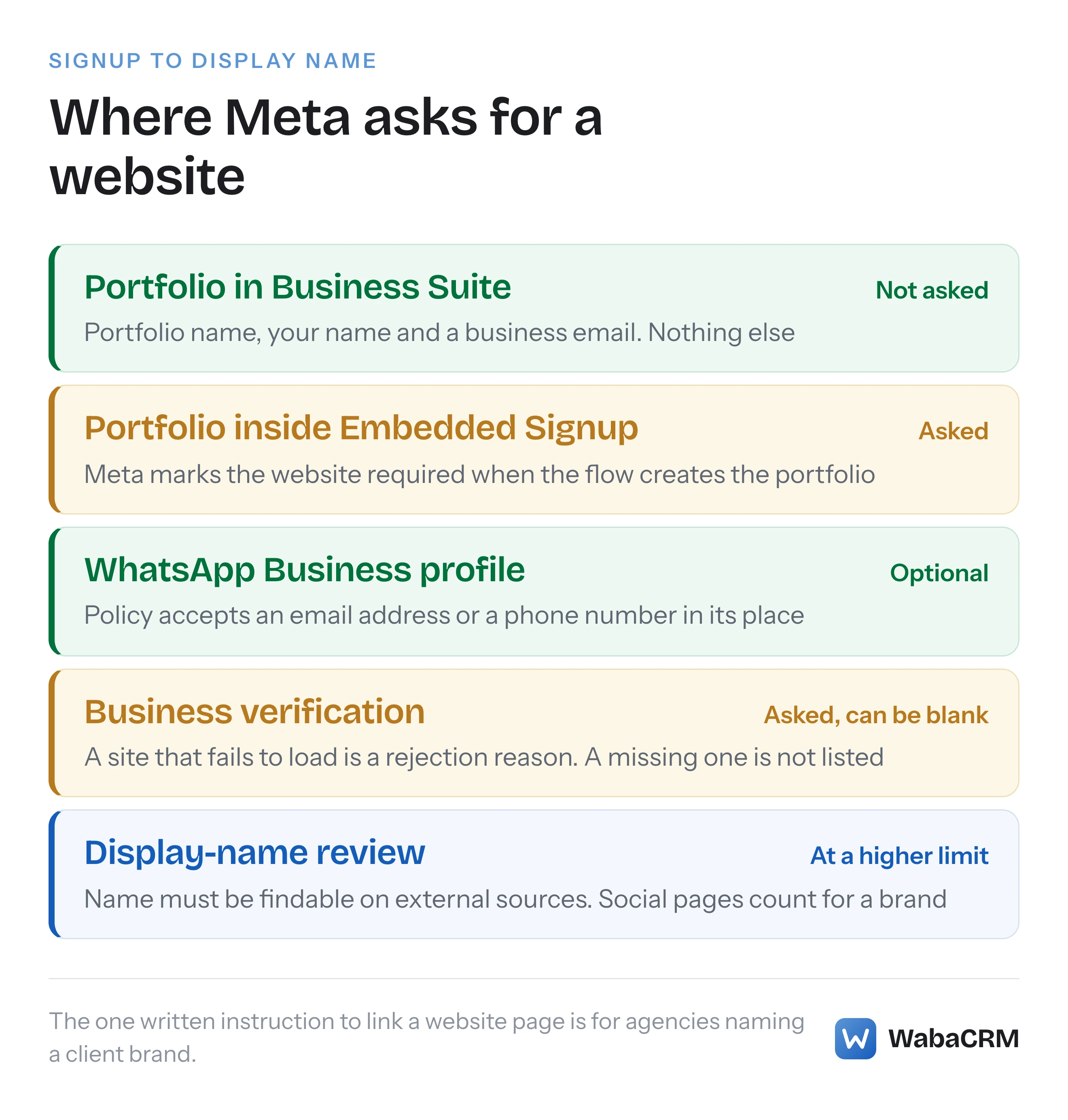
At five points. Meta marks the field required in one of them, when Embedded Signup creates the portfolio, and writes an instruction to link to a website page in one more, when a display name carries another company's brand. The table sets them out in the order a business meets them.
| Stage | What Meta asks for | With no website |
|---|---|---|
| Portfolio created in Meta Business Suite | Portfolio name, your name, business email | Nothing missing |
| Portfolio created inside Embedded Signup | Name, email, country and website | The field is asked for |
| WhatsApp Business profile | One of email, website or phone | Email or phone suffices |
| Business verification | Website among the business details | Not a listed rejection reason |
| Display-name review | Evidence on external sources | Social pages count for a brand |
The rest of this page takes each row in turn, with Meta's own wording.
Does Embedded Signup ask for a business website?
It does when the flow creates the business portfolio for you. Meta's reference for pre-filling Embedded Signup lists the portfolio website field as:
"Required if creating a new business portfolio." (Meta — Embedded Signup, pre-filling screens)
The same entry adds that the value "will appear in the Meta Business Suite > Business portfolio > Settings > Business info panel". The same reference says a new portfolio is created from the injected business.name, business.email, business.website and address.country values, and Meta's description of the coexistence flow's business creation screen lists the same four fields: "This screen allows the business customer to create a new business portfolio by entering business information: name, email address, country, and website." (Meta — Embedded Signup default flow)
Creating the portfolio somewhere else first changes the question. Meta's help article on creating a portfolio in Meta Business Suite asks you to "Enter a name for the business portfolio", and, if you are signed in with a Facebook profile, "your first name and surname and your business email address" (Meta — Create a business portfolio). No website. Embedded Signup then lets a customer select an existing portfolio, and Meta's pre-fill reference says that when a partner pre-fills the ID of a portfolio the customer owns, "Embedded Signup injects its existing data into the flow and ignores all other business object properties."
What Meta does not document is whether the flow then prompts for a website the portfolio does not have. We have not found a page that says either way, so this article will not guess. The objects the flow does need, and the one people wrongly assume it needs, are in whether the WhatsApp API needs a Facebook Page.
Can Meta business verification pass without a website?
Meta's own wording says a verified business can lack one. The verification form does ask for a website, and it is strict about one you do give it.
The step in Meta's verification article reads:
"Provide your business details, including the legal business name, address, phone number and website. Check that the details you enter exactly match the details of your legal business entity." (Meta — Verifying your business in Meta Business Suite)
Two steps further down, the website stops being the only route to the next step: "Choose a method to confirm your connection: email, phone, text message, WhatsApp message or domain verification." Only domain verification needs a site, because Meta describes it as confirming "that you own your business's website by adding a meta tag or DNS record".
The sentence that settles it is on a different page. Meta's article on editing a verified business says:
"You can, however, add a phone number or website address if they are missing, without then needing to reverify your business." (Meta — Edit business details for a verified business)
That describes a verified business with no website on file. The same article draws the line on changes: if you edit your business's "legal name, country, phone number, website address or tax ID (EIN)", you "will need to complete the business verification process again". Adding a missing website later needs no re-verification; changing one does. The documents side of the process, and what Meta matches them against, is covered in Meta business verification in India.
Is a half-built website worse than none for verification?
On Meta's published wording, yes. The rejection reason Meta lists is about a website that exists and misbehaves, not about one that is absent.
Meta's rejection article lists four reasons and introduces them as reasons that "include", so the list is not exhaustive. The website one reads:
"Having a website that fails to load, is not HTTPS compliant (does not use a secure connection) or contains a link that leads to an error message." (Meta — Why was my business verification submission rejected)
A placeholder site on a free builder with a broken contact page, a domain whose certificate lapsed, or a menu link that returns an error page each fits that sentence literally. An empty field does not. That is a reading of Meta's text, not a promise about any one reviewer, but it is the reading the text supports.
The verification article repeats the standard for any site you do submit: "make sure that your business's website loads and is HTTPS-compliant, which means that your website uses a secure connection and the URL starts with https://." If the site is not ready, the honest options are to finish it before verifying or to leave it out and add it later, which the edit article says costs no re-verification.
Which scaling path to the 2,000 limit never looks at a website?
The quality path. Meta offers three ways to lift a new portfolio's limit, and only one involves no business details at all.
Meta's messaging limits page, updated 21 May 2026, says "Newly created business portfolios have a messaging limit of 250" and lists three scaling paths: verify your business, have your partner verify it, or:
"Send 2,000 delivered messages outside of customer service windows to unique WhatsApp user phone numbers within a 30-day moving period, using templates with a high quality rating." (Meta — Messaging limits)
Meta's help centre describes the same path in different numbers: "This requires a minimum of 1,000 conversations over 30 consecutive days." (Meta — Scale your WhatsApp Business account capabilities) The two pages disagree on the threshold, and the developer page carries a date while the help article does not. Plan against the higher figure.
| Scaling path | Asks about a website? | Leads to green tick eligibility? |
|---|---|---|
| Meta business verification | Yes, in the business details | Yes |
| Partner-led business verification | Depends on the partner's submission | Yes |
| Quality messaging | No | No |
The last column is Meta's: "to be eligible for a WhatsApp official business account, you will have to complete verification using path 1 or 2." (Meta — Scale your WhatsApp Business account capabilities)
Partner-led verification is not open to every partner. Meta's developer page says: "This feature is currently only available to approved Select Solution and Premier Solution Partners." (Meta — Partner-led Business Verification) It also compares websites when one is submitted: Meta's webhook reference lists a rejection reason reading "WEBSITE NOT MATCHING — The website domain in the submission does not match the website domain on the client’s business profile" (Meta — account_update webhook reference). WabaCRM is a Meta-verified Tech Provider, not a Solution Partner, so it cannot submit partner-led verification for you.
Will your display name be rejected without a website?
Not for that reason alone, but the name has to be findable somewhere outside WhatsApp. Meta's display name guidelines look for a clear link between the name and your business on external sources, and they name social media pages and your verified legal name alongside a website. Their legal-name examples, though, are judged by whether the name appears on external websites.
The review is triggered by growth, not by signup. Meta's developer page says:
"When you reach a higher messaging limit, your business phone number’s display name automatically undergoes verification based on the display name guidelines." (Meta — Display names)
So a business with no website can connect, send and only meet this check once its limit rises. WabaCRM's numbers screen shows the messaging tier Meta reports for each number, or says Meta has not reported one, and that is the figure to watch for that moment.

The guidelines set out four tests a name can be matched against:
- External sources for a brand. Meta's example "Tom Ford Nike" is not accepted "unless the brand name is officially linked on external sources such as websites or social media pages."
- Branding or the legal name. A display name "must also use branding consistent with external sources such as the company website or marketing, or with the company's verified legal name."
- The legal name. A display name "must have a clear relationship with the business's legal name". The accepted example is a charity's legal name mentioned on a charity's website; the rejected one is the "Legal name of a charity not mentioned on any external websites".
- The nature of a personal-name business. "If a WhatsApp Business platform display name uses a personal name, the nature of the business must be clear on external sources, for example, Tom Ford Chiropractor."
(Meta — Display name guidelines for the WhatsApp Business Platform)
The failing cases in Meta's own examples are names with nothing behind them: "Not accepted: Digital Cloud Solutions, which cannot be found on external sources such as the company website", and the charity whose legal name is on no external website. Meta does not say whose website has to carry the name, but on its wording a business that appears on no website at all is closer to the rejected charity than its verified legal name alone suggests. An Instagram or Facebook page that carries the brand is the one non-website source the guidelines name for the brand link. What happens after a rejection, and why the API spells it two ways, is in WhatsApp error 131037 and name_status DECLINED.
When does a display name need a page on your website?
When the name belongs to someone else's brand. Agencies, distributors, partners and parent companies naming a client or subsidiary meet the one written requirement for a website page in this whole process.
"If a WhatsApp Business platform display name represents a business that the company works with as an agency, distributor, partner or parent company, the relationship between the business in the display name and the end-client business must be evident on the business website." (Meta — Display name guidelines)
Meta's worked example goes further than "evident": Global Voyager, wanting the name Commercial Air, "must submit a link to a website page stating that Commercial Air is a subsidiary of Global Voyager."
The same applies to sub-brands. "Fruit Snacks by Fresh Produce" is accepted where "the association is clearly mentioned on external websites"; plain "Fruit Snacks" is not when the association is mentioned nowhere. If you are an Indian distributor running WhatsApp under a principal's brand name, this is the one place a page on a real website is the documented route. Displaying your own trading name avoids it.
Can an Instagram or Facebook page stand in for a website?
For the display name's brand link and the WhatsApp profile, Meta's own wording allows it. For business verification, Meta does not say so, and domain verification cannot work without a domain you control.
The display name guidelines name "websites or social media pages" together as external sources for a brand link. The WhatsApp Business Profile API describes its websites field as "URLs associated with the business", and Meta's own example request fills it with a website and a Facebook address:
"websites": [
  "https://www.business.com",
  "https://www.facebook.com/business"
]
Source: Meta — WhatsApp Business Profile API reference.
Business verification is the exception. Meta's verification article asks for a website that "loads and is HTTPS-compliant" and does not say whether a social profile is accepted in that field. A social page loads over HTTPS, but it is not a domain you can add "a meta tag or DNS record" to, so it can never be your domain verification route. Confirm your connection by email, phone, text or WhatsApp instead.
What should the WhatsApp Business profile carry instead of a website?
An email address or a telephone number. The WhatsApp Business Messaging Policy asks for contact information and accepts any one of three kinds:
"Maintain a WhatsApp Business profile with customer support contact information and one or more of the following: email address, website address, and/or telephone number." (WhatsApp Business Messaging Policy)
The API agrees. In the update request, Meta's reference marks only messaging_product as required; websites, email, address, about and the rest are optional. A profile update with no website is a valid request:
POST /v26.0/<PHONE_NUMBER_ID>/whatsapp_business_profile

{
  "messaging_product": "whatsapp",
  "about": "Orders on WhatsApp, Monday to Saturday",
  "email": "orders@example.in",
  "address": "14 MG Road, Bengaluru 560001"
}
One obligation does not disappear with the website. The same policy requires you to secure the necessary notices and consents, "including maintaining a published privacy policy". Meta's wording does not say where it must be published, but a business with no website still has to publish one somewhere a customer can read it. That is a point to take to whoever advises you on Indian data law, not a gap to rely on.
Why might Meta's health status still ask for a website?
Because Meta's systems may flag an incomplete business profile, and on one answer we have seen, the missing fields named included Website. We found no Meta page that describes this, so treat it as an observation rather than a rule.
Meta's health status field reports, for each node involved in sending, whether it is AVAILABLE, LIMITED or BLOCKED, and for a blocked node "the errors property will be included which describes the error and a possible solution" (Meta — Messaging and calling health status). Meta's page shows example errors only for a pending template and for calling setup, and Meta's error codes page describes 131000 as "Message failed to send due to an unknown error." Neither page mentions an incomplete business profile. On 19 September 2026, the health status Meta returned for a business portfolio connected to our platform carried this error on its BUSINESS entity:
{
  "error_code": 131000,
  "error_description": "Your business profile is incomplete. The following fields are required: Legal Name, Country, and Website.",
  "possible_solution": "Please complete your business profile in Meta Business Suite under Settings > Business Info. All three fields (Legal Name, Country, Website) must be filled in before integrity checks can proceed."
}
The same entity also carried a business-verification error, so this one answer cannot tell you which of the two was doing the blocking. What it does show is that the Website field in Business info is something Meta's own checks read. If your health status ever names it, the cheapest fix is the one the edit article already permits: add the missing website, which, for a verified business, Meta says needs no re-verification.
Every Meta quotation on this page was read from Meta's own documentation on 16 October 2026. Meta changes that documentation without notice; the linked pages are authoritative and this one is not.
Questions people also ask
Can I use my domain name as my WhatsApp display name?
Does adding a website after verification mean verifying again?
Can I confirm my connection to the business without a website?
Do I need a website to get the WhatsApp green tick?
Can a Google Business Profile link count as my website?
- whatsapp business api without website
- meta business verification without website
- whatsapp display name
- business portfolio
- embedded signup