WhatsApp QR Code for Business: Short Links vs wa.me
The short answer
A WhatsApp QR code for business, made in WhatsApp Manager or through the WhatsApp Business Management API, opens a chat pre-filled with up to 140 characters of text that stays editable after printing. A wa.me link carries its text fixed in the URL. Meta says analytics are not available for QR codes and short links (checked October 2026).
How do you make a WhatsApp QR code for your business?
A WhatsApp QR code for business is made in WhatsApp Manager, under a phone number's Message links tab, or with one request to the message_qrdls endpoint of what Meta calls the WhatsApp Business Management API. Either way you get a code plus a short link of the form wa.me/message/<code>, carrying a pre-filled message of up to 140 characters that you can change after the code has been printed.
The alternative most shops start with is a home-made wa.me link, turned into a QR image by a free generator. That works too, and the two look identical on a counter standee. They behave differently in three places that matter once the standee exists: whether the message can be changed, what a customer sees after you retire the code, and whether anybody can tell you how many people scanned it. Meta's answer to the third question is the same for both, and it is not the answer a scan graph implies.
The sections below take each difference in turn, then the questions that follow a scan: what it costs, whether it counts as permission to market, and what should answer it.
- How do you make a WhatsApp QR code for your business?
- What is the difference between a wa.me link and a WhatsApp short link?
- How do you write a wa.me link with a pre-filled message?
- Why does a wa.me link fail with an Indian phone number?
- How do you create a WhatsApp QR code through the API?
- Can you change a printed WhatsApp QR code's message later?
- Can you see how many people scanned your WhatsApp QR code?
- Does a WhatsApp QR code scan open a free entry point window?
- Is a QR code scan an opt-in for WhatsApp marketing?
- What should answer the message after a customer presses send?
- How should you print a WhatsApp QR code for a counter or packaging?
What is the difference between a wa.me link and a WhatsApp short link?
A wa.me link is a click-to-chat address you write yourself, with the phone number and any pre-filled text inside the URL. A short link is a code Meta issues for a business phone number on the WhatsApp Business Platform, where the number and the message live on Meta's side and only a random code appears in the link. Meta's own FAQ puts the difference in one answer:
"The new short links enable prefilled messages associated with a link to be edited or deleted at any time. They also reduce the syntax of the URL to a random code, which eliminates the need to embed messages in the URL and masks the phone number." (Meta — QR Codes and Short Links)
Every QR code made in WhatsApp Manager or through the API has one of these short links behind it. The API's example response returns a qr_image_url for the image and a deep_link_url of https://wa.me/message/4O4YGZEG3RIVE1 together, so a code you print and a link you paste into an Instagram bio can be the same object.
| Question | wa.me link | Meta QR code or short link |
|---|---|---|
| Who makes it | Anyone, by hand | WhatsApp Manager or Meta's API |
| Phone number in the link | Visible | Masked behind a code |
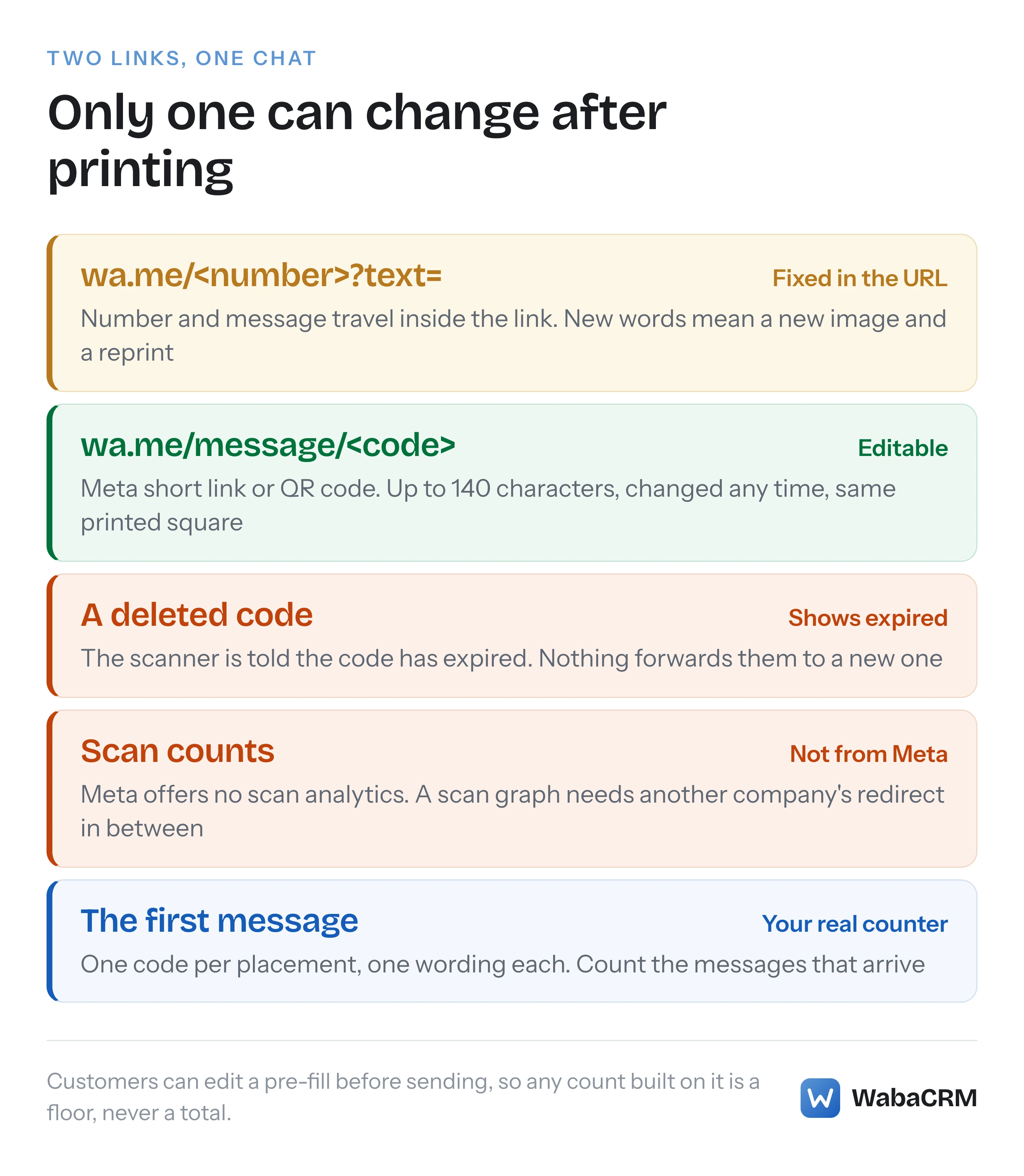
| Pre-filled text | Fixed inside the URL | Up to 140 characters, editable |
| How many per number | No limit published | 2,000 codes and links |
| After you retire it | Cannot be retired | Scanner told it has expired |
| Scan analytics from Meta | None documented | "Analytics are not available" |
A third kind exists for numbers that live only in the WhatsApp Business app on a phone. WhatsApp's help centre says "A short link for your business is automatically generated when you create an account on the WhatsApp Business app" (WhatsApp Help Center — How to create short links), and that link has its own QR code and default message in the app's Tools tab. Meta's Business Help Centre article on platform QR codes tells app-only businesses not to follow its steps, so pick the method that matches where your number actually runs.
How do you write a wa.me link with a pre-filled message?
Write https://wa.me/<number>?text=<message>, with the number in full international format and the message URL-encoded. WhatsApp's help centre gives the rule for the number:
"Use https://wa.me/
where the is a full phone number in international format. Omit any zeroes, brackets, or dashes when adding the phone number in international format." (WhatsApp Help Center — How to use click to chat)
and for the message, on the same page:
"The pre-filled message will automatically appear in the text field of a chat." (WhatsApp Help Center — How to use click to chat)
For an Indian mobile number 98765 43210 and the message "Hi, I want to order", the link is:
https://wa.me/919876543210?text=Hi%2C%20I%20want%20to%20order
Spaces become %20 and the comma becomes %2C. Most spreadsheet and code environments have an encoding function; typing the encoded form by hand is how stray characters end up in the customer's message box.
"Appear in the text field" is the important phrase. Nothing is sent by the link. The customer sees your words in their own composer, can edit or delete them, and has to press send before your business receives anything. The same page also describes a link with no number at all, https://wa.me/?text=urlencodedtext, after which "you’ll be shown a list of contacts you can send your message to". That suits a "share this offer with a friend" button and is useless on a counter, because the customer chooses the recipient.
The help centre publishes no character limit for a wa.me pre-fill; we read the whole click-to-chat article on 17 October 2026 and it states none. The 140-character limit Meta does publish belongs to its own QR codes and short links, not to wa.me. Keep a wa.me message short anyway, because a stranger at a till reads it on a phone before deciding whether to send it.
Why does a wa.me link fail with an Indian phone number?
Because Indian numbers are printed the way people dial them, and a wa.me link needs digits only, starting with the country code. The help centre gives one example to use, https://wa.me/1XXXXXXXXXX, and one not to use, https://wa.me/+001-(XXX)XXXXXXX. The wrong one carries a plus sign, an international dialling prefix, brackets and a dash, which is a fair description of the average visiting card.
| As printed on the card | Problem | In the link |
|---|---|---|
| +91-98765-43210 | Plus sign and dashes | 919876543210 |
| 098765 43210 | Trunk zero, no country code | 919876543210 |
| 0091 98765 43210 | International prefix | 919876543210 |
| 9876543210 | No country code at all | 919876543210 |
The last row is the dangerous one, because it looks complete. In international format the first digits are read as a country code, so wa.me/9876543210 asks for a number beginning with 98, which is Iran's country code, not an Indian mobile number missing its prefix. The link opens, just not to you.
The number also has to be on WhatsApp. The click-to-chat article says the feature works "as long as you know this person’s phone number and they have an active WhatsApp account". A shop that prints its landline on a standee and has never registered that line with WhatsApp has printed a link to nobody.
How do you create a WhatsApp QR code through the API?
Send a POST to /<PHONE_NUMBER_ID>/message_qrdls with the pre-filled message and the image format you want. This is Meta's own example, with the access token shortened:
curl 'https://graph.facebook.com/v26.0/106540352242922/message_qrdls' \
  -H 'Content-Type: application/json' \
  -H 'Authorization: Bearer EAAJB...' \
  -d '{
    "prefilled_message": "Cyber Monday",
    "generate_qr_image": "SVG"
  }'
and Meta's example response:
{
  "code": "4O4YGZEG3RIVE1",
  "prefilled_message": "Cyber Monday 1",
  "deep_link_url": "https://wa.me/message/4O4YGZEG3RIVE1",
  "qr_image_url": "https://scontent-iad3-2.xx.fbcdn.net/..."
}
generate_qr_image takes SVG or PNG. The same endpoint lists every code on the number with a GET, reads one with GET /message_qrdls/<code>, updates one with a POST naming the code, and deletes one with DELETE /message_qrdls/<code>. Keep the code value from the response in your own records; it is the only handle for every later change.
Look closely at that example. The request sends "Cyber Monday", the response returns "Cyber Monday 1", and the list example further down the same page shows the same code holding "Cyber Monday". Meta does not explain the trailing 1. If anything downstream matches incoming messages against your pre-fill, store the text the API returned, then read it back with a GET before relying on it.
Without the API, Meta's Business Help Centre walks the same job through WhatsApp Manager: open the account, click Phone numbers, choose the number, open Message links and click Create message link. Its note on an empty message field is worth knowing: "If you don't add the text, your QR code will pop up an open-ended conversation when scanned." (Meta Business Help Centre — Manage your WhatsApp Business platform QR code)
Can you change a printed WhatsApp QR code's message later?
Yes, if Meta issued the code; no, if it is a wa.me link. A Meta code is a pointer, so you change what it points at and the printed image stays valid. The update is a POST with the same code:
curl 'https://graph.facebook.com/v26.0/106540352242922/message_qrdls' \
  -H 'Content-Type: application/json' \
  -H 'Authorization: Bearer EAAJB...' \
  -d '{ "code": "4O4YGZEG3RIVE1", "prefilled_message": "Cyber Tuesday" }'
In Meta's example the answer carries the new message with the same code and the same deep_link_url, which is the whole point: the square on the box does not change. A wa.me link has its message inside the URL, so changing the words means a new link, a new image and a reprint.
Codes also stay alive until you say otherwise. The developer page says "QR codes do not expire automatically", and the Business Help Centre puts the two rules side by side: "You can create up to 2,000 unique codes and manage them directly in Meta WhatsApp Manager. Your codes won't expire until you delete them." Deleting has a visible cost. Meta's user-experience table says a customer who opens a deleted code or link "sees an error message saying “This QR code [short link] has expired.”" Nothing forwards them anywhere else.
So the safer way to end a festival offer printed on packaging is to edit the pre-fill to a neutral greeting rather than delete the code. Boxes sit in cupboards for months, and a customer who scans one in March should still reach the shop, not an expiry notice.
Can you see how many people scanned your WhatsApp QR code?
No. Meta states it plainly, in the limitations list and again in the FAQ on the same page:
"Analytics are not available for QR Codes and Short Links as we limit the amount of data we log to protect user privacy." (Meta — QR Codes and Short Links)
Nothing in WhatsApp's click-to-chat article offers scan counts for wa.me links either. That tells you how any scan graph must be produced. A phone that scans a code holding your wa.me link goes straight to WhatsApp and reports the scan to no third party, so a QR generator that shows you scan counts cannot be encoding your WhatsApp link. It has to encode its own web address, which logs the visit and then redirects to wa.me. That has four consequences worth weighing before you print it:
- The code works only as long as the redirect does. Its life is tied to that service's uptime and to your account with it, not to WhatsApp.
- Every scan stops at somebody else's server first. Meta lists the absence of an intermediate step as a feature of its own codes: "Users will always go directly to the app without any interstitial page."
- The WhatsApp camera may refuse it. WhatsApp's help centre notes that "The WhatsApp camera can only scan official WhatsApp QR codes" (WhatsApp Help Center — How to share your WhatsApp Business QR code). The article does not define "official", but a code pointing at another company's redirect is the clearest case of one that is not.
- A redirect counts visits, not conversations. The number that matters to a shop is how many people pressed send, and no redirect can see that.
You can count what matters without any redirect. Give each placement its own code, which the 2,000 allowance makes easy, and its own wording: "Hi, I saw your counter standee" on one, "Hi, my order arrived" on the delivery box. Then count first messages that contain each phrase. Treat the result as a floor rather than a total, because customers are free to edit the text before sending, and some will.
Does a WhatsApp QR code scan open a free entry point window?
No. Meta's pricing page names one trigger for the free entry point window, and a QR code is not it:
"If a WhatsApp user messages you via an ad that clicks to WhatsApp (CTWA) using a device running our Android or iOS app (since our desktop and web apps are not supported): A customer service window is opened." (Meta — Pricing on the WhatsApp Business Platform)
The free window only follows from a reply inside that ad-started conversation, as our piece on the click-to-WhatsApp free entry point window sets out. A conversation that starts from a scanned code is an ordinary one. The customer's message costs you nothing, since the same page says "Meta does not charge for messages from users to businesses", and it opens the 24-hour customer service window. Inside that window you reply with service messages, and since 1 October 2026 those are charged after a monthly allowance:
"For each business phone number, Meta provides 1,000 free service messages per month, which do not roll over but reset monthly." (Meta — Pricing on the WhatsApp Business Platform)
When the window closes you are back to approved templates, charged by category and by the recipient's country. A busy counter code can therefore move a number past its free service allowance in a month. How the free tier and the per-message rates interact is laid out in what changed for service messages on 1 October 2026, and the WhatsApp pricing calculator turns an expected volume into a monthly figure.
| What happens | Charged by Meta? |
|---|---|
| Customer scans and sends the pre-fill | No |
| Your free-form replies within 24 hours | Service rate, after 1,000 a month per number |
| A template after the window closes | Yes, by category and market |
| A chat started from a CTWA ad | Free entry point rules apply instead |
Is a QR code scan an opt-in for WhatsApp marketing?
Not on its own. A scan followed by a sent message means the customer started a conversation and you may answer it. Sending them a promotional template next week is a separate act, and Meta's opt-in rule asks for more than a phone number:
"Businesses may contact people on WhatsApp if: (a) they have given their mobile phone number; and (b) businesses have received opt-in permission from the recipient confirming that they wish to receive subsequent messages or calls from a particular business." (Meta — Get opt-in for WhatsApp)
The same page lists what an opt-in must state: "Businesses must clearly state that a person is opting in to receive communication from the business" and "Businesses must clearly state the business’s name that a person is opting in to receive messages from."
A QR standee can be designed to carry both statements. Print the business name and what customers will receive beside the code, and make the pre-fill say it in the customer's own sent message, for example "Yes, Acme Retail can send me offers on WhatsApp". The message then sits in the chat history as a dated record of who agreed to what. Whether that also satisfies the law where your customers live is a separate check, because Meta's third requirement is simply "Businesses must comply with applicable law". What to store so an opt-in can be proved later is covered in what WhatsApp actually requires from an opt-in.
What should answer the message after a customer presses send?
Somebody, quickly, because the customer service window is already counting down. A code on a shop counter tends to produce the same few first messages over and over, so the opening reply is a good candidate for a keyword auto-reply, with a person taking over from the second message.
In WabaCRM the scanned conversation lands in the shared inbox like any other inbound chat, and a keyword chatbot set to Contains can answer a phrase from your pre-fill. Matching ignores letter case, and at most one bot answers any single message. Each bot shows how many times it has been triggered, which turns the per-placement wording from the analytics section into a running count.
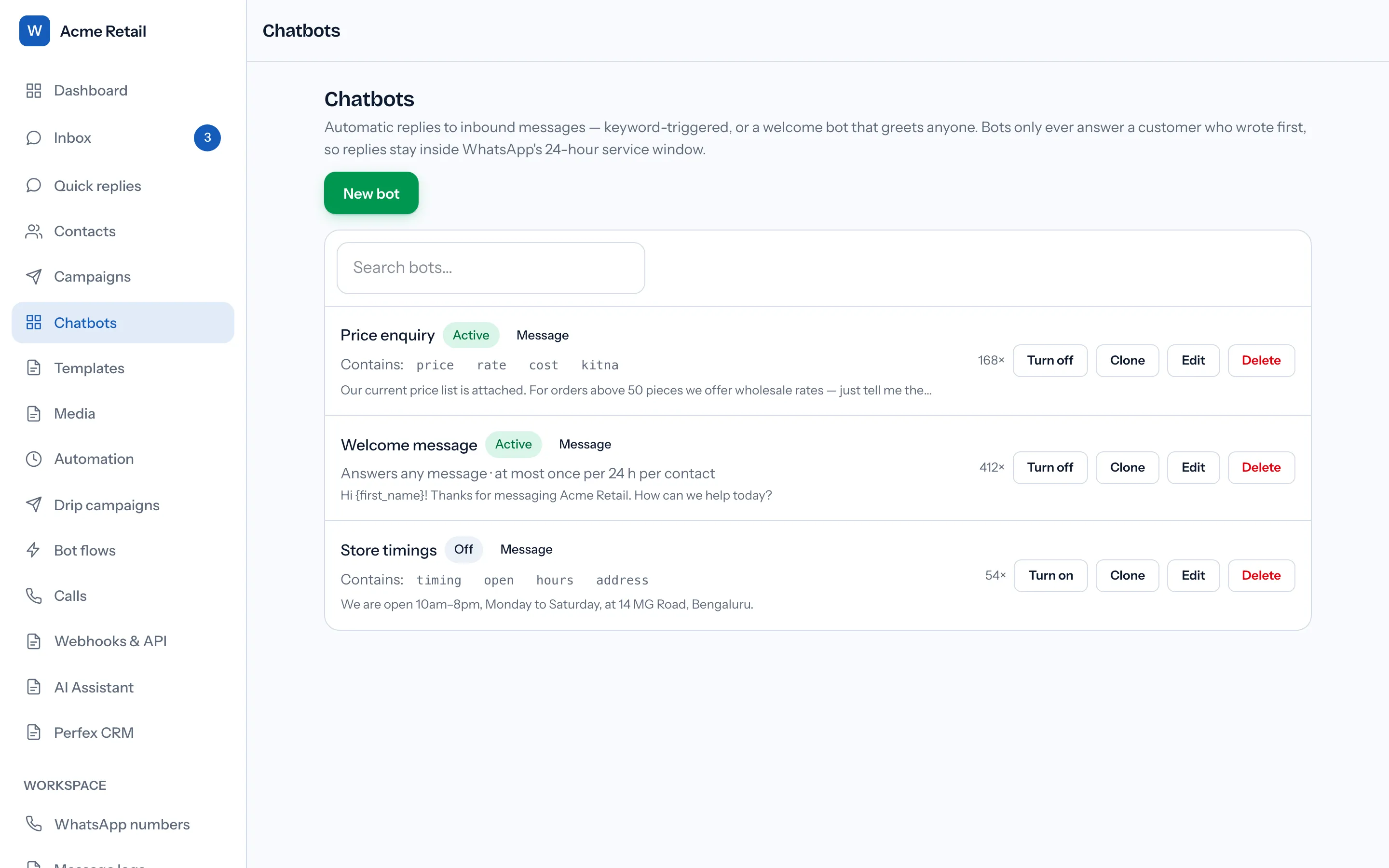
That count is a floor, not a scan total. It records the times the bot answered, so customers who rewrote the pre-fill before sending, and any repeat a bot's own limits held back, are not in it. How keyword bots choose an answer, and when Meta lets them reply at all, is set out in the WhatsApp chatbot builder guide.
How should you print a WhatsApp QR code for a counter or packaging?
As a vector file, in its original colours, with one code per language. Meta's notes on printing are short and specific. On format: "We recommend the .svg file format for the best quality in print materials." On appearance:
"We recommend you do not customize the color or look and feel of the code itself in order to preserve readability." (Meta — QR Codes and Short Links)
On language, the responsibility is yours: "You will be responsible for using the appropriate QR code based on expected location and language of users." A shop serving customers in Hindi and English is better served by two codes with two pre-fills than by one bilingual message. Meta does not say how the 140-character limit counts Devanagari or Tamil script, so test a regional pre-fill in WhatsApp Manager before printing it on ten thousand boxes.
Two more behaviours from Meta's user-experience table are worth knowing before the customer finds them. A short link clicked on a computer opens WhatsApp's desktop app with the message ready, or prompts the user to install it. And someone who once blocked your business "gets a prompt asking if they would like to unblock the business to continue messaging them", so a code on a reorder slip can win back a customer who walked away.
For Indian shops the useful placements are the ones a customer holds while they have a question: the till, the invoice, the delivery box, the clinic reception desk. Each deserves its own code and its own first line, so the conversation starts already knowing where the customer is standing.
Every Meta quotation on this page was read from Meta's own documentation on 17 October 2026. Meta changes that documentation without notice; the linked pages are authoritative and this one is not.
Questions people also ask
Can one WhatsApp number have several QR codes with different messages?
Do WhatsApp QR codes work when scanned with the phone camera instead of WhatsApp?
Does a WhatsApp QR code send a message by itself when it is scanned?
Can a wa.me link point to a number that only uses the WhatsApp Business app?
How do I stop an old WhatsApp QR code from working?
- whatsapp qr code for business
- wa.me link with prefilled message
- whatsapp short link
- message_qrdls
- track whatsapp qr code scans