WhatsApp Bulk Sender Ban: Why Your Number Gets Blocked
The short answer
WhatsApp bans numbers used with bulk sender software because its Terms of Service forbid "bulk messaging, auto-messaging, auto-dialing" and unauthorised non-personal use, and its Help Center says its products "are not intended for bulk or automated messaging". The WhatsApp Business Platform does not lift it: it authorises approved template messages to opted-in people, within a messaging limit (checked October 2026).
Why does WhatsApp ban numbers that use bulk sender software?
WhatsApp bans them because bulk and automated messaging breaks the Terms every WhatsApp account accepts, and because it detects that behaviour on its own servers rather than inside the app the tool controls. WhatsApp's Help Center states it in one sentence:
"Our products are not intended for bulk or automated messaging, both of which have always been a violation of our Terms of Service." (WhatsApp Help Center — Unauthorized use of automated or bulk messaging)
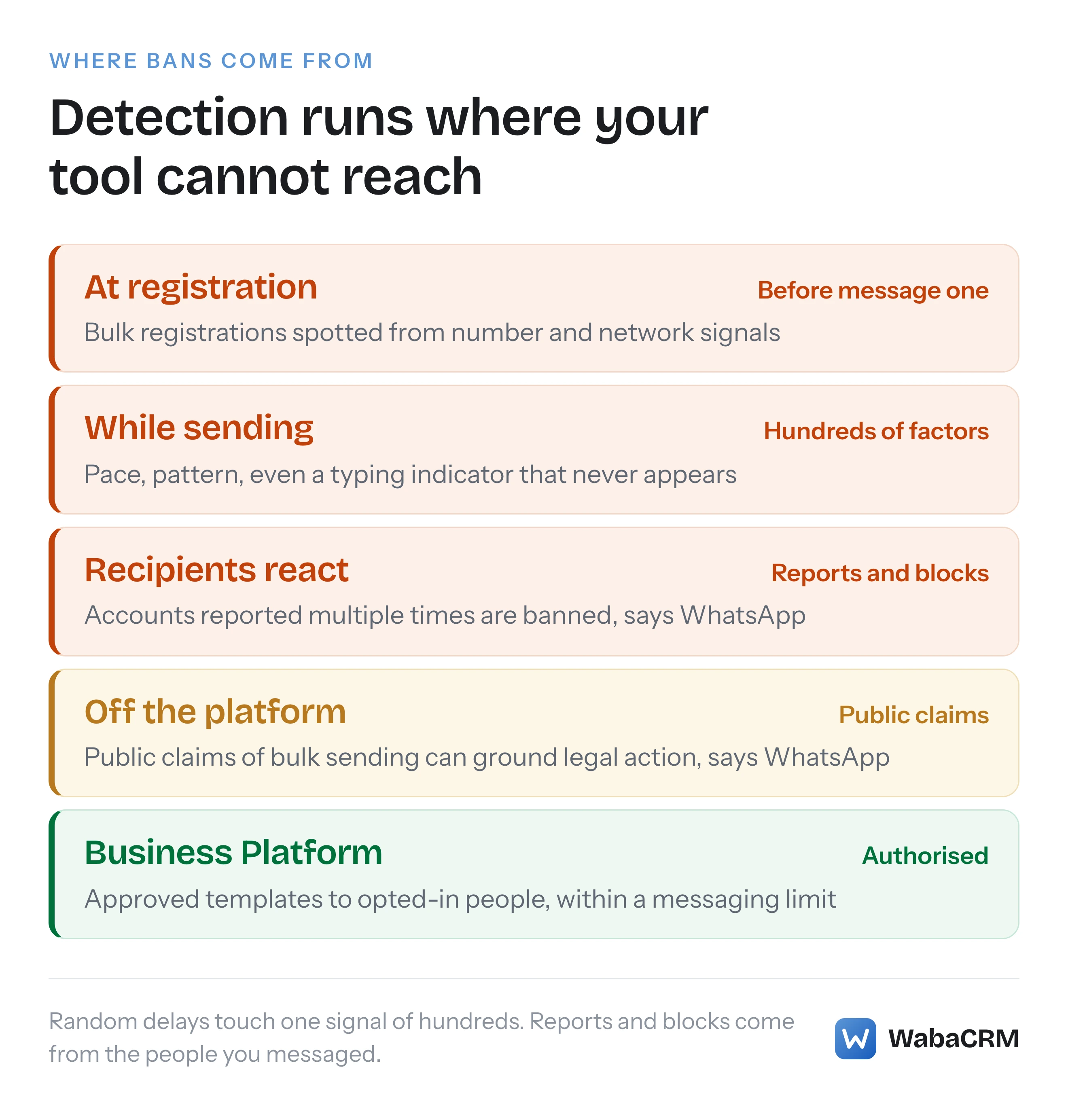
The word that matters is products. The same page names them: "two tools–the WhatsApp Business app and the WhatsApp Business Platform–to help companies manage customer interactions". So the sentence covers the official API as well. The vendor pages that present "the official API" as the way to make bulk messaging allowed are describing something WhatsApp has not said. What the WhatsApp Business Platform authorises is narrower and more useful: approved template messages, sent to people who opted in, inside a messaging limit. That difference runs through every section below.
Bulk sender tools come in three kinds: a modified copy of the WhatsApp app, a program that drives WhatsApp Web on your logged-in session, and a hosted service that sells an "unofficial WhatsApp API" built on one of those. None of them changes what WhatsApp's servers observe, which is one account sending a great many messages to people who did not ask for them.
- Why does WhatsApp ban numbers that use bulk sender software?
- What exactly do WhatsApp's Terms forbid about bulk messaging?
- Which bulk sender tools break which WhatsApp rule?
- What does "You have been logged out for using an unofficial app" mean?
- Do "anti-ban" delays and rotating numbers keep a bulk sender safe?
- Can a flood of incoming messages from an ad get a number banned?
- Does the WhatsApp Business API make bulk messaging allowed?
- What happens when a Business Platform number sends spam anyway?
- Can WhatsApp take legal action over bulk messaging tools?
- Can a number banned for bulk messaging be recovered?
- How do you reach a whole customer list without a bulk sender?
What exactly do WhatsApp's Terms forbid about bulk messaging?
They forbid bulk messaging, auto-messaging and auto-dialling outright, and any non-personal use WhatsApp has not authorised. The clause sits under "Legal And Acceptable Use" in WhatsApp's Terms of Service:
"(e) involve sending illegal or impermissible communications such as bulk messaging, auto-messaging, auto-dialing, and the like; or (f) involve any non-personal use of our Services unless otherwise authorized by us." (WhatsApp Terms of Service)
The page we were served read "Effective Date: January 4, 2021"; WhatsApp says users in the European Region are served by WhatsApp Ireland Limited instead of WhatsApp LLC. Clause (f) is the one bulk sender vendors skip over. Business use is not banned; it is allowed when WhatsApp authorises it, and the authorised routes are the WhatsApp Business app and the WhatsApp Business Platform, each under its own terms.
A business on the WhatsApp Business app is bound by a second contract, the WhatsApp Terms for WhatsApp Business App, which read "Effective September 23, 2026" when we checked. Its acceptable-use section says the business "must not directly, indirectly, or through automated or other means" do a list of things that includes "(h) send, distribute, or post spam, unsolicited electronic communications, chain letters, pyramid schemes, or illegal or impermissible communications". Its restrictions section repeats that lead-in and adds the clause that catches almost every bulk sender built for the Business app:
"(g) develop or use any applications that interact with our Business App Services without our prior written consent" (WhatsApp Terms for WhatsApp Business App)
Note the verb pair. "Develop or use" binds the business that runs the tool, not only the company that wrote it. A browser extension that operates your WhatsApp Web session and presses Send on your behalf is an application interacting with the Business App Services, and the clause asks for WhatsApp's prior written consent before it is used, not after the number is banned.
Which bulk sender tools break which WhatsApp rule?
Every tool that sends from an ordinary WhatsApp number has to go through some WhatsApp client, so each kind of tool collides with a specific line in WhatsApp's own text. The official routes are in the same table, because they have rules too.
| Route | How it sends | WhatsApp's own text | What can follow |
|---|---|---|---|
| Modified app (GB, FM, TM WhatsApp) | Replaces the official app | Named as unofficial apps | Ban, loss of linked devices |
| Extension or desktop sender | Operates WhatsApp Web | "Don't bulk message, auto-message" | Ban from behaviour and reports |
| "Unofficial WhatsApp API" | Sells a logged-in session as an API | Terms forbid unauthorised APIs | Ban of the number behind it |
| Broadcast list | Official app, chats one by one | Reaches only people who saved you | Reports can still ban |
| Template campaign | WhatsApp Cloud API, approved template | Opt-in and a messaging limit | Warnings, then restrictions |
The first row is the plainest. WhatsApp's page on unofficial apps names them: "Examples of unofficial apps may include GB WhatsApp, FM WhatsApp, TeleMessage, TM WhatsApp, and others." (WhatsApp Help Center — About unofficial apps) The list ends with "and others", so the test is not whether a tool is on it. The test is whether the client is WhatsApp's own.
The second row uses an official client, which is why its sellers call it safe. WhatsApp's responsible-use page addresses the behaviour rather than the client:
"Automated or bulk messages: Don't bulk message, auto-message, or auto-dial using WhatsApp. WhatsApp uses both machine learning technology and reports from users to detect and ban accounts that send unwanted automated messages. Also, don't create accounts or groups in unauthorized or automated ways, or use modified versions of WhatsApp." (WhatsApp Help Center — How to use WhatsApp responsibly)
The third row is a hosted version of the second. WhatsApp's Terms say you must not "create software or APIs that function substantially the same as our Services and offer them for use by third parties in an unauthorized manner" (WhatsApp Terms of Service). Whatever that clause means for the company selling the service, the account doing the sending is your number, and your number is what WhatsApp can act on.
The same responsible-use page lists a second practice that bulk senders depend on: "Using contact lists that aren’t yours: Don’t share phone numbers without consent or use data obtained from illicit sources to message users on WhatsApp or add them to groups." A purchased or scraped number list is the fuel for every row above the broadcast list.
What does "You have been logged out for using an unofficial app" mean?
It means WhatsApp has detected that the account is running on a client that is not its own, and has signed it out. WhatsApp quotes the two system messages a user may see:
You need the official WhatsApp to log in
You have been logged out for using an unofficial app.
The same page sets out what is at stake beyond the logout:
"Your WhatsApp account might also be temporarily or permanently banned, or it could lead to restrictions on your account, including the ability to link devices." (WhatsApp Help Center — About unofficial apps)
The last clause deserves attention from anyone running a sender on WhatsApp Web. WhatsApp Web is attached to your phone through Linked devices, and WhatsApp's linking page describes "using your primary phone to link up to four devices" (WhatsApp Help Center — How to link a device). A restriction on linking devices removes the ground an extension-based sender stands on, and with it WhatsApp Web for your own staff.
WhatsApp's instruction for getting back, on the same unofficial-apps page, is specific: "For your safety and to avoid account access issues, please remove all unofficial WhatsApp apps from your device before installing and registering with the official WhatsApp app." A companion page adds a warning that matters for anyone tempted to reinstall the tool later: "We can reinstate an account ban if the account activity continues to violate our Terms of Service." (WhatsApp Help Center — About account bans for unofficial apps)
Do "anti-ban" delays and rotating numbers keep a bulk sender safe?
No. Random delays address only the speed of sending, and WhatsApp's own account of its detection treats speed as one signal among hundreds, alongside how the account was registered and what recipients do with your messages. The source is WhatsApp's white paper, Stopping Abuse: How WhatsApp Fights Bulk Messaging and Automated Behavior, dated 6 February 2019 and still linked from the current Help Center page on automated messaging (WhatsApp Help Center — Unauthorized use of automated or bulk messaging).
The paper describes the baseline every bulk sender is measured against: "Normal users operate relatively slowly on WhatsApp, tapping messages one at a time or occasionally forwarding content." It then says the comparison is not a single threshold: "In sum, our detection systems evaluate hundreds of factors to shut down abuse." A randomised pause between messages moves one of those factors. It does nothing about the others.
The paper gives one example of the others, and it is the kind of signal a delay setting cannot touch: "If an account continually sends messages without triggering the typing indicator, it can be a signal of abuse, and we will ban the account."
Rotating several numbers is answered in the same document: "Because we ban accounts that send a high volume of messages, coordinated campaigns often try to spread their activity across many different accounts." WhatsApp's response is to look for the registration patterns behind those accounts, which is why a batch of fresh SIMs is not the shield it is sold as.
Modified apps fare no better. The paper says of altered APK files: "These modifications cannot circumvent our detection systems that run on our servers and apply to all users without exception."
The headline figure in that paper shows how much of this ran without anyone complaining first: "We remove over two million accounts per month for bulk or automated behavior — over 75% without a recent user report." That figure is WhatsApp's own, from February 2019, and it describes what WhatsApp measured then rather than today: most of those removals did not wait for a recent user report.
The remaining signal is the recipients themselves, and no tool setting reaches their phones. The responsible-use page says frequent broadcasts "may lead people to report your messages, and we ban accounts that are reported multiple times."
Can a flood of incoming messages from an ad get a number banned?
No. WhatsApp says so directly, on the same page that warns about bulk messaging:
"Note: Boosting content may drive more people to message you on WhatsApp, but receiving many messages at once will not result in an account ban." (WhatsApp Help Center — Unauthorized use of automated or bulk messaging)
This matters for anyone running Click-to-WhatsApp ads, QR codes on packaging or a link in an Instagram bio. Inbound volume is people choosing to message you, and WhatsApp says it will not ban an account for it. What its rules target is outbound messaging that recipients did not ask for. A business that gets three hundred enquiries from an ad and answers each one is doing what the product is for; the risk starts when the same business later pastes all three hundred numbers into a sender and messages them again without their agreement.
Does the WhatsApp Business API make bulk messaging allowed?
No. The WhatsApp Business Platform authorises a specific kind of proactive messaging, and "bulk" is not how WhatsApp describes it. Three conditions and a price apply at once.
The first is opt-in. WhatsApp's Business Messaging Policy, last updated 23 September 2026 when we read it, says:
"You may only contact people on WhatsApp if: (a) they have given you their mobile phone number or username; and (b) you have received opt-in permission from the recipient confirming that they wish to receive subsequent messages or calls from you." (WhatsApp Business Messaging Policy)
The second is the template. The same policy's Platform section says "You may only initiate conversations using an approved Message Template (as defined in our documentation)." A message that starts a conversation has been reviewed by Meta before it is sent.
The third is the messaging limit, which rations how many people a business can reach:
"Messaging limits are the maximum number of unique WhatsApp user phone numbers your business can deliver messages to, outside of a customer service window, within a moving 24-hour period." (Meta — Messaging limits)
The same page says "Newly created business portfolios have a messaging limit of 250", shared across every number in the portfolio. The limit rises with verification and sustained quality, and what each WhatsApp limit actually caps is a separate question from this one.
Then there is the price. Meta's pricing page says "Meta charges on a per-message basis" and that "Businesses are only charged when a message is delivered" (Meta — Pricing on the WhatsApp Business Platform). Reaching a large list on the Platform is a cost per delivered message, which is a different proposition from a one-off licence fee for a sender.
Automation is allowed on the Platform, in a defined place: "You may use automation when responding during the 24-hour window, but must also have available prompt, clear, and direct escalation paths." That is the kind of authorisation clause (f) of the Terms leaves room for. It covers answering people who wrote to you, with a human reachable, not messaging a purchased list. What a valid opt-in has to say is covered in what WhatsApp actually requires from an opt-in.
What happens when a Business Platform number sends spam anyway?
It is restricted in stages, and spam is named as a cause. Meta's enforcement guide says "Initially, WhatsApp accounts will get a warning with information on the policy they violated", and then that accounts which repeatedly violate the terms, "such as sending spam, template misclassifications, or high-risk policy categories", "might start seeing messaging restrictions that gradually increase in duration" (Meta — WhatsApp Business Platform policy and spam enforcement).
The ladder the guide describes, read on 17 October 2026:
- "1 or 3 day block on sending marketing, utility, and authentication template messages and adding additional phone numbers to the account"
- "5, 7, or 30 day block on sending any messages and adding additional phone numbers to the account"
- "An account lock, which is an indefinite block on sending any messages; can only be removed via an appeal"
- Permanent removal from the Platform "if the business does not make changes after multiple warnings and feature limits or blocks"
Two further lines in the same guide close the gap that "official API, no ban risk" marketing leaves open. "We might also limit or offboard your business from WhatsApp if your account receives excessive negative feedback from users." And: "Note: Not all spam violations might be appealed." The Platform is staged and visible where the consumer app is abrupt, but it is not a licence. How to read and appeal a restriction is in what to do when a WhatsApp Business account is restricted.
Can WhatsApp take legal action over bulk messaging tools?
Yes. WhatsApp says it does, including against people "assisting others", and including on evidence it found outside WhatsApp:
"In addition, beginning on December 7, 2019, WhatsApp will take legal action against those we determine are engaged in or assisting others in abuse that violates our Terms of Service, such as automated or bulk messaging, or non-personal use, even if that determination is based on information solely available to us off our platform." (WhatsApp Help Center — Unauthorized use of automated or bulk messaging)
The next sentence says what off-platform evidence means: "For example, off-platform information includes public claims from companies about their ability to use WhatsApp in ways that violate our Terms." An advert promising unlimited WhatsApp messages with no ban is the kind of public claim that sentence describes. The 2019 white paper describes the same stance from the other side: "when we see companies claiming they can send bulk messages on WhatsApp, we demand they cease operations and reserve all rights available to us under applicable law."
For an Indian business asking whether bulk WhatsApp is illegal, the honest split is this. The ban and the legal-action notice are WhatsApp enforcing its own contract. India's telecom commercial-messaging rules are a separate regime, and whether DLT registration applies to WhatsApp answers that part. Consent to process a person's number at all falls under data protection law, covered in the DPDP Act and your WhatsApp contact list. None of those three gives a purchased list permission to be messaged.
Can a number banned for bulk messaging be recovered?
Only through WhatsApp's own review, and only if WhatsApp offers one. A banned account sees this message when it opens WhatsApp:
This phone number can't use WhatsApp: [phone number].
You can request a review of this number.
Most reviews are completed within 24 hours.
The rules around that screen are stated on WhatsApp's account bans page (WhatsApp Help Center — About account bans):
- "If you don’t see an option to request a review, it means the ban is final and can’t be appealed."
- "Please note, third party services can't ban your WhatsApp account or remove your account ban. Only WhatsApp can ban or unban a WhatsApp account."
- "You can’t access your chat history or backups while your account is banned."
The Business app version of the page adds a cost specific to businesses: "Note: A banned account automatically loses its Meta Verified subscription." (WhatsApp Help Center — About account bans on the WhatsApp Business app) A ban therefore takes the number your customers know and any Meta Verified subscription attached to it, and locks you out of that number's chat history and backups for as long as it lasts. The bulk sender licence that caused it is usually the cheapest thing in that list.
How do you reach a whole customer list without a bulk sender?
You reach the part of the list that agreed to hear from you, through approved templates, at the pace your messaging limit allows. In practice that is five steps:
- Collect an opt-in that names your business. A form, a checkout box, a paper slip or an SMS can all carry it, as long as it says who will be messaging and that the person agrees.
- Import only those contacts. A number someone gave you for delivery is not a number they gave you for offers.
- Get a template approved. Every conversation you start goes out on a message Meta has reviewed.
- Send within the limit. A new business portfolio can reach 250 unique people in 24 hours outside open service windows. Plan the first campaigns around that, not around the size of the spreadsheet.
- Stop the moment someone opts out, and keep a record that you did.
This is the route WabaCRM is built around. A campaign's audience is drawn only from contacts who have a phone number, have broadcasts switched on, are not blocked and have not opted out, and a reply of STOP opts a contact out before anything else reads the message. The report then shows who was skipped and why, rather than leaving it to guesswork.

The numbers in a report like that are smaller than the number a bulk sender advertises. They are also numbers that are still yours next month. As a Meta-verified Tech Provider, WabaCRM cannot resell Meta's message fees, so each business pays Meta directly for its own delivered templates and WabaCRM adds no markup; the platform side is on the pricing page.
Every Meta quotation on this page was read from Meta's own documentation on 17 October 2026. Meta changes that documentation without notice; the linked pages are authoritative and this one is not.
Questions people also ask
Is a WhatsApp bulk sender Chrome extension safe to use?
Can a business use GB WhatsApp or another modified app for broadcasts?
How many people can a new WhatsApp Business API number message in a day?
Does WhatsApp ban a number for sending broadcast lists too often?
Can a WhatsApp API provider get a banned number unbanned?
- whatsapp bulk sender ban
- whatsapp bulk sender software
- you have been logged out for using an unofficial app
- send bulk whatsapp messages without getting banned
- whatsapp business platform


