Features Pricing Use cases Compare Blog

WhatsApp Business API. Free for 1,000 contacts.

Put your whole team on one number — shared inbox, broadcasts, chatbots and a CRM, with as many agents as you like. You pay Meta directly for messages, at Meta's price. We add nothing.

Company email address, no card. Meta bills you for messages directly, so you will add one to your own Meta account before your first broadcast.

Unlimited team members No card, no contract Your number, on your phone or ours
app.wabacrm.com
The WabaCRM workspace, cycling through four screens: a shared WhatsApp inbox where an agent answers a customer and the reply is delivered; a campaign sending to a 1,000-contact audience; an automation that answers a message containing the word price; and the dashboard's contact, message and automation counts.

+1 lead

captured just now

23h 14m left

to reply for free

What we can actually prove

Meta-verified
Tech Provider on the official WhatsApp Business Platform, verified 30 July 2026
₹0 → ₹960
free to 1,000 contacts, then ₹960 a month at 10,000 — unlimited agents at every point on that line
0%
added to Meta's message fees — we are not permitted to

The problem

One phone. One person. Two hundred and fifty-six contacts.

The WhatsApp Business app runs on a single handset and caps a broadcast list at 256 people who have saved your number. So the owner becomes the bottleneck — replies wait until they are free, leads go cold overnight, and nobody else can see the conversation that just lost a sale.

256 contacts

You want to message 4,000 customers. The app lets you message 256.

Asleep at 11pm

Your best salesperson is asleep, and the enquiry that arrived at 11pm is cold by morning.

Two agents, one chat

Two people open the same conversation and reply twice, contradicting each other.

No memory

A customer asks what you quoted them in March, and nobody can find out.

And the shortcut is worse than the problem

The cheap bulk-WhatsApp tools — the browser extensions, the desktop senders, the "unlimited marketing" panels — work by pretending to be your phone. Meta detects them, and the number it bans is the one your customers have saved. There is no appeal worth relying on and no way to take your chat history with you. WabaCRM is not that: it runs on Meta's own Cloud API, which is the only way to send at volume that Meta itself sanctions.

The official WhatsApp Business API fixes every one of these. Meta starts every new number on a daily messaging limit and raises it as you send well — usually into the thousands within a couple of weeks. We show your current limit on the dashboard instead of letting you find it in an error message. Every platform that sells you access then charges you per agent. We don't.

The whole price

₹0 for 1,000 contacts. Then ₹96 per 1,000 a month.

That is the entire price list. No feature tiers, no agent seats, no setup fee, no onboarding fee, no minimum contract and no annual lock-in.

1,000 contacts

Free, forever

10,000 contacts

₹960 a month

100,000 contacts

₹9,600 a month

You pay for the size of your contact list and nothing else. Add fifty agents, run a hundred campaigns, build twenty chatbots — the number does not move. Meta charges you separately for the messages you send, directly, at Meta's own published rates. That invoice comes from Meta and never touches us.

See the full pricing

On every plan, including free

Everything. Not "everything except the useful parts."

There is no Pro tier. The free plan and the ₹9,600-a-month plan are the same software — the only difference is how many contacts you can hold.

Talk to customers

  • Shared team inbox, unlimited agents
  • Live 24-hour window timer on every chat
  • Assignment and auto-routing to the least-busy agent
  • Quick replies with /shortcut autocomplete
  • Photos, voice notes, PDFs, replies, reactions
  • Real-time updates and sound alerts
  • Departments — control which agent sees which number

Sell to them

  • Contacts CRM with a Kanban pipeline
  • Custom fields, tags, groups, your own statuses
  • 0–100 lead scoring, refreshed on every interaction
  • CSV import with automatic column matching
  • Campaigns with scheduling, pause and cancel
  • Drip sequences with daily send-rate pacing
  • Message logs with CSV export

Automate it

  • Keyword chatbots
  • Drag-and-drop flow builder
  • Greeting and business-hours away replies
  • Automated follow-ups for quiet conversations
  • Template builder with media headers
  • Media library with reuse
  • STOP/START opt-out handled for you

Connect it

  • REST API v1
  • Signed webhook forwarding to n8n or Zapier
  • Multiple WhatsApp numbers
  • Android app on Google Play
  • WhatsApp Business Calling, in the browser
  • AI assistant and AI agent personas
  • Health alerts before Meta restricts a number

One thing is metered: AI actions run on credits, because we pay a model provider per request. Everything else on this page is uncapped.

On your phone

The inbox, on Android

Reply to customers, look up a contact and check the overview from wherever you are, with replies arriving as they happen. Same sign-in as the website; every team member gets it, on every plan. An iPhone app is being prepared.

Get it on Google Play

A look inside

This is the actual product

Not mockups. Watch the whole thing, or read the screens below — both are the software you get on the free plan.

The full product walkthrough. Nothing loads from YouTube until you press play.

Shared inbox

Your whole team, one WhatsApp number

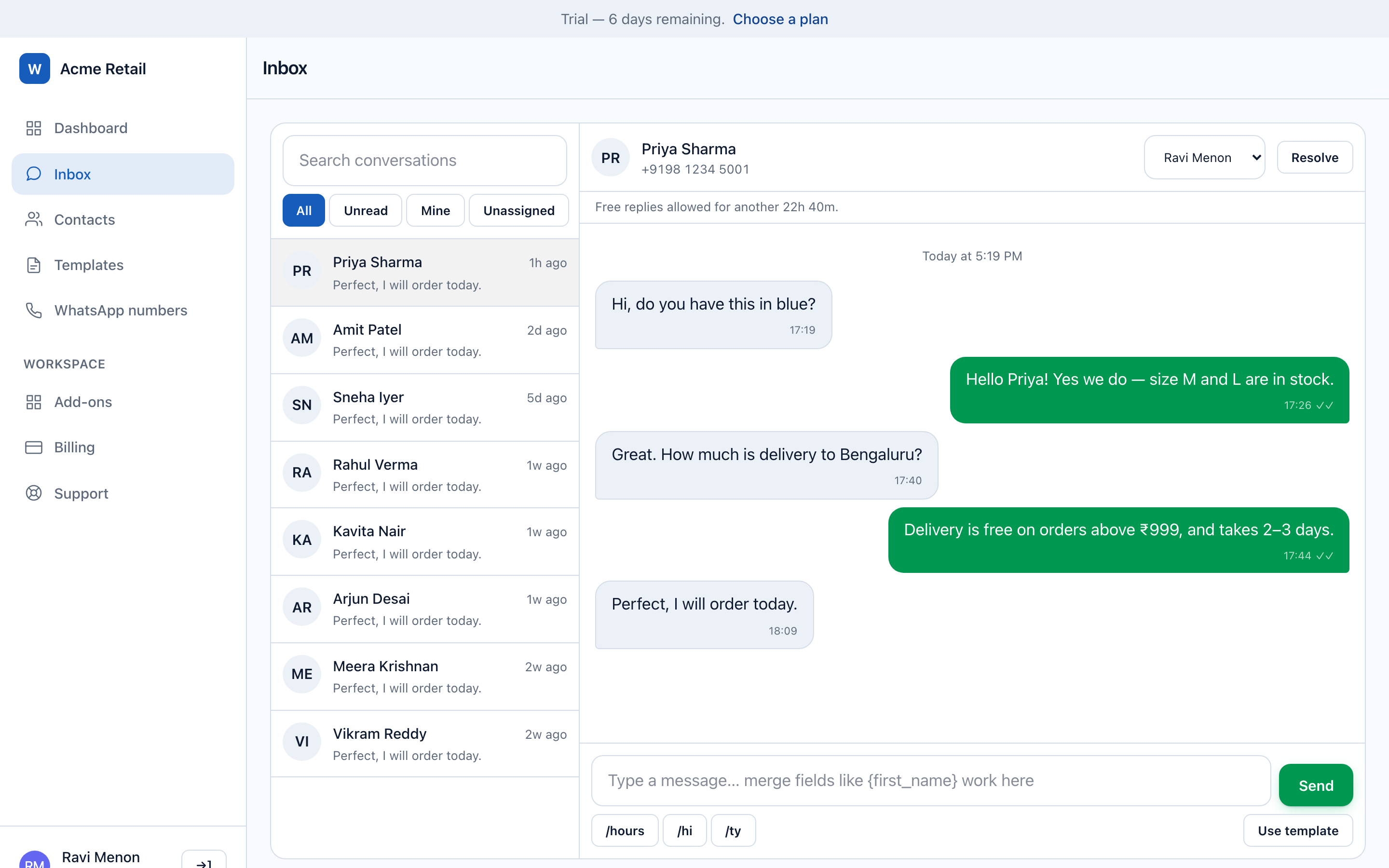
Conversations land in a shared console. Assign them, or let routing hand each new chat to the least-busy agent. Delivery and read receipts sit on every message, and the 24-hour free-reply window counts down on screen — so nobody guesses whether a free reply is still allowed.

  • Unlimited agents, no seat charges
  • Quick replies with /shortcut
  • Sent / delivered / read receipts
  • Automatic template fallback when the window closes
The shared inbox showing a customer conversation, delivery receipts and the remaining 24-hour reply window.

Contacts & pipeline

Every enquiry becomes a tracked lead

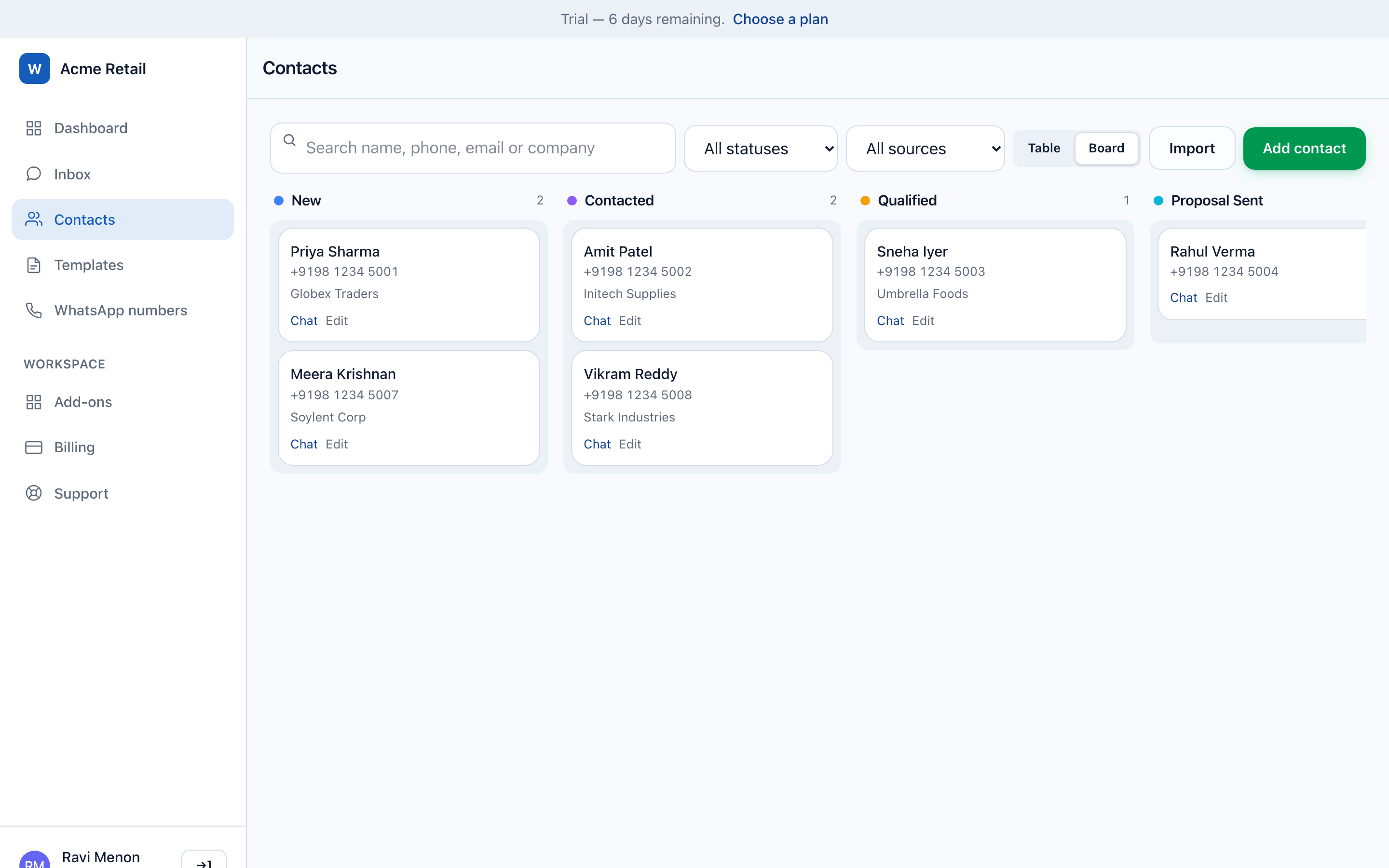
A message from an unknown number creates a contact automatically. Move it through your own pipeline on a drag-and-drop board, or work the list with search, filters, groups and custom fields. Every contact carries a 0–100 lead score that updates as they engage.

  • Automatic lead capture
  • Drag-and-drop pipeline
  • Groups, tags and custom fields
  • Lead scoring you can target campaigns by
The contacts Kanban board with leads arranged across New, Contacted, Qualified and Proposal Sent columns, each card showing a lead score.

Campaigns

Broadcast to thousands, and see exactly what happened

Send Meta-approved templates with merge fields, so every recipient gets their own name or order number. Consent is re-checked per recipient at send time rather than at launch, so someone who opts out mid-campaign stops receiving it. Every skip and every failure is explained by name.

  • Scheduling, pause and cancel
  • Merge fields like {first_name}
  • Per-number rate limiting
  • Per-recipient delivery reporting
A completed campaign report showing 1,840 recipients with sent, delivered, read, failed and skipped counts, and a per-recipient table giving the reason for each failure.

Automation

Answer the 11pm question without being awake

Keyword bots handle the questions you get fifty times a week. The drag-and-drop flow builder handles the ones that need a menu — text, images, documents, location, buttons and call-to-action steps, with an AI assistant step when a scripted answer will not do.

  • Keyword bots with cooldowns
  • Visual flow builder, no code
  • Business-hours away messages
  • Automated follow-up on quiet chats
The drag-and-drop bot flow builder canvas with connected message, button and media steps.

The same team, priced five ways

What a ten-person team costs

Using each platform's own published prices, at monthly billing, before tax and before Meta's message fees.

WabaCRM compared with Wati, AiSensy, Interakt and Gallabox on price, team members and message-fee markup.
  WabaCRM Wati AiSensy Interakt Gallabox
Free plan Forever. 1,000 contacts, every feature, broadcasts included. None — 7-day free trial Free Forever — but their pricing page states broadcasting is not available on it None — No free plan — the entry tier is paid None — No free plan
Entry price ₹0 ₹2,999/month (Growth) ₹1,500/month (Basic) ₹999/month + tax (Starter) ₹2,999/month (billed quarterly) (Basic)
Team members Unlimited, on every plan including free 3 users on Growth — a hard cap you cannot buy past. Pro is ₹6,499/month for 5 users, then ₹1,299 per extra user per month. Marketed as "Unlimited Users"; the paid tiers are where the usable features sit. Unlimited agents, but on Starter everyone holds the owner role: roles and per-agent permissions begin at the Growth tier. Basic is capped at 3 users. Essential includes 6, then ₹1,200 per extra user per month; Advanced includes 10, then ₹1,500.
Cost per extra agent ₹0 — always ₹1,299 per extra user, per month (Pro) Unlimited users advertised Unlimited agents; permissions gated to higher tiers ₹1,200–₹1,500 per extra user, per month
Markup on Meta's message fees None. Meta bills you directly, at Meta's published rate. Conversation charges billed through Wati. Conversation credits sold through AiSensy. Sold as three separately priced products. AI credits metered separately, sold in blocks.
What the price depends on How many contacts you store. Nothing else. Feature tier, plus seats where they apply Feature tier Feature tier, plus seats where they apply Feature tier, plus seats where they apply

Every competitor figure was read from that company's own public pricing page on 17 August 2026, at monthly billing, before tax and before Meta's message fees. Prices in this market change often — check theirs before you decide, and if anything here is out of date, tell us and we will correct it.

Where they beat us today

Wati and Interakt have hundreds of published customer case studies. We have none yet — we are new, and we would rather say so than borrow someone else's logos. Interakt ships a native Shopify app; we integrate through our REST API, signed webhooks, Zapier or n8n, which is more work for you on day one. Wati has a much larger library of prebuilt integrations. If a one-click Shopify install is what decides it, buy Interakt — we would rather you knew that now than in week three.

Three ways in

Keep WhatsApp on your phone. Connect it to the API anyway.

The reason most businesses never move to the WhatsApp API is that they think they will lose the number they have run their business on for six years. You do not have to.

1

One-click connect

Sign in with Facebook, pick your number, done. Meta's own Embedded Signup. Best for a new number, or one moving fully onto the Cloud API.

MOST POPULAR 2

Coexistence

Your number stays live in the WhatsApp Business app on your phone and mirrors into WabaCRM. Reply from your handset and your team watches it appear in the shared inbox, labelled "From WhatsApp on the phone". Nobody has to change how they already work.

3

Your own credentials

Already on the Cloud API, or your account sits somewhere the sign-in cannot reach? Paste your WABA ID, phone number ID and token. This route always exists and we will never remove it.

What coexistence does and does not do

Your past chats stay on your phone — we deliberately do not pull WhatsApp's 180-day history sync, so your WabaCRM inbox starts empty and fills from the moment you connect. Sending is capped at 20 messages per second, which is Meta's limit for coexistence numbers rather than ours. And while coexistence is on, broadcast lists, disappearing messages and view-once are switched off in the phone app. That is Meta's design; we just think you should know before you click, not after.

We are new. Here is how to check us out.

No customer logos yet. Things you can verify instead.

Most platforms in this category ask you to trust a round number on their homepage. We would rather give you things you can go and check for yourself.

A Meta-verified Tech Provider

WabaCRM is built on the official WhatsApp Business Platform, and Meta has verified the company behind it as a Tech Provider. Connect a number and your own phone will show "Connected platform: Waba CRM". Nothing here runs through a browser extension, a phone farm or an unofficial gateway — the kind of thing that gets numbers permanently banned.

Meta verified the company, not just the software

Meta completed business verification on Tirgiji Tech Solutions Private Limited on 28 July 2026, against filed company documents. That is a separate check from the Tech Provider one above: the first says the software may connect to the platform, the second says the business behind it is who it claims to be.

A real company, at a real address

Tirgiji Tech Solutions Private Limited, Plot No. 3, Ambedkar Chauraha, Takrohai, Indira Nagar, Lucknow, Uttar Pradesh 226016, India. That address is on our privacy policy, on our terms, and on the business portfolio Meta verified. Same company, same address, everywhere.

A written guarantee, not a slogan

Our terms of service commit that if we ever change the free plan, every workspace already on it keeps the allowance it had. Section 5. You can read it before you sign up, and hold us to it afterwards — which is the difference between a promise and a marketing line.

Hosted in India, and the host is named

Hosted by Contabo Asia Private Limited, disclosed by name in our privacy policy along with every other sub-processor. A sub-processor a privacy policy does not disclose is the kind of omission that only matters once somebody asks.

Your credentials are encrypted, and every webhook is checked

WhatsApp access tokens, app secrets and two-step PINs are encrypted at rest and never displayed back — not to you, not to us. Every inbound WhatsApp webhook and every payment callback is verified against its signature before a single field of it is trusted. Per-user permissions, per-number department walls and a full activity log sit on top.

Over 700 automated tests run before anything ships

Including tests whose only job is to prove that one workspace cannot read another workspace's messages, that revoking a permission takes effect on a page someone already has open, and that nobody can mark their own invoice paid. We wrote them because we have seen each of those fail somewhere else.

You can leave with everything

Export every contact and every message to CSV, or pull them through the REST API, at any time and on any plan — including the free one. Leaving should be as easy as arriving, and a platform that makes your data hard to retrieve is telling you something.

The obvious question

"Free forever" sounds like a trick. Here is the actual business model.

It is not charity and it is not a loss-leader with a trapdoor. Three things make it work, and all three are checkable.

We do not pay for your messages. Meta bills you directly, on your own card, attached to your own WhatsApp account. That is not a policy we chose — as a Meta Tech Provider we are not permitted to resell Meta's per-message fees at all. So a free workspace sending 50,000 messages costs us nothing in message fees. There is no volume at which a free user becomes expensive to us.

Our costs scale with contacts, not with people. Storage and database load track your contact list. Agents are almost free for us to add — which is exactly why charging per agent per month has always been a pricing decision rather than cost recovery. We charge for the thing that actually costs us money.

1,000 contacts is where a real business outgrows us. A shop with 400 customers stays free forever and we are fine with that. A business with 12,000 contacts pays ₹1,152 a month — a fraction of the cheapest paid plan anywhere in the table above — and we would rather have ten thousand of those than a hundred customers on annual contracts.

You might assume Actually
It is a trial that converts after 14 days There is no clock. The free plan is set to never expire, on purpose.
The free plan cannot broadcast It can. Campaigns, drip sequences, flows and the API — all of it, on free.
You will cap agents at three later Unlimited team members is the whole reason to choose us. Removing it would remove the reason.
You will add a message markup We are not permitted to. A Tech Provider that resold Meta's fees would lose the tier.
"No card" means no payment method anywhere You will add a card to your own Meta account for message fees, because Meta bills you directly. WabaCRM never asks for one.
Crossing 1,000 contacts triggers a charge It does not. Adding contacts stops until you raise the allowance; nothing bills automatically. Inbound enquiries are still captured — see the FAQ.

FAQ

Questions we actually get asked

Genuinely free forever. The free plan holds 1,000 contacts with no time limit and no expiry date, and it needs no card to open or to keep — though Meta will require one on your own Meta account before your first broadcast, which no WhatsApp platform can waive. It includes every feature — shared inbox, campaigns, chatbots, the flow builder, the REST API and unlimited team members. There is no trial period because there is nothing to convert from. You only pay if your contact list grows past 1,000, at ₹96 per 1,000 contacts a month.

No. Team members are unlimited on every plan, including the free one. Most platforms in this category cap seats on the entry plan and then charge roughly ₹750–₹2,199 per extra agent per month; adding your tenth agent here changes your bill by nothing. Price depends only on how many contacts you store.

Yes. Campaigns, drip sequences, chatbots, flows and the API all work on the free plan. This is worth checking on any competitor you compare us with — at least one well-known "free forever" plan in this market disables broadcasting, which is the feature most businesses came for.

No, and we are not permitted to. Meta charges for conversations directly, on your own card attached to your own WhatsApp Business Account, at Meta's published rates. WabaCRM is a Meta-verified Tech Provider, a tier that cannot resell Meta's per-message fees. Some platforms publish an explicit per-conversation markup on top of Meta's price; we add nothing, structurally rather than as a promise. Meta publishes its own rates at developers.facebook.com.

Not if you use coexistence. Your number stays live in the WhatsApp Business app on your handset and mirrors into WabaCRM at the same time, so a reply you send from your phone appears in the shared inbox labelled "From WhatsApp on the phone". Two things to know before you start: your past chats stay on the phone rather than being imported, and while coexistence is on, broadcast lists, disappearing messages and view-once are switched off in the phone app. Both are Meta's design, not ours.

No. WabaCRM is a hosted web application that connects to the official Meta WhatsApp Business Platform (Cloud API), with an Android app alongside it. Several unrelated products use similar names and are browser extensions that drive WhatsApp Web by automating the page — that approach is not sanctioned by Meta and is a common way for a number to be banned. Nothing in WabaCRM touches WhatsApp Web, and there is nothing to install in your browser.

It is fully allowed. WabaCRM runs on the official WhatsApp Business Platform (Meta Cloud API) and our Meta app is published and verified. It is not an unofficial tool that scans a QR code or automates the consumer app — that category is what gets numbers permanently banned. We also surface your quality rating and messaging tier, and email you before Meta restricts a number rather than after.

Any person stored in your contact list. If someone messages you and is captured as a lead, that is one contact. Delete contacts you no longer need and your usage goes straight back down, including back onto the free plan. Quotas round up to whole blocks of 1,000.

Nothing is deleted, nothing is switched off and no card is charged. Your existing conversations, campaigns, chatbots and history all keep working exactly as before — you simply cannot add new contacts through the app, the API or a CSV import until you either raise your allowance or delete some contacts. There is no automatic upgrade and no invoice you did not ask for.

Yes, and we would rather tell you than have you discover it. Inbound messages from new customers are deliberately not blocked by your quota — if someone messages your business and we have no record of them, they are captured as a contact even if that puts you over your allowance. We made that choice because silently dropping a real customer's enquiry is worse than a small overage. The practical effect is that a busy free workspace can drift past 1,000 on its own. Nothing is charged automatically when it does; you will see that you are over, and adding contacts by hand or by import stops until you raise the allowance or delete some.

You are inside WabaCRM in about ten minutes, and connected to your number the same day in most cases. Two steps are not ours to control, and we would rather name them now than after you have committed: Meta reviews each message template before it can be sent outside the 24-hour window, usually within minutes to a few hours; and if your business is not yet verified with Meta, that review belongs to Meta and can take a few days. There is no onboarding fee, no implementation call and nothing to schedule.

Usually not, and no platform can change that. Meta starts every new number on a messaging limit — often 250 or 1,000 unique customers a day — and raises it automatically as your quality rating stays good, typically reaching tens of thousands within a few weeks. WabaCRM shows your current tier on the numbers screen, and campaign pacing respects it, so you do not burn your quality rating trying to beat it.

Because the free plan has no time limit, it only works if the people using it are real businesses. Requiring a company domain keeps it that way — and a WhatsApp Business Account has to belong to a real company in any case. If your business runs on a free mailbox, email support@wabacrm.com and we will sort it out.

Yes, and you keep your number. Your WhatsApp Business Account belongs to your own Meta business portfolio, not to your current provider, so changing platform does not cost you your number, your verified display name or your approved templates. Export your contacts as CSV, import them here — column names are matched automatically and numbers normalised — and reconnect the number.

Yes — an Android app on Google Play, so agents can reply to conversations, look up contacts and check the overview away from a desk. It is included on every plan, including free, and signs in with the same email and password as the website; accounts are created here, not in the app. An iPhone app is being prepared and is not yet available.

That is set by Meta, not by us, and it varies by country and by message category — marketing, utility, authentication or service. Meta publishes the full rate card, and because we add no markup, what Meta publishes is exactly what you pay. Note one country-specific rule worth knowing before you plan a campaign: Meta has restricted marketing-category template messages to United States phone numbers, so a US-focused broadcast strategy needs checking against Meta's current policy first.

Your customers are already on WhatsApp

Free for your first 1,000 contacts, with no time limit and no card. Setting up the workspace takes minutes; connecting a number takes as long as Meta's own review of it.

Sign up with your company email address. No sales call, no onboarding fee, nothing to schedule.

Why this is safe to point your customer list at

Payments are processed by Razorpay on their own checkout — your card details are never entered on, or stored by, WabaCRM. Every inbound WhatsApp webhook is checked against its signature before it is trusted.

Tech Provider is a Meta platform access tier — not a partnership, a reseller agreement or an endorsement.